Principled
Technologies®
Copyright 2023 Principled Technologies, Inc. Based on “Complete laptop and desktop component replacements with ease,” a
Principled Technologies report, November 2023. Principled Technologies®
is a registered trademark of Principled Technologies,
Inc. All other product names are the trademarks of their respective owners.
In our repairability testing with four Dell systems and four Apple
systems, it took less time and effort to replace several key
components in the Dell devices
Complete laptop and desktop component
replacements with ease
Learn more at https://facts.pt/5rBySJ6
Laptops
• Dell Latitude™
7340
• Apple MacBook Air®
13.6"
Mobile workstations
• Dell Precision™
5680
• Apple MacBook Pro®
16"
Desktops
• Dell OptiPlex™
Micro 7010
• Apple Mac®
mini
All-in-one (AIO) desktops
• Dell OptiPlex AIO 7410
• Apple iMac®
Removing and replacing fan (laptops, mobile workstations, desktops, AIO desktops)
Time (mm:ss)
N/A (device does not have a fan)
06:02
Dell Latitude 7340
Apple MacBook Air 13.6"
45:27
05:31
Dell Precision 5680
Apple MacBook Pro 16"
04:47
00:50
Dell OptiPlex Micro 7010
Apple Mac mini
N/A (removal risked damaging screen)
03:21
Dell OptiPlex AIO 7410
Apple iMac
Save up to
40 minutes
Removing and replacing heatsink (mobile workstations)
Time (mm:ss)
43:38
04:18
Dell Precision 5680
Apple MacBook Pro 16"
Save
39 minutes
Removing and replacing speakers (laptops)
Time (mm:ss)
12:37
05:33
Dell Latitude 7340
Apple MacBook Air 13.6"
Save
7 minutes
Removing and replacing battery (laptops, mobile workstations)
Time (mm:ss)
33:41
03:39
Dell Latitude 7340
Apple MacBook Air 13.6"
05:58
Dell Precision 5680
Apple MacBook Pro 16" 29:10
Save up to
30 minutes
Removing and replacing storage
(laptops, mobile workstations, desktops, AIO desktops)
Dell:
Swap storage in less than 4:30
and fewer than 20 steps.
Apple:
Storage was soldered to
the board, so we could
not replace it.
Removing and replacing memory (RAM)
(desktops, AIO desktops)
Dell:
Swap RAM in 1:09 or less
and 14 or fewer steps.
Apple:
RAM was soldered to the
board, so we could not
replace it.
Removing and replacing wireless card
(desktops, AIO desktops)
Dell:
Swap wireless card in 3:28 or
less and 16 or fewer steps.
Apple:
Wireless card was
soldered to the board, so
we could not replace it.
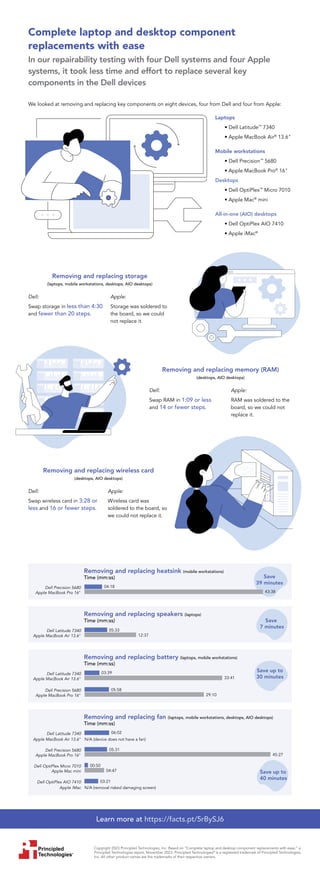
We looked at removing and replacing key components on eight devices, four from Dell and four from Apple:

Complete laptop and desktop component replacements with ease - Infographic

  • 1.
    Principled Technologies® Copyright 2023 PrincipledTechnologies, Inc. Based on “Complete laptop and desktop component replacements with ease,” a Principled Technologies report, November 2023. Principled Technologies® is a registered trademark of Principled Technologies, Inc. All other product names are the trademarks of their respective owners. In our repairability testing with four Dell systems and four Apple systems, it took less time and effort to replace several key components in the Dell devices Complete laptop and desktop component replacements with ease Learn more at https://facts.pt/5rBySJ6 Laptops • Dell Latitude™ 7340 • Apple MacBook Air® 13.6" Mobile workstations • Dell Precision™ 5680 • Apple MacBook Pro® 16" Desktops • Dell OptiPlex™ Micro 7010 • Apple Mac® mini All-in-one (AIO) desktops • Dell OptiPlex AIO 7410 • Apple iMac® Removing and replacing fan (laptops, mobile workstations, desktops, AIO desktops) Time (mm:ss) N/A (device does not have a fan) 06:02 Dell Latitude 7340 Apple MacBook Air 13.6" 45:27 05:31 Dell Precision 5680 Apple MacBook Pro 16" 04:47 00:50 Dell OptiPlex Micro 7010 Apple Mac mini N/A (removal risked damaging screen) 03:21 Dell OptiPlex AIO 7410 Apple iMac Save up to 40 minutes Removing and replacing heatsink (mobile workstations) Time (mm:ss) 43:38 04:18 Dell Precision 5680 Apple MacBook Pro 16" Save 39 minutes Removing and replacing speakers (laptops) Time (mm:ss) 12:37 05:33 Dell Latitude 7340 Apple MacBook Air 13.6" Save 7 minutes Removing and replacing battery (laptops, mobile workstations) Time (mm:ss) 33:41 03:39 Dell Latitude 7340 Apple MacBook Air 13.6" 05:58 Dell Precision 5680 Apple MacBook Pro 16" 29:10 Save up to 30 minutes Removing and replacing storage (laptops, mobile workstations, desktops, AIO desktops) Dell: Swap storage in less than 4:30 and fewer than 20 steps. Apple: Storage was soldered to the board, so we could not replace it. Removing and replacing memory (RAM) (desktops, AIO desktops) Dell: Swap RAM in 1:09 or less and 14 or fewer steps. Apple: RAM was soldered to the board, so we could not replace it. Removing and replacing wireless card (desktops, AIO desktops) Dell: Swap wireless card in 3:28 or less and 16 or fewer steps. Apple: Wireless card was soldered to the board, so we could not replace it. We looked at removing and replacing key components on eight devices, four from Dell and four from Apple: