Training course goals
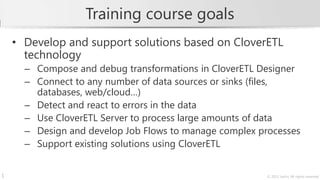
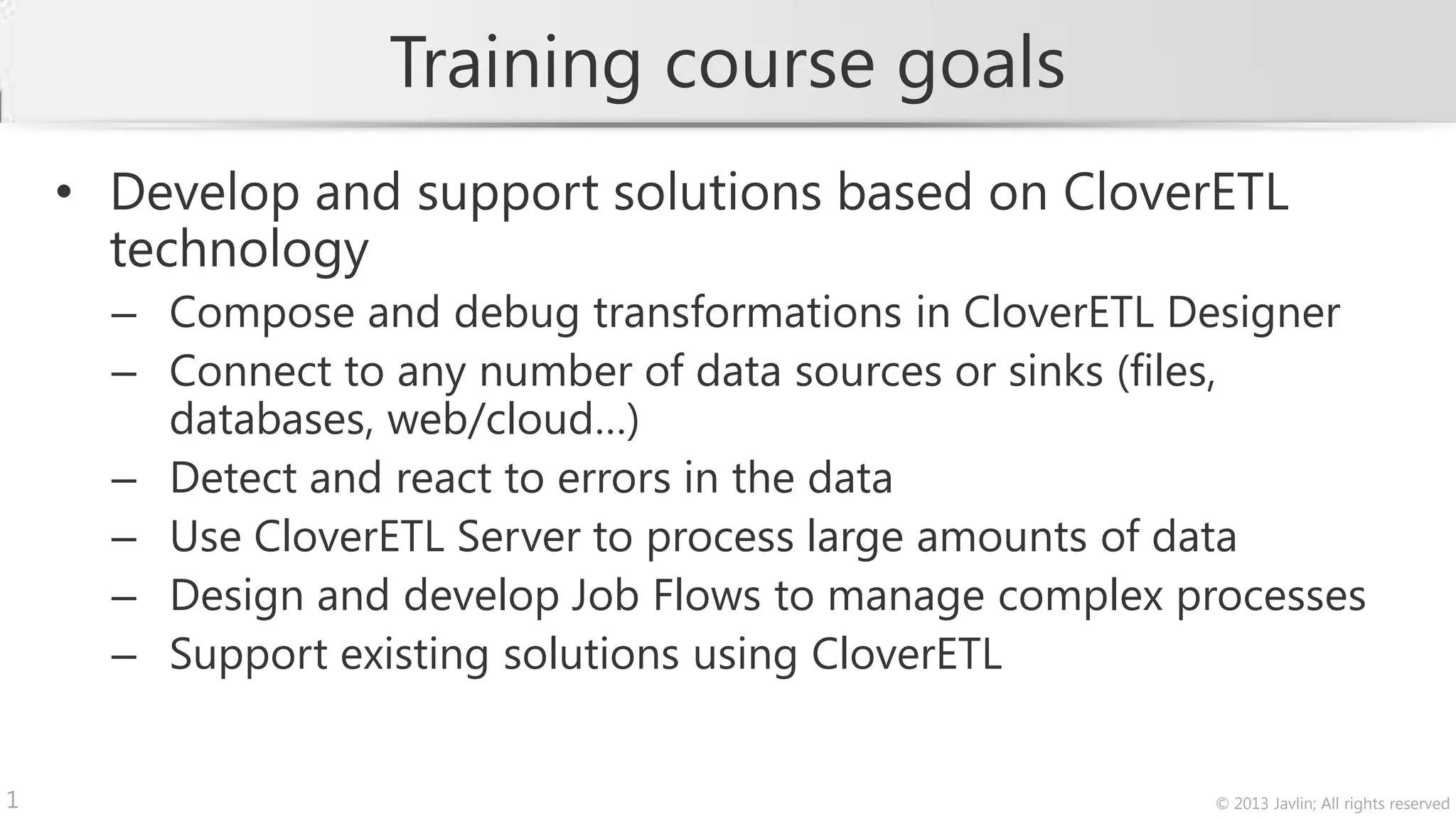
    • Develop and support solutions based on CloverETL
      technology
      – Compose and debug transformations in CloverETL Designer
      – Connect to any number of data sources or sinks (files,
        databases, web/cloud…)
      – Detect and react to errors in the data
      – Use CloverETL Server to process large amounts of data
      – Design and develop Job Flows to manage complex processes
      – Support existing solutions using CloverETL


1                                                        © 2013 Javlin; All rights reserved
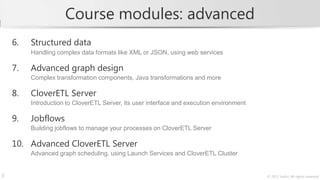
Course modules: basics
    1.   CloverETL introduction
         CloverETL product family, basic terminology

    2.   First steps in CloverETL Designer
         Building transformations with basic components, reading and writing data

    3.   Error handling
         Properly handling input data errors and runtime errors

    4.   Common components and CTL programming
         Commonly used components and business rule development in CTL

    5.   Databases
         Connecting to databases and using them as data sources and targets


2                                                                                   © 2013 Javlin; All rights reserved
Course modules: advanced
    6.   Structured data
         Handling complex data formats like XML or JSON, using web services

    7.   Advanced graph design
         Complex transformation components, Java transformations and more

    8.   CloverETL Server
         Introduction to CloverETL Server, its user interface and execution environment

    9.   Jobflows
         Building jobflows to manage your processes on CloverETL Server

    10. Advanced CloverETL Server
         Advanced graph scheduling, using Launch Services and CloverETL Cluster


3                                                                                         © 2013 Javlin; All rights reserved
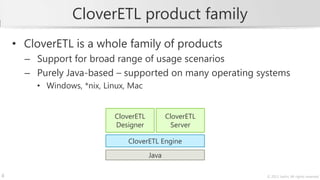
CloverETL product family
    • CloverETL is a whole family of products
      – Support for broad range of usage scenarios
      – Purely Java-based – supported on many operating systems
        • Windows, *nix, Linux, Mac


                           CloverETL          CloverETL
                           Designer             Server

                               CloverETL Engine
                                       Java

4                                                         © 2013 Javlin; All rights reserved
Metadata
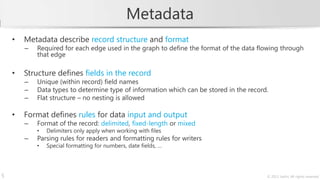
    •   Metadata describe record structure and format
        –   Required for each edge used in the graph to define the format of the data flowing through
            that edge

    •   Structure defines fields in the record
        –   Unique (within record) field names
        –   Data types to determine type of information which can be stored in the record.
        –   Flat structure – no nesting is allowed

    •   Format defines rules for data input and output
        –   Format of the record: delimited, fixed-length or mixed
            •   Delimiters only apply when working with files
        –   Parsing rules for readers and formatting rules for writers
            •   Special formatting for numbers, date fields, …


5                                                                                        © 2013 Javlin; All rights reserved
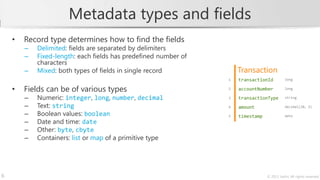
Metadata types and fields
    •   Record type determines how to find the fields
        –   Delimited: fields are separated by delimiters
        –   Fixed-length: each fields has predefined number of
            characters
        –   Mixed: both types of fields in single record             Transaction
                                                                 1   transactionId          long


    •   Fields can be of various types                           2   accountNumber          long

        –   Numeric: integer, long, number, decimal              3   transactionType        string

        –   Text: string                                         4   amount                 decimal(20, 3)

        –   Boolean values: boolean                              5   timestamp              date
        –   Date and time: date
        –   Other: byte, cbyte
        –   Containers: list or map of a primitive type


6                                                                                © 2013 Javlin; All rights reserved
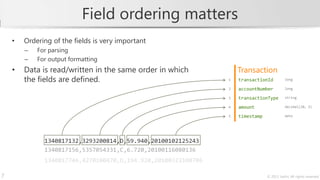
Field ordering matters
    •   Ordering of the fields is very important
        –   For parsing
        –   For output formatting
    •   Data is read/written in the same order in which            Transaction
        the fields are defined.                                1   transactionId          long

                                                               2   accountNumber          long

                                                               3   transactionType        string

                                                               4   amount                 decimal(20, 3)

                                                               5   timestamp              date


              1340817132,3293200814,D,59.940,20100102125243
              1340817156,5357054331,C,6.720,20100116080136
              1340817746,4270100470,D,194.920,20100323100706

7                                                                              © 2013 Javlin; All rights reserved
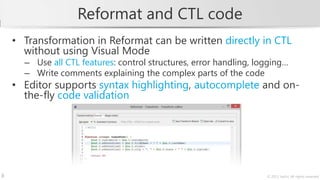
Reformat and CTL code
    • Transformation in Reformat can be written directly in CTL
      without using Visual Mode
      – Use all CTL features: control structures, error handling, logging…
      – Write comments explaining the complex parts of the code
    • Editor supports syntax highlighting, autocomplete and on-
      the-fly code validation


8                                                                   © 2013 Javlin; All rights reserved
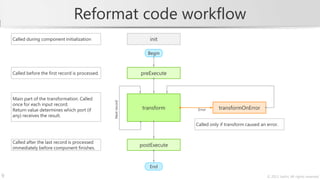
Reformat code workflow
    Called during component initialization                             init

                                                                      Begin


    Called before the first record is processed.                  preExecute


    Main part of the transformation. Called


                                                   Next record
    once for each input record.
                                                                 backransform
                                                                    t        back              transformOnError
    Return value determines which port (if                                           Error
    any) receives the result.
                                                                                    Called only if transform caused an error.


    Called after the last record is processed
    immediately before component finishes.
                                                                  postExecute


                                                                       End
9                                                                                                                      © 2013 Javlin; All rights reserved
Data denormalization
                                       Account
     Original data                     accountId    customerId     balance        created       closed
     Multiple records grouped
     based on the key.                 9804568699   27345              2300.56    2011-11-14
                                       1108193472   27345              -1739.05   2005-07-22
                                       6054951154   27345              4500.60    2009-09-01    2010-04-30
                                       9459175447   27345              3200.80    2011-03-08


            Denormalize


                                       CustomerAccount
     Denormalized data                 s
     Single record containing values   customerId   totalBalance   accounts
     determined by processing the
                                       27345             8262.91   [9804568699, 1108193472, 6054951154, 9459175447]
     whole input group.

10                                                                                                 © 2013 Javlin; All rights reserved
Denormalizer
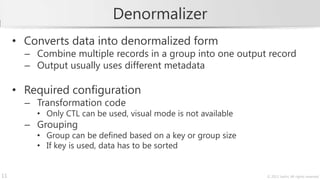
     • Converts data into denormalized form
       – Combine multiple records in a group into one output record
       – Output usually uses different metadata

     • Required configuration
       – Transformation code
         • Only CTL can be used, visual mode is not available
       – Grouping
         • Group can be defined based on a key or group size
         • If key is used, data has to be sorted


11                                                              © 2013 Javlin; All rights reserved
Denormalize code workflow
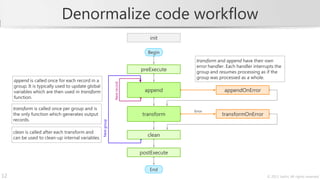
                                                                                      init

                                                                                      Begin
                                                                                                      transform and append have their own
                                                                                                      error handler. Each handler interrupts the
                                                                                 preExecute           group and resumes processing as if the
                                                                                                      group was processed as a whole.
     append is called once for each record in a


                                                                 Next record
     group. It is typically used to update global
                                                                               back append back                    appendOnError
     variables which are then used in transform
     function.

     transform is called once per group and is
                                                                                                     Error
     the only function which generates output                                  backransform
                                                                                  t        back                   transformOnError
     records.
                                                    Next group


     clean is called after each transform and
     can be used to clean-up internal variables.
                                                                               back   clean   back


                                                                                postExecute


                                                                                      End
12                                                                                                                                      © 2013 Javlin; All rights reserved

CloverETL Training Sample

  • 1.
    Training course goals • Develop and support solutions based on CloverETL technology – Compose and debug transformations in CloverETL Designer – Connect to any number of data sources or sinks (files, databases, web/cloud…) – Detect and react to errors in the data – Use CloverETL Server to process large amounts of data – Design and develop Job Flows to manage complex processes – Support existing solutions using CloverETL 1 © 2013 Javlin; All rights reserved
  • 2.
    Course modules: basics 1. CloverETL introduction CloverETL product family, basic terminology 2. First steps in CloverETL Designer Building transformations with basic components, reading and writing data 3. Error handling Properly handling input data errors and runtime errors 4. Common components and CTL programming Commonly used components and business rule development in CTL 5. Databases Connecting to databases and using them as data sources and targets 2 © 2013 Javlin; All rights reserved
  • 3.
    Course modules: advanced 6. Structured data Handling complex data formats like XML or JSON, using web services 7. Advanced graph design Complex transformation components, Java transformations and more 8. CloverETL Server Introduction to CloverETL Server, its user interface and execution environment 9. Jobflows Building jobflows to manage your processes on CloverETL Server 10. Advanced CloverETL Server Advanced graph scheduling, using Launch Services and CloverETL Cluster 3 © 2013 Javlin; All rights reserved
  • 4.
    CloverETL product family • CloverETL is a whole family of products – Support for broad range of usage scenarios – Purely Java-based – supported on many operating systems • Windows, *nix, Linux, Mac CloverETL CloverETL Designer Server CloverETL Engine Java 4 © 2013 Javlin; All rights reserved
  • 5.
    Metadata • Metadata describe record structure and format – Required for each edge used in the graph to define the format of the data flowing through that edge • Structure defines fields in the record – Unique (within record) field names – Data types to determine type of information which can be stored in the record. – Flat structure – no nesting is allowed • Format defines rules for data input and output – Format of the record: delimited, fixed-length or mixed • Delimiters only apply when working with files – Parsing rules for readers and formatting rules for writers • Special formatting for numbers, date fields, … 5 © 2013 Javlin; All rights reserved
  • 6.
    Metadata types andfields • Record type determines how to find the fields – Delimited: fields are separated by delimiters – Fixed-length: each fields has predefined number of characters – Mixed: both types of fields in single record Transaction 1 transactionId long • Fields can be of various types 2 accountNumber long – Numeric: integer, long, number, decimal 3 transactionType string – Text: string 4 amount decimal(20, 3) – Boolean values: boolean 5 timestamp date – Date and time: date – Other: byte, cbyte – Containers: list or map of a primitive type 6 © 2013 Javlin; All rights reserved
  • 7.
    Field ordering matters • Ordering of the fields is very important – For parsing – For output formatting • Data is read/written in the same order in which Transaction the fields are defined. 1 transactionId long 2 accountNumber long 3 transactionType string 4 amount decimal(20, 3) 5 timestamp date 1340817132,3293200814,D,59.940,20100102125243 1340817156,5357054331,C,6.720,20100116080136 1340817746,4270100470,D,194.920,20100323100706 7 © 2013 Javlin; All rights reserved
  • 8.
    Reformat and CTLcode • Transformation in Reformat can be written directly in CTL without using Visual Mode – Use all CTL features: control structures, error handling, logging… – Write comments explaining the complex parts of the code • Editor supports syntax highlighting, autocomplete and on- the-fly code validation 8 © 2013 Javlin; All rights reserved
  • 9.
    Reformat code workflow Called during component initialization init Begin Called before the first record is processed. preExecute Main part of the transformation. Called Next record once for each input record. backransform t back transformOnError Return value determines which port (if Error any) receives the result. Called only if transform caused an error. Called after the last record is processed immediately before component finishes. postExecute End 9 © 2013 Javlin; All rights reserved
  • 10.
    Data denormalization Account Original data accountId customerId balance created closed Multiple records grouped based on the key. 9804568699 27345 2300.56 2011-11-14 1108193472 27345 -1739.05 2005-07-22 6054951154 27345 4500.60 2009-09-01 2010-04-30 9459175447 27345 3200.80 2011-03-08 Denormalize CustomerAccount Denormalized data s Single record containing values customerId totalBalance accounts determined by processing the 27345 8262.91 [9804568699, 1108193472, 6054951154, 9459175447] whole input group. 10 © 2013 Javlin; All rights reserved
  • 11.
    Denormalizer • Converts data into denormalized form – Combine multiple records in a group into one output record – Output usually uses different metadata • Required configuration – Transformation code • Only CTL can be used, visual mode is not available – Grouping • Group can be defined based on a key or group size • If key is used, data has to be sorted 11 © 2013 Javlin; All rights reserved
  • 12.
    Denormalize code workflow init Begin transform and append have their own error handler. Each handler interrupts the preExecute group and resumes processing as if the group was processed as a whole. append is called once for each record in a Next record group. It is typically used to update global back append back appendOnError variables which are then used in transform function. transform is called once per group and is Error the only function which generates output backransform t back transformOnError records. Next group clean is called after each transform and can be used to clean-up internal variables. back clean back postExecute End 12 © 2013 Javlin; All rights reserved

Editor's Notes

  • #5 CloverETL product family can easily fit different usage scenarios:Open source CloverETL Engine for very small or hobby projectsStandalone CloverETL Designer for small projectsCloverETL Server (includes Designer) for medium to large projectsCloverETL Enterprise Server for large projects, optionally can support clustering for even better performance
  • #6 Each metadata defines a record structure which is used when parsing the data in reader components or writing the output in writer components. To make the work easier, each record has its own name. Note that the name does not have to be unique within a graph – Clover uses internal identifiers (metadata id) to distinguish between different records with the same name. It is however strongly recommended that the record names are unique to prevent confusion during the development of larger graphs.Each record name has to be a valid identifier and therefore can only contain letters, numbers and underscores. Record names are case-sensitive when used in code.Each record can contain any number of fields of various types. Fields only have simple types and it is not possible to nest records into each other like in Java or other popular languages. Each field has to have a name which is unique within the record. Field names have to be identifiers as well and therefore they have to conform to the same rules as record names.
  • #7 Record types:Delimited: whole record defines a delimiter between records and each field can have its own delimiter which separates it from the next field. Clover supports delimiters with multiple characters and each delimiter can be different.Fixed-length: each field has predefined width and no delimiters are used.Mixed: some of the fields are delimited and some of the fields have fixed length.Field types:boolean: simple true/false valueinteger: signed integer number, 32-bit (minimum value is -2 147 483 648; maximum is 2 147 483 647)long: signed integer number, 64-bit (minimum is -9 223 372 036 854 775 808; maximum is -9 223 372 036 854 775 807)number: a floating-point number (64-bit IEEE 754 double precision, same as Java double data type).string: a character string. All strings are unicode and are represented in UTF-16. The maximum length of a string is 2^32-1 (the maximum value of integer).date: represents a date with millisecond precision. Note that it is possible to specify the date formatting via custom format string. Clover supports two libraries for date formatting – built-in Java standard library and Joda time library. More details about the formatting options provided by these libraries can be found online:Built-in Java library: formatting performed by java.util.SimpleDateFormat class, online documentation at http://docs.oracle.com/javase/7/docs/api/java/text/SimpleDateFormat.htmlJoda time: formatting performed by org.joda.time.format.DateTimeFormatter class with configuration specified as DateTimeFormat class, online documentation for formatting strings can be found at http://joda-time.sourceforge.net/apidocs/org/joda/time/format/DateTimeFormat.htmldecimal: a fixed-precision number with configurable precision. Two parameters – length and scale – define the total number of digits and the number of digits after decimal point.byte, cbyte: array of bytes. cbyte is compressed in memory so it can be used for larger data.It is also possible to use containers for field values. Clover supports lists and maps of primitive data types. For maps, the map is always map[string, X] where X is the data type specified in the metadata. Note that not all components support these types in full (for example it is not possible to use them as keys for sorting etc.).
  • #10 Programmable components in CloverETL all use set of functions which are called in a specific order when processing the data. In general, the components contain initialization functions (init and preExecute) which are called before the record processing starts. Then usually one “main” function (like transform or generate) which is called once for each incoming record. Finally, after all data is processed, postExecute is called.Only the main function is mandatory – other functions (initialization and post-processing) are optional and you do not need to provide their implementations. All onError functions (like transformOnError) are optional as well – if they are not specified, the processing fails whenever an error is encountered.Some of the components (e.g. RollUp) contain multiple functions which are called for each record. See later modules for more details on advanced programming in Clover.The function prototypes are automatically created for you when you create new transformation (i.e. when you first try to open transformation code after adding a component to the graph). Optional functions are commented out in the source and you can uncomment them if needed.
  • #13 Onlytransform and append functions are mandatory. All other functions mentioned on the slide can be left unimplemented.Note: it is not possible to access fields from the input record in transform function. The transformation will crash if you attempt to use anything from the input port. It is therefore necessary to store all the data you need in a variable. For example, it is possible to create instance of a record and copy the data via wildcard mappings:InputMetadata temp;temp.* = $in.0.*;InputMetadata is of course name of the metadata coming through the input port.Note: it is not possible to access output ports in append function.