Quick Survey
Does anyone have a lot of files on their computer but
dosen’t have the space to store them?
Do you worry about losing files?
Do you want your files to be secure and easily
accessible?
WHAT IS CLOUD STORAGE?
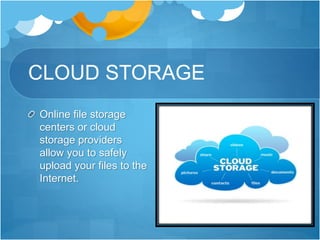
CLOUD STORAGE
Online file storage
centers or cloud
storage providers
allow you to safely
upload your files to the
Internet.
Cloud Providers
There are various providers of cloud storage
Examples:
Apple iCloud
Dropbox
Google Drive
Amazon Cloud Drive
Microsoft SkyDrive
Apple iCloud
Gives 5GB of free storage (if you want more, you have to
pay for it yearly)
Allows you to sync all your idevices to iCloud
Anything you have stored in the iCloud can be accessed
from any idevice
For example, a document typed on an iPad and saved to the
iCloud can be accessed from an iPhone.
Dropbox
Gives you 2GB of free storage
Allows you to get more free space by completing
certain tasks
Available in the App Store and Android Market
For example, a file uploaded to Dropbox from a
MacBook can be accessed from a Samsung phone.
Google Drive
Gives you 15GB of free storage
Requires a G-mail account to be accessed
Individuals can buy more storage for themselves (Google
Apps for Business Administrators can buy storage
licenses)
Allows you to type documents, make
spreadsheets/presentations, etc., and then save them to
your drive.
Amazon Cloud Drive
Gives you 5GB of free storage (additional storage is
available for $10 a year)
Available for download on Kindle Fire(HD)
A Save to CloudDrive app is available in the App
Store for $1.99 and an Amazon Cloud Pictures is in
the Android Market for free.
Microsoft SkyDrive
Gives you 7GB of free storage (additional storage
can be bought)
Requires a Windows Live account to be accessed
Can be saved to a Windows computer as a mapped
drive.
Which One Should I Pick?
The cloud provider you pick should fulfill all your
needs as the consumer
If you need a lot of space, choose a provider that
allows you to get the space you need
If you don’t need a lot of space, choose a provider
that you can use for storing files that don’t take up a
lot of space.
The Cloud Universe
There are tons of different
cloud storage providers in
the world today!!!
Questions?

Cloud Storage Presentationlb.pptx

  • 2.
    Quick Survey Does anyonehave a lot of files on their computer but dosen’t have the space to store them? Do you worry about losing files? Do you want your files to be secure and easily accessible?
  • 3.
    WHAT IS CLOUDSTORAGE?
  • 4.
    CLOUD STORAGE Online filestorage centers or cloud storage providers allow you to safely upload your files to the Internet.
  • 5.
    Cloud Providers There arevarious providers of cloud storage Examples: Apple iCloud Dropbox Google Drive Amazon Cloud Drive Microsoft SkyDrive
  • 6.
    Apple iCloud Gives 5GBof free storage (if you want more, you have to pay for it yearly) Allows you to sync all your idevices to iCloud Anything you have stored in the iCloud can be accessed from any idevice For example, a document typed on an iPad and saved to the iCloud can be accessed from an iPhone.
  • 7.
    Dropbox Gives you 2GBof free storage Allows you to get more free space by completing certain tasks Available in the App Store and Android Market For example, a file uploaded to Dropbox from a MacBook can be accessed from a Samsung phone.
  • 8.
    Google Drive Gives you15GB of free storage Requires a G-mail account to be accessed Individuals can buy more storage for themselves (Google Apps for Business Administrators can buy storage licenses) Allows you to type documents, make spreadsheets/presentations, etc., and then save them to your drive.
  • 9.
    Amazon Cloud Drive Givesyou 5GB of free storage (additional storage is available for $10 a year) Available for download on Kindle Fire(HD) A Save to CloudDrive app is available in the App Store for $1.99 and an Amazon Cloud Pictures is in the Android Market for free.
  • 10.
    Microsoft SkyDrive Gives you7GB of free storage (additional storage can be bought) Requires a Windows Live account to be accessed Can be saved to a Windows computer as a mapped drive.
  • 11.
    Which One ShouldI Pick? The cloud provider you pick should fulfill all your needs as the consumer If you need a lot of space, choose a provider that allows you to get the space you need If you don’t need a lot of space, choose a provider that you can use for storing files that don’t take up a lot of space.
  • 12.
    The Cloud Universe Thereare tons of different cloud storage providers in the world today!!!
  • 13.