Recommended
PDF
20200219 AWS Black Belt Online Seminar オンプレミスとAWS間の冗長化接続
PDF
20210119 AWS Black Belt Online Seminar AWS CloudTrail
PDF
[AWS初心者向けWebinar] 利用者が実施するAWS上でのセキュリティ対策
PDF
PDF
Amazon Aurora - Auroraの止まらない進化とその中身
PDF
20190220 AWS Black Belt Online Seminar Amazon S3 / Glacier
PDF
PDF
Zabbixのパフォーマンスチューニング & インストール時の注意点
PDF
20191016 AWS Black Belt Online Seminar Amazon Route 53 Resolver
PDF
20191029 AWS Black Belt Online Seminar Elastic Load Balancing (ELB)
PDF
20210126 AWS Black Belt Online Seminar AWS CodeDeploy
PDF
20190226 AWS Black Belt Online Seminar Amazon WorkSpaces
PDF
20190806 AWS Black Belt Online Seminar AWS Glue
PDF
20200212 AWS Black Belt Online Seminar AWS Systems Manager
PDF
SD-WANって何だろう。使い方を知ってみよう(AWS分)
PDF
20190326 AWS Black Belt Online Seminar Amazon CloudWatch
PDF
20190911 AWS Black Belt Online Seminar AWS Batch
PDF
20190206 AWS Black Belt Online Seminar Amazon SageMaker Basic Session
PDF
20200930 AWS Black Belt Online Seminar Amazon Kinesis Video Streams
PDF
AWS Black Belt Online Seminar 2017 Amazon Kinesis
PDF
AWS Black Belt Online Seminar 2016 AWS上でのActive Directory構築
PDF
AWS Black Belt Online Seminar 2016 Amazon EC2 Container Service
PDF
20190319 AWS Black Belt Online Seminar Amazon FSx for Windows Server
PDF
20190129 AWS Black Belt Online Seminar AWS Identity and Access Management (AW...
PPTX
「落ちない」AWSのインフラ構成、システム要件にあわせたパターンをご紹介
PDF
PDF
PDF
ElastiCacheを利用する上でキャッシュをどのように有効に使うべきか
PDF
20201028 AWS Black Belt Online Seminar Amazon CloudFront deep dive
PDF
20190730 AWS Black Belt Online Seminar Amazon CloudFrontの概要
More Related Content
PDF
20200219 AWS Black Belt Online Seminar オンプレミスとAWS間の冗長化接続
PDF
20210119 AWS Black Belt Online Seminar AWS CloudTrail
PDF
[AWS初心者向けWebinar] 利用者が実施するAWS上でのセキュリティ対策
PDF
PDF
Amazon Aurora - Auroraの止まらない進化とその中身
PDF
20190220 AWS Black Belt Online Seminar Amazon S3 / Glacier
PDF
PDF
Zabbixのパフォーマンスチューニング & インストール時の注意点
What's hot
PDF
20191016 AWS Black Belt Online Seminar Amazon Route 53 Resolver
PDF
20191029 AWS Black Belt Online Seminar Elastic Load Balancing (ELB)
PDF
20210126 AWS Black Belt Online Seminar AWS CodeDeploy
PDF
20190226 AWS Black Belt Online Seminar Amazon WorkSpaces
PDF
20190806 AWS Black Belt Online Seminar AWS Glue
PDF
20200212 AWS Black Belt Online Seminar AWS Systems Manager
PDF
SD-WANって何だろう。使い方を知ってみよう(AWS分)
PDF
20190326 AWS Black Belt Online Seminar Amazon CloudWatch
PDF
20190911 AWS Black Belt Online Seminar AWS Batch
PDF
20190206 AWS Black Belt Online Seminar Amazon SageMaker Basic Session
PDF
20200930 AWS Black Belt Online Seminar Amazon Kinesis Video Streams
PDF
AWS Black Belt Online Seminar 2017 Amazon Kinesis
PDF
AWS Black Belt Online Seminar 2016 AWS上でのActive Directory構築
PDF
AWS Black Belt Online Seminar 2016 Amazon EC2 Container Service
PDF
20190319 AWS Black Belt Online Seminar Amazon FSx for Windows Server
PDF
20190129 AWS Black Belt Online Seminar AWS Identity and Access Management (AW...
PPTX
「落ちない」AWSのインフラ構成、システム要件にあわせたパターンをご紹介
PDF
PDF
PDF
ElastiCacheを利用する上でキャッシュをどのように有効に使うべきか
Similar to CloudFront最近の事例と間違った使い方
PDF
20201028 AWS Black Belt Online Seminar Amazon CloudFront deep dive
PDF
20190730 AWS Black Belt Online Seminar Amazon CloudFrontの概要
PPTX
今だから!Amazon CloudFront 徹底活用
PDF
[AWSマイスターシリーズ] Amazon CloudFront / Amazon Elastic Transcoderによるコンテンツ配信
PDF
PDF
Amazon VPCトレーニング-トレーニング資料
PDF
Aws summits2014 エンタープライズ向けawscdpネットワーク編
PDF
CloudFront構築事例 ハートビーツ 20121025
PDF
AWSのハンズオンでWordpressを使う時に注意すべき事
PDF
AWSのハンズオンでWordpressを使う時に注意すべき事
PPTX
PDF
Scaling on AWS - Feb 2016
PDF
Awsmeister cloudfront20120611-slideshare用
PDF
20120611 aws meister-reloaded-cloud-front-public
PDF
アマゾンクラウド実践講座 in 福岡/山口クラウドセミナー 20101208
PPTX
20140906 jaws festa 2014 cloud front+route53
PDF
PDF
AWS Solution Architect Associate試験勉強メモ
PDF
Aws summits2014 amazon_cloudfrontを利用したサイト高速化とセキュア配信
PDF
Recently uploaded
PDF
ST2024_PM1_2_Case_study_of_local_newspaper_company.pdf
PDF
Team Topology Adaptive Organizational Design for Rapid Delivery of Valuable S...
PDF
第21回 Gen AI 勉強会「NotebookLMで60ページ超の スライドを作成してみた」
PDF
PMBOK 7th Edition_Project Management Context Diagram
PDF
Starlink Direct-to-Cell (D2C) 技術の概要と将来の展望
PDF
2025→2026宙畑ゆく年くる年レポート_100社を超える企業アンケート総まとめ!!_企業まとめ_1229_3版
PDF
100年後の知財業界-生成AIスライドアドリブプレゼン イーパテントYouTube配信
PDF
FY2025 IT Strategist Afternoon I Question-1 Balanced Scorecard
PDF
Reiwa 7 IT Strategist Afternoon I Question-1 3C Analysis
PDF
PMBOK 7th Edition_Project Management Process_WF Type Development
PDF
Reiwa 7 IT Strategist Afternoon I Question-1 Ansoff's Growth Vector
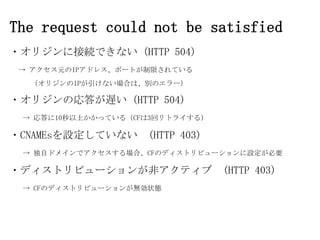
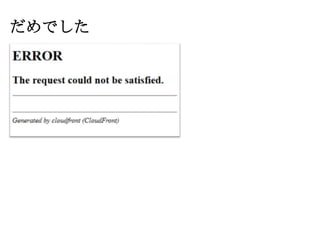
CloudFront最近の事例と間違った使い方 1. 2. 3. 4. 5. 6. 7. 9. 10. 11. 12. 13. 14. 15. The request could not be satisfied
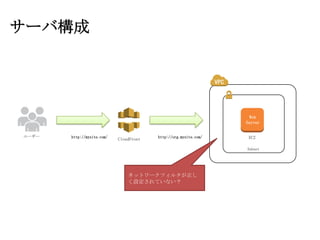
・オリジンに接続できない (HTTP 504)
→ アクセス元のIPアドレス、ポートが制限されている
(オリジンのIPが引けない場合は、別のエラー)
・オリジンの応答が遅い (HTTP 504)
→ 応答に10秒以上かかっている(CFは3回リトライする)
・CNAMEsを設定していない (HTTP 403)
→ 独自ドメインでアクセスする場合、CFのディストリビューションに設定が必要
・ディストリビューションが非アクティブ (HTTP 403)
→ CFのディストリビューションが無効状態
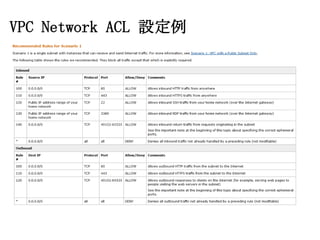
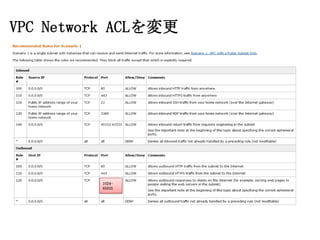
16. 17. 18. 19. 20. 21. 22. 23. デフォルトのNetwork ACLで、
CFのEphemeral portを確認
# netstat -al | grep serv
tcp
0
0 10.0.1.6:http
server-54-240-146-207:38071 TIME_WAIT
tcp
0
0 10.0.1.6:http
server-54-240-146-207:36867 TIME_WAIT
tcp
0
0 10.0.1.6:http
server-54-240-146-207:37525 TIME_WAIT
tcp
0
0 10.0.1.6:http
server-54-240-146-207:37024 TIME_WAIT
tcp
0
0 10.0.1.6:http
server-54-240-146-207:37711 TIME_WAIT
tcp
0
0 10.0.1.6:http
server-204-246-186-69.:
tcp
0
0 10.0.1.6:http
server-54-240-146-207:37914 TIME_WAIT
tcp
0
0 10.0.1.6:http
server-54-240-146-207:36712 TIME_WAIT
6730
TIME_WAIT
24. AWSのドキュメントをよく読む
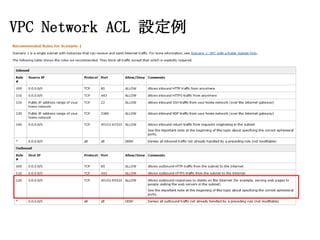
Ephemeral Ports
The example network ACL in the preceding section uses an ephemeral port range of
49152-65535. However, you might want to use a different range for your network
ACLs. This section explains why.
The client that initiates the request chooses the ephemeral port range. The range
varies depending on the client's operating system. Many Linux kernels (including
the Amazon Linux kernel) use ports 32768-61000. Requests originating from Elastic
1024-65535
Load Balancing use ports
. Windows operating systems through
Windows Server 2003 use ports 1025-5000. Windows Server 2008 uses ports 4915265535. Therefore, if a request comes in to a web server in your VPC from a Windows
XP client on the Internet, your network ACL must have an outbound rule to enable
traffic destined for ports 1025-5000.
If an EC2 instance in your VPC is the client initiating a request, your network
ACL must have an inbound rule to enable traffic destined for the ephemeral ports
specific to the type of instance (Amazon Linux, Windows Server 2008, and so on.).
In practice, to cover the different types of clients that might initiate traffic
to public-facing instances in your VPC, you need to open ephemeral ports
1024-65535. However, you can also add rules to the ACL to deny traffic on
any malicious ports within that range. Make sure to place the DENY rules earlier
in the table than the rule that opens the wide range of ephemeral ports.
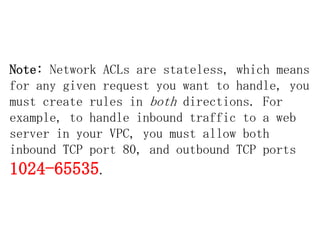
25. 26. 27. 28. Note: Network ACLs are stateless, which means
for any given request you want to handle, you
must create rules in both directions. For
example, to handle inbound traffic to a web
server in your VPC, you must allow both
inbound TCP port 80, and outbound TCP ports
1024-65535.
29. 30. 31.





















![[AWS初心者向けWebinar] 利用者が実施するAWS上でのセキュリティ対策](https://cdn.slidesharecdn.com/ss_thumbnails/20151217-aws-security-151218023451-thumbnail.jpg?width=640&height=640&fit=bounds)


![[AWSマイスターシリーズ] Amazon CloudFront / Amazon Elastic Transcoderによるコンテンツ配信](https://cdn.slidesharecdn.com/ss_thumbnails/20131120aws-medister-regenerate-cloudfrontetspublic-131120181553-phpapp01-thumbnail.jpg?width=640&height=640&fit=bounds)


