Clean Code Style
Paweł Gajda

Android Developer @ EL Passion
Agenda
What is Code Style?
Code Style Guidelines (for + )
IDE Code Style settings
Static Code Analysis
Kotlin static code analyzers
Extending CI workflow
What is Code Style?
The way I (you) create source code and
how it looks.
Everyone has his own preferred style.
It can evolve as we learn.
Where the problems lie?
Development Team
Code Styles in Dev Team
CodeStyle #1
CodeStyle #2
CodeStyle #3
CodeStyle #4
I use
semicolons

in Kotlin
Shame
on you!
Never use
wildcard
imports!
⌥⌘L

again…
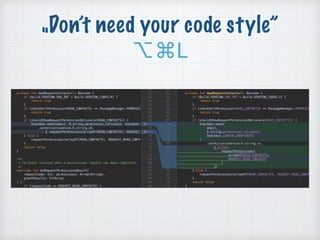
„Don’t need your code style”
⌥⌘L
„Don’t need your code style”
⌥⌘L
„Don’t need your code style”
⌥⌘L
„Don’t need your code style”
⌥⌘L
„Don’t need your code style”
⌥⌘L
How to write code 

in the Team?
How to write code 

in the Team?
With Code Style Guidelines
Code Style Guidelines
A set of rules defined as consistent coding
conventions in the team or project to:
keep codebase clean
provide faster on-boarding for new team
members
enhance code review to focus only on
important things (requires automation)
Code Style Guidelines for
Android Developers
Kotlin Coding Conventions

(from JetBrains)

https://kotlinlang.org/docs/reference/coding-conventions.html
Android Kotlin Style Guide

(from Google)

https://android.github.io/kotlin-guides/style.html
Android Studio Code Style
settings
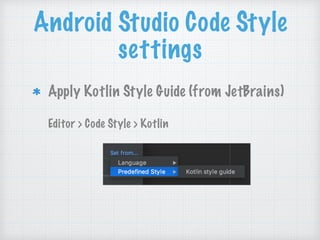
Apply Kotlin Style Guide (from JetBrains)


Editor > Code Style > Kotlin


from
Android Studio Code Style
settings
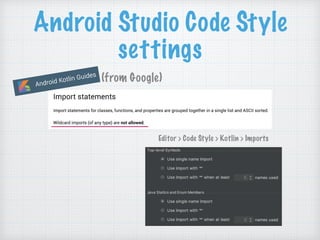
Editor > Code Style > Kotlin > Imports
(from Google)
Android Studio Code Style
settings
Let’s open
Android Studio
How to share

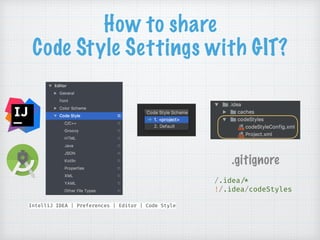
Code Style Settings with GIT?
IntelliJ IDEA | Preferences | Editor | Code Style
.gitignore
/.idea!/*
!/.idea/codeStyles
Maintaining Code Style
between different IDEs
EditorConfig

https://editorconfig.org/
overrides IDE settings
single .editorconfig file:
[*]
indent_style = space
indent_size = 4
end_of_line = lf
insert_final_newline = true
charset = utf-8
Maintaining Code Style
between different IDEs
EditorConfig

https://editorconfig.org/
overrides IDE settings
single .editorconfig file:
[*]
indent_style = space
indent_size = 4
end_of_line = lf
insert_final_newline = true
charset = utf-8
matches

every file
Maintaining Code Style
between different IDEs
EditorConfig

https://editorconfig.org/
overrides IDE settings
single .editorconfig file:
[*]
indent_style = space
end_of_line = lf
insert_final_newline = true
charset = utf-8
[*.{kt,kts}]
indent_size = 4
matches

kotlin files
Maintaining Code Style
between different IDEs
EditorConfig

https://editorconfig.org/
overrides IDE settings
single .editorconfig file:
[*]
indent_style = space
indent_size = 4
end_of_line = lf
insert_final_newline = true
charset = utf-8
Let’s open
Android Studio
Static code analysis
analysis of code without having to
execute the app

(e.g. android lint)
stays in contrast to dynamic code
analysis 

(e.g. unit tests, android tests)
Kotlin static code
analyzers
Android Lint

https://d.android.com/studio/write/lint
ktlint

https://ktlint.github.io/
detekt

https://arturbosch.github.io/detekt/
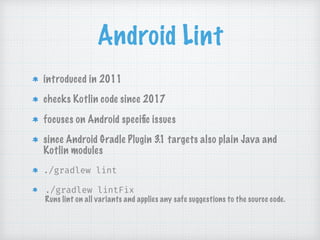
Android Lint
introduced in 2011
checks Kotlin code since 2017
focuses on Android specific issues
since Android Gradle Plugin 3.1 targets also plain Java and
Kotlin modules
./gradlew lint
./gradlew lintFix

Runs lint on all variants and applies any safe suggestions to the source code.
Android Lint
configuring lint options:
android {
lintOptions {
disable ’GradleDependency’
abortOnError false
ignoreWarnings true
}
}
ktlint
simple (no configuration)
tries to reflect JetBrains and Google Style Guides
built-in formatter
./gradlew ktlint
./gradlew ktlintFormat
detekt
code smells analysis
highly configurable rule sets
provides wrapper over ktlint

(formatting rule set)
IntelliJ plugin
./gradlew detekt
Extending CI workflow
1. Run static code analysis
2. Run unit tests
3. Run android tests
Build step duration

in one project:
15 ms
2 min
6 min
Conclusion
delegate code style maintenance to IDE
and static code analysers
select the tool that best suits your team’s
preferences
automate it as much as possible
Q&A
@pawegio

Clean Code Style

  • 1.
    Clean Code Style PawełGajda
 Android Developer @ EL Passion
  • 2.
    Agenda What is CodeStyle? Code Style Guidelines (for + ) IDE Code Style settings Static Code Analysis Kotlin static code analyzers Extending CI workflow
  • 3.
    What is CodeStyle? The way I (you) create source code and how it looks. Everyone has his own preferred style. It can evolve as we learn.
  • 4.
  • 5.
    Where the problemslie? Development Team
  • 6.
    Code Styles inDev Team CodeStyle #1 CodeStyle #2 CodeStyle #3 CodeStyle #4 I use semicolons
 in Kotlin Shame on you! Never use wildcard imports! ⌥⌘L
 again…
  • 7.
    „Don’t need yourcode style” ⌥⌘L
  • 8.
    „Don’t need yourcode style” ⌥⌘L
  • 9.
    „Don’t need yourcode style” ⌥⌘L
  • 10.
    „Don’t need yourcode style” ⌥⌘L
  • 11.
    „Don’t need yourcode style” ⌥⌘L
  • 12.
    How to writecode 
 in the Team?
  • 13.
    How to writecode 
 in the Team? With Code Style Guidelines
  • 14.
  • 15.
    Code Style Guidelines Aset of rules defined as consistent coding conventions in the team or project to: keep codebase clean provide faster on-boarding for new team members enhance code review to focus only on important things (requires automation)
  • 16.
    Code Style Guidelinesfor Android Developers Kotlin Coding Conventions
 (from JetBrains)
 https://kotlinlang.org/docs/reference/coding-conventions.html Android Kotlin Style Guide
 (from Google)
 https://android.github.io/kotlin-guides/style.html
  • 17.
    Android Studio CodeStyle settings Apply Kotlin Style Guide (from JetBrains)
 
 Editor > Code Style > Kotlin


  • 18.
  • 19.
    Android Studio CodeStyle settings Editor > Code Style > Kotlin > Imports (from Google)
  • 20.
    Android Studio CodeStyle settings Let’s open Android Studio
  • 21.
    How to share
 CodeStyle Settings with GIT? IntelliJ IDEA | Preferences | Editor | Code Style .gitignore /.idea!/* !/.idea/codeStyles
  • 22.
    Maintaining Code Style betweendifferent IDEs EditorConfig
 https://editorconfig.org/ overrides IDE settings single .editorconfig file: [*] indent_style = space indent_size = 4 end_of_line = lf insert_final_newline = true charset = utf-8
  • 23.
    Maintaining Code Style betweendifferent IDEs EditorConfig
 https://editorconfig.org/ overrides IDE settings single .editorconfig file: [*] indent_style = space indent_size = 4 end_of_line = lf insert_final_newline = true charset = utf-8 matches
 every file
  • 24.
    Maintaining Code Style betweendifferent IDEs EditorConfig
 https://editorconfig.org/ overrides IDE settings single .editorconfig file: [*] indent_style = space end_of_line = lf insert_final_newline = true charset = utf-8 [*.{kt,kts}] indent_size = 4 matches
 kotlin files
  • 25.
    Maintaining Code Style betweendifferent IDEs EditorConfig
 https://editorconfig.org/ overrides IDE settings single .editorconfig file: [*] indent_style = space indent_size = 4 end_of_line = lf insert_final_newline = true charset = utf-8 Let’s open Android Studio
  • 26.
    Static code analysis analysisof code without having to execute the app
 (e.g. android lint) stays in contrast to dynamic code analysis 
 (e.g. unit tests, android tests)
  • 27.
    Kotlin static code analyzers AndroidLint
 https://d.android.com/studio/write/lint ktlint
 https://ktlint.github.io/ detekt
 https://arturbosch.github.io/detekt/
  • 28.
    Android Lint introduced in2011 checks Kotlin code since 2017 focuses on Android specific issues since Android Gradle Plugin 3.1 targets also plain Java and Kotlin modules ./gradlew lint ./gradlew lintFix
 Runs lint on all variants and applies any safe suggestions to the source code.
  • 29.
    Android Lint configuring lintoptions: android { lintOptions { disable ’GradleDependency’ abortOnError false ignoreWarnings true } }
  • 30.
    ktlint simple (no configuration) triesto reflect JetBrains and Google Style Guides built-in formatter ./gradlew ktlint ./gradlew ktlintFormat
  • 31.
    detekt code smells analysis highlyconfigurable rule sets provides wrapper over ktlint
 (formatting rule set) IntelliJ plugin ./gradlew detekt
  • 32.
    Extending CI workflow 1.Run static code analysis 2. Run unit tests 3. Run android tests Build step duration
 in one project: 15 ms 2 min 6 min
  • 33.
    Conclusion delegate code stylemaintenance to IDE and static code analysers select the tool that best suits your team’s preferences automate it as much as possible
  • 34.