• The goalof this chapter is to consider how
to design interfaces for different
environments, people, places, and
activities.
• Numerous adjectives have been used to
describe the different kinds of interfaces ,
including graphical, command, speech,
multimodal, invisible, ambient, affective,
mobile, intelligent, adaptive, smart,
tangible, touch less, and natural.
www.id-book.com 2
3.
• Some ofthe interface types are primarily
concerned with a function
• (e.g. to be intelligent, to be adaptive, to be
ambient, to be smart),
• while others focus on the interaction style
used (e.g. command, graphical,
multimedia),
• the input/output device used (e.g. pen-
based, speech-based, gesture-based),
• or the platform being designed for (e.g.
tablet, mobile, PC, wearable).
www.id-book.com 3
4.
www.id-book.com 4
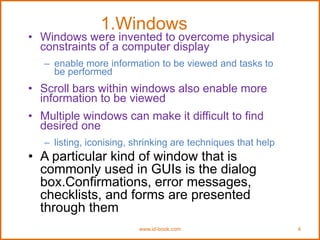
1.Windows
• Windowswere invented to overcome physical
constraints of a computer display
– enable more information to be viewed and tasks to
be performed
• Scroll bars within windows also enable more
information to be viewed
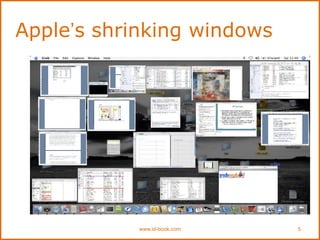
• Multiple windows can make it difficult to find
desired one
– listing, iconising, shrinking are techniques that help
• A particular kind of window that is
commonly used in GUIs is the dialog
box.Confirmations, error messages,
checklists, and forms are presented
through them
www.id-book.com 6
Menus
• interfacemenus offer users a structured way
of choosing from the available set of options
• numerous menu interface styles,
including flat lists, drop-down, pop-up,
contextual, and expanding ones, e.g.
scrolling and cascading.
• Flat menus
– Flat menus are good at displaying a small number
of options at the same time or where the size of
the display is small, e.g. cell phones, cameras,
MP3 players, smartwatches
7.
www.id-book.com 7
Expanding menus
•Enables more options to be shown on a
single screen than is possible with a single
flat menu
• More flexible navigation, allowing for
selection of options to be done in the same
window
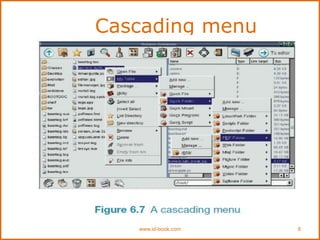
• Most popular are cascading ones
– primary, secondary and even tertiary menus
– downside is that they require precise mouse control
– can result in overshooting or selecting wrong options
www.id-book.com 9
Contextual menus
•Provide access to often-used commands that
make sense in the context of a current task
• Appear when the user presses the Control key
while clicking on an interface element
– e.g., clicking on a photo in a website together with holding down
the Control key results in options ‘open it in a new window,’
‘save it,’ or ‘copy it’
• Helps overcome some of the navigation
problems associated with cascading menus
10.
www.id-book.com 10
2. Multimedia
•Combines different media within a single
interface with various forms of interactivity
namely, graphics, text, video, sound, and
animations, and links them with various forms of
interactivity. It differs from previous forms of
combined media, e.g. TV, in that the different
media are interactive
• Users click on links in an image or text
-> another part of the program
-> an animation or a video clip is played
->can return to where they were or move on to another
place
11.
www.id-book.com 11
3. Virtualreality
• Computer-generated graphical simulations
providing:
– “the illusion of participation in a synthetic environment
rather than external observation of such an
environment” (Gigante, 1993)
• Provide new kinds of experience, enabling users
to interact with objects and navigate in 3D space
• Create highly engaging user experiences
12.
www.id-book.com 12
4. Informationvisualization
and dashboards
• Computer-generated interactive graphics of complex data that
interactive and dynamic
• The goal is to Amplify human cognition, enabling users to see
patterns, trends, and anomalies in the visualization (Card et
al, 1999)
• Aim is to enhance discovery, decision-making, and
explanation of phenomena
• Techniques include:
– 3D interactive maps that can be zoomed in and out of and which
present data via webs, trees, clusters, scatterplot diagrams, and
interconnected nodes
13.
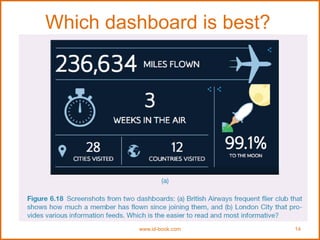
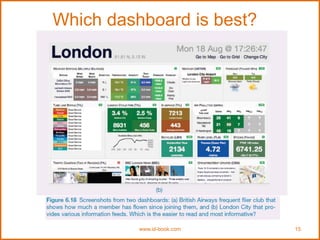
Dashboards (cars?)
• Showscreenshots of data updated over
periods of time - to be read at a glance
• Usually not interactive - slices of data that
depict current state of a system or process
• Need to provide digestible and legible
information for users
– design its spatial layout so intuitive to read when
first looking at it
– should also direct a user’s attention to anomalies
or unexpected deviations
www.id-book.com 13
5.Consumer electronics and
appliances
www.id-book.com16
• Everyday devices in home, public place, or car
– e.g. washing machines, remotes, photocopiers, printers and
navigation systems)
• And personal devices
– e.g. MP3 player, digital clock and digital camera
• Used for short periods
– e.g. putting the washing on, watching a program, buying a ticket,
changing the time, taking a snapshot
• Need to be usable with minimal, if any, learning
17.
www.id-book.com 17
6. Mobile
•Handheld devices intended to be used while on
the move
• Have become pervasive, increasingly used in all
aspects of everyday and working life
• Apps running on mobiles have greatly expanded,
e.g.
– used in restaurants to take orders
– car rentals to check in car returns
– supermarkets for checking stock
– in the streets for multi-user gaming
– in education to support life-long learning
18.
www.id-book.com 18
7. Pen
•Enable people to write, draw, select, and move objects at
an interface using lightpens or styluses
– capitalize on the well-honed drawing skills developed
from childhood
• Digital pens, e.g. Anoto, use a combination of
ordinary ink pen with digital camera that digitally
records everything written with the pen on
special paper
19.
www.id-book.com 19
Pros andcons
• Allows users to quickly and easily
annotate existing documents
• Can be difficult to see options on the
screen because a user’s hand can cover
part of it when writing
20.
www.id-book.com 20
8. Air-basedgestures
• Uses camera recognition, sensor and computer
vision techniques
– can recognize people’s body, arm and hand gestures in a
room
– systems include Kinect
• Movements are mapped onto a variety of gaming
motions, such as swinging, bowling, hitting and
punching
• Players represented on the screen as avatars doing
same actions
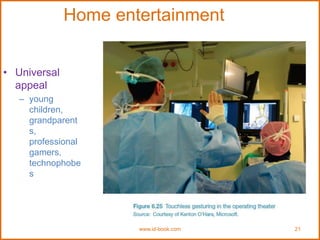
Gestures in theoperating theatre
• A touchless
system that
recognizes
gestures
• surgeons can
interact with and
manipulate MRI
or CT images
– e.g. two-handed
gestures for
zooming and
panning
www.id-book.com 22
23.
www.id-book.com 23
9. Haptic(reaction to sense of
touch)
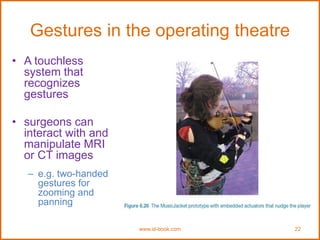
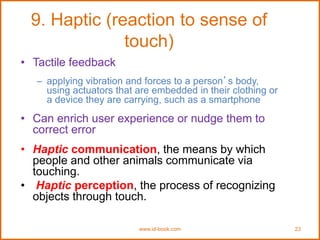
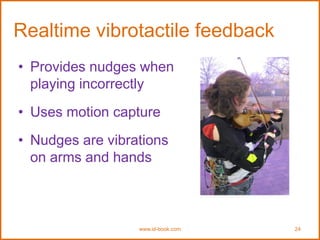
• Tactile feedback
– applying vibration and forces to a person’s body,
using actuators that are embedded in their clothing or
a device they are carrying, such as a smartphone
• Can enrich user experience or nudge them to
correct error
• Haptic communication, the means by which
people and other animals communicate via
touching.
• Haptic perception, the process of recognizing
objects through touch.
www.id-book.com 25
10. Multi-modal
•Meant to provide enriched and complex
user experiences
– multiplying how information is experienced and
detected using different modalities, i.e. touch, sight,
sound, speech
– support more flexible, efficient, and expressive means
of human–computer interaction
– Most common is speech and vision
26.
www.id-book.com 26
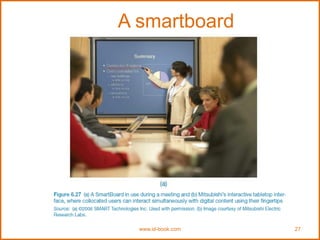
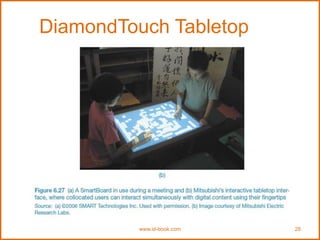
11. Shareable
•Shareable interfaces are designed for more than
one person to use
– provide multiple inputs and sometimes allow
simultaneous input by co-located groups
– large wall displays where people use their own pens
or gestures
– interactive tabletops where small groups interact with
information using their fingertips
– e.g. DiamondTouch, Smart Table and Surface
www.id-book.com 29
Advantages
• Providea large interactional space that can
support flexible group working
• Can be used by multiple users
– Can point to and touch information being displayed
– Simultaneously view the interactions and have same
shared point of reference as others
• Can support more equitable participation
compared with groups using single PC
30.
www.id-book.com 30
12. Tangible
•Type of sensor-based interaction, where
physical objects, e.g., bricks, are coupled with
digital representations
• When a person manipulates the physical
object/s it causes a digital effect to occur, e.g. an
animation
• Digital effects can take place in a number of
media and places or can be embedded in the
physical object
31.
www.id-book.com 31
13.Wearables
• Firstdevelopments were head- and eyewear-mounted
cameras that enabled user to record what was seen and
to access digital information
• Since, jewellery, head-mounted caps, smart fabrics,
glasses, shoes, and jackets have all been used
– provide the user with a means of interacting with digital
information while on the move
• Applications include automatic diaries, tour guides, cycle
indicators and fashion clothing
32.
www.id-book.com 32
14. Brain-computerinterfaces
• Brain–computer interfaces (BCI) provide a
communication pathway between a person’s brain
waves and an external device, such as a cursor on a
screen
• Person is trained to concentrate on the task, e.g. moving
the cursor
• BCIs work through detecting changes in the neural
functioning in the brain
• BCIs apps:
– Games
– enable people who are paralysed to control robots