Solutions Overview and Positioning
Wireless Guest Access
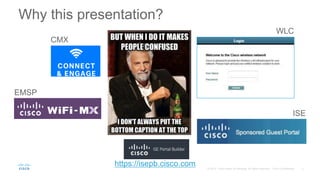
Why this presentation?
CMX
ISE
WLC
https://isepb.cisco.com
EMSP
ISG – Intelligent Services Gateway
http://www.cisco.com/c/en/us/products/collateral/ios-nx-os-software/intelligent-services-gateway-isg/prod_bulletin0900aecd804a2c70.html
More dedicated to SP scenarios.
In some use cases it might be used as an alternative to the presented
solutions, in case scalability limits are hit.
What we will not cover
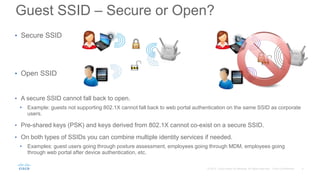
• Secure SSID
• Open SSID
• A secure SSID cannot fall back to open.
• Example: guests not supporting 802.1X cannot fall back to web portal authentication on the same SSID as corporate
users.
• Pre-shared keys (PSK) and keys derived from 802.1X cannot co-exist on a secure SSID.
• On both types of SSIDs you can combine multiple identity services if needed.
• Examples: guest users going through posture assessment, employees going through MDM, employees going
through web portal after device authentication, etc.
Guest SSID – Secure or Open?
To PSK or not to PSK?
• Q: Can I deploy PSK on top of web auth?
A: Yes. But…
• It is not much more secure than Open, since all users will anyway share the same key.
• It adds extra burden to the end users, who would need to ask for the PSK to the helpdesk.
• PSK + LWA has always been supported.
PSK + CWA is supported starting from AireOS 8.3.
• Q: Hey Cisco, why don’t you deploy a guest portal at Cisco Live?
A: We cannot / don’t want to because:
• The WLC has a limitation of up to 2,000 clients in the WEBAUTH_REQD run state (i.e., being
redirected to the web portal and not yet fully authorized).
• For such a big event with thousands of users, we prefer to avoid passersby to connect to the Cisco
Live network from the street and to add even more clients.
WLC native guest
AP-WLC DHCP/DNS RADIUS Server
Additionally:
• MAB
• 802.1X
Pre-webauth
ACL
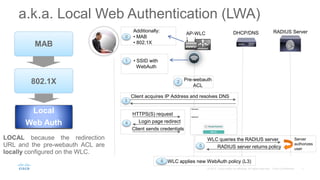
Client acquires IP Address and resolves DNS
HTTPS(S) request
Login page redirect
Client sends credentials
WLC queries the RADIUS server
RADIUS server returns policy
Server
authorizes
user
WLC applies new WebAuth policy (L3)
• SSID with
WebAuth
a.k.a. Local Web Authentication (LWA)
7
LOCAL because the redirection
URL and the pre-webauth ACL are
locally configured on the WLC.
MAB
802.1X
Local
Web Auth
0
1
2
3
4
5
6
AP-WLC DHCP/DNS
Ext. Web/RADIUS
Server
Pre-webauth
ACL
Client acquires IP Address and resolves DNS
• SSID with
WebAuth
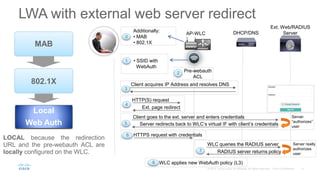
LWA with external web server redirect
1
2
3
HTTP(S) request
Ext. page redirect
4
Client goes to the ext. server and enters credentials
Server redirects back to WLC’s virtual IF with client’s credentials
Server
“authorizes”
user
5
6 HTTPS request with credentials
WLC queries the RADIUS server
RADIUS server returns policy
Server really
authorizes
user
7
WLC applies new WebAuth policy (L3)
8
LOCAL because the redirection
URL and the pre-webauth ACL are
locally configured on the WLC.
MAB
802.1X
Local
Web Auth
Additionally:
• MAB
• 802.1X
0
AP-WLC DHCP/DNS NGS
Pre-webauth
ACL
Client acquires IP Address and resolves DNS
• SSID with
WebAuth
Cisco NAC Guest Server (NGS)
1
2
3
HTTP(S) request
Ext. page redirect
4
Client goes to the ext. server and enters credentials
Server redirects back to WLC’s virtual IF with client’s credentials
Server
“authorizes”
user
5
6 HTTPS request with credentials
WLC queries the RADIUS server
RADIUS server returns policy
Server really
authorizes
user
7
WLC applies new WebAuth policy (L3)
8
Additionally:
• MAB
• 802.1X
0
For your
reference
EoS September ’15
http://www.cisco.com/c/en/us/products/collateral/router
s/7600-series-routers/eos-eol-notice-c51-734104.html
10
For your
reference
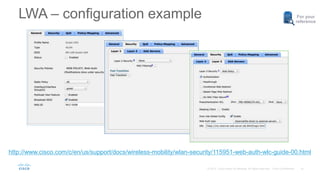
http://www.cisco.com/c/en/us/support/docs/wireless-mobility/wlan-security/115951-web-auth-wlc-guide-00.html
LWA – configuration example
The cool stuff
• It is integrated, has been there since ever and could technically work
with any external web and RADIUS servers.
• It supports both local and external databases.
• It has a fairly good level of customization.
• It supports per-user assignment of some L3 policies (e.g., QoS, rate
limiting, etc.).
• It supports Lobby Ambassador users to create guest accounts, either on
the WLC or through Prime too.
• It supports HTTPS certificate upload for the virtual interface.
• Recommended for: small campuses.
Let’s be aware that…
• The local database is limited to 2048 entries max.
• It is not as easy as ISE or CMX to customize.
• The Lobby Ambassador interface is not customizable and has
limited options (e.g., no SMS support).
• The WLC’s web engine is limited to ~150 logins/sec and
2,000 clients in the WEBAUTH_REQD run state.
• With external portals, we’d need to trust 2 different certificates:
the WLC virtual interface’s and the external web server’s.
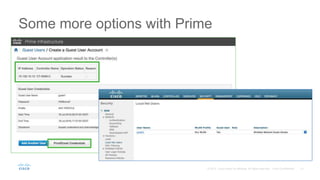
Some more options with Prime
CMX Connect
• Cisco’s former wireless location solution was called MSE (Mobility Services
Engine).
• Up to MSE version 8.0, “MSE” still indicates both the server (physical
appliance or virtual) and the software running on it.
• “CMX” initially was a new set of features, introduced in MSE 7.4, and which
then took over the name for the whole Cisco’s wireless location and analytics
solution.
• Today “MSE” still indicates the physical appliance (e.g., MSE 3365) and
“CMX” indicates the software and all the location and analytics services.
Example: CMX 10.2.2 runs on MSE 3365 or as a virtual image.
What is Cisco CMX?
AP-WLC DHCP/DNS Web Server (CMX)
Pre-webauth
ACL
Client acquires IP Address and resolves DNS
• SSID with
WebAuth
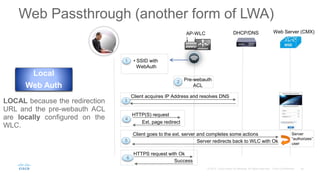
Web Passthrough (another form of LWA)
LOCAL because the redirection
URL and the pre-webauth ACL
are locally configured on the
WLC.
Local
Web Auth
1
2
3
HTTP(S) request
Ext. page redirect
4
Client goes to the ext. server and completes some actions
Server redirects back to WLC with Ok
Server
“authorizes”
user
5
Success
6
HTTPS request with Ok
17
For your
reference
http://www.cisco.com/c/en/us/td/docs/wireless/mse/10-2/cmx_config/b_cg_cmx102/the_cisco_cmx_connect_and_engage_service.html
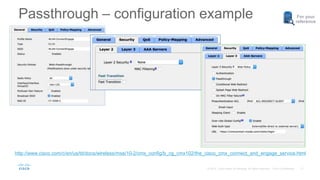
Passthrough – configuration example
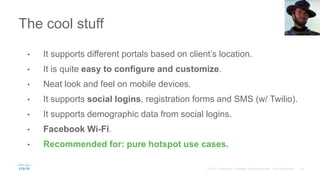
The cool stuff
• It supports different portals based on client’s location.
• It is quite easy to configure and customize.
• Neat look and feel on mobile devices.
• It supports social logins, registration forms and SMS (w/ Twilio).
• It supports demographic data from social logins.
• Facebook Wi-Fi.
• Recommended for: pure hotspot use cases.
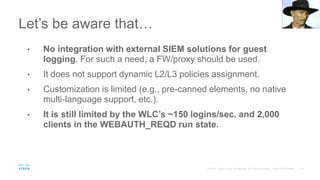
Let’s be aware that…
• No integration with external SIEM solutions for guest
logging. For such a need, a FW/proxy should be used.
• It does not support dynamic L2/L3 policies assignment.
• Customization is limited (e.g., pre-canned elements, no native
multi-language support, etc.).
• It is still limited by the WLC’s ~150 logins/sec. and 2,000
clients in the WEBAUTH_REQD run state.
Enterprise Mobility Services
Platform (EMSP)
AP-WLC DHCP/DNS Web Server (EMSP)
Pre-webauth
ACL
Client acquires IP Address and resolves DNS
• SSID with
WebAuth
Web Passthrough (kind of LWA)
LOCAL because the redirection
URL and the pre-webauth ACL
are locally configured on the
WLC.
Local
Web Auth
1
2
3
HTTP(S) request
Ext. page redirect
4
Client goes to the ext. server and completes some actions
Server redirects back to WLC with Ok
Server
“authorizes”
user
5
Success
6
HTTPS request with Ok
22
For your
reference
Internal only:
http://iwe.cisco.com/web/view-post/post/-/posts?postId=775600122
Passthrough – configuration example
The cool stuff
• It supports different portals based on client’s location.
• It is fully customizable and opens up scenarios for mobile apps
integration.
• Neat look and feel on mobile devices.
• It “should” support user verification through SMS.
• It supports venue maps.
• It supports integration with merchant’s dynamic content.
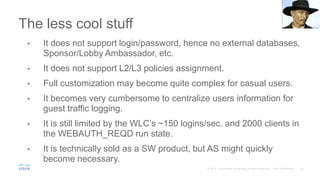
The less cool stuff
• It does not support login/password, hence no external databases,
Sponsor/Lobby Ambassador, etc.
• It does not support L2/L3 policies assignment.
• Full customization may become quite complex for casual users.
• It becomes very cumbersome to centralize users information for
guest traffic logging.
• It is still limited by the WLC’s ~150 logins/sec. and 2000 clients in
the WEBAUTH_REQD run state.
• It is technically sold as a SW product, but AS might quickly
become necessary.
http://www.cisco.com/c/en/us/support/wireless/enterprise-mobility-
services-platform/tsd-products-support-series-home.html
and
http://www.cisco.com/c/dam/en/us/td/docs/solutions/Enterprise/Mobilit
y/Mobility_Services/EMSP/emsp-3-0/Cisco-WiFi-Engage-with-CUWN-
Configuration-Guide.pdf
It’s a Cisco cloud based solution, usually purchased by partners, and
which can then be proposed as a service to end customers.
For more details
ISE Guest Portal
27
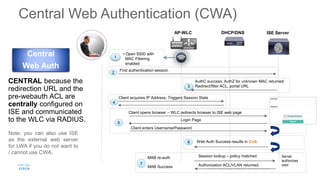
AP-WLC DHCP/DNS ISE Server
Client acquires IP Address, Triggers Session State
4
• Open SSID with
MAC Filtering
enabled
1
AuthC success; AuthZ for unknown MAC returned:
Redirect/filter ACL, portal URL
Client opens browser – WLC redirects browser to ISE web page
Login Page
Client enters Username/Password
5
Web Auth Success results in CoA
Server
authorizes
user
6
MAB re-auth
MAB Success
Session lookup – policy matched
Authorization ACL/VLAN returned.
7
First authentication session
2
3
CENTRAL because the
redirection URL and the
pre-webauth ACL are
centrally configured on
ISE and communicated
to the WLC via RADIUS.
Central
Web Auth
Central Web Authentication (CWA)
Note: you can also use ISE
as the external web server
for LWA if you do not want to
/ cannot use CWA.
For your
reference
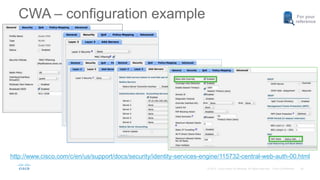
CWA – configuration example
http://www.cisco.com/c/en/us/support/docs/security/identity-services-engine/115732-central-web-auth-00.html
The cool stuff
• It has the most complete set of options for guest access
verification (self-service, SMS, email, common code, etc.).
• It is fully customizable, even with the Portal builder on Cisco
cloud: https://isepb.cisco.com
• It’s the only solution supporting assignment of both L2 and L3
policies.
• It supports both internal and external databases.
• It supports up to 1M local guest accounts, different portals based
on client’s location and certificate(s) on ISE only.
The less cool stuff
• CWA does not work with non-Cisco network devices nowadays (it
should be addressed in ISE 2.0).
• The admin needs to be familiar with access control solutions and
techniques (e.g., LWA vs. CWA).
• Even if there are dedicated “portal admins” using the Portal
Builder, it is up to the “ISE admin” to configure portal policies.
• The guest database cannot be exported/backed up.
• Guest portals are limited to ~150 logins/sec per PSN (3495).
You can still load balance between PSN’s.
• It does not support social logins (yet).
How about Meraki?
It’s not all just about guests…
• Usually customers choose Cloud vs. On Premise based on other major needs,
rather than guest.
• In case the customer chose Meraki, the major features for guests would be:
o Easy portal customization.
o Internal and external database support for RADIUS
authentication.
o SMS authentication with Twilio.
o Integration with a billing system.
o Integration with Meraki’s MDM.
o Some Sponsor/Lobby Ambassador options.
o Support for ISE CWA.
What customers also ask for
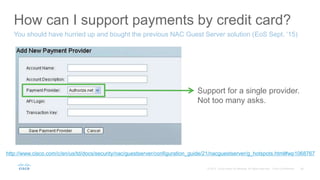
How can I support payments by credit card?
You should have hurried up and bought the previous NAC Guest Server solution (EoS Sept. ‘15)
Support for a single provider.
Not too many asks.
http://www.cisco.com/c/en/us/td/docs/security/nac/guestserver/configuration_guide/21/nacguestserver/g_hotspots.html#wp1068767
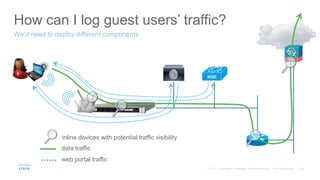
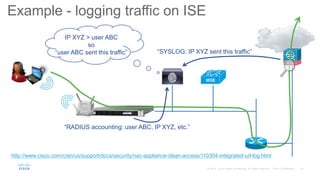
How can I log guest users’ traffic?
We’d need to deploy different components
data traffic
web portal traffic
inline devices with potential traffic visibility
“RADIUS accounting: user ABC, IP XYZ, etc.”
“SYSLOG: IP XYZ sent this traffic”
IP XYZ > user ABC
so
“user ABC sent this traffic”
Example - logging traffic on ISE
http://www.cisco.com/c/en/us/support/docs/security/nac-appliance-clean-access/110304-integrated-url-log.html
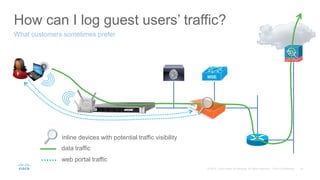
How can I log guest users’ traffic?
What customers sometimes prefer
data traffic
web portal traffic
inline devices with potential traffic visibility
Some quick and dirty
positioning examples
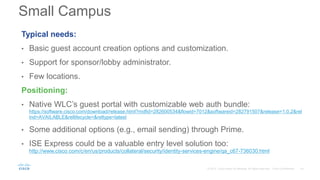
Typical needs:
• Basic guest account creation options and customization.
• Support for sponsor/lobby administrator.
• Few locations.
Positioning:
• Native WLC’s guest portal with customizable web auth bundle:
https://software.cisco.com/download/release.html?mdfid=282600534&flowid=7012&softwareid=282791507&release=1.0.2&rel
ind=AVAILABLE&rellifecycle=&reltype=latest
• Some additional options (e.g., email sending) through Prime.
• ISE Express could be a valuable entry level solution too:
http://www.cisco.com/c/en/us/products/collateral/security/identity-services-engine/qa_c67-736030.html
Small Campus
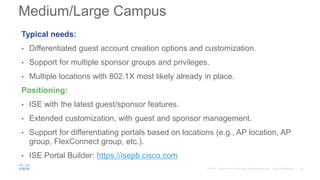
Typical needs:
• Differentiated guest account creation options and customization.
• Support for multiple sponsor groups and privileges.
• Multiple locations with 802.1X most likely already in place.
Positioning:
• ISE with the latest guest/sponsor features.
• Extended customization, with guest and sponsor management.
• Support for differentiating portals based on locations (e.g., AP location, AP
group, FlexConnect group, etc.).
• ISE Portal Builder: https://isepb.cisco.com
Medium/Large Campus
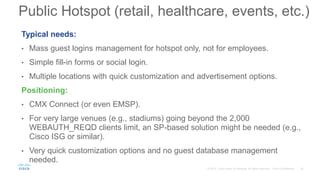
Typical needs:
• Mass guest logins management for hotspot only, not for employees.
• Simple fill-in forms or social login.
• Multiple locations with quick customization and advertisement options.
Positioning:
• CMX Connect (or even EMSP).
• For very large venues (e.g., stadiums) going beyond the 2,000
WEBAUTH_REQD clients limit, an SP-based solution might be needed (e.g.,
Cisco ISG or similar).
• Very quick customization options and no guest database management
needed.
Public Hotspot (retail, healthcare, events, etc.)
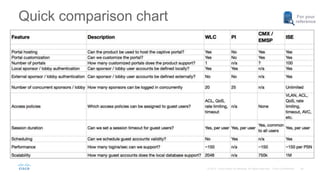
Quick comparison chart For your
reference
It’s never too late to read the full book…
https://communities.cisco.com/docs/DOC-68732
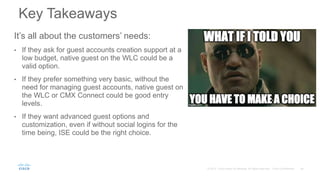
It’s all about the customers’ needs:
• If they ask for guest accounts creation support at a
low budget, native guest on the WLC could be a
valid option.
• If they prefer something very basic, without the
need for managing guest accounts, native guest on
the WLC or CMX Connect could be good entry
levels.
• If they want advanced guest options and
customization, even if without social logins for the
time being, ISE could be the right choice.
Key Takeaways
Cisco-Wireless-Guest-v10.pptx

Cisco-Wireless-Guest-v10.pptx

  • 1.
    Solutions Overview andPositioning Wireless Guest Access
  • 2.
  • 3.
    ISG – IntelligentServices Gateway http://www.cisco.com/c/en/us/products/collateral/ios-nx-os-software/intelligent-services-gateway-isg/prod_bulletin0900aecd804a2c70.html More dedicated to SP scenarios. In some use cases it might be used as an alternative to the presented solutions, in case scalability limits are hit. What we will not cover
  • 4.
    • Secure SSID •Open SSID • A secure SSID cannot fall back to open. • Example: guests not supporting 802.1X cannot fall back to web portal authentication on the same SSID as corporate users. • Pre-shared keys (PSK) and keys derived from 802.1X cannot co-exist on a secure SSID. • On both types of SSIDs you can combine multiple identity services if needed. • Examples: guest users going through posture assessment, employees going through MDM, employees going through web portal after device authentication, etc. Guest SSID – Secure or Open?
  • 5.
    To PSK ornot to PSK? • Q: Can I deploy PSK on top of web auth? A: Yes. But… • It is not much more secure than Open, since all users will anyway share the same key. • It adds extra burden to the end users, who would need to ask for the PSK to the helpdesk. • PSK + LWA has always been supported. PSK + CWA is supported starting from AireOS 8.3. • Q: Hey Cisco, why don’t you deploy a guest portal at Cisco Live? A: We cannot / don’t want to because: • The WLC has a limitation of up to 2,000 clients in the WEBAUTH_REQD run state (i.e., being redirected to the web portal and not yet fully authorized). • For such a big event with thousands of users, we prefer to avoid passersby to connect to the Cisco Live network from the street and to add even more clients.
  • 6.
  • 7.
    AP-WLC DHCP/DNS RADIUSServer Additionally: • MAB • 802.1X Pre-webauth ACL Client acquires IP Address and resolves DNS HTTPS(S) request Login page redirect Client sends credentials WLC queries the RADIUS server RADIUS server returns policy Server authorizes user WLC applies new WebAuth policy (L3) • SSID with WebAuth a.k.a. Local Web Authentication (LWA) 7 LOCAL because the redirection URL and the pre-webauth ACL are locally configured on the WLC. MAB 802.1X Local Web Auth 0 1 2 3 4 5 6
  • 8.
    AP-WLC DHCP/DNS Ext. Web/RADIUS Server Pre-webauth ACL Clientacquires IP Address and resolves DNS • SSID with WebAuth LWA with external web server redirect 1 2 3 HTTP(S) request Ext. page redirect 4 Client goes to the ext. server and enters credentials Server redirects back to WLC’s virtual IF with client’s credentials Server “authorizes” user 5 6 HTTPS request with credentials WLC queries the RADIUS server RADIUS server returns policy Server really authorizes user 7 WLC applies new WebAuth policy (L3) 8 LOCAL because the redirection URL and the pre-webauth ACL are locally configured on the WLC. MAB 802.1X Local Web Auth Additionally: • MAB • 802.1X 0
  • 9.
    AP-WLC DHCP/DNS NGS Pre-webauth ACL Clientacquires IP Address and resolves DNS • SSID with WebAuth Cisco NAC Guest Server (NGS) 1 2 3 HTTP(S) request Ext. page redirect 4 Client goes to the ext. server and enters credentials Server redirects back to WLC’s virtual IF with client’s credentials Server “authorizes” user 5 6 HTTPS request with credentials WLC queries the RADIUS server RADIUS server returns policy Server really authorizes user 7 WLC applies new WebAuth policy (L3) 8 Additionally: • MAB • 802.1X 0 For your reference EoS September ’15 http://www.cisco.com/c/en/us/products/collateral/router s/7600-series-routers/eos-eol-notice-c51-734104.html
  • 10.
  • 11.
    The cool stuff •It is integrated, has been there since ever and could technically work with any external web and RADIUS servers. • It supports both local and external databases. • It has a fairly good level of customization. • It supports per-user assignment of some L3 policies (e.g., QoS, rate limiting, etc.). • It supports Lobby Ambassador users to create guest accounts, either on the WLC or through Prime too. • It supports HTTPS certificate upload for the virtual interface. • Recommended for: small campuses.
  • 12.
    Let’s be awarethat… • The local database is limited to 2048 entries max. • It is not as easy as ISE or CMX to customize. • The Lobby Ambassador interface is not customizable and has limited options (e.g., no SMS support). • The WLC’s web engine is limited to ~150 logins/sec and 2,000 clients in the WEBAUTH_REQD run state. • With external portals, we’d need to trust 2 different certificates: the WLC virtual interface’s and the external web server’s.
  • 13.
  • 14.
  • 15.
    • Cisco’s formerwireless location solution was called MSE (Mobility Services Engine). • Up to MSE version 8.0, “MSE” still indicates both the server (physical appliance or virtual) and the software running on it. • “CMX” initially was a new set of features, introduced in MSE 7.4, and which then took over the name for the whole Cisco’s wireless location and analytics solution. • Today “MSE” still indicates the physical appliance (e.g., MSE 3365) and “CMX” indicates the software and all the location and analytics services. Example: CMX 10.2.2 runs on MSE 3365 or as a virtual image. What is Cisco CMX?
  • 16.
    AP-WLC DHCP/DNS WebServer (CMX) Pre-webauth ACL Client acquires IP Address and resolves DNS • SSID with WebAuth Web Passthrough (another form of LWA) LOCAL because the redirection URL and the pre-webauth ACL are locally configured on the WLC. Local Web Auth 1 2 3 HTTP(S) request Ext. page redirect 4 Client goes to the ext. server and completes some actions Server redirects back to WLC with Ok Server “authorizes” user 5 Success 6 HTTPS request with Ok
  • 17.
  • 18.
    The cool stuff •It supports different portals based on client’s location. • It is quite easy to configure and customize. • Neat look and feel on mobile devices. • It supports social logins, registration forms and SMS (w/ Twilio). • It supports demographic data from social logins. • Facebook Wi-Fi. • Recommended for: pure hotspot use cases.
  • 19.
    Let’s be awarethat… • No integration with external SIEM solutions for guest logging. For such a need, a FW/proxy should be used. • It does not support dynamic L2/L3 policies assignment. • Customization is limited (e.g., pre-canned elements, no native multi-language support, etc.). • It is still limited by the WLC’s ~150 logins/sec. and 2,000 clients in the WEBAUTH_REQD run state.
  • 20.
  • 21.
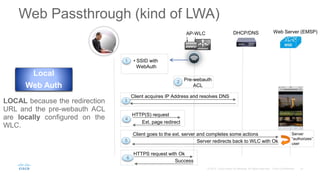
    AP-WLC DHCP/DNS WebServer (EMSP) Pre-webauth ACL Client acquires IP Address and resolves DNS • SSID with WebAuth Web Passthrough (kind of LWA) LOCAL because the redirection URL and the pre-webauth ACL are locally configured on the WLC. Local Web Auth 1 2 3 HTTP(S) request Ext. page redirect 4 Client goes to the ext. server and completes some actions Server redirects back to WLC with Ok Server “authorizes” user 5 Success 6 HTTPS request with Ok
  • 22.
  • 23.
    The cool stuff •It supports different portals based on client’s location. • It is fully customizable and opens up scenarios for mobile apps integration. • Neat look and feel on mobile devices. • It “should” support user verification through SMS. • It supports venue maps. • It supports integration with merchant’s dynamic content.
  • 24.
    The less coolstuff • It does not support login/password, hence no external databases, Sponsor/Lobby Ambassador, etc. • It does not support L2/L3 policies assignment. • Full customization may become quite complex for casual users. • It becomes very cumbersome to centralize users information for guest traffic logging. • It is still limited by the WLC’s ~150 logins/sec. and 2000 clients in the WEBAUTH_REQD run state. • It is technically sold as a SW product, but AS might quickly become necessary.
  • 25.
  • 26.
  • 27.
    27 AP-WLC DHCP/DNS ISEServer Client acquires IP Address, Triggers Session State 4 • Open SSID with MAC Filtering enabled 1 AuthC success; AuthZ for unknown MAC returned: Redirect/filter ACL, portal URL Client opens browser – WLC redirects browser to ISE web page Login Page Client enters Username/Password 5 Web Auth Success results in CoA Server authorizes user 6 MAB re-auth MAB Success Session lookup – policy matched Authorization ACL/VLAN returned. 7 First authentication session 2 3 CENTRAL because the redirection URL and the pre-webauth ACL are centrally configured on ISE and communicated to the WLC via RADIUS. Central Web Auth Central Web Authentication (CWA) Note: you can also use ISE as the external web server for LWA if you do not want to / cannot use CWA.
  • 28.
    For your reference CWA –configuration example http://www.cisco.com/c/en/us/support/docs/security/identity-services-engine/115732-central-web-auth-00.html
  • 29.
    The cool stuff •It has the most complete set of options for guest access verification (self-service, SMS, email, common code, etc.). • It is fully customizable, even with the Portal builder on Cisco cloud: https://isepb.cisco.com • It’s the only solution supporting assignment of both L2 and L3 policies. • It supports both internal and external databases. • It supports up to 1M local guest accounts, different portals based on client’s location and certificate(s) on ISE only.

  • 30.
    The less coolstuff • CWA does not work with non-Cisco network devices nowadays (it should be addressed in ISE 2.0). • The admin needs to be familiar with access control solutions and techniques (e.g., LWA vs. CWA). • Even if there are dedicated “portal admins” using the Portal Builder, it is up to the “ISE admin” to configure portal policies. • The guest database cannot be exported/backed up. • Guest portals are limited to ~150 logins/sec per PSN (3495). You can still load balance between PSN’s. • It does not support social logins (yet).
  • 31.
  • 32.
    It’s not alljust about guests… • Usually customers choose Cloud vs. On Premise based on other major needs, rather than guest. • In case the customer chose Meraki, the major features for guests would be: o Easy portal customization. o Internal and external database support for RADIUS authentication. o SMS authentication with Twilio. o Integration with a billing system. o Integration with Meraki’s MDM. o Some Sponsor/Lobby Ambassador options. o Support for ISE CWA.
  • 33.
  • 34.
    How can Isupport payments by credit card? You should have hurried up and bought the previous NAC Guest Server solution (EoS Sept. ‘15) Support for a single provider. Not too many asks. http://www.cisco.com/c/en/us/td/docs/security/nac/guestserver/configuration_guide/21/nacguestserver/g_hotspots.html#wp1068767
  • 35.
    How can Ilog guest users’ traffic? We’d need to deploy different components data traffic web portal traffic inline devices with potential traffic visibility
  • 36.
    “RADIUS accounting: userABC, IP XYZ, etc.” “SYSLOG: IP XYZ sent this traffic” IP XYZ > user ABC so “user ABC sent this traffic” Example - logging traffic on ISE http://www.cisco.com/c/en/us/support/docs/security/nac-appliance-clean-access/110304-integrated-url-log.html
  • 37.
    How can Ilog guest users’ traffic? What customers sometimes prefer data traffic web portal traffic inline devices with potential traffic visibility
  • 38.
    Some quick anddirty positioning examples
  • 39.
    Typical needs: • Basicguest account creation options and customization. • Support for sponsor/lobby administrator. • Few locations. Positioning: • Native WLC’s guest portal with customizable web auth bundle: https://software.cisco.com/download/release.html?mdfid=282600534&flowid=7012&softwareid=282791507&release=1.0.2&rel ind=AVAILABLE&rellifecycle=&reltype=latest • Some additional options (e.g., email sending) through Prime. • ISE Express could be a valuable entry level solution too: http://www.cisco.com/c/en/us/products/collateral/security/identity-services-engine/qa_c67-736030.html Small Campus
  • 40.
    Typical needs: • Differentiatedguest account creation options and customization. • Support for multiple sponsor groups and privileges. • Multiple locations with 802.1X most likely already in place. Positioning: • ISE with the latest guest/sponsor features. • Extended customization, with guest and sponsor management. • Support for differentiating portals based on locations (e.g., AP location, AP group, FlexConnect group, etc.). • ISE Portal Builder: https://isepb.cisco.com Medium/Large Campus
  • 41.
    Typical needs: • Massguest logins management for hotspot only, not for employees. • Simple fill-in forms or social login. • Multiple locations with quick customization and advertisement options. Positioning: • CMX Connect (or even EMSP). • For very large venues (e.g., stadiums) going beyond the 2,000 WEBAUTH_REQD clients limit, an SP-based solution might be needed (e.g., Cisco ISG or similar). • Very quick customization options and no guest database management needed. Public Hotspot (retail, healthcare, events, etc.)
  • 42.
    Quick comparison chartFor your reference
  • 43.
    It’s never toolate to read the full book… https://communities.cisco.com/docs/DOC-68732
  • 44.
    It’s all aboutthe customers’ needs: • If they ask for guest accounts creation support at a low budget, native guest on the WLC could be a valid option. • If they prefer something very basic, without the need for managing guest accounts, native guest on the WLC or CMX Connect could be good entry levels. • If they want advanced guest options and customization, even if without social logins for the time being, ISE could be the right choice. Key Takeaways