Cisco Secure Firewall
Test Drive
Darwin Ma, Veon Wu, Sumit Bist
Jan 14th 2025
Cisco Security | 2
• Introduction to Cisco Secure
• Cisco Secure Firewall Hardware Portfolio
• dCloud Overview
• Lab Environment Overview
• Lab Scenarios - Walkthrough
Agenda
Introduction to Cisco Secure
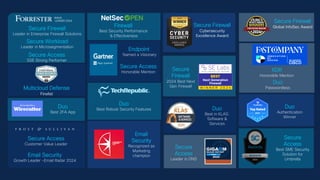
Secure Access
Customer Value Leader
Email Security
Growth Leader -Email Radar 2024
Secure Firewall
Leader in Enterprise Firewall Solutions
Secure Access
SSE Strong Performer
Duo
Best 2FA App
Firewall
Best Security Performance
& Effectiveness
Secure Firewall
Global InfoSec Award
Secure Firewall
Cybersecurity
Excellence Award
Secure
Firewall
2024 Best Next
Gen Firewall
Secure
Access
Best SME Security
Solution for
Umbrella
Email
Security
Recognized as
Marketing
champion
Duo
Best in KLAS:
Software &
Services
Secure
Access
Leader in DNS
Duo
Authentication
Winner
WAVE
LEADER 2024
Multicloud Defense
Finalist
Endpoint
Named a Visionary
Secure Access
Honorable Mention XDR
Honorable Mention
Duo
Passwordless
CISCO
Secure Workload
Leader in Microsegmentation
Duo
Best Robust Security Features
Cisco Security | 5
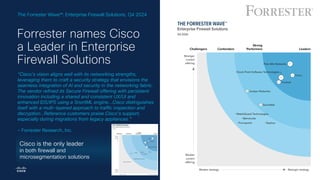
“Cisco’s vision aligns well with its networking strengths,
leveraging them to craft a security strategy that envisions the
seamless integration of AI and security in the networking fabric.
The vendor refined its Secure Firewall offering with persistent
innovation including a shared and consistent UX/UI and
enhanced IDS/IPS using a SnortML engine...Cisco distinguishes
itself with a multi-layered approach to traffic inspection and
decryption…Reference customers praise Cisco’s support,
especially during migrations from legacy appliances.”
- Forrester Research, Inc.
Forrester names Cisco
a Leader in Enterprise
Firewall Solutions
The Forrester Wave : Enterprise Firewall Solutions, Q4 2024
Cisco is the only leader
in both firewall and
microsegmentation solutions
Cisco Security | 6
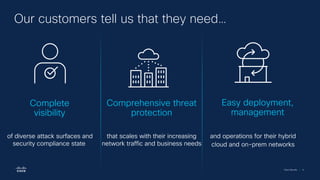
Our customers tell us that they need…
Complete
visibility
of diverse attack surfaces and
security compliance state
Comprehensive threat
protection
that scales with their increasing
network traffic and business needs
Easy deployment,
management
and operations for their hybrid
cloud and on-prem networks
Cisco Security | 7
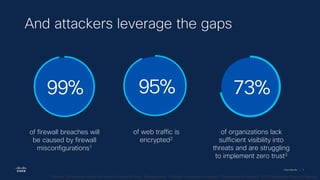
of firewall breaches will
be caused by firewall
misconfigurations1
99%
of web traffic is
encrypted2
95%
of organizations lack
sufficient visibility into
threats and are struggling
to implement zero trust3
73%
And attackers leverage the gaps
1 Gartner Technology Insight for Network Security Policy Management; 2Google Transparency Report; 3Cybersecurity Insiders, 2022 Application Security Report;
Cisco Security | 8
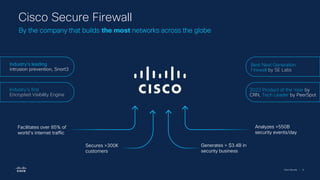
2023 Product of the Year by
CRN, Tech Leader by PeerSpot
Facilitates over 85% of
world’s internet traffic
Analyzes >550B
security events/day
Generates > $3.4B in
security business
Secures >300K
customers
Cisco Secure Firewall
By the company that builds the most networks across the globe
Industry’s leading
intrusion prevention, Snort3
Industry's first
Encrypted Visibility Engine
Best Next Generation
Firewall by SE Labs
Cisco Security | 9
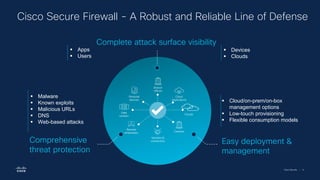
Complete attack surface visibility
Comprehensive
threat protection
Easy deployment &
management
Branch
offices
Remote
employees
Clouds
Data
centers
Cloud
applications
Vendors &
contractors
Personal
devices
Campus
Cisco Secure Firewall - A Robust and Reliable Line of Defense
▪ Devices
▪ Clouds
▪ Malware
▪ Known exploits
▪ Malicious URLs
▪ DNS
▪ Web-based attacks
▪ Cloud/on-prem/on-box
management options
▪ Low-touch provisioning
▪ Flexible consumption models
▪ Apps
▪ Users
Cisco Security | 10
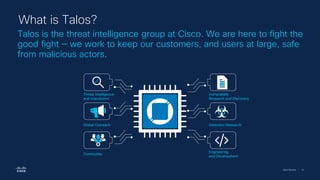
Talos is the threat intelligence group at Cisco. We are here to fight the
good fight — we work to keep our customers, and users at large, safe
from malicious actors.
What is Talos?
Engineering
and Development
Global Outreach
Community
Vulnerability
Research and Discovery
Detection Research
Threat Intelligence
and Interdiction
Cisco Security | 11
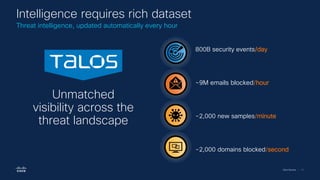
Unmatched
visibility across the
threat landscape
~2,000 new samples/minute
~2,000 domains blocked/second
~9M emails blocked/hour
800B security events/day
Intelligence requires rich dataset
Threat intelligence, updated automatically every hour
Cisco Secure Firewall Portfolio
Cisco Security | 13
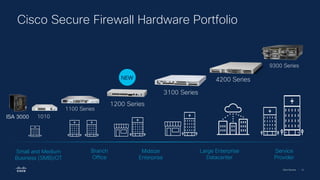
9300 Series
Cisco Secure Firewall Hardware Portfolio
1010
1100 Series
Small and Medium
Business (SMB)/OT
Branch
Office
Midsize
Enterprise
Service
Provider
Large Enterprise
Datacenter
ISA 3000
1200 Series
3100 Series
4200 Series
NEW
Cisco Security | 14
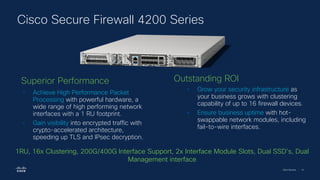
Cisco Secure Firewall 4200 Series
• Grow your security infrastructure as
your business grows with clustering
capability of up to 16 firewall devices.
• Ensure business uptime with hot-
swappable network modules, including
fail-to-wire interfaces.
• Achieve High Performance Packet
Processing with powerful hardware, a
wide range of high performing network
interfaces with a 1 RU footprint.
• Gain visibility into encrypted traffic with
crypto-accelerated architecture,
speeding up TLS and IPsec decryption.
Superior Performance Outstanding ROI
1RU, 16x Clustering, 200G/400G Interface Support, 2x Interface Module Slots, Dual SSD’s, Dual
Management interface
Cisco Security | 15
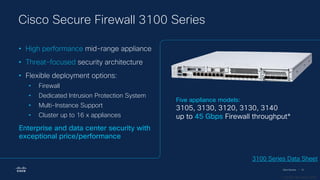
Five appliance models:
3105, 3130, 3120, 3130, 3140
up to 45 Gbps Firewall throughput*
* 1024B FW+AVC+IPS
• High performance mid-range appliance
• Threat-focused security architecture
• Flexible deployment options:
• Firewall
• Dedicated Intrusion Protection System
• Multi-Instance Support
• Cluster up to 16 x appliances
Enterprise and data center security with
exceptional price/performance
3100 Series Data Sheet
Cisco Secure Firewall 3100 Series
Cisco Security | 16
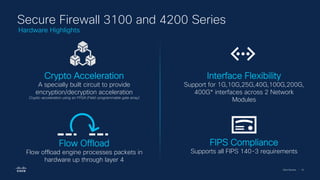
Secure Firewall 3100 and 4200 Series
Crypto Acceleration
A specially built circuit to provide
encryption/decryption acceleration
Crypto-acceleration using an FPGA (Field-programmable gate array)
Interface Flexibility
Support for 1G,10G,25G,40G,100G,200G,
400G* interfaces across 2 Network
Modules
Flow Offload
Flow offload engine processes packets in
hardware up through layer 4
FIPS Compliance
Supports all FIPS 140-3 requirements
Hardware Highlights
Cisco Security | 17
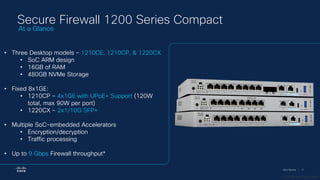
Secure Firewall 1200 Series Compact
• Three Desktop models – 1210CE, 1210CP, & 1220CX
• SoC ARM design
• 16GB of RAM
• 480GB NVMe Storage
• Fixed 8x1GE:
• 1210CP – 4x1GE with UPoE+ Support (120W
total, max 90W per port)
• 1220CX – 2x1/10G SFP+
• Multiple SoC-embedded Accelerators
• Encryption/decryption
• Traffic processing
• Up to 9 Gbps Firewall throughput*
At a Glance
* 1024B FW+AVC+IPS
Cisco Security | 18
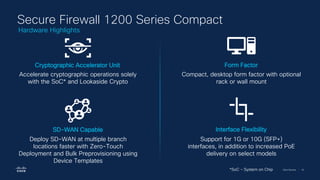
Secure Firewall 1200 Series Compact
Accelerate cryptographic operations solely
with the SoC* and Lookaside Crypto
Cryptographic Accelerator Unit
Deploy SD-WAN at multiple branch
locations faster with Zero-Touch
Deployment and Bulk Preprovisioning using
Device Templates
SD-WAN Capable
Support for 1G or 10G (SFP+)
interfaces, in addition to increased PoE
delivery on select models
Interface Flexibility
Compact, desktop form factor with optional
rack or wall mount
Form Factor
*SoC – System on Chip
Hardware Highlights
Cisco Security | 19
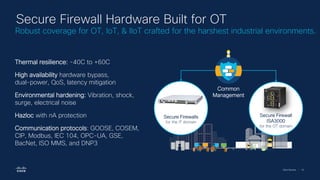
Secure Firewalls
for the IT domain
Secure Firewall
ISA3000
for the OT domain
Common
Management
Thermal resilience: -40C to +60C
High availability hardware bypass,
dual-power, QoS, latency mitigation
Environmental hardening: Vibration, shock,
surge, electrical noise
Hazloc with nA protection
Communication protocols: GOOSE, COSEM,
CIP, Modbus, IEC 104, OPC-UA, GSE,
BacNet, ISO MMS, and DNP3
Secure Firewall Hardware Built for OT
Robust coverage for OT, IoT, & IIoT crafted for the harshest industrial environments.
Cisco Security | 20
Cisco Secure Firewall Virtual Portfolio
Private Cloud Public Cloud Gov/IC Cloud
Virtual firewall performance-based licensing from 100Mbps up to 16Gbps
Cloud Leadership
Dynamic Policy
Clustering & Auto Scaling
Quickstarts, Infrastructure as
Code and Automation
Integration with cloud native
services & infrastructure
Gateway Load balancer integration
Accelerated Networking
Snapshots
Smart & Tiered Licensing
Cisco Security | 21
Secure Firewall Release 7.6
Threat AI/ML Simplify Operations SD-WAN Platform Investment
SnortML – Machine-
Learning based exploit
protection
QUIC Decryption
MITRE security tagging
Encrypted Visibility Engine
enhancements
Cisco Firewall AI
Assistant
AI/ML-based threat
enhancements
(SnortML, Encrypted
Visibility Engine)
Policy Analyzer & Optimizer
SAML-based identity firewalling
Upgrade Workflow Simplification
Change Management Workflows
Decryption Policy Wizard
SD-WAN
Deployment
Wizard
Firewall Templates
for simplified fleet
deployment
1200 Series Branch firewall
4200 Multi-Instance
16-node clustering
for 3100 & 4200
80% RA-VPN performance
improvement over DTLS for
3100/4200 Series
400GE Network Module
Support
ASAv Unlimited for Private
Cloud
ASAv standalone container
Secure Firewall Management
Cisco Security | 25
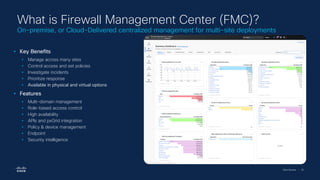
What is Firewall Management Center (FMC)?
On-premise, or Cloud-Delivered centralized management for multi-site deployments
• Key Benefits
• Manage across many sites
• Control access and set policies
• Investigate incidents
• Prioritize response
• Available in physical and virtual options
• Features
• Multi-domain management
• Role-based access control
• High availability
• APIs and pxGrid integration
• Policy & device management
• Endpoint
• Security intelligence
Cisco Security | 26
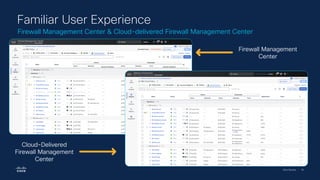
Firewall Management Center & Cloud-delivered Firewall Management Center
Familiar User Experience
Cloud-Delivered
Firewall Management
Center
Firewall Management
Center
Cisco Security | 27
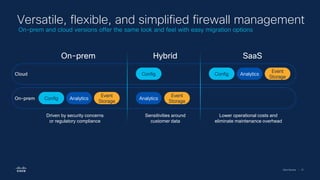
SaaS
On-prem Hybrid
Config Analytics
Event
Storage
Analytics
Event
Storage
Config Config Analytics
Event
Storage
Versatile, flexible, and simplified firewall management
Cloud
On-prem
Driven by security concerns
or regulatory compliance
Sensitivities around
customer data
Lower operational costs and
eliminate maintenance overhead
On-prem and cloud versions offer the same look and feel with easy migration options
Cisco Security | 28
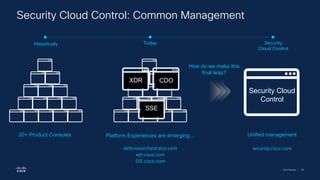
20+ Product Consoles Platform Experiences are emerging…
defenseorchestrator.com
xdr.cisco.com
SSE.cisco.com
CDO
XDR
Security Cloud
Control
Historically Today Security
Cloud Control
SSE
How do we make this
final leap?
security.cisco.com
Unified management
Security Cloud Control: Common Management
Cisco Security | 29
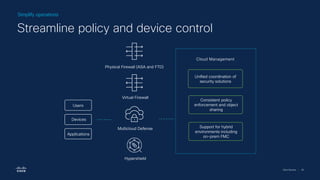
Cloud Management
Unified coordination of
security solutions
Support for hybrid
environments including
on-prem FMC
Consistent policy
enforcement and object
sharing
Physical Firewall (ASA and FTD)
Virtual Firewall
Multicloud Defense
Hypershield
Users
Devices
Applications
Simplify operations
Streamline policy and device control
Cisco Security | 30
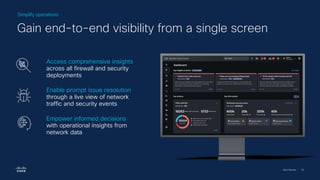
Simplify operations
Gain end-to-end visibility from a single screen
Access comprehensive insights
across all firewall and security
deployments
Enable prompt issue resolution
through a live view of network
traffic and security events
Empower informed decisions
with operational insights from
network data
Cisco dCloud & Lab Environment Overview
Cisco Security | 32
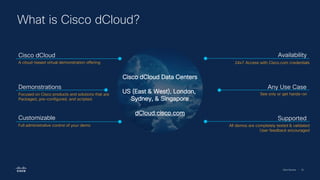
What is Cisco dCloud?
Cisco dCloud Data Centers
US (East & West), London,
Sydney, & Singapore
dCloud.cisco.com
Cisco dCloud
A cloud-based virtual demonstration offering
Demonstrations
Focused on Cisco products and solutions that are
Packaged, pre-configured, and scripted.
Customizable
Full administrative control of your demo
Availability
24x7 Access with Cisco.com credentials
Any Use Case
See only or get hands-on
Supported
All demos are completely tested & validated
User feedback encouraged
Cisco Security | 33
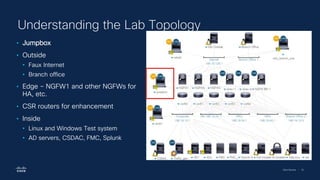
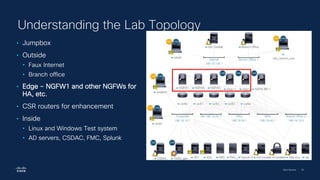
Understanding the Lab Topology
• Jumpbox
• Outside
• Faux Internet
• Branch office
• Edge – NGFW1 and other NGFWs for
HA, etc.
• CSR routers for enhancement
• Inside
• Linux and Windows Test system
• AD servers, CSDAC, FMC, Splunk
Cisco Security | 34
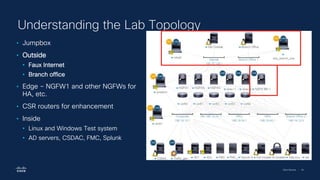
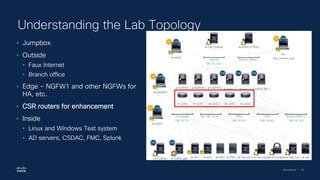
Understanding the Lab Topology
• Jumpbox
• Outside
• Faux Internet
• Branch office
• Edge – NGFW1 and other NGFWs for
HA, etc.
• CSR routers for enhancement
• Inside
• Linux and Windows Test system
• AD servers, CSDAC, FMC, Splunk
Cisco Security | 35
Understanding the Lab Topology
• Jumpbox
• Outside
• Faux Internet
• Branch office
• Edge – NGFW1 and other NGFWs for
HA, etc.
• CSR routers for enhancement
• Inside
• Linux and Windows Test system
• AD servers, CSDAC, FMC, Splunk
Cisco Security | 36
Understanding the Lab Topology
• Jumpbox
• Outside
• Faux Internet
• Branch office
• Edge – NGFW1 and other NGFWs for
HA, etc.
• CSR routers for enhancement
• Inside
• Linux and Windows Test system
• AD servers, CSDAC, FMC, Splunk
Cisco Security | 37
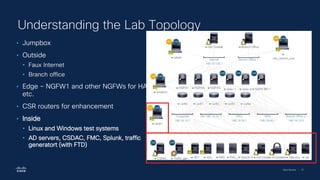
Understanding the Lab Topology
• Jumpbox
• Outside
• Faux Internet
• Branch office
• Edge – NGFW1 and other NGFWs for HA,
etc.
• CSR routers for enhancement
• Inside
• Linux and Windows test systems
• AD servers, CSDAC, FMC, Splunk, traffic
generatort (with FTD)
Cisco Security | 38
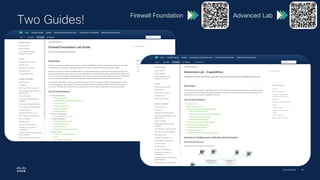
Two Guides!
Firewall Foundation Advanced Lab
Firewall Foundation Lab
Cisco Security | 40
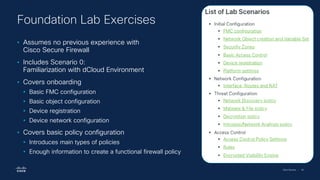
• Assumes no previous experience with
Cisco Secure Firewall
• Includes Scenario 0:
Familiarization with dCloud Environment
• Covers onboarding
• Basic FMC configuration
• Basic object configuration
• Device registration
• Device network configuration
• Covers basic policy configuration
• Introduces main types of policies
• Enough information to create a functional firewall policy
Foundation Lab Exercises
Cisco Security | 41
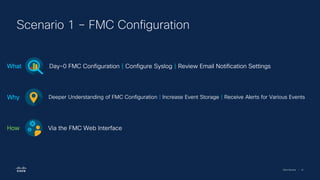
Scenario 1 – FMC Configuration
Day-0 FMC Configuration | Configure Syslog | Review Email Notification Settings
What
Deeper Understanding of FMC Configuration | Increase Event Storage | Receive Alerts for Various Events
Why
Via the FMC Web Interface
How
Cisco Security | 42
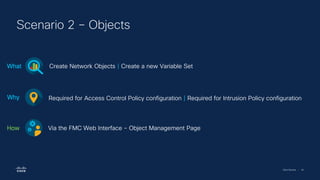
Scenario 2 – Objects
Create Network Objects | Create a new Variable Set
What
Required for Access Control Policy configuration | Required for Intrusion Policy configuration
Why
Via the FMC Web Interface - Object Management Page
How
Cisco Security | 43
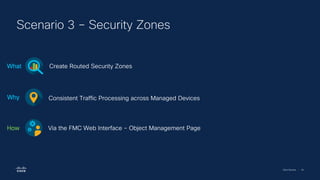
Scenario 3 – Security Zones
Create Routed Security Zones
What
Consistent Traffic Processing across Managed Devices
Why
Via the FMC Web Interface - Object Management Page
How
Cisco Security | 44
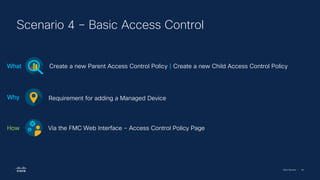
Scenario 4 – Basic Access Control
Create a new Parent Access Control Policy | Create a new Child Access Control Policy
What
Requirement for adding a Managed Device
Why
Via the FMC Web Interface - Access Control Policy Page
How
Cisco Security | 45
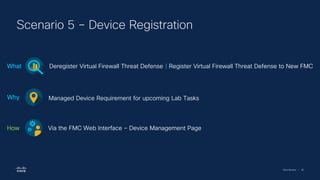
Scenario 5 – Device Registration
Deregister Virtual Firewall Threat Defense | Register Virtual Firewall Threat Defense to New FMC
What
Managed Device Requirement for upcoming Lab Tasks
Why
Via the FMC Web Interface – Device Management Page
How
Cisco Security | 46
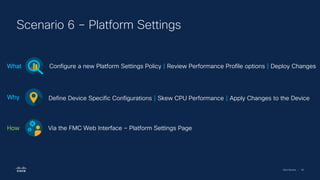
Scenario 6 – Platform Settings
Configure a new Platform Settings Policy | Review Performance Profile options | Deploy Changes
What
Define Device Specific Configurations | Skew CPU Performance | Apply Changes to the Device
Why
Via the FMC Web Interface – Platform Settings Page
How
Cisco Security | 47
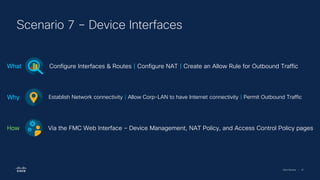
Scenario 7 – Device Interfaces
Configure Interfaces & Routes | Configure NAT | Create an Allow Rule for Outbound Traffic
What
Establish Network connectivity | Allow Corp-LAN to have Internet connectivity | Permit Outbound Traffic
Why
Via the FMC Web Interface – Device Management, NAT Policy, and Access Control Policy pages
How
Cisco Security | 48
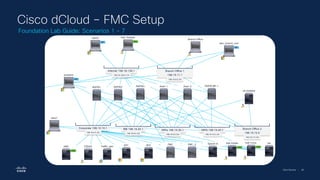
Cisco dCloud – FMC Setup
Foundation Lab Guide: Scenarios 1 - 7
Cisco Security | 49
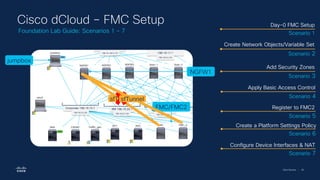
jumpbox
NGFW1
FMC/FMC2
Cisco dCloud – FMC Setup
Foundation Lab Guide: Scenarios 1 - 7
sfTunnel
sfTunnel
Day-0 FMC Setup
Scenario 1
Create Network Objects/Variable Set
Scenario 2
Add Security Zones
Scenario 3
Apply Basic Access Control
Scenario 4
Register to FMC2
Scenario 5
Create a Platform Settings Policy
Scenario 6
Configure Device Interfaces & NAT
Scenario 7
Cisco Security | 50
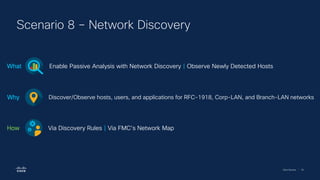
Scenario 8 – Network Discovery
Enable Passive Analysis with Network Discovery | Observe Newly Detected Hosts
What
Discover/Observe hosts, users, and applications for RFC-1918, Corp-LAN, and Branch-LAN networks
Why
Via Discovery Rules | Via FMC’s Network Map
How
Cisco Security | 51
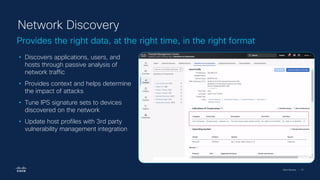
Provides the right data, at the right time, in the right format
Network Discovery
• Discovers applications, users, and
hosts through passive analysis of
network traffic
• Provides context and helps determine
the impact of attacks
• Tune IPS signature sets to devices
discovered on the network
• Update host profiles with 3rd party
vulnerability management integration
Cisco Security | 52
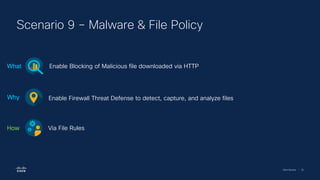
Scenario 9 – Malware & File Policy
Enable Blocking of Malicious file downloaded via HTTP
What
Enable Firewall Threat Defense to detect, capture, and analyze files
Why
Via File Rules
How
Cisco Security | 54
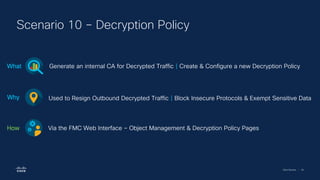
Scenario 10 – Decryption Policy
Generate an internal CA for Decrypted Traffic | Create & Configure a new Decryption Policy
What
Used to Resign Outbound Decrypted Traffic | Block Insecure Protocols & Exempt Sensitive Data
Why
Via the FMC Web Interface – Object Management & Decryption Policy Pages
How
Cisco Security | 55
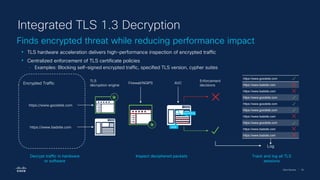
Finds encrypted threat while reducing performance impact
Integrated TLS 1.3 Decryption
• TLS hardware acceleration delivers high-performance inspection of encrypted traffic
• Centralized enforcement of TLS certificate policies
‒ Examples: Blocking self-signed encrypted traffic, specified TLS version, cypher suites
Log
TLS
decryption engine
Firewall/NGIPS
Enforcement
decisions
AVC
ilicit
gambling
https://www.badsite.com
https://www.goodsite.com
Decrypt traffic in hardware
or software
Inspect deciphered packets Track and log all TLS
sessions
https://www.goodsite.com
https://www.badsite.com
https://www.goodsite.com
https://www.badsite.com
https://www.goodsite.com
https://www.badsite.com
Encrypted Traffic
Cisco Security | 56
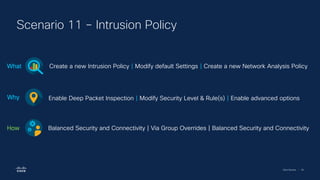
Scenario 11 – Intrusion Policy
Create a new Intrusion Policy | Modify default Settings | Create a new Network Analysis Policy
What
Enable Deep Packet Inspection | Modify Security Level & Rule(s) | Enable advanced options
Why
Balanced Security and Connectivity | Via Group Overrides | Balanced Security and Connectivity
How
Cisco Security | 57
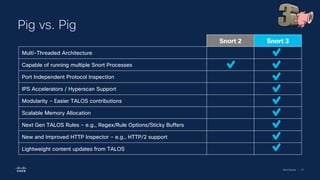
Pig vs. Pig
Snort 2 Snort 3
Multi-Threaded Architecture
Capable of running multiple Snort Processes
Port Independent Protocol Inspection
IPS Accelerators / Hyperscan Support
Modularity – Easier TALOS contributions
Scalable Memory Allocation
Next Gen TALOS Rules – e.g., Regex/Rule Options/Sticky Buffers
New and Improved HTTP Inspector – e.g., HTTP/2 support
Lightweight content updates from TALOS
Cisco Security | 58
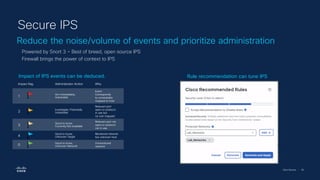
Reduce the noise/volume of events and prioritize administration
Secure IPS
Powered by Snort 3 – Best of breed, open source IPS
Firewall brings the power of context to IPS
Rule recommendation can tune IPS
Impact of IPS events can be deduced.
Impact flag Administrator Action Why
1
Act immediately,
Vulnerable
Event
Corresponds
to vulnerability
mapped to host
2
Investigate, Potentially
Vulnerable
Relevant port
open or protocol
in use but
no vuln mapped
3
Good to know,
Currently Not available
Relevant port not
open or protocol
not in use
4
Good to know,
Unknown Target
Monitored network
but unknown host
0
Good to know,
Unknown Network
Unmonitored
network
Cisco Security | 59
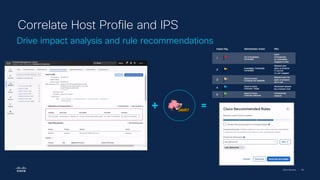
Drive impact analysis and rule recommendations
Correlate Host Profile and IPS
Cisco Security | 60
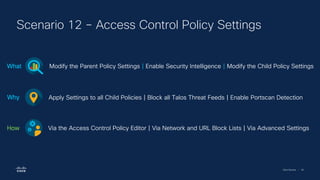
Scenario 12 – Access Control Policy Settings
Modify the Parent Policy Settings | Enable Security Intelligence | Modify the Child Policy Settings
What
Apply Settings to all Child Policies | Block all Talos Threat Feeds | Enable Portscan Detection
Why
Via the Access Control Policy Editor | Via Network and URL Block Lists | Via Advanced Settings
How
Cisco Security | 61
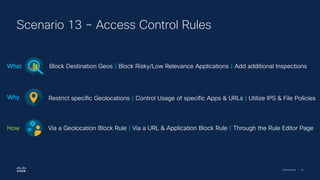
Scenario 13 – Access Control Rules
Block Destination Geos | Block Risky/Low Relevance Applications | Add additional Inspections
What
Restrict specific Geolocations | Control Usage of specific Apps & URLs | Utilize IPS & File Policies
Why
Via a Geolocation Block Rule | Via a URL & Application Block Rule | Through the Rule Editor Page
How
Cisco Security | 62
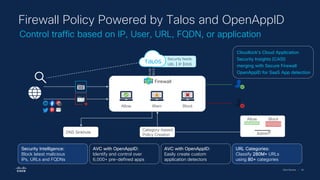
Control traffic based on IP, User, URL, FQDN, or application
Firewall Policy Powered by Talos and OpenAppID
Security Intelligence:
Block latest malicious
IPs, URLs and FQDNs
AVC with OpenAppID:
Identify and control over
6,000+ pre-defined apps
AVC with OpenAppID:
Easily create custom
application detectors
URL Categories:
Classify 280M+ URLs
using 80+ categories
Category-based
Policy Creation Admin
Allow Block
DNS Sinkhole
0100
0010
Security feeds
URL | IP |DNS
Allow Warn Block
Firewall
Cloudlock's Cloud Application
Security Insights (CASI)
merging with Secure Firewall
OpenAppID for SaaS App detection
Cisco Security | 63
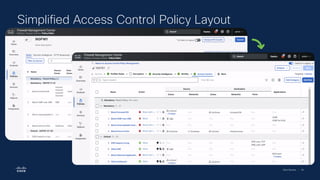
Simplified Access Control Policy Layout
Cisco Security | 64
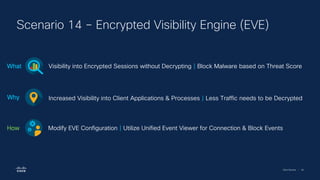
Scenario 14 – Encrypted Visibility Engine (EVE)
Visibility into Encrypted Sessions without Decrypting | Block Malware based on Threat Score
What
Increased Visibility into Client Applications & Processes | Less Traffic needs to be Decrypted
Why
Modify EVE Configuration | Utilize Unified Event Viewer for Connection & Block Events
How
Cisco Security | 65
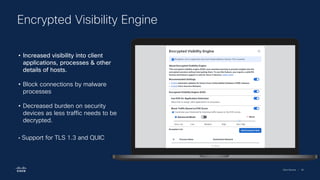
Encrypted Visibility Engine
• Increased visibility into client
applications, processes & other
details of hosts.
• Block connections by malware
processes
• Decreased burden on security
devices as less traffic needs to be
decrypted.
• Support for TLS 1.3 and QUIC
Cisco Security | 66
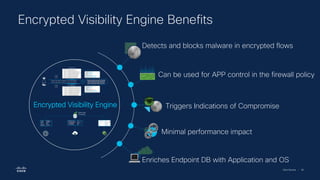
Encrypted Visibility Engine Benefits
66
Can be used for APP control in the firewall policy
Detects and blocks malware in encrypted flows
Minimal performance impact
Triggers Indications of Compromise
Enriches Endpoint DB with Application and OS
Encrypted Visibility Engine
Cisco Security | 67
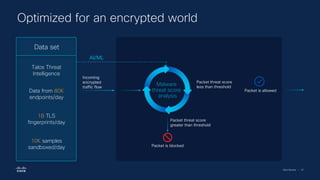
Optimized for an encrypted world
Encrypted Visibility Engine
Data set
Talos Threat
Intelligence
Data from 80K
endpoints/day
1B TLS
fingerprints/day
10K samples
sandboxed/day
Incoming
encrypted
traffic flow
Malware
threat score
analysis
Packet threat score
greater than threshold
Packet is blocked
Packet threat score
less than threshold
Packet is allowed
AI/ML
Firewall Advanced Lab
Cisco Security | 71
• Assumes basic experience with Cisco Secure
Firewall configuration
• Includes Scenario 0:
Familiarization with dCloud Environment
• Unlike Foundation lab, includes section on lab
capabilities to expand beyond lab exercises
• Selected advanced topics
• The lab supports many features not covered in these
exercises.
• Focus is on newer features.
• Majority of exercises focus on SD-WAN and Threat-
related features.
Advanced Lab Exercises
Cisco Security | 72
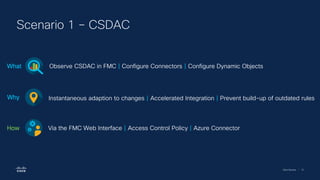
Scenario 1 – CSDAC
Observe CSDAC in FMC | Configure Connectors | Configure Dynamic Objects
What
Instantaneous adaption to changes | Accelerated Integration | Prevent build-up of outdated rules
Why
Via the FMC Web Interface | Access Control Policy | Azure Connector
How
Cisco Security | 73
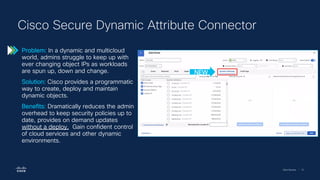
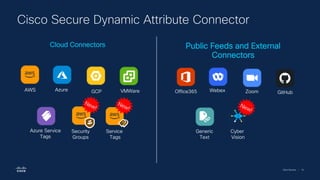
Cisco Secure Dynamic Attribute Connector
Problem: In a dynamic and multicloud
world, admins struggle to keep up with
ever changing object IPs as workloads
are spun up, down and change.
Solution: Cisco provides a programmatic
way to create, deploy and maintain
dynamic objects.
Benefits: Dramatically reduces the admin
overhead to keep security policies up to
date, provides on demand updates
without a deploy. Gain confident control
of cloud services and other dynamic
environments.
NEW
Cisco Security | 74
Cisco Secure Dynamic Attribute Connector
Office365 GitHub
Webex Zoom
Generic
Text
Azure
Azure Service
Tags
VMWare
GCP
AWS
Security
Groups
Service
Tags
Cyber
Vision
Cloud Connectors Public Feeds and External
Connectors
Cisco Security | 75
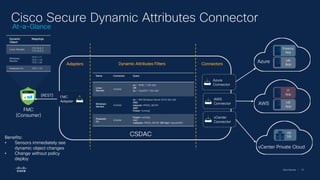
Cisco Secure Dynamic Attributes Connector
Azure
Finance
App
HR
App
AWS
IT
App
HR
App
vCenter Private Cloud
HR
DB
FMC
{REST}
Azure
Connector
AWS
Connector
vCenter
Connector
FMC
Adapter
Connectors
Dynamic
Object
Mappings
Linux-Servers
172.16.0.1
172.16.0.3
Windows-
Servers
10.0.1.11
10.0.1.14
10.0.1.20
Powered-On 10.0.1.14
FMC
(Consumer)
Dynamic Attributes Filters
Adapters
Name Connector Query
Linux-
Servers
vCenter
os = 'RHEL 7 (64-bit)’
OR
os = 'CentOS 7 (64-bit)’
Windows-
Servers
vCenter
os = 'MS Windows Server 2016 (64-bit)’
AND
network=‘PROD_NETW’
AND
Power=‘running’
Powered-
On
vCenter
Power=‘running’
AND
(network=‘PROD_NETW’ OR host=‘SplunkVM’)
CSDAC
Benefits:
• Sensors immediately see
dynamic object changes
• Change without policy
deploy
At-a-Glance
Cisco Security | 76
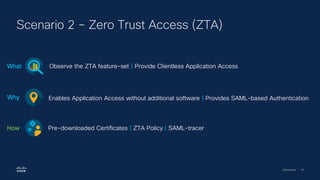
Scenario 2 – Zero Trust Access (ZTA)
Observe the ZTA feature-set | Provide Clientless Application Access
What
Enables Application Access without additional software | Provides SAML-based Authentication
Why
Pre-downloaded Certificates | ZTA Policy | SAML-tracer
How
Cisco Security | 77
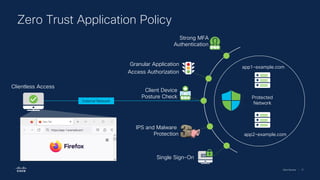
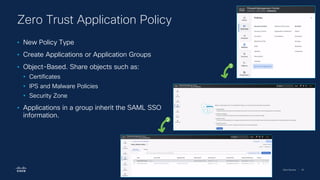
Zero Trust Application Policy
Granular Application
Access Authorization
Single Sign-On
IPS and Malware
Protection
app1-example.com
app2-example.com
Protected
Network
External Network
Clientless Access
Strong MFA
Authentication
Client Device
Posture Check
Cisco Security | 78
Zero Trust Application Policy
• New Policy Type
• Create Applications or Application Groups
• Object-Based. Share objects such as:
• Certificates
• IPS and Malware Policies
• Security Zone
• Applications in a group inherit the SAML SSO
information.
1
2
Cisco Security | 79
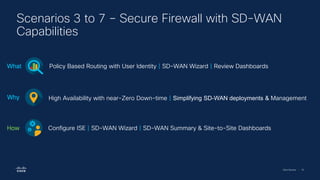
Scenarios 3 to 7 – Secure Firewall with SD-WAN
Capabilities
Policy Based Routing with User Identity | SD-WAN Wizard | Review Dashboards
What
High Availability with near-Zero Down-time | Simplifying SD-WAN deployments & Management
Why
Configure ISE | SD-WAN Wizard | SD-WAN Summary & Site-to-Site Dashboards
How
Cisco Security | 81
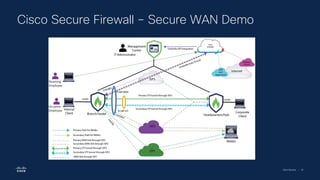
Cisco Secure Firewall – Secure WAN Demo
Cisco Security | 82
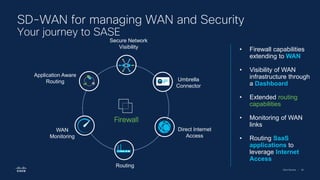
Direct Internet
Access
Umbrella
Connector
Firewall
Secure Network
Visibility
WAN
Monitoring
Routing
Application Aware
Routing
• Firewall capabilities
extending to WAN
• Visibility of WAN
infrastructure through
a Dashboard
• Extended routing
capabilities
• Monitoring of WAN
links
• Routing SaaS
applications to
leverage Internet
Access
SD-WAN for managing WAN and Security
Your journey to SASE
Cisco Security | 83
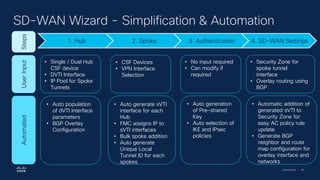
SD-WAN Wizard - Simplification & Automation
1. Hub 2. Spoke 3. Authentication 4. SD-WAN Settings
Steps
User
Input
Automated
• Single / Dual Hub
CSF device
• DVTI Interface
• IP Pool for Spoke
Tunnels
• Auto population
of dVTI Interface
parameters
• BGP Overlay
Configuration
• CSF Devices
• VPN Interface
Selection
• Auto generate sVTI
interface for each
Hub
• FMC assigns IP to
sVTI interfaces
• Bulk spoke addition
• Auto generate
Unique Local
Tunnel ID for each
spokes
• No input required
• Can modify if
required
• Auto generation
of Pre-shared
Key
• Auto selection of
IKE and IPsec
policies
• Security Zone for
spoke tunnel
interface
• Overlay routing using
BGP
• Automatic addition of
generated sVTI to
Security Zone for
easy AC policy rule
update
• Generate BGP
neighbor and route
map configuration for
overlay interface and
networks
Cisco Security | 84
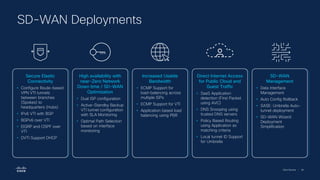
SD-WAN Deployments
Secure Elastic
Connectivity
• Configure Route-based
VPN VTI tunnels
between branches
(Spokes) to
headquarters (Hubs)
• IPv6 VTI with BGP
• BGPv6 over VTI
• EIGRP and OSPF over
VTI
• DVTI Support DHCP
High availability with
near-Zero Network
Down time / SD-WAN
Optimization
• Dual ISP configuration
• Active-Standby Backup
VTI tunnel configuration
with SLA Monitoring
• Optimal Path Selection
based on interface
monitoring
Increased Usable
Bandwidth
• ECMP Support for
load-balancing across
multiple ISPs
• ECMP Support for VTI
• Application based load
balancing using PBR
Direct Internet Access
for Public Cloud and
Guest Traffic
• SaaS Application
detection (First Packet
using AVC)
• DNS Snooping using
trusted DNS servers
• Policy Based Routing
using Application as
matching criteria
• Local tunnel ID Support
for Umbrella
SD-WAN
Management
• Data Interface
Management
• Auto Config Rollback
• SASE: Umbrella Auto-
tunnel deployment
• SD-WAN Wizard:
Deployment
Simplification
Cisco Security | 85
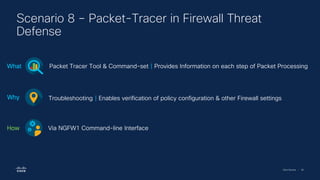
Scenario 8 – Packet-Tracer in Firewall Threat
Defense
Packet Tracer Tool & Command-set | Provides Information on each step of Packet Processing
What
Troubleshooting | Enables verification of policy configuration & other Firewall settings
Why
Via NGFW1 Command-line Interface
How
Cisco Security | 86
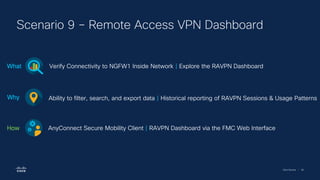
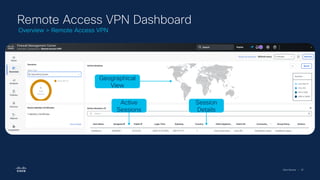
Scenario 9 – Remote Access VPN Dashboard
Verify Connectivity to NGFW1 Inside Network | Explore the RAVPN Dashboard
What
Ability to filter, search, and export data | Historical reporting of RAVPN Sessions & Usage Patterns
Why
AnyConnect Secure Mobility Client | RAVPN Dashboard via the FMC Web Interface
How
Cisco Security | 87
Remote Access VPN Dashboard
Active
Sessions
Geographical
View
Session
Details
Overview > Remote Access VPN
Cisco Security | 88
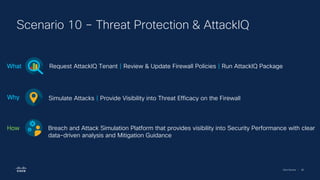
Scenario 10 – Threat Protection & AttackIQ
Request AttackIQ Tenant | Review & Update Firewall Policies | Run AttackIQ Package
What
Simulate Attacks | Provide Visibility into Threat Efficacy on the Firewall
Why
Breach and Attack Simulation Platform that provides visibility into Security Performance with clear
data-driven analysis and Mitigation Guidance
How
Cisco Security | 89
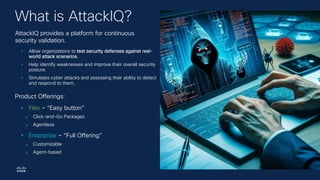
What is AttackIQ?
AttackIQ provides a platform for continuous
security validation.
• Allow organizations to test security defenses against real-
world attack scenarios.
• Help identify weaknesses and improve their overall security
posture.
• Simulates cyber attacks and assessing their ability to detect
and respond to them.
Product Offerings:
• Flex – “Easy button”
❑ Click-and-Go Packages
❑ Agentless
• Enterprise – “Full Offering”
❑ Customizable
❑ Agent-based
Cisco Security | 90
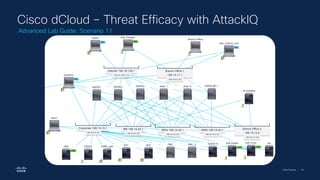
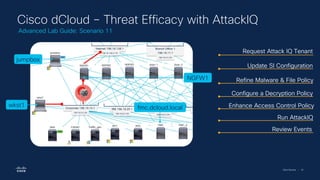
Cisco dCloud – Threat Efficacy with AttackIQ
Advanced Lab Guide: Scenario 11
Cisco Security | 91
wkst1
NGFW1
Cisco dCloud – Threat Efficacy with AttackIQ
Advanced Lab Guide: Scenario 11
jumpbox
fmc.dcloud.local
Request Attack IQ Tenant
Update SI Configuration
Refine Malware & File Policy
Configure a Decryption Policy
Enhance Access Control Policy
Run AttackIQ
Review Events
Cisco Security | 92
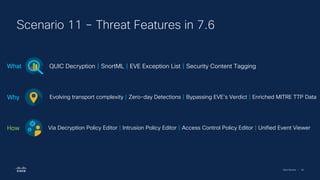
Scenario 11 – Threat Features in 7.6
QUIC Decryption | SnortML | EVE Exception List | Security Content Tagging
What
Evolving transport complexity | Zero-day Detections | Bypassing EVE’s Verdict | Enriched MITRE TTP Data
Why
Via Decryption Policy Editor | Intrusion Policy Editor | Access Control Policy Editor | Unified Event Viewer
How
Cisco Security | 93
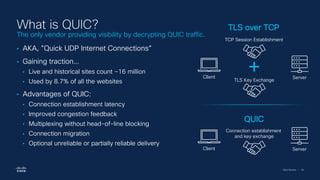
What is QUIC?
• AKA, "Quick UDP Internet Connections”
• Gaining traction…
• Live and historical sites count ~16 million
• Used by 8.7% of all the websites
• Advantages of QUIC:
• Connection establishment latency
• Improved congestion feedback
• Multiplexing without head-of-line blocking
• Connection migration
• Optional unreliable or partially reliable delivery
TCP Session Establishment
TLS Key Exchange
Client Server
Connection establishment
and key exchange
Client Server
QUIC
TLS over TCP
The only vendor providing visibility by decrypting QUIC traffic.
Cisco Security | 94
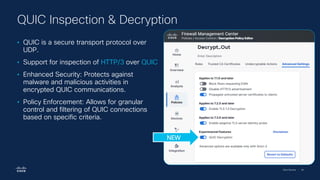
• QUIC is a secure transport protocol over
UDP.
• Support for inspection of HTTP/3 over QUIC
• Enhanced Security: Protects against
malware and malicious activities in
encrypted QUIC communications.
• Policy Enforcement: Allows for granular
control and filtering of QUIC connections
based on specific criteria.
QUIC Inspection & Decryption
NEW
Cisco Security | 95
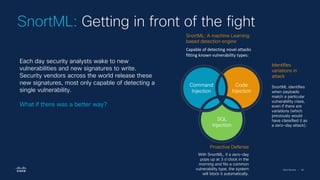
SnortML: A machine Learning
based detection engine
Capable of detecting novel attacks
fitting known vulnerability types:
Identifies
variations in
attack
SnortML identifies
when payloads
match a particular
vulnerability class,
even if there are
variations (which
previously would
have classified it as
a zero-day attack).
Proactive Defense
With SnortML, if a zero-day
pops up at 3 o’clock in the
morning and fits a common
vulnerability type, the system
will block it automatically.
SnortML: Getting in front of the fight
Each day security analysts wake to new
vulnerabilities and new signatures to write.
Security vendors across the world release these
new signatures, most only capable of detecting a
single vulnerability.
What if there was a better way?
Command
Injection
Code
Injection
SQL
Injection
Cisco Security | 96
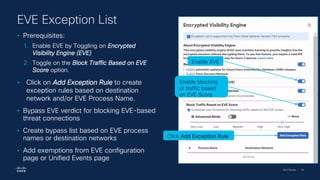
• Prerequisites:
1. Enable EVE by Toggling on Encrypted
Visibility Engine (EVE)
2. Toggle on the Block Traffic Based on EVE
Score option.
• Click on Add Exception Rule to create
exception rules based on destination
network and/or EVE Process Name.
• Bypass EVE verdict for blocking EVE-based
threat connections
• Create bypass list based on EVE process
names or destination networks
• Add exemptions from EVE configuration
page or Unified Events page
EVE Exception List
Enable EVE
Enable blocking
of traffic based
on EVE Score
Click Add Exception Rule
Cisco Security | 97
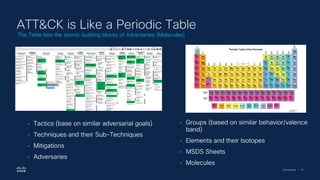
ATT&CK is Like a Periodic Table
The Table lists the atomic building blocks of Adversaries (Molecules)
• Tactics (base on similar adversarial goals)
• Techniques and their Sub-Techniques
• Mitigations
• Adversaries
• Groups (based on similar behavior/valence
band)
• Elements and their Isotopes
• MSDS Sheets
• Molecules
Cisco Security | 98
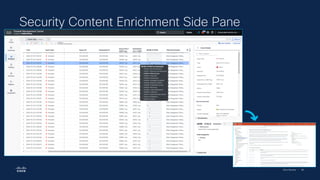
Security Content Enrichment Side Pane
Cisco Security | 99
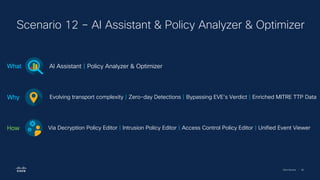
Scenario 12 – AI Assistant & Policy Analyzer & Optimizer
AI Assistant | Policy Analyzer & Optimizer
What
Evolving transport complexity | Zero-day Detections | Bypassing EVE’s Verdict | Enriched MITRE TTP Data
Why
Via Decryption Policy Editor | Intrusion Policy Editor | Access Control Policy Editor | Unified Event Viewer
How
Cisco Security | 100
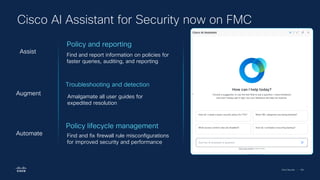
Cisco AI Assistant for Security now on FMC
Troubleshooting and detection
Amalgamate all user guides for
expedited resolution
Augment
Policy lifecycle management
Find and fix firewall rule misconfigurations
for improved security and performance
Automate
Policy and reporting
Find and report information on policies for
faster queries, auditing, and reporting
Assist
Cisco Security | 101
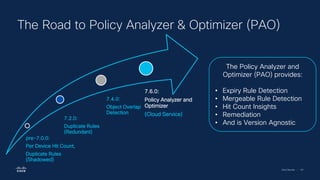
The Road to Policy Analyzer & Optimizer (PAO)
pre-7.0.0:
Per Device Hit Count,
Duplicate Rules
(Shadowed)
7.2.0:
Duplicate Rules
(Redundant)
7.4.0:
Object Overlap
Detection
7.6.0:
Policy Analyzer and
Optimizer
(Cloud Service)
The Policy Analyzer and
Optimizer (PAO) provides:
• Expiry Rule Detection
• Mergeable Rule Detection
• Hit Count Insights
• Remediation
• And is Version Agnostic
Cisco Security | 102
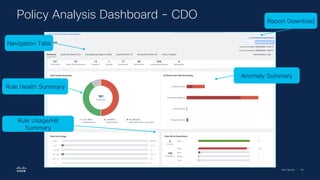
Policy Analysis Dashboard - CDO
Rule Health Summary
Anomaly Summary
Rule Usage/Hit
Summary
Report Download
Navigation Tabs
Additional Resources
Cisco Security | 104
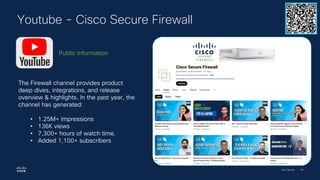
Youtube - Cisco Secure Firewall
The Firewall channel provides product
deep dives, integrations, and release
overview & highlights. In the past year, the
channel has generated:
• 1.25M+ impressions
• 136K views
• 7,300+ hours of watch time.
• Added 1,100+ subscribers
Public Information
Cisco Security | 105
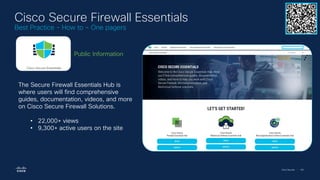
Cisco Secure Firewall Essentials
Best Practice - How to – One pagers
The Secure Firewall Essentials Hub is
where users will find comprehensive
guides, documentation, videos, and more
on Cisco Secure Firewall Solutions.
• 22,000+ views
• 9,300+ active users on the site
Public Information
Cisco Security | 106
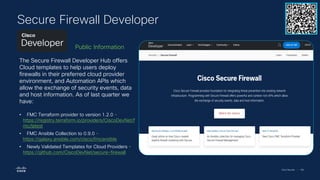
Secure Firewall Developer
The Secure Firewall Developer Hub offers
Cloud templates to help users deploy
firewalls in their preferred cloud provider
environment, and Automation APIs which
allow the exchange of security events, data
and host information. As of last quarter we
have:
• FMC Terraform provider to version 1.2.0 -
https://registry.terraform.io/providers/CiscoDevNet/f
mc/latest
• FMC Ansible Collection to 0.9.0 -
https://galaxy.ansible.com/cisco/fmcansible
• Newly Validated Templates for Cloud Providers -
https://github.com/CiscoDevNet/secure-firewall
Public Information
Cisco Secure Firewall Test Drive Presentation

Cisco Secure Firewall Test Drive Presentation

  • 1.
    Cisco Secure Firewall TestDrive Darwin Ma, Veon Wu, Sumit Bist Jan 14th 2025
  • 2.
    Cisco Security |2 • Introduction to Cisco Secure • Cisco Secure Firewall Hardware Portfolio • dCloud Overview • Lab Environment Overview • Lab Scenarios - Walkthrough Agenda
  • 3.
  • 4.
    Secure Access Customer ValueLeader Email Security Growth Leader -Email Radar 2024 Secure Firewall Leader in Enterprise Firewall Solutions Secure Access SSE Strong Performer Duo Best 2FA App Firewall Best Security Performance & Effectiveness Secure Firewall Global InfoSec Award Secure Firewall Cybersecurity Excellence Award Secure Firewall 2024 Best Next Gen Firewall Secure Access Best SME Security Solution for Umbrella Email Security Recognized as Marketing champion Duo Best in KLAS: Software & Services Secure Access Leader in DNS Duo Authentication Winner WAVE LEADER 2024 Multicloud Defense Finalist Endpoint Named a Visionary Secure Access Honorable Mention XDR Honorable Mention Duo Passwordless CISCO Secure Workload Leader in Microsegmentation Duo Best Robust Security Features
  • 5.
    Cisco Security |5 “Cisco’s vision aligns well with its networking strengths, leveraging them to craft a security strategy that envisions the seamless integration of AI and security in the networking fabric. The vendor refined its Secure Firewall offering with persistent innovation including a shared and consistent UX/UI and enhanced IDS/IPS using a SnortML engine...Cisco distinguishes itself with a multi-layered approach to traffic inspection and decryption…Reference customers praise Cisco’s support, especially during migrations from legacy appliances.” - Forrester Research, Inc. Forrester names Cisco a Leader in Enterprise Firewall Solutions The Forrester Wave : Enterprise Firewall Solutions, Q4 2024 Cisco is the only leader in both firewall and microsegmentation solutions
  • 6.
    Cisco Security |6 Our customers tell us that they need… Complete visibility of diverse attack surfaces and security compliance state Comprehensive threat protection that scales with their increasing network traffic and business needs Easy deployment, management and operations for their hybrid cloud and on-prem networks
  • 7.
    Cisco Security |7 of firewall breaches will be caused by firewall misconfigurations1 99% of web traffic is encrypted2 95% of organizations lack sufficient visibility into threats and are struggling to implement zero trust3 73% And attackers leverage the gaps 1 Gartner Technology Insight for Network Security Policy Management; 2Google Transparency Report; 3Cybersecurity Insiders, 2022 Application Security Report;
  • 8.
    Cisco Security |8 2023 Product of the Year by CRN, Tech Leader by PeerSpot Facilitates over 85% of world’s internet traffic Analyzes >550B security events/day Generates > $3.4B in security business Secures >300K customers Cisco Secure Firewall By the company that builds the most networks across the globe Industry’s leading intrusion prevention, Snort3 Industry's first Encrypted Visibility Engine Best Next Generation Firewall by SE Labs
  • 9.
    Cisco Security |9 Complete attack surface visibility Comprehensive threat protection Easy deployment & management Branch offices Remote employees Clouds Data centers Cloud applications Vendors & contractors Personal devices Campus Cisco Secure Firewall - A Robust and Reliable Line of Defense ▪ Devices ▪ Clouds ▪ Malware ▪ Known exploits ▪ Malicious URLs ▪ DNS ▪ Web-based attacks ▪ Cloud/on-prem/on-box management options ▪ Low-touch provisioning ▪ Flexible consumption models ▪ Apps ▪ Users
  • 10.
    Cisco Security |10 Talos is the threat intelligence group at Cisco. We are here to fight the good fight — we work to keep our customers, and users at large, safe from malicious actors. What is Talos? Engineering and Development Global Outreach Community Vulnerability Research and Discovery Detection Research Threat Intelligence and Interdiction
  • 11.
    Cisco Security |11 Unmatched visibility across the threat landscape ~2,000 new samples/minute ~2,000 domains blocked/second ~9M emails blocked/hour 800B security events/day Intelligence requires rich dataset Threat intelligence, updated automatically every hour
  • 12.
  • 13.
    Cisco Security |13 9300 Series Cisco Secure Firewall Hardware Portfolio 1010 1100 Series Small and Medium Business (SMB)/OT Branch Office Midsize Enterprise Service Provider Large Enterprise Datacenter ISA 3000 1200 Series 3100 Series 4200 Series NEW
  • 14.
    Cisco Security |14 Cisco Secure Firewall 4200 Series • Grow your security infrastructure as your business grows with clustering capability of up to 16 firewall devices. • Ensure business uptime with hot- swappable network modules, including fail-to-wire interfaces. • Achieve High Performance Packet Processing with powerful hardware, a wide range of high performing network interfaces with a 1 RU footprint. • Gain visibility into encrypted traffic with crypto-accelerated architecture, speeding up TLS and IPsec decryption. Superior Performance Outstanding ROI 1RU, 16x Clustering, 200G/400G Interface Support, 2x Interface Module Slots, Dual SSD’s, Dual Management interface
  • 15.
    Cisco Security |15 Five appliance models: 3105, 3130, 3120, 3130, 3140 up to 45 Gbps Firewall throughput* * 1024B FW+AVC+IPS • High performance mid-range appliance • Threat-focused security architecture • Flexible deployment options: • Firewall • Dedicated Intrusion Protection System • Multi-Instance Support • Cluster up to 16 x appliances Enterprise and data center security with exceptional price/performance 3100 Series Data Sheet Cisco Secure Firewall 3100 Series
  • 16.
    Cisco Security |16 Secure Firewall 3100 and 4200 Series Crypto Acceleration A specially built circuit to provide encryption/decryption acceleration Crypto-acceleration using an FPGA (Field-programmable gate array) Interface Flexibility Support for 1G,10G,25G,40G,100G,200G, 400G* interfaces across 2 Network Modules Flow Offload Flow offload engine processes packets in hardware up through layer 4 FIPS Compliance Supports all FIPS 140-3 requirements Hardware Highlights
  • 17.
    Cisco Security |17 Secure Firewall 1200 Series Compact • Three Desktop models – 1210CE, 1210CP, & 1220CX • SoC ARM design • 16GB of RAM • 480GB NVMe Storage • Fixed 8x1GE: • 1210CP – 4x1GE with UPoE+ Support (120W total, max 90W per port) • 1220CX – 2x1/10G SFP+ • Multiple SoC-embedded Accelerators • Encryption/decryption • Traffic processing • Up to 9 Gbps Firewall throughput* At a Glance * 1024B FW+AVC+IPS
  • 18.
    Cisco Security |18 Secure Firewall 1200 Series Compact Accelerate cryptographic operations solely with the SoC* and Lookaside Crypto Cryptographic Accelerator Unit Deploy SD-WAN at multiple branch locations faster with Zero-Touch Deployment and Bulk Preprovisioning using Device Templates SD-WAN Capable Support for 1G or 10G (SFP+) interfaces, in addition to increased PoE delivery on select models Interface Flexibility Compact, desktop form factor with optional rack or wall mount Form Factor *SoC – System on Chip Hardware Highlights
  • 19.
    Cisco Security |19 Secure Firewalls for the IT domain Secure Firewall ISA3000 for the OT domain Common Management Thermal resilience: -40C to +60C High availability hardware bypass, dual-power, QoS, latency mitigation Environmental hardening: Vibration, shock, surge, electrical noise Hazloc with nA protection Communication protocols: GOOSE, COSEM, CIP, Modbus, IEC 104, OPC-UA, GSE, BacNet, ISO MMS, and DNP3 Secure Firewall Hardware Built for OT Robust coverage for OT, IoT, & IIoT crafted for the harshest industrial environments.
  • 20.
    Cisco Security |20 Cisco Secure Firewall Virtual Portfolio Private Cloud Public Cloud Gov/IC Cloud Virtual firewall performance-based licensing from 100Mbps up to 16Gbps Cloud Leadership Dynamic Policy Clustering & Auto Scaling Quickstarts, Infrastructure as Code and Automation Integration with cloud native services & infrastructure Gateway Load balancer integration Accelerated Networking Snapshots Smart & Tiered Licensing
  • 21.
    Cisco Security |21 Secure Firewall Release 7.6 Threat AI/ML Simplify Operations SD-WAN Platform Investment SnortML – Machine- Learning based exploit protection QUIC Decryption MITRE security tagging Encrypted Visibility Engine enhancements Cisco Firewall AI Assistant AI/ML-based threat enhancements (SnortML, Encrypted Visibility Engine) Policy Analyzer & Optimizer SAML-based identity firewalling Upgrade Workflow Simplification Change Management Workflows Decryption Policy Wizard SD-WAN Deployment Wizard Firewall Templates for simplified fleet deployment 1200 Series Branch firewall 4200 Multi-Instance 16-node clustering for 3100 & 4200 80% RA-VPN performance improvement over DTLS for 3100/4200 Series 400GE Network Module Support ASAv Unlimited for Private Cloud ASAv standalone container
  • 22.
  • 23.
    Cisco Security |25 What is Firewall Management Center (FMC)? On-premise, or Cloud-Delivered centralized management for multi-site deployments • Key Benefits • Manage across many sites • Control access and set policies • Investigate incidents • Prioritize response • Available in physical and virtual options • Features • Multi-domain management • Role-based access control • High availability • APIs and pxGrid integration • Policy & device management • Endpoint • Security intelligence
  • 24.
    Cisco Security |26 Firewall Management Center & Cloud-delivered Firewall Management Center Familiar User Experience Cloud-Delivered Firewall Management Center Firewall Management Center
  • 25.
    Cisco Security |27 SaaS On-prem Hybrid Config Analytics Event Storage Analytics Event Storage Config Config Analytics Event Storage Versatile, flexible, and simplified firewall management Cloud On-prem Driven by security concerns or regulatory compliance Sensitivities around customer data Lower operational costs and eliminate maintenance overhead On-prem and cloud versions offer the same look and feel with easy migration options
  • 26.
    Cisco Security |28 20+ Product Consoles Platform Experiences are emerging… defenseorchestrator.com xdr.cisco.com SSE.cisco.com CDO XDR Security Cloud Control Historically Today Security Cloud Control SSE How do we make this final leap? security.cisco.com Unified management Security Cloud Control: Common Management
  • 27.
    Cisco Security |29 Cloud Management Unified coordination of security solutions Support for hybrid environments including on-prem FMC Consistent policy enforcement and object sharing Physical Firewall (ASA and FTD) Virtual Firewall Multicloud Defense Hypershield Users Devices Applications Simplify operations Streamline policy and device control
  • 28.
    Cisco Security |30 Simplify operations Gain end-to-end visibility from a single screen Access comprehensive insights across all firewall and security deployments Enable prompt issue resolution through a live view of network traffic and security events Empower informed decisions with operational insights from network data
  • 29.
    Cisco dCloud &Lab Environment Overview
  • 30.
    Cisco Security |32 What is Cisco dCloud? Cisco dCloud Data Centers US (East & West), London, Sydney, & Singapore dCloud.cisco.com Cisco dCloud A cloud-based virtual demonstration offering Demonstrations Focused on Cisco products and solutions that are Packaged, pre-configured, and scripted. Customizable Full administrative control of your demo Availability 24x7 Access with Cisco.com credentials Any Use Case See only or get hands-on Supported All demos are completely tested & validated User feedback encouraged
  • 31.
    Cisco Security |33 Understanding the Lab Topology • Jumpbox • Outside • Faux Internet • Branch office • Edge – NGFW1 and other NGFWs for HA, etc. • CSR routers for enhancement • Inside • Linux and Windows Test system • AD servers, CSDAC, FMC, Splunk
  • 32.
    Cisco Security |34 Understanding the Lab Topology • Jumpbox • Outside • Faux Internet • Branch office • Edge – NGFW1 and other NGFWs for HA, etc. • CSR routers for enhancement • Inside • Linux and Windows Test system • AD servers, CSDAC, FMC, Splunk
  • 33.
    Cisco Security |35 Understanding the Lab Topology • Jumpbox • Outside • Faux Internet • Branch office • Edge – NGFW1 and other NGFWs for HA, etc. • CSR routers for enhancement • Inside • Linux and Windows Test system • AD servers, CSDAC, FMC, Splunk
  • 34.
    Cisco Security |36 Understanding the Lab Topology • Jumpbox • Outside • Faux Internet • Branch office • Edge – NGFW1 and other NGFWs for HA, etc. • CSR routers for enhancement • Inside • Linux and Windows Test system • AD servers, CSDAC, FMC, Splunk
  • 35.
    Cisco Security |37 Understanding the Lab Topology • Jumpbox • Outside • Faux Internet • Branch office • Edge – NGFW1 and other NGFWs for HA, etc. • CSR routers for enhancement • Inside • Linux and Windows test systems • AD servers, CSDAC, FMC, Splunk, traffic generatort (with FTD)
  • 36.
    Cisco Security |38 Two Guides! Firewall Foundation Advanced Lab
  • 37.
  • 38.
    Cisco Security |40 • Assumes no previous experience with Cisco Secure Firewall • Includes Scenario 0: Familiarization with dCloud Environment • Covers onboarding • Basic FMC configuration • Basic object configuration • Device registration • Device network configuration • Covers basic policy configuration • Introduces main types of policies • Enough information to create a functional firewall policy Foundation Lab Exercises
  • 39.
    Cisco Security |41 Scenario 1 – FMC Configuration Day-0 FMC Configuration | Configure Syslog | Review Email Notification Settings What Deeper Understanding of FMC Configuration | Increase Event Storage | Receive Alerts for Various Events Why Via the FMC Web Interface How
  • 40.
    Cisco Security |42 Scenario 2 – Objects Create Network Objects | Create a new Variable Set What Required for Access Control Policy configuration | Required for Intrusion Policy configuration Why Via the FMC Web Interface - Object Management Page How
  • 41.
    Cisco Security |43 Scenario 3 – Security Zones Create Routed Security Zones What Consistent Traffic Processing across Managed Devices Why Via the FMC Web Interface - Object Management Page How
  • 42.
    Cisco Security |44 Scenario 4 – Basic Access Control Create a new Parent Access Control Policy | Create a new Child Access Control Policy What Requirement for adding a Managed Device Why Via the FMC Web Interface - Access Control Policy Page How
  • 43.
    Cisco Security |45 Scenario 5 – Device Registration Deregister Virtual Firewall Threat Defense | Register Virtual Firewall Threat Defense to New FMC What Managed Device Requirement for upcoming Lab Tasks Why Via the FMC Web Interface – Device Management Page How
  • 44.
    Cisco Security |46 Scenario 6 – Platform Settings Configure a new Platform Settings Policy | Review Performance Profile options | Deploy Changes What Define Device Specific Configurations | Skew CPU Performance | Apply Changes to the Device Why Via the FMC Web Interface – Platform Settings Page How
  • 45.
    Cisco Security |47 Scenario 7 – Device Interfaces Configure Interfaces & Routes | Configure NAT | Create an Allow Rule for Outbound Traffic What Establish Network connectivity | Allow Corp-LAN to have Internet connectivity | Permit Outbound Traffic Why Via the FMC Web Interface – Device Management, NAT Policy, and Access Control Policy pages How
  • 46.
    Cisco Security |48 Cisco dCloud – FMC Setup Foundation Lab Guide: Scenarios 1 - 7
  • 47.
    Cisco Security |49 jumpbox NGFW1 FMC/FMC2 Cisco dCloud – FMC Setup Foundation Lab Guide: Scenarios 1 - 7 sfTunnel sfTunnel Day-0 FMC Setup Scenario 1 Create Network Objects/Variable Set Scenario 2 Add Security Zones Scenario 3 Apply Basic Access Control Scenario 4 Register to FMC2 Scenario 5 Create a Platform Settings Policy Scenario 6 Configure Device Interfaces & NAT Scenario 7
  • 48.
    Cisco Security |50 Scenario 8 – Network Discovery Enable Passive Analysis with Network Discovery | Observe Newly Detected Hosts What Discover/Observe hosts, users, and applications for RFC-1918, Corp-LAN, and Branch-LAN networks Why Via Discovery Rules | Via FMC’s Network Map How
  • 49.
    Cisco Security |51 Provides the right data, at the right time, in the right format Network Discovery • Discovers applications, users, and hosts through passive analysis of network traffic • Provides context and helps determine the impact of attacks • Tune IPS signature sets to devices discovered on the network • Update host profiles with 3rd party vulnerability management integration
  • 50.
    Cisco Security |52 Scenario 9 – Malware & File Policy Enable Blocking of Malicious file downloaded via HTTP What Enable Firewall Threat Defense to detect, capture, and analyze files Why Via File Rules How
  • 51.
    Cisco Security |54 Scenario 10 – Decryption Policy Generate an internal CA for Decrypted Traffic | Create & Configure a new Decryption Policy What Used to Resign Outbound Decrypted Traffic | Block Insecure Protocols & Exempt Sensitive Data Why Via the FMC Web Interface – Object Management & Decryption Policy Pages How
  • 52.
    Cisco Security |55 Finds encrypted threat while reducing performance impact Integrated TLS 1.3 Decryption • TLS hardware acceleration delivers high-performance inspection of encrypted traffic • Centralized enforcement of TLS certificate policies ‒ Examples: Blocking self-signed encrypted traffic, specified TLS version, cypher suites Log TLS decryption engine Firewall/NGIPS Enforcement decisions AVC ilicit gambling https://www.badsite.com https://www.goodsite.com Decrypt traffic in hardware or software Inspect deciphered packets Track and log all TLS sessions https://www.goodsite.com https://www.badsite.com https://www.badsite.com https://www.goodsite.com https://www.goodsite.com https://www.goodsite.com https://www.badsite.com https://www.goodsite.com https://www.badsite.com https://www.badsite.com Encrypted Traffic
  • 53.
    Cisco Security |56 Scenario 11 – Intrusion Policy Create a new Intrusion Policy | Modify default Settings | Create a new Network Analysis Policy What Enable Deep Packet Inspection | Modify Security Level & Rule(s) | Enable advanced options Why Balanced Security and Connectivity | Via Group Overrides | Balanced Security and Connectivity How
  • 54.
    Cisco Security |57 Pig vs. Pig Snort 2 Snort 3 Multi-Threaded Architecture Capable of running multiple Snort Processes Port Independent Protocol Inspection IPS Accelerators / Hyperscan Support Modularity – Easier TALOS contributions Scalable Memory Allocation Next Gen TALOS Rules – e.g., Regex/Rule Options/Sticky Buffers New and Improved HTTP Inspector – e.g., HTTP/2 support Lightweight content updates from TALOS
  • 55.
    Cisco Security |58 Reduce the noise/volume of events and prioritize administration Secure IPS Powered by Snort 3 – Best of breed, open source IPS Firewall brings the power of context to IPS Rule recommendation can tune IPS Impact of IPS events can be deduced. Impact flag Administrator Action Why 1 Act immediately, Vulnerable Event Corresponds to vulnerability mapped to host 2 Investigate, Potentially Vulnerable Relevant port open or protocol in use but no vuln mapped 3 Good to know, Currently Not available Relevant port not open or protocol not in use 4 Good to know, Unknown Target Monitored network but unknown host 0 Good to know, Unknown Network Unmonitored network
  • 56.
    Cisco Security |59 Drive impact analysis and rule recommendations Correlate Host Profile and IPS
  • 57.
    Cisco Security |60 Scenario 12 – Access Control Policy Settings Modify the Parent Policy Settings | Enable Security Intelligence | Modify the Child Policy Settings What Apply Settings to all Child Policies | Block all Talos Threat Feeds | Enable Portscan Detection Why Via the Access Control Policy Editor | Via Network and URL Block Lists | Via Advanced Settings How
  • 58.
    Cisco Security |61 Scenario 13 – Access Control Rules Block Destination Geos | Block Risky/Low Relevance Applications | Add additional Inspections What Restrict specific Geolocations | Control Usage of specific Apps & URLs | Utilize IPS & File Policies Why Via a Geolocation Block Rule | Via a URL & Application Block Rule | Through the Rule Editor Page How
  • 59.
    Cisco Security |62 Control traffic based on IP, User, URL, FQDN, or application Firewall Policy Powered by Talos and OpenAppID Security Intelligence: Block latest malicious IPs, URLs and FQDNs AVC with OpenAppID: Identify and control over 6,000+ pre-defined apps AVC with OpenAppID: Easily create custom application detectors URL Categories: Classify 280M+ URLs using 80+ categories Category-based Policy Creation Admin Allow Block DNS Sinkhole 0100 0010 Security feeds URL | IP |DNS Allow Warn Block Firewall Cloudlock's Cloud Application Security Insights (CASI) merging with Secure Firewall OpenAppID for SaaS App detection
  • 60.
    Cisco Security |63 Simplified Access Control Policy Layout
  • 61.
    Cisco Security |64 Scenario 14 – Encrypted Visibility Engine (EVE) Visibility into Encrypted Sessions without Decrypting | Block Malware based on Threat Score What Increased Visibility into Client Applications & Processes | Less Traffic needs to be Decrypted Why Modify EVE Configuration | Utilize Unified Event Viewer for Connection & Block Events How
  • 62.
    Cisco Security |65 Encrypted Visibility Engine • Increased visibility into client applications, processes & other details of hosts. • Block connections by malware processes • Decreased burden on security devices as less traffic needs to be decrypted. • Support for TLS 1.3 and QUIC
  • 63.
    Cisco Security |66 Encrypted Visibility Engine Benefits 66 Can be used for APP control in the firewall policy Detects and blocks malware in encrypted flows Minimal performance impact Triggers Indications of Compromise Enriches Endpoint DB with Application and OS Encrypted Visibility Engine
  • 64.
    Cisco Security |67 Optimized for an encrypted world Encrypted Visibility Engine Data set Talos Threat Intelligence Data from 80K endpoints/day 1B TLS fingerprints/day 10K samples sandboxed/day Incoming encrypted traffic flow Malware threat score analysis Packet threat score greater than threshold Packet is blocked Packet threat score less than threshold Packet is allowed AI/ML
  • 65.
  • 66.
    Cisco Security |71 • Assumes basic experience with Cisco Secure Firewall configuration • Includes Scenario 0: Familiarization with dCloud Environment • Unlike Foundation lab, includes section on lab capabilities to expand beyond lab exercises • Selected advanced topics • The lab supports many features not covered in these exercises. • Focus is on newer features. • Majority of exercises focus on SD-WAN and Threat- related features. Advanced Lab Exercises
  • 67.
    Cisco Security |72 Scenario 1 – CSDAC Observe CSDAC in FMC | Configure Connectors | Configure Dynamic Objects What Instantaneous adaption to changes | Accelerated Integration | Prevent build-up of outdated rules Why Via the FMC Web Interface | Access Control Policy | Azure Connector How
  • 68.
    Cisco Security |73 Cisco Secure Dynamic Attribute Connector Problem: In a dynamic and multicloud world, admins struggle to keep up with ever changing object IPs as workloads are spun up, down and change. Solution: Cisco provides a programmatic way to create, deploy and maintain dynamic objects. Benefits: Dramatically reduces the admin overhead to keep security policies up to date, provides on demand updates without a deploy. Gain confident control of cloud services and other dynamic environments. NEW
  • 69.
    Cisco Security |74 Cisco Secure Dynamic Attribute Connector Office365 GitHub Webex Zoom Generic Text Azure Azure Service Tags VMWare GCP AWS Security Groups Service Tags Cyber Vision Cloud Connectors Public Feeds and External Connectors
  • 70.
    Cisco Security |75 Cisco Secure Dynamic Attributes Connector Azure Finance App HR App AWS IT App HR App vCenter Private Cloud HR DB FMC {REST} Azure Connector AWS Connector vCenter Connector FMC Adapter Connectors Dynamic Object Mappings Linux-Servers 172.16.0.1 172.16.0.3 Windows- Servers 10.0.1.11 10.0.1.14 10.0.1.20 Powered-On 10.0.1.14 FMC (Consumer) Dynamic Attributes Filters Adapters Name Connector Query Linux- Servers vCenter os = 'RHEL 7 (64-bit)’ OR os = 'CentOS 7 (64-bit)’ Windows- Servers vCenter os = 'MS Windows Server 2016 (64-bit)’ AND network=‘PROD_NETW’ AND Power=‘running’ Powered- On vCenter Power=‘running’ AND (network=‘PROD_NETW’ OR host=‘SplunkVM’) CSDAC Benefits: • Sensors immediately see dynamic object changes • Change without policy deploy At-a-Glance
  • 71.
    Cisco Security |76 Scenario 2 – Zero Trust Access (ZTA) Observe the ZTA feature-set | Provide Clientless Application Access What Enables Application Access without additional software | Provides SAML-based Authentication Why Pre-downloaded Certificates | ZTA Policy | SAML-tracer How
  • 72.
    Cisco Security |77 Zero Trust Application Policy Granular Application Access Authorization Single Sign-On IPS and Malware Protection app1-example.com app2-example.com Protected Network External Network Clientless Access Strong MFA Authentication Client Device Posture Check
  • 73.
    Cisco Security |78 Zero Trust Application Policy • New Policy Type • Create Applications or Application Groups • Object-Based. Share objects such as: • Certificates • IPS and Malware Policies • Security Zone • Applications in a group inherit the SAML SSO information. 1 2
  • 74.
    Cisco Security |79 Scenarios 3 to 7 – Secure Firewall with SD-WAN Capabilities Policy Based Routing with User Identity | SD-WAN Wizard | Review Dashboards What High Availability with near-Zero Down-time | Simplifying SD-WAN deployments & Management Why Configure ISE | SD-WAN Wizard | SD-WAN Summary & Site-to-Site Dashboards How
  • 75.
    Cisco Security |81 Cisco Secure Firewall – Secure WAN Demo
  • 76.
    Cisco Security |82 Direct Internet Access Umbrella Connector Firewall Secure Network Visibility WAN Monitoring Routing Application Aware Routing • Firewall capabilities extending to WAN • Visibility of WAN infrastructure through a Dashboard • Extended routing capabilities • Monitoring of WAN links • Routing SaaS applications to leverage Internet Access SD-WAN for managing WAN and Security Your journey to SASE
  • 77.
    Cisco Security |83 SD-WAN Wizard - Simplification & Automation 1. Hub 2. Spoke 3. Authentication 4. SD-WAN Settings Steps User Input Automated • Single / Dual Hub CSF device • DVTI Interface • IP Pool for Spoke Tunnels • Auto population of dVTI Interface parameters • BGP Overlay Configuration • CSF Devices • VPN Interface Selection • Auto generate sVTI interface for each Hub • FMC assigns IP to sVTI interfaces • Bulk spoke addition • Auto generate Unique Local Tunnel ID for each spokes • No input required • Can modify if required • Auto generation of Pre-shared Key • Auto selection of IKE and IPsec policies • Security Zone for spoke tunnel interface • Overlay routing using BGP • Automatic addition of generated sVTI to Security Zone for easy AC policy rule update • Generate BGP neighbor and route map configuration for overlay interface and networks
  • 78.
    Cisco Security |84 SD-WAN Deployments Secure Elastic Connectivity • Configure Route-based VPN VTI tunnels between branches (Spokes) to headquarters (Hubs) • IPv6 VTI with BGP • BGPv6 over VTI • EIGRP and OSPF over VTI • DVTI Support DHCP High availability with near-Zero Network Down time / SD-WAN Optimization • Dual ISP configuration • Active-Standby Backup VTI tunnel configuration with SLA Monitoring • Optimal Path Selection based on interface monitoring Increased Usable Bandwidth • ECMP Support for load-balancing across multiple ISPs • ECMP Support for VTI • Application based load balancing using PBR Direct Internet Access for Public Cloud and Guest Traffic • SaaS Application detection (First Packet using AVC) • DNS Snooping using trusted DNS servers • Policy Based Routing using Application as matching criteria • Local tunnel ID Support for Umbrella SD-WAN Management • Data Interface Management • Auto Config Rollback • SASE: Umbrella Auto- tunnel deployment • SD-WAN Wizard: Deployment Simplification
  • 79.
    Cisco Security |85 Scenario 8 – Packet-Tracer in Firewall Threat Defense Packet Tracer Tool & Command-set | Provides Information on each step of Packet Processing What Troubleshooting | Enables verification of policy configuration & other Firewall settings Why Via NGFW1 Command-line Interface How
  • 80.
    Cisco Security |86 Scenario 9 – Remote Access VPN Dashboard Verify Connectivity to NGFW1 Inside Network | Explore the RAVPN Dashboard What Ability to filter, search, and export data | Historical reporting of RAVPN Sessions & Usage Patterns Why AnyConnect Secure Mobility Client | RAVPN Dashboard via the FMC Web Interface How
  • 81.
    Cisco Security |87 Remote Access VPN Dashboard Active Sessions Geographical View Session Details Overview > Remote Access VPN
  • 82.
    Cisco Security |88 Scenario 10 – Threat Protection & AttackIQ Request AttackIQ Tenant | Review & Update Firewall Policies | Run AttackIQ Package What Simulate Attacks | Provide Visibility into Threat Efficacy on the Firewall Why Breach and Attack Simulation Platform that provides visibility into Security Performance with clear data-driven analysis and Mitigation Guidance How
  • 83.
    Cisco Security |89 What is AttackIQ? AttackIQ provides a platform for continuous security validation. • Allow organizations to test security defenses against real- world attack scenarios. • Help identify weaknesses and improve their overall security posture. • Simulates cyber attacks and assessing their ability to detect and respond to them. Product Offerings: • Flex – “Easy button” ❑ Click-and-Go Packages ❑ Agentless • Enterprise – “Full Offering” ❑ Customizable ❑ Agent-based
  • 84.
    Cisco Security |90 Cisco dCloud – Threat Efficacy with AttackIQ Advanced Lab Guide: Scenario 11
  • 85.
    Cisco Security |91 wkst1 NGFW1 Cisco dCloud – Threat Efficacy with AttackIQ Advanced Lab Guide: Scenario 11 jumpbox fmc.dcloud.local Request Attack IQ Tenant Update SI Configuration Refine Malware & File Policy Configure a Decryption Policy Enhance Access Control Policy Run AttackIQ Review Events
  • 86.
    Cisco Security |92 Scenario 11 – Threat Features in 7.6 QUIC Decryption | SnortML | EVE Exception List | Security Content Tagging What Evolving transport complexity | Zero-day Detections | Bypassing EVE’s Verdict | Enriched MITRE TTP Data Why Via Decryption Policy Editor | Intrusion Policy Editor | Access Control Policy Editor | Unified Event Viewer How
  • 87.
    Cisco Security |93 What is QUIC? • AKA, "Quick UDP Internet Connections” • Gaining traction… • Live and historical sites count ~16 million • Used by 8.7% of all the websites • Advantages of QUIC: • Connection establishment latency • Improved congestion feedback • Multiplexing without head-of-line blocking • Connection migration • Optional unreliable or partially reliable delivery TCP Session Establishment TLS Key Exchange Client Server Connection establishment and key exchange Client Server QUIC TLS over TCP The only vendor providing visibility by decrypting QUIC traffic.
  • 88.
    Cisco Security |94 • QUIC is a secure transport protocol over UDP. • Support for inspection of HTTP/3 over QUIC • Enhanced Security: Protects against malware and malicious activities in encrypted QUIC communications. • Policy Enforcement: Allows for granular control and filtering of QUIC connections based on specific criteria. QUIC Inspection & Decryption NEW
  • 89.
    Cisco Security |95 SnortML: A machine Learning based detection engine Capable of detecting novel attacks fitting known vulnerability types: Identifies variations in attack SnortML identifies when payloads match a particular vulnerability class, even if there are variations (which previously would have classified it as a zero-day attack). Proactive Defense With SnortML, if a zero-day pops up at 3 o’clock in the morning and fits a common vulnerability type, the system will block it automatically. SnortML: Getting in front of the fight Each day security analysts wake to new vulnerabilities and new signatures to write. Security vendors across the world release these new signatures, most only capable of detecting a single vulnerability. What if there was a better way? Command Injection Code Injection SQL Injection
  • 90.
    Cisco Security |96 • Prerequisites: 1. Enable EVE by Toggling on Encrypted Visibility Engine (EVE) 2. Toggle on the Block Traffic Based on EVE Score option. • Click on Add Exception Rule to create exception rules based on destination network and/or EVE Process Name. • Bypass EVE verdict for blocking EVE-based threat connections • Create bypass list based on EVE process names or destination networks • Add exemptions from EVE configuration page or Unified Events page EVE Exception List Enable EVE Enable blocking of traffic based on EVE Score Click Add Exception Rule
  • 91.
    Cisco Security |97 ATT&CK is Like a Periodic Table The Table lists the atomic building blocks of Adversaries (Molecules) • Tactics (base on similar adversarial goals) • Techniques and their Sub-Techniques • Mitigations • Adversaries • Groups (based on similar behavior/valence band) • Elements and their Isotopes • MSDS Sheets • Molecules
  • 92.
    Cisco Security |98 Security Content Enrichment Side Pane
  • 93.
    Cisco Security |99 Scenario 12 – AI Assistant & Policy Analyzer & Optimizer AI Assistant | Policy Analyzer & Optimizer What Evolving transport complexity | Zero-day Detections | Bypassing EVE’s Verdict | Enriched MITRE TTP Data Why Via Decryption Policy Editor | Intrusion Policy Editor | Access Control Policy Editor | Unified Event Viewer How
  • 94.
    Cisco Security |100 Cisco AI Assistant for Security now on FMC Troubleshooting and detection Amalgamate all user guides for expedited resolution Augment Policy lifecycle management Find and fix firewall rule misconfigurations for improved security and performance Automate Policy and reporting Find and report information on policies for faster queries, auditing, and reporting Assist
  • 95.
    Cisco Security |101 The Road to Policy Analyzer & Optimizer (PAO) pre-7.0.0: Per Device Hit Count, Duplicate Rules (Shadowed) 7.2.0: Duplicate Rules (Redundant) 7.4.0: Object Overlap Detection 7.6.0: Policy Analyzer and Optimizer (Cloud Service) The Policy Analyzer and Optimizer (PAO) provides: • Expiry Rule Detection • Mergeable Rule Detection • Hit Count Insights • Remediation • And is Version Agnostic
  • 96.
    Cisco Security |102 Policy Analysis Dashboard - CDO Rule Health Summary Anomaly Summary Rule Usage/Hit Summary Report Download Navigation Tabs
  • 97.
  • 98.
    Cisco Security |104 Youtube - Cisco Secure Firewall The Firewall channel provides product deep dives, integrations, and release overview & highlights. In the past year, the channel has generated: • 1.25M+ impressions • 136K views • 7,300+ hours of watch time. • Added 1,100+ subscribers Public Information
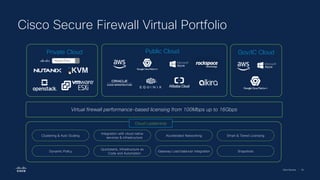
  • 99.
    Cisco Security |105 Cisco Secure Firewall Essentials Best Practice - How to – One pagers The Secure Firewall Essentials Hub is where users will find comprehensive guides, documentation, videos, and more on Cisco Secure Firewall Solutions. • 22,000+ views • 9,300+ active users on the site Public Information
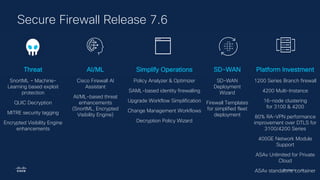
  • 100.
    Cisco Security |106 Secure Firewall Developer The Secure Firewall Developer Hub offers Cloud templates to help users deploy firewalls in their preferred cloud provider environment, and Automation APIs which allow the exchange of security events, data and host information. As of last quarter we have: • FMC Terraform provider to version 1.2.0 - https://registry.terraform.io/providers/CiscoDevNet/f mc/latest • FMC Ansible Collection to 0.9.0 - https://galaxy.ansible.com/cisco/fmcansible • Newly Validated Templates for Cloud Providers - https://github.com/CiscoDevNet/secure-firewall Public Information