Check Point Kernel Debugging, In-Depth
John Petrucci
July 2013
Rev. 3 – February 2015
© 2012 FishNet Security Inc. All rights reserved.
© 2013 FishNet Security Inc. All rights reserved.
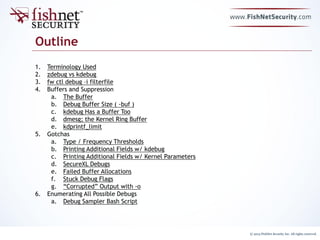
Outline
1. Terminology Used
2. zdebug vs kdebug
3. fw ctl debug –i filterfile
4. Buffers and Suppression
a. The Buffer
b. Debug Buffer Size ( -buf )
c. kdebug Has a Buffer Too
d. dmesg; the Kernel Ring Buffer
e. kdprintf_limit
5. Gotchas
a. Type / Frequency Thresholds
b. Printing Additional Fields w/ kdebug
c. Printing Additional Fields w/ Kernel Parameters
d. SecureXL Debugs
e. Failed Buffer Allocations
f. Stuck Debug Flags
g. “Corrupted” Output with -o
6. Enumerating All Possible Debugs
a. Debug Sampler Bash Script
© 2013 FishNet Security Inc. All rights reserved.
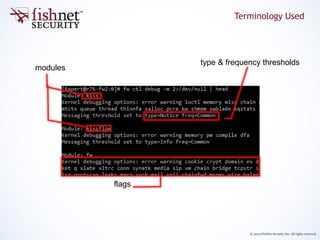
modules
type & frequency thresholds
flags
Terminology Used
© 2013 FishNet Security Inc. All rights reserved.
zdebug vs kdebug
© 2013 FishNet Security Inc. All rights reserved.
zdebug is intended for quick, transient debugging. It is typically used when
you plan to review the output immediately such as while in a remote session
with a client and looking for something specific like a rulebase drop.
zdebug is a shortcut which automatically:
1. sets the buffer to 1MB
2. enables the selected flags
3. starts printing the debug buffer contents to the screen
4. resets the buffer and modules to the defaults when you’re finished
zdebug is limited in that you cannot:
• modify the buffer size
• specify type/frequency thresholds
• debug on flags from more than one module
• enable timestamps
zdebug vs kdebug
© 2013 FishNet Security Inc. All rights reserved.
kdebug requires a bit more setup work, but can do much more:
• Set any combination of module and flags
• Display second or microsecond timestamps
• Create a cyclic set of files to keep disk space from being consumed (e.g.
debug.0, debug.1, …, debug.n)
• Print additional “fields” (columns) of data (see Printing Additional Fields w/ kdebug)
Think of kdebug as a way to view the kernel message buffer. The actual
manipulation of what appears in the buffer; modules, flags, types, and
frequencies is done with `fw ctl debug`. In fact, as long as you set a buffer
first with `fw ctl debug` you can start viewing it with kdebug and manipulate
the modules and flags while kdebug is running.
kdebug can be used to view the messages on the console in realtime just like
zdebug, but it is more useful when we redirect the output to a file.
zdebug vs kdebug (cont.)
© 2013 FishNet Security Inc. All rights reserved.
Cyclic file creation is one of the most under-utilized features of kdebug. It can
be used so that a debug may be run for an extended period of time without
ever consuming too much disk space. You should still be wary of the CPU
overhead though, when asking a client to run a heavy debug during
production hours. To set up a cyclic kdebug use the syntax:
fw ctl kdebug –s <Size_of_each> –m <nuMber_rotations> -o <Output_name> -f
This is more resistant to file corruption and disk space exhaustion than using
a file descriptor redirect such as:
fw ctl kdebug –f > debug.out
An interesting and undocumented behavior is seen when the –s and –m are
omitted, but –o is still used to redirect the output. The output file will appear
to be corrupted, however it actually is encoded with additional data and can
be “played back” with ‘fw ctl kdebug –i <file>’. You can then switch
timestamps on and off, and toggle –p data display during the playback instead
of during the collection.
In practice there is little reason for using –i in this way, but if you receive a
debug which appears corrupted in your text editor this might be the reason.
zdebug vs kdebug (cont.)
© 2013 FishNet Security Inc. All rights reserved.
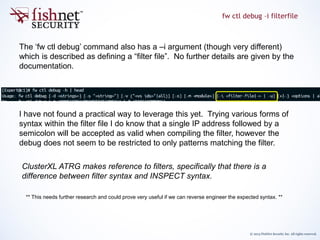
The ‘fw ctl debug’ command also has a –i argument (though very different)
which is described as defining a “filter file”. No further details are given by the
documentation.
I have not found a practical way to leverage this yet. Trying various forms of
syntax within the filter file I do know that a single IP address followed by a
semicolon will be accepted as valid when compiling the filter, however the
debug does not seem to be restricted to only patterns matching the filter.
fw ctl debug –i filterfile
** This needs further research and could prove very useful if we can reverse engineer the expected syntax. **
ClusterXL ATRG makes reference to filters, specifically that there is a
difference between filter syntax and INSPECT syntax.
© 2013 FishNet Security Inc. All rights reserved.
Buffers and Suppression
© 2013 FishNet Security Inc. All rights reserved.
When kdebug or zdebug is used to view the messages in the buffer or write
them to a file we introduce a bottleneck. The system must now put all of
these messages somewhere- and the hard drive / terminal read this data
much slower than the kernel spits them out.
The Buffer
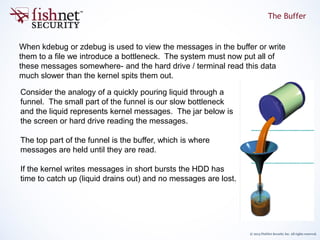
Consider the analogy of a quickly pouring liquid through a
funnel. The small part of the funnel is our slow bottleneck
and the liquid represents kernel messages. The jar below is
the screen or hard drive reading the messages.
The top part of the funnel is the buffer, which is where
messages are held until they are read.
If the kernel writes messages in short bursts the HDD has
time to catch up (liquid drains out) and no messages are lost.
© 2013 FishNet Security Inc. All rights reserved.
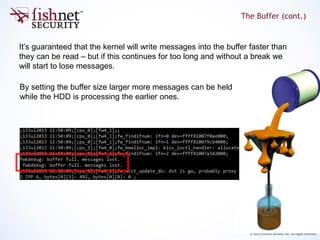
It’s guaranteed that the kernel will write messages into the buffer faster than
they can be read – but if this continues for too long and without a break we
will start to lose messages.
The Buffer (cont.)
By setting the buffer size larger more messages can be held
while the HDD is processing the earlier ones.
© 2013 FishNet Security Inc. All rights reserved.
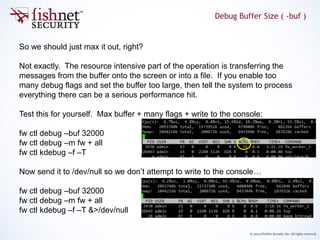
So we should just max it out, right?
Not exactly. The resource intensive part of the operation is transferring the
messages from the buffer onto the screen or into a file. If you enable too
many debug flags and set the buffer too large, then tell the system to process
everything there can be a serious performance hit.
Test this for yourself. Max buffer + many flags + write to the console:
fw ctl debug –buf 32000
fw ctl debug –m fw + all
fw ctl kdebug –f –T
Now send it to /dev/null so we don’t attempt to write to the console…
fw ctl debug –buf 32000
fw ctl debug –m fw + all
fw ctl kdebug –f –T &>/dev/null
Debug Buffer Size ( -buf )
© 2013 FishNet Security Inc. All rights reserved.
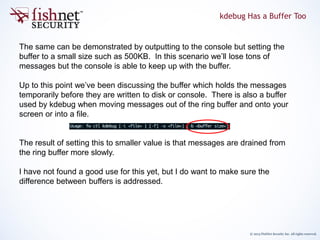
The same can be demonstrated by outputting to the console but setting the
buffer to a small size such as 500KB. In this scenario we’ll lose tons of
messages but the console is able to keep up with the buffer.
Up to this point we’ve been discussing the buffer which holds the messages
temporarily before they are written to disk or console. There is also a buffer
used by kdebug when moving messages out of the ring buffer and onto your
screen or into a file.
The result of setting this to smaller value is that messages are drained from
the ring buffer more slowly.
I have not found a good use for this yet, but I do want to make sure the
difference between buffers is addressed.
kdebug Has a Buffer Too
© 2013 FishNet Security Inc. All rights reserved.
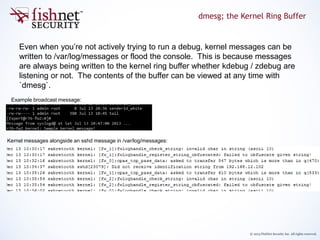
Even when you’re not actively trying to run a debug, kernel messages can be
written to /var/log/messages or flood the console. This is because messages
are always being written to the kernel ring buffer whether kdebug / zdebug are
listening or not. The contents of the buffer can be viewed at any time with
`dmesg`.
dmesg; the Kernel Ring Buffer
Example broadcast message:
Kernel messages alongside an sshd message in /var/log/messages:
© 2013 FishNet Security Inc. All rights reserved.
From the ring buffer, messages are typically picked up by the syslog and klog
daemons, and the buffer is cleared. The messages can then be redirected to
files, remote syslog servers, pipes and FIFOs, or flooded to every console.
kdprintf_limit
Operating in this mode, there are two kernel parameters for log suppression.
They are fw_kdprintf_limit and fw_kdprintf_limit_time, and their job is to
prevent excessive debug messages when we’re not actively trying to debug.
/var/log/messages
remote syslog
FIFOs / console flood
Flow: No active debug running
© 2013 FishNet Security Inc. All rights reserved.
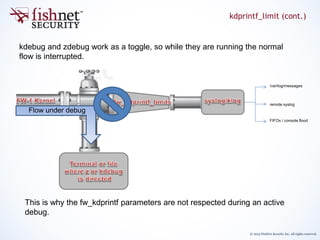
kdebug and zdebug work as a toggle, so while they are running the normal
flow is interrupted.
kdprintf_limit (cont.)
This is why the fw_kdprintf parameters are not respected during an active
debug.
/var/log/messages
remote syslog
FIFOs / console flood
Flow under debug
© 2013 FishNet Security Inc. All rights reserved.
Gotchas
© 2013 FishNet Security Inc. All rights reserved.
Type and frequency thresholds are not documented very well. They are a
means to control debug verbosity, but similar to the user space
“TDERROR_ALL_ALL=[1-5]”, the impact is arbitrary. Unless we know that a
particular message only appears at a higher “type” it is best to leave these at
the most verbose setting. As of the time of this writing the available levels are
as follows:
Type / Frequency Thresholds
Type Frequency
INFO COMMON
NOTICE RARE
WRN
ERR
NONE
Careful! Unlike all other levels of “type”, when NONE is set there is no feedback printed to
the console to warn you that your debug will be empty.
Type and frequency are changed with `fw ctl debug -t <type> -f <freq>`.
© 2013 FishNet Security Inc. All rights reserved.
kdebug accepts an optional argument “[-p fld1[,fld2..]” which can be used to
further control fields that get printed.
This is the only exception to the earlier statement*;
“Think of kdebug as a way to view the kernel message buffer. The actual manipulation of what
appears in the buffer; modules, flags, types, and frequencies is done with `fw ctl debug`”
The contextual help shows all possible values for -p:
Among these is a “type” and “freq”, which can be leveraged to find at which
threshold a known message exists.
Printing Additional Fields w/ kdebug
© 2013 FishNet Security Inc. All rights reserved.
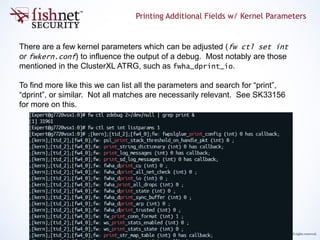
There are a few kernel parameters which can be adjusted (fw ctl set int
or fwkern.conf) to influence the output of a debug. Most notably are those
mentioned in the ClusterXL ATRG, such as fwha_dprint_io.
To find more like this we can list all the parameters and search for “print”,
“dprint”, or similar. Not all matches are necessarily relevant. See SK33156
for more on this.
Printing Additional Fields w/ Kernel Parameters
© 2013 FishNet Security Inc. All rights reserved.
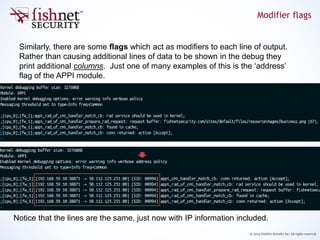
Similarly, there are some flags which act as modifiers to each line of output.
Rather than causing additional lines of data to be shown in the debug they
print additional columns. Just one of many examples of this is the ‘address’
flag of the APPI module.
Modifier flags
Notice that the lines are the same, just now with IP information included.
© 2013 FishNet Security Inc. All rights reserved.
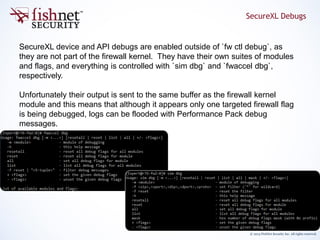
SecureXL device and API debugs are enabled outside of `fw ctl debug`, as
they are not part of the firewall kernel. They have their own suites of modules
and flags, and everything is controlled with `sim dbg` and `fwaccel dbg`,
respectively.
Unfortunately their output is sent to the same buffer as the firewall kernel
module and this means that although it appears only one targeted firewall flag
is being debugged, logs can be flooded with Performance Pack debug
messages.
SecureXL Debugs
© 2013 FishNet Security Inc. All rights reserved.
If the kernel has no spare memory available you might encounter an error
when trying to set the buffer with `fw ctl debug –buf <number>`, such as:
FW-1: Failed to allocate debugging buffer (<number>K)
This issue is described in sk41862, but essentially the kernel cannot spare
any additional memory and a reboot will be required to allocate that amount of
memory. This issue is indicative of a larger memory issue.
After rebooting you should be able to immediately allocate the maximum
amount of memory to the debug buffer and nothing else will be able to ‘steal’ it
away.
Failed Buffer Allocations
© 2013 FishNet Security Inc. All rights reserved.
There is a known issue in R77.10 described in sk98625, where the translation
from the user space commands to the kernel are not correctly parsed on a
system using CoreXL.
If the command to set or unset a module & flag does not contain a +/- symbol
it may not be applied to FW workers except for fw_worker_0.
Stuck Debug Flags
© 2013 FishNet Security Inc. All rights reserved.
Practical Use
© 2013 FishNet Security Inc. All rights reserved.
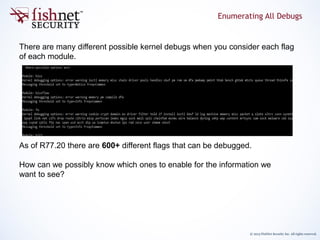
There are many different possible kernel debugs when you consider each flag
of each module.
As of R77.20 there are 600+ different flags that can be debugged.
How can we possibly know which ones to enable for the information we
want to see?
Enumerating All Debugs
© 2013 FishNet Security Inc. All rights reserved.
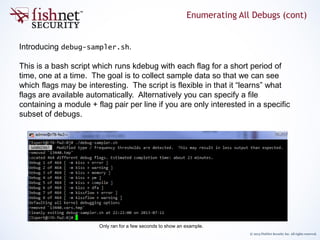
Introducing debug-sampler.sh.
This is a bash script which runs kdebug with each flag for a short period of
time, one at a time. The goal is to collect sample data so that we can see
which flags may be interesting. The script is flexible in that it “learns” what
flags are available automatically. Alternatively you can specify a file
containing a module + flag pair per line if you are only interested in a specific
subset of debugs.
Only ran for a few seconds to show an example.
Enumerating All Debugs (cont)
© 2013 FishNet Security Inc. All rights reserved.
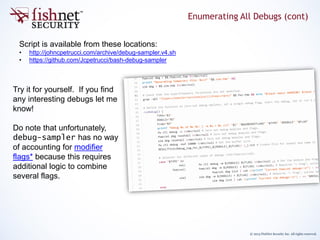
Script is available from these locations:
• http://johncpetrucci.com/archive/debug-sampler.v4.sh
• https://github.com/Jcpetrucci/bash-debug-sampler
Try it for yourself. If you find
any interesting debugs let me
know!
Do note that unfortunately,
debug-sampler has no way
of accounting for modifier
flags* because this requires
additional logic to combine
several flags.
Enumerating All Debugs (cont)

Check Point - Advanced Kernel Debug

  • 1.
    Check Point KernelDebugging, In-Depth John Petrucci July 2013 Rev. 3 – February 2015
  • 2.
    © 2012 FishNetSecurity Inc. All rights reserved. © 2013 FishNet Security Inc. All rights reserved. Outline 1. Terminology Used 2. zdebug vs kdebug 3. fw ctl debug –i filterfile 4. Buffers and Suppression a. The Buffer b. Debug Buffer Size ( -buf ) c. kdebug Has a Buffer Too d. dmesg; the Kernel Ring Buffer e. kdprintf_limit 5. Gotchas a. Type / Frequency Thresholds b. Printing Additional Fields w/ kdebug c. Printing Additional Fields w/ Kernel Parameters d. SecureXL Debugs e. Failed Buffer Allocations f. Stuck Debug Flags g. “Corrupted” Output with -o 6. Enumerating All Possible Debugs a. Debug Sampler Bash Script
  • 3.
    © 2013 FishNetSecurity Inc. All rights reserved. modules type & frequency thresholds flags Terminology Used
  • 4.
    © 2013 FishNetSecurity Inc. All rights reserved. zdebug vs kdebug
  • 5.
    © 2013 FishNetSecurity Inc. All rights reserved. zdebug is intended for quick, transient debugging. It is typically used when you plan to review the output immediately such as while in a remote session with a client and looking for something specific like a rulebase drop. zdebug is a shortcut which automatically: 1. sets the buffer to 1MB 2. enables the selected flags 3. starts printing the debug buffer contents to the screen 4. resets the buffer and modules to the defaults when you’re finished zdebug is limited in that you cannot: • modify the buffer size • specify type/frequency thresholds • debug on flags from more than one module • enable timestamps zdebug vs kdebug
  • 6.
    © 2013 FishNetSecurity Inc. All rights reserved. kdebug requires a bit more setup work, but can do much more: • Set any combination of module and flags • Display second or microsecond timestamps • Create a cyclic set of files to keep disk space from being consumed (e.g. debug.0, debug.1, …, debug.n) • Print additional “fields” (columns) of data (see Printing Additional Fields w/ kdebug) Think of kdebug as a way to view the kernel message buffer. The actual manipulation of what appears in the buffer; modules, flags, types, and frequencies is done with `fw ctl debug`. In fact, as long as you set a buffer first with `fw ctl debug` you can start viewing it with kdebug and manipulate the modules and flags while kdebug is running. kdebug can be used to view the messages on the console in realtime just like zdebug, but it is more useful when we redirect the output to a file. zdebug vs kdebug (cont.)
  • 7.
    © 2013 FishNetSecurity Inc. All rights reserved. Cyclic file creation is one of the most under-utilized features of kdebug. It can be used so that a debug may be run for an extended period of time without ever consuming too much disk space. You should still be wary of the CPU overhead though, when asking a client to run a heavy debug during production hours. To set up a cyclic kdebug use the syntax: fw ctl kdebug –s <Size_of_each> –m <nuMber_rotations> -o <Output_name> -f This is more resistant to file corruption and disk space exhaustion than using a file descriptor redirect such as: fw ctl kdebug –f > debug.out An interesting and undocumented behavior is seen when the –s and –m are omitted, but –o is still used to redirect the output. The output file will appear to be corrupted, however it actually is encoded with additional data and can be “played back” with ‘fw ctl kdebug –i <file>’. You can then switch timestamps on and off, and toggle –p data display during the playback instead of during the collection. In practice there is little reason for using –i in this way, but if you receive a debug which appears corrupted in your text editor this might be the reason. zdebug vs kdebug (cont.)
  • 8.
    © 2013 FishNetSecurity Inc. All rights reserved. The ‘fw ctl debug’ command also has a –i argument (though very different) which is described as defining a “filter file”. No further details are given by the documentation. I have not found a practical way to leverage this yet. Trying various forms of syntax within the filter file I do know that a single IP address followed by a semicolon will be accepted as valid when compiling the filter, however the debug does not seem to be restricted to only patterns matching the filter. fw ctl debug –i filterfile ** This needs further research and could prove very useful if we can reverse engineer the expected syntax. ** ClusterXL ATRG makes reference to filters, specifically that there is a difference between filter syntax and INSPECT syntax.
  • 9.
    © 2013 FishNetSecurity Inc. All rights reserved. Buffers and Suppression
  • 10.
    © 2013 FishNetSecurity Inc. All rights reserved. When kdebug or zdebug is used to view the messages in the buffer or write them to a file we introduce a bottleneck. The system must now put all of these messages somewhere- and the hard drive / terminal read this data much slower than the kernel spits them out. The Buffer Consider the analogy of a quickly pouring liquid through a funnel. The small part of the funnel is our slow bottleneck and the liquid represents kernel messages. The jar below is the screen or hard drive reading the messages. The top part of the funnel is the buffer, which is where messages are held until they are read. If the kernel writes messages in short bursts the HDD has time to catch up (liquid drains out) and no messages are lost.
  • 11.
    © 2013 FishNetSecurity Inc. All rights reserved. It’s guaranteed that the kernel will write messages into the buffer faster than they can be read – but if this continues for too long and without a break we will start to lose messages. The Buffer (cont.) By setting the buffer size larger more messages can be held while the HDD is processing the earlier ones.
  • 12.
    © 2013 FishNetSecurity Inc. All rights reserved. So we should just max it out, right? Not exactly. The resource intensive part of the operation is transferring the messages from the buffer onto the screen or into a file. If you enable too many debug flags and set the buffer too large, then tell the system to process everything there can be a serious performance hit. Test this for yourself. Max buffer + many flags + write to the console: fw ctl debug –buf 32000 fw ctl debug –m fw + all fw ctl kdebug –f –T Now send it to /dev/null so we don’t attempt to write to the console… fw ctl debug –buf 32000 fw ctl debug –m fw + all fw ctl kdebug –f –T &>/dev/null Debug Buffer Size ( -buf )
  • 13.
    © 2013 FishNetSecurity Inc. All rights reserved. The same can be demonstrated by outputting to the console but setting the buffer to a small size such as 500KB. In this scenario we’ll lose tons of messages but the console is able to keep up with the buffer. Up to this point we’ve been discussing the buffer which holds the messages temporarily before they are written to disk or console. There is also a buffer used by kdebug when moving messages out of the ring buffer and onto your screen or into a file. The result of setting this to smaller value is that messages are drained from the ring buffer more slowly. I have not found a good use for this yet, but I do want to make sure the difference between buffers is addressed. kdebug Has a Buffer Too
  • 14.
    © 2013 FishNetSecurity Inc. All rights reserved. Even when you’re not actively trying to run a debug, kernel messages can be written to /var/log/messages or flood the console. This is because messages are always being written to the kernel ring buffer whether kdebug / zdebug are listening or not. The contents of the buffer can be viewed at any time with `dmesg`. dmesg; the Kernel Ring Buffer Example broadcast message: Kernel messages alongside an sshd message in /var/log/messages:
  • 15.
    © 2013 FishNetSecurity Inc. All rights reserved. From the ring buffer, messages are typically picked up by the syslog and klog daemons, and the buffer is cleared. The messages can then be redirected to files, remote syslog servers, pipes and FIFOs, or flooded to every console. kdprintf_limit Operating in this mode, there are two kernel parameters for log suppression. They are fw_kdprintf_limit and fw_kdprintf_limit_time, and their job is to prevent excessive debug messages when we’re not actively trying to debug. /var/log/messages remote syslog FIFOs / console flood Flow: No active debug running
  • 16.
    © 2013 FishNetSecurity Inc. All rights reserved. kdebug and zdebug work as a toggle, so while they are running the normal flow is interrupted. kdprintf_limit (cont.) This is why the fw_kdprintf parameters are not respected during an active debug. /var/log/messages remote syslog FIFOs / console flood Flow under debug
  • 17.
    © 2013 FishNetSecurity Inc. All rights reserved. Gotchas
  • 18.
    © 2013 FishNetSecurity Inc. All rights reserved. Type and frequency thresholds are not documented very well. They are a means to control debug verbosity, but similar to the user space “TDERROR_ALL_ALL=[1-5]”, the impact is arbitrary. Unless we know that a particular message only appears at a higher “type” it is best to leave these at the most verbose setting. As of the time of this writing the available levels are as follows: Type / Frequency Thresholds Type Frequency INFO COMMON NOTICE RARE WRN ERR NONE Careful! Unlike all other levels of “type”, when NONE is set there is no feedback printed to the console to warn you that your debug will be empty. Type and frequency are changed with `fw ctl debug -t <type> -f <freq>`.
  • 19.
    © 2013 FishNetSecurity Inc. All rights reserved. kdebug accepts an optional argument “[-p fld1[,fld2..]” which can be used to further control fields that get printed. This is the only exception to the earlier statement*; “Think of kdebug as a way to view the kernel message buffer. The actual manipulation of what appears in the buffer; modules, flags, types, and frequencies is done with `fw ctl debug`” The contextual help shows all possible values for -p: Among these is a “type” and “freq”, which can be leveraged to find at which threshold a known message exists. Printing Additional Fields w/ kdebug
  • 20.
    © 2013 FishNetSecurity Inc. All rights reserved. There are a few kernel parameters which can be adjusted (fw ctl set int or fwkern.conf) to influence the output of a debug. Most notably are those mentioned in the ClusterXL ATRG, such as fwha_dprint_io. To find more like this we can list all the parameters and search for “print”, “dprint”, or similar. Not all matches are necessarily relevant. See SK33156 for more on this. Printing Additional Fields w/ Kernel Parameters
  • 21.
    © 2013 FishNetSecurity Inc. All rights reserved. Similarly, there are some flags which act as modifiers to each line of output. Rather than causing additional lines of data to be shown in the debug they print additional columns. Just one of many examples of this is the ‘address’ flag of the APPI module. Modifier flags Notice that the lines are the same, just now with IP information included.
  • 22.
    © 2013 FishNetSecurity Inc. All rights reserved. SecureXL device and API debugs are enabled outside of `fw ctl debug`, as they are not part of the firewall kernel. They have their own suites of modules and flags, and everything is controlled with `sim dbg` and `fwaccel dbg`, respectively. Unfortunately their output is sent to the same buffer as the firewall kernel module and this means that although it appears only one targeted firewall flag is being debugged, logs can be flooded with Performance Pack debug messages. SecureXL Debugs
  • 23.
    © 2013 FishNetSecurity Inc. All rights reserved. If the kernel has no spare memory available you might encounter an error when trying to set the buffer with `fw ctl debug –buf <number>`, such as: FW-1: Failed to allocate debugging buffer (<number>K) This issue is described in sk41862, but essentially the kernel cannot spare any additional memory and a reboot will be required to allocate that amount of memory. This issue is indicative of a larger memory issue. After rebooting you should be able to immediately allocate the maximum amount of memory to the debug buffer and nothing else will be able to ‘steal’ it away. Failed Buffer Allocations
  • 24.
    © 2013 FishNetSecurity Inc. All rights reserved. There is a known issue in R77.10 described in sk98625, where the translation from the user space commands to the kernel are not correctly parsed on a system using CoreXL. If the command to set or unset a module & flag does not contain a +/- symbol it may not be applied to FW workers except for fw_worker_0. Stuck Debug Flags
  • 25.
    © 2013 FishNetSecurity Inc. All rights reserved. Practical Use
  • 26.
    © 2013 FishNetSecurity Inc. All rights reserved. There are many different possible kernel debugs when you consider each flag of each module. As of R77.20 there are 600+ different flags that can be debugged. How can we possibly know which ones to enable for the information we want to see? Enumerating All Debugs
  • 27.
    © 2013 FishNetSecurity Inc. All rights reserved. Introducing debug-sampler.sh. This is a bash script which runs kdebug with each flag for a short period of time, one at a time. The goal is to collect sample data so that we can see which flags may be interesting. The script is flexible in that it “learns” what flags are available automatically. Alternatively you can specify a file containing a module + flag pair per line if you are only interested in a specific subset of debugs. Only ran for a few seconds to show an example. Enumerating All Debugs (cont)
  • 28.
    © 2013 FishNetSecurity Inc. All rights reserved. Script is available from these locations: • http://johncpetrucci.com/archive/debug-sampler.v4.sh • https://github.com/Jcpetrucci/bash-debug-sampler Try it for yourself. If you find any interesting debugs let me know! Do note that unfortunately, debug-sampler has no way of accounting for modifier flags* because this requires additional logic to combine several flags. Enumerating All Debugs (cont)