1
Unit 2
Python Operators and Control flow
Statements
2
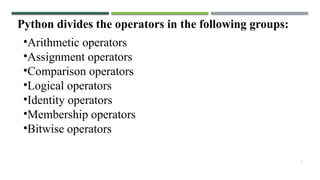
Python divides the operators in the following groups:
‱Arithmetic operators
‱Assignment operators
‱Comparison operators
‱Logical operators
‱Identity operators
‱Membership operators
‱Bitwise operators
3
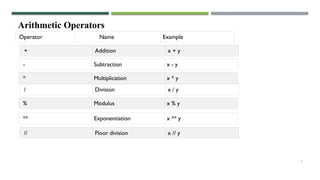
Arithmetic Operators
Operator Name Example
+ Addition x + y
- Subtraction x - y
* Multiplication x * y
/ Division x / y
% Modulus x % y
** Exponentiation x ** y
// Floor division x // y
4
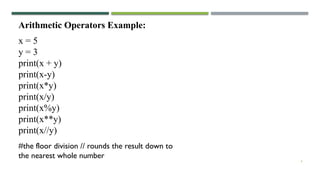
#the floor division // rounds the result down to
the nearest whole number
x = 5
y = 3
print(x + y)
print(x-y)
print(x*y)
print(x/y)
print(x%y)
print(x**y)
print(x//y)
Arithmetic Operators Example:
5
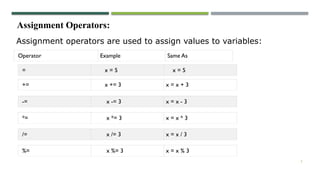
Assignment Operators:
Assignment operators are used to assign values to variables:
Operator Example Same As
= x = 5 x = 5
+= x += 3 x = x + 3
-= x -= 3 x = x - 3
*= x *= 3 x = x * 3
/= x /= 3 x = x / 3
%= x %= 3 x = x % 3
6
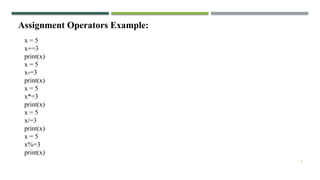
Assignment Operators Example:
x = 5
x+=3
print(x)
x = 5
x-=3
print(x)
x = 5
x*=3
print(x)
x = 5
x/=3
print(x)
x = 5
x%=3
print(x)
7
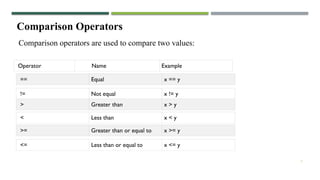
Comparison Operators
Operator Name Example
== Equal x == y
!= Not equal x != y
> Greater than x > y
< Less than x < y
>= Greater than or equal to x >= y
<= Less than or equal to x <= y
Comparison operators are used to compare two values:
8
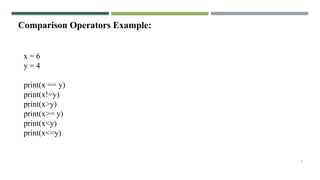
x = 6
y = 4
print(x == y)
print(x!=y)
print(x>y)
print(x>= y)
print(x<y)
print(x<=y)
Comparison Operators Example:
9
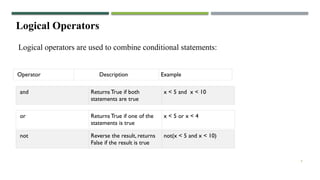
Logical Operators
Operator Description Example
and Returns True if both
statements are true
x < 5 and x < 10
or Returns True if one of the
statements is true
x < 5 or x < 4
not Reverse the result, returns
False if the result is true
not(x < 5 and x < 10)
Logical operators are used to combine conditional statements:
10
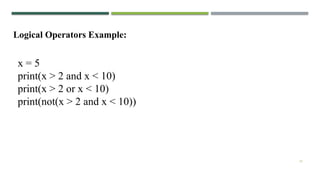
x = 5
print(x > 2 and x < 10)
print(x > 2 or x < 10)
print(not(x > 2 and x < 10))
Logical Operators Example:
11
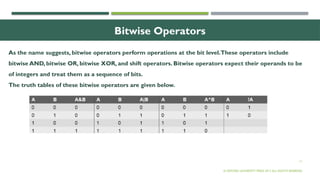
Bitwise Operators
© OXFORD UNIVERSITY PRESS 2017.ALL RIGHTS RESERVED.
As the name suggests, bitwise operators perform operations at the bit level.These operators include
bitwise AND, bitwise OR, bitwise XOR, and shift operators. Bitwise operators expect their operands to be
of integers and treat them as a sequence of bits.
The truth tables of these bitwise operators are given below.
12
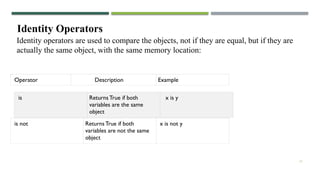
Identity Operators
Operator Description Example
is Returns True if both
variables are the same
object
x is y
is not Returns True if both
variables are not the same
object
x is not y
Identity operators are used to compare the objects, not if they are equal, but if they are
actually the same object, with the same memory location:
13
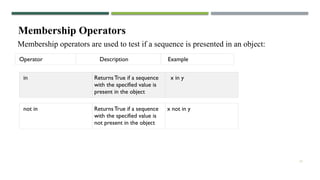
Membership Operators
Membership operators are used to test if a sequence is presented in an object:
Operator Description Example
in Returns True if a sequence
with the specified value is
present in the object
x in y
not in Returns True if a sequence
with the specified value is
not present in the object
x not in y
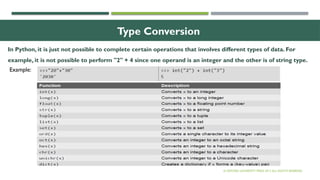
Type Conversion
In Python, it is just not possible to complete certain operations that involves different types of data. For
example, it is not possible to perform "2" + 4 since one operand is an integer and the other is of string type.
© OXFORD UNIVERSITY PRESS 2017.ALL RIGHTS RESERVED.
Example:
15
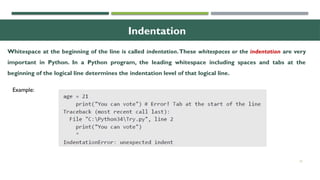
Indentation
Whitespace at the beginning of the line is called indentation.These whitespaces or the indentation are very
important in Python. In a Python program, the leading whitespace including spaces and tabs at the
beginning of the logical line determines the indentation level of that logical line.
Example:
16
Conditional Statements
CONDITIONAL EXECUTION (IF
)
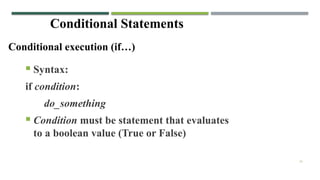
Conditional execution (if
)
ï‚Ą Syntax:
if condition:
do_something
ï‚Ą Condition must be statement that evaluates
to a boolean value (True or False)
17
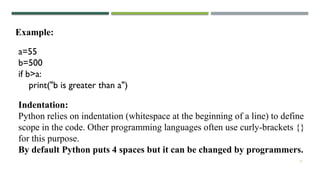
Example:
Indentation:
Python relies on indentation (whitespace at the beginning of a line) to define
scope in the code. Other programming languages often use curly-brackets {}
for this purpose.
By default Python puts 4 spaces but it can be changed by programmers.
a=55
b=500
if b>a:
print("b is greater than a")
18
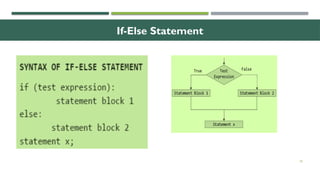
If-Else Statement
19
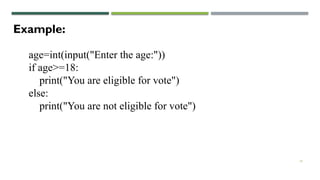
Example:
age=int(input("Enter the age:"))
if age>=18:
print("You are eligible for vote")
else:
print("You are not eligible for vote")
20
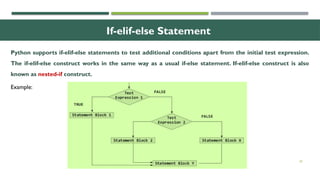
If-elif-else Statement
Python supports if-elif-else statements to test additional conditions apart from the initial test expression.
The if-elif-else construct works in the same way as a usual if-else statement. If-elif-else construct is also
known as nested-if construct.
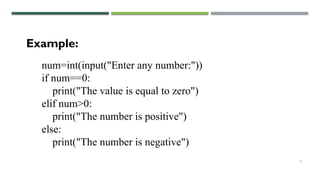
Example:
21
num=int(input("Enter any number:"))
if num==0:
print("The value is equal to zero")
elif num>0:
print("The number is positive")
else:
print("The number is negative")
Example:
22
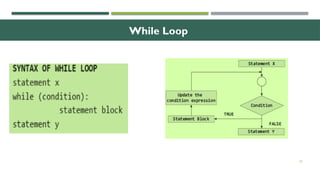
While Loop
23
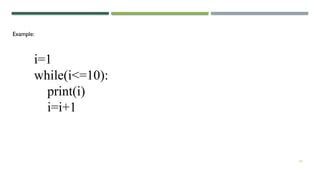
Example:
i=1
while(i<=10):
print(i)
i=i+1
24
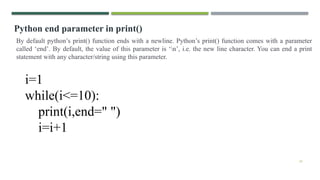
Python end parameter in print()
By default python’s print() function ends with a newline. Python’s print() function comes with a parameter
called ‘end’. By default, the value of this parameter is ‘n’, i.e. the new line character. You can end a print
statement with any character/string using this parameter.
i=1
while(i<=10):
print(i,end=" ")
i=i+1
25
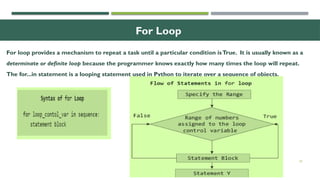
For Loop
For loop provides a mechanism to repeat a task until a particular condition isTrue. It is usually known as a
determinate or definite loop because the programmer knows exactly how many times the loop will repeat.
The for...in statement is a looping statement used in Python to iterate over a sequence of objects.
26
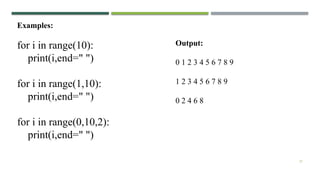
For Loop and Range() Function
The range() function is a built-in function in Python that is used to iterate over a sequence of numbers.The
syntax of range() is range(beg, end, [step])
The range() produces a sequence of numbers starting with beg (inclusive) and ending with one less than the
number end.The step argument is option (that is why it is placed in brackets). By default, every number in
the range is incremented by 1 but we can specify a different increment using step. It can be both negative and
positive, but not zero.
If range() function is given a single argument, it produces an object with values from 0 to argument-1. For
example: range(10) is equal to writing range(0, 10).
‱ If range() is called with two arguments, it produces values from the first to the second. For example,
range(0,10).
‱ If range() has three arguments then the third argument specifies the interval of the sequence produced.
In this case, the third argument must be an integer. For example, range(1,20,3).
27
Examples:
for i in range(10):
print(i,end=" ")
for i in range(1,10):
print(i,end=" ")
for i in range(0,10,2):
print(i,end=" ")
Output:
0 1 2 3 4 5 6 7 8 9
1 2 3 4 5 6 7 8 9
0 2 4 6 8
28
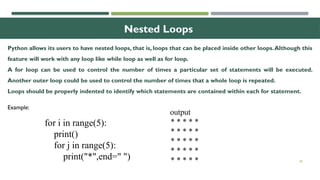
Nested Loops
Python allows its users to have nested loops, that is, loops that can be placed inside other loops.Although this
feature will work with any loop like while loop as well as for loop.
A for loop can be used to control the number of times a particular set of statements will be executed.
Another outer loop could be used to control the number of times that a whole loop is repeated.
Loops should be properly indented to identify which statements are contained within each for statement.
Example:
for i in range(5):
print()
for j in range(5):
print("*",end=" ")
output
* * * * *
* * * * *
* * * * *
* * * * *
* * * * *
29
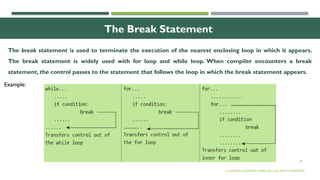
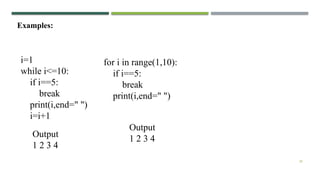
The Break Statement
© OXFORD UNIVERSITY PRESS 2017.ALL RIGHTS RESERVED.
The break statement is used to terminate the execution of the nearest enclosing loop in which it appears.
The break statement is widely used with for loop and while loop. When compiler encounters a break
statement, the control passes to the statement that follows the loop in which the break statement appears.
Example:
30
Examples:
i=1
while i<=10:
if i==5:
break
print(i,end=" ")
i=i+1
Output
1 2 3 4
for i in range(1,10):
if i==5:
break
print(i,end=" ")
Output
1 2 3 4
31
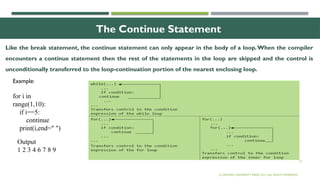
The Continue Statement
© OXFORD UNIVERSITY PRESS 2017.ALL RIGHTS RESERVED.
Like the break statement, the continue statement can only appear in the body of a loop.When the compiler
encounters a continue statement then the rest of the statements in the loop are skipped and the control is
unconditionally transferred to the loop-continuation portion of the nearest enclosing loop.
Example:
for i in
range(1,10):
if i==5:
continue
print(i,end=" ")
Output
1 2 3 4 6 7 8 9
32
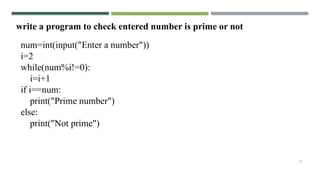
write a program to check entered number is prime or not
num=int(input("Enter a number"))
i=2
while(num%i!=0):
i=i+1
if i==num:
print("Prime number")
else:
print("Not prime")
33
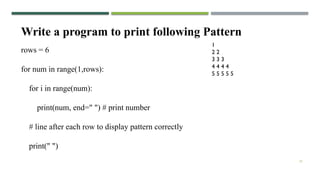
Write a program to print following Pattern
1
2 2
3 3 3
4 4 4 4
5 5 5 5 5
rows = 6
for num in range(1,rows):
for i in range(num):
print(num, end=" ") # print number
# line after each row to display pattern correctly
print(" ")
34
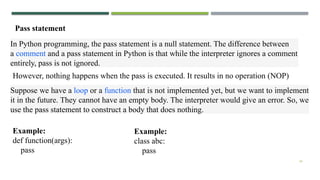
Pass statement
In Python programming, the pass statement is a null statement. The difference between
a comment and a pass statement in Python is that while the interpreter ignores a comment
entirely, pass is not ignored.
However, nothing happens when the pass is executed. It results in no operation (NOP)
Suppose we have a loop or a function that is not implemented yet, but we want to implement
it in the future. They cannot have an empty body. The interpreter would give an error. So, we
use the pass statement to construct a body that does nothing.
Example:
def function(args):
pass
Example:
class abc:
pass

Chapter 2-Python and control flow statement.pptx

  • 1.
    1 Unit 2 Python Operatorsand Control flow Statements
  • 2.
    2 Python divides theoperators in the following groups: ‱Arithmetic operators ‱Assignment operators ‱Comparison operators ‱Logical operators ‱Identity operators ‱Membership operators ‱Bitwise operators
  • 3.
    3 Arithmetic Operators Operator NameExample + Addition x + y - Subtraction x - y * Multiplication x * y / Division x / y % Modulus x % y ** Exponentiation x ** y // Floor division x // y
  • 4.
    4 #the floor division// rounds the result down to the nearest whole number x = 5 y = 3 print(x + y) print(x-y) print(x*y) print(x/y) print(x%y) print(x**y) print(x//y) Arithmetic Operators Example:
  • 5.
    5 Assignment Operators: Assignment operatorsare used to assign values to variables: Operator Example Same As = x = 5 x = 5 += x += 3 x = x + 3 -= x -= 3 x = x - 3 *= x *= 3 x = x * 3 /= x /= 3 x = x / 3 %= x %= 3 x = x % 3
  • 6.
    6 Assignment Operators Example: x= 5 x+=3 print(x) x = 5 x-=3 print(x) x = 5 x*=3 print(x) x = 5 x/=3 print(x) x = 5 x%=3 print(x)
  • 7.
    7 Comparison Operators Operator NameExample == Equal x == y != Not equal x != y > Greater than x > y < Less than x < y >= Greater than or equal to x >= y <= Less than or equal to x <= y Comparison operators are used to compare two values:
  • 8.
    8 x = 6 y= 4 print(x == y) print(x!=y) print(x>y) print(x>= y) print(x<y) print(x<=y) Comparison Operators Example:
  • 9.
    9 Logical Operators Operator DescriptionExample and Returns True if both statements are true x < 5 and x < 10 or Returns True if one of the statements is true x < 5 or x < 4 not Reverse the result, returns False if the result is true not(x < 5 and x < 10) Logical operators are used to combine conditional statements:
  • 10.
    10 x = 5 print(x> 2 and x < 10) print(x > 2 or x < 10) print(not(x > 2 and x < 10)) Logical Operators Example:
  • 11.
    11 Bitwise Operators © OXFORDUNIVERSITY PRESS 2017.ALL RIGHTS RESERVED. As the name suggests, bitwise operators perform operations at the bit level.These operators include bitwise AND, bitwise OR, bitwise XOR, and shift operators. Bitwise operators expect their operands to be of integers and treat them as a sequence of bits. The truth tables of these bitwise operators are given below.
  • 12.
    12 Identity Operators Operator DescriptionExample is Returns True if both variables are the same object x is y is not Returns True if both variables are not the same object x is not y Identity operators are used to compare the objects, not if they are equal, but if they are actually the same object, with the same memory location:
  • 13.
    13 Membership Operators Membership operatorsare used to test if a sequence is presented in an object: Operator Description Example in Returns True if a sequence with the specified value is present in the object x in y not in Returns True if a sequence with the specified value is not present in the object x not in y
  • 14.
    Type Conversion In Python,it is just not possible to complete certain operations that involves different types of data. For example, it is not possible to perform "2" + 4 since one operand is an integer and the other is of string type. © OXFORD UNIVERSITY PRESS 2017.ALL RIGHTS RESERVED. Example:
  • 15.
    15 Indentation Whitespace at thebeginning of the line is called indentation.These whitespaces or the indentation are very important in Python. In a Python program, the leading whitespace including spaces and tabs at the beginning of the logical line determines the indentation level of that logical line. Example:
  • 16.
    16 Conditional Statements CONDITIONAL EXECUTION(IF
) Conditional execution (if
) ï‚Ą Syntax: if condition: do_something ï‚Ą Condition must be statement that evaluates to a boolean value (True or False)
  • 17.
    17 Example: Indentation: Python relies onindentation (whitespace at the beginning of a line) to define scope in the code. Other programming languages often use curly-brackets {} for this purpose. By default Python puts 4 spaces but it can be changed by programmers. a=55 b=500 if b>a: print("b is greater than a")
  • 18.
  • 19.
    19 Example: age=int(input("Enter the age:")) ifage>=18: print("You are eligible for vote") else: print("You are not eligible for vote")
  • 20.
    20 If-elif-else Statement Python supportsif-elif-else statements to test additional conditions apart from the initial test expression. The if-elif-else construct works in the same way as a usual if-else statement. If-elif-else construct is also known as nested-if construct. Example:
  • 21.
    21 num=int(input("Enter any number:")) ifnum==0: print("The value is equal to zero") elif num>0: print("The number is positive") else: print("The number is negative") Example:
  • 22.
  • 23.
  • 24.
    24 Python end parameterin print() By default python’s print() function ends with a newline. Python’s print() function comes with a parameter called ‘end’. By default, the value of this parameter is ‘n’, i.e. the new line character. You can end a print statement with any character/string using this parameter. i=1 while(i<=10): print(i,end=" ") i=i+1
  • 25.
    25 For Loop For loopprovides a mechanism to repeat a task until a particular condition isTrue. It is usually known as a determinate or definite loop because the programmer knows exactly how many times the loop will repeat. The for...in statement is a looping statement used in Python to iterate over a sequence of objects.
  • 26.
    26 For Loop andRange() Function The range() function is a built-in function in Python that is used to iterate over a sequence of numbers.The syntax of range() is range(beg, end, [step]) The range() produces a sequence of numbers starting with beg (inclusive) and ending with one less than the number end.The step argument is option (that is why it is placed in brackets). By default, every number in the range is incremented by 1 but we can specify a different increment using step. It can be both negative and positive, but not zero. If range() function is given a single argument, it produces an object with values from 0 to argument-1. For example: range(10) is equal to writing range(0, 10). ‱ If range() is called with two arguments, it produces values from the first to the second. For example, range(0,10). ‱ If range() has three arguments then the third argument specifies the interval of the sequence produced. In this case, the third argument must be an integer. For example, range(1,20,3).
  • 27.
    27 Examples: for i inrange(10): print(i,end=" ") for i in range(1,10): print(i,end=" ") for i in range(0,10,2): print(i,end=" ") Output: 0 1 2 3 4 5 6 7 8 9 1 2 3 4 5 6 7 8 9 0 2 4 6 8
  • 28.
    28 Nested Loops Python allowsits users to have nested loops, that is, loops that can be placed inside other loops.Although this feature will work with any loop like while loop as well as for loop. A for loop can be used to control the number of times a particular set of statements will be executed. Another outer loop could be used to control the number of times that a whole loop is repeated. Loops should be properly indented to identify which statements are contained within each for statement. Example: for i in range(5): print() for j in range(5): print("*",end=" ") output * * * * * * * * * * * * * * * * * * * * * * * * *
  • 29.
    29 The Break Statement ©OXFORD UNIVERSITY PRESS 2017.ALL RIGHTS RESERVED. The break statement is used to terminate the execution of the nearest enclosing loop in which it appears. The break statement is widely used with for loop and while loop. When compiler encounters a break statement, the control passes to the statement that follows the loop in which the break statement appears. Example:
  • 30.
    30 Examples: i=1 while i<=10: if i==5: break print(i,end="") i=i+1 Output 1 2 3 4 for i in range(1,10): if i==5: break print(i,end=" ") Output 1 2 3 4
  • 31.
    31 The Continue Statement ©OXFORD UNIVERSITY PRESS 2017.ALL RIGHTS RESERVED. Like the break statement, the continue statement can only appear in the body of a loop.When the compiler encounters a continue statement then the rest of the statements in the loop are skipped and the control is unconditionally transferred to the loop-continuation portion of the nearest enclosing loop. Example: for i in range(1,10): if i==5: continue print(i,end=" ") Output 1 2 3 4 6 7 8 9
  • 32.
    32 write a programto check entered number is prime or not num=int(input("Enter a number")) i=2 while(num%i!=0): i=i+1 if i==num: print("Prime number") else: print("Not prime")
  • 33.
    33 Write a programto print following Pattern 1 2 2 3 3 3 4 4 4 4 5 5 5 5 5 rows = 6 for num in range(1,rows): for i in range(num): print(num, end=" ") # print number # line after each row to display pattern correctly print(" ")
  • 34.
    34 Pass statement In Pythonprogramming, the pass statement is a null statement. The difference between a comment and a pass statement in Python is that while the interpreter ignores a comment entirely, pass is not ignored. However, nothing happens when the pass is executed. It results in no operation (NOP) Suppose we have a loop or a function that is not implemented yet, but we want to implement it in the future. They cannot have an empty body. The interpreter would give an error. So, we use the pass statement to construct a body that does nothing. Example: def function(args): pass Example: class abc: pass