S
MEP
Channel Admin
Intro to MEP Admin: Section 1
Channel Admin: Getting Started
S The channel admin delivers
direct administrative access
to your brand’s Video
Content, User
Management, Ad
Management and Analytic
Reports.
S Use the admin to manage
video content, monitor
traffic, and collect user’s
feedback.
User Management
Super and Channel Admin Responsibilities
S Security and task management
are the key functions of User
Management
S Create new Admin Users and
grant access to the various
admin tools by checking
responsibilities in “Roles”
S Caution: granting Super Admin
access to everyone can result
in a too-many-cooks situation
Content Management
Content and Channel Admin Responsibilities
S Add multi-media content to your
Channel: Video, Documents,
Images and Links
S Upload your content, select
content “Type”, add a title, set
thumbnails and select a Publish
Date. Now it can be published into
your channel.
S To publish content click “Manage
Content”. Find your content by
title, click it. Then click “Publish”
Managing Content
View your uploaded content in list-form under Manage Content.
Activate, Deactivate or Queue channel content and get a
snapshot view of what is happening in your channel.
Comment Management
Moderator Responsibilities
S Review all comments on the
channel
S Approve or Deny comments
S Flag unruly behavior
S Collect user feedback and
monitor content engagement
Manage Comments, Moderator View
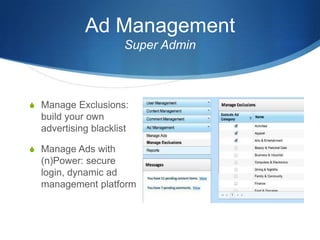
Ad Management
Super Admin
S Manage Exclusions:
build your own
advertising blacklist
S Manage Ads with
(n)Power: secure
login, dynamic ad
management platform
Reports
Financial Admin
S Get constantly updated
reports on your channel
activity
S Track video engagement
S Monitor user actions
End of Section 1: MEP Channel Admin
Next Section: Shake & Win Admin

Channel adminppt

  • 1.
    S MEP Channel Admin Intro toMEP Admin: Section 1
  • 2.
    Channel Admin: GettingStarted S The channel admin delivers direct administrative access to your brand’s Video Content, User Management, Ad Management and Analytic Reports. S Use the admin to manage video content, monitor traffic, and collect user’s feedback.
  • 3.
    User Management Super andChannel Admin Responsibilities S Security and task management are the key functions of User Management S Create new Admin Users and grant access to the various admin tools by checking responsibilities in “Roles” S Caution: granting Super Admin access to everyone can result in a too-many-cooks situation
  • 4.
    Content Management Content andChannel Admin Responsibilities S Add multi-media content to your Channel: Video, Documents, Images and Links S Upload your content, select content “Type”, add a title, set thumbnails and select a Publish Date. Now it can be published into your channel. S To publish content click “Manage Content”. Find your content by title, click it. Then click “Publish”
  • 5.
    Managing Content View youruploaded content in list-form under Manage Content. Activate, Deactivate or Queue channel content and get a snapshot view of what is happening in your channel.
  • 6.
    Comment Management Moderator Responsibilities SReview all comments on the channel S Approve or Deny comments S Flag unruly behavior S Collect user feedback and monitor content engagement
  • 7.
  • 8.
    Ad Management Super Admin SManage Exclusions: build your own advertising blacklist S Manage Ads with (n)Power: secure login, dynamic ad management platform
  • 9.
    Reports Financial Admin S Getconstantly updated reports on your channel activity S Track video engagement S Monitor user actions
  • 10.
    End of Section1: MEP Channel Admin Next Section: Shake & Win Admin