4. Deploying Applications & Cloud
Services
By Ashwini Satkar
Moving Applications to Cloud
 The process of moving applications from local to the cloud
environments is referred to as Migration.
 In this process all data and applications are transformed from a local
or on-premises data center to the cloud.
 Many cloud service providers used like Microsoft Azure, Google
Cloud Services, AmazonWeb Services etc.
 Reason:
1. To improve the operational performance
2. Flexibility, workload scalability and security of application as well
as data.
3. Cost effective solution and clarify business goals
What is Cloud Migration?
On-premises to cloud migration process :
Every business starting from small to large organizations follows slightly different process for
cloud migration. Some of the common elements which are considered before cloud
migration are:
1. Evaluation of requirement and performance
2. Selection of cloud provider
3. Calculation of operational costs
 Cloud migration is the process of moving data, applications or other business
elements to a cloud computing environment.
 Cloud Migration is a transformation from old traditional business operations
to digital business operations and the process refers to moving the digital business
operations to cloud.
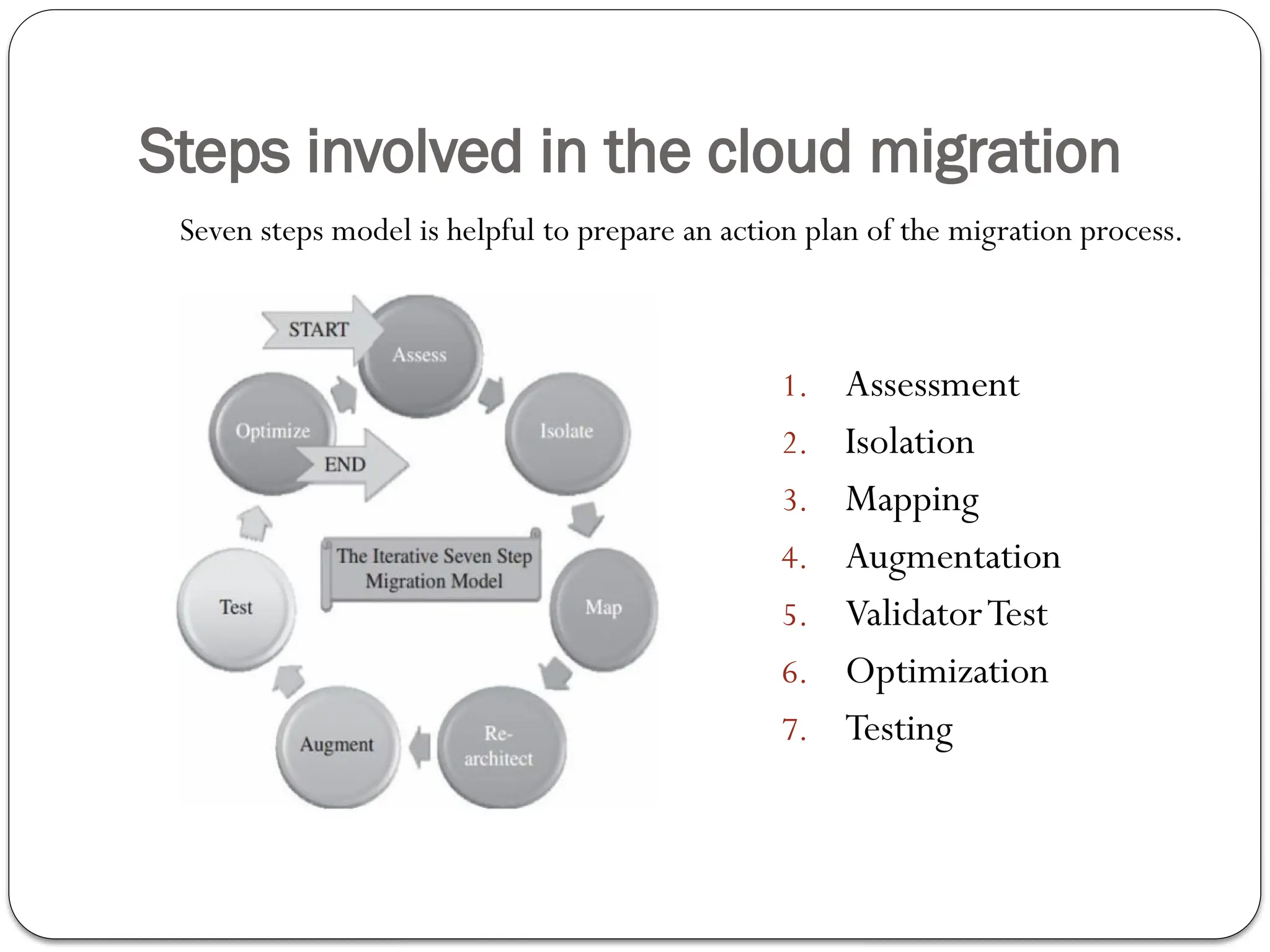
Steps involved in the cloud migration
1. Assessment
2. Isolation
3. Mapping
4. Augmentation
5. ValidatorTest
6. Optimization
7. Testing
Seven steps model is helpful to prepare an action plan of the migration process.
Assessment
 Assessment is the first step of the iterative seven step model
migration process.
 It is focusing on the overall requirement of cloud resources as
well as cost requirement of migration at the assessment level.
 This step includes assessment at code, design and architecture
levels.
 Assessments are also required for tools being used with their
functionality, different test cases and configuration of the
application.
 Choose a cloud provider that aligns with your needs, budget, and
model requirement. consider the factors such as compliance,
privacy and security.
Isolation and Mapping
Isolation
 Isolation is the second iterative step where we divide process into
modules & then dependencies between different modules are to
be identified.
 This step isolates different dependent enterprise application
components.These include library, application, and architectural
dependencies.
 This step intern in a better understanding of the complexity of the
migration.
 Mapping
 After isolation step it get decided what components should reside
in a captive data center and what components should go on to
the cloud.
Re-Architect, Augment & Validate or Test
 Re-Architect
 Set up your cloud computing resources.This includes selecting the appropriate
instance type and setting up a virtual machine(VM) or container for your
model.
 Consequently there may be chances of losing functionality because of isolation
and other migration stuff.
 To avoid loss in the functionality some part of the application has to be re­
architected, redesigned and implemented in the cloud environment.
 It is possible to approximate lost functionality using cloud runtime support API.
 Augment
 In this step, we have to extend several features of our application as per drastically
changing environment.
 The internal features of the cloud computing service to augment our enterprise
application in its own small ways.
Validate or Test
 Validate orTest
 After successful augmentation it is necessary to test or validate our
application to check whether its working as per expectations or
not.
 In this step, we validate or test the new version of our enterprise
application with an extensive test suite that covers testing the
components of the enterprise application on the cloud
environment.
 Optimization:
 In this step after validation we optimize it as possible.
 As it is iterative process after several iterations, the migration is
considered to be successful.
Benefits of Cloud Migration
 Easy for scalability
You can easily scale computing resources as per increasing demand.
 Cost Reduction Operational cost gets reduced.
 Pay as per usage pay-as-you-go model
 Remote Access
Cloud computing environments allow remotely located employees to access applications
and work via the internet(Work from Home).
 Easy up gradation
Software as well as hardware up-gradation everything can be handled by cloud service
provider.
 Recovery
It provides backup and recovery solutions to businesses with less time and upfront
investment.
 More focus on development
You can give more focus on application performance and development not on resources.
Risk of Cloud Migration
 Data Sensitivity
For several organization data is very sensitive even if they don't want to share
their data with third parties.
If you haven't plan migration properly there may chances of leakage or data loss.
 Security
Security is very essential and necessary for proper functioning of your applications
while choosing cloud service provided all security concerned should be fixed or
checked off.
 Cost andTime Proper planning and management of cloud migration may
take more time and it will increase the overall cost at the initial stage.
 Interoperability becomes a problem as it is not easy to establish a perfect
communication in between existing applications and newer cloud
environments.
 Using cloud services, getting good with newer cloud procedures, managing resources
and cloud activities requires trained IT professionals who can work in the cloud
eco system.
Microsoft Cloud Services
What is Azure?
 TheAzure is cloud platform provided by Microsoft.
 Microsoft Azure is a public cloud platform.
 It has more than 200 products and cloud services covering 18
broad categories.
 Services are designed:
 To help users to bring new solutions and to solve today's challenges.
 To Build, run and manage applications across multiple clouds, on-
premises and at the edge, with the tools and frameworks of customers choice.
 Azure integrates the cloud services that you need to develop, test,
deploy and manage your applications.
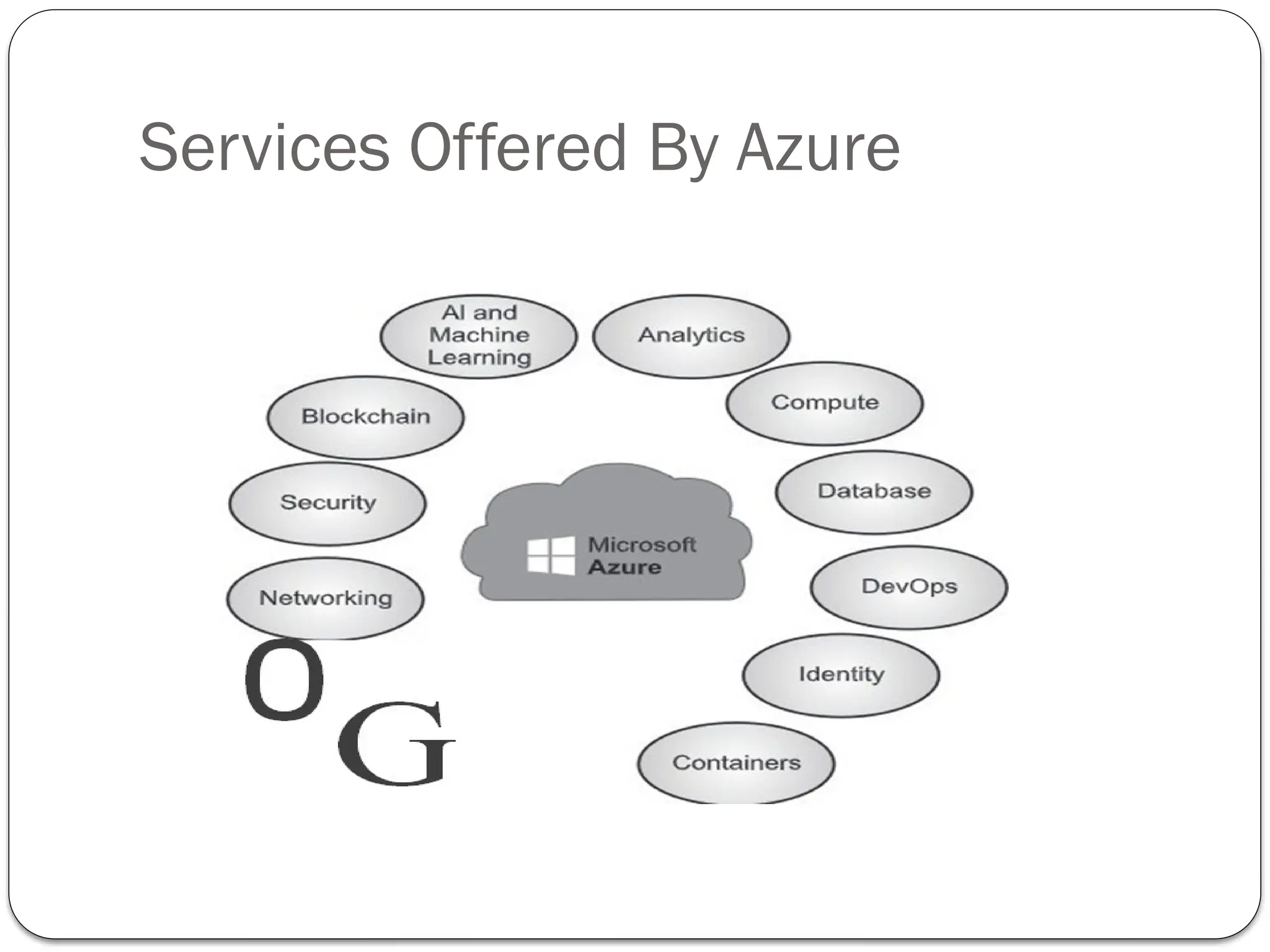
Services Offered By Azure
AI and Machine Learning
 For developers & data scientist
 Build and deploy our own AI solutions
 Access high-quality vision, speech ,language and decision­making
AI models through simple API calls.
 Create our own machine learning models with several tools
like Jupyter Notebook,Visual Studio Code and open-
source frameworks likeTensor Flow and PyTorch
 Includes Azure bot service,Azure Cognitive Search,Azure
Machine Learning, Speech Analytics, Speech toText,
Language Analyzer etc.
Analytics and Compute , Databases
Analytics
 It help businesses collect, store, analyze and visualize data.These services
enable organizations to gain insights from their data and make data-driven
decisions. Comprehensive set of solutions which turn your data into
actionable intuitions.
 It includes Azure SynapseAnalytics,Azure Purview,Azure Data factory, HD
insight,Azure Analysis Services etc.
Compute
 Designed to provide cloud based compute facilities likeVirtual Machine,Azure
Spring Cloud,App Service etc.
Databases
 Designed to support rapid growth and innovate faster with secure, enterprise-
grade and fully managed database services likeAzure SQL,Azure Cosmos DB,
Azure SQL Database,Azure Database for Postgre SQL etc.
Application Hosting Options in Azure
 Azure offers true server less hosting where user just
needs to write their code.
 Services offered by Azure that help and support user
application development and hosting requirements.
 Azure provides three options to host a web application are:
1. AzureVirtual Machines
2. App Service
3. Service Fabric: It is designed to simplify the development,
deployment, and management of scalable and reliable
micro services and containers.
Azure App Service
 Extend your web apps to support your mobile clients
and publish easily consumed REST API’s.
 Provides authentication by using social providers, traffic­
based auto scaling, testing in production and continuous and
container-based deployments.
 Make web apps, mobile app back ends and API apps.
 Designed with DevOps in mind.
 Supports tools for publishing and continuous integration
deployments.Tools include GitHub webhooks, Jenkins,
Azure DevOps ,TeamCity etc.
 AzureVirtual Machines:
 Infrastructure-as-a-Service(IaaS)
 Supports the arrangement of Windows or LinuxVMs to Azure.
 Users have choice or total control over the configuration of
the machine(RAM, Storage etc.).
 User is responsible for all server software installation,
configuration, maintenance and operating system related
stuff.
Azure Service Fabric
 Distributed systems platform.
 build, package, deploy, and manage scalable and reliable micro-
services.
 Provides inclusive application management capabilities
like Provisioning, Deploying, Monitoring, Upgrading/patching,
Deleting
 Supports Web API with OpenWeb Interface
for .NET(OWIN)and ASP.NET Core.
 Provides Software Development Kits for building services
on Linux in both .NET Core and Java.
Google Cloud Platform(GCP)
 It is public cloud platform.
 It offers a wide range of cloud computing services to help businesses
build, deploy manage applications and infrastructure
 It offers a suite of computing services like
a. data management to delivering web
b. video over the web to AI
c. machine learning tools.
 Customers are able to access computer resources housed in Google's
data centers around the world for free or on a pay-per-use basis.
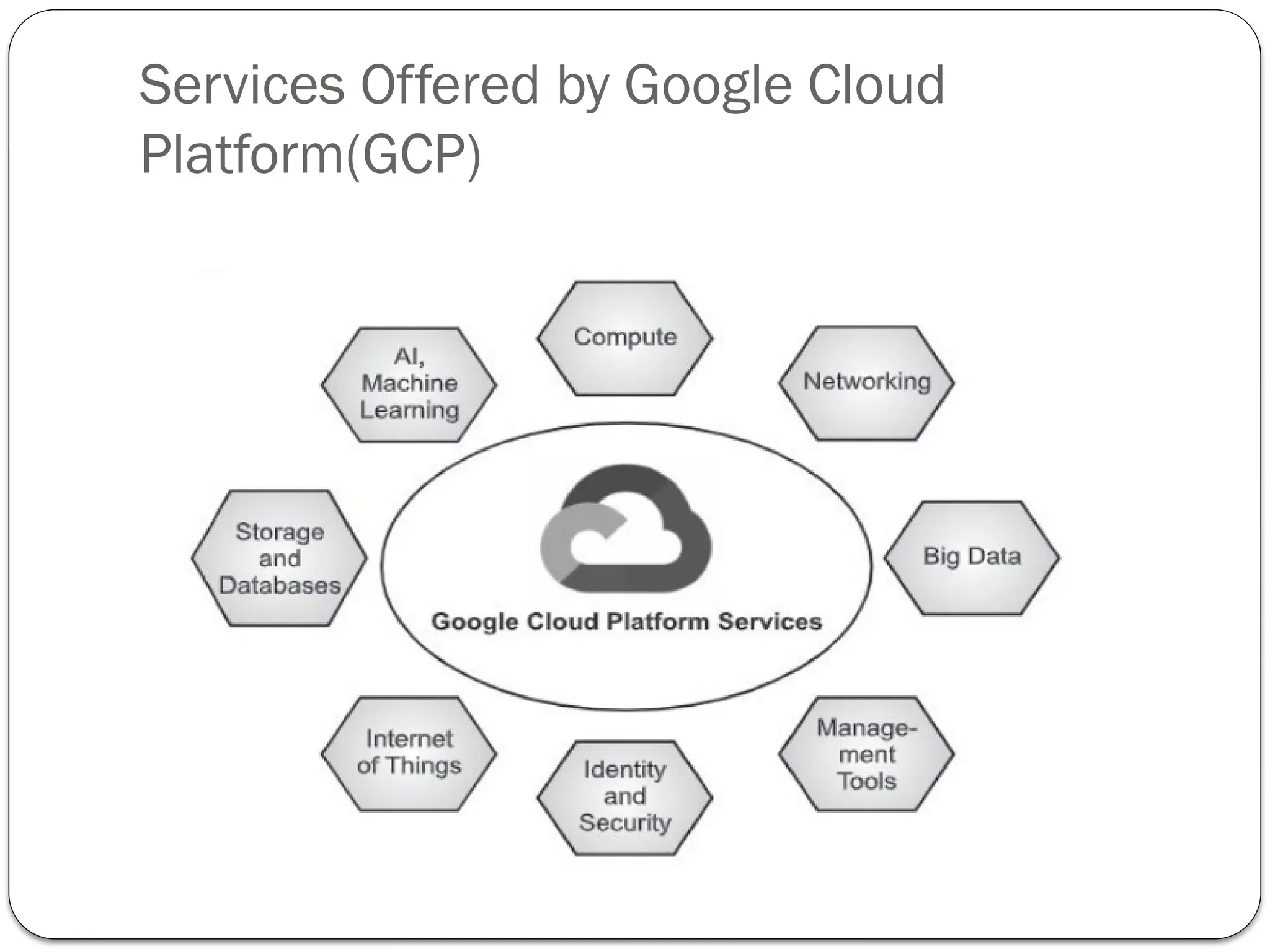
Services Offered by Google Cloud
Platform(GCP)
Services offered by Amazon Web Service
Amazon EC2
 IaaS Service
 It gives us choice to purchase processor , storage , networking , os
model.
AWS App Runner
 It is a fully managed service that simplifies the process of building,
deploying and scaling containerized web applications and APIs.
 It is designed to make it easier for developers to quickly and efficiently
run containerized applications.
 No prior experience of infrastructure is required.
 Scale Up and scale down easily.
Amazon Light Sail
 It is a simplified, user-friendly and cost-effective
cloud computing service offered by AmazonWeb Services
(AWS).
 It is a virtual private server(VPS)
 It is designed for individuals, small businesses and
developers who want an easy way to deploy and
manage web applications, websites and simple
cloud infrastructure without the complexities of traditional
AWS services.
Amazon EKS
 Amazon Elastic Kubernetes Service (Amazon EKS) is a managed Kubernetes
service to run Kubernetes in the AWS cloud and on-premises data centers.
 In the cloud,Amazon EKS automatically manages the availability and scalability of
the Kubernetes control plane nodes responsible for scheduling containers,
managing application availability, storing cluster data and other key
tasks.
 With Amazon EKS, we can take advantage of all the performance, scale,
reliability, and availability of AWS infrastructure, as well as integrations
with AWS networking and security services.
 On-premises, EKS provides a consistent, fully-supported Kubernetes
solution with integrated tooling and simple deployment to AWS Outposts,
virtual machines or bare metal servers.
 E.g Intel, goDaddy , Snap etc
 Migration is easy.
Amazon Aurora
 It is a relational database system (RDBS) built for the cloud
with full MySQL and PostgreSQL compatibility.
 Aurora gives you the performance and availability of
commercial-grade databases at one-tenth the cost.
 It helps us encrypt our databases usingAWS Key
Management Service (KMS).
 5 times faster than MYSQL and 3 times faster than
PLPGSQL
 It is managed by Amazon(RDS) automate time consuming
administrative tasks like backups, patching ,database setup.
Amazon DynamoDB
 It is NOSQL database service.
 Amazon DynamoDB is a fully managed, serverless, key-value
NoSQL database designed to run high-performance
applications at any scale.
 DynamoDB offers built-in security, continuous backups,
automated multi-Region replication, in-memory caching, and
data import and export tools.
 Handles many (10 trillion ) requests per day and 20
million request per second.
Amazon Quantum Ledger DB(QLDB)
 Amazon Quantum Ledger Database (QLDB) is a purpose-
built ledger database that provides a complete and
cryptographically verifiable history of all changes
made to your application data.
 Record history of economic and financial activity in an
organization.
 Example Banking Applications (Keeps tracks of
Credits and Debits)
 QLDB provides a familiar SQL-like API, a flexible document
data model and full support for transactions.
 AWS IOT Core
 Connect IoT devices to the AWS cloud.
 Support billions of devices and trillions of messages
 Process and route those messages to AWS endpoints and to other devices
reliably and securely.
 Can keep track of and communicate with all devices, all the time, even
when they aren't connected.
 AWS IOT Analytics
 Fully managed service for handling massive volumes of IoT data.
 Get insights to make better and more accurate decisions for IoT
applications with ML techniques
 Business intelligence tools that are designed to process structured data.
 IoT data comes from devices that often record fairly noisy processes (such as
temperature, motion, or sound).
 It helps to analyzed at a from millions of heterogeneous devices and build fast,
responsive IoT applications.
 AWS IoT Device Management
 It is used to register, organize, monitor and remotely manage IoT
devices at large scale.
 We can troubleshoot device functionality, query the state of any
IoT device.
 We can manage devices from constrained microcontrollers to connected
cars all with the same service.
 AmazonVirtual Private Cloud
 Build a logically isolated virtual network in the AWS cloud.
 AmazonVPC makes it easy to customize yourVPC's network
configuration.
 Allow selection of our own IP address range, creation of subnets
and configuration of route tables and network gateways.
 Amazon API Gateway
 It makes it easy for developer to create, publish, maintain, monitor
and secure API’s at any scale.
 API’s acts as a "front door“ for applications to access data, business
logic functionality from our backend services.
 We can create RESTful API’s and Web Socket API’s that enable real-
time two-way communication applications.
 Supports containerized and serverless workloads as well as web
applications.
 AWS Backup
 Centrally manage and automates backups acrossAWS services.
 AWS Backup enables us to centrally deploy data protection
policies to configure, manage, and govern our backup activity
across our organization's AWS accounts and resources.

Ch4-Deploying Applications & Cloud Services.pptx

  • 1.
    4. Deploying Applications& Cloud Services By Ashwini Satkar
  • 2.
    Moving Applications toCloud  The process of moving applications from local to the cloud environments is referred to as Migration.  In this process all data and applications are transformed from a local or on-premises data center to the cloud.  Many cloud service providers used like Microsoft Azure, Google Cloud Services, AmazonWeb Services etc.  Reason: 1. To improve the operational performance 2. Flexibility, workload scalability and security of application as well as data. 3. Cost effective solution and clarify business goals
  • 3.
    What is CloudMigration? On-premises to cloud migration process : Every business starting from small to large organizations follows slightly different process for cloud migration. Some of the common elements which are considered before cloud migration are: 1. Evaluation of requirement and performance 2. Selection of cloud provider 3. Calculation of operational costs  Cloud migration is the process of moving data, applications or other business elements to a cloud computing environment.  Cloud Migration is a transformation from old traditional business operations to digital business operations and the process refers to moving the digital business operations to cloud.
  • 4.
    Steps involved inthe cloud migration 1. Assessment 2. Isolation 3. Mapping 4. Augmentation 5. ValidatorTest 6. Optimization 7. Testing Seven steps model is helpful to prepare an action plan of the migration process.
  • 5.
    Assessment  Assessment isthe first step of the iterative seven step model migration process.  It is focusing on the overall requirement of cloud resources as well as cost requirement of migration at the assessment level.  This step includes assessment at code, design and architecture levels.  Assessments are also required for tools being used with their functionality, different test cases and configuration of the application.  Choose a cloud provider that aligns with your needs, budget, and model requirement. consider the factors such as compliance, privacy and security.
  • 6.
    Isolation and Mapping Isolation Isolation is the second iterative step where we divide process into modules & then dependencies between different modules are to be identified.  This step isolates different dependent enterprise application components.These include library, application, and architectural dependencies.  This step intern in a better understanding of the complexity of the migration.  Mapping  After isolation step it get decided what components should reside in a captive data center and what components should go on to the cloud.
  • 7.
    Re-Architect, Augment &Validate or Test  Re-Architect  Set up your cloud computing resources.This includes selecting the appropriate instance type and setting up a virtual machine(VM) or container for your model.  Consequently there may be chances of losing functionality because of isolation and other migration stuff.  To avoid loss in the functionality some part of the application has to be re­ architected, redesigned and implemented in the cloud environment.  It is possible to approximate lost functionality using cloud runtime support API.  Augment  In this step, we have to extend several features of our application as per drastically changing environment.  The internal features of the cloud computing service to augment our enterprise application in its own small ways.
  • 8.
    Validate or Test Validate orTest  After successful augmentation it is necessary to test or validate our application to check whether its working as per expectations or not.  In this step, we validate or test the new version of our enterprise application with an extensive test suite that covers testing the components of the enterprise application on the cloud environment.  Optimization:  In this step after validation we optimize it as possible.  As it is iterative process after several iterations, the migration is considered to be successful.
  • 9.
    Benefits of CloudMigration  Easy for scalability You can easily scale computing resources as per increasing demand.  Cost Reduction Operational cost gets reduced.  Pay as per usage pay-as-you-go model  Remote Access Cloud computing environments allow remotely located employees to access applications and work via the internet(Work from Home).  Easy up gradation Software as well as hardware up-gradation everything can be handled by cloud service provider.  Recovery It provides backup and recovery solutions to businesses with less time and upfront investment.  More focus on development You can give more focus on application performance and development not on resources.
  • 10.
    Risk of CloudMigration  Data Sensitivity For several organization data is very sensitive even if they don't want to share their data with third parties. If you haven't plan migration properly there may chances of leakage or data loss.  Security Security is very essential and necessary for proper functioning of your applications while choosing cloud service provided all security concerned should be fixed or checked off.  Cost andTime Proper planning and management of cloud migration may take more time and it will increase the overall cost at the initial stage.  Interoperability becomes a problem as it is not easy to establish a perfect communication in between existing applications and newer cloud environments.  Using cloud services, getting good with newer cloud procedures, managing resources and cloud activities requires trained IT professionals who can work in the cloud eco system.
  • 11.
    Microsoft Cloud Services Whatis Azure?  TheAzure is cloud platform provided by Microsoft.  Microsoft Azure is a public cloud platform.  It has more than 200 products and cloud services covering 18 broad categories.  Services are designed:  To help users to bring new solutions and to solve today's challenges.  To Build, run and manage applications across multiple clouds, on- premises and at the edge, with the tools and frameworks of customers choice.  Azure integrates the cloud services that you need to develop, test, deploy and manage your applications.
  • 12.
  • 13.
    AI and MachineLearning  For developers & data scientist  Build and deploy our own AI solutions  Access high-quality vision, speech ,language and decision­making AI models through simple API calls.  Create our own machine learning models with several tools like Jupyter Notebook,Visual Studio Code and open- source frameworks likeTensor Flow and PyTorch  Includes Azure bot service,Azure Cognitive Search,Azure Machine Learning, Speech Analytics, Speech toText, Language Analyzer etc.
  • 14.
    Analytics and Compute, Databases Analytics  It help businesses collect, store, analyze and visualize data.These services enable organizations to gain insights from their data and make data-driven decisions. Comprehensive set of solutions which turn your data into actionable intuitions.  It includes Azure SynapseAnalytics,Azure Purview,Azure Data factory, HD insight,Azure Analysis Services etc. Compute  Designed to provide cloud based compute facilities likeVirtual Machine,Azure Spring Cloud,App Service etc. Databases  Designed to support rapid growth and innovate faster with secure, enterprise- grade and fully managed database services likeAzure SQL,Azure Cosmos DB, Azure SQL Database,Azure Database for Postgre SQL etc.
  • 15.
    Application Hosting Optionsin Azure  Azure offers true server less hosting where user just needs to write their code.  Services offered by Azure that help and support user application development and hosting requirements.  Azure provides three options to host a web application are: 1. AzureVirtual Machines 2. App Service 3. Service Fabric: It is designed to simplify the development, deployment, and management of scalable and reliable micro services and containers.
  • 16.
    Azure App Service Extend your web apps to support your mobile clients and publish easily consumed REST API’s.  Provides authentication by using social providers, traffic­ based auto scaling, testing in production and continuous and container-based deployments.  Make web apps, mobile app back ends and API apps.  Designed with DevOps in mind.  Supports tools for publishing and continuous integration deployments.Tools include GitHub webhooks, Jenkins, Azure DevOps ,TeamCity etc.
  • 17.
     AzureVirtual Machines: Infrastructure-as-a-Service(IaaS)  Supports the arrangement of Windows or LinuxVMs to Azure.  Users have choice or total control over the configuration of the machine(RAM, Storage etc.).  User is responsible for all server software installation, configuration, maintenance and operating system related stuff.
  • 18.
    Azure Service Fabric Distributed systems platform.  build, package, deploy, and manage scalable and reliable micro- services.  Provides inclusive application management capabilities like Provisioning, Deploying, Monitoring, Upgrading/patching, Deleting  Supports Web API with OpenWeb Interface for .NET(OWIN)and ASP.NET Core.  Provides Software Development Kits for building services on Linux in both .NET Core and Java.
  • 19.
    Google Cloud Platform(GCP) It is public cloud platform.  It offers a wide range of cloud computing services to help businesses build, deploy manage applications and infrastructure  It offers a suite of computing services like a. data management to delivering web b. video over the web to AI c. machine learning tools.  Customers are able to access computer resources housed in Google's data centers around the world for free or on a pay-per-use basis.
  • 20.
    Services Offered byGoogle Cloud Platform(GCP)
  • 21.
    Services offered byAmazon Web Service Amazon EC2  IaaS Service  It gives us choice to purchase processor , storage , networking , os model. AWS App Runner  It is a fully managed service that simplifies the process of building, deploying and scaling containerized web applications and APIs.  It is designed to make it easier for developers to quickly and efficiently run containerized applications.  No prior experience of infrastructure is required.  Scale Up and scale down easily.
  • 22.
    Amazon Light Sail It is a simplified, user-friendly and cost-effective cloud computing service offered by AmazonWeb Services (AWS).  It is a virtual private server(VPS)  It is designed for individuals, small businesses and developers who want an easy way to deploy and manage web applications, websites and simple cloud infrastructure without the complexities of traditional AWS services.
  • 23.
    Amazon EKS  AmazonElastic Kubernetes Service (Amazon EKS) is a managed Kubernetes service to run Kubernetes in the AWS cloud and on-premises data centers.  In the cloud,Amazon EKS automatically manages the availability and scalability of the Kubernetes control plane nodes responsible for scheduling containers, managing application availability, storing cluster data and other key tasks.  With Amazon EKS, we can take advantage of all the performance, scale, reliability, and availability of AWS infrastructure, as well as integrations with AWS networking and security services.  On-premises, EKS provides a consistent, fully-supported Kubernetes solution with integrated tooling and simple deployment to AWS Outposts, virtual machines or bare metal servers.  E.g Intel, goDaddy , Snap etc  Migration is easy.
  • 24.
    Amazon Aurora  Itis a relational database system (RDBS) built for the cloud with full MySQL and PostgreSQL compatibility.  Aurora gives you the performance and availability of commercial-grade databases at one-tenth the cost.  It helps us encrypt our databases usingAWS Key Management Service (KMS).  5 times faster than MYSQL and 3 times faster than PLPGSQL  It is managed by Amazon(RDS) automate time consuming administrative tasks like backups, patching ,database setup.
  • 25.
    Amazon DynamoDB  Itis NOSQL database service.  Amazon DynamoDB is a fully managed, serverless, key-value NoSQL database designed to run high-performance applications at any scale.  DynamoDB offers built-in security, continuous backups, automated multi-Region replication, in-memory caching, and data import and export tools.  Handles many (10 trillion ) requests per day and 20 million request per second.
  • 26.
    Amazon Quantum LedgerDB(QLDB)  Amazon Quantum Ledger Database (QLDB) is a purpose- built ledger database that provides a complete and cryptographically verifiable history of all changes made to your application data.  Record history of economic and financial activity in an organization.  Example Banking Applications (Keeps tracks of Credits and Debits)  QLDB provides a familiar SQL-like API, a flexible document data model and full support for transactions.
  • 27.
     AWS IOTCore  Connect IoT devices to the AWS cloud.  Support billions of devices and trillions of messages  Process and route those messages to AWS endpoints and to other devices reliably and securely.  Can keep track of and communicate with all devices, all the time, even when they aren't connected.  AWS IOT Analytics  Fully managed service for handling massive volumes of IoT data.  Get insights to make better and more accurate decisions for IoT applications with ML techniques  Business intelligence tools that are designed to process structured data.  IoT data comes from devices that often record fairly noisy processes (such as temperature, motion, or sound).  It helps to analyzed at a from millions of heterogeneous devices and build fast, responsive IoT applications.
  • 28.
     AWS IoTDevice Management  It is used to register, organize, monitor and remotely manage IoT devices at large scale.  We can troubleshoot device functionality, query the state of any IoT device.  We can manage devices from constrained microcontrollers to connected cars all with the same service.  AmazonVirtual Private Cloud  Build a logically isolated virtual network in the AWS cloud.  AmazonVPC makes it easy to customize yourVPC's network configuration.  Allow selection of our own IP address range, creation of subnets and configuration of route tables and network gateways.
  • 29.
     Amazon APIGateway  It makes it easy for developer to create, publish, maintain, monitor and secure API’s at any scale.  API’s acts as a "front door“ for applications to access data, business logic functionality from our backend services.  We can create RESTful API’s and Web Socket API’s that enable real- time two-way communication applications.  Supports containerized and serverless workloads as well as web applications.  AWS Backup  Centrally manage and automates backups acrossAWS services.  AWS Backup enables us to centrally deploy data protection policies to configure, manage, and govern our backup activity across our organization's AWS accounts and resources.