10
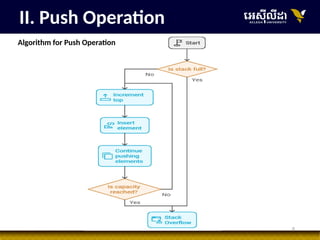
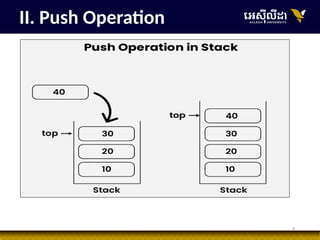
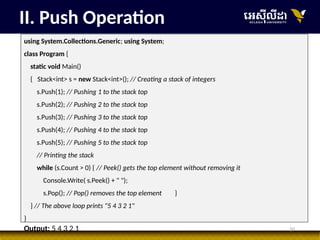
II. Push Operation
usingSystem.Collections.Generic; using System;
class Program {
static void Main()
{ Stack<int> s = new Stack<int>(); // Creating a stack of integers
s.Push(1); // Pushing 1 to the stack top
s.Push(2); // Pushing 2 to the stack top
s.Push(3); // Pushing 3 to the stack top
s.Push(4); // Pushing 4 to the stack top
s.Push(5); // Pushing 5 to the stack top
// Printing the stack
while (s.Count > 0) { // Peek() gets the top element without removing it
Console.Write( s.Peek() + " ");
s.Pop(); // Pop() removes the top element }
} // The above loop prints "5 4 3 2 1"
}
Output: 5 4 3 2 1
13
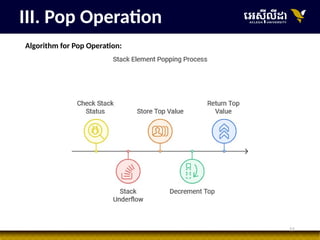
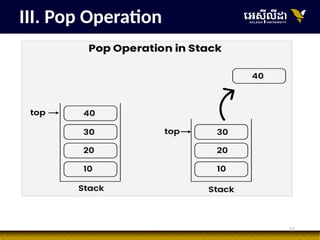
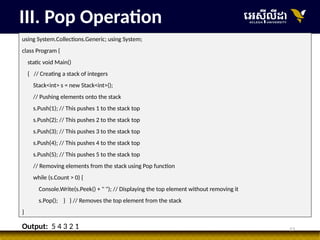
III. Pop Operation
usingSystem.Collections.Generic; using System;
class Program {
static void Main()
{ // Creating a stack of integers
Stack<int> s = new Stack<int>();
// Pushing elements onto the stack
s.Push(1); // This pushes 1 to the stack top
s.Push(2); // This pushes 2 to the stack top
s.Push(3); // This pushes 3 to the stack top
s.Push(4); // This pushes 4 to the stack top
s.Push(5); // This pushes 5 to the stack top
// Removing elements from the stack using Pop function
while (s.Count > 0) {
Console.Write(s.Peek() + " "); // Displaying the top element without removing it
s.Pop(); } } // Removes the top element from the stack
}
Output: 5 4 3 2 1
14.
14
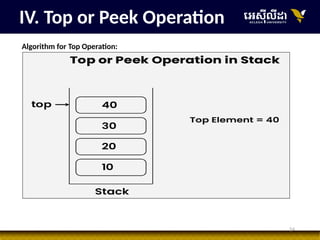
IV. Top orPeek Operation
Algorithm for Top Operation:
15.
15
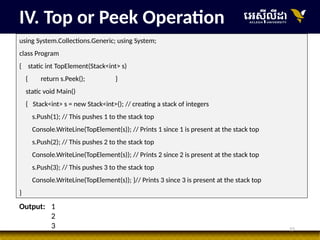
IV. Top orPeek Operation
using System.Collections.Generic; using System;
class Program
{ static int TopElement(Stack<int> s)
{ return s.Peek(); }
static void Main()
{ Stack<int> s = new Stack<int>(); // creating a stack of integers
s.Push(1); // This pushes 1 to the stack top
Console.WriteLine(TopElement(s)); // Prints 1 since 1 is present at the stack top
s.Push(2); // This pushes 2 to the stack top
Console.WriteLine(TopElement(s)); // Prints 2 since 2 is present at the stack top
s.Push(3); // This pushes 3 to the stack top
Console.WriteLine(TopElement(s)); }// Prints 3 since 3 is present at the stack top
}
Output: 1
2
3
17
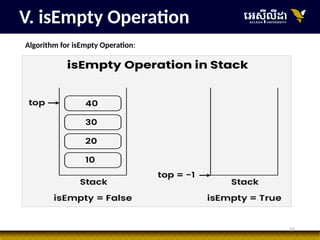
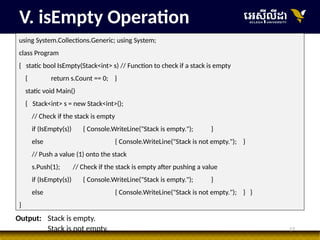
V. isEmpty Operation
usingSystem.Collections.Generic; using System;
class Program
{ static bool IsEmpty(Stack<int> s) // Function to check if a stack is empty
{ return s.Count == 0; }
static void Main()
{ Stack<int> s = new Stack<int>();
// Check if the stack is empty
if (IsEmpty(s)) { Console.WriteLine("Stack is empty."); }
else { Console.WriteLine("Stack is not empty."); }
// Push a value (1) onto the stack
s.Push(1); // Check if the stack is empty after pushing a value
if (IsEmpty(s)) { Console.WriteLine("Stack is empty."); }
else { Console.WriteLine("Stack is not empty."); } }
}
Output: Stack is empty.
Stack is not empty.
19
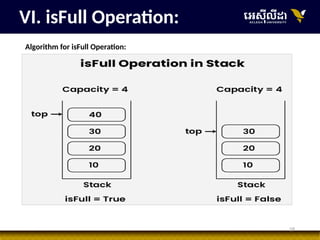
VI. isFull Operation:
usingSystem.Collections.Generic; using System;
internal class Program
{ static bool IsFull(Stack<int> s)
{ return s.Count == 5; }
static void Main(string[] args)
{ Stack<int> s = new Stack<int>(); // Check if the stack is empty
if (IsFull(s)) { Console.WriteLine("Stack is full."); }
else { Console.WriteLine("Stack is not full."); }
// Push a value (1) onto the stack
s.Push(1); s.Push(2); s.Push(3); s.Push(4); s.Push(5);
// Check if the stack is empty after pushing a value
if (IsFull(s)) { Console.WriteLine("Stack is full."); }
else { Console.WriteLine("Stack is not full."); }
Console.Read(); }
}
}
Output: Stack is not full.
Stack is full.
21
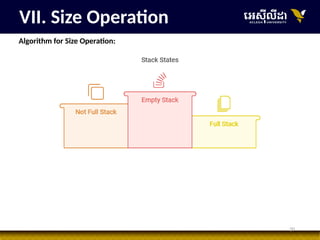
VII. Size Operation
usingSystem.Collections.Generic; using System;
public class Program
{ public static void Main(string[] args)
{ Stack<int> s = new Stack<int>(); // creating a stack of integers
Console.WriteLine(s.Count); // Prints 0 since the stack is empty
s.Push(1); // This pushes 1 to the stack top
s.Push(2); // This pushes 2 to the stack top
// Prints 2 since the stack contains two elements
Console.WriteLine(s.Count);
s.Push(3); // This pushes 3 to the stack top
Console.WriteLine(s.Count);
// Prints 3 since the stack contains three elements
}
}
Output: 0
2
3
28
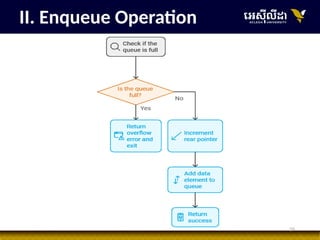
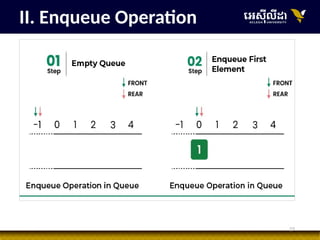
II. Enqueue Operation
//Function to add an item to the queue.
// It changes rear and size
public void enqueue(int item)
{
if (rear == max - 1) {
Console.WriteLine("Queue Overflow");
return;
}
else {
ele[++rear] = item;
}
}
31
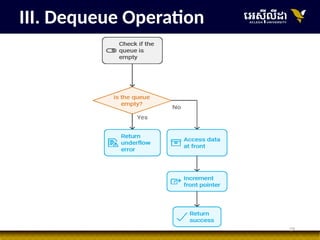
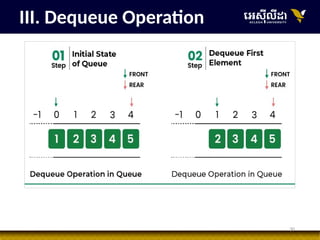
III. Dequeue Operation
//Function to remove an item from queue.
// It changes front and size
public int dequeue()
{
if (front == rear + 1) {
Console.WriteLine("Queue is Empty");
return -1;
} else {
int p = ele[front++];
return p;
}
}
32.
32
• This operationreturns the element at the front end without removing it.
IV. Front Operation
// Function to get front of queue
public int front()
{ if (isempty())
return INT_MIN;
return arr[front];
}
33.
33
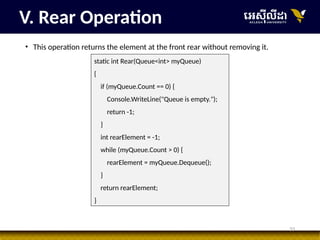
• This operationreturns the element at the front rear without removing it.
V. Rear Operation
static int Rear(Queue<int> myQueue)
{
if (myQueue.Count == 0) {
Console.WriteLine("Queue is empty.");
return -1;
}
int rearElement = -1;
while (myQueue.Count > 0) {
rearElement = myQueue.Dequeue();
}
return rearElement;
}
34.
34
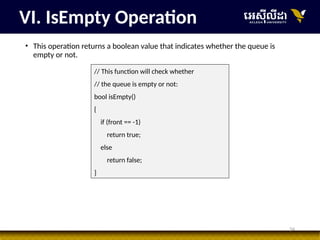
• This operationreturns a boolean value that indicates whether the queue is
empty or not.
VI. IsEmpty Operation
// This function will check whether
// the queue is empty or not:
bool isEmpty()
{
if (front == -1)
return true;
else
return false;
}
35.
35
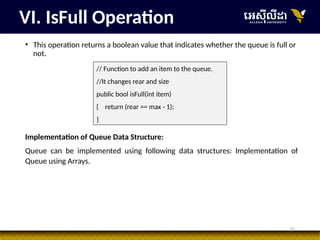
• This operationreturns a boolean value that indicates whether the queue is full or
not.
VI. IsFull Operation
// Function to add an item to the queue.
//It changes rear and size
public bool isFull(int item)
{ return (rear == max - 1);
}
Implementation of Queue Data Structure:
Queue can be implemented using following data structures: Implementation of
Queue using Arrays.
36.
36
// C# programfor array implementation of queue using System;
namespace GFG { // A class to represent a linear queue
class Queue {
private int[] ele; private int front; private int rear; private int max;
public Queue(int size)
{ ele = new int[size]; front = 0; rear = -1; max = size;
}// Function to add an item to the queue. It changes rear and size
public void enqueue(int item)
{ if (rear == max - 1) {
Console.WriteLine("Queue Overflow"); return;
}else { ele[++rear] = item; }
}// Function to remove an item from queue. It changes front and size
public int dequeue()
{ if (front == rear + 1) {
Console.WriteLine("Queue is Empty"); return -1; }
Implementation
37.
37
else { Console.WriteLine(ele[front]+" dequeued from queue");
int p = ele[front++];
Console.WriteLine("Front item is {0}", ele[front]);
Console.WriteLine("Rear item is {0} ", ele[rear]); return p; }
}// Function to print queue.
public void printQueue()
{ if (front == rear + 1) { Console.WriteLine("Queue is Empty"); return;
}else { for (int i = front; i <= rear; i++) {
Console.WriteLine(ele[i]+ " enqueued to queue"); } } } }// Driver code
class Program {
static void Main()
{ Queue Q = new Queue(5);
Q.enqueue(10); Q.enqueue(20);
Q.enqueue(30); Q.enqueue(40);
Q.printQueue(); Q.dequeue(); } } }
Implementation
38.
38
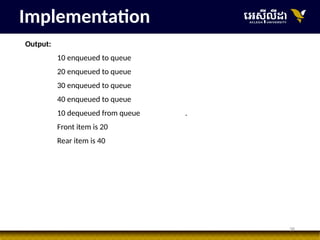
Output:
10 enqueued toqueue
20 enqueued to queue
30 enqueued to queue
40 enqueued to queue
10 dequeued from queue .
Front item is 20
Rear item is 40
Implementation
39.
39
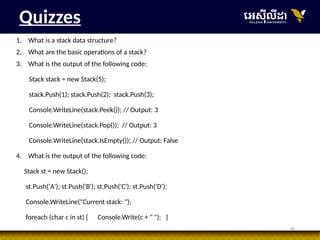
Quizzes
1. What isa stack data structure?
2. What are the basic operations of a stack?
3. What is the output of the following code:
Stack stack = new Stack(5);
stack.Push(1); stack.Push(2); stack.Push(3);
Console.WriteLine(stack.Peek()); // Output: 3
Console.WriteLine(stack.Pop()); // Output: 3
Console.WriteLine(stack.IsEmpty()); // Output: False
4. What is the output of the following code:
Stack st = new Stack();
st.Push('A'); st.Push('B'); st.Push('C'); st.Push('D');
Console.WriteLine("Current stack: ");
foreach (char c in st) { Console.Write(c + " "); }
40.
40
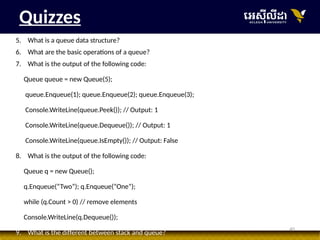
Quizzes
5. What isa queue data structure?
6. What are the basic operations of a queue?
7. What is the output of the following code:
Queue queue = new Queue(5);
queue.Enqueue(1); queue.Enqueue(2); queue.Enqueue(3);
Console.WriteLine(queue.Peek()); // Output: 1
Console.WriteLine(queue.Dequeue()); // Output: 1
Console.WriteLine(queue.IsEmpty()); // Output: False
8. What is the output of the following code:
Queue q = new Queue();
q.Enqueue(“Two”); q.Enqueue(“One”);
while (q.Count > 0) // remove elements
Console.WriteLine(q.Dequeue());
9. What is the different between stack and queue?
![19
VI. isFull Operation:
using System.Collections.Generic; using System;
internal class Program
{ static bool IsFull(Stack<int> s)
{ return s.Count == 5; }
static void Main(string[] args)
{ Stack<int> s = new Stack<int>(); // Check if the stack is empty
if (IsFull(s)) { Console.WriteLine("Stack is full."); }
else { Console.WriteLine("Stack is not full."); }
// Push a value (1) onto the stack
s.Push(1); s.Push(2); s.Push(3); s.Push(4); s.Push(5);
// Check if the stack is empty after pushing a value
if (IsFull(s)) { Console.WriteLine("Stack is full."); }
else { Console.WriteLine("Stack is not full."); }
Console.Read(); }
}
}
Output: Stack is not full.
Stack is full.](https://image.slidesharecdn.com/ch3-stackandqueue-251005074018-01847e91/85/Ch3-Stack-and-Queue-pptxnbhhjhjkhuuiyuiyuihhjkbgdeewwer-19-320.jpg)
![21
VII. Size Operation
using System.Collections.Generic; using System;
public class Program
{ public static void Main(string[] args)
{ Stack<int> s = new Stack<int>(); // creating a stack of integers
Console.WriteLine(s.Count); // Prints 0 since the stack is empty
s.Push(1); // This pushes 1 to the stack top
s.Push(2); // This pushes 2 to the stack top
// Prints 2 since the stack contains two elements
Console.WriteLine(s.Count);
s.Push(3); // This pushes 3 to the stack top
Console.WriteLine(s.Count);
// Prints 3 since the stack contains three elements
}
}
Output: 0
2
3](https://image.slidesharecdn.com/ch3-stackandqueue-251005074018-01847e91/85/Ch3-Stack-and-Queue-pptxnbhhjhjkhuuiyuiyuihhjkbgdeewwer-21-320.jpg)
![28
II. Enqueue Operation
// Function to add an item to the queue.
// It changes rear and size
public void enqueue(int item)
{
if (rear == max - 1) {
Console.WriteLine("Queue Overflow");
return;
}
else {
ele[++rear] = item;
}
}](https://image.slidesharecdn.com/ch3-stackandqueue-251005074018-01847e91/85/Ch3-Stack-and-Queue-pptxnbhhjhjkhuuiyuiyuihhjkbgdeewwer-28-320.jpg)
![31
III. Dequeue Operation
// Function to remove an item from queue.
// It changes front and size
public int dequeue()
{
if (front == rear + 1) {
Console.WriteLine("Queue is Empty");
return -1;
} else {
int p = ele[front++];
return p;
}
}](https://image.slidesharecdn.com/ch3-stackandqueue-251005074018-01847e91/85/Ch3-Stack-and-Queue-pptxnbhhjhjkhuuiyuiyuihhjkbgdeewwer-31-320.jpg)
![32
• This operation returns the element at the front end without removing it.
IV. Front Operation
// Function to get front of queue
public int front()
{ if (isempty())
return INT_MIN;
return arr[front];
}](https://image.slidesharecdn.com/ch3-stackandqueue-251005074018-01847e91/85/Ch3-Stack-and-Queue-pptxnbhhjhjkhuuiyuiyuihhjkbgdeewwer-32-320.jpg)
![36
// C# program for array implementation of queue using System;
namespace GFG { // A class to represent a linear queue
class Queue {
private int[] ele; private int front; private int rear; private int max;
public Queue(int size)
{ ele = new int[size]; front = 0; rear = -1; max = size;
}// Function to add an item to the queue. It changes rear and size
public void enqueue(int item)
{ if (rear == max - 1) {
Console.WriteLine("Queue Overflow"); return;
}else { ele[++rear] = item; }
}// Function to remove an item from queue. It changes front and size
public int dequeue()
{ if (front == rear + 1) {
Console.WriteLine("Queue is Empty"); return -1; }
Implementation](https://image.slidesharecdn.com/ch3-stackandqueue-251005074018-01847e91/85/Ch3-Stack-and-Queue-pptxnbhhjhjkhuuiyuiyuihhjkbgdeewwer-36-320.jpg)
![37
else { Console.WriteLine(ele[front]+ " dequeued from queue");
int p = ele[front++];
Console.WriteLine("Front item is {0}", ele[front]);
Console.WriteLine("Rear item is {0} ", ele[rear]); return p; }
}// Function to print queue.
public void printQueue()
{ if (front == rear + 1) { Console.WriteLine("Queue is Empty"); return;
}else { for (int i = front; i <= rear; i++) {
Console.WriteLine(ele[i]+ " enqueued to queue"); } } } }// Driver code
class Program {
static void Main()
{ Queue Q = new Queue(5);
Q.enqueue(10); Q.enqueue(20);
Q.enqueue(30); Q.enqueue(40);
Q.printQueue(); Q.dequeue(); } } }
Implementation](https://image.slidesharecdn.com/ch3-stackandqueue-251005074018-01847e91/85/Ch3-Stack-and-Queue-pptxnbhhjhjkhuuiyuiyuihhjkbgdeewwer-37-320.jpg)