ch02_overview_c computer science and engineering.pdf
1.
CSE 115 ProgrammingLanguage I ECE@NSU
Overview of C
Programming
Mirza Mohammad Lutfe Elahi
2.
CSE 115 ProgrammingLanguage I ECE@NSU
2
Outline
§ History of C
§ C Language Elements
§ Data Types and Variable Declarations
§ Executable Statements
§ Input and Output Functions
§ General form of a C program
§ Arithmetic Expressions
§ Formatting Numbers in Program Output
3.
CSE 115 ProgrammingLanguage I ECE@NSU
3
History of C
§ C was developed in 1972 by Dennis Ritchie at AT&T
Bell Laboratories.
§ C was designed as a programming language to write
the Unix Operating System.
§ C became the most commonly used language for
writing system software.
§ C is machine independent: C programs can be
compiled to run on a wide variety of processors and
operating systems.
4.
CSE 115 ProgrammingLanguage I ECE@NSU
4
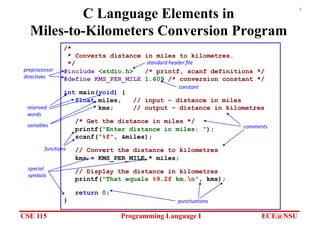
C Language Elements in
Miles-to-Kilometers Conversion Program
/*
* Converts distance in miles to kilometres.
*/
#include <stdio.h> /* printf, scanf definitions */
#define KMS_PER_MILE 1.609 /* conversion constant */
int main(void) {
float miles, // input – distance in miles
kms; // output – distance in kilometres
/* Get the distance in miles */
printf("Enter distance in miles: ");
scanf("%f", &miles);
// Convert the distance to kilometres
kms = KMS_PER_MILE * miles;
// Display the distance in kilometres
printf("That equals %9.2f km.n", kms);
return 0;
}
preprocessor
directives
standard header file
comments
constant
reserved
words
variables
functions
special
symbols
punctuations
5.
CSE 115 ProgrammingLanguage I ECE@NSU
5
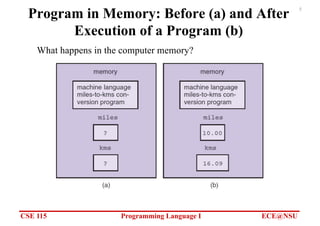
Program in Memory: Before (a) and After
Execution of a Program (b)
What happens in the computer memory?
6.
CSE 115 ProgrammingLanguage I ECE@NSU
6
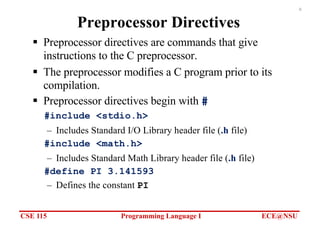
Preprocessor Directives
§ Preprocessor directives are commands that give
instructions to the C preprocessor.
§ The preprocessor modifies a C program prior to its
compilation.
§ Preprocessor directives begin with #
#include <stdio.h>
– Includes Standard I/O Library header file (.h file)
#include <math.h>
– Includes Standard Math Library header file (.h file)
#define PI 3.141593
– Defines the constant PI
7.
CSE 115 ProgrammingLanguage I ECE@NSU
7
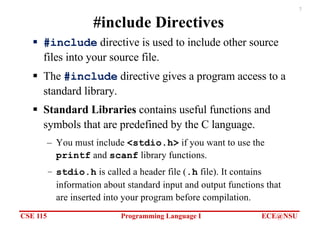
#include Directives
§ #include directive is used to include other source
files into your source file.
§ The #include directive gives a program access to a
standard library.
§ Standard Libraries contains useful functions and
symbols that are predefined by the C language.
– You must include <stdio.h> if you want to use the
printf and scanf library functions.
– stdio.h is called a header file (.h file). It contains
information about standard input and output functions that
are inserted into your program before compilation.
8.
CSE 115 ProgrammingLanguage I ECE@NSU
8
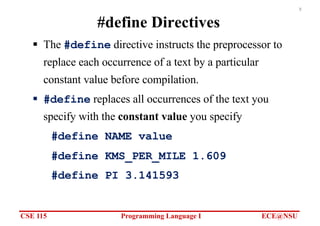
#define Directives
§ The #define directive instructs the preprocessor to
replace each occurrence of a text by a particular
constant value before compilation.
§ #define replaces all occurrences of the text you
specify with the constant value you specify
#define NAME value
#define KMS_PER_MILE 1.609
#define PI 3.141593
9.
CSE 115 ProgrammingLanguage I ECE@NSU
9
The main Function
• int main(void) marks the beginning of the main
function where program execution begins.
• Every C program has a main function.
• Braces { and } mark the beginning and end of the body of
function main.
• A function body has two parts:
– Declarations - tell the compiler what memory cells are
needed in the function
– Executable statements - (derived from the algorithm) are
translated into machine language and later executed by the
computer
10.
CSE 115 ProgrammingLanguage I ECE@NSU
10
Reserved Words
• A word that has special meaning to C and can not be
used for other purposes.
• These are words that C reserves for its own uses
• Built-in Types: int, float, double, char, etc.
• Control flow: if, else, for, while, return, etc.
• Always lower case
11.
CSE 115 ProgrammingLanguage I ECE@NSU
11
Standard Identifiers
§ Identifier - A name given to a variable or a function
§ Standard Identifier - An identifier defined in a
standard C library and has special meaning in C.
– Examples: printf, scanf
– Standard identifiers are not reserved words
– You can redefine standard identifiers if you want to, but it is
not recommended.
– For example, if you define your own function printf,
then you cannot use the C library function printf.
12.
CSE 115 ProgrammingLanguage I ECE@NSU
12
User Defined Identifiers
§ We choose our own identifiers to
– Name memory cells that will hold data and program results
– Name functions that we define
§ Rules for Naming Identifiers:
– An identifier consists only of letters, digits, and underscores
– An identifier cannot begin with a digit
– A C reserved word cannot be used as an identifier
– A standard C identifier should not be redefined
§ Examples of Valid identifiers:
– letter1, inches, KMS_PER_MILE
§ Examples of Invalid identifiers:
– 1letter, Happy$trout, return
13.
CSE 115 ProgrammingLanguage I ECE@NSU
13
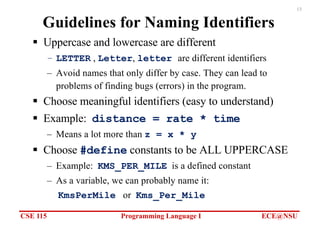
Guidelines for Naming Identifiers
§ Uppercase and lowercase are different
– LETTER , Letter, letter are different identifiers
– Avoid names that only differ by case. They can lead to
problems of finding bugs (errors) in the program.
§ Choose meaningful identifiers (easy to understand)
§ Example: distance = rate * time
– Means a lot more than z = x * y
§ Choose #define constants to be ALL UPPERCASE
– Example: KMS_PER_MILE is a defined constant
– As a variable, we can probably name it:
KmsPerMile or Kms_Per_Mile
14.
CSE 115 ProgrammingLanguage I ECE@NSU
14
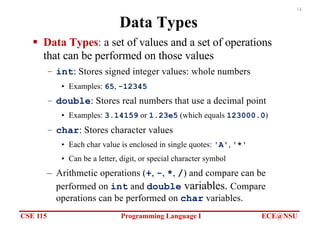
Data Types
§ Data Types: a set of values and a set of operations
that can be performed on those values
– int: Stores signed integer values: whole numbers
• Examples: 65, -12345
– double: Stores real numbers that use a decimal point
• Examples: 3.14159 or 1.23e5 (which equals 123000.0)
– char: Stores character values
• Each char value is enclosed in single quotes: 'A', '*'
• Can be a letter, digit, or special character symbol
– Arithmetic operations (+, -, *, /) and compare can be
performed on int and double variables. Compare
operations can be performed on char variables.
15.
CSE 115 ProgrammingLanguage I ECE@NSU
15
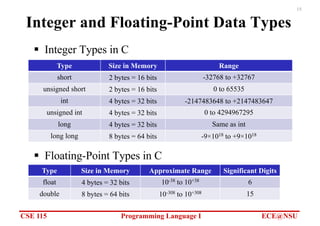
Integer and Floating-Point Data Types
§ Integer Types in C
Type Size in Memory Range
short 2 bytes = 16 bits -32768 to +32767
unsigned short 2 bytes = 16 bits 0 to 65535
int 4 bytes = 32 bits -2147483648 to +2147483647
unsigned int 4 bytes = 32 bits 0 to 4294967295
long 4 bytes = 32 bits Same as int
long long 8 bytes = 64 bits -9×10¹⁸ to +9×10¹⁸
Type Size in Memory Approximate Range Significant Digits
float 4 bytes = 32 bits 10-38 to 10+38 6
double 8 bytes = 64 bits 10-308 to 10+308 15
§ Floating-Point Types in C
16.
CSE 115 ProgrammingLanguage I ECE@NSU
16
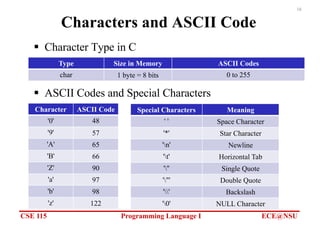
Characters and ASCII Code
§ Character Type in C
Type Size in Memory ASCII Codes
char 1 byte = 8 bits 0 to 255
Character ASCII Code
'0' 48
'9' 57
'A' 65
'B' 66
'Z' 90
'a' 97
'b' 98
'z' 122
Special Characters Meaning
' ' Space Character
'*' Star Character
'n' Newline
't' Horizontal Tab
''' Single Quote
'"' Double Quote
'' Backslash
'0' NULL Character
§ ASCII Codes and Special Characters
17.
CSE 115 ProgrammingLanguage I ECE@NSU
17
Variable Declaration
§ Variables: The memory cells used for storing a
program’s input data and its computational results
– The Value of a Variable can change at runtime
§ Variable declarations: Statements that communicate
to the compiler the names of variables in the program
and the type of data they can store.
– Examples:
double miles, kms;
int count;
char answer;
– C requires that you declare every variable in the program.
18.
CSE 115 ProgrammingLanguage I ECE@NSU
18
Executable Statements
§ Executable Statements: C statements used to write
or code the algorithm. C compiler translates the
executable statements to machine code.
§ Examples of executable Statements:
– Assignment Statements
– Function Calls, such as calling printf and scanf
– return statement
– if and switch statements (selection) - later
– for and while statements (iteration) - later
19.
CSE 115 ProgrammingLanguage I ECE@NSU
19
Assignment Statements
§ Stores a value or a computational result in a variable
variable = expression;
= is the Assignment Operator
§ The assignment statement computes the expression
that appears after the assignment operator and stores
its value in the variable that appears to the left.
20.
CSE 115 ProgrammingLanguage I ECE@NSU
20
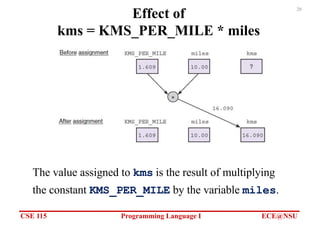
Effect of
kms = KMS_PER_MILE * miles
The value assigned to kms is the result of multiplying
the constant KMS_PER_MILE by the variable miles.
21.
CSE 115 ProgrammingLanguage I ECE@NSU
21
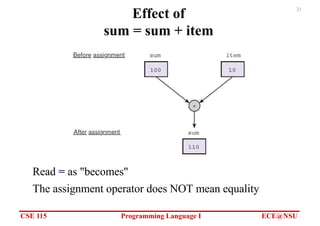
Effect of
sum = sum + item
Read = as "becomes"
The assignment operator does NOT mean equality
22.
CSE 115 ProgrammingLanguage I ECE@NSU
22
Input/Output Operations and Functions
§ Input operation: data transfer from the outside world
into computer memory
§ Output operation: program results can be displayed
to the program user
§ Input/Output functions: special program units that
do all input/output operations
– printf : output function
– scanf : input function
§ Function call: used to call or activate a function
– Asking another piece of code to do some work for you
23.
CSE 115 ProgrammingLanguage I ECE@NSU
23
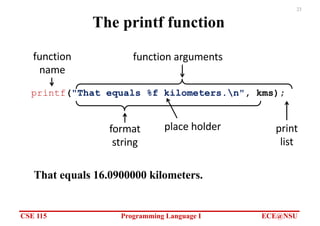
The printf function
That equals 16.0900000 kilometers.
function
name
printf("That equals %f kilometers.n", kms);
function arguments
format
string
print
list
place holder
24.
CSE 115 ProgrammingLanguage I ECE@NSU
24
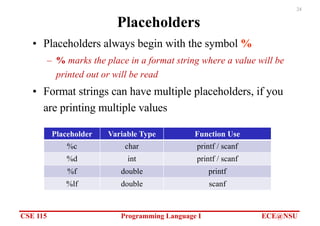
Placeholders
• Placeholders always begin with the symbol %
– % marks the place in a format string where a value will be
printed out or will be read
• Format strings can have multiple placeholders, if you
are printing multiple values
Placeholder Variable Type Function Use
%c char printf / scanf
%d int printf / scanf
%f double printf
%lf double scanf
25.
CSE 115 ProgrammingLanguage I ECE@NSU
25
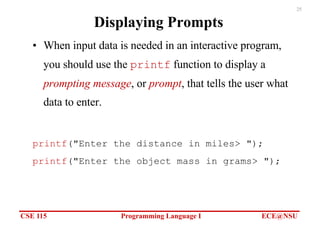
Displaying Prompts
• When input data is needed in an interactive program,
you should use the printf function to display a
prompting message, or prompt, that tells the user what
data to enter.
printf("Enter the distance in miles> ");
printf("Enter the object mass in grams> ");
26.
CSE 115 ProgrammingLanguage I ECE@NSU
26
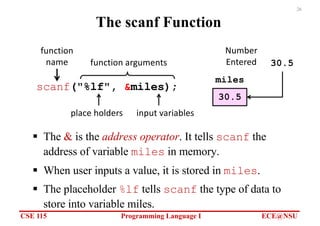
The scanf Function
§ The & is the address operator. It tells scanf the
address of variable miles in memory.
§ When user inputs a value, it is stored in miles.
§ The placeholder %lf tells scanf the type of data to
store into variable miles.
scanf("%lf", &miles);
function
name function arguments
place holders input variables
30.5
miles
30.5
Number
Entered
27.
CSE 115 ProgrammingLanguage I ECE@NSU
27
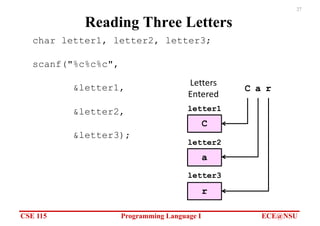
Reading Three Letters
char letter1, letter2, letter3;
scanf("%c%c%c",
&letter1,
&letter2,
&letter3);
letter3
letter1
letter2
C
C
Letters
Entered
a
r
a r
28.
CSE 115 ProgrammingLanguage I ECE@NSU
28
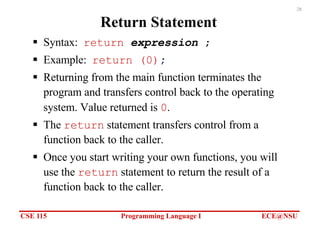
Return Statement
§ Syntax: return expression ;
§ Example: return (0);
§ Returning from the main function terminates the
program and transfers control back to the operating
system. Value returned is 0.
§ The return statement transfers control from a
function back to the caller.
§ Once you start writing your own functions, you will
use the return statement to return the result of a
function back to the caller.
29.
CSE 115 ProgrammingLanguage I ECE@NSU
29
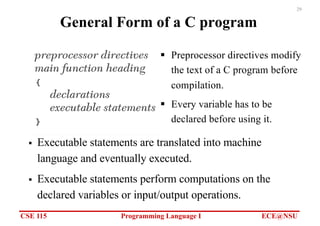
General Form of a C program
§ Preprocessor directives modify
the text of a C program before
compilation.
§ Every variable has to be
declared before using it.
§ Executable statements are translated into machine
language and eventually executed.
§ Executable statements perform computations on the
declared variables or input/output operations.
30.
CSE 115 ProgrammingLanguage I ECE@NSU
30
Comments
§ Comments making it easier for us to understand the program,
but are ignored by the C compiler.
§ Two forms of comments:
– /* C comment */ anything between /* and */ is
considered a comment, even if it spans on multiple lines.
– // C++ comment anything after // is considered a
comment until the end of the line.
§ Comments are used to create Program Documentation
– Help others read and understand the program.
§ The start of the program should consist of a comment that
includes programmer’s name, date, current version, and a brief
description of what the program does.
§ Always Comment your Code!
31.
CSE 115 ProgrammingLanguage I ECE@NSU
31
Programming Style
§ Why we need to follow conventions?
– A program that looks good is easier to read and understand
than one that is sloppy.
– 80% of the cost of software goes to maintenance.
– Hardly any software is maintained for its whole lifetime by
the original author.
– Programs that follow the typical conventions are more
readable and allow engineers to understand the code more
quickly and thoroughly.
§ Check your text book and expert programmers on how
to improve your programming style.
32.
CSE 115 ProgrammingLanguage I ECE@NSU
32
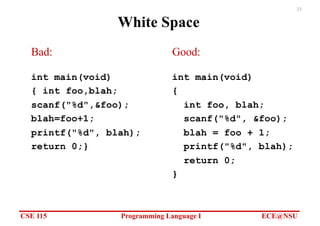
White Space
§ The compiler ignores extra blanks between words and
symbols, but you may insert space to improve the
readability and style of a program.
§ You should always leave a blank space after a comma
and before and after operators such as: + − * /
and =
§ You should indent the lines of code in the body of a
function.
33.
CSE 115 ProgrammingLanguage I ECE@NSU
33
White Space
int main(void)
{ int foo,blah;
scanf("%d",&foo);
blah=foo+1;
printf("%d", blah);
return 0;}
int main(void)
{
int foo, blah;
scanf("%d", &foo);
blah = foo + 1;
printf("%d", blah);
return 0;
}
Bad: Good:
34.
CSE 115 ProgrammingLanguage I ECE@NSU
34
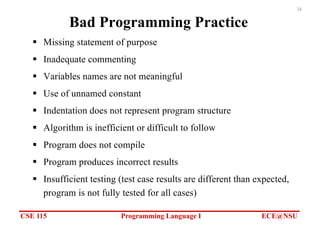
Bad Programming Practice
§ Missing statement of purpose
§ Inadequate commenting
§ Variables names are not meaningful
§ Use of unnamed constant
§ Indentation does not represent program structure
§ Algorithm is inefficient or difficult to follow
§ Program does not compile
§ Program produces incorrect results
§ Insufficient testing (test case results are different than expected,
program is not fully tested for all cases)
35.
CSE 115 ProgrammingLanguage I ECE@NSU
35
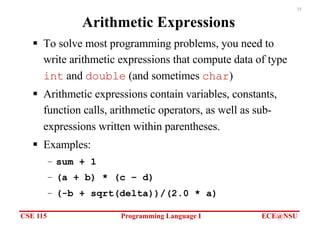
Arithmetic Expressions
§ To solve most programming problems, you need to
write arithmetic expressions that compute data of type
int and double (and sometimes char)
§ Arithmetic expressions contain variables, constants,
function calls, arithmetic operators, as well as sub-
expressions written within parentheses.
§ Examples:
– sum + 1
– (a + b) * (c – d)
– (-b + sqrt(delta))/(2.0 * a)
36.
CSE 115 ProgrammingLanguage I ECE@NSU
36
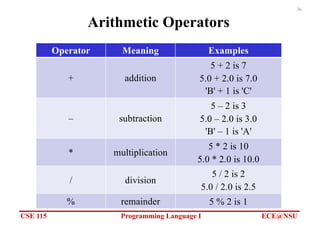
Arithmetic Operators
Operator Meaning Examples
+ addition
5 + 2 is 7
5.0 + 2.0 is 7.0
'B' + 1 is 'C'
– subtraction
5 – 2 is 3
5.0 – 2.0 is 3.0
'B' – 1 is 'A'
* multiplication
5 * 2 is 10
5.0 * 2.0 is 10.0
/ division
5 / 2 is 2
5.0 / 2.0 is 2.5
% remainder 5 % 2 is 1
37.
CSE 115 ProgrammingLanguage I ECE@NSU
37
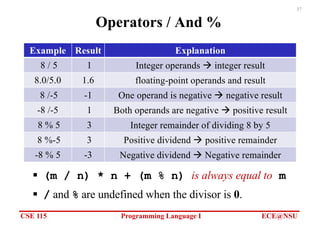
Operators / And %
§ (m / n) * n + (m % n) is always equal to m
§ / and % are undefined when the divisor is 0.
Example Result Explanation
8 / 5 1 Integer operands à integer result
8.0/5.0 1.6 floating-point operands and result
8 /-5 -1 One operand is negative à negative result
-8 /-5 1 Both operands are negative à positive result
8 % 5 3 Integer remainder of dividing 8 by 5
8 %-5 3 Positive dividend à positive remainder
-8 % 5 -3 Negative dividend à Negative remainder
38.
CSE 115 ProgrammingLanguage I ECE@NSU
38
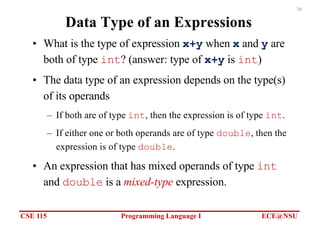
Data Type of an Expressions
• What is the type of expression x+y when x and y are
both of type int? (answer: type of x+y is int)
• The data type of an expression depends on the type(s)
of its operands
– If both are of type int, then the expression is of type int.
– If either one or both operands are of type double, then the
expression is of type double.
• An expression that has mixed operands of type int
and double is a mixed-type expression.
39.
CSE 115 ProgrammingLanguage I ECE@NSU
39
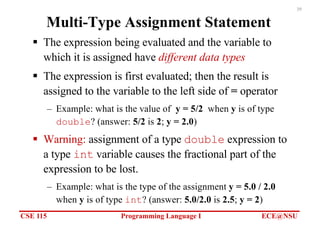
Multi-Type Assignment Statement
§ The expression being evaluated and the variable to
which it is assigned have different data types
§ The expression is first evaluated; then the result is
assigned to the variable to the left side of = operator
– Example: what is the value of y = 5/2 when y is of type
double? (answer: 5/2 is 2; y = 2.0)
§ Warning: assignment of a type double expression to
a type int variable causes the fractional part of the
expression to be lost.
– Example: what is the type of the assignment y = 5.0 / 2.0
when y is of type int? (answer: 5.0/2.0 is 2.5; y = 2)
40.
CSE 115 ProgrammingLanguage I ECE@NSU
40
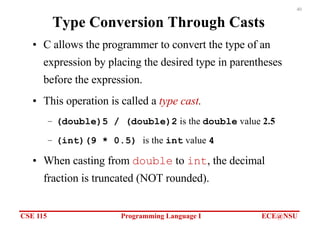
Type Conversion Through Casts
• C allows the programmer to convert the type of an
expression by placing the desired type in parentheses
before the expression.
• This operation is called a type cast.
– (double)5 / (double)2 is the double value 2.5
– (int)(9 * 0.5) is the int value 4
• When casting from double to int, the decimal
fraction is truncated (NOT rounded).
41.
CSE 115 ProgrammingLanguage I ECE@NSU
41
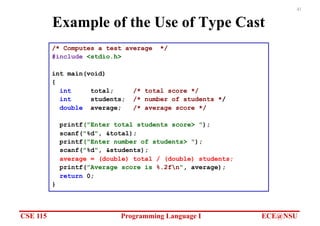
Example of the Use of Type Cast
/* Computes a test average */
#include <stdio.h>
int main(void)
{
int total; /* total score */
int students; /* number of students */
double average; /* average score */
printf("Enter total students score> ");
scanf("%d", &total);
printf("Enter number of students> ");
scanf("%d", &students);
average = (double) total / (double) students;
printf("Average score is %.2fn", average);
return 0;
}
42.
CSE 115 ProgrammingLanguage I ECE@NSU
42
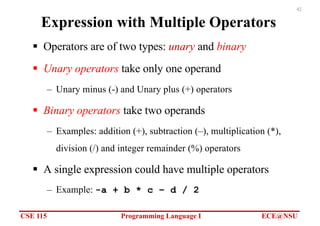
Expression with Multiple Operators
§ Operators are of two types: unary and binary
§ Unary operators take only one operand
– Unary minus (-) and Unary plus (+) operators
§ Binary operators take two operands
– Examples: addition (+), subtraction (–), multiplication (*),
division (/) and integer remainder (%) operators
§ A single expression could have multiple operators
– Example: -a + b * c – d / 2
43.
CSE 115 ProgrammingLanguage I ECE@NSU
43
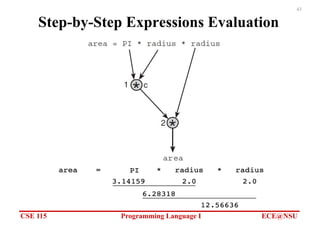
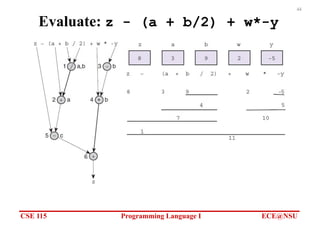
Step-by-Step Expressions Evaluation
CSE 115 ProgrammingLanguage I ECE@NSU
45
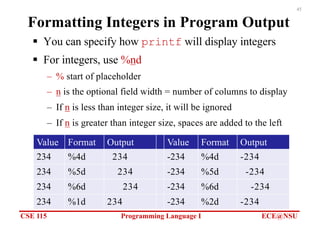
Formatting Integers in Program Output
§ You can specify how printf will display integers
§ For integers, use %nd
– % start of placeholder
– n is the optional field width = number of columns to display
– If n is less than integer size, it will be ignored
– If n is greater than integer size, spaces are added to the left
Value Format Output Value Format Output
234 %4d 234 -234 %4d -234
234 %5d 234 -234 %5d -234
234 %6d 234 -234 %6d -234
234 %1d 234 -234 %2d -234
46.
CSE 115 ProgrammingLanguage I ECE@NSU
46
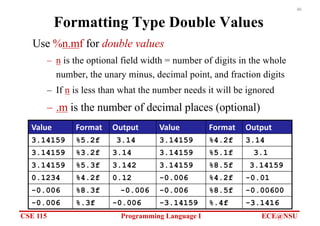
Formatting Type Double Values
Use %n.mf for double values
– n is the optional field width = number of digits in the whole
number, the unary minus, decimal point, and fraction digits
– If n is less than what the number needs it will be ignored
– .m is the number of decimal places (optional)
Value Format Output Value Format Output
3.14159 %5.2f 3.14 3.14159 %4.2f 3.14
3.14159 %3.2f 3.14 3.14159 %5.1f 3.1
3.14159 %5.3f 3.142 3.14159 %8.5f 3.14159
0.1234 %4.2f 0.12 -0.006 %4.2f -0.01
-0.006 %8.3f -0.006 -0.006 %8.5f -0.00600
-0.006 %.3f -0.006 -3.14159 %.4f -3.1416
47.
CSE 115 ProgrammingLanguage I ECE@NSU
47
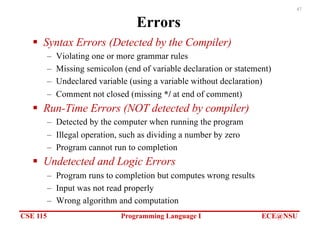
Errors
§ Syntax Errors (Detected by the Compiler)
– Violating one or more grammar rules
– Missing semicolon (end of variable declaration or statement)
– Undeclared variable (using a variable without declaration)
– Comment not closed (missing */ at end of comment)
§ Run-Time Errors (NOT detected by compiler)
– Detected by the computer when running the program
– Illegal operation, such as dividing a number by zero
– Program cannot run to completion
§ Undetected and Logic Errors
– Program runs to completion but computes wrong results
– Input was not read properly
– Wrong algorithm and computation