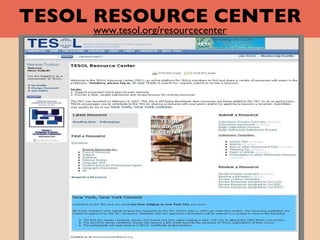
TESOL RESOURCE CENTER www.tesol.org/resourcecenter
TESOL Resource Center (TRC)   A new online benefit for  TESOL Members The TRC provides these opportunities: Expand your professional activities Publish your resources online Share your expertise with colleagues in the field Access a variety of educational and academic resources Receive recognition for your contribution
TESOL Resource Center (TRC)   Members can approach the TRC in three ways:   I.   Find Resources  for * Classroom purposes   * Professional development purposes   II. Submit Resources     III. Review Resources
TESOL Resource Center I.  Find Resources   Log in or join TESOL Find Resources   Latest Resource Browse by Type of Resource  Lesson Plan  Activity  Quiz or Other Assessment Tool Teaching Tip  Papers Presentation and Other Multimedia Resources Subject Audience (educators, students/levels) Interest Section  Language Skills Content Area (for professional papers) Geographical Relevance All
Log in or join   TESOL . Browse the resources to see what is available .
TESOL RESOURCE CENTER II.  Submit Resources Online Submission Process Submission Overview Submission Agreement Begin Submission Process Submission Templates Lesson Plan Activity Quiz or Other Assessment Tool Teaching Tip Paper or Article Presentation or Other Multimedia Resource
Log in or join TESOL. You can submit a resource to the TRC.
TESOL RESOURCE CENTER II. Submit Resources Online To submit a resource you need to   Have your resource ready to upload.  Sign the Submission Agreement Form.  Use the appropriate Submission Template. Provide information about your submission: title, type, level, subject/content, summary, date and place of previous publication, if applicable.
Online Submission Step 1
Online Submission Step 2
Online Submission Step 3
Online Submission Agreement
Online Submission Confirmation
TESOL RESOURCE CENTER III. Review a Resource Become a Reviewer  info are posted in the TRC site.  Review Process Overview IS Member Review  PDC Member Review  Approve/Provisionally Approve/Disapprove If  approved , the resource will be posted. If  provisionally approved , submitter will revise the resource before posting.  Review Templates and criteria  are   provided in the TRC site for submitters and reviewers .
Log in or join TESOL. You can become a TRC reviewer.
TESOL RESOURCE CENTER visit the TRC at   www.tesol.org/resourcecenter

C:\fakepath\tesol resource center

  • 1.
    TESOL RESOURCE CENTERwww.tesol.org/resourcecenter
  • 2.
    TESOL Resource Center(TRC) A new online benefit for TESOL Members The TRC provides these opportunities: Expand your professional activities Publish your resources online Share your expertise with colleagues in the field Access a variety of educational and academic resources Receive recognition for your contribution
  • 3.
    TESOL Resource Center(TRC) Members can approach the TRC in three ways: I. Find Resources for * Classroom purposes * Professional development purposes II. Submit Resources III. Review Resources
  • 4.
    TESOL Resource CenterI. Find Resources Log in or join TESOL Find Resources Latest Resource Browse by Type of Resource Lesson Plan Activity Quiz or Other Assessment Tool Teaching Tip Papers Presentation and Other Multimedia Resources Subject Audience (educators, students/levels) Interest Section Language Skills Content Area (for professional papers) Geographical Relevance All
  • 5.
    Log in orjoin TESOL . Browse the resources to see what is available .
  • 6.
    TESOL RESOURCE CENTERII. Submit Resources Online Submission Process Submission Overview Submission Agreement Begin Submission Process Submission Templates Lesson Plan Activity Quiz or Other Assessment Tool Teaching Tip Paper or Article Presentation or Other Multimedia Resource
  • 7.
    Log in orjoin TESOL. You can submit a resource to the TRC.
  • 8.
    TESOL RESOURCE CENTERII. Submit Resources Online To submit a resource you need to Have your resource ready to upload. Sign the Submission Agreement Form. Use the appropriate Submission Template. Provide information about your submission: title, type, level, subject/content, summary, date and place of previous publication, if applicable.
  • 9.
  • 10.
  • 11.
  • 12.
  • 13.
  • 14.
  • 15.
    TESOL RESOURCE CENTERIII. Review a Resource Become a Reviewer info are posted in the TRC site. Review Process Overview IS Member Review PDC Member Review Approve/Provisionally Approve/Disapprove If approved , the resource will be posted. If provisionally approved , submitter will revise the resource before posting. Review Templates and criteria are provided in the TRC site for submitters and reviewers .
  • 16.
    Log in orjoin TESOL. You can become a TRC reviewer.
  • 17.
    TESOL RESOURCE CENTERvisit the TRC at www.tesol.org/resourcecenter