1
Felix Barnsteiner | Software Engineer APM Java agent
28.01.2020
Centralized logging for
(Java) applications with
the Elastic stack -
made easy
2
Agenda
Centralized logging 1011
Introducing ECS (Elastic Common Schema)3
Introducing ecs-logging-java4
Demo5
Centralized logging can be hard2
3
📃
Servers Elasticsearch Kibana
Centralized logging 101
Filebeat
📃
📃
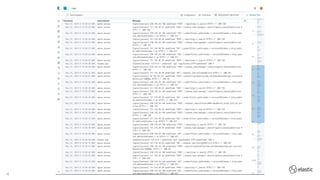
ssh into every server vs central dashboard
4
5
Centralized logging 101
• Search and filter by specific fields
‒ Timestamp
‒ Log level
‒ Message
‒ Service name
• Aggregations/Dashboards
‒ Rate of ERROR logs for each service
Structured logs
6
Centralized logging 101
•
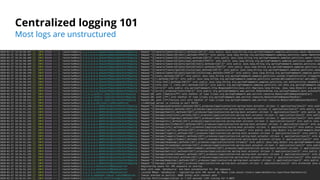
Most logs are unstructured
7
Re-applying structure
LogEvent
<PatternLayout/>
2020-01-27 18:36:51.394 INFO 83260 --- [ main]
o.s.s.petclinic.PetClinicApplication : Hello World
(?m)^%{TIMESTAMP_ISO8601:@timestamp}%{SPACE}%{LOGLEVEL:lo
g.level}
%{SPACE}%{NUMBER:pid}%{SPACE}%{SYSLOG5424SD:thread.name}%
{SPACE}---%{SPACE}%{JAVACLASSSHORT:classname}%{SPACE}:%{S
PACE}%{GREEDYDATA:message}
{"@timestamp":"2019-08-06T12:09:12.375Z",
"log.level": "INFO", "message":"Hello World"}
… a bit like trying to make a fish from Sushi
🐟
🔪
🍣
📃
🔪
⏪
8
Centralized logging can be hard
• Every Java app has a different logging layout
• Parsing can become hard
‒ Grok is easier than regex but can still be hard
‒ Parsing multi-line stacktraces 🤯
• Teams might use different field names
Structure is great, but which structure should be used?
‒ No cross-team dashboards
‒ This is where ECS can help
The not so easy part
9
Introducing ECS
• A common set of fields names for event
data
• Elasticsearch datatypes for each field
‒ Filebeat creates an optimized ES mapping
• Allows to analyze and visualize data from
different sources
• Elastic products adhere to ECS
‒ Filebeat modules
‒ APM
‒ Packetbeat
‒ Logs App
Elastic Common Schema https://ela.st/ecs
10
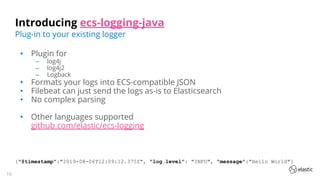
Introducing ecs-logging-java
• Plugin for
‒ log4j
‒ log4j2
‒ Logback
• Formats your logs into ECS-compatible JSON
• Filebeat can just send the logs as-is to Elasticsearch
• No complex parsing
• Other languages supported
github.com/elastic/ecs-logging
Plug-in to your existing logger
{"@timestamp":"2019-08-06T12:09:12.375Z", "log.level": "INFO", "message":"Hello World"}
11
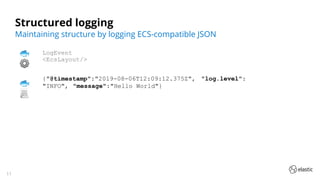
Structured logging
LogEvent
<EcsLayout/>
{"@timestamp":"2019-08-06T12:09:12.375Z", "log.level":
"INFO", "message":"Hello World"}
Maintaining structure by logging ECS-compatible JSON
🐟
⚙
🐟
📃
12
Structured logging
With ecs-logging-java
13
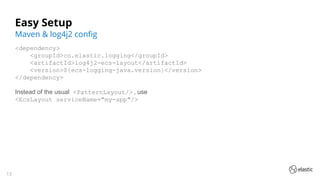
Easy Setup
<dependency>
<groupId>co.elastic.logging</groupId>
<artifactId>log4j2-ecs-layout</artifactId>
<version>${ecs-logging-java.version}</version>
</dependency>
Instead of the usual <PatternLayout/> , use
<EcsLayout serviceName="my-app"/>
Maven & log4j2 config
14
Easy Setup
filebeat.inputs:
- type: log
paths: /path/to/logs.json
json.keys_under_root: true
json.overwrite_keys: true
output.elasticsearch:
hosts: ["https://localhost:9200"]
Filebeat config
15
Benefits
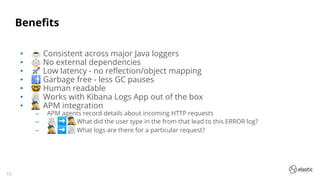
• ☕ Consistent across major Java loggers
• ⚖ No external dependencies
• 🚀 Low latency - no reflection/object mapping
• 🚮 Garbage free - less GC pauses
• 🤓 Human readable
• 📃 Works with Kibana Logs App out of the box
• 🕵 APM integration
‒ APM agents record details about incoming HTTP requests
‒ 📃➡🕵What did the user type in the from that lead to this ERROR log?
‒ 🕵➡📃What logs are there for a particular request?
16
Alternatives
• log4j2: github.com/vy/log4j2-logstash-layout
• Logback: github.com/logstash/logstash-logback-encoder
• ➕More flexibility in layout
‒ Supports non-ECS layouts
• ➖More configuration
• ➖Less consistency
Don't like ecs-logging-java? Try these:
17
📃
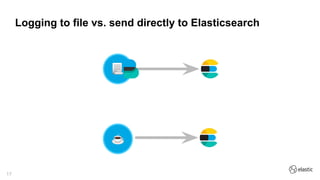
Logging to file vs. send directly to Elasticsearch
☕
��
18
Send directly to Elasticsearch?
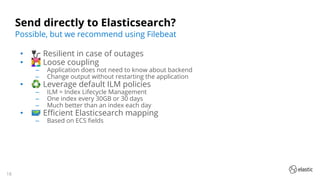
• 🔌 Resilient in case of outages
• 👩‍❤‍👨 Loose coupling
‒ Application does not need to know about backend
‒ Change output without restarting the application
• ♻ Leverage default ILM policies
‒ ILM = Index Lifecycle Management
‒ One index every 30GB or 30 days
‒ Much better than an index each day
• 🗺 Efficient Elasticsearch mapping
‒ Based on ECS fields
Possible, but we recommend using Filebeat
19
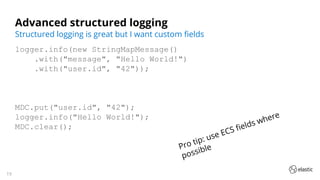
Advanced structured logging
logger.info(new StringMapMessage()
.with("message", "Hello World!")
.with("user.id", "42"));
MDC.put("user.id", "42");
logger.info("Hello World!");
MDC.clear();
Structured logging is great but I want custom fields
Pro tip: use ECS fields where
possible
20
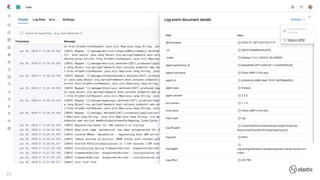
Demo!
21
22
Questions?
github.com/elastic/ecs-logging-java
Twitter: @felix_b
No fish were harmed in the making of this presentation

Centralized logging for (java) applications with the elastic stack made easy