Contextual Proactivity for Media
Sharing Scenarios in Proximity
Networks
Edwin A. Heredia, Shailendra Kumar, Jun Nishimura, George Hsieh, Alan Messer
Advanced Technology Lab
Samsung Research America
San Jose, CA, USA
January 2014
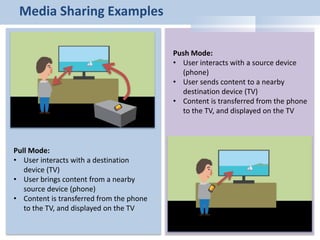
Media Sharing Examples
Pull Mode:
• User interacts with a destination
device (TV)
• User brings content from a nearby
source device (phone)
• Content is transferred from the phone
to the TV, and displayed on the TV
Push Mode:
• User interacts with a source device
(phone)
• User sends content to a nearby
destination device (TV)
• Content is transferred from the phone
to the TV, and displayed on the TV
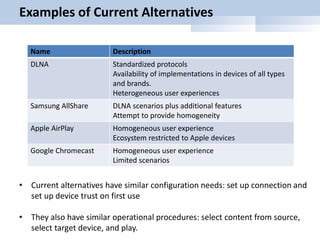
Examples of Current Alternatives
Name Description
DLNA Standardized protocols
Availability of implementations in devices of all types
and brands.
Heterogeneous user experiences
Samsung AllShare DLNA scenarios plus additional features
Attempt to provide homogeneity
Apple AirPlay Homogeneous user experience
Ecosystem restricted to Apple devices
Google Chromecast Homogeneous user experience
Limited scenarios
• Current alternatives have similar configuration needs: set up connection and
set up device trust on first use
• They also have similar operational procedures: select content from source,
select target device, and play.
Challenge
• Users capture millions of pictures and videos daily with
phones
• Users share millions of pictures and videos daily over social
networks
• All these pictures and videos are available in mobile devices
(phones, tablets)
• Despite a strong interest from users, when users are located
near TVs, they rarely use current media sharing alternatives to
view the content
Reasons
Multiple reasons including:
• Insufficient knowledge
• Perceived complexity; including maintenance complexity
• Heterogeneous configuration procedures
• Heterogeneous playback experiences
• Some broken experiences (content types)
• Non-intuitive experiences
• Network latencies and performance
• Islands of interoperability
Alternative paradigm
User-centric networks:
• Users should not have to learn how to set up and operate devices or apps.
Instead devices should learn how to interpret user intent and perform
operations on behalf of the user
Contextual proactivity:
• Devices use context to identify user probable behavior and execute
proactive actions to facilitate connected experiences
Caveat:
• We need unobtrusive solutions. Device intelligence and proactive actions
cannot hinder user intent.
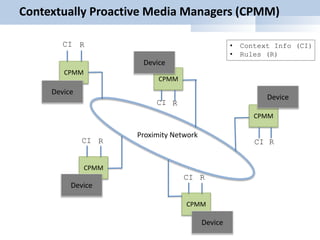
Contextually Proactive Media Managers (CPMM)
CPMM
Device
CPMM
CPMM
CPMM
CPMM
Device
Device
Device
Device
Proximity Network
CI R
CI
CICI
CI
R
RR
R
• Context Info (CI)
• Rules (R)
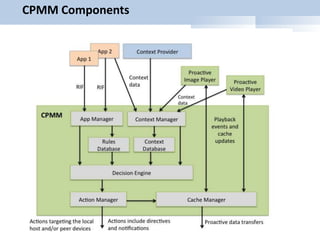
CPMM Components
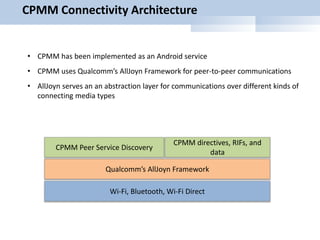
CPMM Connectivity Architecture
CPMM directives, RIFs, and
data
Qualcomm’s AllJoyn Framework
Wi-Fi, Bluetooth, Wi-Fi Direct
CPMM Peer Service Discovery
• CPMM has been implemented as an Android service
• CPMM uses Qualcomm’s AllJoyn Framework for peer-to-peer communications
• AllJoyn serves an an abstraction layer for communications over different kinds of
connecting media types
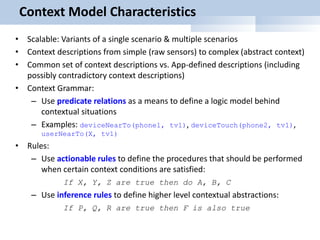
Context Model Characteristics
• Scalable: Variants of a single scenario & multiple scenarios
• Context descriptions from simple (raw sensors) to complex (abstract context)
• Common set of context descriptions vs. App-defined descriptions (including
possibly contradictory context descriptions)
• Context Grammar:
– Use predicate relations as a means to define a logic model behind
contextual situations
– Examples: deviceNearTo(phone1, tv1), deviceTouch(phone2, tv1),
userNearTo(X, tv1)
• Rules:
– Use actionable rules to define the procedures that should be performed
when certain context conditions are satisfied:
If X, Y, Z are true then do A, B, C
– Use inference rules to define higher level contextual abstractions:
If P, Q, R are true then F is also true
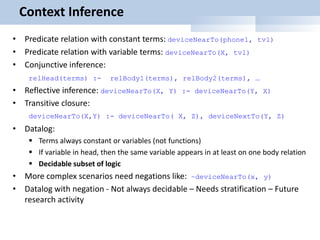
Context Inference
• Predicate relation with constant terms: deviceNearTo(phone1, tv1)
• Predicate relation with variable terms: deviceNearTo(X, tv1)
• Conjunctive inference:
relHead(terms) :- relBody1(terms), relBody2(terms), …
• Reflective inference: deviceNearTo(X, Y) :- deviceNearTo(Y, X)
• Transitive closure:
deviceNearTo(X,Y) :- deviceNearTo( X, Z), deviceNextTo(Y, Z)
• Datalog:
 Terms always constant or variables (not functions)
 If variable in head, then the same variable appears in at least on one body relation
 Decidable subset of logic
• More complex scenarios need negations like: ~deviceNearTo(x, y)
• Datalog with negation - Not always decidable – Needs stratification – Future
research activity
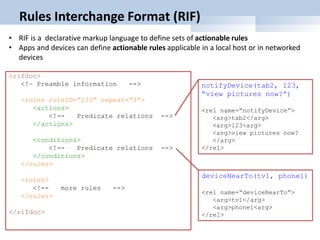
Rules Interchange Format (RIF)
<rifdoc>
<!– Preamble information -->
<rules ruleID=“123” repeat=“3”>
<actions>
<!-- Predicate relations -->
</actions>
<conditions>
<!-- Predicate relations -->
</conditions>
</rules>
<rules>
<!-- more rules -->
</rules>
</rifdoc>
deviceNearTo(tv1, phone1)
<rel name=“deviceNearTo”>
<arg>tv1</arg>
<arg>phone1<arg>
</rel>
• RIF is a declarative markup language to define sets of actionable rules
• Apps and devices can define actionable rules applicable in a local host or in networked
devices
notifyDevice(tab2, 123,
“view pictures now?”)
<rel name=“notifyDevice”>
<arg>tab2</arg>
<arg>123<arg>
<arg>view pictures now?
</arg>
</rel>
Contextually Proactive Media Sharing
• Detect user intent:
 New pictures available with tag T
 Video paused
 Book reading paused at page N
 Game level reached
• Detect context info in the form of device and/or user proximity (sensors, cameras, etc.)
• Read app-defined context conditions and actions
• Evaluate context conditions
• When conditions are satisfied:
 Set up connections
 Proactive transfer of content
 Recommend content services (via notifications)
Examples
• New images
 If new images detected and if user is at home, the system transfers images proactively to a nearby TV.
 If the user starts watching TV, the system offers the user to view the content (using notifications)
• Aggregated slide show
 If images with tag T detected from phones in the network, the system asks users if they would like to
contribute the images to a slide show
 If these users gather around the TV, the system asks one user if it is time to start the slide show (using
notifications)
• Paused videos
 If a user starts watching video and then pauses playback, the system proactively transfers the video file
or portions of the video file to nearby TVs.
 If the user starts watching TV, the system offers the user to resume watching the paused video (using
notifications)
• Paused games
 If a user starts playing a game on a phone, and after reaching some level the user pauses the game, the
system proactively transfers game resources and game state to a nearby tablet.
 If the user touches the tablet with the phone, the game immediately starts on the tablet from the same
state as before
• SMS redirection
 If a user is alone in a car and receives an SMS message, the message is transferred to the car speaker
system (using text-to-speech).
 If a user is not alone in a car and receives an SMS message, the message notification is transferred to
the user’s Galaxy Gear watch as a personal event.
Conclusions
• We described the operation of a Contextually Proactive Media Manager
(CPMM), which provides a level of awareness of user intentions to devices
across a proximity network.
• Under the proper context conditions, CPMM agents installed in devices
cooperate to proactively set up connections and transfer content in
anticipation of usage
• CPMM-enabled devices and apps can implement certain media sharing
scenarios with a much simplified user experience.
• CPMM reduces playback latency to values close to zero for content
transferred proactively to a destination device, thus providing a good
solution for truly interactive network media scenarios.

ccnc_contextPro

  • 1.
    Contextual Proactivity forMedia Sharing Scenarios in Proximity Networks Edwin A. Heredia, Shailendra Kumar, Jun Nishimura, George Hsieh, Alan Messer Advanced Technology Lab Samsung Research America San Jose, CA, USA January 2014
  • 2.
    Media Sharing Examples PullMode: • User interacts with a destination device (TV) • User brings content from a nearby source device (phone) • Content is transferred from the phone to the TV, and displayed on the TV Push Mode: • User interacts with a source device (phone) • User sends content to a nearby destination device (TV) • Content is transferred from the phone to the TV, and displayed on the TV
  • 3.
    Examples of CurrentAlternatives Name Description DLNA Standardized protocols Availability of implementations in devices of all types and brands. Heterogeneous user experiences Samsung AllShare DLNA scenarios plus additional features Attempt to provide homogeneity Apple AirPlay Homogeneous user experience Ecosystem restricted to Apple devices Google Chromecast Homogeneous user experience Limited scenarios • Current alternatives have similar configuration needs: set up connection and set up device trust on first use • They also have similar operational procedures: select content from source, select target device, and play.
  • 4.
    Challenge • Users capturemillions of pictures and videos daily with phones • Users share millions of pictures and videos daily over social networks • All these pictures and videos are available in mobile devices (phones, tablets) • Despite a strong interest from users, when users are located near TVs, they rarely use current media sharing alternatives to view the content
  • 5.
    Reasons Multiple reasons including: •Insufficient knowledge • Perceived complexity; including maintenance complexity • Heterogeneous configuration procedures • Heterogeneous playback experiences • Some broken experiences (content types) • Non-intuitive experiences • Network latencies and performance • Islands of interoperability
  • 6.
    Alternative paradigm User-centric networks: •Users should not have to learn how to set up and operate devices or apps. Instead devices should learn how to interpret user intent and perform operations on behalf of the user Contextual proactivity: • Devices use context to identify user probable behavior and execute proactive actions to facilitate connected experiences Caveat: • We need unobtrusive solutions. Device intelligence and proactive actions cannot hinder user intent.
  • 7.
    Contextually Proactive MediaManagers (CPMM) CPMM Device CPMM CPMM CPMM CPMM Device Device Device Device Proximity Network CI R CI CICI CI R RR R • Context Info (CI) • Rules (R)
  • 8.
  • 9.
    CPMM Connectivity Architecture CPMMdirectives, RIFs, and data Qualcomm’s AllJoyn Framework Wi-Fi, Bluetooth, Wi-Fi Direct CPMM Peer Service Discovery • CPMM has been implemented as an Android service • CPMM uses Qualcomm’s AllJoyn Framework for peer-to-peer communications • AllJoyn serves an an abstraction layer for communications over different kinds of connecting media types
  • 10.
    Context Model Characteristics •Scalable: Variants of a single scenario & multiple scenarios • Context descriptions from simple (raw sensors) to complex (abstract context) • Common set of context descriptions vs. App-defined descriptions (including possibly contradictory context descriptions) • Context Grammar: – Use predicate relations as a means to define a logic model behind contextual situations – Examples: deviceNearTo(phone1, tv1), deviceTouch(phone2, tv1), userNearTo(X, tv1) • Rules: – Use actionable rules to define the procedures that should be performed when certain context conditions are satisfied: If X, Y, Z are true then do A, B, C – Use inference rules to define higher level contextual abstractions: If P, Q, R are true then F is also true
  • 11.
    Context Inference • Predicaterelation with constant terms: deviceNearTo(phone1, tv1) • Predicate relation with variable terms: deviceNearTo(X, tv1) • Conjunctive inference: relHead(terms) :- relBody1(terms), relBody2(terms), … • Reflective inference: deviceNearTo(X, Y) :- deviceNearTo(Y, X) • Transitive closure: deviceNearTo(X,Y) :- deviceNearTo( X, Z), deviceNextTo(Y, Z) • Datalog:  Terms always constant or variables (not functions)  If variable in head, then the same variable appears in at least on one body relation  Decidable subset of logic • More complex scenarios need negations like: ~deviceNearTo(x, y) • Datalog with negation - Not always decidable – Needs stratification – Future research activity
  • 12.
    Rules Interchange Format(RIF) <rifdoc> <!– Preamble information --> <rules ruleID=“123” repeat=“3”> <actions> <!-- Predicate relations --> </actions> <conditions> <!-- Predicate relations --> </conditions> </rules> <rules> <!-- more rules --> </rules> </rifdoc> deviceNearTo(tv1, phone1) <rel name=“deviceNearTo”> <arg>tv1</arg> <arg>phone1<arg> </rel> • RIF is a declarative markup language to define sets of actionable rules • Apps and devices can define actionable rules applicable in a local host or in networked devices notifyDevice(tab2, 123, “view pictures now?”) <rel name=“notifyDevice”> <arg>tab2</arg> <arg>123<arg> <arg>view pictures now? </arg> </rel>
  • 13.
    Contextually Proactive MediaSharing • Detect user intent:  New pictures available with tag T  Video paused  Book reading paused at page N  Game level reached • Detect context info in the form of device and/or user proximity (sensors, cameras, etc.) • Read app-defined context conditions and actions • Evaluate context conditions • When conditions are satisfied:  Set up connections  Proactive transfer of content  Recommend content services (via notifications)
  • 14.
    Examples • New images If new images detected and if user is at home, the system transfers images proactively to a nearby TV.  If the user starts watching TV, the system offers the user to view the content (using notifications) • Aggregated slide show  If images with tag T detected from phones in the network, the system asks users if they would like to contribute the images to a slide show  If these users gather around the TV, the system asks one user if it is time to start the slide show (using notifications) • Paused videos  If a user starts watching video and then pauses playback, the system proactively transfers the video file or portions of the video file to nearby TVs.  If the user starts watching TV, the system offers the user to resume watching the paused video (using notifications) • Paused games  If a user starts playing a game on a phone, and after reaching some level the user pauses the game, the system proactively transfers game resources and game state to a nearby tablet.  If the user touches the tablet with the phone, the game immediately starts on the tablet from the same state as before • SMS redirection  If a user is alone in a car and receives an SMS message, the message is transferred to the car speaker system (using text-to-speech).  If a user is not alone in a car and receives an SMS message, the message notification is transferred to the user’s Galaxy Gear watch as a personal event.
  • 15.
    Conclusions • We describedthe operation of a Contextually Proactive Media Manager (CPMM), which provides a level of awareness of user intentions to devices across a proximity network. • Under the proper context conditions, CPMM agents installed in devices cooperate to proactively set up connections and transfer content in anticipation of usage • CPMM-enabled devices and apps can implement certain media sharing scenarios with a much simplified user experience. • CPMM reduces playback latency to values close to zero for content transferred proactively to a destination device, thus providing a good solution for truly interactive network media scenarios.