Convocatoria  
                                                                                           Fotografía Digital 


Nivel: Secundaria a Universidad 
Tema: “Shadows from the past and future” (sombras del pasado y futuro) 
 
Objetivo: Que el participante a través de su lente y manipulación digital muestre en un portafolio su punto de 
vista en torno al tema del concurso 
 
         a. Cada equipo participante podrá presentar de tres a cinco fotografías digitales, con absoluta 
             libertad técnica, de procedimientos, obtención, retoques y efectos digitales.  
         b. Se podrá utilizar cualquier aplicación de software para la manipulación de las imágenes. 
         c. Las fotografías tanto deberán enviarse como archivo digital .jpg con una resolución de 300 dpi, en 
             formato de 8 x 10 pulgadas. 
         d. Podrá presentarse material en color o blanco y negro. 
         e. Las fotos deberán ser tomadas obligatoriamente por él o los participantes. 
         f. En la entrega del portafolio deberá incluir además del portafolio final, las imágenes originales sin 
             retoques.   
         g. En caso de utilizar la técnica de fotomontaje, las imágenes adicionales pueden ser fotos 
             existentes, agregando en el  documento técnico anexo al proyecto el sitio web de donde se tomó 
             la misma o bien los créditos correspondientes. 
         h. De ser finalistas, se invitará a los participantes a asistir a la fase final que se realizará del 24 al 27 
             de febrero de 2011 en la Ciudad de Guadalajara, Jalisco, México,  donde presentarán su proyecto 
             al jurado evaluador y montarán un stand durante la exposición tecnológica. 
         i. Cada proyecto (portafolio) participará en la categoría correspondiente a su grado escolar. 
         j. No se admiten imágenes ni contenido ofensivo. 
         k. Se Recomienda no agregar textos a la imagen para con ello mantener limpia la fotografía 
     
Competencias a Evaluar: 
 
                              •   Originalidad / Creatividad 
                              •   Complejidad del proyecto elaborado 
                              •   Técnica fotográfica (composición, color, luz, líneas, texturas, etcétera) 
                              •   Impacto visual 
                              •   Mensaje a transmitir 
 
 
¿Aún con dudas? Visita la sección de preguntas frecuentes, donde podrás contactarnos a través de 
un formulario. 
 
Te recomendamos el siguiente artículo de “Tips para tomar mejores fotografías” 
 
 
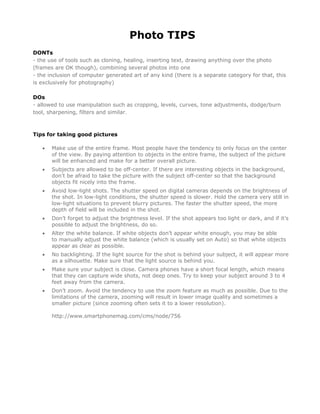
Photo TIPS
DONTs
- the use of tools such as cloning, healing, inserting text, drawing anything over the photo
(frames are OK though), combining several photos into one
- the inclusion of computer generated art of any kind (there is a separate category for that, this
is exclusively for photography)

DOs
- allowed to use manipulation such as cropping, levels, curves, tone adjustments, dodge/burn
tool, sharpening, filters and similar.


Tips for taking good pictures

   •   Make use of the entire frame. Most people have the tendency to only focus on the center
       of the view. By paying attention to objects in the entire frame, the subject of the picture
       will be enhanced and make for a better overall picture.
   •   Subjects are allowed to be off-center. If there are interesting objects in the background,
       don’t be afraid to take the picture with the subject off-center so that the background
       objects fit nicely into the frame.
   •   Avoid low-light shots. The shutter speed on digital cameras depends on the brightness of
       the shot. In low-light conditions, the shutter speed is slower. Hold the camera very still in
       low-light situations to prevent blurry pictures. The faster the shutter speed, the more
       depth of field will be included in the shot.
   •   Don’t forget to adjust the brightness level. If the shot appears too light or dark, and if it’s
       possible to adjust the brightness, do so.
   •   Alter the white balance. If white objects don’t appear white enough, you may be able
       to manually adjust the white balance (which is usually set on Auto) so that white objects
       appear as clear as possible.
   •   No backlighting. If the light source for the shot is behind your subject, it will appear more
       as a silhouette. Make sure that the light source is behind you.
   •   Make sure your subject is close. Camera phones have a short focal length, which means
       that they can capture wide shots, not deep ones. Try to keep your subject around 3 to 4
       feet away from the camera.
   •   Don’t zoom. Avoid the tendency to use the zoom feature as much as possible. Due to the
       limitations of the camera, zooming will result in lower image quality and sometimes a
       smaller picture (since zooming often sets it to a lower resolution).

       http://www.smartphonemag.com/cms/node/756
Top 10 Tips for Great Pictures

                                    Do you wish you were a better photographer? All it takes is a little
                                    know-how and experience. Keep reading for some important
                                    picture-taking tips. Then grab your camera and start shooting your
                                    way to great pictures.


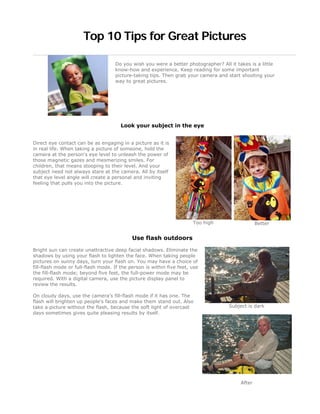
                                       Look your subject in the eye


Direct eye contact can be as engaging in a picture as it is
in real life. When taking a picture of someone, hold the
camera at the person's eye level to unleash the power of
those magnetic gazes and mesmerizing smiles. For
children, that means stooping to their level. And your
subject need not always stare at the camera. All by itself
that eye level angle will create a personal and inviting
feeling that pulls you into the picture.


                                                                       Too high                  Better


                                            Use flash outdoors

Bright sun can create unattractive deep facial shadows. Eliminate the
shadows by using your flash to lighten the face. When taking people
pictures on sunny days, turn your flash on. You may have a choice of
fill-flash mode or full-flash mode. If the person is within five feet, use
the fill-flash mode; beyond five feet, the full-power mode may be
required. With a digital camera, use the picture display panel to
review the results.

On cloudy days, use the camera's fill-flash mode if it has one. The
flash will brighten up people's faces and make them stand out. Also
take a picture without the flash, because the soft light of overcast                Subject is dark
days sometimes gives quite pleasing results by itself.


                                                                                         After
Move in close

If your subject is smaller than a car, take a step or two closer before
taking the picture and zoom in on your subject. Your goal is to fill the
picture area with the subject you are photographing. Up close you
can reveal telling details, like a sprinkle of freckles or an arched
eyebrow.

But don't get too close or your pictures will be blurry. The closest
focusing distance for most cameras is about three feet, or about one
step away from your camera. If you get closer than the closest
focusing distance of your camera (see your manual to be sure), your
pictures will be blurry.                                                    Good


                                                                            Better

                                         Move it from the middle

Center-stage is a great place for a performer to be. However, the
middle of your picture is not the best place for your subject. Bring
your picture to life by simply moving your subject away from the
middle of your picture. Start by playing tick-tack-toe with subject
position. Imagine a tick-tack-toe grid in your viewfinder. Now
place your important subject at one of the intersections of lines.
You'll need to lock the focus if you have an auto-focus camera
because most of them focus on whatever is in the center of the
viewfinder.


                                                                           Boring


                                                                           Better
Lock the focus

If your subject is not in the center of the picture, you need to lock the
focus to create a sharp picture. Most auto-focus cameras focus on
whatever is in the center of the picture. But to improve pictures, you
will often want to move the subject away from the center of the
picture. If you don't want a blurred picture, you'll need to first lock
the focus with the subject in the middle and then recompose the
picture so the subject is away from the middle.

Usually you can lock the focus in three steps. First, center the subject
and press and hold the shutter button halfway down. Second,
reposition your camera (while still holding the shutter button) so the      Subject not in focus
subject is away from the center. And third, finish by pressing the
shutter button all the way down to take the picture.


                                                                                  Better

                                         Know your flash's range

The number one flash mistake is taking pictures beyond the flash's
range. Why is this a mistake? Because pictures taken beyond the
maximum flash range will be too dark. For many cameras, the
maximum flash range is less than fifteen feet—about five steps
away.

What is your camera's flash range? Look it up in your camera
manual. Can't find it? Then don't take a chance. Position yourself so
subjects are no farther than ten feet away. Film users can extend
the flash range by using Kodak Max versatility or versatility plus
film.
                                                                             Without flash


                                                                              With flash
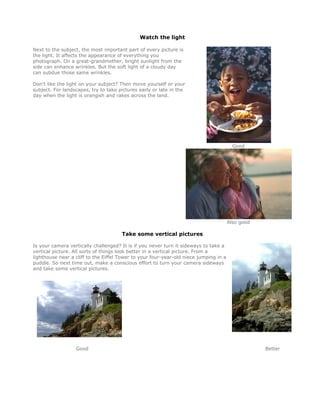
Watch the light

Next to the subject, the most important part of every picture is
the light. It affects the appearance of everything you
photograph. On a great-grandmother, bright sunlight from the
side can enhance wrinkles. But the soft light of a cloudy day
can subdue those same wrinkles.

Don't like the light on your subject? Then move yourself or your
subject. For landscapes, try to take pictures early or late in the
day when the light is orangish and rakes across the land.


                                                                                         Good


                                                                                       Also good

                                      Take some vertical pictures

Is your camera vertically challenged? It is if you never turn it sideways to take a
vertical picture. All sorts of things look better in a vertical picture. From a
lighthouse near a cliff to the Eiffel Tower to your four-year-old niece jumping in a
puddle. So next time out, make a conscious effort to turn your camera sideways
and take some vertical pictures.


                  Good                                                                             Better
Be a picture director

Take control of your picture-taking and watch your pictures
dramatically improve. Become a picture director, not just a
passive picture-taker. A picture director takes charge. A picture
director picks the location: "Everybody go outside to the
backyard." A picture director adds props: "Girls, put on your pink
sunglasses." A picture director arranges people: "Now move in
close, and lean toward the camera."

Most pictures won't be that involved, but you get the idea: Take
charge of your pictures and win your own best picture awards.
                                                                     Boring


                                                                     Better


http://www.kodak.com/eknec/PageQuerier.jhtml?pq-path=317/10032&pq-locale=en_GB 


Cat fotografia

  • 1.
      Convocatoria         Fotografía Digital        Nivel: Secundaria a Universidad  Tema: “Shadows from the past and future” (sombras del pasado y futuro)    Objetivo: Que el participante a través de su lente y manipulación digital muestre en un portafolio su punto de  vista en torno al tema del concurso    a. Cada equipo participante podrá presentar de tres a cinco fotografías digitales, con absoluta  libertad técnica, de procedimientos, obtención, retoques y efectos digitales.   b. Se podrá utilizar cualquier aplicación de software para la manipulación de las imágenes.  c. Las fotografías tanto deberán enviarse como archivo digital .jpg con una resolución de 300 dpi, en  formato de 8 x 10 pulgadas.  d. Podrá presentarse material en color o blanco y negro.  e. Las fotos deberán ser tomadas obligatoriamente por él o los participantes.  f. En la entrega del portafolio deberá incluir además del portafolio final, las imágenes originales sin  retoques.    g. En caso de utilizar la técnica de fotomontaje, las imágenes adicionales pueden ser fotos  existentes, agregando en el  documento técnico anexo al proyecto el sitio web de donde se tomó  la misma o bien los créditos correspondientes.  h. De ser finalistas, se invitará a los participantes a asistir a la fase final que se realizará del 24 al 27  de febrero de 2011 en la Ciudad de Guadalajara, Jalisco, México,  donde presentarán su proyecto  al jurado evaluador y montarán un stand durante la exposición tecnológica.  i. Cada proyecto (portafolio) participará en la categoría correspondiente a su grado escolar.  j. No se admiten imágenes ni contenido ofensivo.  k. Se Recomienda no agregar textos a la imagen para con ello mantener limpia la fotografía    Competencias a Evaluar:    • Originalidad / Creatividad  • Complejidad del proyecto elaborado  • Técnica fotográfica (composición, color, luz, líneas, texturas, etcétera)  • Impacto visual  • Mensaje a transmitir      ¿Aún con dudas? Visita la sección de preguntas frecuentes, donde podrás contactarnos a través de  un formulario.    Te recomendamos el siguiente artículo de “Tips para tomar mejores fotografías”     
  • 2.
    Photo TIPS DONTs - theuse of tools such as cloning, healing, inserting text, drawing anything over the photo (frames are OK though), combining several photos into one - the inclusion of computer generated art of any kind (there is a separate category for that, this is exclusively for photography) DOs - allowed to use manipulation such as cropping, levels, curves, tone adjustments, dodge/burn tool, sharpening, filters and similar. Tips for taking good pictures • Make use of the entire frame. Most people have the tendency to only focus on the center of the view. By paying attention to objects in the entire frame, the subject of the picture will be enhanced and make for a better overall picture. • Subjects are allowed to be off-center. If there are interesting objects in the background, don’t be afraid to take the picture with the subject off-center so that the background objects fit nicely into the frame. • Avoid low-light shots. The shutter speed on digital cameras depends on the brightness of the shot. In low-light conditions, the shutter speed is slower. Hold the camera very still in low-light situations to prevent blurry pictures. The faster the shutter speed, the more depth of field will be included in the shot. • Don’t forget to adjust the brightness level. If the shot appears too light or dark, and if it’s possible to adjust the brightness, do so. • Alter the white balance. If white objects don’t appear white enough, you may be able to manually adjust the white balance (which is usually set on Auto) so that white objects appear as clear as possible. • No backlighting. If the light source for the shot is behind your subject, it will appear more as a silhouette. Make sure that the light source is behind you. • Make sure your subject is close. Camera phones have a short focal length, which means that they can capture wide shots, not deep ones. Try to keep your subject around 3 to 4 feet away from the camera. • Don’t zoom. Avoid the tendency to use the zoom feature as much as possible. Due to the limitations of the camera, zooming will result in lower image quality and sometimes a smaller picture (since zooming often sets it to a lower resolution). http://www.smartphonemag.com/cms/node/756
  • 3.
    Top 10 Tipsfor Great Pictures Do you wish you were a better photographer? All it takes is a little know-how and experience. Keep reading for some important picture-taking tips. Then grab your camera and start shooting your way to great pictures. Look your subject in the eye Direct eye contact can be as engaging in a picture as it is in real life. When taking a picture of someone, hold the camera at the person's eye level to unleash the power of those magnetic gazes and mesmerizing smiles. For children, that means stooping to their level. And your subject need not always stare at the camera. All by itself that eye level angle will create a personal and inviting feeling that pulls you into the picture. Too high Better Use flash outdoors Bright sun can create unattractive deep facial shadows. Eliminate the shadows by using your flash to lighten the face. When taking people pictures on sunny days, turn your flash on. You may have a choice of fill-flash mode or full-flash mode. If the person is within five feet, use the fill-flash mode; beyond five feet, the full-power mode may be required. With a digital camera, use the picture display panel to review the results. On cloudy days, use the camera's fill-flash mode if it has one. The flash will brighten up people's faces and make them stand out. Also take a picture without the flash, because the soft light of overcast Subject is dark days sometimes gives quite pleasing results by itself. After
  • 4.
    Move in close Ifyour subject is smaller than a car, take a step or two closer before taking the picture and zoom in on your subject. Your goal is to fill the picture area with the subject you are photographing. Up close you can reveal telling details, like a sprinkle of freckles or an arched eyebrow. But don't get too close or your pictures will be blurry. The closest focusing distance for most cameras is about three feet, or about one step away from your camera. If you get closer than the closest focusing distance of your camera (see your manual to be sure), your pictures will be blurry. Good Better Move it from the middle Center-stage is a great place for a performer to be. However, the middle of your picture is not the best place for your subject. Bring your picture to life by simply moving your subject away from the middle of your picture. Start by playing tick-tack-toe with subject position. Imagine a tick-tack-toe grid in your viewfinder. Now place your important subject at one of the intersections of lines. You'll need to lock the focus if you have an auto-focus camera because most of them focus on whatever is in the center of the viewfinder. Boring Better
  • 5.
    Lock the focus Ifyour subject is not in the center of the picture, you need to lock the focus to create a sharp picture. Most auto-focus cameras focus on whatever is in the center of the picture. But to improve pictures, you will often want to move the subject away from the center of the picture. If you don't want a blurred picture, you'll need to first lock the focus with the subject in the middle and then recompose the picture so the subject is away from the middle. Usually you can lock the focus in three steps. First, center the subject and press and hold the shutter button halfway down. Second, reposition your camera (while still holding the shutter button) so the Subject not in focus subject is away from the center. And third, finish by pressing the shutter button all the way down to take the picture. Better Know your flash's range The number one flash mistake is taking pictures beyond the flash's range. Why is this a mistake? Because pictures taken beyond the maximum flash range will be too dark. For many cameras, the maximum flash range is less than fifteen feet—about five steps away. What is your camera's flash range? Look it up in your camera manual. Can't find it? Then don't take a chance. Position yourself so subjects are no farther than ten feet away. Film users can extend the flash range by using Kodak Max versatility or versatility plus film. Without flash With flash
  • 6.
    Watch the light Nextto the subject, the most important part of every picture is the light. It affects the appearance of everything you photograph. On a great-grandmother, bright sunlight from the side can enhance wrinkles. But the soft light of a cloudy day can subdue those same wrinkles. Don't like the light on your subject? Then move yourself or your subject. For landscapes, try to take pictures early or late in the day when the light is orangish and rakes across the land. Good Also good Take some vertical pictures Is your camera vertically challenged? It is if you never turn it sideways to take a vertical picture. All sorts of things look better in a vertical picture. From a lighthouse near a cliff to the Eiffel Tower to your four-year-old niece jumping in a puddle. So next time out, make a conscious effort to turn your camera sideways and take some vertical pictures. Good Better
  • 7.
    Be a picturedirector Take control of your picture-taking and watch your pictures dramatically improve. Become a picture director, not just a passive picture-taker. A picture director takes charge. A picture director picks the location: "Everybody go outside to the backyard." A picture director adds props: "Girls, put on your pink sunglasses." A picture director arranges people: "Now move in close, and lean toward the camera." Most pictures won't be that involved, but you get the idea: Take charge of your pictures and win your own best picture awards. Boring Better http://www.kodak.com/eknec/PageQuerier.jhtml?pq-path=317/10032&pq-locale=en_GB