Modifiers List
Create panel > Geometry > Compound Objects
Create menu > Compound
Compound objects include the following
object types:
Morph Compound Object
Scatter Compound Object
Conform Compound Object
Connect Compound Object
BlobMesh Compound Object
ShapeMerge Compound Object
Boolean Compound Object
Terrain Compound Object
Loft Compound Object
Mesher Compound Object
ProBoolean Compound Object
ProCutter Compound Object
Loft objects
Loft objects are two-dimensional shapes extruded along a third axis.
You create loft objects from two or more existing spline objects.
1
2
3
4
5
6
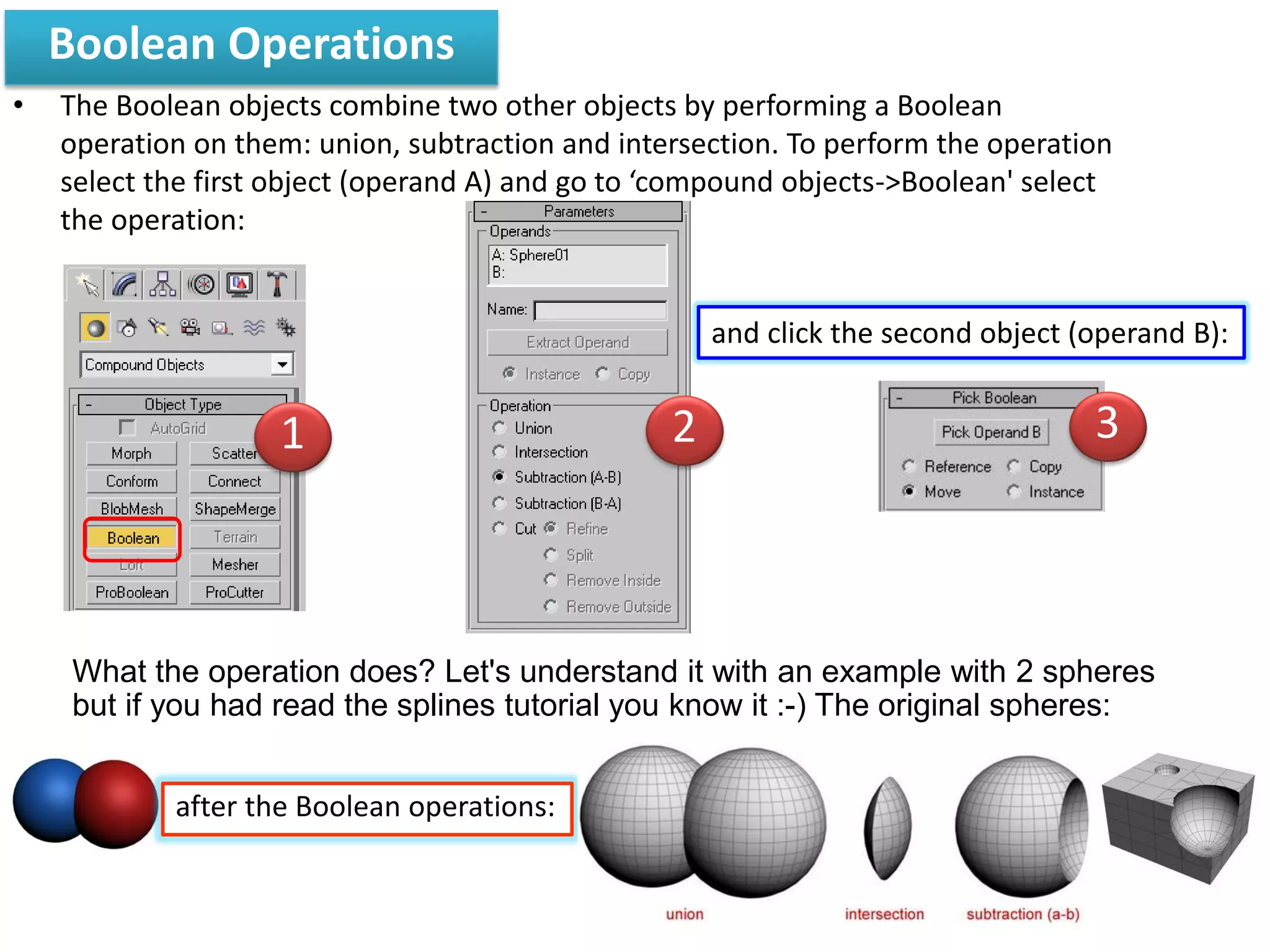
Boolean Operations
• The Boolean objects combine two other objects by performing a Boolean
operation on them: union, subtraction and intersection. To perform the operation
select the first object (operand A) and go to ‘compound objects->Boolean' select
the operation:
What the operation does? Let's understand it with an example with 2 spheres
but if you had read the splines tutorial you know it :-) The original spheres:
and click the second object (operand B):
after the Boolean operations:
21 3
Scatter
Now create a sphere (bigger than the cylinder). Go
to compound objects and select the cylinder. Select
‘scatter', and pick the distribution object: the sphere.
create a cylinder:
apply a taper and a bend modifier:
1
2
3 4
5
Press M on your keyboard and choose an empty slot. In
a Material/Map browser choose Multi/Sub-object.
1
2
3
4
5
Workshop : 3D Cartoon animal planet
2 models (Editable Mesh)
– Compound object ± 2 marks
– Modifiers List (Cage) ± 2 marks
– Multi/Sub-object (Thai flag) ± 2 marks
– Foliage, Railing ± 2 marks
– One Scene (JPG) ± 2 marks
Cartoon animal

Cartoon animal

  • 4.
  • 6.
    Create panel >Geometry > Compound Objects Create menu > Compound Compound objects include the following object types: Morph Compound Object Scatter Compound Object Conform Compound Object Connect Compound Object BlobMesh Compound Object ShapeMerge Compound Object Boolean Compound Object Terrain Compound Object Loft Compound Object Mesher Compound Object ProBoolean Compound Object ProCutter Compound Object
  • 7.
    Loft objects Loft objectsare two-dimensional shapes extruded along a third axis. You create loft objects from two or more existing spline objects. 1 2 3 4 5 6
  • 8.
    Boolean Operations • TheBoolean objects combine two other objects by performing a Boolean operation on them: union, subtraction and intersection. To perform the operation select the first object (operand A) and go to ‘compound objects->Boolean' select the operation: What the operation does? Let's understand it with an example with 2 spheres but if you had read the splines tutorial you know it :-) The original spheres: and click the second object (operand B): after the Boolean operations: 21 3
  • 9.
    Scatter Now create asphere (bigger than the cylinder). Go to compound objects and select the cylinder. Select ‘scatter', and pick the distribution object: the sphere. create a cylinder: apply a taper and a bend modifier: 1 2 3 4 5
  • 10.
    Press M onyour keyboard and choose an empty slot. In a Material/Map browser choose Multi/Sub-object. 1 2 3 4 5
  • 11.
    Workshop : 3DCartoon animal planet 2 models (Editable Mesh) – Compound object ± 2 marks – Modifiers List (Cage) ± 2 marks – Multi/Sub-object (Thai flag) ± 2 marks – Foliage, Railing ± 2 marks – One Scene (JPG) ± 2 marks