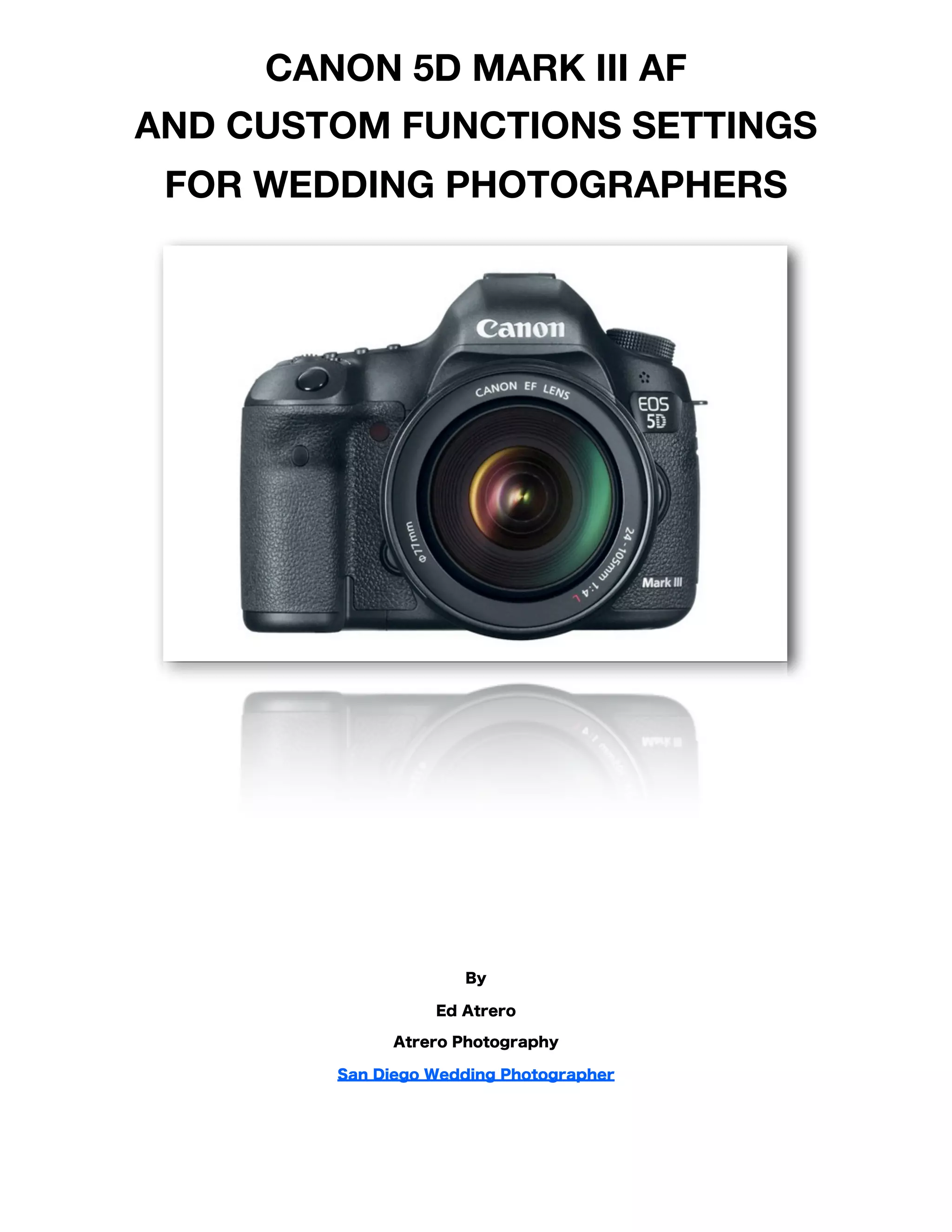
CANON 5D MARK III AF
AND CUSTOM FUNCTIONS SETTINGS
 FOR WEDDING PHOTOGRAPHERS


                     By

                  Ed Atrero

              Atrero Photography

        San Diego Wedding Photographer
Introduction!                                                                    1

    A New Standard in Auto-focus!                                                1

Canon 5D Mark III AF Settings!                                                   2

    AF Submenu 1: AI Servo AF Characteristics!                                   2

    AI First and Second Image Priority !                                         4

    USM Lens Electronic MF!                                                      6

    Enabling MF After AF Operation!                                              7

    AF-assist Beam Firing!                                                       8

    One-Shot AF Release Priority!                                                9

    Setting Lens Drive!                                                         10

    Select AF Points!                                                           12

    AF Area Selection Mode!                                                     13

    AF Area Selection Method!                                                   14

    Orientation Linked AF Point!                                                15

    Manual AF Point Selection Pattern!                                          16

    AF Point Display During Focus!                                              18

    VF Display Illumination!                                                    19

    AF Microadjustments!                                                        20

    Playback Settings!                                                          21

Canon 5D Mark III Custom Function Settings!                                     22

    Exposure Level Increments!                                                  22

Custom Controls!                                                                23

    How to Set Back Button Focus on Canon 5D Mark III!                          24

    AF-ON Button Assignment!                                                    25


Canon 5D Mark III AF and Custom Function Settings For Wedding Photographers !    ii
AE Lock Button Assignment!                                                  26

    DOF preview button!                                                         27

    Lens AF stop button!                                                        28

    Multi-function Button Assignment!                                           29

    Set Button Assignment!                                                      30

    Multi-Controller Assignment!                                                31

    Main Dial Assignment!                                                       32

    Setting My Menu Recommendations!                                            34

Final Words and Further Reading!                                                35


Canon 5D Mark III AF and Custom Function Settings For Wedding Photographers !    iii
Introduction
A New Standard in Auto-focus
At least for the Canon line. ;) As a long time Canon 5D series shooter, we’ve been on sitting sidelines while our
Nikon brethren have been running circles around us in the AF department. At last, no longer is that true! The Canon
EOS 5D Mark III is here and it’s a joy to use. Long time Canon 5D and 5D Mark II users have lots to look forward to
in the AF department. Karen and I have been a San Diego Wedding Photographer duo for over 7 years and we
haven’t been this excited about a camera this much in all those years. There are several new settings in the 5D Mark
III. This article covers some of the new 5D Mark III AF and Custom function settings available on the Mark III and the
settings I have settled on for now, along with commentary on the settings. I use these settings for shooting weddings.

Disclaimer: we get nuts and bolts technical on this, so stop here if F stops or setting AF modes give you headaches.
For the technically fearless, read on!


                                                                                                                         1
Canon 5D Mark III AF Settings
There are tons of new AF settings with respect to previous 5D models (AF has 5 submenus alone!).

AF Submenu 1: AI Servo AF Characteristics
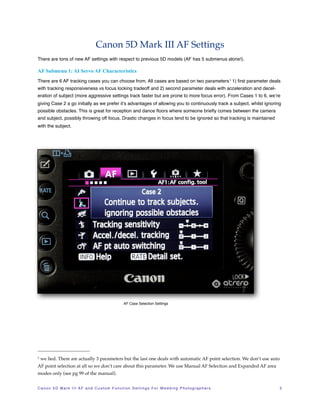
There are 6 AF tracking cases you can choose from. All cases are based on two parameters 1 1) first parameter deals
with tracking responsiveness vs focus locking tradeoff and 2) second parameter deals with acceleration and decel-
eration of subject (more aggressive settings track faster but are prone to more focus error). From Cases 1 to 6, we’re
giving Case 2 a go initially as we prefer it’s advantages of allowing you to continuously track a subject, whilst ignoring
possible obstacles. This is great for reception and dance floors where someone briefly comes between the camera
and subject, possibly throwing off focus. Drastic changes in focus tend to be ignored so that tracking is maintained
with the subject.


                                                               AF Case Selection Settings


1   we lied. There are actually 3 parameters but the last one deals with automatic AF point selection. We don’t use auto
AF point selection at all so we don’t care about this parameter. We use Manual AF Selection and Expanded AF area
modes only (see pg 99 of the manual).


C a n o n 5 D M a r k I I I A F a n d C u s t o m F u n c t i o n S e t t i n g s F o r W e d d i n g P h o t o g r a p h e r s!   2
The different cases in more detail:

• Case 1: Default tracking for general subjects.

• Case 2: Continues to track subject with intermittent obstacles blocking subject.

• Case 3: You can think of this as the opposite of Case 2. Instantly tracks new subjects entering the frame.

• Case 4: Good for subjects that are abruptly accelerating or decelerating. Not to sure this is useful for weddings, but
  if you were shooting sports such as tracking a basketball being passed I’d imagine this would be useful.

• Case 5: For erratic subject movement. Might be useful at a skeet shooting themed wedding I suppose.

• Case 6: Useful if you are shooting multiple skeet shooting themed weddings simultaneously.


.


                                        Ed’s Notes: “I Case 2 handled
                                                                                   beautifully for a wedding process
                                                                                                                                   ional
                                       we shot this past weekend at my
                                                                                      Ponte Winery wedding. As the
                                                                                                                   wed                 -
                                       ding party was making way dow
                                                                                     n the aisle, each person had to
                                                                                                        walk
                                       passed some trees and AI Servo
                                                                         maintained lock on the subjects
                                                                                                           as
                                      they passed beh ind the trees. Ed
                                                                        shot from the front of the ceremon
                                                                                                              y
                                      aisle and nailed 100% of the proc
                                                                         essional using the 2nd to top cen
                                                                                                             ter
                                      cross AF point to focus on the
                                                                      face in AI Servo. As noted in the
                                                                                                        user
                                     manual, the 2nd to top center cros
                                                                         s AF point is a dual cross type
                                                                                                         , the
                                     topmost is a regular cross type
                                                                      so keep that in mind”


C a n o n 5 D M a r k I I I A F a n d C u s t o m F u n c t i o n S e t t i n g s F o r W e d d i n g P h o t o g r a p h e r s!           3
AI First and Second Image Priority
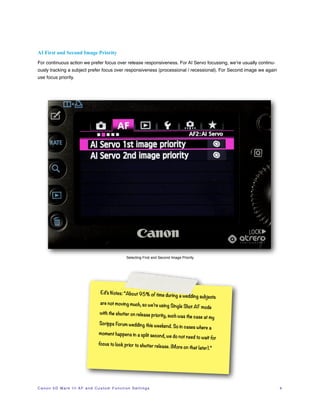
For continuous action we prefer focus over release responsiveness. For AI Servo focussing, we’re usually continu-
ously tracking a subject prefer focus over responsiveness (processional / recessional). For Second image we again
use focus priority.


                                                                Selecting First and Second Image Priority


                                             Ed’s Notes: “About 95% of time
                                                                                          during a wedding subjects
                                             are not moving much, so we’re
                                                                                     using Single Shot AF mode
                                             with the shutter on release prio
                                                                             rity, such was the case at my
                                            Scripps Forum wedding this wee
                                                                                         kend. So in cases where a
                                            moment happens in a split second
                                                                                          , we do not need to wait for
                                            focus to lock prior to shutter rele
                                                                               ase          . (More on that later).”


C a n o n 5 D M a r k I I I A F a n d C u s t o m F u n c t i o n S e t t i n g s!   !                                   4
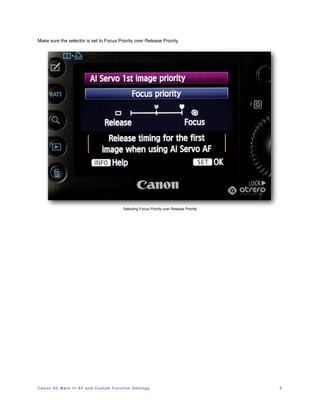
Make sure the selector is set to Focus Priority over Release Priority.


                                                              Selecting Focus Priority over Release Priority


C a n o n 5 D M a r k I I I A F a n d C u s t o m F u n c t i o n S e t t i n g s!   !                         5
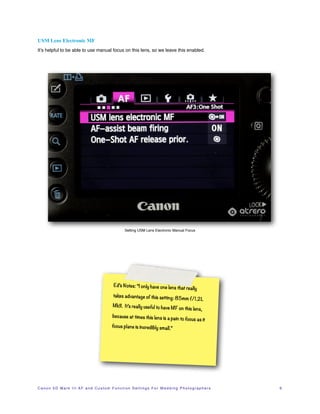
USM Lens Electronic MF
It’s helpful to be able to use manual focus on this lens, so we leave this enabled.


                                                                Setting USM Lens Electronic Manual Focus


                                                       Ed’s Notes: “I only have one lens
                                                                                                      that really
                                                       takes advantage of this setting:
                                                                                        85                mm f/1.2L
                                                       MkII. It’s really useful to have MF
                                                                                           on this lens,
                                                      because at times this lens is a pain
                                                                                           to focus as it
                                                      focus plane is incredibly small.”


C a n o n 5 D M a r k I I I A F a n d C u s t o m F u n c t i o n S e t t i n g s F o r W e d d i n g P h o t o g r a p h e r s!   6
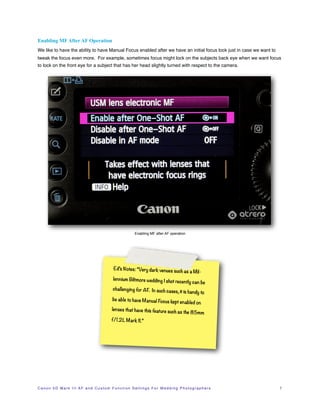
Enabling MF After AF Operation
We like to have the ability to have Manual Focus enabled after we have an initial focus lock just in case we want to
tweak the focus even more. For example, sometimes focus might lock on the subjects back eye when we want focus
to lock on the front eye for a subject that has her head slightly turned with respect to the camera.


                                                                       Enabling MF after AF operation


                                                       Ed’s Notes: “Very dark venues
                                                                                                    such as a Mil-
                                                       lennium Biltmore wedding I sho
                                                                                     t recently can be
                                                       challenging for AF. In such cas
                                                                                      es, it is handy to
                                                       be able to have Manual Focus kep
                                                                                       t enabled on
                                                      lenses that have this feature suc
                                                                                        h as               the 85mm
                                                      f/1.2L Mark II.”


C a n o n 5 D M a r k I I I A F a n d C u s t o m F u n c t i o n S e t t i n g s F o r W e d d i n g P h o t o g r a p h e r s!   7
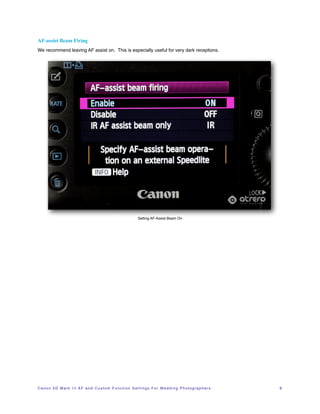
AF-assist Beam Firing
We recommend leaving AF assist on. This is especially useful for very dark receptions.


                                                                         Setting AF-Assist Beam On


C a n o n 5 D M a r k I I I A F a n d C u s t o m F u n c t i o n S e t t i n g s F o r W e d d i n g P h o t o g r a p h e r s!   8
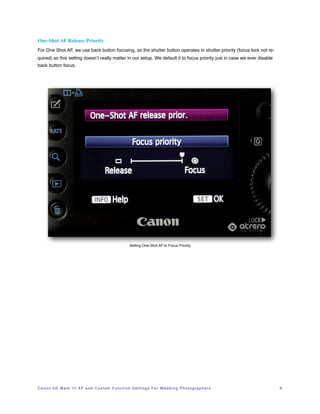
One-Shot AF Release Priority
For One Shot AF, we use back button focusing, so the shutter button operates in shutter priority (focus lock not re-
quired) so this setting doesn’t really matter in our setup. We default it to focus priority just in case we ever disable
back button focus.


                                                                   Setting One-Shot AF to Focus Priority


C a n o n 5 D M a r k I I I A F a n d C u s t o m F u n c t i o n S e t t i n g s F o r W e d d i n g P h o t o g r a p h e r s!   9
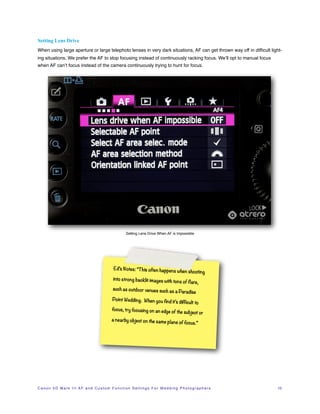
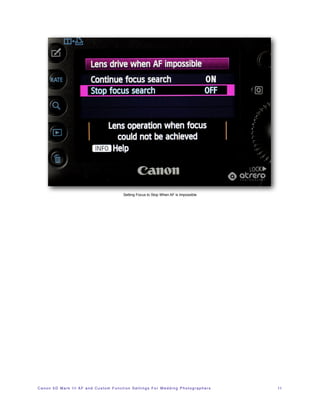
Setting Lens Drive
When using large aperture or large telephoto lenses in very dark situations, AF can get thrown way off in difficult light-
ing situations. We prefer the AF to stop focusing instead of continuously racking focus. We’ll opt to manual focus
when AF can’t focus instead of the camera continuously trying to hunt for focus.


                                                                 Setting Lens Drive When AF is Impossible


                                                       Ed’s Notes: “Th is often happen
                                                                                      s when shooting
                                                       into strong backlit images with
                                                                                                   tons of flare,
                                                       such as outdoor venues such as
                                                                                                     a Paradise
                                                       Point Wedding. When you find
                                                                                    it’s difficult to
                                                      focus, try focusing on an edge
                                                                                     of the                subject or
                                                      a nearby object on the same plan
                                                                                                     e of focus.”


C a n o n 5 D M a r k I I I A F a n d C u s t o m F u n c t i o n S e t t i n g s F o r W e d d i n g P h o t o g r a p h e r s!   10
Setting Focus to Stop When AF is Impossible


C a n o n 5 D M a r k I I I A F a n d C u s t o m F u n c t i o n S e t t i n g s F o r W e d d i n g P h o t o g r a p h e r s!   11
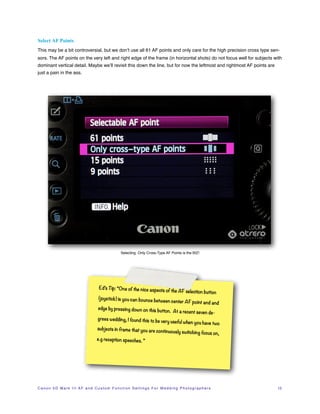
Select AF Points
This may be a bit controversial, but we don’t use all 61 AF points and only care for the high precision cross type sen-
sors. The AF points on the very left and right edge of the frame (in horizontal shots) do not focus well for subjects with
dominant vertical detail. Maybe we’ll revisit this down the line, but for now the leftmost and rightmost AF points are
just a pain in the ass.


                                                             Selecting Only Cross-Type AF Points is the BIZ!


                                             Ed’s Tip: “One of the nice aspects
                                                                                              of the AF selection button
                                            (joystick) is you can bounce betw
                                                                             een                  center AF point and and
                                            edge by pressing down on this
                                                                          button. At a recent seven de-
                                            grees wedding, I found this to be
                                                                              very
                                                                                 useful when you have two
                                           subjects in frame that you are con
                                                                             tinuously switching focus on,
                                           e.g reception speeches. ”


C a n o n 5 D M a r k I I I A F a n d C u s t o m F u n c t i o n S e t t i n g s F o r W e d d i n g P h o t o g r a p h e r s!   12
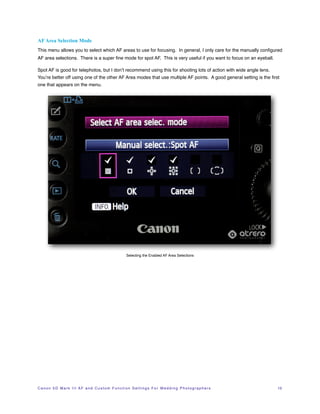
AF Area Selection Mode
This menu allows you to select which AF areas to use for focusing. In general, I only care for the manually configured
AF area selections. There is a super fine mode for spot AF. This is very useful if you want to focus on an eyeball.

Spot AF is good for telephotos, but I don’t recommend using this for shooting lots of action with wide angle lens.
You’re better off using one of the other AF Area modes that use multiple AF points. A good general setting is the first
one that appears on the menu.


                                                                 Selecting the Enabled AF Area Selections


C a n o n 5 D M a r k I I I A F a n d C u s t o m F u n c t i o n S e t t i n g s F o r W e d d i n g P h o t o g r a p h e r s!   13
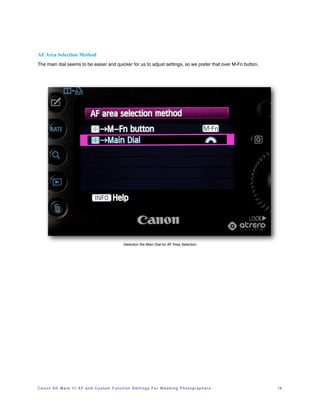
AF Area Selection Method
The main dial seems to be easier and quicker for us to adjust settings, so we prefer that over M-Fn button.


                                                               Selection the Main Dial for AF Area Selection


C a n o n 5 D M a r k I I I A F a n d C u s t o m F u n c t i o n S e t t i n g s F o r W e d d i n g P h o t o g r a p h e r s!   14
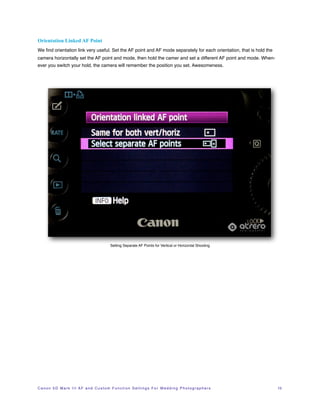
Orientation Linked AF Point
We find orientation link very useful. Set the AF point and AF mode separately for each orientation, that is hold the
camera horizontally set the AF point and mode, then hold the camer and set a different AF point and mode. When-
ever you switch your hold, the camera will remember the position you set. Awesomeness.


                                                     Setting Separate AF Points for Vertical or Horizontal Shooting


C a n o n 5 D M a r k I I I A F a n d C u s t o m F u n c t i o n S e t t i n g s F o r W e d d i n g P h o t o g r a p h e r s!   15
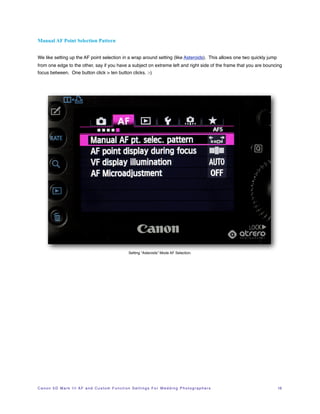
Manual AF Point Selection Pattern


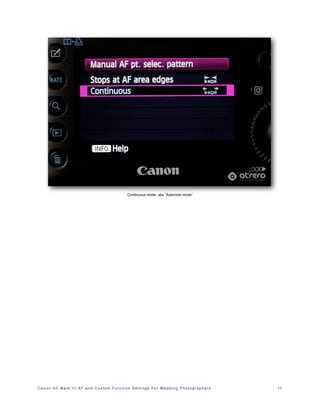
We like setting up the AF point selection in a wrap around setting (like Asteroids). This allows one two quickly jump
from one edge to the other, say if you have a subject on extreme left and right side of the frame that you are bouncing
focus between. One button click > ten button clicks. :-)


                                                                   Setting “Asteroids” Mode AF Selection.


C a n o n 5 D M a r k I I I A F a n d C u s t o m F u n c t i o n S e t t i n g s F o r W e d d i n g P h o t o g r a p h e r s!   16
Continuous mode: aka “Asteroids mode”


C a n o n 5 D M a r k I I I A F a n d C u s t o m F u n c t i o n S e t t i n g s F o r W e d d i n g P h o t o g r a p h e r s!   17
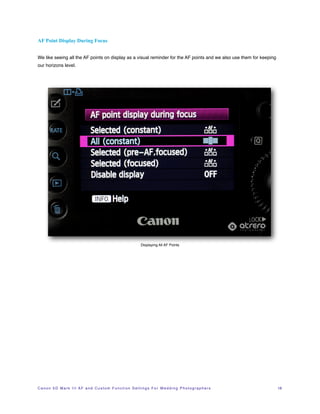
AF Point Display During Focus


We like seeing all the AF points on display as a visual reminder for the AF points and we also use them for keeping
our horizons level.


                                                                            Displaying All AF Points


C a n o n 5 D M a r k I I I A F a n d C u s t o m F u n c t i o n S e t t i n g s F o r W e d d i n g P h o t o g r a p h e r s!   18
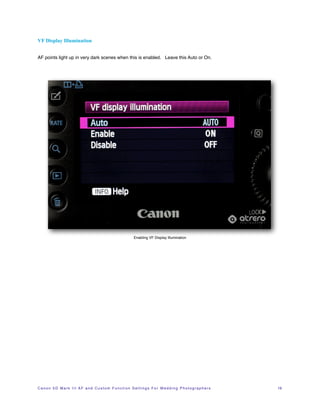
VF Display Illumination


AF points light up in very dark scenes when this is enabled. Leave this Auto or On.


                                                                      Enabling VF Display Illumination


C a n o n 5 D M a r k I I I A F a n d C u s t o m F u n c t i o n S e t t i n g s F o r W e d d i n g P h o t o g r a p h e r s!   19
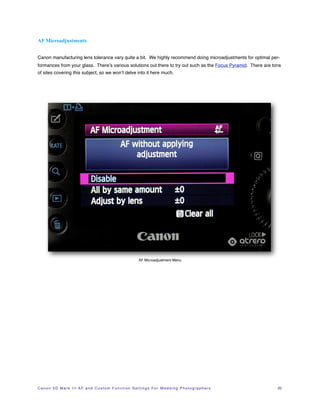
AF Microadjustments


Canon manufacturing lens tolerance vary quite a bit. We highly recommend doing microadjustments for optimal per-
formances from your glass. There’s various solutions out there to try out such as the Focus Pyramid. There are tons
of sites covering this subject, so we won’t delve into it here much.


                                                                          AF Microadjustment Menu


C a n o n 5 D M a r k I I I A F a n d C u s t o m F u n c t i o n S e t t i n g s F o r W e d d i n g P h o t o g r a p h e r s!   20
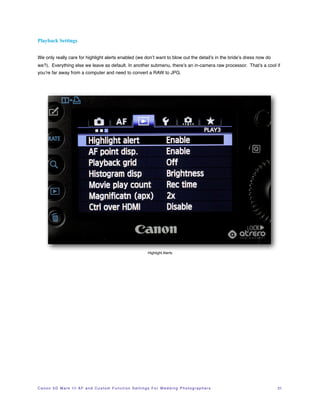
Playback Settings


We only really care for highlight alerts enabled (we don’t want to blow out the detail’s in the bride’s dress now do
we?). Everything else we leave as default. In another submenu, there’s an in-camera raw processor. That’s a cool if
you’re far away from a computer and need to convert a RAW to JPG.


                                                                                 Highlight Alerts


C a n o n 5 D M a r k I I I A F a n d C u s t o m F u n c t i o n S e t t i n g s F o r W e d d i n g P h o t o g r a p h e r s!   21
Canon 5D Mark III Custom Function Settings
This is where the fun starts. :)
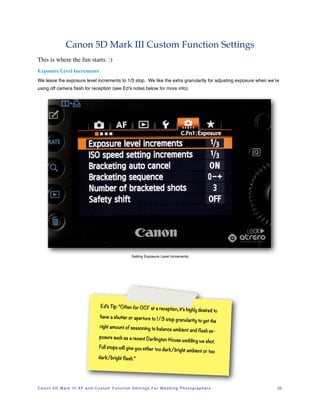
Exposure Level Increments
We leave the exposure level increments to 1/3 stop. We like the extra granularity for adjusting exposure when we’re
using off camera flash for reception (see Ed’s notes below for more info).


                                                                     Setting Exposure Level Increments


                                              Ed’s Tip: “Often for OCF at a rece
                                                                                               ption, it’s highly desired to
                                              have a shutter or aperture to 1/3
                                                                                              stop granularity to get the
                                             right amount of seasoning to bala
                                                                               nce                 ambient and flash ex-
                                             posure such as a recent Darling
                                                                            ton                 House wedding we shot.
                                             Full stops will give you either too
                                                                                           dark/bright ambient or too
                                            dark/bright flash.”


C a n o n 5 D M a r k I I I A F a n d C u s t o m F u n c t i o n S e t t i n g s F o r W e d d i n g P h o t o g r a p h e r s!   22
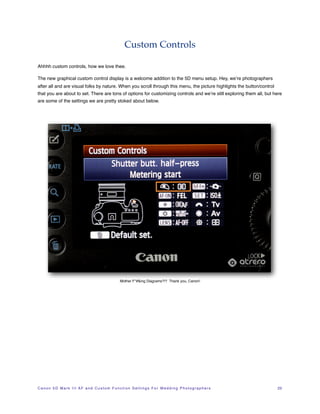
Custom Controls

Ahhhh custom controls, how we love thee.

The new graphical custom control display is a welcome addition to the 5D menu setup. Hey, we’re photographers
after all and are visual folks by nature. When you scroll through this menu, the picture highlights the button/control
that you are about to set. There are tons of options for customizing controls and we’re still exploring them all, but here
are some of the settings we are pretty stoked about below.


                                                            Mother F*#&ing Diagrams?!? Thank you, Canon!


C a n o n 5 D M a r k I I I A F a n d C u s t o m F u n c t i o n S e t t i n g s F o r W e d d i n g P h o t o g r a p h e r s!   23
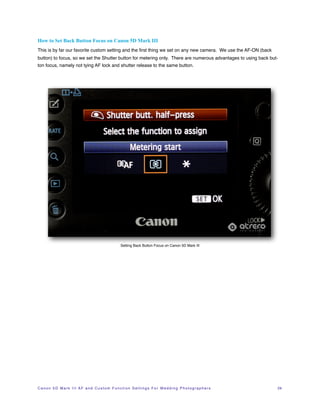
How to Set Back Button Focus on Canon 5D Mark III
This is by far our favorite custom setting and the first thing we set on any new camera. We use the AF-ON (back
button) to focus, so we set the Shutter button for metering only. There are numerous advantages to using back but-
ton focus, namely not tying AF lock and shutter release to the same button.


                                                             Setting Back Button Focus on Canon 5D Mark III


C a n o n 5 D M a r k I I I A F a n d C u s t o m F u n c t i o n S e t t i n g s F o r W e d d i n g P h o t o g r a p h e r s!   24
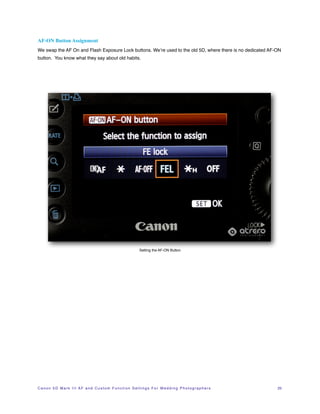
AF-ON Button Assignment
We swap the AF On and Flash Exposure Lock buttons. We’re used to the old 5D, where there is no dedicated AF-ON
button. You know what they say about old habits.


                                                                          Setting the AF-ON Button


C a n o n 5 D M a r k I I I A F a n d C u s t o m F u n c t i o n S e t t i n g s F o r W e d d i n g P h o t o g r a p h e r s!   25
AE Lock Button Assignment
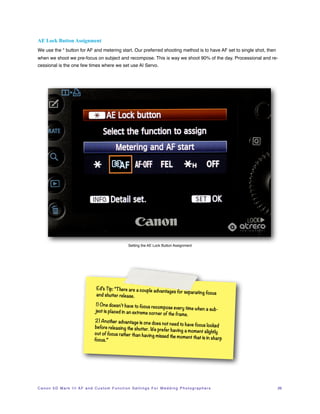
We use the * button for AF and metering start. Our preferred shooting method is to have AF set to single shot, then
when we shoot we pre-focus on subject and recompose. This is way we shoot 90% of the day. Processional and re-
cessional is the one few times where we set use AI Servo.


                                                                  Setting the AE Lock Button Assignment


                                           Ed’s Tip: “There are a couple adv
                                                                            antages for separating focus
                                           and shutter release.

                                          1) One doesn’t have to focus reco
                                                                              mpose every time when a sub-
                                          ject is placed in an extreme cor
                                                                           ner of the frame.
                                         2) Another advantage is one doe
                                                                             s not need to have focus locked
                                         before releasing the shutter. We
                                                                            prefer having a moment slightly
                                         out of focus rather than having
                                                                           missed the moment that is in sha
                                         focus.”                                                            rp


C a n o n 5 D M a r k I I I A F a n d C u s t o m F u n c t i o n S e t t i n g s F o r W e d d i n g P h o t o g r a p h e r s!   26
DOF preview button
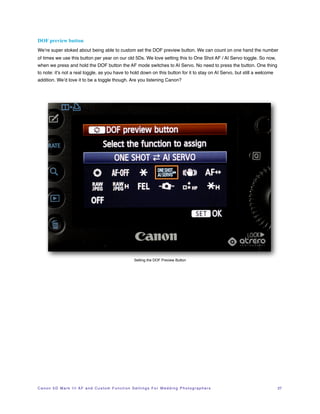
We’re super stoked about being able to custom set the DOF preview button. We can count on one hand the number
of times we use this button per year on our old 5Ds. We love setting this to One Shot AF / AI Servo toggle. So now,
when we press and hold the DOF button the AF mode switches to AI Servo. No need to press the button. One thing

to note: it’s not a real toggle, as you have to hold down on this button for it to stay on AI Servo, but still a welcome
addition. We’d love it to be a toggle though. Are you listening Canon?


                                                                       Setting the DOF Preview Button


C a n o n 5 D M a r k I I I A F a n d C u s t o m F u n c t i o n S e t t i n g s F o r W e d d i n g P h o t o g r a p h e r s!   27
Lens AF stop button


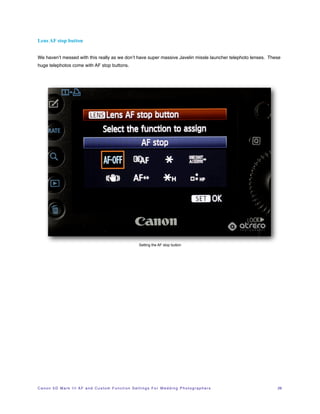
We haven’t messed with this really as we don’t have super massive Javelin missle launcher telephoto lenses. These
huge telephotos come with AF stop buttons.


                                                                          Setting the AF stop button


C a n o n 5 D M a r k I I I A F a n d C u s t o m F u n c t i o n S e t t i n g s F o r W e d d i n g P h o t o g r a p h e r s!   28
Multi-function Button Assignment


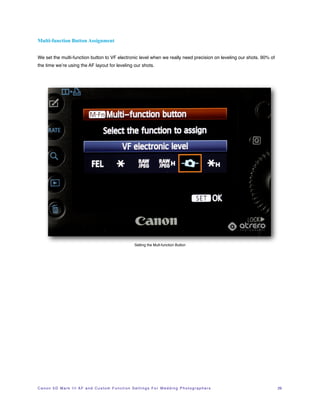
We set the multi-function button to VF electronic level when we really need precision on leveling our shots. 90% of
the time we’re using the AF layout for leveling our shots.


                                                                       Setting the Mult-function Button


C a n o n 5 D M a r k I I I A F a n d C u s t o m F u n c t i o n S e t t i n g s F o r W e d d i n g P h o t o g r a p h e r s!   29
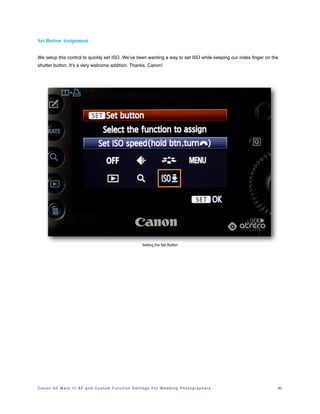
Set Button Assignment


We setup this control to quickly set ISO. We’ve been wanting a way to set ISO while keeping our index finger on the
shutter button. It’s a very welcome addition. Thanks, Canon!


                                                                             Setting the Set Button


C a n o n 5 D M a r k I I I A F a n d C u s t o m F u n c t i o n S e t t i n g s F o r W e d d i n g P h o t o g r a p h e r s!   30
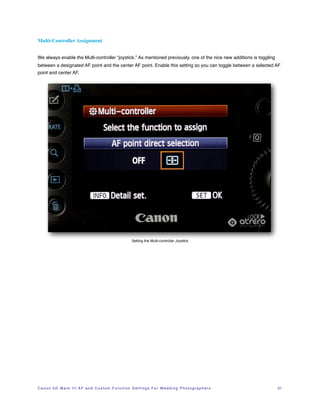
Multi-Controller Assignment


We always enable the Multi-controller “joystick.” As mentioned previously, one of the nice new additions is toggling
between a designated AF point and the center AF point. Enable this setting so you can toggle between a selected AF
point and center AF.


                                                                     Setting the Multi-controller Joystick


C a n o n 5 D M a r k I I I A F a n d C u s t o m F u n c t i o n S e t t i n g s F o r W e d d i n g P h o t o g r a p h e r s!   31
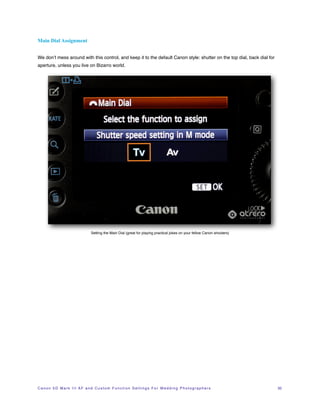
Main Dial Assignment


We don’t mess around with this control, and keep it to the default Canon style: shutter on the top dial, back dial for
aperture, unless you live on Bizarro world.


                                       Setting the Main Dial (great for playing practical jokes on your fellow Canon shooters)


C a n o n 5 D M a r k I I I A F a n d C u s t o m F u n c t i o n S e t t i n g s F o r W e d d i n g P h o t o g r a p h e r s!   32
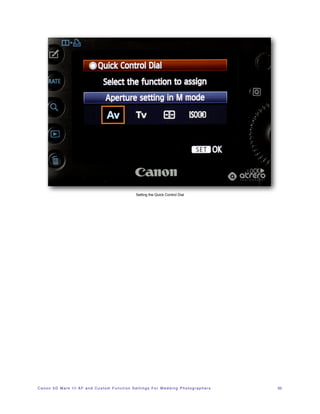
Setting the Quick Control Dial


C a n o n 5 D M a r k I I I A F a n d C u s t o m F u n c t i o n S e t t i n g s F o r W e d d i n g P h o t o g r a p h e r s!   33
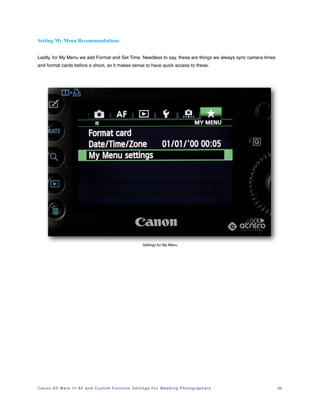
Setting My Menu Recommendations


Lastly, for My Menu we add Format and Set Time. Needless to say, these are things we always sync camera times
and format cards before a shoot, so it makes sense to have quick access to these.


                                                                             Settings for My Menu


C a n o n 5 D M a r k I I I A F a n d C u s t o m F u n c t i o n S e t t i n g s F o r W e d d i n g P h o t o g r a p h e r s!   34
Final Words and Further Reading

There you have it! Thanks for reading my mini guide on using the new Canon 5D Mark III AF and Custom Function
Settings. If you have any questions feel free to drop me a line on the site. Be sure to check out Canon’s AF Setting
Guidebook for the definitive descriptions on the AF system.


If you found this useful, please link or tweet a link to this document. Please be sure to check out our other guides
such as 18 Essential SEO Tips for Photographers.


Ed Atrero


C a n o n 5 D M a r k I I I A F a n d C u s t o m F u n c t i o n S e t t i n g s F o r W e d d i n g P h o t o g r a p h e r s!   35

Canon EOS 5D Mark III AF and Custom Function Settings for Wedding Photographers

  • 1.
    CANON 5D MARKIII AF AND CUSTOM FUNCTIONS SETTINGS FOR WEDDING PHOTOGRAPHERS By Ed Atrero Atrero Photography San Diego Wedding Photographer
  • 2.
    Introduction! 1 A New Standard in Auto-focus! 1 Canon 5D Mark III AF Settings! 2 AF Submenu 1: AI Servo AF Characteristics! 2 AI First and Second Image Priority ! 4 USM Lens Electronic MF! 6 Enabling MF After AF Operation! 7 AF-assist Beam Firing! 8 One-Shot AF Release Priority! 9 Setting Lens Drive! 10 Select AF Points! 12 AF Area Selection Mode! 13 AF Area Selection Method! 14 Orientation Linked AF Point! 15 Manual AF Point Selection Pattern! 16 AF Point Display During Focus! 18 VF Display Illumination! 19 AF Microadjustments! 20 Playback Settings! 21 Canon 5D Mark III Custom Function Settings! 22 Exposure Level Increments! 22 Custom Controls! 23 How to Set Back Button Focus on Canon 5D Mark III! 24 AF-ON Button Assignment! 25 Canon 5D Mark III AF and Custom Function Settings For Wedding Photographers ! ii
  • 3.
    AE Lock ButtonAssignment! 26 DOF preview button! 27 Lens AF stop button! 28 Multi-function Button Assignment! 29 Set Button Assignment! 30 Multi-Controller Assignment! 31 Main Dial Assignment! 32 Setting My Menu Recommendations! 34 Final Words and Further Reading! 35 Canon 5D Mark III AF and Custom Function Settings For Wedding Photographers ! iii
  • 4.
    Introduction A New Standardin Auto-focus At least for the Canon line. ;) As a long time Canon 5D series shooter, we’ve been on sitting sidelines while our Nikon brethren have been running circles around us in the AF department. At last, no longer is that true! The Canon EOS 5D Mark III is here and it’s a joy to use. Long time Canon 5D and 5D Mark II users have lots to look forward to in the AF department. Karen and I have been a San Diego Wedding Photographer duo for over 7 years and we haven’t been this excited about a camera this much in all those years. There are several new settings in the 5D Mark III. This article covers some of the new 5D Mark III AF and Custom function settings available on the Mark III and the settings I have settled on for now, along with commentary on the settings. I use these settings for shooting weddings. Disclaimer: we get nuts and bolts technical on this, so stop here if F stops or setting AF modes give you headaches. For the technically fearless, read on! 1
  • 5.
    Canon 5D MarkIII AF Settings There are tons of new AF settings with respect to previous 5D models (AF has 5 submenus alone!). AF Submenu 1: AI Servo AF Characteristics There are 6 AF tracking cases you can choose from. All cases are based on two parameters 1 1) first parameter deals with tracking responsiveness vs focus locking tradeoff and 2) second parameter deals with acceleration and decel- eration of subject (more aggressive settings track faster but are prone to more focus error). From Cases 1 to 6, we’re giving Case 2 a go initially as we prefer it’s advantages of allowing you to continuously track a subject, whilst ignoring possible obstacles. This is great for reception and dance floors where someone briefly comes between the camera and subject, possibly throwing off focus. Drastic changes in focus tend to be ignored so that tracking is maintained with the subject. AF Case Selection Settings 1 we lied. There are actually 3 parameters but the last one deals with automatic AF point selection. We don’t use auto AF point selection at all so we don’t care about this parameter. We use Manual AF Selection and Expanded AF area modes only (see pg 99 of the manual). C a n o n 5 D M a r k I I I A F a n d C u s t o m F u n c t i o n S e t t i n g s F o r W e d d i n g P h o t o g r a p h e r s! 2
  • 6.
    The different casesin more detail: • Case 1: Default tracking for general subjects. • Case 2: Continues to track subject with intermittent obstacles blocking subject. • Case 3: You can think of this as the opposite of Case 2. Instantly tracks new subjects entering the frame. • Case 4: Good for subjects that are abruptly accelerating or decelerating. Not to sure this is useful for weddings, but if you were shooting sports such as tracking a basketball being passed I’d imagine this would be useful. • Case 5: For erratic subject movement. Might be useful at a skeet shooting themed wedding I suppose. • Case 6: Useful if you are shooting multiple skeet shooting themed weddings simultaneously. . Ed’s Notes: “I Case 2 handled beautifully for a wedding process ional we shot this past weekend at my Ponte Winery wedding. As the wed - ding party was making way dow n the aisle, each person had to walk passed some trees and AI Servo maintained lock on the subjects as they passed beh ind the trees. Ed shot from the front of the ceremon y aisle and nailed 100% of the proc essional using the 2nd to top cen ter cross AF point to focus on the face in AI Servo. As noted in the user manual, the 2nd to top center cros s AF point is a dual cross type , the topmost is a regular cross type so keep that in mind” C a n o n 5 D M a r k I I I A F a n d C u s t o m F u n c t i o n S e t t i n g s F o r W e d d i n g P h o t o g r a p h e r s! 3
  • 7.
    AI First andSecond Image Priority For continuous action we prefer focus over release responsiveness. For AI Servo focussing, we’re usually continu- ously tracking a subject prefer focus over responsiveness (processional / recessional). For Second image we again use focus priority. Selecting First and Second Image Priority Ed’s Notes: “About 95% of time during a wedding subjects are not moving much, so we’re using Single Shot AF mode with the shutter on release prio rity, such was the case at my Scripps Forum wedding this wee kend. So in cases where a moment happens in a split second , we do not need to wait for focus to lock prior to shutter rele ase . (More on that later).” C a n o n 5 D M a r k I I I A F a n d C u s t o m F u n c t i o n S e t t i n g s! ! 4
  • 8.
    Make sure theselector is set to Focus Priority over Release Priority. Selecting Focus Priority over Release Priority C a n o n 5 D M a r k I I I A F a n d C u s t o m F u n c t i o n S e t t i n g s! ! 5
  • 9.
    USM Lens ElectronicMF It’s helpful to be able to use manual focus on this lens, so we leave this enabled. Setting USM Lens Electronic Manual Focus Ed’s Notes: “I only have one lens that really takes advantage of this setting: 85 mm f/1.2L MkII. It’s really useful to have MF on this lens, because at times this lens is a pain to focus as it focus plane is incredibly small.” C a n o n 5 D M a r k I I I A F a n d C u s t o m F u n c t i o n S e t t i n g s F o r W e d d i n g P h o t o g r a p h e r s! 6
  • 10.
    Enabling MF AfterAF Operation We like to have the ability to have Manual Focus enabled after we have an initial focus lock just in case we want to tweak the focus even more. For example, sometimes focus might lock on the subjects back eye when we want focus to lock on the front eye for a subject that has her head slightly turned with respect to the camera. Enabling MF after AF operation Ed’s Notes: “Very dark venues such as a Mil- lennium Biltmore wedding I sho t recently can be challenging for AF. In such cas es, it is handy to be able to have Manual Focus kep t enabled on lenses that have this feature suc h as the 85mm f/1.2L Mark II.” C a n o n 5 D M a r k I I I A F a n d C u s t o m F u n c t i o n S e t t i n g s F o r W e d d i n g P h o t o g r a p h e r s! 7
  • 11.
    AF-assist Beam Firing Werecommend leaving AF assist on. This is especially useful for very dark receptions. Setting AF-Assist Beam On C a n o n 5 D M a r k I I I A F a n d C u s t o m F u n c t i o n S e t t i n g s F o r W e d d i n g P h o t o g r a p h e r s! 8
  • 12.
    One-Shot AF ReleasePriority For One Shot AF, we use back button focusing, so the shutter button operates in shutter priority (focus lock not re- quired) so this setting doesn’t really matter in our setup. We default it to focus priority just in case we ever disable back button focus. Setting One-Shot AF to Focus Priority C a n o n 5 D M a r k I I I A F a n d C u s t o m F u n c t i o n S e t t i n g s F o r W e d d i n g P h o t o g r a p h e r s! 9
  • 13.
    Setting Lens Drive Whenusing large aperture or large telephoto lenses in very dark situations, AF can get thrown way off in difficult light- ing situations. We prefer the AF to stop focusing instead of continuously racking focus. We’ll opt to manual focus when AF can’t focus instead of the camera continuously trying to hunt for focus. Setting Lens Drive When AF is Impossible Ed’s Notes: “Th is often happen s when shooting into strong backlit images with tons of flare, such as outdoor venues such as a Paradise Point Wedding. When you find it’s difficult to focus, try focusing on an edge of the subject or a nearby object on the same plan e of focus.” C a n o n 5 D M a r k I I I A F a n d C u s t o m F u n c t i o n S e t t i n g s F o r W e d d i n g P h o t o g r a p h e r s! 10
  • 14.
    Setting Focus toStop When AF is Impossible C a n o n 5 D M a r k I I I A F a n d C u s t o m F u n c t i o n S e t t i n g s F o r W e d d i n g P h o t o g r a p h e r s! 11
  • 15.
    Select AF Points Thismay be a bit controversial, but we don’t use all 61 AF points and only care for the high precision cross type sen- sors. The AF points on the very left and right edge of the frame (in horizontal shots) do not focus well for subjects with dominant vertical detail. Maybe we’ll revisit this down the line, but for now the leftmost and rightmost AF points are just a pain in the ass. Selecting Only Cross-Type AF Points is the BIZ! Ed’s Tip: “One of the nice aspects of the AF selection button (joystick) is you can bounce betw een center AF point and and edge by pressing down on this button. At a recent seven de- grees wedding, I found this to be very useful when you have two subjects in frame that you are con tinuously switching focus on, e.g reception speeches. ” C a n o n 5 D M a r k I I I A F a n d C u s t o m F u n c t i o n S e t t i n g s F o r W e d d i n g P h o t o g r a p h e r s! 12
  • 16.
    AF Area SelectionMode This menu allows you to select which AF areas to use for focusing. In general, I only care for the manually configured AF area selections. There is a super fine mode for spot AF. This is very useful if you want to focus on an eyeball. Spot AF is good for telephotos, but I don’t recommend using this for shooting lots of action with wide angle lens. You’re better off using one of the other AF Area modes that use multiple AF points. A good general setting is the first one that appears on the menu. Selecting the Enabled AF Area Selections C a n o n 5 D M a r k I I I A F a n d C u s t o m F u n c t i o n S e t t i n g s F o r W e d d i n g P h o t o g r a p h e r s! 13
  • 17.
    AF Area SelectionMethod The main dial seems to be easier and quicker for us to adjust settings, so we prefer that over M-Fn button. Selection the Main Dial for AF Area Selection C a n o n 5 D M a r k I I I A F a n d C u s t o m F u n c t i o n S e t t i n g s F o r W e d d i n g P h o t o g r a p h e r s! 14
  • 18.
    Orientation Linked AFPoint We find orientation link very useful. Set the AF point and AF mode separately for each orientation, that is hold the camera horizontally set the AF point and mode, then hold the camer and set a different AF point and mode. When- ever you switch your hold, the camera will remember the position you set. Awesomeness. Setting Separate AF Points for Vertical or Horizontal Shooting C a n o n 5 D M a r k I I I A F a n d C u s t o m F u n c t i o n S e t t i n g s F o r W e d d i n g P h o t o g r a p h e r s! 15
  • 19.
    Manual AF PointSelection Pattern We like setting up the AF point selection in a wrap around setting (like Asteroids). This allows one two quickly jump from one edge to the other, say if you have a subject on extreme left and right side of the frame that you are bouncing focus between. One button click > ten button clicks. :-) Setting “Asteroids” Mode AF Selection. C a n o n 5 D M a r k I I I A F a n d C u s t o m F u n c t i o n S e t t i n g s F o r W e d d i n g P h o t o g r a p h e r s! 16
  • 20.
    Continuous mode: aka“Asteroids mode” C a n o n 5 D M a r k I I I A F a n d C u s t o m F u n c t i o n S e t t i n g s F o r W e d d i n g P h o t o g r a p h e r s! 17
  • 21.
    AF Point DisplayDuring Focus We like seeing all the AF points on display as a visual reminder for the AF points and we also use them for keeping our horizons level. Displaying All AF Points C a n o n 5 D M a r k I I I A F a n d C u s t o m F u n c t i o n S e t t i n g s F o r W e d d i n g P h o t o g r a p h e r s! 18
  • 22.
    VF Display Illumination AFpoints light up in very dark scenes when this is enabled. Leave this Auto or On. Enabling VF Display Illumination C a n o n 5 D M a r k I I I A F a n d C u s t o m F u n c t i o n S e t t i n g s F o r W e d d i n g P h o t o g r a p h e r s! 19
  • 23.
    AF Microadjustments Canon manufacturinglens tolerance vary quite a bit. We highly recommend doing microadjustments for optimal per- formances from your glass. There’s various solutions out there to try out such as the Focus Pyramid. There are tons of sites covering this subject, so we won’t delve into it here much. AF Microadjustment Menu C a n o n 5 D M a r k I I I A F a n d C u s t o m F u n c t i o n S e t t i n g s F o r W e d d i n g P h o t o g r a p h e r s! 20
  • 24.
    Playback Settings We onlyreally care for highlight alerts enabled (we don’t want to blow out the detail’s in the bride’s dress now do we?). Everything else we leave as default. In another submenu, there’s an in-camera raw processor. That’s a cool if you’re far away from a computer and need to convert a RAW to JPG. Highlight Alerts C a n o n 5 D M a r k I I I A F a n d C u s t o m F u n c t i o n S e t t i n g s F o r W e d d i n g P h o t o g r a p h e r s! 21
  • 25.
    Canon 5D MarkIII Custom Function Settings This is where the fun starts. :) Exposure Level Increments We leave the exposure level increments to 1/3 stop. We like the extra granularity for adjusting exposure when we’re using off camera flash for reception (see Ed’s notes below for more info). Setting Exposure Level Increments Ed’s Tip: “Often for OCF at a rece ption, it’s highly desired to have a shutter or aperture to 1/3 stop granularity to get the right amount of seasoning to bala nce ambient and flash ex- posure such as a recent Darling ton House wedding we shot. Full stops will give you either too dark/bright ambient or too dark/bright flash.” C a n o n 5 D M a r k I I I A F a n d C u s t o m F u n c t i o n S e t t i n g s F o r W e d d i n g P h o t o g r a p h e r s! 22
  • 26.
    Custom Controls Ahhhh customcontrols, how we love thee. The new graphical custom control display is a welcome addition to the 5D menu setup. Hey, we’re photographers after all and are visual folks by nature. When you scroll through this menu, the picture highlights the button/control that you are about to set. There are tons of options for customizing controls and we’re still exploring them all, but here are some of the settings we are pretty stoked about below. Mother F*#&ing Diagrams?!? Thank you, Canon! C a n o n 5 D M a r k I I I A F a n d C u s t o m F u n c t i o n S e t t i n g s F o r W e d d i n g P h o t o g r a p h e r s! 23
  • 27.
    How to SetBack Button Focus on Canon 5D Mark III This is by far our favorite custom setting and the first thing we set on any new camera. We use the AF-ON (back button) to focus, so we set the Shutter button for metering only. There are numerous advantages to using back but- ton focus, namely not tying AF lock and shutter release to the same button. Setting Back Button Focus on Canon 5D Mark III C a n o n 5 D M a r k I I I A F a n d C u s t o m F u n c t i o n S e t t i n g s F o r W e d d i n g P h o t o g r a p h e r s! 24
  • 28.
    AF-ON Button Assignment Weswap the AF On and Flash Exposure Lock buttons. We’re used to the old 5D, where there is no dedicated AF-ON button. You know what they say about old habits. Setting the AF-ON Button C a n o n 5 D M a r k I I I A F a n d C u s t o m F u n c t i o n S e t t i n g s F o r W e d d i n g P h o t o g r a p h e r s! 25
  • 29.
    AE Lock ButtonAssignment We use the * button for AF and metering start. Our preferred shooting method is to have AF set to single shot, then when we shoot we pre-focus on subject and recompose. This is way we shoot 90% of the day. Processional and re- cessional is the one few times where we set use AI Servo. Setting the AE Lock Button Assignment Ed’s Tip: “There are a couple adv antages for separating focus and shutter release. 1) One doesn’t have to focus reco mpose every time when a sub- ject is placed in an extreme cor ner of the frame. 2) Another advantage is one doe s not need to have focus locked before releasing the shutter. We prefer having a moment slightly out of focus rather than having missed the moment that is in sha focus.” rp C a n o n 5 D M a r k I I I A F a n d C u s t o m F u n c t i o n S e t t i n g s F o r W e d d i n g P h o t o g r a p h e r s! 26
  • 30.
    DOF preview button We’resuper stoked about being able to custom set the DOF preview button. We can count on one hand the number of times we use this button per year on our old 5Ds. We love setting this to One Shot AF / AI Servo toggle. So now, when we press and hold the DOF button the AF mode switches to AI Servo. No need to press the button. One thing to note: it’s not a real toggle, as you have to hold down on this button for it to stay on AI Servo, but still a welcome addition. We’d love it to be a toggle though. Are you listening Canon? Setting the DOF Preview Button C a n o n 5 D M a r k I I I A F a n d C u s t o m F u n c t i o n S e t t i n g s F o r W e d d i n g P h o t o g r a p h e r s! 27
  • 31.
    Lens AF stopbutton We haven’t messed with this really as we don’t have super massive Javelin missle launcher telephoto lenses. These huge telephotos come with AF stop buttons. Setting the AF stop button C a n o n 5 D M a r k I I I A F a n d C u s t o m F u n c t i o n S e t t i n g s F o r W e d d i n g P h o t o g r a p h e r s! 28
  • 32.
    Multi-function Button Assignment Weset the multi-function button to VF electronic level when we really need precision on leveling our shots. 90% of the time we’re using the AF layout for leveling our shots. Setting the Mult-function Button C a n o n 5 D M a r k I I I A F a n d C u s t o m F u n c t i o n S e t t i n g s F o r W e d d i n g P h o t o g r a p h e r s! 29
  • 33.
    Set Button Assignment Wesetup this control to quickly set ISO. We’ve been wanting a way to set ISO while keeping our index finger on the shutter button. It’s a very welcome addition. Thanks, Canon! Setting the Set Button C a n o n 5 D M a r k I I I A F a n d C u s t o m F u n c t i o n S e t t i n g s F o r W e d d i n g P h o t o g r a p h e r s! 30
  • 34.
    Multi-Controller Assignment We alwaysenable the Multi-controller “joystick.” As mentioned previously, one of the nice new additions is toggling between a designated AF point and the center AF point. Enable this setting so you can toggle between a selected AF point and center AF. Setting the Multi-controller Joystick C a n o n 5 D M a r k I I I A F a n d C u s t o m F u n c t i o n S e t t i n g s F o r W e d d i n g P h o t o g r a p h e r s! 31
  • 35.
    Main Dial Assignment Wedon’t mess around with this control, and keep it to the default Canon style: shutter on the top dial, back dial for aperture, unless you live on Bizarro world. Setting the Main Dial (great for playing practical jokes on your fellow Canon shooters) C a n o n 5 D M a r k I I I A F a n d C u s t o m F u n c t i o n S e t t i n g s F o r W e d d i n g P h o t o g r a p h e r s! 32
  • 36.
    Setting the QuickControl Dial C a n o n 5 D M a r k I I I A F a n d C u s t o m F u n c t i o n S e t t i n g s F o r W e d d i n g P h o t o g r a p h e r s! 33
  • 37.
    Setting My MenuRecommendations Lastly, for My Menu we add Format and Set Time. Needless to say, these are things we always sync camera times and format cards before a shoot, so it makes sense to have quick access to these. Settings for My Menu C a n o n 5 D M a r k I I I A F a n d C u s t o m F u n c t i o n S e t t i n g s F o r W e d d i n g P h o t o g r a p h e r s! 34
  • 38.
    Final Words andFurther Reading There you have it! Thanks for reading my mini guide on using the new Canon 5D Mark III AF and Custom Function Settings. If you have any questions feel free to drop me a line on the site. Be sure to check out Canon’s AF Setting Guidebook for the definitive descriptions on the AF system. If you found this useful, please link or tweet a link to this document. Please be sure to check out our other guides such as 18 Essential SEO Tips for Photographers. Ed Atrero C a n o n 5 D M a r k I I I A F a n d C u s t o m F u n c t i o n S e t t i n g s F o r W e d d i n g P h o t o g r a p h e r s! 35