Command Line
Võ Tâm Vân
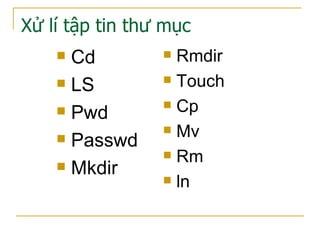
Xử lí tập tin thư mục
 Rmdir
 Touch
 Cp
 Mv
 Rm
 ln
 Cd
 LS
 Pwd
 Passwd
 Mkdir
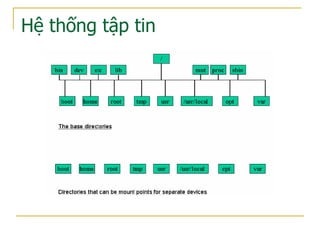
Hệ thống tập tin
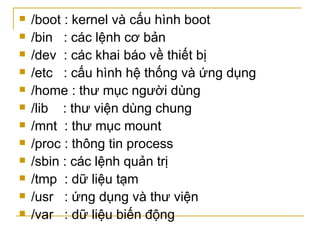
 /boot : kernel và cấu hình boot
 /bin : các lệnh cơ bản
 /dev : các khai báo về thiết bị
 /etc : cấu hình hệ thống và ứng dụng
 /home : thư mục người dùng
 /lib : thư viện dùng chung
 /mnt : thư mục mount
 /proc : thông tin process
 /sbin : các lệnh quản trị
 /tmp : dữ liệu tạm
 /usr : ứng dụng và thư viện
 /var : dữ liệu biến động
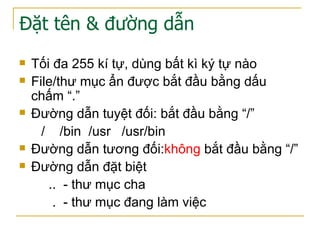
Đặt tên & đường dẫn
 Tối đa 255 kí tự, dùng bất kì ký tự nào
 File/thư mục ẩn được bắt đầu bằng dấu
chấm “.”
 Đường dẫn tuyệt đối: bắt đầu bằng “/”
/ /bin /usr /usr/bin
 Đường dẫn tương đối:không bắt đầu bằng “/”
 Đường dẫn đặt biệt
.. - thư mục cha
. - thư mục đang làm việc
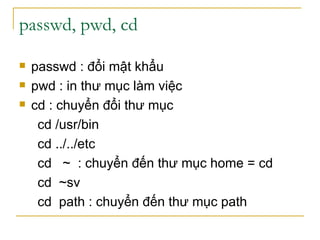
passwd, pwd, cd
 passwd : đổi mật khẩu
 pwd : in thư mục làm việc
 cd : chuyển đổi thư mục
cd /usr/bin
cd ../../etc
cd ~ : chuyển đến thư mục home = cd
cd ~sv
cd path : chuyển đến thư mục path
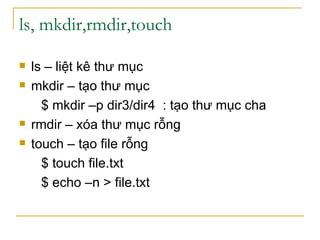
ls, mkdir,rmdir,touch
 ls – liệt kê thư mục
 mkdir – tạo thư mục
$ mkdir –p dir3/dir4 : tạo thư mục cha
 rmdir – xóa thư mục rỗng
 touch – tạo file rỗng
$ touch file.txt
$ echo –n > file.txt
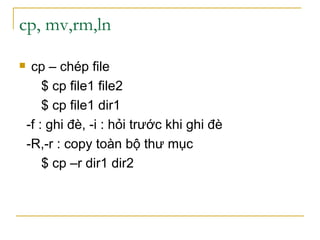
cp, mv,rm,ln
 cp – chép file
$ cp file1 file2
$ cp file1 dir1
-f : ghi đè, -i : hỏi trước khi ghi đè
-R,-r : copy toàn bộ thư mục
$ cp –r dir1 dir2
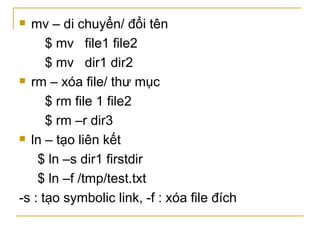
 mv – di chuyển/ đổi tên
$ mv file1 file2
$ mv dir1 dir2
 rm – xóa file/ thư mục
$ rm file 1 file2
$ rm –r dir3
 ln – tạo liên kết
$ ln –s dir1 firstdir
$ ln –f /tmp/test.txt
-s : tạo symbolic link, -f : xóa file đích
Kí tự thay thế
 * : mọi chuỗi kể cả rỗng
 ?
 […] : tương ứng với một trong các kí tự
 [!/^] : không tương ứng
  : loại bỏ ý nghĩa đặc biệt
Xử lí chuỗi
 cat & tac
 head & tail
 nl & wc,
 expand & unexpand
 od & hexdump
 cut, paste, join, sort, tr
 sed, grep
L nh cat & tacệ
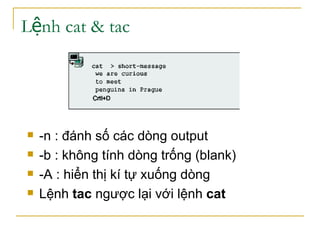
 -n : đánh số các dòng output
 -b : không tính dòng trống (blank)
 -A : hiển thị kí tự xuống dòng
 Lệnh tac ngược lại với lệnh cat
L nh head & tailệ
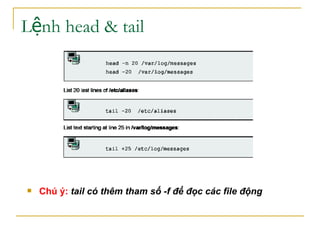
 Chú ý: tail có thêm tham số -f để đọc các file động
Đếm số dòng, từ hoặc byte – wc
 Syntax: wc [option] [files]
-l : đếm số dòng
-c hay –m : đếm kí tự
-w : đếm số từ
 $ wc -l file1 - đếm số dòng
 $ wc file[123] - đếm 3 file
 $ wc -c file1 - đếm số kí tự
 $ grep "^ *$" /etc/inittab | wc –l
đếm số dòng trống
Đánh s dòng – nlố
 Syntax: nl [options] [files]
 b style: set lại kiểu của body [t]
 f style: kiểu của footer [n]
 h style: kiểu của header [n]
 style = A, t, n hoặc p<biểu thức>
 Chú ý: một trang thông thường gồm các
phần header, body và footer tương ứng
với ::: , ::, và :
od - dump file
 Syntax: od [options] [files]
 Tham số: –t type = A, c, O, x
 Lệnh khác: hexdump
$ od -t o1 file1
00000000 141 061 012 101 061
012
00000006
$ od -t x1 file1
00000000 61 31 0a 41 31
0a
00000006
$ od -t c file1
00000000 a 1 n A 1 n
00000006
$ od -t a file1
00000000 a 1 nl A 1 nl
00000006
- cut & paste
 Syntax cut [options] [files]
 -b, -c, -d, -f, --output-delimiter
 Chọn kí tự: cut –c {range1, range2}
$cut –c5-10,15- /etc/password
 Chọn field: cut -d {delimiter} -f {fields}
$ cut -d: -f1 /etc/passwd
 Output-delimeter
$cut -d: -f 1,7 --output-delimiter=" " /etc/passwd
Chú ý: tự xem lệnh paste theo dòng & cột
join
 Syntax join [options] file1 file2
tham số: -j1 field1, -j2 field2, -j field
 $ join –j 1 file1 file2
 $ join –j1 1 file1 file2
 $ join –j2 1 file1 file2
File2: 1 11
2 22
3 33
File1: 1 one
2 two
3 three
tr – translate text
 Syntax tr [options] [[string1 [string2]]
 tham số : –d xóa, -s : thay thế lặp
$ cat file1 | tr a-z A-Z - thường sang hoa
$ cat file1 | tr -s a -
$ tr '[A-B]' '[a-b]'< file.txt – hoa sang thường
$ tr ':' ' ' < /etc/passwd - thay “:” bằng “ “
$ cat file1 | tr -d abc - xóa kí tự abc
[:lower:], [:upper:], [:alnum:]
 Chú ý: tr chỉ có 2 đối số
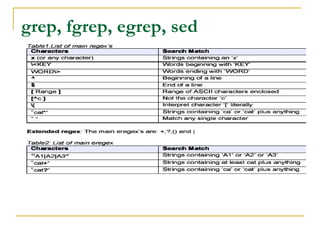
grep, fgrep, egrep, sed
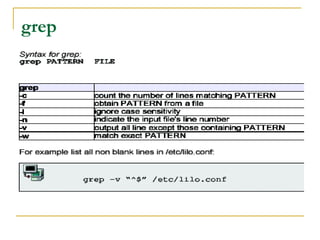
grep
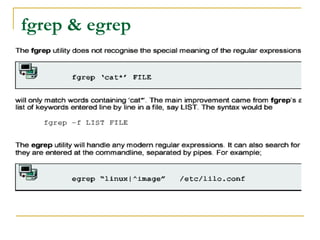
fgrep & egrep
sed
 Syntax
sed [options] 'command1' [files]
sed [options] -f script [files]
sed [options] -e 'com1' [-e 'com2'...] [files]
Tham số :
 d - delete lines.
 s - substitutions. s/pattern/replacement/[flags]
g - Replace all instances of pattern, not just the first.
n - Replace nth instance of pattern; the default is 1.
p - Print the line, used with the –n
w – print to file
y - Translate characters.
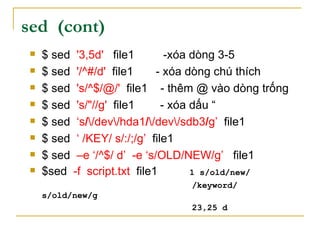
sed (cont)
 $ sed '3,5d' file1 -xóa dòng 3-5
 $ sed '/^#/d' file1 - xóa dòng chú thích
 $ sed 's/^$/@/' file1 - thêm @ vào dòng trống
 $ sed 's/"//g' file1 - xóa dấu “
 $ sed ‘s//dev/hda1//dev/sdb3/g’ file1
 $ sed ‘ /KEY/ s/:/;/g’ file1
 $ sed –e ‘/^$/ d’ -e ‘s/OLD/NEW/g’ file1
 $sed -f script.txt file1 1 s/old/new/
/keyword/
s/old/new/g
23,25 d
xargs
 Syntax
xargs [options] [command] [initial-
arguments]
Tham số –n maxargs
-p promt
 $ ls | xargs rm -f
 $ find / -type f | xargs -n 1 grep linux
 $ find / -type f -user 502 | xargs rm –f
 Chú ý : một số lệnh có tham số -exec ~ xargs
find / -type f -user 502 –exec rm –f {} ;

Cac lenh linux_co_ban

  • 1.
  • 2.
    Xử lí tậptin thư mục  Rmdir  Touch  Cp  Mv  Rm  ln  Cd  LS  Pwd  Passwd  Mkdir
  • 3.
  • 4.
     /boot :kernel và cấu hình boot  /bin : các lệnh cơ bản  /dev : các khai báo về thiết bị  /etc : cấu hình hệ thống và ứng dụng  /home : thư mục người dùng  /lib : thư viện dùng chung  /mnt : thư mục mount  /proc : thông tin process  /sbin : các lệnh quản trị  /tmp : dữ liệu tạm  /usr : ứng dụng và thư viện  /var : dữ liệu biến động
  • 5.
    Đặt tên &đường dẫn  Tối đa 255 kí tự, dùng bất kì ký tự nào  File/thư mục ẩn được bắt đầu bằng dấu chấm “.”  Đường dẫn tuyệt đối: bắt đầu bằng “/” / /bin /usr /usr/bin  Đường dẫn tương đối:không bắt đầu bằng “/”  Đường dẫn đặt biệt .. - thư mục cha . - thư mục đang làm việc
  • 6.
    passwd, pwd, cd passwd : đổi mật khẩu  pwd : in thư mục làm việc  cd : chuyển đổi thư mục cd /usr/bin cd ../../etc cd ~ : chuyển đến thư mục home = cd cd ~sv cd path : chuyển đến thư mục path
  • 7.
    ls, mkdir,rmdir,touch  ls– liệt kê thư mục  mkdir – tạo thư mục $ mkdir –p dir3/dir4 : tạo thư mục cha  rmdir – xóa thư mục rỗng  touch – tạo file rỗng $ touch file.txt $ echo –n > file.txt
  • 8.
    cp, mv,rm,ln  cp– chép file $ cp file1 file2 $ cp file1 dir1 -f : ghi đè, -i : hỏi trước khi ghi đè -R,-r : copy toàn bộ thư mục $ cp –r dir1 dir2
  • 9.
     mv –di chuyển/ đổi tên $ mv file1 file2 $ mv dir1 dir2  rm – xóa file/ thư mục $ rm file 1 file2 $ rm –r dir3  ln – tạo liên kết $ ln –s dir1 firstdir $ ln –f /tmp/test.txt -s : tạo symbolic link, -f : xóa file đích
  • 10.
    Kí tự thaythế  * : mọi chuỗi kể cả rỗng  ?  […] : tương ứng với một trong các kí tự  [!/^] : không tương ứng  : loại bỏ ý nghĩa đặc biệt
  • 11.
    Xử lí chuỗi cat & tac  head & tail  nl & wc,  expand & unexpand  od & hexdump  cut, paste, join, sort, tr  sed, grep
  • 12.
    L nh cat& tacệ  -n : đánh số các dòng output  -b : không tính dòng trống (blank)  -A : hiển thị kí tự xuống dòng  Lệnh tac ngược lại với lệnh cat
  • 13.
    L nh head& tailệ  Chú ý: tail có thêm tham số -f để đọc các file động
  • 14.
    Đếm số dòng,từ hoặc byte – wc  Syntax: wc [option] [files] -l : đếm số dòng -c hay –m : đếm kí tự -w : đếm số từ  $ wc -l file1 - đếm số dòng  $ wc file[123] - đếm 3 file  $ wc -c file1 - đếm số kí tự  $ grep "^ *$" /etc/inittab | wc –l đếm số dòng trống
  • 15.
    Đánh s dòng– nlố  Syntax: nl [options] [files]  b style: set lại kiểu của body [t]  f style: kiểu của footer [n]  h style: kiểu của header [n]  style = A, t, n hoặc p<biểu thức>  Chú ý: một trang thông thường gồm các phần header, body và footer tương ứng với ::: , ::, và :
  • 16.
    od - dumpfile  Syntax: od [options] [files]  Tham số: –t type = A, c, O, x  Lệnh khác: hexdump $ od -t o1 file1 00000000 141 061 012 101 061 012 00000006 $ od -t x1 file1 00000000 61 31 0a 41 31 0a 00000006 $ od -t c file1 00000000 a 1 n A 1 n 00000006 $ od -t a file1 00000000 a 1 nl A 1 nl 00000006
  • 17.
    - cut &paste  Syntax cut [options] [files]  -b, -c, -d, -f, --output-delimiter  Chọn kí tự: cut –c {range1, range2} $cut –c5-10,15- /etc/password  Chọn field: cut -d {delimiter} -f {fields} $ cut -d: -f1 /etc/passwd  Output-delimeter $cut -d: -f 1,7 --output-delimiter=" " /etc/passwd Chú ý: tự xem lệnh paste theo dòng & cột
  • 18.
    join  Syntax join[options] file1 file2 tham số: -j1 field1, -j2 field2, -j field  $ join –j 1 file1 file2  $ join –j1 1 file1 file2  $ join –j2 1 file1 file2 File2: 1 11 2 22 3 33 File1: 1 one 2 two 3 three
  • 19.
    tr – translatetext  Syntax tr [options] [[string1 [string2]]  tham số : –d xóa, -s : thay thế lặp $ cat file1 | tr a-z A-Z - thường sang hoa $ cat file1 | tr -s a - $ tr '[A-B]' '[a-b]'< file.txt – hoa sang thường $ tr ':' ' ' < /etc/passwd - thay “:” bằng “ “ $ cat file1 | tr -d abc - xóa kí tự abc [:lower:], [:upper:], [:alnum:]  Chú ý: tr chỉ có 2 đối số
  • 20.
  • 21.
  • 22.
  • 23.
    sed  Syntax sed [options]'command1' [files] sed [options] -f script [files] sed [options] -e 'com1' [-e 'com2'...] [files] Tham số :  d - delete lines.  s - substitutions. s/pattern/replacement/[flags] g - Replace all instances of pattern, not just the first. n - Replace nth instance of pattern; the default is 1. p - Print the line, used with the –n w – print to file y - Translate characters.
  • 24.
    sed (cont)  $sed '3,5d' file1 -xóa dòng 3-5  $ sed '/^#/d' file1 - xóa dòng chú thích  $ sed 's/^$/@/' file1 - thêm @ vào dòng trống  $ sed 's/"//g' file1 - xóa dấu “  $ sed ‘s//dev/hda1//dev/sdb3/g’ file1  $ sed ‘ /KEY/ s/:/;/g’ file1  $ sed –e ‘/^$/ d’ -e ‘s/OLD/NEW/g’ file1  $sed -f script.txt file1 1 s/old/new/ /keyword/ s/old/new/g 23,25 d
  • 25.
    xargs  Syntax xargs [options][command] [initial- arguments] Tham số –n maxargs -p promt  $ ls | xargs rm -f  $ find / -type f | xargs -n 1 grep linux  $ find / -type f -user 502 | xargs rm –f  Chú ý : một số lệnh có tham số -exec ~ xargs find / -type f -user 502 –exec rm –f {} ;