Lesson #6 - Data Structures
By: Alfonso Torres
Lesson Overview
● Vectors
● Stacks
● Queues
Vectors
What is a Vector?
● Vector - collects a sequence of values, just like an array does, but its size can
change.
● Before using a vector there is one important thing to take in mind. You need to
use the Vector Library. On the top of your program you need to call the library
#include <vector>, this syntax will let your program know that you can use
vectors and their member functions.
● Vector Syntax
○ vector<type> vectorName; //example
○ vector<double> values; //empty vector of type double
○ vector<double> values(10); //vector with a size of 10
○ vector<double> values = {32,22.5,6,11,33}; //specifying initial values
○ vector[0] = 5; //updating value in vector (similar to arrays)
Vector Member Function
Examples
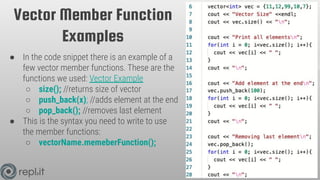
● In the code snippet there is an example of a
few vector member functions. These are the
functions we used: Vector Example
○ size(); //returns size of vector
○ push_back(x); //adds element at the end
○ pop_back(); //removes last element
● This is the syntax you need to write to use
the member functions:
○ vectorName.memeberFunction();
Practice - Vectors
● Follow the commands given to you in the comments. At the end of your
program there will be a loop to check your work and see if you followed the
commands correctly: Practice - Vectors
● Things to think about:
○ What does does the vector member function push_back() do?
○ Will this code work?
■ vec.pop_back(11);
○ Name some differences between arrays.
Stacks & Queues
What are Stacks and Queues?
● Stack - is a container of elements that follows “last in, first out”(LIFO) retrieval
method. The stack lets you insert and remove elements at one end only.
○ To use a stack container you will need to call the #include <stack> library
on top of your main program.
○ stack<dataType> stackName; //Example
○ stack<string> myStack; //Creating a stack
● Queue - is a container of elements that follows the “first in, first out”(FIFO)
retrieval method. A queue lets you add elements at one end (the back or tail)
and remove elements at the other end (the front or head).
○ To use a queue container you will need to call the #include <queue>
library on top of your main program.
○ queue<dataType> queueName; //Example
○ queue<string> myQueue; //Creating a queue
Stack Member Function
Examples
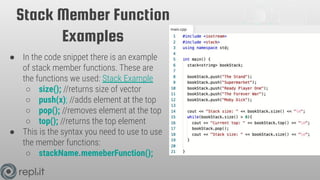
● In the code snippet there is an example
of stack member functions. These are
the functions we used: Stack Example
○ size(); //returns size of vector
○ push(x); //adds element at the top
○ pop(); //removes element at the top
○ top(); //returns the top element
● This is the syntax you need to use to use
the member functions:
○ stackName.memeberFunction();
Queue Member Function
Examples
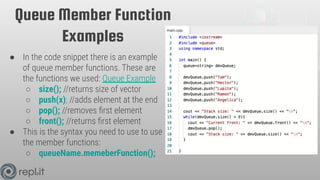
● In the code snippet there is an example
of queue member functions. These are
the functions we used: Queue Example
○ size(); //returns size of vector
○ push(x); //adds element at the end
○ pop(); //removes first element
○ front(); //returns first element
● This is the syntax you need to use to use
the member functions:
○ queueName.memeberFunction();
Homework - The Right Fit
● In this homework we will be finding the right data structure to use for each
problem in our program. We will be able to choose from arrays, vectors,
stacks, and queues : Homework - The Right Fit
● Things to think about:
○ What does FIFO stand for?
○ What does LIFO stand for?
○ Pretend you wanted to keep track of an unknown number names, what
data structure would you use? Explain your answer.
Lesson Summary
● Vector - collects a sequence of values, just like an array does, but its size can
change.
● Before using a vector there is one important thing to take in mind. You need to
use the Vector Library. On the top of your program you need to call the library
#include <vector>, this syntax will let your program know that you can use
vectors and their member functions.
○ size(); //returns size of vector
○ push_back(x); //adds element at the end
○ pop_back(); //removes last element
● Stack - is a container of elements that follows “last in, first out”(LIFO) retrieval
method. The stack lets you insert and remove elements at one end only.
○ size(); //returns size of vector
○ push(x); //adds element at the top
○ pop(); //removes element at the top
○ top(); //returns the top element
Lesson Summary
● Queue - is a container of elements that follows the “first in, first out”(FIFO)
retrieval method. A queue lets you add elements at one end (the back or tail)
and remove elements at the other end (the front or head).
○ size(); //returns size of vector
○ push(x); //adds element at the end
○ pop(); //removes first element
○ front(); //returns first element
Solutions
● Practice - Vectors - Solution
● Homework - The Right Fit - Solution
References
● Big C++: Late Objects 3rd Edition
● C++ STL Tutorial - Vectors
● cpluplus - Vectors
Thank You!

C++ Lesson #6 - Data Structures vector queue stack.pdf

  • 1.
    Lesson #6 -Data Structures By: Alfonso Torres
  • 2.
  • 3.
  • 4.
    What is aVector? ● Vector - collects a sequence of values, just like an array does, but its size can change. ● Before using a vector there is one important thing to take in mind. You need to use the Vector Library. On the top of your program you need to call the library #include <vector>, this syntax will let your program know that you can use vectors and their member functions. ● Vector Syntax ○ vector<type> vectorName; //example ○ vector<double> values; //empty vector of type double ○ vector<double> values(10); //vector with a size of 10 ○ vector<double> values = {32,22.5,6,11,33}; //specifying initial values ○ vector[0] = 5; //updating value in vector (similar to arrays)
  • 5.
    Vector Member Function Examples ●In the code snippet there is an example of a few vector member functions. These are the functions we used: Vector Example ○ size(); //returns size of vector ○ push_back(x); //adds element at the end ○ pop_back(); //removes last element ● This is the syntax you need to write to use the member functions: ○ vectorName.memeberFunction();
  • 6.
    Practice - Vectors ●Follow the commands given to you in the comments. At the end of your program there will be a loop to check your work and see if you followed the commands correctly: Practice - Vectors ● Things to think about: ○ What does does the vector member function push_back() do? ○ Will this code work? ■ vec.pop_back(11); ○ Name some differences between arrays.
  • 7.
  • 8.
    What are Stacksand Queues? ● Stack - is a container of elements that follows “last in, first out”(LIFO) retrieval method. The stack lets you insert and remove elements at one end only. ○ To use a stack container you will need to call the #include <stack> library on top of your main program. ○ stack<dataType> stackName; //Example ○ stack<string> myStack; //Creating a stack ● Queue - is a container of elements that follows the “first in, first out”(FIFO) retrieval method. A queue lets you add elements at one end (the back or tail) and remove elements at the other end (the front or head). ○ To use a queue container you will need to call the #include <queue> library on top of your main program. ○ queue<dataType> queueName; //Example ○ queue<string> myQueue; //Creating a queue
  • 9.
    Stack Member Function Examples ●In the code snippet there is an example of stack member functions. These are the functions we used: Stack Example ○ size(); //returns size of vector ○ push(x); //adds element at the top ○ pop(); //removes element at the top ○ top(); //returns the top element ● This is the syntax you need to use to use the member functions: ○ stackName.memeberFunction();
  • 10.
    Queue Member Function Examples ●In the code snippet there is an example of queue member functions. These are the functions we used: Queue Example ○ size(); //returns size of vector ○ push(x); //adds element at the end ○ pop(); //removes first element ○ front(); //returns first element ● This is the syntax you need to use to use the member functions: ○ queueName.memeberFunction();
  • 11.
    Homework - TheRight Fit ● In this homework we will be finding the right data structure to use for each problem in our program. We will be able to choose from arrays, vectors, stacks, and queues : Homework - The Right Fit ● Things to think about: ○ What does FIFO stand for? ○ What does LIFO stand for? ○ Pretend you wanted to keep track of an unknown number names, what data structure would you use? Explain your answer.
  • 12.
    Lesson Summary ● Vector- collects a sequence of values, just like an array does, but its size can change. ● Before using a vector there is one important thing to take in mind. You need to use the Vector Library. On the top of your program you need to call the library #include <vector>, this syntax will let your program know that you can use vectors and their member functions. ○ size(); //returns size of vector ○ push_back(x); //adds element at the end ○ pop_back(); //removes last element ● Stack - is a container of elements that follows “last in, first out”(LIFO) retrieval method. The stack lets you insert and remove elements at one end only. ○ size(); //returns size of vector ○ push(x); //adds element at the top ○ pop(); //removes element at the top ○ top(); //returns the top element
  • 13.
    Lesson Summary ● Queue- is a container of elements that follows the “first in, first out”(FIFO) retrieval method. A queue lets you add elements at one end (the back or tail) and remove elements at the other end (the front or head). ○ size(); //returns size of vector ○ push(x); //adds element at the end ○ pop(); //removes first element ○ front(); //returns first element
  • 14.
    Solutions ● Practice -Vectors - Solution ● Homework - The Right Fit - Solution
  • 15.
    References ● Big C++:Late Objects 3rd Edition ● C++ STL Tutorial - Vectors ● cpluplus - Vectors
  • 16.