Business Process Simulation
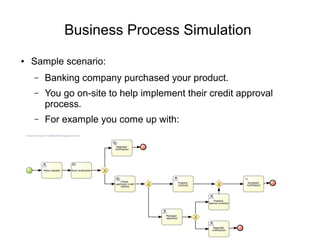
● Sample scenario:
– Banking company purchased your product.
– You go on-site to help implement their credit approval
process.
– For example you come up with:
Business Process Simulation (2)
● Sample scenario (cont.):
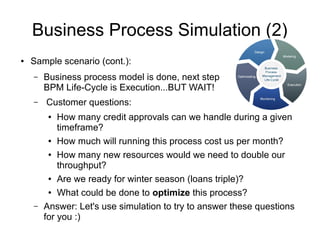
– Business process model is done, next step in
BPM Life-Cycle is Execution...BUT WAIT!
– Customer questions:
● How many credit approvals can we handle during a given
timeframe?
● How much will running this process cost us per month?
● How many new resources would we need to double our
throughput?
● Are we ready for winter season (loans triple)?
● What could be done to optimize this process?
– Answer: Let's use simulation to try to answer these questions
for you :)
Business Process Simulation (3)
● Goals:
– Statistical Analysis of process models over time
– Pre-execution and post-execution optimization
– Reducing risk of change
– Predict business process performance
– Continuous improvement
● Performance
● Quality
● Resource utilization
● Challenges:
– Increase process complexity
– Result presentation / interpretation
– Standard / Interoperability
● +
– Each element of the process can be parameterized to add
simulation information
● Time
● Resource
● Cost
● Priority
● etc
BPS in jBPM - Notation
BPS in jBPM - Runtime
● Extension to the jBPM runtime engine
● Relies on process paths rather than process data
● Built on-top of the Drools simulation and test framework.
● Generates individual events for every simulated activity.
● Events can be stored in simulation repository
● CEP and Rules applied to provide meaningful simulation
results.
BPS in jBPM - Tooling
● JBPM Designer
● Simulate “as you go”
● In-line process simulation
● Visualize process paths
BPS in jBPM – Tooling (2)
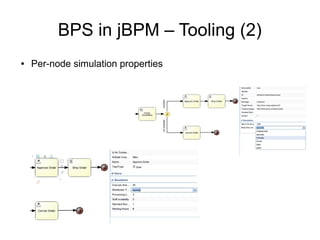
● Per-node simulation properties
BPS in jBPM – Tooling (3)
● Execution parameters:
BPS in jBPM – Tooling (4)
● Simulation Results:
BPS in jBPM – Tooling (5)
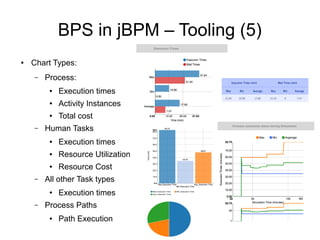
● Chart Types:
– Process:
● Execution times
● Activity Instances
● Total cost
– Human Tasks
● Execution times
● Resource Utilization
● Resource Cost
– All other Task types
● Execution times
– Process Paths
● Path Execution
BPS in jBPM – Tooling (6)
● Simulation Timeline:
– Navigate through each step of the simulation
– Chart View – Execution times
BPS in jBPM – Tooling (7)
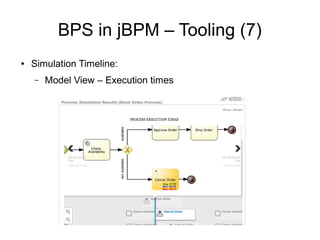
● Simulation Timeline:
– Model View – Execution times
BPS in jBPM – Tooling (8)
● Path Execution:

Business Process Simulation in jBPM

  • 1.
    Business Process Simulation ●Sample scenario: – Banking company purchased your product. – You go on-site to help implement their credit approval process. – For example you come up with:
  • 2.
    Business Process Simulation(2) ● Sample scenario (cont.): – Business process model is done, next step in BPM Life-Cycle is Execution...BUT WAIT! – Customer questions: ● How many credit approvals can we handle during a given timeframe? ● How much will running this process cost us per month? ● How many new resources would we need to double our throughput? ● Are we ready for winter season (loans triple)? ● What could be done to optimize this process? – Answer: Let's use simulation to try to answer these questions for you :)
  • 3.
    Business Process Simulation(3) ● Goals: – Statistical Analysis of process models over time – Pre-execution and post-execution optimization – Reducing risk of change – Predict business process performance – Continuous improvement ● Performance ● Quality ● Resource utilization ● Challenges: – Increase process complexity – Result presentation / interpretation – Standard / Interoperability
  • 4.
    ● + – Eachelement of the process can be parameterized to add simulation information ● Time ● Resource ● Cost ● Priority ● etc BPS in jBPM - Notation
  • 5.
    BPS in jBPM- Runtime ● Extension to the jBPM runtime engine ● Relies on process paths rather than process data ● Built on-top of the Drools simulation and test framework. ● Generates individual events for every simulated activity. ● Events can be stored in simulation repository ● CEP and Rules applied to provide meaningful simulation results.
  • 6.
    BPS in jBPM- Tooling ● JBPM Designer ● Simulate “as you go” ● In-line process simulation ● Visualize process paths
  • 7.
    BPS in jBPM– Tooling (2) ● Per-node simulation properties
  • 8.
    BPS in jBPM– Tooling (3) ● Execution parameters:
  • 9.
    BPS in jBPM– Tooling (4) ● Simulation Results:
  • 10.
    BPS in jBPM– Tooling (5) ● Chart Types: – Process: ● Execution times ● Activity Instances ● Total cost – Human Tasks ● Execution times ● Resource Utilization ● Resource Cost – All other Task types ● Execution times – Process Paths ● Path Execution
  • 11.
    BPS in jBPM– Tooling (6) ● Simulation Timeline: – Navigate through each step of the simulation – Chart View – Execution times
  • 12.
    BPS in jBPM– Tooling (7) ● Simulation Timeline: – Model View – Execution times
  • 13.
    BPS in jBPM– Tooling (8) ● Path Execution: