BUILDING GENERIC DATA QUERIES
USING PYTHON AST
Paris.py - Paris
2015-09-16
meetup #7
Adrien Chauve @adrienchauve
@Serenytics
CONTENTS
1.
2.
3.
Building generic data queries: why?
Python AST to the rescue
Walking the AST to build data queries
1. BUILDING GENERIC DATA QUERIES: WHY?
Context:
You love data
You want to watch a movie
You know the (20M ratings on 27k
movies by 138k users)
MovieLens database
Disclaimer:
could also be bigger data (sales) but less sexy!
data could be stored on a SQL server instead of a CSV le
1. CONTEXT: SELECT THE BEST MOVIE (1/3)
Naïve sort: by Average Rating then by NbRatings
Title Average Rating NbRatings
Consuming Kids: The Commercialization of Childhood (2008) 5 2
Catastroika (2012) 5 2
Life On A String (Bian chang Bian Zou) (1991) 5 1
Hijacking Catastrophe: 9/11, Fear & the Selling of American Empire (2004) 5 1
Snow Queen, The (Lumikuningatar) (1986) 5 1
Al otro lado (2004) 5 1
Sierra, La (2005) 5 1
Between the Devil and the Deep Blue Sea (1995) 5 1
Schmatta: Rags to Riches to Rags (2009) 5 1
Moth, The (Cma) (1980) 5 1
1. CONTEXT: SELECT THE BEST MOVIE (2/3)
Naïve sort: by NbRatings
Title Average Rating NbRatings
Pulp Fiction (1994) 4.17 67310
Forrest Gump (1994) 4.03 66172
Shawshank Redemption, The (1994) 4.45 63366
Silence of the Lambs, The (1991) 4.18 63299
Jurassic Park (1993) 3.66 59715
Star Wars: Episode IV - A New Hope (1977) 4.19 54502
Braveheart (1995) 4.04 53769
Terminator 2: Judgment Day (1991) 3.93 52244
Matrix, The (1999) 4.19 51334
Schindler's List (1993) 4.31 50054
$$CustomRating_k = AverageRating * {NbRatings over
NbRatings + k}$$
1. CONTEXT: SELECT THE BEST MOVIE (3/3)
Better sort: by custom rating (k=1000)
Title Custom Rating
k=1000
Average
Rating
NbRatings
Shawshank Redemption, The (1994) 4.378 4.45 63366
Godfather, The (1972) 4.262 4.36 41355
Usual Suspects, The (1995) 4.244 4.33 47006
Schindler's List (1993) 4.226 4.31 50054
Godfather: Part II, The (1974) 4.125 4.28 27398
Fight Club (1999) 4.124 4.23 40106
Raiders of the Lost Ark (Indiana Jones and the Raiders of the Lost
Ark) (1981)
4.124 4.22 43295
Star Wars: Episode IV - A New Hope (1977) 4.115 4.19 54502
Pulp Fiction (1994) 4.113 4.17 67310
Silence of the Lambs, The (1991) 4.112 4.18 63299
1. NEED COMPUTED COLUMNS TO BEST ANALYZE YOUR DATA
New computed column: $$CustomRating = AverageRating *
{NbRatings over NbRatings + 1000}$$
Using pandas (python):
# df is a pandas.DataFrame instance
df['CustomRating'] = df['AverageRating'] * df['NbRatings'] / (df['NbRatings'] + 1000
In SQL:
SELECT AverageRating * NbRatings / (NbRatings + 1000) AS CustomRating FROM ...;
How to generate both pandas and SQL from a single string?
2. PYTHON AST TO THE RESCUE
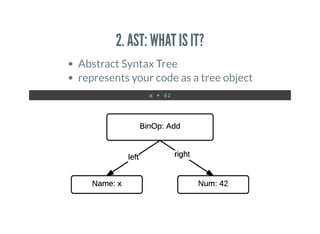
2. AST: WHAT IS IT?
Abstract Syntax Tree
represents your code as a tree object
x + 42
2. AST: WHAT IS IT?
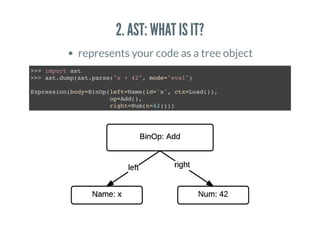
represents your code as a tree object
>>> import ast
>>> ast.dump(ast.parse("x + 42", mode="eval")
Expression(body=BinOp(left=Name(id='x', ctx=Load()),
op=Add(),
right=Num(n=42))))
2. AST: WHAT IS IT?
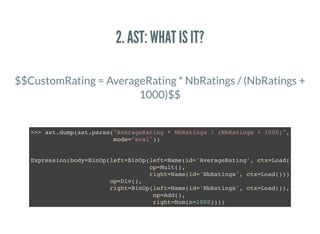
$$CustomRating = AverageRating * NbRatings / (NbRatings +
1000)$$
>>> ast.dump(ast.parse("AverageRating * NbRatings / (NbRatings + 1000)",
mode="eval"))
Expression(body=BinOp(left=BinOp(left=Name(id='AverageRating', ctx=Load()),
op=Mult(),
right=Name(id='NbRatings', ctx=Load())),
op=Div(),
right=BinOp(left=Name(id='NbRatings', ctx=Load()),
op=Add(),
right=Num(n=1000))))
3. WALKING THE AST TO BUILD DATA QUERIES
3. AST: GREAT, BUT WHAT CAN WE DO WITH IT?
Expression(body=BinOp(left=Name(id='x', ctx=Load()),
op=Add(),
right=Num(n=42)))
OPERATORS = {
ast.Add: operator.add,
ast.Mult: operator.mul,
ast.Div: operator.truediv,
}
def eval_expr(expr):
return _eval(ast.parse(expr, mode='eval').body)
def _eval(node): # recursively evaluate tree nodes
if isinstance(node, ast.Num):
return node.n
elif isinstance(node, ast.BinOp):
return OPERATORS[type(node.op)](_eval(node.left), _eval(node.right)
elif isinstance(node, ast.UnaryOp):
return OPERATORS[type(node.op)](_eval(node.operand))
elif isinstance(node, ast.Name):
return ???
raise TypeError(node)
3. AST: BUILDING A PANDAS QUERY
class PandasEvaluator(object):
def __init__(self, dataframe):
self._dataframe = dataframe
def eval_expr(self, expr):
return self._eval(ast.parse(expr, mode='eval').body)
def _eval(self, node): # recursively evaluate tree nodes
if isinstance(node, ast.Num):
return node.n
elif isinstance(node, ast.BinOp):
return OPERATORS[type(node.op)](self._eval(node.left),
self._eval(node.right))
elif isinstance(node, ast.UnaryOp):
return OPERATORS[type(node.op)](self._eval(node.operand))
elif isinstance(node, ast.Name):
return self.dataframe[node.id]
raise TypeError(node)
df = pandas.read_csv('ratings.csv')
formula = "AverageRating * NbRatings / (NbRatings + 1000)"
df['CustomRating'] = PandasEvaluator(df).eval_expr(formula)
3. AST: BUILDING A SQL QUERY USING SQLALCHEMY
class SQLEvaluator(object):
def __init__(self, sql_table):
self._sql_table = sql_table # instance of SQLAlchemy Table class
def eval_expr(self, expr):
return self._eval(ast.parse(expr, mode='eval').body)
def _eval(self, node): # recursively evaluate tree nodes
if isinstance(node, ast.Num):
return node.n
elif isinstance(node, ast.BinOp):
return OPERATORS[type(node.op)](self._eval(node.left),
self._eval(node.right))
elif isinstance(node, ast.UnaryOp):
return OPERATORS[type(node.op)](self._eval(node.operand))
elif isinstance(node, ast.Name):
return self._sql_table[node.id]
raise TypeError(node)
session = sessionmaker(...)
sql_table = Table(...)
formula = "AverageRating * NbRatings / (NbRatings + 1000)"
custom_ratings_column = SQLEvaluator(sql_table).eval_expr(formula)
data = [row for row in session.query(custom_ratings_column)]
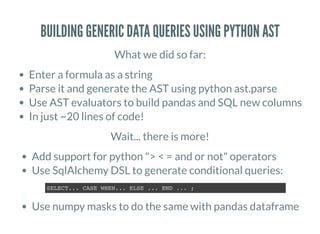
BUILDING GENERIC DATA QUERIES USING PYTHON AST
What we did so far:
Enter a formula as a string
Parse it and generate the AST using python ast.parse
Use AST evaluators to build pandas and SQL new columns
In just ~20 lines of code!
Wait... there is more!
Add support for python "> < = and or not" operators
Use SqlAlchemy DSL to generate conditional queries:
Use numpy masks to do the same with pandas dataframe
SELECT... CASE WHEN... ELSE ... END ... ;
GREAT LINKS
Great Python book by Julien Danjou; has a part on AST
by
to add new computed columns in your
dataset using (including conditional formulas)
The Hacker's Guide to Python
MovieLens database grouplens
A detailed HowTo
Serenytics
Module(body=[
Print(dest=None,
values=[Str(s='Thank you! Questions?'
nl=True)
])
@adrienchauve
adrien.chauve@serenytics.com

Building generic data queries using python ast

  • 1.
    BUILDING GENERIC DATAQUERIES USING PYTHON AST Paris.py - Paris 2015-09-16 meetup #7 Adrien Chauve @adrienchauve @Serenytics
  • 2.
    CONTENTS 1. 2. 3. Building generic dataqueries: why? Python AST to the rescue Walking the AST to build data queries
  • 3.
    1. BUILDING GENERICDATA QUERIES: WHY?
  • 4.
    1. BUILDING GENERICDATA QUERIES: WHY? Context: You love data You want to watch a movie You know the (20M ratings on 27k movies by 138k users) MovieLens database Disclaimer: could also be bigger data (sales) but less sexy! data could be stored on a SQL server instead of a CSV le
  • 5.
    1. CONTEXT: SELECTTHE BEST MOVIE (1/3) Naïve sort: by Average Rating then by NbRatings Title Average Rating NbRatings Consuming Kids: The Commercialization of Childhood (2008) 5 2 Catastroika (2012) 5 2 Life On A String (Bian chang Bian Zou) (1991) 5 1 Hijacking Catastrophe: 9/11, Fear & the Selling of American Empire (2004) 5 1 Snow Queen, The (Lumikuningatar) (1986) 5 1 Al otro lado (2004) 5 1 Sierra, La (2005) 5 1 Between the Devil and the Deep Blue Sea (1995) 5 1 Schmatta: Rags to Riches to Rags (2009) 5 1 Moth, The (Cma) (1980) 5 1
  • 6.
    1. CONTEXT: SELECTTHE BEST MOVIE (2/3) Naïve sort: by NbRatings Title Average Rating NbRatings Pulp Fiction (1994) 4.17 67310 Forrest Gump (1994) 4.03 66172 Shawshank Redemption, The (1994) 4.45 63366 Silence of the Lambs, The (1991) 4.18 63299 Jurassic Park (1993) 3.66 59715 Star Wars: Episode IV - A New Hope (1977) 4.19 54502 Braveheart (1995) 4.04 53769 Terminator 2: Judgment Day (1991) 3.93 52244 Matrix, The (1999) 4.19 51334 Schindler's List (1993) 4.31 50054
  • 7.
    $$CustomRating_k = AverageRating* {NbRatings over NbRatings + k}$$ 1. CONTEXT: SELECT THE BEST MOVIE (3/3) Better sort: by custom rating (k=1000) Title Custom Rating k=1000 Average Rating NbRatings Shawshank Redemption, The (1994) 4.378 4.45 63366 Godfather, The (1972) 4.262 4.36 41355 Usual Suspects, The (1995) 4.244 4.33 47006 Schindler's List (1993) 4.226 4.31 50054 Godfather: Part II, The (1974) 4.125 4.28 27398 Fight Club (1999) 4.124 4.23 40106 Raiders of the Lost Ark (Indiana Jones and the Raiders of the Lost Ark) (1981) 4.124 4.22 43295 Star Wars: Episode IV - A New Hope (1977) 4.115 4.19 54502 Pulp Fiction (1994) 4.113 4.17 67310 Silence of the Lambs, The (1991) 4.112 4.18 63299
  • 8.
    1. NEED COMPUTEDCOLUMNS TO BEST ANALYZE YOUR DATA New computed column: $$CustomRating = AverageRating * {NbRatings over NbRatings + 1000}$$ Using pandas (python): # df is a pandas.DataFrame instance df['CustomRating'] = df['AverageRating'] * df['NbRatings'] / (df['NbRatings'] + 1000 In SQL: SELECT AverageRating * NbRatings / (NbRatings + 1000) AS CustomRating FROM ...; How to generate both pandas and SQL from a single string?
  • 9.
    2. PYTHON ASTTO THE RESCUE
  • 10.
    2. AST: WHATIS IT? Abstract Syntax Tree represents your code as a tree object x + 42
  • 11.
    2. AST: WHATIS IT? represents your code as a tree object >>> import ast >>> ast.dump(ast.parse("x + 42", mode="eval") Expression(body=BinOp(left=Name(id='x', ctx=Load()), op=Add(), right=Num(n=42))))
  • 12.
    2. AST: WHATIS IT? $$CustomRating = AverageRating * NbRatings / (NbRatings + 1000)$$ >>> ast.dump(ast.parse("AverageRating * NbRatings / (NbRatings + 1000)", mode="eval")) Expression(body=BinOp(left=BinOp(left=Name(id='AverageRating', ctx=Load()), op=Mult(), right=Name(id='NbRatings', ctx=Load())), op=Div(), right=BinOp(left=Name(id='NbRatings', ctx=Load()), op=Add(), right=Num(n=1000))))
  • 13.
    3. WALKING THEAST TO BUILD DATA QUERIES
  • 14.
    3. AST: GREAT,BUT WHAT CAN WE DO WITH IT? Expression(body=BinOp(left=Name(id='x', ctx=Load()), op=Add(), right=Num(n=42))) OPERATORS = { ast.Add: operator.add, ast.Mult: operator.mul, ast.Div: operator.truediv, } def eval_expr(expr): return _eval(ast.parse(expr, mode='eval').body) def _eval(node): # recursively evaluate tree nodes if isinstance(node, ast.Num): return node.n elif isinstance(node, ast.BinOp): return OPERATORS[type(node.op)](_eval(node.left), _eval(node.right) elif isinstance(node, ast.UnaryOp): return OPERATORS[type(node.op)](_eval(node.operand)) elif isinstance(node, ast.Name): return ??? raise TypeError(node)
  • 15.
    3. AST: BUILDINGA PANDAS QUERY class PandasEvaluator(object): def __init__(self, dataframe): self._dataframe = dataframe def eval_expr(self, expr): return self._eval(ast.parse(expr, mode='eval').body) def _eval(self, node): # recursively evaluate tree nodes if isinstance(node, ast.Num): return node.n elif isinstance(node, ast.BinOp): return OPERATORS[type(node.op)](self._eval(node.left), self._eval(node.right)) elif isinstance(node, ast.UnaryOp): return OPERATORS[type(node.op)](self._eval(node.operand)) elif isinstance(node, ast.Name): return self.dataframe[node.id] raise TypeError(node) df = pandas.read_csv('ratings.csv') formula = "AverageRating * NbRatings / (NbRatings + 1000)" df['CustomRating'] = PandasEvaluator(df).eval_expr(formula)
  • 16.
    3. AST: BUILDINGA SQL QUERY USING SQLALCHEMY class SQLEvaluator(object): def __init__(self, sql_table): self._sql_table = sql_table # instance of SQLAlchemy Table class def eval_expr(self, expr): return self._eval(ast.parse(expr, mode='eval').body) def _eval(self, node): # recursively evaluate tree nodes if isinstance(node, ast.Num): return node.n elif isinstance(node, ast.BinOp): return OPERATORS[type(node.op)](self._eval(node.left), self._eval(node.right)) elif isinstance(node, ast.UnaryOp): return OPERATORS[type(node.op)](self._eval(node.operand)) elif isinstance(node, ast.Name): return self._sql_table[node.id] raise TypeError(node) session = sessionmaker(...) sql_table = Table(...) formula = "AverageRating * NbRatings / (NbRatings + 1000)" custom_ratings_column = SQLEvaluator(sql_table).eval_expr(formula) data = [row for row in session.query(custom_ratings_column)]
  • 17.
    BUILDING GENERIC DATAQUERIES USING PYTHON AST What we did so far: Enter a formula as a string Parse it and generate the AST using python ast.parse Use AST evaluators to build pandas and SQL new columns In just ~20 lines of code! Wait... there is more! Add support for python "> < = and or not" operators Use SqlAlchemy DSL to generate conditional queries: Use numpy masks to do the same with pandas dataframe SELECT... CASE WHEN... ELSE ... END ... ;
  • 18.
    GREAT LINKS Great Pythonbook by Julien Danjou; has a part on AST by to add new computed columns in your dataset using (including conditional formulas) The Hacker's Guide to Python MovieLens database grouplens A detailed HowTo Serenytics
  • 19.