Build Computer Vision Models
for Rapid Response In 5 Steps
By: Nicholas Toscano
Method:
• Use Oracle Cloud Infrastructure Vision Service to build and deploy a
custom computer vision model.
• Data:
• 735 satellite photos of images with and without planes for training
• 455 satellite images with CGI planes for testing
Use Case:
Intelligence analysts are tasked with rapidly distilling information of
intelligence value for decision makers. Intelligence response time
frames can be minutes, hours, or days. Computer Vision is a
technology capability that analysts can leverage to enhance their ability
to quickly interrogate satellite imagery and other digital imagery for
intelligence value. Without computer vision analyst must manually
review every image or photos they are working with. Modestly, this
could entail reviewing thousands of images or photos.
Challenge:
Computer vision models can be built using various methods. One
method include using a neural network. Building neural network
models can be very resource intensive and time consuming and
unrealistic for analysts working within a time and resource constrained
environment. In addition, models will need to be built and trained for
each intelligence requirement.
This can cause problems, such as missing or overlooking valuable
intelligence information using image sources simply due to time.
Solution:
OCI Vision service is is an AI service for performing deep-learning–
based image analysis at scale. This service provides models available
out of the box that can be run on images without the need for
additional training. For specific use cases, analysts can rapidly train
custom vision models in with their own data.
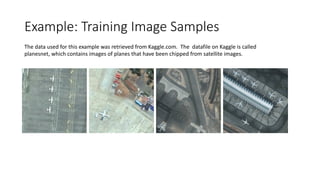
Example: Training Image Samples
The data used for this example was retrieved from Kaggle.com. The datafile on Kaggle is called
planesnet, which contains images of planes that have been chipped from satellite images.
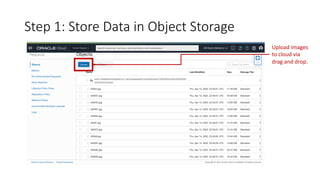
Step 1: Store Data in Object Storage
Upload images
to cloud via
drag and drop.
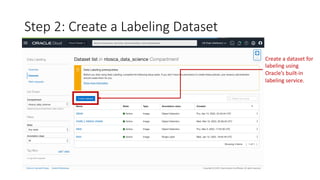
Step 2: Create a Labeling Dataset
Create a dataset for
labeling using
Oracle’s built-in
labeling service.
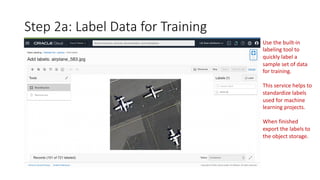
Step 2a: Label Data for Training
Use the built-in
labeling tool to
quickly label a
sample set of data
for training.
This service helps to
standardize labels
used for machine
learning projects.
When finished
export the labels to
the object storage.
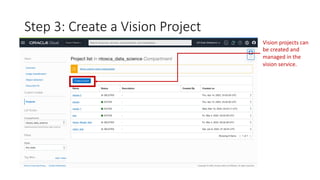
Step 3: Create a Vision Project
Vision projects can
be created and
managed in the
vision service.
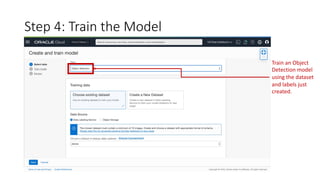
Step 4: Train the Model
Train an Object
Detection model
using the dataset
and labels just
created.
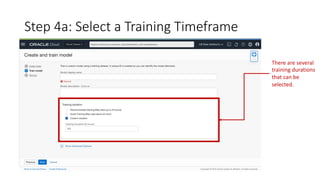
Step 4a: Select a Training Timeframe
There are several
training durations
that can be
selected.
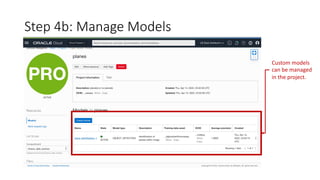
Step 4b: Manage Models
Custom models
can be managed
in the project.
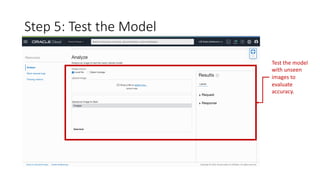
Step 5: Test the Model
Test the model
with unseen
images to
evaluate
accuracy.
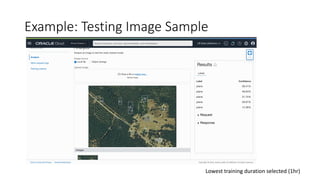
Example: Testing Image Sample
Lowest training duration selected (1hr)
-END-

Building a Custom Vision Model

  • 1.
    Build Computer VisionModels for Rapid Response In 5 Steps By: Nicholas Toscano
  • 2.
    Method: • Use OracleCloud Infrastructure Vision Service to build and deploy a custom computer vision model. • Data: • 735 satellite photos of images with and without planes for training • 455 satellite images with CGI planes for testing
  • 3.
    Use Case: Intelligence analystsare tasked with rapidly distilling information of intelligence value for decision makers. Intelligence response time frames can be minutes, hours, or days. Computer Vision is a technology capability that analysts can leverage to enhance their ability to quickly interrogate satellite imagery and other digital imagery for intelligence value. Without computer vision analyst must manually review every image or photos they are working with. Modestly, this could entail reviewing thousands of images or photos.
  • 4.
    Challenge: Computer vision modelscan be built using various methods. One method include using a neural network. Building neural network models can be very resource intensive and time consuming and unrealistic for analysts working within a time and resource constrained environment. In addition, models will need to be built and trained for each intelligence requirement. This can cause problems, such as missing or overlooking valuable intelligence information using image sources simply due to time.
  • 5.
    Solution: OCI Vision serviceis is an AI service for performing deep-learning– based image analysis at scale. This service provides models available out of the box that can be run on images without the need for additional training. For specific use cases, analysts can rapidly train custom vision models in with their own data.
  • 6.
    Example: Training ImageSamples The data used for this example was retrieved from Kaggle.com. The datafile on Kaggle is called planesnet, which contains images of planes that have been chipped from satellite images.
  • 7.
    Step 1: StoreData in Object Storage Upload images to cloud via drag and drop.
  • 8.
    Step 2: Createa Labeling Dataset Create a dataset for labeling using Oracle’s built-in labeling service.
  • 9.
    Step 2a: LabelData for Training Use the built-in labeling tool to quickly label a sample set of data for training. This service helps to standardize labels used for machine learning projects. When finished export the labels to the object storage.
  • 10.
    Step 3: Createa Vision Project Vision projects can be created and managed in the vision service.
  • 11.
    Step 4: Trainthe Model Train an Object Detection model using the dataset and labels just created.
  • 12.
    Step 4a: Selecta Training Timeframe There are several training durations that can be selected.
  • 13.
    Step 4b: ManageModels Custom models can be managed in the project.
  • 14.
    Step 5: Testthe Model Test the model with unseen images to evaluate accuracy.
  • 15.
    Example: Testing ImageSample Lowest training duration selected (1hr)
  • 16.