Bridge the Gap:
Research Alerts and Updates
March 26, 2014
Andrew Winston
I. Alerts
Uses of Alerts
3
 Receive regular, automatic
updates on legal and/or news
developments on issues
 Be notified of new citations to
a case
 Be notified of pending legislation
that affects an existing statute
 Receive articles on a topic from a
specified publication
Example
4
A. Lexis Advance
5
 Search Alert
 Shepard’s Alert
 Specific Publication Alert
 Pending Legislation Alert
 Topic Alert
More Information:
http://info.legalsolutions.thomsonreuters.com/westlawnext/a
bout/awareness/alerts/default.aspx
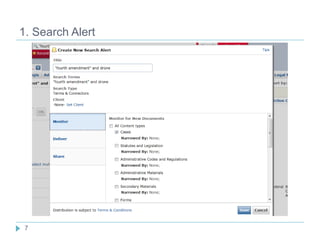
1. Search Alert
6
 Run search
 Refine using filters to retrieve desired results
 Click the Alert icon above results to set up an Alert; select
content type, delivery method, and other recipients
1. Search Alert
7
2. Shepard’s Alert
8
 Shepardize an item
 Click the Alert icon above results to set up an Alert to be
notified of new negative or other analysis of the item
3. Specific Publication Alert
9
 Select a publication using Browse Sources and add to search
 Enter search terms and run search
 Click the Alert icon above results to set up an Alert for articles
in that publication that meet search criteria
4. Pending Legislation Alert
10
 Retrieve federal or state statute by citation (or otherwise)
 Click the Alert icon to set up an Alert for pending legislation that
could amend or repeal that statute
5. Topic Alert
11
 Select Browse Topics
 Search for particular topics and select relevant practice areas
from search results
 Click on a subsection and set an Alert
6. Manage Alerts
12
B. WestlawNext
13
Set up various alerts via WestlawNext’s Alerts Center (or
when viewing particular search results):
 WestClip
 KeyCite Alert
 Court Wire Alert
 Docket Alert
 Publication Alert
More Information:
https://info.legalsolutions.thomsonreuters.com/pdf/wln2/L-
381793_Alerts_brochure2.pdf
B. WestlawNext
14
B. WestlawNext – Alert Center
15
 Create new Alert
1. WestClip
16
 Name the Alert
1. WestClip
17
 Select type(s) of materials
1. WestClip
18
 Set search terms
1. WestClip
19
 Specify delivery
1. WestClip
20
 Schedule Alert
2. Other Alerts on WestlawNext
21
 KeyCite – monitor new negative and other citations to cases,
statutes, and regulations
 Court Wire – monitor new cases in multiple courts based on
specified criteria
 Docket – receive updates on new filings on a specified case
 Publication – receive alerts on new documents from a specified
publication that meet search criteria
3. Manage Alerts
22
4. Westlaw Classic
23
4. Westlaw Classic – Alert Center
24
C. Bloomberg Law
25
 Search Alerts
 Citation Alerts
More Information:
http://www.bloomberglaw.com/help/AL_Saved_Searches__
_Alerts_Overview.htm
1. Example – Docket Alert
26
1. Example – Docket Alert
27
2. Example – Legislative Search Alerts
28
3. Example – Citation Alerts
29
4. Manage Alerts
30
D. CCH Intelliconnect
31
 Trackers – daily news updates on particular topics via email or
RSS reader
More Information:
http://support.cch.com/productsupport/solution.aspx?id=rp2275&
prodpath=%2FTopics%2Fproduct_support%2Fintelliconnect&pro
dname=CCH%20IntelliConnect
D. CCH Intelliconnect
32
D. CCH Intelliconnect
33
D. CCH Intelliconnect
34
E. Bloomberg BNA
35
 Email alerts on various Bloomberg BNA newsletters
1. Bloomberg BNA
36
1. Bloomberg BNA
37
1. Bloomberg BNA
38
2. Bloomberg BNA on Bloomberg Law
39
2. Bloomberg BNA on Bloomberg Law
40
F. Some Other Databases Offering Alert Services
41
 Law360
 Index to Legal Periodicals
 LegalTrac
 JSTOR
 SSRN
II. Legal Blogs
42
A. Some Examples
43
 SCOTUSBlog
 FCPA Blog
 Concurring Opinions
 Prawfsblawg
 Wall Street Journal’s Law Blog
 Virginia Lawyers Weekly’s VLW Blog
B. Finding Other Legal Blogs
44
 ABA Journal’s Blawg Directory
 Justia’s BlawgSearch
 Law Professor Blogs
 Search with Google
 Review blogrolls of
other blogs
C. RSS Readers
45
Some examples:
 Feedly
 Digg
 GR2Reader
 NewsBlur
 The Old Reader
Note: Many blogs also post links to new posts on Twitter.

Bridge the gap alerts