Instructions Manual (English)
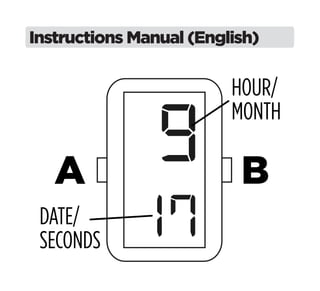
Your Breo watch has 3 display modes: TIME,
CALENDAR and SECONDS. Press B to change
between modes.
PLEASE NOTE: In CALENDAR mode, the watch will
automatically return to TIME mode if there is no
button pressed for approximately 3 seconds.

SETTING THE TIME AND DATE
1. From TIME mode, press A twice; the Month will
be displayed.
2. Press or hold B to set the Month.
3. Press A again; The Date will be displayed.
4. Press or hold B to set the Date.
5. Press A again; The Hour figure, with an ‘A’ (A.M.)
or ‘P’ (P.M.) will be displayed.
6. Press or hold B to set the Hour.
7. Press A again; The Minute will be displayed.
8. Press or hold B to set the Minute.
PLEASE NOTE: While in TIME mode, hold A for 3
seconds to make to watch simultaneously show the
Time and Date. Press B twice to exit this mode.
CHANGING THE BATTERY
1. It is recommended to take your watch to a repair
shop to change the battery.
2. When you want to change the battery by yourself,
unscrew 2 external screws and take out plastic
watch case from the silicon band. Carefully
unscrew the screws of the watch case and
change the battery.
3. SR626W is the model of battery required.
4. Assemble the watch in reverse order.
Watch Care and Precautions
This watch contains precision electronic components.
To ensure the best life for your Breo, please follow the
simple guidelines for watch care.
1. Avoid leaving your watch in any extremes for long
periods of time; direct sunlight, extremely warm
or cold environments. Extreme heat will cause
malfunctions and shorten the battery life. Extreme
cold will cause the watch to gain or lose time.
2. Avoid extreme shock or impact. Your watch is
designed to withstand impact under normal use.
3. Do not operate any of the function buttons when
the watch is submerged in water. Should water or
condensation appear in the watch face, have
the watch checked immediately. Water can corrode
electronic parts inside the case.
4. Do not submerge your watch in hot water or shower.
5. Keep your watch clean. Clean your watch with a soft
cloth and water only.
Worldwide Warranty
Thanks for choosing a Breo watch. We warrant this item for 12 months
Worldwide from the date of purchase for all constructing defects. We
are not responsible for any damage caused by inappropriate use.
From the warranty are excluded: Glass, strap & battery (SR626W).
The development of a malfunction does not imply the extension of
the 12 months warranty period.
Once a malfunction occurs, the consumer can contact the
retailer where the watch was purchased whom will take care of
warranty obligations.
If it is not possible to contact the reseller, simply send email to our
customer service info@breo.com with all your contact information,
and proof that the watch was purchased no more than 12 months
earlier. We will respond as soon as possible, sending you all free parts
and instruction for the repairing worldwide.
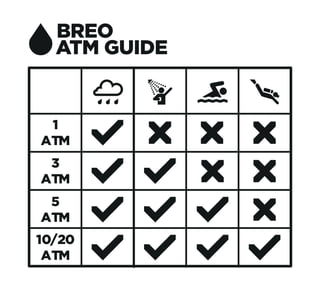
1
ATM
3
ATM
5
ATM
10/20
ATM
Breo Block Watch Instructions

Breo Block Watch Instructions

  • 2.
  • 3.
    Your Breo watchhas 3 display modes: TIME, CALENDAR and SECONDS. Press B to change between modes. PLEASE NOTE: In CALENDAR mode, the watch will automatically return to TIME mode if there is no button pressed for approximately 3 seconds. SETTING THE TIME AND DATE 1. From TIME mode, press A twice; the Month will be displayed.
  • 4.
    2. Press orhold B to set the Month. 3. Press A again; The Date will be displayed. 4. Press or hold B to set the Date. 5. Press A again; The Hour figure, with an ‘A’ (A.M.) or ‘P’ (P.M.) will be displayed. 6. Press or hold B to set the Hour. 7. Press A again; The Minute will be displayed. 8. Press or hold B to set the Minute.
  • 5.
    PLEASE NOTE: Whilein TIME mode, hold A for 3 seconds to make to watch simultaneously show the Time and Date. Press B twice to exit this mode.
  • 6.
    CHANGING THE BATTERY 1.It is recommended to take your watch to a repair shop to change the battery. 2. When you want to change the battery by yourself, unscrew 2 external screws and take out plastic watch case from the silicon band. Carefully unscrew the screws of the watch case and change the battery. 3. SR626W is the model of battery required. 4. Assemble the watch in reverse order.
  • 7.
    Watch Care andPrecautions This watch contains precision electronic components. To ensure the best life for your Breo, please follow the simple guidelines for watch care. 1. Avoid leaving your watch in any extremes for long periods of time; direct sunlight, extremely warm or cold environments. Extreme heat will cause malfunctions and shorten the battery life. Extreme cold will cause the watch to gain or lose time. 2. Avoid extreme shock or impact. Your watch is
  • 8.
    designed to withstandimpact under normal use. 3. Do not operate any of the function buttons when the watch is submerged in water. Should water or condensation appear in the watch face, have the watch checked immediately. Water can corrode electronic parts inside the case. 4. Do not submerge your watch in hot water or shower. 5. Keep your watch clean. Clean your watch with a soft cloth and water only.
  • 9.
    Worldwide Warranty Thanks forchoosing a Breo watch. We warrant this item for 12 months Worldwide from the date of purchase for all constructing defects. We are not responsible for any damage caused by inappropriate use. From the warranty are excluded: Glass, strap & battery (SR626W). The development of a malfunction does not imply the extension of the 12 months warranty period. Once a malfunction occurs, the consumer can contact the retailer where the watch was purchased whom will take care of warranty obligations. If it is not possible to contact the reseller, simply send email to our customer service info@breo.com with all your contact information, and proof that the watch was purchased no more than 12 months earlier. We will respond as soon as possible, sending you all free parts and instruction for the repairing worldwide.
  • 10.