Bot Template
Framework
The basics
Agenda
➔ What is Bot Template Framework
➔ How to use it
➔ Templates structure
➔ Blocks
➔ Drivers
➔ Example
➔ Links
What is Bot Template Framework
A framework for rapid development of chatbots (templates), describing a
chatbot in a scenario file. It’s built on Botman framework. More here:
https://github.com/adellantado/bot-template-framework
What is the problem? You need to write code even for standart things, like
sending an image, asking a simple question or even replying with a simple button,
often you need to write a lot of code. After you need to change the chatbot
behavior and again it means write code. And in final you have the none consistent
scenario which look like a bunch of code.
How to use it
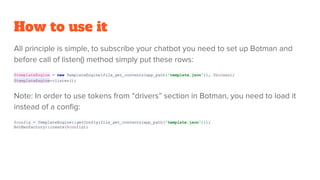
All principle is simple, to subscribe your chatbot you need to set up Botman and
before call of listen() method simply put these rows:
$templateEngine = new TemplateEngine(file_get_contents(app_path('template.json')), $botman);
$templateEngine->listen();
Note: In order to use tokens from “drivers” section in Botman, you need to load it
instead of a config:
$config = TemplateEngine::getConfig(file_get_contents(app_path('template.json')));
BotManFactory::create($config);
Templates structure
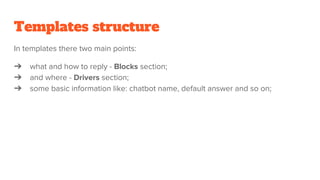
In templates there two main points:
➔ what and how to reply - Blocks section;
➔ and where - Drivers section;
➔ some basic information like: chatbot name, default answer and so on;
Blocks
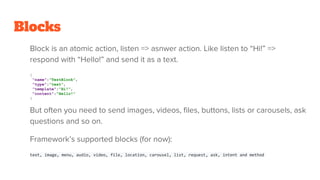
Block is an atomic action, listen => asnwer action. Like listen to “Hi!” =>
respond with “Hello!” and send it as a text.
{
"name":"TestBlock",
"type":"text",
"template":"Hi!",
"content":"Hello!"
}
But often you need to send images, videos, files, buttons, lists or carousels, ask
questions and so on.
Framework’s supported blocks (for now):
text, image, menu, audio, video, file, location, carousel, list, request, ask, intent and method
Blocks
Blocks support:
➔ flows: Using “next” field it’s easy to create chains;
➔ save/restore data with variables;
➔ built in variables;
➔ NLP (with dialogflow);
➔ locale;
➔ HTTP requests;
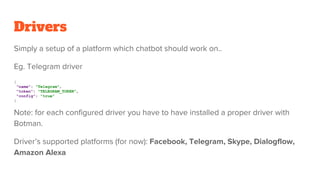
Drivers
Simply a setup of a platform which chatbot should work on..
Eg. Telegram driver
{
"name": "Telegram",
"token": "TELEGRAM_TOKEN",
"config": "true"
}
Note: for each configured driver you have to have installed a proper driver with
Botman.
Driver’s supported platforms (for now): Facebook, Telegram, Skype, Dialogflow,
Amazon Alexa
Example
< Here should be paste a link to youtube live video recording >
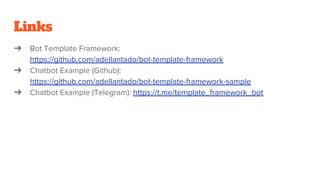
Links
➔ Bot Template Framework:
https://github.com/adellantado/bot-template-framework
➔ Chatbot Example (Github):
https://github.com/adellantado/bot-template-framework-sample
➔ Chatbot Example (Telegram): https://t.me/template_framework_bot

Bot template framework

  • 1.
  • 2.
    Agenda ➔ What isBot Template Framework ➔ How to use it ➔ Templates structure ➔ Blocks ➔ Drivers ➔ Example ➔ Links
  • 3.
    What is BotTemplate Framework A framework for rapid development of chatbots (templates), describing a chatbot in a scenario file. It’s built on Botman framework. More here: https://github.com/adellantado/bot-template-framework What is the problem? You need to write code even for standart things, like sending an image, asking a simple question or even replying with a simple button, often you need to write a lot of code. After you need to change the chatbot behavior and again it means write code. And in final you have the none consistent scenario which look like a bunch of code.
  • 4.
    How to useit All principle is simple, to subscribe your chatbot you need to set up Botman and before call of listen() method simply put these rows: $templateEngine = new TemplateEngine(file_get_contents(app_path('template.json')), $botman); $templateEngine->listen(); Note: In order to use tokens from “drivers” section in Botman, you need to load it instead of a config: $config = TemplateEngine::getConfig(file_get_contents(app_path('template.json'))); BotManFactory::create($config);
  • 5.
    Templates structure In templatesthere two main points: ➔ what and how to reply - Blocks section; ➔ and where - Drivers section; ➔ some basic information like: chatbot name, default answer and so on;
  • 6.
    Blocks Block is anatomic action, listen => asnwer action. Like listen to “Hi!” => respond with “Hello!” and send it as a text. { "name":"TestBlock", "type":"text", "template":"Hi!", "content":"Hello!" } But often you need to send images, videos, files, buttons, lists or carousels, ask questions and so on. Framework’s supported blocks (for now): text, image, menu, audio, video, file, location, carousel, list, request, ask, intent and method
  • 7.
    Blocks Blocks support: ➔ flows:Using “next” field it’s easy to create chains; ➔ save/restore data with variables; ➔ built in variables; ➔ NLP (with dialogflow); ➔ locale; ➔ HTTP requests;
  • 8.
    Drivers Simply a setupof a platform which chatbot should work on.. Eg. Telegram driver { "name": "Telegram", "token": "TELEGRAM_TOKEN", "config": "true" } Note: for each configured driver you have to have installed a proper driver with Botman. Driver’s supported platforms (for now): Facebook, Telegram, Skype, Dialogflow, Amazon Alexa
  • 9.
    Example < Here shouldbe paste a link to youtube live video recording >
  • 10.
    Links ➔ Bot TemplateFramework: https://github.com/adellantado/bot-template-framework ➔ Chatbot Example (Github): https://github.com/adellantado/bot-template-framework-sample ➔ Chatbot Example (Telegram): https://t.me/template_framework_bot