Vinod Dangudubiyyapu Bootstrap SharePoint
1 Monday, August 01, 2016
Bootstrap SharePoint 2013
+
Contents
About.............................................................................................................................................................1
Author...........................................................................................................................................................1
Prerequisites .................................................................................................................................................2
Master page..................................................................................................................................................2
Styling and Script reference..........................................................................................................................3
Navigation.....................................................................................................................................................4
Top navigation ..........................................................................................................................................4
Left side.....................................................................................................................................................4
Page Layout...................................................................................................................................................5
Footer........................................................................................................................................................5
Web part OOB customization .......................................................................................................................6
Responsive SharePoint..................................................................................................................................6
About
The SharePoint 2013 provides the table less structure which gives flexibility for Responsive UI. The
Responsive UI can be experienced from a smaller device (tablet or smartphone)
Author
Author VINOD DANGUDUBIYYAPU
Guide Version 1.0
Modified On 1 August 2016
Vinod Dangudubiyyapu Bootstrap SharePoint
2 Monday, August 01, 2016
Prerequisites
To achieve the SharePoint Responsive a configuration need to be done, by default SharePoint has its
own Mobile version is activated.
Go to features of SharePoint and disable the "Mobile Browser View".
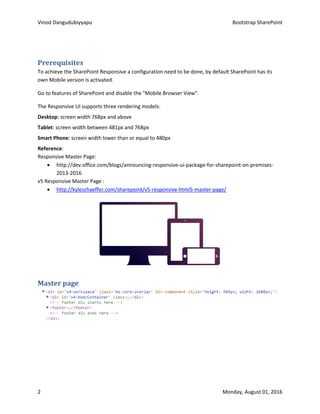
The Responsive UI supports three rendering models:
Desktop: screen width 768px and above
Tablet: screen width between 481px and 768px
Smart Phone: screen width lower than or equal to 480px
Reference:
Responsive Master Page:
 http://dev.office.com/blogs/announcing-responsive-ui-package-for-sharepoint-on-premises-
2013-2016
v5 Responsive Master Page :
 http://kyleschaeffer.com/sharepoint/v5-responsive-html5-master-page/
Master page
Vinod Dangudubiyyapu Bootstrap SharePoint
3 Monday, August 01, 2016
Styling and Script reference
/*Global Styling*/
img, a, a:hover, a:focus, a:visited, a:active,
button {
outline: 0;
}
a:focus, a:visited, a:active {
text-decoration: none;
color: inherit;
}
textarea {
resize: none;
}
/*Bootstrap overrides*/
button {
min-width: inherit;
}
input[type="button"],
input[type="sumbit"],
input[type="reset"], button {
background-color:
rgba(255,255,255,0.7);
display: block;
padding: 10px 32px;
text-align: center;
color: #000;
display: inline-block;
text-decoration: none;
transition: all .4s;
border: 0;
}
input[type="button"],
input[type="sumbit"],
input[type="reset"], button {
margin-left: 5px;
}
input[type="button"]:hover,
input[type="sumbit"]:hover,
input[type="reset"]:hover,
button:hover{
background-color:
rgba(227,3,124,0.9);
color: #fff;
}
/*SharePoint overrides*/
body #s4-workspace {
background:
url("../AppImages/createevent.j
pg") no-repeat fixed center top;
background-size: cover;
}
Vinod Dangudubiyyapu Bootstrap SharePoint
4 Monday, August 01, 2016
body #s4-titlerow {
background: #fff
url("../AppImages/ironpatern.p
ng") repeat-x left top;
padding: 0;
top: 64px;
z-index: 102;
height: 120px;
transition: all 0.4s;
}
#titleAreaBox {
margin: auto;
}
body #s4-titlerow .ms-siteicon-
a {
position: relative;
text-align: center;
vertical-align: middle;
height: 120px;
transition: all .4s;
max-height: none;
max-width: none;
display: table-cell;
transition: all 0.4s;
}
body #s4-titlerow .ms-
siteicon-a .ms-siteicon-img {
max-width: 100%;
max-height: 100%;
transition: all 0.4s;
}
#s4-bodyContainer {
padding: 0;
min-height: 100%;
}
#contentRow {
padding: 15px 0 50px;
}
#contentBox {
margin: 0;
min-width: 0;
}
Navigation
Top navigation
.ms-breadcrumb-box {
height: auto;
}
.ms-core-listMenu-
horizontalBox li.static > .ms-
core-listMenu-item {
color: #000;
padding: 0px 20px;
text-align: center;
font-size: 18px;
position: relative;
text-decoration: none;
transition: all .4s;
}
.ms-core-listMenu-
horizontalBox li.static > .ms-
core-listMenu-item:first-child
{
display: none;
}
.ms-core-listMenu-
horizontalBox li.static li.static
> .ms-core-listMenu-item {
display: inherit;
}
.dynamic-children ul.dynamic
{
text-align: left;
box-shadow: none;
background: #fff
url("../AppImages/ironpatern
.png") repeat left top;
border: 0px solid #ed037c;
border-top: 0;
margin-left: -30px;
margin-top: -1px;
padding: 0 5px;
width: auto!important;
min-width:200px;
max-width: 250px;
}
Left side
.ms-core-listMenu-horizontalBox > .ms-core-listMenu-root > .ms-listMenu-editLink,
Vinod Dangudubiyyapu Bootstrap SharePoint
5 Monday, August 01, 2016
body #s4-titlerow .ms-mpSearchBox, #sideNavBox {
display: none;
}
Page Layout
Change Blankwebpart layout to Bootstrap “col-xx-xx“ classes
Figure 1: Out Of the Box Code
Figure 2: Customized with Bootstrap Classes
Footer
/* Footer styles starts here */
footer {
background: #000
/*url('/SiteAssets/Astro/AppIm
ages/c-p-btm.jpg') no-repeat
50% 0*/;
text-align: center;
clear: both;
display: block;
margin-top: -50px;
}
footer .footerWrapper {
padding: 15px 0;
}
Vinod Dangudubiyyapu Bootstrap SharePoint
6 Monday, August 01, 2016
footer a {
color: #fff!important;
font-size: 12px;
font-family: 'LatoWeb';
text-decoration: none;
padding: 0 5px;
border-right: 1px solid #fff;
}
footer a:hover, footer
a:active, footer a:focus, footer
a:visited {
color: #fff;
border-right: 1px solid
#fff;
text-decoration: none;
}
footer a:hover {
text-decoration:
underline;
}
footer span {
font-weight: bold;
font-family: 'LatoWeb';
font-size: 12px;
color: #fff;
padding-left: 5px;
}
Web part OOB customization
.ms-webpartzone-cell {
margin: 0;
}
.ms-webpart-zone, .ms-webpart-chrome-vertical, .ms-webpart-cell-vertical {
display: block;
}
Responsive SharePoint
@media screen and (max-width:359px) {
}
@media screen and (max-width:480px) {
.ms-breadcrumb-box {
position: relative;
bottom: 18px;
height: auto;
}
.dynamic-children.hover ul.dynamic {
position: static;
width: 100%!important;
max-width: none;
border: 0;
background: inherit;
margin: 0;
display: block;
}
.dynamic-children.hover ul.dynamic a {
color:#fff;
}
}
Vinod Dangudubiyyapu Bootstrap SharePoint
7 Monday, August 01, 2016
@media screen and (max-width:767px) {
.navbar-fixed-top .ms-breadcrumb-box {
background: #fff;
}
body #s4-titlerow .ms-siteicon-a {
height: 80px;
}
body #s4-titlerow .ms-siteicon-a .ms-
siteicon-img {
max-width: 60%;
}
.ms-core-listMenu-horizontalBox,
.ms-core-listMenu-horizontalBox ul.static,
.ms-core-listMenu-horizontalBox li.static, .ms-
core-listMenu-horizontalBox .ms-core-listMenu-
item, .ms-core-listMenu-horizontalBox >
ul.static > li.static > table {
display: block;
}
.ms-core-listMenu-horizontalBox li.static {
border-bottom: 1px solid #ed037c;
background: #000;
text-align: center;
}
.ms-core-listMenu-horizontalBox li.static >
.ms-core-listMenu-item {
color: #f1f1f1;
}
.ms-core-listMenu-horizontalBox li.static
li.static {
border-left: 0px solid #ed037c;
border-top: 1px solid #ed037c;
border-bottom: 0;
}
}
@media screen and (min-width:768px) {
.navbar-fixed-top .ms-breadcrumb-box {
background: transparent none;
}
.ms-core-listMenu-horizontalBox li.static >
.ms-core-listMenu-item {
min-width: 0;
margin-right: 0;
}
.ms-core-listMenu-horizontalBox li.static
li.static:first-child {
border-left: 0 none;
}
.ms-core-listMenu-horizontalBox li.static
li.static {
border-left: 1px solid #ed037c;
}
.ms-core-listMenu-horizontalBox li.dynamic >
.menu-item {
padding: 5px 2px;
font-size: inherit;
color: #333;
}
.ms-core-listMenu-horizontalBox li.dynamic
> .menu-item .additional-background {
padding-left: 0!important;
border: 0!important;
}
Vinod Dangudubiyyapu Bootstrap SharePoint
8 Monday, August 01, 2016
.ms-core-listMenu-horizontalBox li.dynamic >
a:hover {
text-decoration: none;
color: #000;
background: #fafafa;
}
.ms-breadcrumb-title {
display: none;
}
}
@media screen and (max-width:768px) {
.ms-core-listMenu-horizontalBox li.static > .ms-
core-listMenu-item {
padding: 0 10px;
}
.ms-breadcrumb-title { display: none; }
.ms-siteicon-a {
height: 85px;
}
}
@media (min-width:992px) {
.ms-core-listMenu-horizontalBox li.static > .ms-
core-listMenu-item {
padding: 0 40px;
min-width: 0;
margin-right: 0;
}
.ms-core-listMenu-horizontalBox {
margin-right: 45px;
}
.ms-breadcrumb-top {
padding-top: 35px!important;
position: absolute;
right: 0;
}
.navbar-fixed-top .ms-breadcrumb-box {
background: transparent;
}
.navbar-fixed-top .ReferencePane {
margin-top: 10px;
}
}

Bootstrap share point 2013

  • 1.
    Vinod Dangudubiyyapu BootstrapSharePoint 1 Monday, August 01, 2016 Bootstrap SharePoint 2013 + Contents About.............................................................................................................................................................1 Author...........................................................................................................................................................1 Prerequisites .................................................................................................................................................2 Master page..................................................................................................................................................2 Styling and Script reference..........................................................................................................................3 Navigation.....................................................................................................................................................4 Top navigation ..........................................................................................................................................4 Left side.....................................................................................................................................................4 Page Layout...................................................................................................................................................5 Footer........................................................................................................................................................5 Web part OOB customization .......................................................................................................................6 Responsive SharePoint..................................................................................................................................6 About The SharePoint 2013 provides the table less structure which gives flexibility for Responsive UI. The Responsive UI can be experienced from a smaller device (tablet or smartphone) Author Author VINOD DANGUDUBIYYAPU Guide Version 1.0 Modified On 1 August 2016
  • 2.
    Vinod Dangudubiyyapu BootstrapSharePoint 2 Monday, August 01, 2016 Prerequisites To achieve the SharePoint Responsive a configuration need to be done, by default SharePoint has its own Mobile version is activated. Go to features of SharePoint and disable the "Mobile Browser View". The Responsive UI supports three rendering models: Desktop: screen width 768px and above Tablet: screen width between 481px and 768px Smart Phone: screen width lower than or equal to 480px Reference: Responsive Master Page:  http://dev.office.com/blogs/announcing-responsive-ui-package-for-sharepoint-on-premises- 2013-2016 v5 Responsive Master Page :  http://kyleschaeffer.com/sharepoint/v5-responsive-html5-master-page/ Master page
  • 3.
    Vinod Dangudubiyyapu BootstrapSharePoint 3 Monday, August 01, 2016 Styling and Script reference /*Global Styling*/ img, a, a:hover, a:focus, a:visited, a:active, button { outline: 0; } a:focus, a:visited, a:active { text-decoration: none; color: inherit; } textarea { resize: none; } /*Bootstrap overrides*/ button { min-width: inherit; } input[type="button"], input[type="sumbit"], input[type="reset"], button { background-color: rgba(255,255,255,0.7); display: block; padding: 10px 32px; text-align: center; color: #000; display: inline-block; text-decoration: none; transition: all .4s; border: 0; } input[type="button"], input[type="sumbit"], input[type="reset"], button { margin-left: 5px; } input[type="button"]:hover, input[type="sumbit"]:hover, input[type="reset"]:hover, button:hover{ background-color: rgba(227,3,124,0.9); color: #fff; } /*SharePoint overrides*/ body #s4-workspace { background: url("../AppImages/createevent.j pg") no-repeat fixed center top; background-size: cover; }
  • 4.
    Vinod Dangudubiyyapu BootstrapSharePoint 4 Monday, August 01, 2016 body #s4-titlerow { background: #fff url("../AppImages/ironpatern.p ng") repeat-x left top; padding: 0; top: 64px; z-index: 102; height: 120px; transition: all 0.4s; } #titleAreaBox { margin: auto; } body #s4-titlerow .ms-siteicon- a { position: relative; text-align: center; vertical-align: middle; height: 120px; transition: all .4s; max-height: none; max-width: none; display: table-cell; transition: all 0.4s; } body #s4-titlerow .ms- siteicon-a .ms-siteicon-img { max-width: 100%; max-height: 100%; transition: all 0.4s; } #s4-bodyContainer { padding: 0; min-height: 100%; } #contentRow { padding: 15px 0 50px; } #contentBox { margin: 0; min-width: 0; } Navigation Top navigation .ms-breadcrumb-box { height: auto; } .ms-core-listMenu- horizontalBox li.static > .ms- core-listMenu-item { color: #000; padding: 0px 20px; text-align: center; font-size: 18px; position: relative; text-decoration: none; transition: all .4s; } .ms-core-listMenu- horizontalBox li.static > .ms- core-listMenu-item:first-child { display: none; } .ms-core-listMenu- horizontalBox li.static li.static > .ms-core-listMenu-item { display: inherit; } .dynamic-children ul.dynamic { text-align: left; box-shadow: none; background: #fff url("../AppImages/ironpatern .png") repeat left top; border: 0px solid #ed037c; border-top: 0; margin-left: -30px; margin-top: -1px; padding: 0 5px; width: auto!important; min-width:200px; max-width: 250px; } Left side .ms-core-listMenu-horizontalBox > .ms-core-listMenu-root > .ms-listMenu-editLink,
  • 5.
    Vinod Dangudubiyyapu BootstrapSharePoint 5 Monday, August 01, 2016 body #s4-titlerow .ms-mpSearchBox, #sideNavBox { display: none; } Page Layout Change Blankwebpart layout to Bootstrap “col-xx-xx“ classes Figure 1: Out Of the Box Code Figure 2: Customized with Bootstrap Classes Footer /* Footer styles starts here */ footer { background: #000 /*url('/SiteAssets/Astro/AppIm ages/c-p-btm.jpg') no-repeat 50% 0*/; text-align: center; clear: both; display: block; margin-top: -50px; } footer .footerWrapper { padding: 15px 0; }
  • 6.
    Vinod Dangudubiyyapu BootstrapSharePoint 6 Monday, August 01, 2016 footer a { color: #fff!important; font-size: 12px; font-family: 'LatoWeb'; text-decoration: none; padding: 0 5px; border-right: 1px solid #fff; } footer a:hover, footer a:active, footer a:focus, footer a:visited { color: #fff; border-right: 1px solid #fff; text-decoration: none; } footer a:hover { text-decoration: underline; } footer span { font-weight: bold; font-family: 'LatoWeb'; font-size: 12px; color: #fff; padding-left: 5px; } Web part OOB customization .ms-webpartzone-cell { margin: 0; } .ms-webpart-zone, .ms-webpart-chrome-vertical, .ms-webpart-cell-vertical { display: block; } Responsive SharePoint @media screen and (max-width:359px) { } @media screen and (max-width:480px) { .ms-breadcrumb-box { position: relative; bottom: 18px; height: auto; } .dynamic-children.hover ul.dynamic { position: static; width: 100%!important; max-width: none; border: 0; background: inherit; margin: 0; display: block; } .dynamic-children.hover ul.dynamic a { color:#fff; } }
  • 7.
    Vinod Dangudubiyyapu BootstrapSharePoint 7 Monday, August 01, 2016 @media screen and (max-width:767px) { .navbar-fixed-top .ms-breadcrumb-box { background: #fff; } body #s4-titlerow .ms-siteicon-a { height: 80px; } body #s4-titlerow .ms-siteicon-a .ms- siteicon-img { max-width: 60%; } .ms-core-listMenu-horizontalBox, .ms-core-listMenu-horizontalBox ul.static, .ms-core-listMenu-horizontalBox li.static, .ms- core-listMenu-horizontalBox .ms-core-listMenu- item, .ms-core-listMenu-horizontalBox > ul.static > li.static > table { display: block; } .ms-core-listMenu-horizontalBox li.static { border-bottom: 1px solid #ed037c; background: #000; text-align: center; } .ms-core-listMenu-horizontalBox li.static > .ms-core-listMenu-item { color: #f1f1f1; } .ms-core-listMenu-horizontalBox li.static li.static { border-left: 0px solid #ed037c; border-top: 1px solid #ed037c; border-bottom: 0; } } @media screen and (min-width:768px) { .navbar-fixed-top .ms-breadcrumb-box { background: transparent none; } .ms-core-listMenu-horizontalBox li.static > .ms-core-listMenu-item { min-width: 0; margin-right: 0; } .ms-core-listMenu-horizontalBox li.static li.static:first-child { border-left: 0 none; } .ms-core-listMenu-horizontalBox li.static li.static { border-left: 1px solid #ed037c; } .ms-core-listMenu-horizontalBox li.dynamic > .menu-item { padding: 5px 2px; font-size: inherit; color: #333; } .ms-core-listMenu-horizontalBox li.dynamic > .menu-item .additional-background { padding-left: 0!important; border: 0!important; }
  • 8.
    Vinod Dangudubiyyapu BootstrapSharePoint 8 Monday, August 01, 2016 .ms-core-listMenu-horizontalBox li.dynamic > a:hover { text-decoration: none; color: #000; background: #fafafa; } .ms-breadcrumb-title { display: none; } } @media screen and (max-width:768px) { .ms-core-listMenu-horizontalBox li.static > .ms- core-listMenu-item { padding: 0 10px; } .ms-breadcrumb-title { display: none; } .ms-siteicon-a { height: 85px; } } @media (min-width:992px) { .ms-core-listMenu-horizontalBox li.static > .ms- core-listMenu-item { padding: 0 40px; min-width: 0; margin-right: 0; } .ms-core-listMenu-horizontalBox { margin-right: 45px; } .ms-breadcrumb-top { padding-top: 35px!important; position: absolute; right: 0; } .navbar-fixed-top .ms-breadcrumb-box { background: transparent; } .navbar-fixed-top .ReferencePane { margin-top: 10px; } }