www.siliconexpert.com
BOM GRADING
Focus on Your High RiskParts
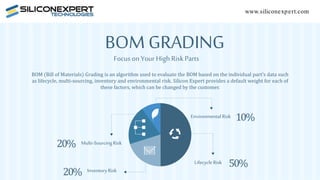
BOM (Bill of Materials) Grading is an algorithm used to evaluate the BOM based on the individual part’s data such
as lifecycle, multi-sourcing, inventory and environmental risk. Silicon Expert provides a default weight for each of
these factors, which can be changed by the customer.
Multi-SourcingRisk
InventoryRisk
EnvironmentalRisk
LifecycleRisk 50%
10%
20%
20%
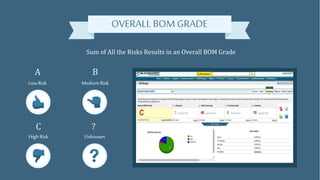
OVERALL BOM GRADE
Sum of All the Risks Results in an Overall BOM Grade
LowRisk Medium Risk
High Risk Unknown
A B
C ?
EVALUATE YOUR BOM GRADE
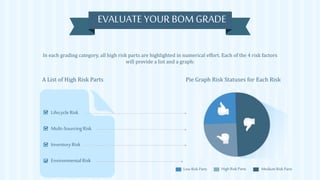
In each grading category, all high risk parts are highlighted in numerical effort. Each of the 4 risk factors
will provide a list and a graph:
A List of High Risk Parts Pie Graph Risk Statuses for Each Risk
Low Risk Parts High Risk Parts Medium Risk Parts
LifecycleRisk
Multi-SourcingRisk
InventoryRisk
EnvironmentalRisk
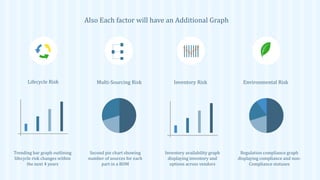
Also Each factor will have an Additional Graph
Lifecycle Risk Multi-Sourcing Risk Inventory Risk Environmental Risk
Trending bar graph outlining
lifecycle risk changes within
the next 4 years
Second pie chart showing
number of sources for each
part in a BOM
Inventory availability graph
displaying inventory and
options across vendors
Regulation compliance graph
displaying compliance and non-
Compliance statuses
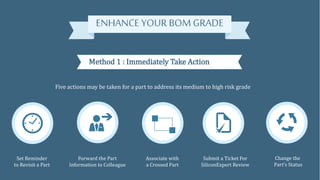
ENHANCEYOUR BOM GRADE
Method 1 : Immediately Take Action
Five actions may be taken for a part to address its medium to high risk grade
Set Reminder
to Revisit a Part
Forward the Part
Information to Colleague
Associate with
a Crossed Part
Submit a Ticket For
SiliconExpert Review
Change the
Part’s Status
Method 2: SiliconExpert recommendations
For high risk parts where applicable SiliconExpert will provide solutions
Provide Options to Accept,
Reject or Compare
the Risky Part
Provide Explanation for
Why Options were
Recommended
Side by Side
Comparison
of the Two Parts
Do you have the industry tool for risk assessment?
Upgrade your BOM Manager today
Email us at: sales@siliconexpert.com

BOM Grading Infographic

  • 1.
    www.siliconexpert.com BOM GRADING Focus onYour High RiskParts BOM (Bill of Materials) Grading is an algorithm used to evaluate the BOM based on the individual part’s data such as lifecycle, multi-sourcing, inventory and environmental risk. Silicon Expert provides a default weight for each of these factors, which can be changed by the customer. Multi-SourcingRisk InventoryRisk EnvironmentalRisk LifecycleRisk 50% 10% 20% 20%
  • 2.
    OVERALL BOM GRADE Sumof All the Risks Results in an Overall BOM Grade LowRisk Medium Risk High Risk Unknown A B C ?
  • 3.
    EVALUATE YOUR BOMGRADE In each grading category, all high risk parts are highlighted in numerical effort. Each of the 4 risk factors will provide a list and a graph: A List of High Risk Parts Pie Graph Risk Statuses for Each Risk Low Risk Parts High Risk Parts Medium Risk Parts LifecycleRisk Multi-SourcingRisk InventoryRisk EnvironmentalRisk
  • 4.
    Also Each factorwill have an Additional Graph Lifecycle Risk Multi-Sourcing Risk Inventory Risk Environmental Risk Trending bar graph outlining lifecycle risk changes within the next 4 years Second pie chart showing number of sources for each part in a BOM Inventory availability graph displaying inventory and options across vendors Regulation compliance graph displaying compliance and non- Compliance statuses
  • 5.
    ENHANCEYOUR BOM GRADE Method1 : Immediately Take Action Five actions may be taken for a part to address its medium to high risk grade Set Reminder to Revisit a Part Forward the Part Information to Colleague Associate with a Crossed Part Submit a Ticket For SiliconExpert Review Change the Part’s Status
  • 6.
    Method 2: SiliconExpertrecommendations For high risk parts where applicable SiliconExpert will provide solutions Provide Options to Accept, Reject or Compare the Risky Part Provide Explanation for Why Options were Recommended Side by Side Comparison of the Two Parts Do you have the industry tool for risk assessment? Upgrade your BOM Manager today Email us at: sales@siliconexpert.com