©2025 EPSUM LABS 1
©2025 EPSUM LABS 2
In the world of embedded systems, getting hardware and software to work together
seamlessly is no small feat. That’s where the Board Support Package (BSP) comes in—a
critical component that ensures your operating system (OS) communicates effectively
with your hardware.
But what exactly is BSP, and why does it matter for embedded development?
Let’s break it down step by step in simple terms.
What is a Board Support Package (BSP)?
Think of BSP as a bridge between hardware and software. It contains the essential
drivers, configuration files, and bootloaders that allow an OS—like Linux—to run on a
specific hardware platform. Without it, your board is just an expensive piece of silicon!
Core Components of BSP:
✅ Bootloader – Wakes up the hardware and loads the OS into memory.
✅ Kernel & Device Tree (DTB) – Customizes the OS to recognize hardware features like
GPIOs, buses, and memory.
✅ Device Drivers – Enables communication between the OS and peripherals (USB,
Ethernet, Display, etc.).
✅ Root Filesystem (RootFS) – Houses system libraries, scripts, and utilities that run in
user space.
✅ Board Configuration Files – Stores startup scripts and kernel configurations to define
system behavior.
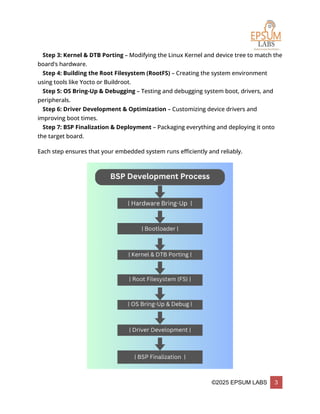
Step-by-Step BSP Development Process
Building a BSP isn’t just about writing code—it’s a structured process to ensure hardware
and software integration. Here’s how it works:
🔹 Step 1: Hardware Bring-Up – Getting the board powered up and running.
🔹 Step 2: Bootloader Configuration & Debugging – Setting up the bootloader to initialize
hardware correctly.
©2025 EPSUM LABS 3
🔹 Step 3: Kernel & DTB Porting – Modifying the Linux Kernel and device tree to match the
board’s hardware.
🔹 Step 4: Building the Root Filesystem (RootFS) – Creating the system environment
using tools like Yocto or Buildroot.
🔹 Step 5: OS Bring-Up & Debugging – Testing and debugging system boot, drivers, and
peripherals.
🔹 Step 6: Driver Development & Optimization – Customizing device drivers and
improving boot times.
🔹 Step 7: BSP Finalization & Deployment – Packaging everything and deploying it onto
the target board.
Each step ensures that your embedded system runs efficiently and reliably.
©2025 EPSUM LABS 4
Common BSP Tools & Techniques
Debugging embedded systems can be tricky, but with the right tools, you can quickly
identify and resolve issues:
 Bootloader Debugging – Commands like printenv, mmc info, and fatload help
check if the board is initializing correctly.
 Kernel Debugging – Tools like dmesg, lsmod, and cat /proc/devices assist in
analyzing kernel behavior.
 JTAG Debugging – Hardware debuggers like Lauterbach TRACE32 help trace code
execution.
 Serial Console (UART Debugging) – Programs like PuTTY or Minicom let you
monitor the board’s startup process.
Peripheral Debugging – Commands like i2cdetect and ls /sys/class/gpio/ help
verify if devices are recognized.
With these tools, you can pinpoint issues related to booting, memory, and peripheral
interactions.
©2025 EPSUM LABS 5
BSP Packaging & Deployment
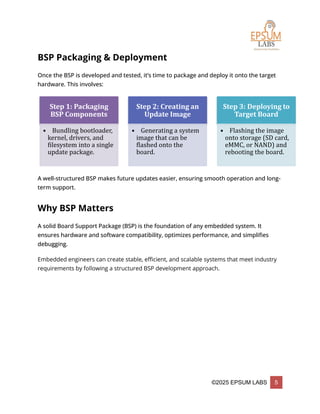
Once the BSP is developed and tested, it’s time to package and deploy it onto the target
hardware. This involves:
A well-structured BSP makes future updates easier, ensuring smooth operation and long-
term support.
Why BSP Matters
A solid Board Support Package (BSP) is the foundation of any embedded system. It
ensures hardware and software compatibility, optimizes performance, and simplifies
debugging.
Embedded engineers can create stable, efficient, and scalable systems that meet industry
requirements by following a structured BSP development approach.
Step 1: Packaging
BSP Components
• Bundling bootloader,
kernel, drivers, and
filesystem into a single
update package.
Step 2: Creating an
Update Image
• Generating a system
image that can be
flashed onto the
board.
Step 3: Deploying to
Target Board
• Flashing the image
onto storage (SD card,
eMMC, or NAND) and
rebooting the board.

Board Support Package (BSP) Development: The Backbone of Embedded Systems

  • 1.
  • 2.
    ©2025 EPSUM LABS2 In the world of embedded systems, getting hardware and software to work together seamlessly is no small feat. That’s where the Board Support Package (BSP) comes in—a critical component that ensures your operating system (OS) communicates effectively with your hardware. But what exactly is BSP, and why does it matter for embedded development? Let’s break it down step by step in simple terms. What is a Board Support Package (BSP)? Think of BSP as a bridge between hardware and software. It contains the essential drivers, configuration files, and bootloaders that allow an OS—like Linux—to run on a specific hardware platform. Without it, your board is just an expensive piece of silicon! Core Components of BSP: ✅ Bootloader – Wakes up the hardware and loads the OS into memory. ✅ Kernel & Device Tree (DTB) – Customizes the OS to recognize hardware features like GPIOs, buses, and memory. ✅ Device Drivers – Enables communication between the OS and peripherals (USB, Ethernet, Display, etc.). ✅ Root Filesystem (RootFS) – Houses system libraries, scripts, and utilities that run in user space. ✅ Board Configuration Files – Stores startup scripts and kernel configurations to define system behavior. Step-by-Step BSP Development Process Building a BSP isn’t just about writing code—it’s a structured process to ensure hardware and software integration. Here’s how it works: 🔹 Step 1: Hardware Bring-Up – Getting the board powered up and running. 🔹 Step 2: Bootloader Configuration & Debugging – Setting up the bootloader to initialize hardware correctly.
  • 3.
    ©2025 EPSUM LABS3 🔹 Step 3: Kernel & DTB Porting – Modifying the Linux Kernel and device tree to match the board’s hardware. 🔹 Step 4: Building the Root Filesystem (RootFS) – Creating the system environment using tools like Yocto or Buildroot. 🔹 Step 5: OS Bring-Up & Debugging – Testing and debugging system boot, drivers, and peripherals. 🔹 Step 6: Driver Development & Optimization – Customizing device drivers and improving boot times. 🔹 Step 7: BSP Finalization & Deployment – Packaging everything and deploying it onto the target board. Each step ensures that your embedded system runs efficiently and reliably.
  • 4.
    ©2025 EPSUM LABS4 Common BSP Tools & Techniques Debugging embedded systems can be tricky, but with the right tools, you can quickly identify and resolve issues:  Bootloader Debugging – Commands like printenv, mmc info, and fatload help check if the board is initializing correctly.  Kernel Debugging – Tools like dmesg, lsmod, and cat /proc/devices assist in analyzing kernel behavior.  JTAG Debugging – Hardware debuggers like Lauterbach TRACE32 help trace code execution.  Serial Console (UART Debugging) – Programs like PuTTY or Minicom let you monitor the board’s startup process. Peripheral Debugging – Commands like i2cdetect and ls /sys/class/gpio/ help verify if devices are recognized. With these tools, you can pinpoint issues related to booting, memory, and peripheral interactions.
  • 5.
    ©2025 EPSUM LABS5 BSP Packaging & Deployment Once the BSP is developed and tested, it’s time to package and deploy it onto the target hardware. This involves: A well-structured BSP makes future updates easier, ensuring smooth operation and long- term support. Why BSP Matters A solid Board Support Package (BSP) is the foundation of any embedded system. It ensures hardware and software compatibility, optimizes performance, and simplifies debugging. Embedded engineers can create stable, efficient, and scalable systems that meet industry requirements by following a structured BSP development approach. Step 1: Packaging BSP Components • Bundling bootloader, kernel, drivers, and filesystem into a single update package. Step 2: Creating an Update Image • Generating a system image that can be flashed onto the board. Step 3: Deploying to Target Board • Flashing the image onto storage (SD card, eMMC, or NAND) and rebooting the board.