Michael Alan Heath May
Supervisor: Kevin McManus
Due 18th
April 2016
BlueHop: Creating an independent distributed ad-hoc communication
system for disaster relief
Video URL: https://vimeo.com/163258470
Word count: 12,988
Product and Development files:
Uploaded as a zip file
A dissertation submitted in partial fulfilment of the University of Greenwich’s
BSc (Hons) Computer Science
ii
ABSTRACT
This report discusses the design and execution of an independent, ad-hoc communication network
which allows smartphone users to contact one another in the event that the phone lines were to
become impaired. This project will lead to the creation of a prototype that aims to be a reliable and
stable connection which could be implemented during times of great crisis to aid disaster relief.
Final Year Individual Project COMP168
BSc (Hons) Computer Science
Due Date: 18th April 2016
Words: 1874
iii
ACKNOWLEDGEMENTS
Firstly, I’d like to say thanks to my supervisor, Kevin McManus for the advice and the quick replies he
provided.
Thanks to my best friends, Tom Bastianello and Oliver Rossiter for helping me piece this project together
and for putting up with me through the late nights and hair pulling.
Thanks to my parents and sister, for their support and understanding.
Finally, a huge thank you to my girlfriend Jade Turnstill, as none of the report would have made sense
without her.
iv
CONTENTS
Acknowledgements..................................................................................................................................iii
Contents ..................................................................................................................................................iv
1 Introduction..................................................................................................................................... 1
1.1 Background.............................................................................................................................. 1
1.2 Project Aims & Objectives........................................................................................................ 2
1.3 Methodology ........................................................................................................................... 2
1.4 Scope ....................................................................................................................................... 3
2 Literature Review............................................................................................................................. 4
2.1 Introduction............................................................................................................................. 4
2.2 Overview of the requirements for relief communication networks ........................................ 4
2.3 Communication models........................................................................................................... 6
2.4 Conclusion................................................................................................................................ 9
3 Product Review.............................................................................................................................. 10
3.1 Introduction........................................................................................................................... 10
3.2 FireChat.................................................................................................................................. 12
3.3 Commotion............................................................................................................................ 13
3.4 Serval project......................................................................................................................... 14
3.5 Key issues to use in the design and implementation ............................................................. 15
4 Technical Review............................................................................................................................ 16
4.1 System Overview ................................................................................................................... 16
4.2 Technologies.......................................................................................................................... 17
5 Requirements Analysis................................................................................................................... 19
5.1 Introduction........................................................................................................................... 19
5.2 System requirements............................................................................................................. 19
5.3 Network device requirements ............................................................................................... 20
5.4 UI app requirements.............................................................................................................. 21
6 Design of BlueHop.......................................................................................................................... 22
6.1 Introduction........................................................................................................................... 22
6.2 Prototype 1............................................................................................................................ 22
6.3 Prototype 2............................................................................................................................ 30
7 Development of BlueHop............................................................................................................... 32
v
7.1 Introduction........................................................................................................................... 32
7.2 Bluetooth and Nano functionality.......................................................................................... 32
7.3 Nano and Nano connection ................................................................................................... 33
7.4 Automate communication..................................................................................................... 34
7.5 Create an app......................................................................................................................... 34
7.6 Integrate mobile commands.................................................................................................. 34
7.7 Basic connection protocol...................................................................................................... 35
8 Legal, Social, Ethical and Professional Issues ................................................................................. 37
8.1 Introduction........................................................................................................................... 37
8.2 External obstacles.................................................................................................................. 37
8.3 Internal obstacles................................................................................................................... 38
9 Evaluation ...................................................................................................................................... 39
9.1 Introduction........................................................................................................................... 39
9.2 Testing ................................................................................................................................... 39
9.3 Evaluation of requirements ................................................................................................... 41
9.4 Likert scale ............................................................................................................................. 42
10 Conclusion.................................................................................................................................. 43
10.1 Introduction........................................................................................................................... 43
10.2 Critical Evaluation of Project Process..................................................................................... 43
10.3 Critical Evaluation of Product................................................................................................. 45
10.4 Critical Evaluation of Personal Performance.......................................................................... 46
References............................................................................................................................................. 47
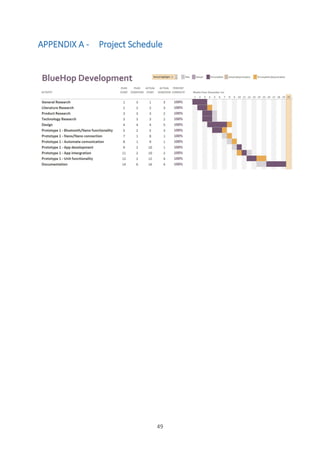
APPENDIX A - Project Schedule ........................................................................................................ 49
APPENDIX B - Likert Scale................................................................................................................. 50
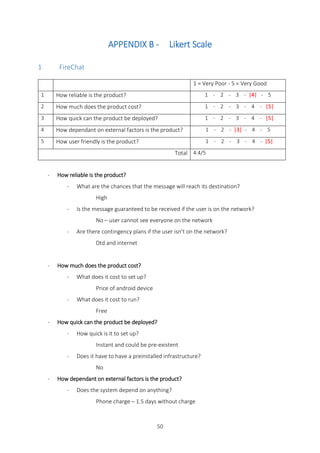
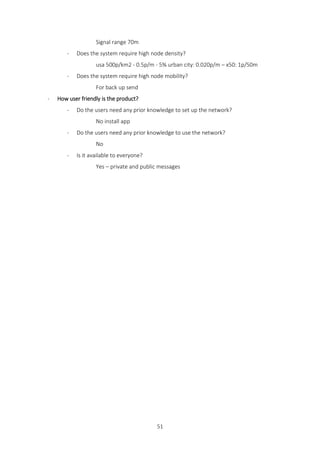
1 FireChat.......................................................................................................................................... 50
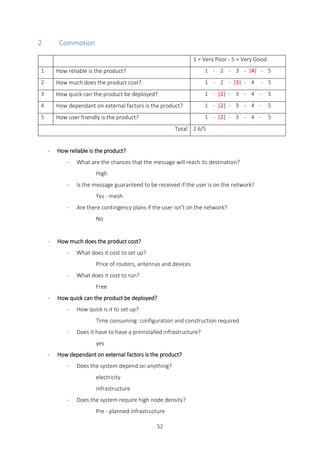
2 Commotion.................................................................................................................................... 52
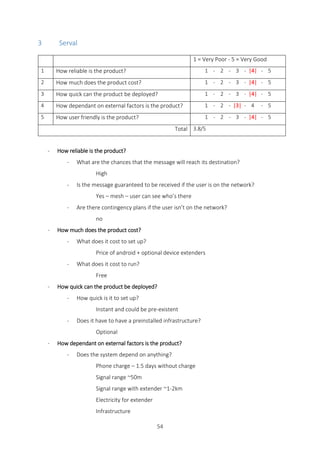
3 Serval ............................................................................................................................................. 54
4 BlueHop – Prototype 1................................................................................................................... 56
5 BlueHop – Prototype 2................................................................................................................... 58
APPENDIX C - Flow Chart diagrams .................................................................................................. 60
APPENDIX D - Arduino Methods....................................................................................................... 62
1 At toggle......................................................................................................................................... 62
2 Module Restart .............................................................................................................................. 62
3 Connection..................................................................................................................................... 63
4 Disconnection ................................................................................................................................ 63
vi
APPENDIX E - App Screen shots ....................................................................................................... 64
APPENDIX F - Testing Setup ............................................................................................................. 65
APPENDIX G - Testing Tables ............................................................................................................ 66
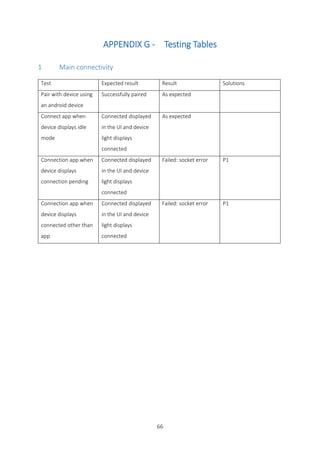
1 Main connectivity .......................................................................................................................... 66
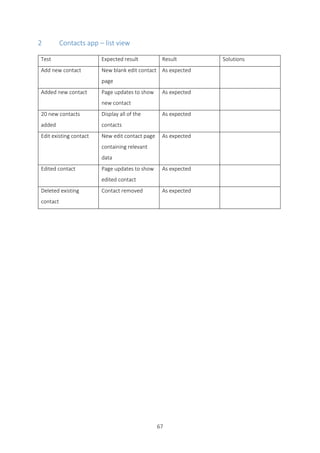
2 Contacts app – list view ................................................................................................................. 67
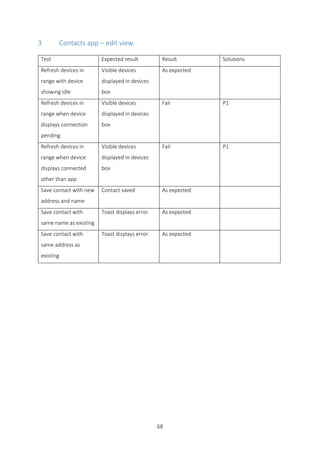
3 Contacts app – edit view................................................................................................................ 68
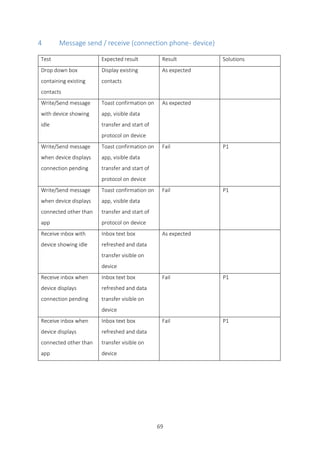
4 Message send / receive (connection phone - device).................................................................... 69
5 Message send / receive (device - device) ...................................................................................... 70
APPENDIX H - Hardware Diagrams ................................................................................................... 71
1 SD card........................................................................................................................................... 71
2 Bluetooth module.......................................................................................................................... 71
3 Circuit............................................................................................................................................. 72
4 Devices........................................................................................................................................... 72
APPENDIX I - Android Connection Manager.................................................................................... 73
1 Start connection............................................................................................................................. 73
2 Receive........................................................................................................................................... 74
3 Read Packet ................................................................................................................................... 75
4 Refresh Address............................................................................................................................. 76
5 Read in........................................................................................................................................... 77
6 Send............................................................................................................................................... 78
7 writeOutBt ..................................................................................................................................... 79
8 mDec.............................................................................................................................................. 79
1
1 INTRODUCTION
1.1 Background
Worldwide, an estimated 50 billion messages are sent from mobile phones (SMS and WhatsApp) each
day (The Economist, 2015). This is a form of communication we have come to rely on, although these
methods depend on the signal and availability of the network. What would happen to the 6.8 billion
mobile phone users if even a small area of the network failed? This could occur due to a number of
reasons including natural disasters or a concentrated amount of usage in one location. This proposal is
not aimed at revolutionising the network systems currently in use, but more as to provide an emergency
secondary communication system if the network was to become impaired.
Both natural and man-made disasters cause panic and mass chaos, often leading to a high number of
causalities and fatalities; in these circumstances, individuals can find themselves having to fight not only
for their lives, but the lives of their loved ones too. Such disasters, whether it be an earthquake which
ruptures the ground beneath your feet or a terror attack that rips apart an entire town, can tear families
apart and leave survivors in peril with little to no means of communication. Imagine a situation where
you are isolated, trapped under rubble, and possibly hurt. You have no food, no water, no medical
supplies. You’re in a secluded area, somewhere on the outskirts of town, where fewer people venture
in their day to day lives. What then? In a time of crisis, aid will more often be scattered across the most
heavily populated areas first, meaning that many days can pass before they reach quieter areas. Even if
an injured or isolated victim has a phone in their possession, if the networks are down then this leaves
them with little to no hope or chance of survival.
However, if a separate, independent network was to be available that works even when the phone lines
are down, communication is primarily restored and would allow for individuals to make contact with
others. While this system would help aid workers to communicate and possibly pinpoint affected
people, this is also a way for survivors to make contact with their family and friends, whether this be to
inform them that they’re in trouble and provide their location, or just to ease their minds and let them
know that they’re safe. The concept of BlueHop as a self-healing, ad-hoc communication system arose
for this exact purpose; to create a device which could ensure that phone users are still able to
communicate, even in times of great peril and network failures.
2
1.2 Project Aims & Objectives
The aim of this project is to explore the creation and implementation of a secondary, independent
network which would allow smartphone users to communicate with one another even in the event that
phone lines are down. Delving into research and similar systems that are currently available or in
development, this project will lead to the creation of a prototype that aims to be a reliable and stable
connection which could be put in place during times of great crisis to aid disaster relief as a form of
communication.
Please see below for some of the key objectives that have been created to work alongside this project:
Conduct and compile a thorough literature review to investigate the works of others into self-sustaining,
ad-hoc communication networks, using such research as a basis of this project.
• Conduct and compile a product review which looks at comparable products, similar to that of the
prototype concept, in order to see how they work and where they are in their developments stages.
• Conduct and compile a technical review in order to determine the different technologies to be used
for this system prototype.
• Produce design documentation in order to show the inner workings of the device.
• Create the prototype and test the implemented system.
• Evaluate the product including its strengths and weaknesses, as well as possible problems and their
required solutions.
• Create a video demonstration of the prototype at the end of the academic project to accompany this
report.
1.3 Methodology
After consideration, it has been decided that evolutionary prototyping will be the main development
approach in this project due to the fact that the exact technical requirements of the product can’t be
pre-empted. With this type of system, it is also inevitable that it will have to undergo some changes
during the development stage as different, and often unexpected, issues may arise. The evolutionary
approach enables for refinements to be made as the project progresses, and also allows for a more
iterative and systematic development process in comparison to other possible approaches.
3
1.4 Scope
The purpose of the project is to explore the development of a system that would provide an
independent, ad-hoc communication method for victims of disaster relief. By examining the
requirements of the environment and existing types of ad-hoc networks, the foundations of a working
backup communication system will be formed. One of the key elements of this project is that the
prototype will be based around, but not limited to, mobile phones. This was chosen because of the sheer
popularity and dependency of smartphones across the globe, meaning that the system would reach a
wider target audience.
Due to the short time scale of the project, it is not within the scope to fully implement the functionality,
but to approximate the requirements and design the grounding for further development. The project
will be evaluated on the amount of requirements met throughout the design and implementation; this
will include a comparison to other products that are currently available on the market.
4
2 LITERATURE REVIEW
2.1 Introduction
The purpose of this literature review is to investigate situations in which a self-sustaining ad-hoc
communication network may be used as a replacement for standard high-powered communication
systems such as cellular networks. It also explores how such systems can provide a backup
communication channel in disaster areas, or when conditions don’t allow individuals to communicate
by means of network systems that would normally be used in favourable conditions. Knowledge
acquired in this review will be carried through to the technical review and applied to the prototype.
Firstly, we will discuss the Overview of the requirements for relief communication networks, examining
the environment where the device could be deployed and evaluating the criteria such a system would
have to meet. Secondly we will look at the different communication models commonly used in areas
effected by a disaster, with the ultimate goal of ascertaining a network model compatible with the
requirements determined in the first half.
2.2 Overview of the requirements for relief communication networks
Natural and man-made disasters cause panic and potential causalities, individuals can be forced to fight
for their lives and the lives of their loved ones. Survivors can find themselves trapped without means of
reaching for help with lack of environmental supplies or means of communication. In the meantime, aid
can be scattered across affected areas with the likelihood of being inefficient in helping those who need
it most because, in many cases, large scale disasters can wipe out of disable regular means of
communication (Gunaratna et al., 2015). Lakshmi (Lakshmi Narayanan & Ibe, 2012) reminds us that in
the midst of the physical and social disorder caused by the incident, fundamental resources must be
distributed and carefully coordinated to reduce the disaster’s impact on the population. They also
explain that in order to provide effective relief provisions, two types of network are required for disaster
relief; Disaster Recovery Network (DRN) and Search and Rescue Network (SRN). While they contain the
same core features, which will be detailed later on, the networks have distinct goals. DRN aims to
provide a communication channel for victims and crew members to coordinate rescue operations and
relief support, as opposed to SRN which is more focused on tracking affected individuals in the
emergency operations (Reina et al., 2015).
5
The core features that the networks must provide are described in most of the articles featured in the
bibliography, however if they are not explicitly stated then they are illustrated in their concepts’ designs.
As mentioned previously, the following has been detailed by Lakshmi (Lakshmi Narayanan & Ibe, 2012)
and confirmed by Reina (Reina et al., 2015).
The first key feature discussed is the fact that the network must become operational quickly. As Lakshmi
(Lakshmi Narayanan & Ibe, 2012) states, “more than 50% of deaths occurred within a few hours after
the disaster event”, which means that the quicker communication is established, the more lives are
potentially saved. Once the network is operational, it is expected to be able to cope with the increasing
and decreasing amount of traffic over a long enough period of time, so as to act as a replacement for
the normal means of communication; this can range from a matter of days, months or even years. The
victims of the disaster have limited resources so for the duration of the network black out, the relief
network needs to be tariff-free and cheap to install, along with having little to no learning time on how
to use the network. Lakshmi (Lakshmi Narayanan & Ibe, 2012) also explains that interoperability is
another factor to take into consideration; in other words, the network needs to be able to connect with
different networks so as to increase the range of the temporary one. As an example, the recovery
network could be able to connect to the internet of existing phone lines.
6
2.3 Communication models
2.3.1 Overview of Ad communication models
There are six main types of ad hoc models concerning disaster networks: Mobile Ad
hoc NETworks (MANETs), Vehicular Ad hoc NETworks (VANETs), Delay Tolerant Networks (DTNs),
Wireless Sensor Networks (WSNs), Wireless Mesh Networks (WMNs),
and TETRA Reina (Reina et al., 2015), although only a select few are suitable for spontaneous, ad hoc
communication systems.
2.3.2 VANETs
Reina (Reina et al., 2015) explains that basic Vehicular Ad hoc NETworks are designed to provide two
levels of communication, single and multi-hop, the same as most communication models. Single hop
communication is an exchange of data which is limited between two nodes at any one time; in this
example, a traffic light can hold data regarding traffic flow, and exchange this information between the
individual vehicles that pass it. The data isn’t forwarded by the vehicle once it has been received,
therefore it is a single hop communication.
Alternatively, multi-hop communication is a system whereby nodes rely on routing protocols to create
a communication path to a target point using other intermediate nodes to carry the message. Multi-hop
communication allows a node, in this case a vehicle, the ability to send information such as warnings,
alarm notifications and messages, to its neighbour, a second node within range of the first device. This
second point receives the information and can then pass the message on to a third, who will send it to
a fourth, and so on.
In VANETs, this is used to communicate with two types of nodes, other vehicles and nodes commonly
attached to road structures referred to as static nodes or infrastructure nodes. This intern allows us to
distinguish between a vehicle, vehicle communication and a vehicle, infrastructure communication. This
is confirmed by Conti (Conti & Giordano, 2007), although Reina (Reina et al., 2015) continues by saying
that only vehicle to vehicle communication is suitable in a disaster situation as the event could have
disabled the road units, so vehicle, to infrastructure communication would be impaired. While Conti
(Conti & Giordano, 2007) neither confirms nor denies this, he does state that the system would require
a minimum number of vehicles equipped with the device for communication to be possible. It is also
important to note that a disaster can affect the roads in a number of ways, rendering them unusable
and unsafe, resulting in fewer cars - and therefore fewer nodes - on the network, potentially causing the
system to fail.
7
2.3.3 WSN
Both Conti (Conti & Giordano, 2007) and Reina (Reina et al., 2015) explain that Wireless Sensor Networks
(WSN) were designed to transmit data collected from various sensors to alert or warn a recipient about
a potential disaster; this does not fulfil the requirements assuring any form of human to human
communication. Both authors continue to explain that WSN’s are primarily cluster based
communications consisting of multiple isolated, miniature mesh networks; inside each of these isolated
networks, there is a designated node which works on a higher network level to share data with the other
solitary networks.
2.3.4 WMNs
Both Conti (Conti & Giordano, 2007) and Reina (Reina et al., 2015) explain that Wireless Mesh Networks,
as previously mentioned, are structured in clusters. Devices in the area are connected to a mesh router
which is connected to other mesh routers, with some are connected to the internet allowing for a path
to be created through various mesh routers. Gunaratna (Gunaratna et al., 2015) documented the
application of this and was seen to work well, although this requires mesh routers to be installed and
can add to the deployment time of the network.
2.3.5 Mobile ad hoc networks
As mentioned previously, Reina (Reina et al., 2015) states Mobile Ad hoc Networks can work as single
or multi-hop network and by using routing tables can create a path to a target node. Conti (Conti &
Giordano, 2007) continues by explaining that the standard wired protocols keeping the routing tables
up to date do not apply to this type of network due to the nodes mobility. This leads to two main
categories of routing protocol: proactive and reactive protocols. According to Liliana (Liliana & Luis,
2014) a proactive routing protocol maintains information on all the routes throughout the network by
regularly distributing information to precompute all possible paths. When a change in the network
happens, either by a node connecting or disconnecting, the update propagates through the system;
Conti (Conti & Giordano, 2007) also agrees with this. A reactive protocol, Liliana (Liliana & Luis, 2014)
continues, allows the tables to update on demand. Communication is split into two parts; first is route
discovery, which finds a suitable path, and secondly is route maintenance, which maintains the path for
breaks and repairs them when necessary. Conti (Conti & Giordano, 2007) also mentions that MANETs
are reliant on node density and without a path from sender to recipient data cannot be sent, this is one
of the major limitations of this network type.
8
2.3.6 Delay tolerant networks
Conti (Conti & Giordano, 2007) explains that Delay Tolerant Networks (DTN), also known as
opportunistic networks, avoids the discussed limitations of MANETs as the network doesn’t require a
fully completed path at any one point. This works on multi-hop communication where intermediate
nodes acts as routers forwarding messages addressed to other nodes, although as opposed to MANETs,
the DTNs store the message if the recipient can’t be reached so as to deliver the message later when a
path can be conceived. Allowing for more mobility and greater distance between nodes, this permits a
node to ‘physically carry buffered data while they move around in a networked area until they get in
contact with a suitable next hop-node’. (Conti & Giordano, 2007). Karamshuk (Karamshuk et al., 2011)
confirmed this and continued by stating that the greatest problem in this type of network is finding a
path between two disconnected nodes. To achieve this, the context of the network must be known, this
can be assessed from a wide range of data, i.e. Users, address’, the probability of meeting with friends
or the frequency of meeting a particular node.
2.3.7 Merging the two
‘To achieve the best performance in multi hop D2D (device to device) communications, each terminal
needs to choose the best routing technology for itself according to the situation and the usage methods’
(Nishiyama et al., 2014). Nishiyama elaborates by categorising two types of routing technologies,
MANETs and DTNs. Reina (Reina et al., 2015) confirms this by stating that the main problem in this sector
is to decide when a node should switch between the MANETs and DTNs. He also mentions that the
primary key to resolving this issue is by analysing the density of nodes in the area, as in high density
situations, the device should communicate within a MANET, whereas lower density should trigger a
DTN. While Nishiyama (Nishiyama et al., 2014) agrees with this, he continues by stating that this is only
one of three key elements to take into consideration. The second standard for choosing the
communication mode is the terminals movement. High mobility causes a greater chance of
encountering new nodes and less chance of keeping nodes constantly in range, therefore a DTN is more
reliable in situations of high mobility, while MANETs make a better choice for static or semi-static
devices. “The third standard for choosing a communication mode is the amount of remaining battery
power” (Nishiyama et al., 2014); the battery consumption required to manage an end to end
communication such as MANETs would be high in comparison to DTNs. This network type would expand
the overall life span of the device if transactions of data are less frequent.
9
2.4 Conclusion
General Requirements
In the “overview of the requirements for relief communication network” section, Lakshmi (Lakshmi
Narayanan & Ibe, 2012) and Reina (Reina et al., 2015) refer to the two main types of network that are
needed for disaster relief, Disaster Recovery Networks (DRN) and Search and Rescue Network (SRN),
which share the same core features: to be quick to deploy, sustainable and reliable until the regular
network is revived, tariff-free and simple to use.
Communication Requirements
In the “communication models” section different models were assessed and the best model for DRN
appears, according to Nishiyama (Nishiyama et al., 2014) and Reina (Reina et al., 2015), to be a fusion
between MANETs and DTNs as this provides flexibility in the two possible scenarios: high vs low density
of node. This system would choose between the two models by analysing node density, mobility of the
device and its battery life. In order to secure reliability of the system, interoperability is another
networking method to take into consideration. (Lakshmi & Ibe, 2012)
10
3 PRODUCT REVIEW
3.1 Introduction
There are currently systems in place that are publicly available and aim to provide a second network
which is independent from others, although most are either in a research or testing phase. The choice
of products which have been evaluated are based on their proximity to the requirements as previously
highlighted, but also depending on whether they are in a late development stage and are accessible to
the public.
A search online revealed three comparable products: FireChat, Commotion and Serval. More products
exist on a military scale but these aren’t publicly accessible and thus are hard to review.
To evaluate these products, the Likert scale will be applied resulting in a value that can be analysed
mathematically and highlight the strengths and pitfalls of the product. This scale was primarily
chosen for its simplicity, familiarity, that it is universal and easily understood (Gee, March 11 2013).
Below is a list of categories that I will assess based on the requirements explored in the literature
review, the questions refining each section will be answered on a scale of one to five, one being
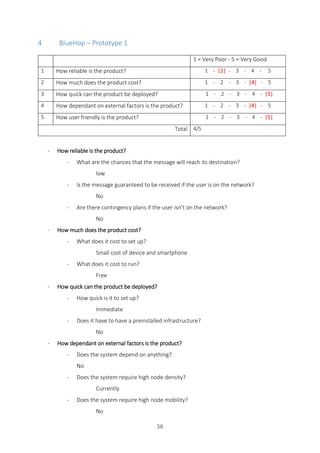
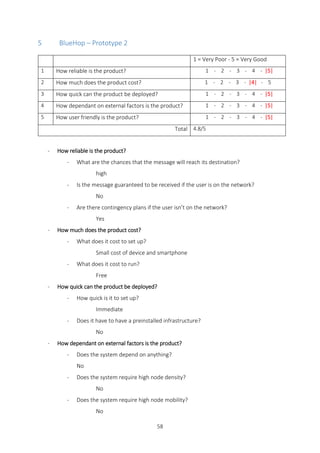
‘very poor’ and five being ‘very good’ (See individual product Likert scales in Appendix B)
- How reliable is the product?
- What are the chances that the message will reach its destination?
- Is the message guaranteed to be received if the user is on the network?
- Are there contingency plans if the user isn’t on the network?
- How much does the product cost?
- What does it cost to set up?
- What does it cost to run?
- How quick can the product be deployed?
- How quick is it to set up?
- Does it have to have a pre-installed infrastructure?
11
- How dependant on external factors is the product?
- Does the system depend on anything?
- Does the system require high node density?
- Does the system require high node mobility?
- How user friendly is the product?
- Do the users need any prior knowledge to set up the network?
- Do the users need any prior knowledge to use the network?
- Is it available to everyone?
12
3.2 FireChat
3.2.1 Overview
FireChat is a free “off-the-grid” messaging app, allowing for communication through Wi-Fi and Bluetooth
on an Android or iOS device. The app, having won the SXSW 2015 Innovation Award and Tech4Resilience
2015 Award amongst others, “has been used all over the world, from Taiwan to Hong Kong, Delhi,
Moscow, Paris and Manila.” (opengarden, n.d.). The app allows for chatroom type communication with
a specific hashtag or an encrypted message designated for a target user. FireChat seems to be mainly
used in crowds or densely populated cities, as it is a mesh ad-hoc system this relies heavily on the
amount of devices in proximity of each other, and has a 70m range (opengarden, n.d.). Other than using
MANETs, the app also communicates in a further two ways in order to combat low node density. If the
communication has an end to end path through the network, a mesh type protocol is used, otherwise
the system adopts a delay tolerant type protocol, and finally if still unsuccessful, the message is placed
online through a web enabled node to await a path to the recipient.
The app has a nice and simple theme, opening up onto recent conversations so that you can access that
chats feed or send a new private message. Swiping left moves to reveal the contacts, active chatrooms
and settings/edit profile. The clear design and familiar menu style allows the user to be guided around
the app and shortens the necessary learning curve.
3.2.2 Conclusion
Overall FireChat performs very well on the Likert scale scoring 4.4/5.
The products pitfalls were found in the reliability of its functionality and the dependency on external
factors. The fact that the user can’t see if other users are online gives the product a 4/5 for reliability.
FireChat scored 3/5 for its dependency issues as the network relies heavily on the battery life of a mobile
phone (1.5 days) and a high node density (50m/node).
The positive aspects of this product is that the cost is low, as it only requires a smart phone, it can be
deployed instantly and there is also little to no learning curve for this product. Most importantly the
device communicates over 3 different types of network: mesh, delay tolerant and the internet which
provides the product with a wider variety of paths to reach the target user.
13
3.3 Commotion
3.3.1 Overview
“Commotion is a free, open-source communication tool that uses wireless devices to create
decentralized mesh networks” (commotion, 2016). It allows for peer-to-peer type communications with
other devices on the network or through the internet if a node is connected to it; to communicate over
great distances the system uses Wi-Fi or GSM through cell towers or routers with custom firmware. This
system has been in field testing in a number of locations all over the world since 2012-2013, however
there hasn’t been much news on their progress over recent years.
3.3.2 Conclusion
Commotion did poorly in meeting the criteria for a disaster relief network with a score of only 2.6/5 in
the Likert scale.
The product had many pitfalls and scored 3 or below in everything but reliability. The cost is high for this
system to work as it requires many expensive routers and communication towers; this is also the reason
why it takes time to deploy as the different devices require configuring, meaning it isn’t simple to set up
and use. Finally, the system requires a constant supply of electricity meaning the system isn’t compatible
with areas effected by disasters.
The positive side to this product is that due to the pre-planned and mesh nature of the system, the
reliability is high in the system between interconnected devices, as each node should know the location
of the others.
14
3.4 Serval project
3.4.1 Overview
There are two parts to the system, the Serval mesh and the mesh extender.
Serval mesh is an App for rooted android phones which allows users to generate an impromptu mesh
network over Wi-Fi. The app uses the phones built in Wi-Fi to propagate data allowing for calls, messages
and GPS location to other devices on the mesh network. If a phone on this network also has GSM signal
(phone cell coverage), the app can pass other phones data through the cell network, allowing for calls
to be made to phones on a normal functioning cell network through an impaired cell network.
The mesh extender is a standalone node; this range is 10x – 100x wider than the normal range of the
Wi-Fi modules found in mobile phones (project, 2013).
3.4.2 Conclusion
Serval met the requirements quite well, scoring 3.8/5 in the Likert scale.
The general draw back of the system would be that, in order for the network to span over a few
kilometres, the system requires a signal extender; without this the system cannot operate unless there
is an end to end path present in the network. There is no alternative way of sending data which is a huge
problem as the signal extenders require electricity and aren’t battery operated.
The positive aspect of this is in fact the very same mesh extenders as they enable the network to operate
on a very low node density (1-2Km/signal extender).
15
3.5 Key issues to use in the design and implementation
The interesting functionality came from FireChat and the Serval project, scoring 4.1/5 on average
between them on the Likert scale. FireChat seems to merge different network protocols, as discussed
in the literature review, allowing for multiple possible paths to be created to combat the short range of
the phones Wi-Fi/Bluetooth signal, while providing a simple, cheap and scalable system. Unfortunately,
this system still requires a high node density and relies on a phones battery. On the other hand, Serval
project uses mesh extenders to fight the high density requirement but falls short in providing a version
with an adequate battery lifespan and the capability of creating multiple potential paths on different
networks amongst others.
Combining both ideas in one system could resolve most of the pitfalls found in both products, although
the lifespan of the product, without relying on the mains electricity, is still an issue.
16
4 TECHNICAL REVIEW
4.1 System Overview
In this section we will be determining the different technologies to be used for this system based on
elements discovered in the previous reviews.
As discussed, a merger between FireChat and the Serval project seems to meet most of the
requirements found in the literature review. The other requirement not covered by these systems is the
life span of the node operating in the network without external power. Both outlined systems use a
smart phone as a communication node and a user interface; this not only draws a huge amount of power
from the phone but also shortens the lifespan of the node operating in the network. Separating a power
hungry UI and the vital network node into two independently powered devices would be a beneficial
decision.
The network device requires a long-life power supply, a computation platform, a data storage facility
and a technology to send/receive data to/from other nodes and a UI. The UI should be contained in an
app on a smart phone as this reduces the cost of another device and has adequate computational
power.
17
4.2 Technologies
The hardware was primarily chosen on the basis of their power consumption, as the battery needs to
function for as long as possible on a single charge.
4.2.1 Processing technology
Three microcontroller types were considered for this device: The Pi Zero, the Arduino Nano and the
Atmel ATmega328. All three have adequate processing power and are a compact size, so the deciding
factor comes down to the power consumption. The Pi Zero on its own consumes around 30 mA
(Geerling, November 27, 2015) whereas the Arduino Nano consumes around 17mA if the LEDs are
removed (Baoshi, 2012). The Atmel ATmega328 can consume far less power than the other two at
6.7mA (Schwartz, August 7, 2013) but this requires constructing a custom microcontroller base and
programming a sleep mode into the device (Arne & Asmund, 2006); this would ultimately make it the
better option. However, the Arduino Nano was chosen as, during the prototype phase, it is important
that power consumption is taken into account. While this is the case, the language used on the Arduino
Nano can be similar to the Atmel ATmega328 and so it would be relatively straightforward to migrate
the code when required after the prototyping phase.
4.2.2 Communication technology
Bluetooth was chosen as the wireless technology for this project as, following research into different
communication modules, it became apparent that there are some drastic differences; whilst constantly
streaming, Bluetooth can use 45mA (Anon., March 2010), in comparison to Wi-Fi which used 100+mA
(fab-lab.eu, 2015). It should be noted that while Bluetooth and Wi-Fi require this amount of current
while constantly streaming, if programmed correctly, these modules could be used more economically
and power consumption could be almost halved.
4.2.3 Storage technology
To aid security and stability of a device such as this it is important to have non-volatile storage to ensure
that preferences and data aren’t lost, even in the absence of power. The Arduino Nano uses SRAM -
volatile storage - and EEPROM, which is only used to store code but not run-time data. To solve this
issue, an SD Card and Reader is required to save data; as an added benefit, this also aides the limiting
2KB of SRAM included in the Arduino Nano. A Sandisk 8GB was chosen as these were the smallest card
available at the time of purchase, although a smaller card would be more than adequate. If each
message takes up 5KB on the card, 200,000 messages could be stored per GB. It is important to note
that the Reader will consume about 25mA of current of constant use (skiwall, 2013), so coding a power
save mode could possibly halve this amount.
18
4.2.4 Battery
In order for the device to be autonomous, a battery is required to supply the various modules with
sufficient power. The total current required ranges from 52mA to a maximum of 87mA, so a 5600mAh
rechargeable Li-Ion battery was chosen for this project; this means that the device should last 4.5 days,
with an ultimate minimum of 2.5 days. While this battery life is adequate for the prototype phase, more
steps would need to be taken to increase its lifespan in the long term such as perfecting the sleep
function of the modules, migrating to the Atmel ATmega328, and increasing the mAh of the battery.
Pi Zero Arduino Nano Atmel
ATmega328
Bluetooth Wifi SD Card Reader Total of chosen
30mA 17mA 6.7mA 20-45mA 50-100+mA 15-25mA 52-87mA
4.2.5 Smartphone UI
Finally, Android was chosen over iOS as the mobile platform to interact with the device. This decision is
based on Android being present on a wider range of devices, with the company holding an 82.8% (IDC
Research, Inc., 2015) share of the current market; this exceptionally high percentage ensures a larger
target audience and the device having a greater success rate in affected disaster areas.
19
5 REQUIREMENTS ANALYSIS
5.1 Introduction
In this section we aim to define the requirements for the system using the previous reviews.
The prioritisation has been inspired by the MoSCoW method (Coley Consulting, 2015 ), based in order
of importance the items were sorted into functional and non-functional elements in their respective
categories as outlined below.
Elements listed in the functional requirements refers to a range from the ‘Must’ to the ‘Should’ of
MoSCoW, whereas the items in the non-functional list can be associated from the ‘Could’ to the ‘Would’.
5.2 System requirements
5.2.1 Functional
- Send data
The system must be able to send data via Bluetooth to a recipient device through the network
of nodes or directly to the UI.
- Receive data
The system must able to receive data via Bluetooth from other nodes and the UI for it then to
be analysed.
- Forward data
The system must be able to forward data until a destination node is found, with a finite end to
the messages propagation. If the device is paired with a UI, the user must be oblivious to this
functionality.
- Different protocols
The system should be able operate on different protocols to send the data: Mesh, delay tolerant
and internet network. This is to increase the chances of reception.
- Scalable
The network should be dynamic and readjust the paths directories to accommodate nodes
appearing and disappearing.
20
5.2.2 Non-Functional
- Routing protocols
The system could know how to reach a specific node which could reduce the networks load and
give the message a better chance of being received.
- Assigning protocol
The device could automatically assign a protocol to send the message on; this could depend on
elements such as reception failure, static or non-static nodes, and other environmental
elements.
- Encrypted messages/private
Another feature could be encrypting the messages to ensure they are read by the desired
recipient. As the messages propagate from device to device, anyone could potentially read its
content which is especially an issue if the content contains any private information.
5.3 Network device requirements
5.3.1 Functional
- Autonomous
The device should be able to work whether a phone is paired or not. It needs to be able to
forward messages from one device to another, and automatically adjust its sending parameters
in order to do this more efficiently.
- Low power consumption
The device must operate on low a minimum amount of power so as to prolong its battery life
as, in a natural disaster area, access to a power source could be as scarce as the signal itself. In
order to uphold a reliable network for the duration of the disturbance, the battery should aim
to last as long as possible.
5.3.2 Non-Functional
- Adaptable Design
The physical design could accommodate certain features in order to fit different situations and
better adapt to the users’ needs or the environments restrictions.
21
5.4 UI app requirements
5.4.1 Functional
- UI Display
The app needs to be paired with a network device as this will act as the user’s interface to the
network. Any user’s preferences and settings for the device will be set via the app.
- Use battery economically
The app must also draw as little power from its own battery as possible.
- Simple to use
There must be a little to no learning time on how to use the device. This system would need to
be put in place spontaneously as to be used as soon as the normal network goes down.
5.4.2 Non-Functional
- Device discovery
The app could return local devices in range to facilitate adding contacts instead of the user
entering them manually.
- Send current GPS location on one click
An added feature would be to send your location to a contact. One of the main reasons of
communication in the midst of a natural disaster or communication block out would be to find
friends and family.
22
6 DESIGN OF BLUEHOP
6.1 Introduction
In this section we will discuss how the final product works and how a more elaborate and extensive
version would operate. The system has been named BlueHop as the device primarily communicates
through Bluetooth, and the data propagates through the system by “hopping” from device to device to
reach its intended destination. As previously discussed, BlueHop is split into two primary devices: The
BlueHop app on an android phone and the BlueHop device with an Arduino Nano as a base.
Evolutionary prototyping was used in the creation of BlueHop which is important to note as two
prototypes were conceived for the BlueHop, one obtainable goal and a stretch target. The basic version,
Prototype 1, was realised and is the current system, whereas Prototype 2 is a design for a more complete
system.
6.2 Prototype 1
6.2.1 Overview
Basic functionality is to be achieved in this prototype, the requirements to be completed by this system
are detailed below:
5.2.1 System requirements
- Send data
- Receive data
- Forward data
5.3.1 Device requirements
- Autonomous
5.4.1 UI Requirements
- UI Display
- Simple to use
- Use battery economically
- Device discovery
23
There are three key elements to the system and its intended design - communication, hardware, and
software - however it is necessary to under the system as a whole before detailing these.
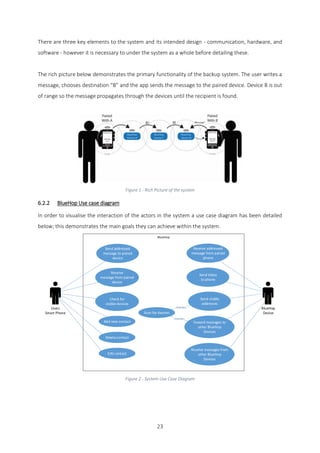
The rich picture below demonstrates the primary functionality of the backup system. The user writes a
message, chooses destination “B” and the app sends the message to the paired device. Device B is out
of range so the message propagates through the devices until the recipient is found.
Figure 1 - Rich Picture of the system
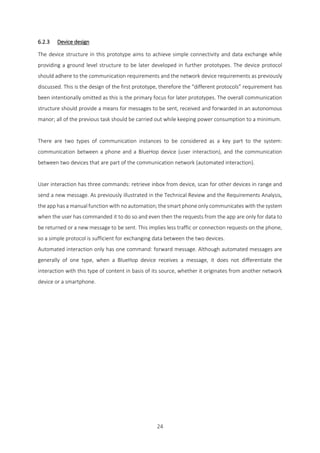
6.2.2 BlueHop Use case diagram
In order to visualise the interaction of the actors in the system a use case diagram has been detailed
below; this demonstrates the main goals they can achieve within the system.
Users
Smart Phone
Send addressed
message to paired
device
Receive
message from paired
device
Check for
visible devices
Receive addressed
message from paired
phone
Send inbox
to phone
Send visible
addresses
Foward messages to
other BlueHop
Devices
Receive messages from
other BlueHop
Devices
BlueHop
Device
Add new contact
Delete contact
Edit contact
Scan for devices
<Extends>
<Extends>
Figure 2 - System Use Case Diagram
24
6.2.3 Device design
The device structure in this prototype aims to achieve simple connectivity and data exchange while
providing a ground level structure to be later developed in further prototypes. The device protocol
should adhere to the communication requirements and the network device requirements as previously
discussed. This is the design of the first prototype, therefore the “different protocols” requirement has
been intentionally omitted as this is the primary focus for later prototypes. The overall communication
structure should provide a means for messages to be sent, received and forwarded in an autonomous
manor; all of the previous task should be carried out while keeping power consumption to a minimum.
There are two types of communication instances to be considered as a key part to the system:
communication between a phone and a BlueHop device (user interaction), and the communication
between two devices that are part of the communication network (automated interaction).
User interaction has three commands: retrieve inbox from device, scan for other devices in range and
send a new message. As previously illustrated in the Technical Review and the Requirements Analysis,
the app has a manual function with no automation; the smart phone only communicates with the system
when the user has commanded it to do so and even then the requests from the app are only for data to
be returned or a new message to be sent. This implies less traffic or connection requests on the phone,
so a simple protocol is sufficient for exchanging data between the two devices.
Automated interaction only has one command: forward message. Although automated messages are
generally of one type, when a BlueHop device receives a message, it does not differentiate the
interaction with this type of content in basis of its source, whether it originates from another network
device or a smartphone.
25
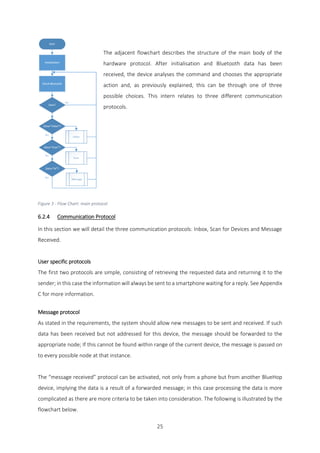
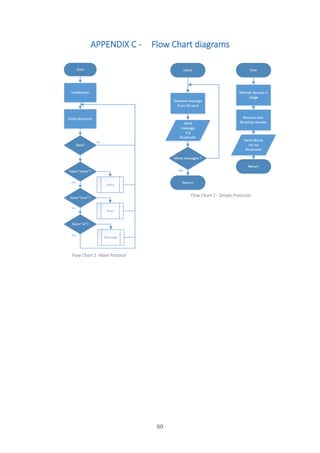
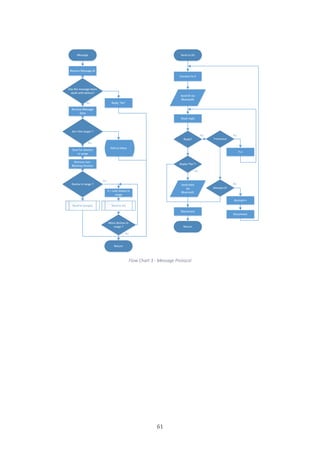
The adjacent flowchart describes the structure of the main body of the
hardware protocol. After initialisation and Bluetooth data has been
received, the device analyses the command and chooses the appropriate
action and, as previously explained, this can be through one of three
possible choices. This intern relates to three different communication
protocols.
Figure 3 - Flow Chart: main protocol
6.2.4 Communication Protocol
In this section we will detail the three communication protocols: Inbox, Scan for Devices and Message
Received.
User specific protocols
The first two protocols are simple, consisting of retrieving the requested data and returning it to the
sender; in this case the information will always be sent to a smartphone waiting for a reply. See Appendix
C for more information.
Message protocol
As stated in the requirements, the system should allow new messages to be sent and received. If such
data has been received but not addressed for this device, the message should be forwarded to the
appropriate node; If this cannot be found within range of the current device, the message is passed on
to every possible node at that instance.
The “message received” protocol can be activated, not only from a phone but from another BlueHop
device, implying the data is a result of a forwarded message; in this case processing the data is more
complicated as there are more criteria to be taken into consideration. The following is illustrated by the
flowchart below.
26
- The ID of a message is the first item to be received which
is then compared to a record of previous messages the device
has already dealt with. In the case where the ID matches an
entry in the list, the message shouldn’t be forwarded by this
device as it has already done so; the device declines the rest of
the message to be sent and the communication ends. In the
case where the ID doesn’t match an item in the list, the rest of
the message is accepted.
The ID and message could be sent in one block of information
to reduce the complexity of the communication protocol; it
would then check to see if it had already dealt with the
message, and discards if so. While this simplifies
communication, transferring the message is a time consuming
task which is why a decision was made to only send the ID first
so that the device could accept or decline the heavy payload.
- Once the message is fully received, the device compares
the address with its own in order to determine if it is the
designated recipient; if this is the case the message is moved to
the inbox where it waits for the user to request it, otherwise it
is placed in the outbox for it to be forwarded.
- If the message is moved to the outbox, the device starts the forwarding procedure. First it scans
to determine the list of contacts in range and checks to see if the target address for the message
is present; if so the device starts the send procedure aimed at the target, otherwise the device
sends the message to all available nodes.
- As previously described, the send procedure starts by sending the message ID which will be
declined or accepted. If it is declined the communication ends there, otherwise the full data is
transferred.
Figure 4 - Flow Chart: Message Protocol
27
1.1.4. Bluetooth design
Two types of data are sent to and from the Bluetooth module: data concerning another device and data
about the module itself. The module defaults to its normal mode, allowing for devices to connect to it
and to exchange data; if the device is placed into AT mode, communication refers to the modules
settings, parameters, and functions. This switch needs to happen in a timely manner so as not to affect
the flow of the program.
XML type notation is used to define different elements in the communication string such as message ID,
target device, message content, etc. The aforementioned notation allows for the data contained to be
easily sorted and analysed. This also applies to the structure in which a message is sent, so as not to
overload the SRAM of the Nano and to ensure time for all of the data to be received. Messages are sent
in blocks, marking the start and end of a block with a message tag and marking the start and end of the
entire data set with another data tag.
For example, <Data><Message>This is the data t</Message><Message>o be sent</Message></Data>
6.2.5 SD card design
As previously discussed in the technical review, the Arduino Nano has a limited amount of SRAM and
therefore, to minimise the amount stored, all possible variables are saved to the SD card.
The biggest form of variable in this prototype are the messages themselves, so in order to save SRAM,
the messages are stored on the SD card in two separate folders: an inbox and an outbox. As discussed
in the protocol design, once a full message has been received the Nano analyses the address to
determine what to do with the data. This can fall into two categories in terms of data processing, the
outbox, for messages that are to be forwarded to another BlueHop device and the inbox, for messages
that have been specifically sent to this device. The file is named after its ID and placed into one of these
two folders. The Inbox is only emptied once all of the data has been sent to the app whereas the outbox
remains constant, providing a list of previously dealt with messages.
Other variables such as visible device address’ or the own device address are stored in a text file in the
root directory of the SD card.
28
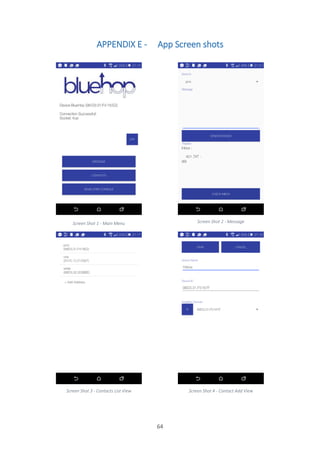
6.2.6 App design
The design of the app should abide by the System Requirements and the UI Requirements. The user
should be able to send and receive messages from different users through the BlueHop device while
also being simple to use and having a low power consumption. Three key elements need to be defined
in the functionality of the app: Contacts, messages and device information.
Figure 5 - Wireframe: Main Screen
Device information needs to be displayed so as to identify the users own address and the connectivity
status of the device. This page also consists of the menu for the other pages of the app, as seen above.
Figure 6 - Wireframe: Contact Screens
The contacts feature must allow the user to add, remove and edit contacts simply and efficiently for
them to later be used in the app. The essential data each contact should contain only needs to consist
of their Bluetooth address and an identifier, ie, the contacts name given by the user. This page has an
intuitive list (as seen above left), revealing the contacts information and the option to add a new contact.
Upon clicking one of the items containing data, the user is taken to a second screen list (as seen above
right) where they can modify or delete the data in that item; if the user pressed new contact the same
screen with empty fields would appear. As a non-functional requirement, the app can also request the
address’ of currently visible BlueHop devices in range, this assures less errors caused by the wrong input
from users.
29
Figure 7 - Wireframe: Messages Screen
In order to make this feature user friendly, the functionality echoes that of the send and receive
functions found in email applications that most users are familiar with. Sending allows the user to type
and send messages to other users which is achieved by passing the text and the recipients address to
the BlueHop device for it then to analyse and distribute. The receiving feature consists of retrieving the
inbox from the device and displaying it to the user. This is contained in one page (see above) - a split
screen - the top half for sending and the bottom half for receiving. The top half consists of a contact list
drop down box, a text field to write messages, and a send button. The bottom half contains an un-
editable text field and a retrieve inbox button which, once the BlueHop device replies, will populate the
bottom text field.
30
6.3 Prototype 2
Prototype 2 is a working concept which will be fully implemented upon the completion of Prototype 1.
The aim of this version will be to fulfil the rest of the requirements detailed previously.
6.3.1 Overview
In this section a merger between DTN, MANET and the interoperability of the internet, as detailed in the
literature review, will be the main focus of prototype 2.
6.3.2 Communication design
Once the basic mesh, ad-hoc network in the first prototype is fulfilled, routing tables can be added; this
is done to map out the connecting nodes in order to economically direct traffic to the target device. In
this system, messages contain the history of all nodes that they have been sent to and subsequently
forwarded from, thus creating a known path through the system. The routing tables are therefore
generated by gathering information from this list of past addresses. Upon receiving a message, the
device adds its own address to the list then forwards it. The routing tables consist of listing how many
hops the target node is away from the current node, and which point to start from. As there can be
multiple first steps to reach a target node, a number is associated to each in order to illustrate reliability;
this is generated by the frequency of a successfully transmitted message.
The routing table is copied so as there is two tables at any one point: one displaying the current status
of the network and another, a network prediction (detailed in the following). Every hour an average of
the routing table is calculated per entry with all of the other entries for that target node, all of these
values are saved daily; so 24 values of the hourly average for each target is saved, with each of these
individual values being averaged daily. The end result is a rough prediction of which devices that
particular node encounters on a regular basis; this can give the DTN a better chance of being more
beneficial as the device would know if it is worth saving the message or not.
Depending on the values of the routing table, or if the message has no visible recipient on the network,
the device would choose a DTN over a MESH type network; this would allow the message to be saved
to be delivered at a later stage when the target node is finally available to receive the data. If a threshold
of both previous network types fail, then this turns into a golden message intended for the web server;
the message would then infiltrate the network at a higher priority to reach a device which has access to
the web. These devices would be connected to a phone which has access to the web, and the message
would flow through the mobile. Once the message is on the server, it will reside there until a connected
31
device can locate the target node; this device then downloads the data and forwards it to the designated
recipient.
6.3.3 Software design
The design of the app should echo a more familiar messaging system, such as WhatsApp. The send and
receive previously discussed should be contained in a chat thread for that contact.
6.3.4 Aesthetic
The final product should be self-contained in a sealed unit with limited buttons and lights. The unit could
be a part of a modular design, meaning that the BlueHop device would remain a core part of the design
with interchangeable accessories. Some of these accessory concepts have been listed below:
 Phone case to ease portability
 Wall mounted cases to ensure more static nodes
 Solar panel cases to prolong battery life
 Ethernet adaptor to ensure web connection
 A UI touch screen to allow non-smartphone users to access the network
The concepts discussed would also have the capacity to be secured on a moving object, such as a helium
balloon, in order to increase range and reliability of the network.
32
7 DEVELOPMENT OF BLUEHOP
7.1 Introduction
In this part we will discuss how the issues were conceived and resolved during the development of first
prototype of BlueHop. As previously discussed an evolutionary creation and iterative testing was used
in this project.
Six key stages were defined in the development of the system, some taking much longer than others
but each a milestone never the less. As the product mainly revolves around the BlueHop device, this
was shown to be the driving element in the order of development. The element would be subject to
testing at each stage, it was fundamental to have a solid base or understanding of the code and
hardware before moving onto the next step in order to build a functional product. It is important to note
that periodic testing occurred throughout the projects development with a strict focus on how the
system met the criteria specified in each section; this unearthed many of the errors mentioned in the
following. As an added challenge the Arduino studio has no native debugging tool, therefore all
debugging on the Nano was achieved through variable print outs in the studios terminal.
7.2 Bluetooth and Nano functionality
The first task was to assemble the Nano and the Bluetooth module together. The aim of this step was
to create a system to manually manipulate the Bluetooth module and understand the different modes
and settings it operated with. This was by far the longest stage of the implementation as understanding
how the module functions was one of the greater challenges in the development of this product.
The first problem was in creating a function to restart the module from the Arduino instead of manually
stopping the power temporarily. Turning the unit on and off is required to put the module into ATmode;
as previously described in the Bluetooth design section, this feature allows the Arduino to talk to the
module instead of through it, permitting settings and preferences to be exchanged. Many solutions were
implemented in an attempt to restart the module: outputting 5v through the analogue ports of the Nano
to the Vcc of the module, shorting the circuit, and buying transistors. After many attempts and more
research, the module was found to turn off when 0V was applied its EN Pin.
33
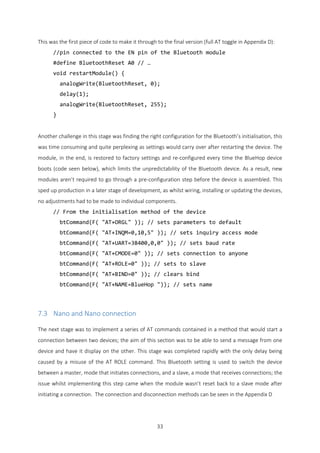
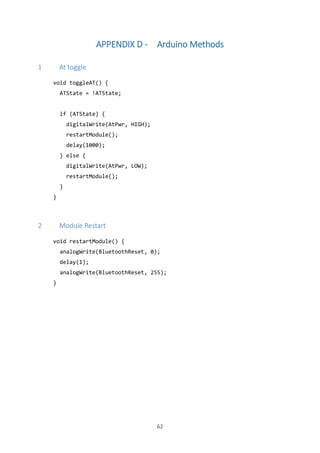
This was the first piece of code to make it through to the final version (full AT toggle in Appendix D):
//pin connected to the EN pin of the Bluetooth module
#define BluetoothReset A0 // …
void restartModule() {
analogWrite(BluetoothReset, 0);
delay(1);
analogWrite(BluetoothReset, 255);
}
Another challenge in this stage was finding the right configuration for the Bluetooth’s initialisation, this
was time consuming and quite perplexing as settings would carry over after restarting the device. The
module, in the end, is restored to factory settings and re-configured every time the BlueHop device
boots (code seen below), which limits the unpredictability of the Bluetooth device. As a result, new
modules aren’t required to go through a pre-configuration step before the device is assembled. This
sped up production in a later stage of development, as whilst wiring, installing or updating the devices,
no adjustments had to be made to individual components.
// From the initialisation method of the device
btCommand(F( "AT+ORGL" )); // sets parameters to default
btCommand(F( "AT+INQM=0,10,5" )); // sets inquiry access mode
btCommand(F( "AT+UART=38400,0,0" )); // sets baud rate
btCommand(F( "AT+CMODE=0" )); // sets connection to anyone
btCommand(F( "AT+ROLE=0" )); // sets to slave
btCommand(F( "AT+BIND=0" )); // clears bind
btCommand(F( "AT+NAME=BlueHop ")); // sets name
7.3 Nano and Nano connection
The next stage was to implement a series of AT commands contained in a method that would start a
connection between two devices; the aim of this section was to be able to send a message from one
device and have it display on the other. This stage was completed rapidly with the only delay being
caused by a misuse of the AT ROLE command. This Bluetooth setting is used to switch the device
between a master, mode that initiates connections, and a slave, a mode that receives connections; the
issue whilst implementing this step came when the module wasn’t reset back to a slave mode after
initiating a connection. The connection and disconnection methods can be seen in the Appendix D
34
7.4 Automate communication
This stage was to build upon the previous step and, instead of a message being sent manually between
the devices, they would “bounce” a hard coded message back and forth to each other, automatically
starting and stopping their own connections. The main goal for this step was to create a method that
would convert text into command. This was accomplished without issue; the only set back in the
implementation was adjusting the time outs so that the device had enough time to send the message,
but an error or the next step would trigger if something was taking too long.
7.5 Create an app
The aim of this stage was to create the apps UI as previously designed in order to implement basic
functionality. A Logo and name were designed and a simple colour scheme was applied. This was
achieved by following several tutorials online and, once the UI builder was understood, was straight
forward in its implementation. (Final app screenshots in Appendix E).
7.6 Integrate mobile commands
The aim of this stage of development is to connect the phone with the device; networking classes were
implemented with the aid of online research. A few issues arose in this section, the first consisted of the
phone sending data too quickly for the device to register it as the processors are much faster than those
found in the Nano. An attempt was made to speed up the BlueHop device but due to hardware time
outs this was found not to be possible; the only other solution was to slow down the android device
with delays (see Appendix I 6 for send method).
One problem that was found, and is still currently unresolved (problem detailed in section 9.2 P1), is
that in certain cases the phone cannot connect to the device; a temporary fix was implemented
consisting of a button on the menu screen that forces the disconnection and reconnection. While this
not an ideal fix, the issue doesn’t occur often enough to stop development, so it has been left to be
resolved in later versions.
35
7.7 Basic connection protocol
Finally, the aim of this section was to implement the devices protocol as designed. This was another
major challenge in the development as the previous development stages had to be merged and function
as a whole. Many problems arose during this stage.
The first problem whist merging the different stages was that the Nano soon ran out of SRAM quicker
than expected. The SRAM was at 70% in the compiler meaning only 30% was free for local variables, this
originally caused confusion as methods that would work fine returned strange values or nothing at all.
An SD card reader was always part of the design to ease the strain on the SRAM although it was
underestimated how important it was.
Another issue that arose during the SD cards implementation was that the SD library consumes 24% of
the SRAM which caused serious problems in running the code. To fix this, a smaller library was initially
researched although this option was abandoned because, while smaller libraries do exist, they aren’t
written in the language used in the Nano meaning that a custom wrapper would also be required. Not
only was that a time consuming process but the added code might have made the smaller library and
wrapper bigger than the default library; this sparked research into slimming the full codes usage of the
SRAM. It was discovered that all of the hardcoded Strings used in the program were being duplicated
from the EEPROM (where the code is stored on the Nano) to the SRAM, this was a common problem. A
macro built into the Arduino studio tells the compiler to leave the Strings in the EEPROM instead of
copying them across; this method is called parking variables and is simply achieved by placing F()
around hardcoded Strings as demonstrated below. This almost halved the SRAM used in the original
code before the SD card was implemented.
reply.replace( F("<con>") , F("") );
This method technically solved the problem that the SD card reader was supposed to resolve, although
its integration still proved to be important. Before the reader was able to be fully implemented, another
SD card related problem occurred. This was caused by the limited amount of SPI pins on the Nano -
these pins handle the serial information entering the device as opposed to a single Boolean or analogue
signal. Both the Bluetooth module and the SD card reader used port 11 as this was a serial port but also
the MOSI that the SD card reader needed. After research into what each element required, it was
discovered that the chip select pin of the SD card only required a Boolean input set to 1, this allowed
the software serial - used for the Bluetooth module - to be moved to D9 D10 which ultimately freed the
port 11 to be used for the MOSI of the SD card.
36
In later testing, large messages would crash the device as global and local variables were used to handle
its entirety as per design. Moving all global variables to the SD card proved to create a more stable
system. This allowed messages of any size to be transmitted and placed in a temporary text file,
constructed block by block as the data comes in.
tmp+=readString;
tmp.replace("<M>","");
tmp.replace("</M>","");
writeSd("","IncMess","<"+(String)i+">"+tmp);
This also allowed for an indexed system inside the text file, transforming its functionality from just a file
holding simple string data to a numbered array type system. This proved useful as once the message
was divided up into packets by the smartphone, the message would only need to be retransmitted in
the same fashion it was received.
37
8 LEGAL, SOCIAL, ETHICAL AND PROFESSIONAL ISSUES
8.1 Introduction
This section discusses the concerns and considerations regarding the production process of this project
if it were to be placed on the market.
8.2 External obstacles
This product has a few external obstacles to take into consideration depending on the release of the
specification for the system. If the system doesn’t incorporate message encryption, data would be
transferred wirelessly and could be subject to interception, allowing for an unauthorised third party to
read the message. While this could be useful information to accurately deliver aid if the data was
monitored externally, this could also be in breach of the data protection act and, without due diligence,
the app could assist in a big brother government. This conflict could be amplified if a users’ location is
set through the system as per non-functional requirement (5.2.4). This could be used both to map a
victim’s whereabouts in order to distribute aid, but also to help control the masses as a potential big
brother government would know not only who said what but their exact location too.
To overcome this obstacle, the responsibility could be placed in the hands of the user by having them
include a disclaimer, therefore the user is aware of the possibility that their data can be potentially
monitored. Another option would be to encrypt the messages, simply by implementing a well-known
cryptographic system of public and private keys before the data leaves the phone; this would solve the
previously discussed problem as even if the information is intercepted, it could not be read without
being decoded. However, this poses another problem if this technology was applied in malicious areas
such as terrorism as these organisations would be able to communicate without any trace on public
networks. As a current example, if this technology was available in Syria, the refugees could use the
system to regroup and plan their escape without relying on a potentially compromised GSM network.
On the other hand, if a militant group such as Islamic State gained access to the technology, they could
potentially use it to coordinate counter attacks on their own soil or help organise terror attacks.
38
8.3 Internal obstacles
If BlueHop was to be considered for commercial development, the cost of the device would have to be
minimised. For the prototype stage, the build cost was under £7 per device, however this would need
to be reduced in order to make the product viable to be applied as a form of disaster relief. This would
be easily achieved by mass producing the hardware thus drastically reducing the cost.
As previously explained, this system works not only with an in-phone app, but also with a small Bluetooth
enabled device. Because of this addition, it is not realistic to imagine that every single individual will be
in possession of the necessary device if a disaster was to strike, therefore distribution is a key focal point.
The target clients for this product would primarily be disaster relief charities who could distribute the
device to the public in the wake of a catastrophe; these groups would be able to access affected areas
and could deliver the devices along with other forms of aid. These devices would therefore be
distributed to the victims and installed in tactical locations across the area. Equally this could be used as
a pre-emptive measure by selling and installing devices in high risk areas that are prone to these kinds
of disasters; a planned system would help to create a more reliable and stable network in such an event.
39
9 EVALUATION
9.1 Introduction
In this section the final product, BlueHop Prototype 1, will be evaluated in multiple ways. Firstly, the
product was tested in order to assess the bugs in the system; the requirements were then compared to
those originally outlined, and finally followed by the Likert scale being applied to compare the system
with the others previously reviewed.
Prototype 2 will not be included in this section as the system has currently not been implemented. If
this prototype was ready to be evaluated, this would consist of the same steps as detailed below,
although they would be adjusted to accommodate harsher conditions and a wider range of testing
scenarios. Finally, the evaluation would conclude with field testing of the product and users’ opinion of
the system. A Likert scale of this prototype can be found in the Appendix B.
9.2 Testing
Testing the system partially proved to be difficult as, without using the UI alongside the device, it is hard
to observe the results. Testing consisted of placing five devices in a static position with a varying amount
of ranges (as shown the Appendix F and demonstrated in video: https://vimeo.com/163258470). It is
important to note that the only feedback available from the device is the Bluetooth connectivity state;
if the Bluetooth LED flashes once every second, the module is in idle mode, if the LED flashes for a
second once every 2 seconds, the device is in AT mode or trying to connect to another device, and if the
light flashes twice in quick succession every 2 seconds then the device is paired with another.
Five testing plans were devised in order to evaluate the system, the overall plan was structured around
the three main functions of the UI: device data and connection, save contact, and sending and receiving
messages. Testing was an overall success although two main problems were highlighted. (see Appendix
G for the full testing tables).
P1: The phone fails to connect with the device when it is occupied at that moment in time; it can be
occupied by attempting to connect, or is already connected to another device. This operation is normal
as the device cannot do multiple things at once, meaning that the phone shouldn’t be able to send a
message at that specific time but will instead wait until the device is free.
40
The problem occurring here is caused by a socket error on the phone. In order to start the connection,
the Bluetooth socket is opened but, as there is an error connecting because the device is busy, the
socket isn’t closed and the connection times out. Two elements must be fixed in order to solve this issue;
the socket needs to close if an error occurs for it to later be reopened, and the connection needs to be
reattempted after a short delay.
P2: The issue as highlighted in P2.1 and P2.2 refer to the same cause. In P2.1, the message received isn’t
identical to the original message sent, although the disfiguration appears differently on each occasion.
In P2.2, the message gets lost in transit and doesn’t reach its destination at all. As previously stated,
these issues stem from the same cause which is due to multiple devices trying to send data to the same
node at the same time; the data is inserted into the same String and not differentiated by source. This
is primarily due to a miscomprehension of the AT command used to initialise the connection mode of
the Bluetooth module; AT+CMODE=0 allows any device to connect but also allows any number of
devices to connect at the same time.
This issue could be fixed in multiple ways. One example would be to change the initialisation command
to AT+CMODE=1 which only permits paired devices to connect, although this would possibly slow down
the data transfer process, having to first pair then un-pair. Another option could be changing other
initialisation parameters such as the inquiry mode in an attempt to force single connection to the device.
Finally, the last option would be that a different connection ID is attached to each packet sent across,
defining the origin of each message and enabling data from different sources to be processed
separately.
41
9.3 Evaluation of requirements
See Requirements Analysis for more details.
Requirements met Requirements not met
5.2.1 System requirements
- Send data
- Receive data
- Forward data
5.2.1 System requirements
- Different protocols
- Scalable
- Routing protocols
- Assigning protocol
- Encrypted messages/private
5.3.1 Device requirements
- Autonomous
5.3.1 Device requirements
- Low power consumption
- Adaptable Design
5.4.1 UI Requirements
- UI Display
- Simple to use
- Use battery economically
- Device discovery
5.4.1 UI Requirements
- Send current GPS location on one click
The requirements met in this prototype provide basic functionality and a simple mesh network; data
can be sent, received and forwarded autonomously. A custom app interacts with the device, operating
as a user friendly interface, allowing for device discovery and communication over the network, all while
keeping Bluetooth connection to a minimum to save on battery life.
While many requirements have been met, the entire system wasn’t fully implemented; the fundamental
features would still have to be applied to the product if it was to be used in the target environment.
Different network and routing protocols would have to be automatically allocated in order assist the
scalability of the system, and a lower power consumption to extend the battery life of the devices so as
to assure the stability of the network. BlueHop could also encrypt messages to increase security, send
GPS location to make the app more useful, and make the housing adaptable so as to improve the
functionality of the system.
42
9.4 Likert scale
The prototype currently scored 4/5 in the Likert scale (see Appendix B) which is a positive outcome when
mathematically compared to the other products, Serval Project and Commotion, which achieved no
higher than 3.8/5, although FireChat surpasses the BlueHop Prototype 1 with 4.4/5.
Despite this project mathematically outshining two existing products and coming close to a third, the
prototype wouldn’t currently be functional in real world applications. Looking further into the Likert
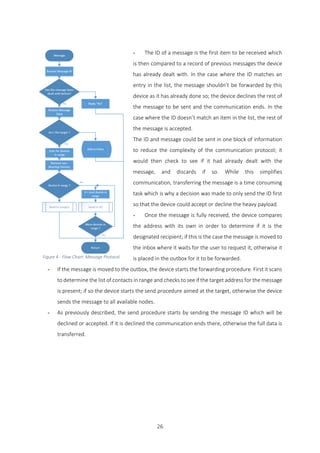
scale applied, the system scored 2/5 for reliability whereas the others scored 4/5, meaning that the
primary function of the device acts poorly. Having said this, this does mean that if only the reliability was
improved, as the full system would be, the value from the Likert scale would eclipse the other products.
43
10 CONCLUSION
10.1 Introduction
In this section we evaluate the project process, the product itself and personal performance.
10.2 Critical Evaluation of Project Process
I believe that the project has had a rather streamline process overall despite my entire project changing
half way through the academic year. Before September, when I first started researching ideas for my
final year project, a concept was drafted for a motion detection system using only Wi-Fi signals; despite
all of the research I collected and further development plans that were drafted, the project fell flat in
December. This was due to an inability to replicate the technology details in the original literature
review; none of the hardware I was using could output a signal strength of modulation precise enough
for testing and manipulation. I still believe that the other project can be completed but it would
necessitate much more time and knowledge than required for a third year project.
This late start influenced the development of this project a great deal as half of my allocated time which
could have been used to complete the design and research for BlueHop was lost. This resulted in a
partial implementation of the full system as only Prototype 1 was completed; however, given enough
time to execute my design for Prototype 2, this would have helped to rectify the issues encountered
and fulfil all necessary requirements.
The literature review was a fundamental starting point of this project as researching the environment
revealed prime requirements, set goals for specific points in the design, and helped to accurately tailor
the system to an area and situation that I could only previously speculated about. The other half of the
review was dedicated to understanding ad-hoc communications in the disaster network field as this not
only influenced how other products were understood but also aided in their evaluation. Comprehending
how these products functioned in the target environment also drastically affected the technology
review. I believe that proceeding in this order really helped to create solid grounds for developing a
stable product for the intended market.
44
Whilst designing the product, I kept the time frame in mind and planned a system which was realistic
and attainable; I believe the balance between achievability and creating a functional prototype was the
most difficult part of bringing this concept to life. Whilst implementing the design, the difficulty laid in
assessing the hardware; tying the different modules together and producing a device that met the
design was challenging, especially at the beginning of the development when the Bluetooth module was
causing issues.
I found Section 8 to be one of the most interesting to research and write about in this report due to the
moral and ethical issues that arose. These especially related to the possibility of aiding an all-knowing,
big brother government or helping to hide the encrypted messages sent by terror organisations. This
section helped me to understand the privacy issues that such a system could encounter and how best
to deal with them.
Finally, the evaluation section was a challenging part of writing this document, primarily due to the fact
that the full system could not be implemented. Despite this, the decision to only evaluate Prototype 1
resulted in useful data and information that could be applied to the second prototype in order to
streamline its development. Overall, the process of the development has generally gone to plan and
aided me in the production of BlueHop.
45
10.3 Critical Evaluation of Product
A more in-depth assessment regarding this product can be found in the evaluation section of this report,
however it is important to note that Prototype 1 met much of the key criteria for the project in hand,
including basic functionality and the creation of a simple mesh network. The system capably and
autonomously sends, receives and forwards data, the custom phone app interacts with the device as
required, it operates with a user friendly interface, and allows for device discovery and communication.
Overall the product scored a strong 4/5 on the Likert scale which is a very positive outcome, especially
when compared to other similar products that are already available.
While Prototype 1 doesn’t accomplish the full functionality essentials of a required system, and would
therefore not be in a current state to market to the masses, it does show a lot of promise. There are
currently issues in regards to the products scalability, power consumption and overall stability, but this
project does still provide a solid base for further development.
As previously discussed, the plans for Prototype 2 could definitely help to iron out some of the main
issues highlighted in this report, but given the shorter time frame that was available to me for this
project, it was impossible to complete the full system ahead of the final deadline. However, I feel that
BlueHop is a realistic product which, following some further developments and minor refinements,
could well be a viable form of communication in times of crisis.
46
10.4 Critical Evaluation of Personal Performance
I believe my performance was quite proficient and proactive during this project by completing goals
within a reasonable delay and dynamically changing the design to adapt to problems. Despite starting
late on the product due to the change in direction and the accompanying stress and panic over the
shorter timeframe, the project was a success and I am happy with the result.
During the course of the project I have developed many skills by having to manage this project and keep
to a schedule, not to mention the technical skills developed; I am now confident in designing and
assembling smart autonomous systems whilst integrating them in amongst other platforms and
programming languages. Alongside this, my Arduino and Android programming skills have improved
dramatically. Other key skills I believe I have developed have been in regards to problem solving and
time management; I encountered many issues along the way which drastically changed the design, as
well as keeping on top of the sheer frequency and scale of research that was required. This project called
for a lot of trial and error during the products development, however I do feel that I learnt from my
mistakes and am confident that I could now efficiently develop most systems on most platforms.
If I could start the project over again, I would have cut my losses on the previous project sooner and
possibly have chosen an easier platform to work on instead of an Arduino Nano. Overall I deem the
project a success and look forward to continuing its development in the future.
47
REFERENCES
Anon. (March 2010) Bluetooth power consumption [Online]. Available from:
http://forum.arduino.cc/index.php?topic=23805.0 [Accessed 04 April 2016].
Arne, M.H. & Asmund, S. (2006) Innovative Techniques for Extremely Low Power Consumption. Atmel
White Paper, 1(1), pp.1-16.
Baoshi. (2012) Project Crystal (Part 1) [Online]. Available from: http://www.ba0sh1.com/project-
crystal-part-1/ [Accessed 04 April 2016].
Coley Consulting. (2015 ) moscow [Online]. Available from:
http://www.coleyconsulting.co.uk/moscow.htm [Accessed 04 April 2016].
commotion. (2016) about [Online]. Available from: https://commotionwireless.net/about/ [Accessed
04 April 2016].
Conti, M. & Giordano, S. (2007) Multihop Ad Hoc Networking: The Reality. IEEE Commun. Mag., 45(4),
pp.88-95.
Conti, M. & Giordano, S. (2007) Multihop Ad Hoc Networking: The Theory. IEEE Commun. Mag., 45(4),
pp.78-86.
fab-lab.eu. (2015) Tame the beast: Ultra-Low Power #ESP8266 Thing [Online]. Available from:
https://www.hackster.io/fablabeu/esp8266-thing-by-sparkfun-982bc6 [Accessed 04 April 2016].
Gee. (March 11 2013) Advantages of Using Likert Scale Questions [Online]. Available from:
https://www.smartsurvey.co.uk/blog/advantages-of-using-likert-scale-questions/ [Accessed 04 April
2016].
Geerling, J. (November 27, 2015) Raspberry Pi Zero - Power Consumption Comparison [Online].
Available from: http://www.jeffgeerling.com/blogs/jeff-geerling/raspberry-pi-zero-power [Accessed 04
April 2016].
Gunaratna, G.T.C., Jayarathna, P.V.N.M., Sandamini, S.S.P. & De Silva, D.S. (2015) Implementing
Wireless Adhoc Networks for Disaster Relief Communication. 2015 8th International Conference on
Ubi-Media Computing (UMEDIA), pp.66-71.
Gunaratna, G.T.C., Jayarathna, P.V.N.M., Sandamini, S.S.P. & De Silva, D.S. (2015) Implementing
Wireless Adhoc Networks for Disaster Relief Communication. 8th International Conference on Ubi-
Media Computing (UMEDIA), pp.66-71.
IDC Research, Inc. (2015) Smartphone OS Market Share, 2015 Q2 [Online]. Available from:
http://www.idc.com/prodserv/smartphone-os-market-share.jsp [Accessed 04 April 2016].
Karamshuk, D., Boldrini, C., Conti, M. & Passarella, A. (2011) Human mobility models for opportunistic
networks. IEEE Commun. Mag, 49(12), pp.157-65.
48
Lakshmi, N.R. & Ibe, O. (2012) A joint network for disaster recovery and search and rescue operations.
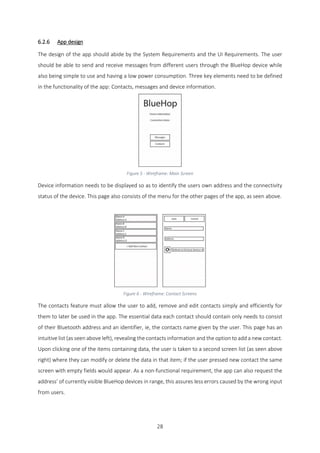
Computer Networks, (56), pp.3347-73.
Liliana, E.Q. & Luis, M.G. (2014) Behavior of Ad Hoc routing protocols, analyzed for emergency and
rescue. Expert Systems with Applications, 41(5), pp.2565-73.
Nishiyama, H., Ito, M. & Kato, N. (2014) Relay-by-smartphone: realizing multihop device-to-device
communications. IEEE Commun. Mag., 52(4), pp.56-65.
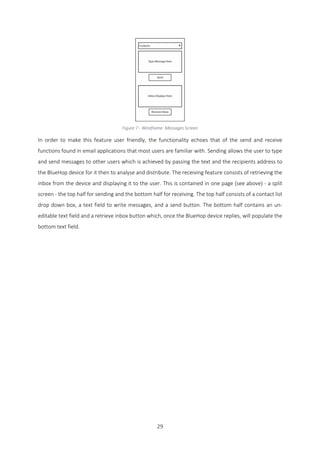
opengarden. (n.d.) How To [Online]. Available from: http://opengarden.com/how-to/ [Accessed 2016].
project, s. (2013) serval project [Online]. Available from: http://www.servalproject.org/ [Accessed 04
April 2016].
Reina, D. et al. (2015) A Survey on Multihop Ad Hoc Networks for Disaster Response Scenarios.
International Journal of Distributed Sensor Networks, pp.1-16.
Schwartz, M. (August 7, 2013) How to Run an Arduino for Years on a Battery [Online]. Available from:
https://www.openhomeautomation.net/arduino-battery/ [Accessed 04 April 2016].
skiwall. (2013) SD Card [Online]. Available from: http://forum.arduino.cc/index.php?topic=149504.0
[Accessed 04 April 2016].
The Economist. (2015) What’s up? [Online]. Available from:
http://www.economist.com/blogs/graphicdetail/2015/03/messaging-apps [Accessed 02 Febuary
2016].
49
APPENDIX A - Project Schedule
50
APPENDIX B - Likert Scale
1 FireChat
1 = Very Poor - 5 = Very Good
1 How reliable is the product? 1 - 2 - 3 - |4| - 5
2 How much does the product cost? 1 - 2 - 3 - 4 - |5|
3 How quick can the product be deployed? 1 - 2 - 3 - 4 - |5|
4 How dependant on external factors is the product? 1 - 2 - |3| - 4 - 5
5 How user friendly is the product? 1 - 2 - 3 - 4 - |5|
Total 4.4/5
- How reliable is the product?
- What are the chances that the message will reach its destination?
High
- Is the message guaranteed to be received if the user is on the network?
No – user cannot see everyone on the network
- Are there contingency plans if the user isn’t on the network?
Dtd and internet
- How much does the product cost?
- What does it cost to set up?
Price of android device
- What does it cost to run?
Free
- How quick can the product be deployed?
- How quick is it to set up?
Instant and could be pre-existent
- Does it have to have a preinstalled infrastructure?
No
- How dependant on external factors is the product?
- Does the system depend on anything?
Phone charge – 1.5 days without charge
51
Signal range 70m
- Does the system require high node density?
usa 500p/km2 - 0.5p/m - 5% urban city: 0.020p/m – x50: 1p/50m
- Does the system require high node mobility?
For back up send
- How user friendly is the product?
- Do the users need any prior knowledge to set up the network?
No install app
- Do the users need any prior knowledge to use the network?
No
- Is it available to everyone?
Yes – private and public messages
52
2 Commotion
1 = Very Poor - 5 = Very Good
1 How reliable is the product? 1 - 2 - 3 - |4| - 5
2 How much does the product cost? 1 - 2 - |3| - 4 - 5
3 How quick can the product be deployed? 1 - |2| - 3 - 4 - 5
4 How dependant on external factors is the product? 1 - |2| - 3 - 4 - 5
5 How user friendly is the product? 1 - |2| - 3 - 4 - 5
Total 2.6/5
- How reliable is the product?
- What are the chances that the message will reach its destination?
High
- Is the message guaranteed to be received if the user is on the network?
Yes - mesh
- Are there contingency plans if the user isn’t on the network?
No
- How much does the product cost?
- What does it cost to set up?
Price of routers, antennas and devices
- What does it cost to run?
Free
- How quick can the product be deployed?
- How quick is it to set up?
Time consuming: configuration and construction required
- Does it have to have a preinstalled infrastructure?
yes
- How dependant on external factors is the product?
- Does the system depend on anything?
electricity
infrastructure
- Does the system require high node density?
Pre - planned infrastructure
53
- Does the system require high node mobility?
No
- How user friendly is the product?
- Do the users need any prior knowledge to set up the network?
Yes complicated setup
- Do the users need any prior knowledge to use the network?
Reasonable amount
Phone needs to be rooted
- Is it available to everyone?
Yes – any data transfer
54
3 Serval
1 = Very Poor - 5 = Very Good
1 How reliable is the product? 1 - 2 - 3 - |4| - 5
2 How much does the product cost? 1 - 2 - 3 - |4| - 5
3 How quick can the product be deployed? 1 - 2 - 3 - |4| - 5
4 How dependant on external factors is the product? 1 - 2 - |3| - 4 - 5
5 How user friendly is the product? 1 - 2 - 3 - |4| - 5
Total 3.8/5
- How reliable is the product?
- What are the chances that the message will reach its destination?
High
- Is the message guaranteed to be received if the user is on the network?
Yes – mesh – user can see who’s there
- Are there contingency plans if the user isn’t on the network?
no
- How much does the product cost?
- What does it cost to set up?
Price of android + optional device extenders
- What does it cost to run?
Free
- How quick can the product be deployed?
- How quick is it to set up?
Instant and could be pre-existent
- Does it have to have a preinstalled infrastructure?
Optional
- How dependant on external factors is the product?
- Does the system depend on anything?
Phone charge – 1.5 days without charge
Signal range ~50m
Signal range with extender ~1-2km
Electricity for extender
Infrastructure
55
- Does the system require high node density?
Pre - planned infrastructure
- Does the system require high node mobility?
No
- How user friendly is the product?
- Do the users need any prior knowledge to set up the network?
little
- Do the users need any prior knowledge to use the network?
Phone needs to be rooted
- Is it available to everyone?
Yes – private messages
56
4 BlueHop – Prototype 1
1 = Very Poor - 5 = Very Good
1 How reliable is the product? 1 - |2| - 3 - 4 - 5
2 How much does the product cost? 1 - 2 - 3 - |4| - 5
3 How quick can the product be deployed? 1 - 2 - 3 - 4 - |5|
4 How dependant on external factors is the product? 1 - 2 - 3 - |4| - 5
5 How user friendly is the product? 1 - 2 - 3 - 4 - |5|
Total 4/5
- How reliable is the product?
- What are the chances that the message will reach its destination?
low
- Is the message guaranteed to be received if the user is on the network?
No
- Are there contingency plans if the user isn’t on the network?
No
- How much does the product cost?
- What does it cost to set up?
Small cost of device and smartphone
- What does it cost to run?
Free
- How quick can the product be deployed?
- How quick is it to set up?
Immediate
- Does it have to have a preinstalled infrastructure?
No
- How dependant on external factors is the product?
- Does the system depend on anything?
No
- Does the system require high node density?
Currently
- Does the system require high node mobility?
No
57
- How user friendly is the product?
- Do the users need any prior knowledge to set up the network?
No
- Do the users need any prior knowledge to use the network?
No
- Is it available to everyone?
Yes
58
5 BlueHop – Prototype 2
1 = Very Poor - 5 = Very Good
1 How reliable is the product? 1 - 2 - 3 - 4 - |5|
2 How much does the product cost? 1 - 2 - 3 - |4| - 5
3 How quick can the product be deployed? 1 - 2 - 3 - 4 - |5|
4 How dependant on external factors is the product? 1 - 2 - 3 - 4 - |5|
5 How user friendly is the product? 1 - 2 - 3 - 4 - |5|
Total 4.8/5
- How reliable is the product?
- What are the chances that the message will reach its destination?
high
- Is the message guaranteed to be received if the user is on the network?
No
- Are there contingency plans if the user isn’t on the network?
Yes
- How much does the product cost?
- What does it cost to set up?
Small cost of device and smartphone
- What does it cost to run?
Free
- How quick can the product be deployed?
- How quick is it to set up?
Immediate
- Does it have to have a preinstalled infrastructure?
No
- How dependant on external factors is the product?
- Does the system depend on anything?
No
- Does the system require high node density?
No
- Does the system require high node mobility?
No
59
- How user friendly is the product?
- Do the users need any prior knowledge to set up the network?
No
- Do the users need any prior knowledge to use the network?
No
- Is it available to everyone?
Yes
60
APPENDIX C - Flow Chart diagrams
Flow Chart 1 -Main Protocol
Flow Chart 2 - Simple Protocols
61
Flow Chart 3 - Message Protocol
62
APPENDIX D - Arduino Methods
1 At toggle
void toggleAT() {
ATState = !ATState;
if (ATState) {
digitalWrite(AtPwr, HIGH);
restartModule();
delay(1000);
} else {
digitalWrite(AtPwr, LOW);
restartModule();
}
}
2 Module Restart
void restartModule() {
analogWrite(BluetoothReset, 0);
delay(1);
analogWrite(BluetoothReset, 255);
}
63
3 Connection
void ConnectionOpen(String add) {
toggleAT();
btCommand(F("AT"));
btCommand(F("AT+INIT"));
btCommand(F("AT+ROLE=1"));
btCommand("AT+BIND=" + add);
Serial.println("Link to ["+add+"]");
btCommand("AT+LINK=" + add);
toggleAT();
}
4 Disconnection
void ConnectionClose() {
toggleAT();
btCommand(F("AT+ROLE=0"));
btCommand(F("AT+BIND=0"));
Serial.println(F("Connection Closed"));
toggleAT();
}
64
APPENDIX E - App Screen shots
Screen Shot 1 - Main Menu Screen Shot 2 - Message
Screen Shot 3 - Contacts List View Screen Shot 4 - Contact Add View
65
APPENDIX F - Testing Setup
Map 1 - Testing Locations for BlueHop devices
See video for more details: https://vimeo.com/163258470
66
APPENDIX G - Testing Tables
1 Main connectivity
Test Expected result Result Solutions
Pair with device using
an android device
Successfully paired As expected
Connect app when
device displays idle
mode
Connected displayed
in the UI and device
light displays
connected
As expected
Connection app when
device displays
connection pending
Connected displayed
in the UI and device
light displays
connected
Failed: socket error P1
Connection app when
device displays
connected other than
app
Connected displayed
in the UI and device
light displays
connected
Failed: socket error P1
67
2 Contacts app – list view
Test Expected result Result Solutions
Add new contact New blank edit contact
page
As expected
Added new contact Page updates to show
new contact
As expected
20 new contacts
added
Display all of the
contacts
As expected
Edit existing contact New edit contact page
containing relevant
data
As expected
Edited contact Page updates to show
edited contact
As expected
Deleted existing
contact
Contact removed As expected
68
3 Contacts app – edit view
Test Expected result Result Solutions
Refresh devices in
range with device
showing idle
Visible devices
displayed in devices
box
As expected
Refresh devices in
range when device
displays connection
pending
Visible devices
displayed in devices
box
Fail P1
Refresh devices in
range when device
displays connected
other than app
Visible devices
displayed in devices
box
Fail P1
Save contact with new
address and name
Contact saved As expected
Save contact with
same name as existing
Toast displays error As expected
Save contact with
same address as
existing
Toast displays error As expected
69
4 Message send / receive (connection phone- device)
Test Expected result Result Solutions
Drop down box
containing existing
contacts
Display existing
contacts
As expected
Write/Send message
with device showing
idle
Toast confirmation on
app, visible data
transfer and start of
protocol on device
As expected
Write/Send message
when device displays
connection pending
Toast confirmation on
app, visible data
transfer and start of
protocol on device
Fail P1
Write/Send message
when device displays
connected other than
app
Toast confirmation on
app, visible data
transfer and start of
protocol on device
Fail P1
Receive inbox with
device showing idle
Inbox text box
refreshed and data
transfer visible on
device
As expected
Receive inbox when
device displays
connection pending
Inbox text box
refreshed and data
transfer visible on
device
Fail P1
Receive inbox when
device displays
connected other than
app
Inbox text box
refreshed and data
transfer visible on
device
Fail P1
70
5 Message send / receive (device- device)
This set up for the test is shown in Appendix F
The full set of tests were completed 5 times each as this is returns the most variable results, 3/5 full
test set were successful. 2/5 failed in certain areas and are shown below
1
Test Expected result Result Solutions
Message sent from
device A to device B
Hello 15:18 test Hello 15:18 test
Message sent from
device A to device C
Hello 15:25 test Hello 15:25 test
Message sent from
device A to device D
Hello 15:31 test Hello 15:31 test<Con> P2.1
Message sent from
device A to device E
Hello 15:40 test Hello 15:4<Con> 12<
0test
P2.1
2
Test Expected result Result Solutions
Message sent from
device A to device B
Hello 16:02 test Hello 16:02 test
Message sent from
device A to device C
Hello 16:15 test Hello<con>
1255515test
P2.1
Message sent from
device A to device D
Hello 16:28 test No result P2.2
Message sent from
device A to device E
Hello 15:48 test No result P2.2
71
APPENDIX H - Hardware Diagrams
1 SD card
As seen in the image to the left, the SD card requires connection to
- CS: Chip Select (SPI)
- SCK: Serial ClocK (SPI)
- MOSI: Master Output Slave Input (SPI)
- MISO: Master Input Slave Output (SPI)
- VCC: Power
- GND: Ground
SPI: Serial Peripheral Interface
2 Bluetooth module
As seen in the image to the left, the Bluetooth module requires connection to
- State: Not used
- RXD: Receive data (SS)
- TXD: Transmit data (SS)
- GND: Ground
- VCC: Power
- EN: Enables the module (used for restarting)
- Pin 34: At mode toggle
SS: software serial
72
3 Circuit
4 Devices
73
APPENDIX I - Android Connection Manager
1 Start connection
public void startConnection() {
BluetoothAdapter mBluetoothAdapter = BluetoothAdapter.getDefaultAdapter();
Object[] pairedDevices = mBluetoothAdapter.getBondedDevices().toArray();
int le = pairedDevices.length;
int count = 0;
int pos = 0;
if (le > 0) {
for (int i = 0; i < le; i++) {
BluetoothDevice device = (BluetoothDevice) pairedDevices[i];
String address = device.getAddress();
String name = device.getName();
if (name.contains("BlueHop")) {
connection = ("nDevice " + name + " [" + address + "]n");
pos = i;
count++;
}
}
//console.append("nCompatible devices found: " + count);
if (count > 1) {
conText = (connection + "nOnly one BlueHop device should be
paired.");
} else if (count == 0) {
conText = (connection + "nNo devices found, please pair a BlueHop
Node.");
} else if (count == 1) {
try {
device = (BluetoothDevice) pairedDevices[pos];
mmSocket = device.createRfcommSocketToServiceRecord(uuid);
mmSocket.connect();
boS = mmSocket.getOutputStream();
biS = mmSocket.getInputStream();
conText = (connection + "n" + Html.fromHtml("<b>Connection
Successful!</b>"));
connected = true;
} catch (Exception e) {
conText = (connection + "n" + Html.fromHtml("<b>Connection
UnSuccessful!</b>") + "n" + e.toString());
connected = false;
}
}
}
}
74
2 Receive
public void recieve() {
String messageTmp = "";
try {
toggleConnection(true);
if (mmSocket.isConnected()) {
String text = "<M>inbox</M>";
char[] output = text.toCharArray();
for (int i = 0; i < output.length; i++) {
boS.write(output[i]);
}
comms.clear();
boolean start=false;
boolean stop=false;
while(!stop){
String mess =readInPacket();
if (mess.contains("<D>")&&!start){
start=true;
}else if (start&&mess.contains("</D>")) {
stop = true;
if (messageTmp!=""){
comms.add(messageTmp);
}
break;
}else if(mess.contains("<Id>")){
if (messageTmp!=""){
comms.add(messageTmp);
}
mess=mess.replace("<Id>", "");
mess=mess.replace("</Id>","");
messageTmp="n "+mess+" :n";
}else{
messageTmp+=mess;
}
}
}
} catch (Exception e) {
}
}
75
3 Read Packet
private String readInPacket(){
String input = "";
try {
int timeout = 0;
while (!input.contains("<M>")) {
input += (char) biS.read();
//Thread.sleep(100);
timeout++;
if (timeout == 50) {
break;
}
}
timeout = 0;
while (!input.contains("</M>")) {
input += (char) biS.read();
//Thread.sleep(100);
timeout++;
if (timeout == 50) {
break;
}
}
} catch (Exception e) {
}
input=input.trim();
input=input.replace("<M>","");
input=input.replace("</M>","");
input=input.replace("rn","");
return input;
}
76
4 Refresh Address
public ArrayList refreshAddress() {
String input = " ";
try {
toggleConnection(true);
if (mmSocket.isConnected()) {
String text = "<M>addr</M>";
char[] output = text.toCharArray();
for (int i = 0; i < output.length; i++) {
boS.write(output[i]);
}
toggleConnection(false);
Thread.sleep(12000); // see if this time can be shortened
by looking at the mnsocket
toggleConnection(true);
text = "<M>adds</M>";
output = text.toCharArray();
for (int i = 0; i < output.length; i++) {
boS.write(output[i]);
}
availableAddress.clear();
boolean start = false;
boolean end = false;
int timeout = 0;
while (!start || !end) {
input = readIn();
if (input.contains("<D>")) {
start = true;
} else if (input.contains("</D>")) {
end = true;
} else {
availableAddress.add(input);
}
timeout++;
Thread.sleep(100);
if (timeout == 50) {
break;
}
}
}
} catch (Exception e) {
}
return availableAddress;
}
77
5 Read in
private String readIn() {
String mes = "";
try {
int timeout = 0;
while (!mes.contains("<M>")) {
mes += (char) biS.read();
Thread.sleep(100);
timeout++;
if (timeout == 50) {
break;
}
}
timeout = 0;
while (!mes.contains("</M>")) {
mes += (char) biS.read();
Thread.sleep(100);
timeout++;
if (timeout == 50) {
break;
}
}
} catch (Exception e) {
}
mes = mes.replace("<M>", "");
mes = mes.replace("</M>", "");
mes = mes.trim();
return mes;
}
78
6 Send
public String send(int target, String text) {
int cutLength=20;
int del=200; // WAS 500
String ret="";
if (!text.isEmpty()) {
toggleConnection(true);
if (connected) {
try {
int tO=100;
Random rand = new Random();
int n = rand.nextInt(999); // generate ID
String nS= String.valueOf(n);
String t = mDec("<con>"+nS+"</con>");
writeOutBt(t);
Thread.sleep(del);
while(tO>0){
String tmp =readIn();
if(tmp.contains("<OK>")){
break;
}else {
Thread.sleep(del);
tO--;
}
}
if (tO>0) { // Divides packets up
ret="Connection confirmed";
String[] tmp = SettingsManager.savedAddress.get(target);
t = mDec("<D>" + tmp[1]);
writeOutBt(t);
Thread.sleep(del);
for (int i = 0; i < text.length(); i += cutLength) {
Thread.sleep(del);
if (i + cutLength > text.length()) {
t = mDec(text.substring(i, text.length()));
writeOutBt(t);
} else {
t = mDec(text.substring(i, i + cutLength));
writeOutBt(t);
comms.add("n" + t);
}
}
Thread.sleep(del);
t = mDec("</D>");
writeOutBt(t);
}
} catch (Exception e) {
ret="Error Sending Message";
}
}
}
return ret;
}
79
7 writeOutBt
private void writeOutBt(String t) {
try {
char[] output = t.toCharArray();
for (int i = 0; i < output.length; i++) {
boS.write(output[i]);
}
} catch (Exception e) {
//comms.add("Error Sending Message"+e);
}
}
private String mDec(String t) {
return " <M>" + t + "</M>";
}
8 mDec
private String mDec(String t) {
return " <M>" + t + "</M>";
}

BlueHop-FinalReport

  • 1.
    Michael Alan HeathMay Supervisor: Kevin McManus Due 18th April 2016 BlueHop: Creating an independent distributed ad-hoc communication system for disaster relief Video URL: https://vimeo.com/163258470 Word count: 12,988 Product and Development files: Uploaded as a zip file A dissertation submitted in partial fulfilment of the University of Greenwich’s BSc (Hons) Computer Science
  • 2.
    ii ABSTRACT This report discussesthe design and execution of an independent, ad-hoc communication network which allows smartphone users to contact one another in the event that the phone lines were to become impaired. This project will lead to the creation of a prototype that aims to be a reliable and stable connection which could be implemented during times of great crisis to aid disaster relief. Final Year Individual Project COMP168 BSc (Hons) Computer Science Due Date: 18th April 2016 Words: 1874
  • 3.
    iii ACKNOWLEDGEMENTS Firstly, I’d liketo say thanks to my supervisor, Kevin McManus for the advice and the quick replies he provided. Thanks to my best friends, Tom Bastianello and Oliver Rossiter for helping me piece this project together and for putting up with me through the late nights and hair pulling. Thanks to my parents and sister, for their support and understanding. Finally, a huge thank you to my girlfriend Jade Turnstill, as none of the report would have made sense without her.
  • 4.
    iv CONTENTS Acknowledgements..................................................................................................................................iii Contents ..................................................................................................................................................iv 1 Introduction.....................................................................................................................................1 1.1 Background.............................................................................................................................. 1 1.2 Project Aims & Objectives........................................................................................................ 2 1.3 Methodology ........................................................................................................................... 2 1.4 Scope ....................................................................................................................................... 3 2 Literature Review............................................................................................................................. 4 2.1 Introduction............................................................................................................................. 4 2.2 Overview of the requirements for relief communication networks ........................................ 4 2.3 Communication models........................................................................................................... 6 2.4 Conclusion................................................................................................................................ 9 3 Product Review.............................................................................................................................. 10 3.1 Introduction........................................................................................................................... 10 3.2 FireChat.................................................................................................................................. 12 3.3 Commotion............................................................................................................................ 13 3.4 Serval project......................................................................................................................... 14 3.5 Key issues to use in the design and implementation ............................................................. 15 4 Technical Review............................................................................................................................ 16 4.1 System Overview ................................................................................................................... 16 4.2 Technologies.......................................................................................................................... 17 5 Requirements Analysis................................................................................................................... 19 5.1 Introduction........................................................................................................................... 19 5.2 System requirements............................................................................................................. 19 5.3 Network device requirements ............................................................................................... 20 5.4 UI app requirements.............................................................................................................. 21 6 Design of BlueHop.......................................................................................................................... 22 6.1 Introduction........................................................................................................................... 22 6.2 Prototype 1............................................................................................................................ 22 6.3 Prototype 2............................................................................................................................ 30 7 Development of BlueHop............................................................................................................... 32
  • 5.
    v 7.1 Introduction........................................................................................................................... 32 7.2Bluetooth and Nano functionality.......................................................................................... 32 7.3 Nano and Nano connection ................................................................................................... 33 7.4 Automate communication..................................................................................................... 34 7.5 Create an app......................................................................................................................... 34 7.6 Integrate mobile commands.................................................................................................. 34 7.7 Basic connection protocol...................................................................................................... 35 8 Legal, Social, Ethical and Professional Issues ................................................................................. 37 8.1 Introduction........................................................................................................................... 37 8.2 External obstacles.................................................................................................................. 37 8.3 Internal obstacles................................................................................................................... 38 9 Evaluation ...................................................................................................................................... 39 9.1 Introduction........................................................................................................................... 39 9.2 Testing ................................................................................................................................... 39 9.3 Evaluation of requirements ................................................................................................... 41 9.4 Likert scale ............................................................................................................................. 42 10 Conclusion.................................................................................................................................. 43 10.1 Introduction........................................................................................................................... 43 10.2 Critical Evaluation of Project Process..................................................................................... 43 10.3 Critical Evaluation of Product................................................................................................. 45 10.4 Critical Evaluation of Personal Performance.......................................................................... 46 References............................................................................................................................................. 47 APPENDIX A - Project Schedule ........................................................................................................ 49 APPENDIX B - Likert Scale................................................................................................................. 50 1 FireChat.......................................................................................................................................... 50 2 Commotion.................................................................................................................................... 52 3 Serval ............................................................................................................................................. 54 4 BlueHop – Prototype 1................................................................................................................... 56 5 BlueHop – Prototype 2................................................................................................................... 58 APPENDIX C - Flow Chart diagrams .................................................................................................. 60 APPENDIX D - Arduino Methods....................................................................................................... 62 1 At toggle......................................................................................................................................... 62 2 Module Restart .............................................................................................................................. 62 3 Connection..................................................................................................................................... 63 4 Disconnection ................................................................................................................................ 63
  • 6.
    vi APPENDIX E -App Screen shots ....................................................................................................... 64 APPENDIX F - Testing Setup ............................................................................................................. 65 APPENDIX G - Testing Tables ............................................................................................................ 66 1 Main connectivity .......................................................................................................................... 66 2 Contacts app – list view ................................................................................................................. 67 3 Contacts app – edit view................................................................................................................ 68 4 Message send / receive (connection phone - device).................................................................... 69 5 Message send / receive (device - device) ...................................................................................... 70 APPENDIX H - Hardware Diagrams ................................................................................................... 71 1 SD card........................................................................................................................................... 71 2 Bluetooth module.......................................................................................................................... 71 3 Circuit............................................................................................................................................. 72 4 Devices........................................................................................................................................... 72 APPENDIX I - Android Connection Manager.................................................................................... 73 1 Start connection............................................................................................................................. 73 2 Receive........................................................................................................................................... 74 3 Read Packet ................................................................................................................................... 75 4 Refresh Address............................................................................................................................. 76 5 Read in........................................................................................................................................... 77 6 Send............................................................................................................................................... 78 7 writeOutBt ..................................................................................................................................... 79 8 mDec.............................................................................................................................................. 79
  • 7.
    1 1 INTRODUCTION 1.1 Background Worldwide,an estimated 50 billion messages are sent from mobile phones (SMS and WhatsApp) each day (The Economist, 2015). This is a form of communication we have come to rely on, although these methods depend on the signal and availability of the network. What would happen to the 6.8 billion mobile phone users if even a small area of the network failed? This could occur due to a number of reasons including natural disasters or a concentrated amount of usage in one location. This proposal is not aimed at revolutionising the network systems currently in use, but more as to provide an emergency secondary communication system if the network was to become impaired. Both natural and man-made disasters cause panic and mass chaos, often leading to a high number of causalities and fatalities; in these circumstances, individuals can find themselves having to fight not only for their lives, but the lives of their loved ones too. Such disasters, whether it be an earthquake which ruptures the ground beneath your feet or a terror attack that rips apart an entire town, can tear families apart and leave survivors in peril with little to no means of communication. Imagine a situation where you are isolated, trapped under rubble, and possibly hurt. You have no food, no water, no medical supplies. You’re in a secluded area, somewhere on the outskirts of town, where fewer people venture in their day to day lives. What then? In a time of crisis, aid will more often be scattered across the most heavily populated areas first, meaning that many days can pass before they reach quieter areas. Even if an injured or isolated victim has a phone in their possession, if the networks are down then this leaves them with little to no hope or chance of survival. However, if a separate, independent network was to be available that works even when the phone lines are down, communication is primarily restored and would allow for individuals to make contact with others. While this system would help aid workers to communicate and possibly pinpoint affected people, this is also a way for survivors to make contact with their family and friends, whether this be to inform them that they’re in trouble and provide their location, or just to ease their minds and let them know that they’re safe. The concept of BlueHop as a self-healing, ad-hoc communication system arose for this exact purpose; to create a device which could ensure that phone users are still able to communicate, even in times of great peril and network failures.
  • 8.
    2 1.2 Project Aims& Objectives The aim of this project is to explore the creation and implementation of a secondary, independent network which would allow smartphone users to communicate with one another even in the event that phone lines are down. Delving into research and similar systems that are currently available or in development, this project will lead to the creation of a prototype that aims to be a reliable and stable connection which could be put in place during times of great crisis to aid disaster relief as a form of communication. Please see below for some of the key objectives that have been created to work alongside this project: Conduct and compile a thorough literature review to investigate the works of others into self-sustaining, ad-hoc communication networks, using such research as a basis of this project. • Conduct and compile a product review which looks at comparable products, similar to that of the prototype concept, in order to see how they work and where they are in their developments stages. • Conduct and compile a technical review in order to determine the different technologies to be used for this system prototype. • Produce design documentation in order to show the inner workings of the device. • Create the prototype and test the implemented system. • Evaluate the product including its strengths and weaknesses, as well as possible problems and their required solutions. • Create a video demonstration of the prototype at the end of the academic project to accompany this report. 1.3 Methodology After consideration, it has been decided that evolutionary prototyping will be the main development approach in this project due to the fact that the exact technical requirements of the product can’t be pre-empted. With this type of system, it is also inevitable that it will have to undergo some changes during the development stage as different, and often unexpected, issues may arise. The evolutionary approach enables for refinements to be made as the project progresses, and also allows for a more iterative and systematic development process in comparison to other possible approaches.
  • 9.
    3 1.4 Scope The purposeof the project is to explore the development of a system that would provide an independent, ad-hoc communication method for victims of disaster relief. By examining the requirements of the environment and existing types of ad-hoc networks, the foundations of a working backup communication system will be formed. One of the key elements of this project is that the prototype will be based around, but not limited to, mobile phones. This was chosen because of the sheer popularity and dependency of smartphones across the globe, meaning that the system would reach a wider target audience. Due to the short time scale of the project, it is not within the scope to fully implement the functionality, but to approximate the requirements and design the grounding for further development. The project will be evaluated on the amount of requirements met throughout the design and implementation; this will include a comparison to other products that are currently available on the market.
  • 10.
    4 2 LITERATURE REVIEW 2.1Introduction The purpose of this literature review is to investigate situations in which a self-sustaining ad-hoc communication network may be used as a replacement for standard high-powered communication systems such as cellular networks. It also explores how such systems can provide a backup communication channel in disaster areas, or when conditions don’t allow individuals to communicate by means of network systems that would normally be used in favourable conditions. Knowledge acquired in this review will be carried through to the technical review and applied to the prototype. Firstly, we will discuss the Overview of the requirements for relief communication networks, examining the environment where the device could be deployed and evaluating the criteria such a system would have to meet. Secondly we will look at the different communication models commonly used in areas effected by a disaster, with the ultimate goal of ascertaining a network model compatible with the requirements determined in the first half. 2.2 Overview of the requirements for relief communication networks Natural and man-made disasters cause panic and potential causalities, individuals can be forced to fight for their lives and the lives of their loved ones. Survivors can find themselves trapped without means of reaching for help with lack of environmental supplies or means of communication. In the meantime, aid can be scattered across affected areas with the likelihood of being inefficient in helping those who need it most because, in many cases, large scale disasters can wipe out of disable regular means of communication (Gunaratna et al., 2015). Lakshmi (Lakshmi Narayanan & Ibe, 2012) reminds us that in the midst of the physical and social disorder caused by the incident, fundamental resources must be distributed and carefully coordinated to reduce the disaster’s impact on the population. They also explain that in order to provide effective relief provisions, two types of network are required for disaster relief; Disaster Recovery Network (DRN) and Search and Rescue Network (SRN). While they contain the same core features, which will be detailed later on, the networks have distinct goals. DRN aims to provide a communication channel for victims and crew members to coordinate rescue operations and relief support, as opposed to SRN which is more focused on tracking affected individuals in the emergency operations (Reina et al., 2015).
  • 11.
    5 The core featuresthat the networks must provide are described in most of the articles featured in the bibliography, however if they are not explicitly stated then they are illustrated in their concepts’ designs. As mentioned previously, the following has been detailed by Lakshmi (Lakshmi Narayanan & Ibe, 2012) and confirmed by Reina (Reina et al., 2015). The first key feature discussed is the fact that the network must become operational quickly. As Lakshmi (Lakshmi Narayanan & Ibe, 2012) states, “more than 50% of deaths occurred within a few hours after the disaster event”, which means that the quicker communication is established, the more lives are potentially saved. Once the network is operational, it is expected to be able to cope with the increasing and decreasing amount of traffic over a long enough period of time, so as to act as a replacement for the normal means of communication; this can range from a matter of days, months or even years. The victims of the disaster have limited resources so for the duration of the network black out, the relief network needs to be tariff-free and cheap to install, along with having little to no learning time on how to use the network. Lakshmi (Lakshmi Narayanan & Ibe, 2012) also explains that interoperability is another factor to take into consideration; in other words, the network needs to be able to connect with different networks so as to increase the range of the temporary one. As an example, the recovery network could be able to connect to the internet of existing phone lines.
  • 12.
    6 2.3 Communication models 2.3.1Overview of Ad communication models There are six main types of ad hoc models concerning disaster networks: Mobile Ad hoc NETworks (MANETs), Vehicular Ad hoc NETworks (VANETs), Delay Tolerant Networks (DTNs), Wireless Sensor Networks (WSNs), Wireless Mesh Networks (WMNs), and TETRA Reina (Reina et al., 2015), although only a select few are suitable for spontaneous, ad hoc communication systems. 2.3.2 VANETs Reina (Reina et al., 2015) explains that basic Vehicular Ad hoc NETworks are designed to provide two levels of communication, single and multi-hop, the same as most communication models. Single hop communication is an exchange of data which is limited between two nodes at any one time; in this example, a traffic light can hold data regarding traffic flow, and exchange this information between the individual vehicles that pass it. The data isn’t forwarded by the vehicle once it has been received, therefore it is a single hop communication. Alternatively, multi-hop communication is a system whereby nodes rely on routing protocols to create a communication path to a target point using other intermediate nodes to carry the message. Multi-hop communication allows a node, in this case a vehicle, the ability to send information such as warnings, alarm notifications and messages, to its neighbour, a second node within range of the first device. This second point receives the information and can then pass the message on to a third, who will send it to a fourth, and so on. In VANETs, this is used to communicate with two types of nodes, other vehicles and nodes commonly attached to road structures referred to as static nodes or infrastructure nodes. This intern allows us to distinguish between a vehicle, vehicle communication and a vehicle, infrastructure communication. This is confirmed by Conti (Conti & Giordano, 2007), although Reina (Reina et al., 2015) continues by saying that only vehicle to vehicle communication is suitable in a disaster situation as the event could have disabled the road units, so vehicle, to infrastructure communication would be impaired. While Conti (Conti & Giordano, 2007) neither confirms nor denies this, he does state that the system would require a minimum number of vehicles equipped with the device for communication to be possible. It is also important to note that a disaster can affect the roads in a number of ways, rendering them unusable and unsafe, resulting in fewer cars - and therefore fewer nodes - on the network, potentially causing the system to fail.
  • 13.
    7 2.3.3 WSN Both Conti(Conti & Giordano, 2007) and Reina (Reina et al., 2015) explain that Wireless Sensor Networks (WSN) were designed to transmit data collected from various sensors to alert or warn a recipient about a potential disaster; this does not fulfil the requirements assuring any form of human to human communication. Both authors continue to explain that WSN’s are primarily cluster based communications consisting of multiple isolated, miniature mesh networks; inside each of these isolated networks, there is a designated node which works on a higher network level to share data with the other solitary networks. 2.3.4 WMNs Both Conti (Conti & Giordano, 2007) and Reina (Reina et al., 2015) explain that Wireless Mesh Networks, as previously mentioned, are structured in clusters. Devices in the area are connected to a mesh router which is connected to other mesh routers, with some are connected to the internet allowing for a path to be created through various mesh routers. Gunaratna (Gunaratna et al., 2015) documented the application of this and was seen to work well, although this requires mesh routers to be installed and can add to the deployment time of the network. 2.3.5 Mobile ad hoc networks As mentioned previously, Reina (Reina et al., 2015) states Mobile Ad hoc Networks can work as single or multi-hop network and by using routing tables can create a path to a target node. Conti (Conti & Giordano, 2007) continues by explaining that the standard wired protocols keeping the routing tables up to date do not apply to this type of network due to the nodes mobility. This leads to two main categories of routing protocol: proactive and reactive protocols. According to Liliana (Liliana & Luis, 2014) a proactive routing protocol maintains information on all the routes throughout the network by regularly distributing information to precompute all possible paths. When a change in the network happens, either by a node connecting or disconnecting, the update propagates through the system; Conti (Conti & Giordano, 2007) also agrees with this. A reactive protocol, Liliana (Liliana & Luis, 2014) continues, allows the tables to update on demand. Communication is split into two parts; first is route discovery, which finds a suitable path, and secondly is route maintenance, which maintains the path for breaks and repairs them when necessary. Conti (Conti & Giordano, 2007) also mentions that MANETs are reliant on node density and without a path from sender to recipient data cannot be sent, this is one of the major limitations of this network type.
  • 14.
    8 2.3.6 Delay tolerantnetworks Conti (Conti & Giordano, 2007) explains that Delay Tolerant Networks (DTN), also known as opportunistic networks, avoids the discussed limitations of MANETs as the network doesn’t require a fully completed path at any one point. This works on multi-hop communication where intermediate nodes acts as routers forwarding messages addressed to other nodes, although as opposed to MANETs, the DTNs store the message if the recipient can’t be reached so as to deliver the message later when a path can be conceived. Allowing for more mobility and greater distance between nodes, this permits a node to ‘physically carry buffered data while they move around in a networked area until they get in contact with a suitable next hop-node’. (Conti & Giordano, 2007). Karamshuk (Karamshuk et al., 2011) confirmed this and continued by stating that the greatest problem in this type of network is finding a path between two disconnected nodes. To achieve this, the context of the network must be known, this can be assessed from a wide range of data, i.e. Users, address’, the probability of meeting with friends or the frequency of meeting a particular node. 2.3.7 Merging the two ‘To achieve the best performance in multi hop D2D (device to device) communications, each terminal needs to choose the best routing technology for itself according to the situation and the usage methods’ (Nishiyama et al., 2014). Nishiyama elaborates by categorising two types of routing technologies, MANETs and DTNs. Reina (Reina et al., 2015) confirms this by stating that the main problem in this sector is to decide when a node should switch between the MANETs and DTNs. He also mentions that the primary key to resolving this issue is by analysing the density of nodes in the area, as in high density situations, the device should communicate within a MANET, whereas lower density should trigger a DTN. While Nishiyama (Nishiyama et al., 2014) agrees with this, he continues by stating that this is only one of three key elements to take into consideration. The second standard for choosing the communication mode is the terminals movement. High mobility causes a greater chance of encountering new nodes and less chance of keeping nodes constantly in range, therefore a DTN is more reliable in situations of high mobility, while MANETs make a better choice for static or semi-static devices. “The third standard for choosing a communication mode is the amount of remaining battery power” (Nishiyama et al., 2014); the battery consumption required to manage an end to end communication such as MANETs would be high in comparison to DTNs. This network type would expand the overall life span of the device if transactions of data are less frequent.
  • 15.
    9 2.4 Conclusion General Requirements Inthe “overview of the requirements for relief communication network” section, Lakshmi (Lakshmi Narayanan & Ibe, 2012) and Reina (Reina et al., 2015) refer to the two main types of network that are needed for disaster relief, Disaster Recovery Networks (DRN) and Search and Rescue Network (SRN), which share the same core features: to be quick to deploy, sustainable and reliable until the regular network is revived, tariff-free and simple to use. Communication Requirements In the “communication models” section different models were assessed and the best model for DRN appears, according to Nishiyama (Nishiyama et al., 2014) and Reina (Reina et al., 2015), to be a fusion between MANETs and DTNs as this provides flexibility in the two possible scenarios: high vs low density of node. This system would choose between the two models by analysing node density, mobility of the device and its battery life. In order to secure reliability of the system, interoperability is another networking method to take into consideration. (Lakshmi & Ibe, 2012)
  • 16.
    10 3 PRODUCT REVIEW 3.1Introduction There are currently systems in place that are publicly available and aim to provide a second network which is independent from others, although most are either in a research or testing phase. The choice of products which have been evaluated are based on their proximity to the requirements as previously highlighted, but also depending on whether they are in a late development stage and are accessible to the public. A search online revealed three comparable products: FireChat, Commotion and Serval. More products exist on a military scale but these aren’t publicly accessible and thus are hard to review. To evaluate these products, the Likert scale will be applied resulting in a value that can be analysed mathematically and highlight the strengths and pitfalls of the product. This scale was primarily chosen for its simplicity, familiarity, that it is universal and easily understood (Gee, March 11 2013). Below is a list of categories that I will assess based on the requirements explored in the literature review, the questions refining each section will be answered on a scale of one to five, one being ‘very poor’ and five being ‘very good’ (See individual product Likert scales in Appendix B) - How reliable is the product? - What are the chances that the message will reach its destination? - Is the message guaranteed to be received if the user is on the network? - Are there contingency plans if the user isn’t on the network? - How much does the product cost? - What does it cost to set up? - What does it cost to run? - How quick can the product be deployed? - How quick is it to set up? - Does it have to have a pre-installed infrastructure?
  • 17.
    11 - How dependanton external factors is the product? - Does the system depend on anything? - Does the system require high node density? - Does the system require high node mobility? - How user friendly is the product? - Do the users need any prior knowledge to set up the network? - Do the users need any prior knowledge to use the network? - Is it available to everyone?
  • 18.
    12 3.2 FireChat 3.2.1 Overview FireChatis a free “off-the-grid” messaging app, allowing for communication through Wi-Fi and Bluetooth on an Android or iOS device. The app, having won the SXSW 2015 Innovation Award and Tech4Resilience 2015 Award amongst others, “has been used all over the world, from Taiwan to Hong Kong, Delhi, Moscow, Paris and Manila.” (opengarden, n.d.). The app allows for chatroom type communication with a specific hashtag or an encrypted message designated for a target user. FireChat seems to be mainly used in crowds or densely populated cities, as it is a mesh ad-hoc system this relies heavily on the amount of devices in proximity of each other, and has a 70m range (opengarden, n.d.). Other than using MANETs, the app also communicates in a further two ways in order to combat low node density. If the communication has an end to end path through the network, a mesh type protocol is used, otherwise the system adopts a delay tolerant type protocol, and finally if still unsuccessful, the message is placed online through a web enabled node to await a path to the recipient. The app has a nice and simple theme, opening up onto recent conversations so that you can access that chats feed or send a new private message. Swiping left moves to reveal the contacts, active chatrooms and settings/edit profile. The clear design and familiar menu style allows the user to be guided around the app and shortens the necessary learning curve. 3.2.2 Conclusion Overall FireChat performs very well on the Likert scale scoring 4.4/5. The products pitfalls were found in the reliability of its functionality and the dependency on external factors. The fact that the user can’t see if other users are online gives the product a 4/5 for reliability. FireChat scored 3/5 for its dependency issues as the network relies heavily on the battery life of a mobile phone (1.5 days) and a high node density (50m/node). The positive aspects of this product is that the cost is low, as it only requires a smart phone, it can be deployed instantly and there is also little to no learning curve for this product. Most importantly the device communicates over 3 different types of network: mesh, delay tolerant and the internet which provides the product with a wider variety of paths to reach the target user.
  • 19.
    13 3.3 Commotion 3.3.1 Overview “Commotionis a free, open-source communication tool that uses wireless devices to create decentralized mesh networks” (commotion, 2016). It allows for peer-to-peer type communications with other devices on the network or through the internet if a node is connected to it; to communicate over great distances the system uses Wi-Fi or GSM through cell towers or routers with custom firmware. This system has been in field testing in a number of locations all over the world since 2012-2013, however there hasn’t been much news on their progress over recent years. 3.3.2 Conclusion Commotion did poorly in meeting the criteria for a disaster relief network with a score of only 2.6/5 in the Likert scale. The product had many pitfalls and scored 3 or below in everything but reliability. The cost is high for this system to work as it requires many expensive routers and communication towers; this is also the reason why it takes time to deploy as the different devices require configuring, meaning it isn’t simple to set up and use. Finally, the system requires a constant supply of electricity meaning the system isn’t compatible with areas effected by disasters. The positive side to this product is that due to the pre-planned and mesh nature of the system, the reliability is high in the system between interconnected devices, as each node should know the location of the others.
  • 20.
    14 3.4 Serval project 3.4.1Overview There are two parts to the system, the Serval mesh and the mesh extender. Serval mesh is an App for rooted android phones which allows users to generate an impromptu mesh network over Wi-Fi. The app uses the phones built in Wi-Fi to propagate data allowing for calls, messages and GPS location to other devices on the mesh network. If a phone on this network also has GSM signal (phone cell coverage), the app can pass other phones data through the cell network, allowing for calls to be made to phones on a normal functioning cell network through an impaired cell network. The mesh extender is a standalone node; this range is 10x – 100x wider than the normal range of the Wi-Fi modules found in mobile phones (project, 2013). 3.4.2 Conclusion Serval met the requirements quite well, scoring 3.8/5 in the Likert scale. The general draw back of the system would be that, in order for the network to span over a few kilometres, the system requires a signal extender; without this the system cannot operate unless there is an end to end path present in the network. There is no alternative way of sending data which is a huge problem as the signal extenders require electricity and aren’t battery operated. The positive aspect of this is in fact the very same mesh extenders as they enable the network to operate on a very low node density (1-2Km/signal extender).
  • 21.
    15 3.5 Key issuesto use in the design and implementation The interesting functionality came from FireChat and the Serval project, scoring 4.1/5 on average between them on the Likert scale. FireChat seems to merge different network protocols, as discussed in the literature review, allowing for multiple possible paths to be created to combat the short range of the phones Wi-Fi/Bluetooth signal, while providing a simple, cheap and scalable system. Unfortunately, this system still requires a high node density and relies on a phones battery. On the other hand, Serval project uses mesh extenders to fight the high density requirement but falls short in providing a version with an adequate battery lifespan and the capability of creating multiple potential paths on different networks amongst others. Combining both ideas in one system could resolve most of the pitfalls found in both products, although the lifespan of the product, without relying on the mains electricity, is still an issue.
  • 22.
    16 4 TECHNICAL REVIEW 4.1System Overview In this section we will be determining the different technologies to be used for this system based on elements discovered in the previous reviews. As discussed, a merger between FireChat and the Serval project seems to meet most of the requirements found in the literature review. The other requirement not covered by these systems is the life span of the node operating in the network without external power. Both outlined systems use a smart phone as a communication node and a user interface; this not only draws a huge amount of power from the phone but also shortens the lifespan of the node operating in the network. Separating a power hungry UI and the vital network node into two independently powered devices would be a beneficial decision. The network device requires a long-life power supply, a computation platform, a data storage facility and a technology to send/receive data to/from other nodes and a UI. The UI should be contained in an app on a smart phone as this reduces the cost of another device and has adequate computational power.
  • 23.
    17 4.2 Technologies The hardwarewas primarily chosen on the basis of their power consumption, as the battery needs to function for as long as possible on a single charge. 4.2.1 Processing technology Three microcontroller types were considered for this device: The Pi Zero, the Arduino Nano and the Atmel ATmega328. All three have adequate processing power and are a compact size, so the deciding factor comes down to the power consumption. The Pi Zero on its own consumes around 30 mA (Geerling, November 27, 2015) whereas the Arduino Nano consumes around 17mA if the LEDs are removed (Baoshi, 2012). The Atmel ATmega328 can consume far less power than the other two at 6.7mA (Schwartz, August 7, 2013) but this requires constructing a custom microcontroller base and programming a sleep mode into the device (Arne & Asmund, 2006); this would ultimately make it the better option. However, the Arduino Nano was chosen as, during the prototype phase, it is important that power consumption is taken into account. While this is the case, the language used on the Arduino Nano can be similar to the Atmel ATmega328 and so it would be relatively straightforward to migrate the code when required after the prototyping phase. 4.2.2 Communication technology Bluetooth was chosen as the wireless technology for this project as, following research into different communication modules, it became apparent that there are some drastic differences; whilst constantly streaming, Bluetooth can use 45mA (Anon., March 2010), in comparison to Wi-Fi which used 100+mA (fab-lab.eu, 2015). It should be noted that while Bluetooth and Wi-Fi require this amount of current while constantly streaming, if programmed correctly, these modules could be used more economically and power consumption could be almost halved. 4.2.3 Storage technology To aid security and stability of a device such as this it is important to have non-volatile storage to ensure that preferences and data aren’t lost, even in the absence of power. The Arduino Nano uses SRAM - volatile storage - and EEPROM, which is only used to store code but not run-time data. To solve this issue, an SD Card and Reader is required to save data; as an added benefit, this also aides the limiting 2KB of SRAM included in the Arduino Nano. A Sandisk 8GB was chosen as these were the smallest card available at the time of purchase, although a smaller card would be more than adequate. If each message takes up 5KB on the card, 200,000 messages could be stored per GB. It is important to note that the Reader will consume about 25mA of current of constant use (skiwall, 2013), so coding a power save mode could possibly halve this amount.
  • 24.
    18 4.2.4 Battery In orderfor the device to be autonomous, a battery is required to supply the various modules with sufficient power. The total current required ranges from 52mA to a maximum of 87mA, so a 5600mAh rechargeable Li-Ion battery was chosen for this project; this means that the device should last 4.5 days, with an ultimate minimum of 2.5 days. While this battery life is adequate for the prototype phase, more steps would need to be taken to increase its lifespan in the long term such as perfecting the sleep function of the modules, migrating to the Atmel ATmega328, and increasing the mAh of the battery. Pi Zero Arduino Nano Atmel ATmega328 Bluetooth Wifi SD Card Reader Total of chosen 30mA 17mA 6.7mA 20-45mA 50-100+mA 15-25mA 52-87mA 4.2.5 Smartphone UI Finally, Android was chosen over iOS as the mobile platform to interact with the device. This decision is based on Android being present on a wider range of devices, with the company holding an 82.8% (IDC Research, Inc., 2015) share of the current market; this exceptionally high percentage ensures a larger target audience and the device having a greater success rate in affected disaster areas.
  • 25.
    19 5 REQUIREMENTS ANALYSIS 5.1Introduction In this section we aim to define the requirements for the system using the previous reviews. The prioritisation has been inspired by the MoSCoW method (Coley Consulting, 2015 ), based in order of importance the items were sorted into functional and non-functional elements in their respective categories as outlined below. Elements listed in the functional requirements refers to a range from the ‘Must’ to the ‘Should’ of MoSCoW, whereas the items in the non-functional list can be associated from the ‘Could’ to the ‘Would’. 5.2 System requirements 5.2.1 Functional - Send data The system must be able to send data via Bluetooth to a recipient device through the network of nodes or directly to the UI. - Receive data The system must able to receive data via Bluetooth from other nodes and the UI for it then to be analysed. - Forward data The system must be able to forward data until a destination node is found, with a finite end to the messages propagation. If the device is paired with a UI, the user must be oblivious to this functionality. - Different protocols The system should be able operate on different protocols to send the data: Mesh, delay tolerant and internet network. This is to increase the chances of reception. - Scalable The network should be dynamic and readjust the paths directories to accommodate nodes appearing and disappearing.
  • 26.
    20 5.2.2 Non-Functional - Routingprotocols The system could know how to reach a specific node which could reduce the networks load and give the message a better chance of being received. - Assigning protocol The device could automatically assign a protocol to send the message on; this could depend on elements such as reception failure, static or non-static nodes, and other environmental elements. - Encrypted messages/private Another feature could be encrypting the messages to ensure they are read by the desired recipient. As the messages propagate from device to device, anyone could potentially read its content which is especially an issue if the content contains any private information. 5.3 Network device requirements 5.3.1 Functional - Autonomous The device should be able to work whether a phone is paired or not. It needs to be able to forward messages from one device to another, and automatically adjust its sending parameters in order to do this more efficiently. - Low power consumption The device must operate on low a minimum amount of power so as to prolong its battery life as, in a natural disaster area, access to a power source could be as scarce as the signal itself. In order to uphold a reliable network for the duration of the disturbance, the battery should aim to last as long as possible. 5.3.2 Non-Functional - Adaptable Design The physical design could accommodate certain features in order to fit different situations and better adapt to the users’ needs or the environments restrictions.
  • 27.
    21 5.4 UI apprequirements 5.4.1 Functional - UI Display The app needs to be paired with a network device as this will act as the user’s interface to the network. Any user’s preferences and settings for the device will be set via the app. - Use battery economically The app must also draw as little power from its own battery as possible. - Simple to use There must be a little to no learning time on how to use the device. This system would need to be put in place spontaneously as to be used as soon as the normal network goes down. 5.4.2 Non-Functional - Device discovery The app could return local devices in range to facilitate adding contacts instead of the user entering them manually. - Send current GPS location on one click An added feature would be to send your location to a contact. One of the main reasons of communication in the midst of a natural disaster or communication block out would be to find friends and family.
  • 28.
    22 6 DESIGN OFBLUEHOP 6.1 Introduction In this section we will discuss how the final product works and how a more elaborate and extensive version would operate. The system has been named BlueHop as the device primarily communicates through Bluetooth, and the data propagates through the system by “hopping” from device to device to reach its intended destination. As previously discussed, BlueHop is split into two primary devices: The BlueHop app on an android phone and the BlueHop device with an Arduino Nano as a base. Evolutionary prototyping was used in the creation of BlueHop which is important to note as two prototypes were conceived for the BlueHop, one obtainable goal and a stretch target. The basic version, Prototype 1, was realised and is the current system, whereas Prototype 2 is a design for a more complete system. 6.2 Prototype 1 6.2.1 Overview Basic functionality is to be achieved in this prototype, the requirements to be completed by this system are detailed below: 5.2.1 System requirements - Send data - Receive data - Forward data 5.3.1 Device requirements - Autonomous 5.4.1 UI Requirements - UI Display - Simple to use - Use battery economically - Device discovery
  • 29.
    23 There are threekey elements to the system and its intended design - communication, hardware, and software - however it is necessary to under the system as a whole before detailing these. The rich picture below demonstrates the primary functionality of the backup system. The user writes a message, chooses destination “B” and the app sends the message to the paired device. Device B is out of range so the message propagates through the devices until the recipient is found. Figure 1 - Rich Picture of the system 6.2.2 BlueHop Use case diagram In order to visualise the interaction of the actors in the system a use case diagram has been detailed below; this demonstrates the main goals they can achieve within the system. Users Smart Phone Send addressed message to paired device Receive message from paired device Check for visible devices Receive addressed message from paired phone Send inbox to phone Send visible addresses Foward messages to other BlueHop Devices Receive messages from other BlueHop Devices BlueHop Device Add new contact Delete contact Edit contact Scan for devices <Extends> <Extends> Figure 2 - System Use Case Diagram
  • 30.
    24 6.2.3 Device design Thedevice structure in this prototype aims to achieve simple connectivity and data exchange while providing a ground level structure to be later developed in further prototypes. The device protocol should adhere to the communication requirements and the network device requirements as previously discussed. This is the design of the first prototype, therefore the “different protocols” requirement has been intentionally omitted as this is the primary focus for later prototypes. The overall communication structure should provide a means for messages to be sent, received and forwarded in an autonomous manor; all of the previous task should be carried out while keeping power consumption to a minimum. There are two types of communication instances to be considered as a key part to the system: communication between a phone and a BlueHop device (user interaction), and the communication between two devices that are part of the communication network (automated interaction). User interaction has three commands: retrieve inbox from device, scan for other devices in range and send a new message. As previously illustrated in the Technical Review and the Requirements Analysis, the app has a manual function with no automation; the smart phone only communicates with the system when the user has commanded it to do so and even then the requests from the app are only for data to be returned or a new message to be sent. This implies less traffic or connection requests on the phone, so a simple protocol is sufficient for exchanging data between the two devices. Automated interaction only has one command: forward message. Although automated messages are generally of one type, when a BlueHop device receives a message, it does not differentiate the interaction with this type of content in basis of its source, whether it originates from another network device or a smartphone.
  • 31.
    25 The adjacent flowchartdescribes the structure of the main body of the hardware protocol. After initialisation and Bluetooth data has been received, the device analyses the command and chooses the appropriate action and, as previously explained, this can be through one of three possible choices. This intern relates to three different communication protocols. Figure 3 - Flow Chart: main protocol 6.2.4 Communication Protocol In this section we will detail the three communication protocols: Inbox, Scan for Devices and Message Received. User specific protocols The first two protocols are simple, consisting of retrieving the requested data and returning it to the sender; in this case the information will always be sent to a smartphone waiting for a reply. See Appendix C for more information. Message protocol As stated in the requirements, the system should allow new messages to be sent and received. If such data has been received but not addressed for this device, the message should be forwarded to the appropriate node; If this cannot be found within range of the current device, the message is passed on to every possible node at that instance. The “message received” protocol can be activated, not only from a phone but from another BlueHop device, implying the data is a result of a forwarded message; in this case processing the data is more complicated as there are more criteria to be taken into consideration. The following is illustrated by the flowchart below.
  • 32.
    26 - The IDof a message is the first item to be received which is then compared to a record of previous messages the device has already dealt with. In the case where the ID matches an entry in the list, the message shouldn’t be forwarded by this device as it has already done so; the device declines the rest of the message to be sent and the communication ends. In the case where the ID doesn’t match an item in the list, the rest of the message is accepted. The ID and message could be sent in one block of information to reduce the complexity of the communication protocol; it would then check to see if it had already dealt with the message, and discards if so. While this simplifies communication, transferring the message is a time consuming task which is why a decision was made to only send the ID first so that the device could accept or decline the heavy payload. - Once the message is fully received, the device compares the address with its own in order to determine if it is the designated recipient; if this is the case the message is moved to the inbox where it waits for the user to request it, otherwise it is placed in the outbox for it to be forwarded. - If the message is moved to the outbox, the device starts the forwarding procedure. First it scans to determine the list of contacts in range and checks to see if the target address for the message is present; if so the device starts the send procedure aimed at the target, otherwise the device sends the message to all available nodes. - As previously described, the send procedure starts by sending the message ID which will be declined or accepted. If it is declined the communication ends there, otherwise the full data is transferred. Figure 4 - Flow Chart: Message Protocol
  • 33.
    27 1.1.4. Bluetooth design Twotypes of data are sent to and from the Bluetooth module: data concerning another device and data about the module itself. The module defaults to its normal mode, allowing for devices to connect to it and to exchange data; if the device is placed into AT mode, communication refers to the modules settings, parameters, and functions. This switch needs to happen in a timely manner so as not to affect the flow of the program. XML type notation is used to define different elements in the communication string such as message ID, target device, message content, etc. The aforementioned notation allows for the data contained to be easily sorted and analysed. This also applies to the structure in which a message is sent, so as not to overload the SRAM of the Nano and to ensure time for all of the data to be received. Messages are sent in blocks, marking the start and end of a block with a message tag and marking the start and end of the entire data set with another data tag. For example, <Data><Message>This is the data t</Message><Message>o be sent</Message></Data> 6.2.5 SD card design As previously discussed in the technical review, the Arduino Nano has a limited amount of SRAM and therefore, to minimise the amount stored, all possible variables are saved to the SD card. The biggest form of variable in this prototype are the messages themselves, so in order to save SRAM, the messages are stored on the SD card in two separate folders: an inbox and an outbox. As discussed in the protocol design, once a full message has been received the Nano analyses the address to determine what to do with the data. This can fall into two categories in terms of data processing, the outbox, for messages that are to be forwarded to another BlueHop device and the inbox, for messages that have been specifically sent to this device. The file is named after its ID and placed into one of these two folders. The Inbox is only emptied once all of the data has been sent to the app whereas the outbox remains constant, providing a list of previously dealt with messages. Other variables such as visible device address’ or the own device address are stored in a text file in the root directory of the SD card.
  • 34.
    28 6.2.6 App design Thedesign of the app should abide by the System Requirements and the UI Requirements. The user should be able to send and receive messages from different users through the BlueHop device while also being simple to use and having a low power consumption. Three key elements need to be defined in the functionality of the app: Contacts, messages and device information. Figure 5 - Wireframe: Main Screen Device information needs to be displayed so as to identify the users own address and the connectivity status of the device. This page also consists of the menu for the other pages of the app, as seen above. Figure 6 - Wireframe: Contact Screens The contacts feature must allow the user to add, remove and edit contacts simply and efficiently for them to later be used in the app. The essential data each contact should contain only needs to consist of their Bluetooth address and an identifier, ie, the contacts name given by the user. This page has an intuitive list (as seen above left), revealing the contacts information and the option to add a new contact. Upon clicking one of the items containing data, the user is taken to a second screen list (as seen above right) where they can modify or delete the data in that item; if the user pressed new contact the same screen with empty fields would appear. As a non-functional requirement, the app can also request the address’ of currently visible BlueHop devices in range, this assures less errors caused by the wrong input from users.
  • 35.
    29 Figure 7 -Wireframe: Messages Screen In order to make this feature user friendly, the functionality echoes that of the send and receive functions found in email applications that most users are familiar with. Sending allows the user to type and send messages to other users which is achieved by passing the text and the recipients address to the BlueHop device for it then to analyse and distribute. The receiving feature consists of retrieving the inbox from the device and displaying it to the user. This is contained in one page (see above) - a split screen - the top half for sending and the bottom half for receiving. The top half consists of a contact list drop down box, a text field to write messages, and a send button. The bottom half contains an un- editable text field and a retrieve inbox button which, once the BlueHop device replies, will populate the bottom text field.
  • 36.
    30 6.3 Prototype 2 Prototype2 is a working concept which will be fully implemented upon the completion of Prototype 1. The aim of this version will be to fulfil the rest of the requirements detailed previously. 6.3.1 Overview In this section a merger between DTN, MANET and the interoperability of the internet, as detailed in the literature review, will be the main focus of prototype 2. 6.3.2 Communication design Once the basic mesh, ad-hoc network in the first prototype is fulfilled, routing tables can be added; this is done to map out the connecting nodes in order to economically direct traffic to the target device. In this system, messages contain the history of all nodes that they have been sent to and subsequently forwarded from, thus creating a known path through the system. The routing tables are therefore generated by gathering information from this list of past addresses. Upon receiving a message, the device adds its own address to the list then forwards it. The routing tables consist of listing how many hops the target node is away from the current node, and which point to start from. As there can be multiple first steps to reach a target node, a number is associated to each in order to illustrate reliability; this is generated by the frequency of a successfully transmitted message. The routing table is copied so as there is two tables at any one point: one displaying the current status of the network and another, a network prediction (detailed in the following). Every hour an average of the routing table is calculated per entry with all of the other entries for that target node, all of these values are saved daily; so 24 values of the hourly average for each target is saved, with each of these individual values being averaged daily. The end result is a rough prediction of which devices that particular node encounters on a regular basis; this can give the DTN a better chance of being more beneficial as the device would know if it is worth saving the message or not. Depending on the values of the routing table, or if the message has no visible recipient on the network, the device would choose a DTN over a MESH type network; this would allow the message to be saved to be delivered at a later stage when the target node is finally available to receive the data. If a threshold of both previous network types fail, then this turns into a golden message intended for the web server; the message would then infiltrate the network at a higher priority to reach a device which has access to the web. These devices would be connected to a phone which has access to the web, and the message would flow through the mobile. Once the message is on the server, it will reside there until a connected
  • 37.
    31 device can locatethe target node; this device then downloads the data and forwards it to the designated recipient. 6.3.3 Software design The design of the app should echo a more familiar messaging system, such as WhatsApp. The send and receive previously discussed should be contained in a chat thread for that contact. 6.3.4 Aesthetic The final product should be self-contained in a sealed unit with limited buttons and lights. The unit could be a part of a modular design, meaning that the BlueHop device would remain a core part of the design with interchangeable accessories. Some of these accessory concepts have been listed below:  Phone case to ease portability  Wall mounted cases to ensure more static nodes  Solar panel cases to prolong battery life  Ethernet adaptor to ensure web connection  A UI touch screen to allow non-smartphone users to access the network The concepts discussed would also have the capacity to be secured on a moving object, such as a helium balloon, in order to increase range and reliability of the network.
  • 38.
    32 7 DEVELOPMENT OFBLUEHOP 7.1 Introduction In this part we will discuss how the issues were conceived and resolved during the development of first prototype of BlueHop. As previously discussed an evolutionary creation and iterative testing was used in this project. Six key stages were defined in the development of the system, some taking much longer than others but each a milestone never the less. As the product mainly revolves around the BlueHop device, this was shown to be the driving element in the order of development. The element would be subject to testing at each stage, it was fundamental to have a solid base or understanding of the code and hardware before moving onto the next step in order to build a functional product. It is important to note that periodic testing occurred throughout the projects development with a strict focus on how the system met the criteria specified in each section; this unearthed many of the errors mentioned in the following. As an added challenge the Arduino studio has no native debugging tool, therefore all debugging on the Nano was achieved through variable print outs in the studios terminal. 7.2 Bluetooth and Nano functionality The first task was to assemble the Nano and the Bluetooth module together. The aim of this step was to create a system to manually manipulate the Bluetooth module and understand the different modes and settings it operated with. This was by far the longest stage of the implementation as understanding how the module functions was one of the greater challenges in the development of this product. The first problem was in creating a function to restart the module from the Arduino instead of manually stopping the power temporarily. Turning the unit on and off is required to put the module into ATmode; as previously described in the Bluetooth design section, this feature allows the Arduino to talk to the module instead of through it, permitting settings and preferences to be exchanged. Many solutions were implemented in an attempt to restart the module: outputting 5v through the analogue ports of the Nano to the Vcc of the module, shorting the circuit, and buying transistors. After many attempts and more research, the module was found to turn off when 0V was applied its EN Pin.
  • 39.
    33 This was thefirst piece of code to make it through to the final version (full AT toggle in Appendix D): //pin connected to the EN pin of the Bluetooth module #define BluetoothReset A0 // … void restartModule() { analogWrite(BluetoothReset, 0); delay(1); analogWrite(BluetoothReset, 255); } Another challenge in this stage was finding the right configuration for the Bluetooth’s initialisation, this was time consuming and quite perplexing as settings would carry over after restarting the device. The module, in the end, is restored to factory settings and re-configured every time the BlueHop device boots (code seen below), which limits the unpredictability of the Bluetooth device. As a result, new modules aren’t required to go through a pre-configuration step before the device is assembled. This sped up production in a later stage of development, as whilst wiring, installing or updating the devices, no adjustments had to be made to individual components. // From the initialisation method of the device btCommand(F( "AT+ORGL" )); // sets parameters to default btCommand(F( "AT+INQM=0,10,5" )); // sets inquiry access mode btCommand(F( "AT+UART=38400,0,0" )); // sets baud rate btCommand(F( "AT+CMODE=0" )); // sets connection to anyone btCommand(F( "AT+ROLE=0" )); // sets to slave btCommand(F( "AT+BIND=0" )); // clears bind btCommand(F( "AT+NAME=BlueHop ")); // sets name 7.3 Nano and Nano connection The next stage was to implement a series of AT commands contained in a method that would start a connection between two devices; the aim of this section was to be able to send a message from one device and have it display on the other. This stage was completed rapidly with the only delay being caused by a misuse of the AT ROLE command. This Bluetooth setting is used to switch the device between a master, mode that initiates connections, and a slave, a mode that receives connections; the issue whilst implementing this step came when the module wasn’t reset back to a slave mode after initiating a connection. The connection and disconnection methods can be seen in the Appendix D
  • 40.
    34 7.4 Automate communication Thisstage was to build upon the previous step and, instead of a message being sent manually between the devices, they would “bounce” a hard coded message back and forth to each other, automatically starting and stopping their own connections. The main goal for this step was to create a method that would convert text into command. This was accomplished without issue; the only set back in the implementation was adjusting the time outs so that the device had enough time to send the message, but an error or the next step would trigger if something was taking too long. 7.5 Create an app The aim of this stage was to create the apps UI as previously designed in order to implement basic functionality. A Logo and name were designed and a simple colour scheme was applied. This was achieved by following several tutorials online and, once the UI builder was understood, was straight forward in its implementation. (Final app screenshots in Appendix E). 7.6 Integrate mobile commands The aim of this stage of development is to connect the phone with the device; networking classes were implemented with the aid of online research. A few issues arose in this section, the first consisted of the phone sending data too quickly for the device to register it as the processors are much faster than those found in the Nano. An attempt was made to speed up the BlueHop device but due to hardware time outs this was found not to be possible; the only other solution was to slow down the android device with delays (see Appendix I 6 for send method). One problem that was found, and is still currently unresolved (problem detailed in section 9.2 P1), is that in certain cases the phone cannot connect to the device; a temporary fix was implemented consisting of a button on the menu screen that forces the disconnection and reconnection. While this not an ideal fix, the issue doesn’t occur often enough to stop development, so it has been left to be resolved in later versions.
  • 41.
    35 7.7 Basic connectionprotocol Finally, the aim of this section was to implement the devices protocol as designed. This was another major challenge in the development as the previous development stages had to be merged and function as a whole. Many problems arose during this stage. The first problem whist merging the different stages was that the Nano soon ran out of SRAM quicker than expected. The SRAM was at 70% in the compiler meaning only 30% was free for local variables, this originally caused confusion as methods that would work fine returned strange values or nothing at all. An SD card reader was always part of the design to ease the strain on the SRAM although it was underestimated how important it was. Another issue that arose during the SD cards implementation was that the SD library consumes 24% of the SRAM which caused serious problems in running the code. To fix this, a smaller library was initially researched although this option was abandoned because, while smaller libraries do exist, they aren’t written in the language used in the Nano meaning that a custom wrapper would also be required. Not only was that a time consuming process but the added code might have made the smaller library and wrapper bigger than the default library; this sparked research into slimming the full codes usage of the SRAM. It was discovered that all of the hardcoded Strings used in the program were being duplicated from the EEPROM (where the code is stored on the Nano) to the SRAM, this was a common problem. A macro built into the Arduino studio tells the compiler to leave the Strings in the EEPROM instead of copying them across; this method is called parking variables and is simply achieved by placing F() around hardcoded Strings as demonstrated below. This almost halved the SRAM used in the original code before the SD card was implemented. reply.replace( F("<con>") , F("") ); This method technically solved the problem that the SD card reader was supposed to resolve, although its integration still proved to be important. Before the reader was able to be fully implemented, another SD card related problem occurred. This was caused by the limited amount of SPI pins on the Nano - these pins handle the serial information entering the device as opposed to a single Boolean or analogue signal. Both the Bluetooth module and the SD card reader used port 11 as this was a serial port but also the MOSI that the SD card reader needed. After research into what each element required, it was discovered that the chip select pin of the SD card only required a Boolean input set to 1, this allowed the software serial - used for the Bluetooth module - to be moved to D9 D10 which ultimately freed the port 11 to be used for the MOSI of the SD card.
  • 42.
    36 In later testing,large messages would crash the device as global and local variables were used to handle its entirety as per design. Moving all global variables to the SD card proved to create a more stable system. This allowed messages of any size to be transmitted and placed in a temporary text file, constructed block by block as the data comes in. tmp+=readString; tmp.replace("<M>",""); tmp.replace("</M>",""); writeSd("","IncMess","<"+(String)i+">"+tmp); This also allowed for an indexed system inside the text file, transforming its functionality from just a file holding simple string data to a numbered array type system. This proved useful as once the message was divided up into packets by the smartphone, the message would only need to be retransmitted in the same fashion it was received.
  • 43.
    37 8 LEGAL, SOCIAL,ETHICAL AND PROFESSIONAL ISSUES 8.1 Introduction This section discusses the concerns and considerations regarding the production process of this project if it were to be placed on the market. 8.2 External obstacles This product has a few external obstacles to take into consideration depending on the release of the specification for the system. If the system doesn’t incorporate message encryption, data would be transferred wirelessly and could be subject to interception, allowing for an unauthorised third party to read the message. While this could be useful information to accurately deliver aid if the data was monitored externally, this could also be in breach of the data protection act and, without due diligence, the app could assist in a big brother government. This conflict could be amplified if a users’ location is set through the system as per non-functional requirement (5.2.4). This could be used both to map a victim’s whereabouts in order to distribute aid, but also to help control the masses as a potential big brother government would know not only who said what but their exact location too. To overcome this obstacle, the responsibility could be placed in the hands of the user by having them include a disclaimer, therefore the user is aware of the possibility that their data can be potentially monitored. Another option would be to encrypt the messages, simply by implementing a well-known cryptographic system of public and private keys before the data leaves the phone; this would solve the previously discussed problem as even if the information is intercepted, it could not be read without being decoded. However, this poses another problem if this technology was applied in malicious areas such as terrorism as these organisations would be able to communicate without any trace on public networks. As a current example, if this technology was available in Syria, the refugees could use the system to regroup and plan their escape without relying on a potentially compromised GSM network. On the other hand, if a militant group such as Islamic State gained access to the technology, they could potentially use it to coordinate counter attacks on their own soil or help organise terror attacks.
  • 44.
    38 8.3 Internal obstacles IfBlueHop was to be considered for commercial development, the cost of the device would have to be minimised. For the prototype stage, the build cost was under £7 per device, however this would need to be reduced in order to make the product viable to be applied as a form of disaster relief. This would be easily achieved by mass producing the hardware thus drastically reducing the cost. As previously explained, this system works not only with an in-phone app, but also with a small Bluetooth enabled device. Because of this addition, it is not realistic to imagine that every single individual will be in possession of the necessary device if a disaster was to strike, therefore distribution is a key focal point. The target clients for this product would primarily be disaster relief charities who could distribute the device to the public in the wake of a catastrophe; these groups would be able to access affected areas and could deliver the devices along with other forms of aid. These devices would therefore be distributed to the victims and installed in tactical locations across the area. Equally this could be used as a pre-emptive measure by selling and installing devices in high risk areas that are prone to these kinds of disasters; a planned system would help to create a more reliable and stable network in such an event.
  • 45.
    39 9 EVALUATION 9.1 Introduction Inthis section the final product, BlueHop Prototype 1, will be evaluated in multiple ways. Firstly, the product was tested in order to assess the bugs in the system; the requirements were then compared to those originally outlined, and finally followed by the Likert scale being applied to compare the system with the others previously reviewed. Prototype 2 will not be included in this section as the system has currently not been implemented. If this prototype was ready to be evaluated, this would consist of the same steps as detailed below, although they would be adjusted to accommodate harsher conditions and a wider range of testing scenarios. Finally, the evaluation would conclude with field testing of the product and users’ opinion of the system. A Likert scale of this prototype can be found in the Appendix B. 9.2 Testing Testing the system partially proved to be difficult as, without using the UI alongside the device, it is hard to observe the results. Testing consisted of placing five devices in a static position with a varying amount of ranges (as shown the Appendix F and demonstrated in video: https://vimeo.com/163258470). It is important to note that the only feedback available from the device is the Bluetooth connectivity state; if the Bluetooth LED flashes once every second, the module is in idle mode, if the LED flashes for a second once every 2 seconds, the device is in AT mode or trying to connect to another device, and if the light flashes twice in quick succession every 2 seconds then the device is paired with another. Five testing plans were devised in order to evaluate the system, the overall plan was structured around the three main functions of the UI: device data and connection, save contact, and sending and receiving messages. Testing was an overall success although two main problems were highlighted. (see Appendix G for the full testing tables). P1: The phone fails to connect with the device when it is occupied at that moment in time; it can be occupied by attempting to connect, or is already connected to another device. This operation is normal as the device cannot do multiple things at once, meaning that the phone shouldn’t be able to send a message at that specific time but will instead wait until the device is free.
  • 46.
    40 The problem occurringhere is caused by a socket error on the phone. In order to start the connection, the Bluetooth socket is opened but, as there is an error connecting because the device is busy, the socket isn’t closed and the connection times out. Two elements must be fixed in order to solve this issue; the socket needs to close if an error occurs for it to later be reopened, and the connection needs to be reattempted after a short delay. P2: The issue as highlighted in P2.1 and P2.2 refer to the same cause. In P2.1, the message received isn’t identical to the original message sent, although the disfiguration appears differently on each occasion. In P2.2, the message gets lost in transit and doesn’t reach its destination at all. As previously stated, these issues stem from the same cause which is due to multiple devices trying to send data to the same node at the same time; the data is inserted into the same String and not differentiated by source. This is primarily due to a miscomprehension of the AT command used to initialise the connection mode of the Bluetooth module; AT+CMODE=0 allows any device to connect but also allows any number of devices to connect at the same time. This issue could be fixed in multiple ways. One example would be to change the initialisation command to AT+CMODE=1 which only permits paired devices to connect, although this would possibly slow down the data transfer process, having to first pair then un-pair. Another option could be changing other initialisation parameters such as the inquiry mode in an attempt to force single connection to the device. Finally, the last option would be that a different connection ID is attached to each packet sent across, defining the origin of each message and enabling data from different sources to be processed separately.
  • 47.
    41 9.3 Evaluation ofrequirements See Requirements Analysis for more details. Requirements met Requirements not met 5.2.1 System requirements - Send data - Receive data - Forward data 5.2.1 System requirements - Different protocols - Scalable - Routing protocols - Assigning protocol - Encrypted messages/private 5.3.1 Device requirements - Autonomous 5.3.1 Device requirements - Low power consumption - Adaptable Design 5.4.1 UI Requirements - UI Display - Simple to use - Use battery economically - Device discovery 5.4.1 UI Requirements - Send current GPS location on one click The requirements met in this prototype provide basic functionality and a simple mesh network; data can be sent, received and forwarded autonomously. A custom app interacts with the device, operating as a user friendly interface, allowing for device discovery and communication over the network, all while keeping Bluetooth connection to a minimum to save on battery life. While many requirements have been met, the entire system wasn’t fully implemented; the fundamental features would still have to be applied to the product if it was to be used in the target environment. Different network and routing protocols would have to be automatically allocated in order assist the scalability of the system, and a lower power consumption to extend the battery life of the devices so as to assure the stability of the network. BlueHop could also encrypt messages to increase security, send GPS location to make the app more useful, and make the housing adaptable so as to improve the functionality of the system.
  • 48.
    42 9.4 Likert scale Theprototype currently scored 4/5 in the Likert scale (see Appendix B) which is a positive outcome when mathematically compared to the other products, Serval Project and Commotion, which achieved no higher than 3.8/5, although FireChat surpasses the BlueHop Prototype 1 with 4.4/5. Despite this project mathematically outshining two existing products and coming close to a third, the prototype wouldn’t currently be functional in real world applications. Looking further into the Likert scale applied, the system scored 2/5 for reliability whereas the others scored 4/5, meaning that the primary function of the device acts poorly. Having said this, this does mean that if only the reliability was improved, as the full system would be, the value from the Likert scale would eclipse the other products.
  • 49.
    43 10 CONCLUSION 10.1 Introduction Inthis section we evaluate the project process, the product itself and personal performance. 10.2 Critical Evaluation of Project Process I believe that the project has had a rather streamline process overall despite my entire project changing half way through the academic year. Before September, when I first started researching ideas for my final year project, a concept was drafted for a motion detection system using only Wi-Fi signals; despite all of the research I collected and further development plans that were drafted, the project fell flat in December. This was due to an inability to replicate the technology details in the original literature review; none of the hardware I was using could output a signal strength of modulation precise enough for testing and manipulation. I still believe that the other project can be completed but it would necessitate much more time and knowledge than required for a third year project. This late start influenced the development of this project a great deal as half of my allocated time which could have been used to complete the design and research for BlueHop was lost. This resulted in a partial implementation of the full system as only Prototype 1 was completed; however, given enough time to execute my design for Prototype 2, this would have helped to rectify the issues encountered and fulfil all necessary requirements. The literature review was a fundamental starting point of this project as researching the environment revealed prime requirements, set goals for specific points in the design, and helped to accurately tailor the system to an area and situation that I could only previously speculated about. The other half of the review was dedicated to understanding ad-hoc communications in the disaster network field as this not only influenced how other products were understood but also aided in their evaluation. Comprehending how these products functioned in the target environment also drastically affected the technology review. I believe that proceeding in this order really helped to create solid grounds for developing a stable product for the intended market.
  • 50.
    44 Whilst designing theproduct, I kept the time frame in mind and planned a system which was realistic and attainable; I believe the balance between achievability and creating a functional prototype was the most difficult part of bringing this concept to life. Whilst implementing the design, the difficulty laid in assessing the hardware; tying the different modules together and producing a device that met the design was challenging, especially at the beginning of the development when the Bluetooth module was causing issues. I found Section 8 to be one of the most interesting to research and write about in this report due to the moral and ethical issues that arose. These especially related to the possibility of aiding an all-knowing, big brother government or helping to hide the encrypted messages sent by terror organisations. This section helped me to understand the privacy issues that such a system could encounter and how best to deal with them. Finally, the evaluation section was a challenging part of writing this document, primarily due to the fact that the full system could not be implemented. Despite this, the decision to only evaluate Prototype 1 resulted in useful data and information that could be applied to the second prototype in order to streamline its development. Overall, the process of the development has generally gone to plan and aided me in the production of BlueHop.
  • 51.
    45 10.3 Critical Evaluationof Product A more in-depth assessment regarding this product can be found in the evaluation section of this report, however it is important to note that Prototype 1 met much of the key criteria for the project in hand, including basic functionality and the creation of a simple mesh network. The system capably and autonomously sends, receives and forwards data, the custom phone app interacts with the device as required, it operates with a user friendly interface, and allows for device discovery and communication. Overall the product scored a strong 4/5 on the Likert scale which is a very positive outcome, especially when compared to other similar products that are already available. While Prototype 1 doesn’t accomplish the full functionality essentials of a required system, and would therefore not be in a current state to market to the masses, it does show a lot of promise. There are currently issues in regards to the products scalability, power consumption and overall stability, but this project does still provide a solid base for further development. As previously discussed, the plans for Prototype 2 could definitely help to iron out some of the main issues highlighted in this report, but given the shorter time frame that was available to me for this project, it was impossible to complete the full system ahead of the final deadline. However, I feel that BlueHop is a realistic product which, following some further developments and minor refinements, could well be a viable form of communication in times of crisis.
  • 52.
    46 10.4 Critical Evaluationof Personal Performance I believe my performance was quite proficient and proactive during this project by completing goals within a reasonable delay and dynamically changing the design to adapt to problems. Despite starting late on the product due to the change in direction and the accompanying stress and panic over the shorter timeframe, the project was a success and I am happy with the result. During the course of the project I have developed many skills by having to manage this project and keep to a schedule, not to mention the technical skills developed; I am now confident in designing and assembling smart autonomous systems whilst integrating them in amongst other platforms and programming languages. Alongside this, my Arduino and Android programming skills have improved dramatically. Other key skills I believe I have developed have been in regards to problem solving and time management; I encountered many issues along the way which drastically changed the design, as well as keeping on top of the sheer frequency and scale of research that was required. This project called for a lot of trial and error during the products development, however I do feel that I learnt from my mistakes and am confident that I could now efficiently develop most systems on most platforms. If I could start the project over again, I would have cut my losses on the previous project sooner and possibly have chosen an easier platform to work on instead of an Arduino Nano. Overall I deem the project a success and look forward to continuing its development in the future.
  • 53.
    47 REFERENCES Anon. (March 2010)Bluetooth power consumption [Online]. Available from: http://forum.arduino.cc/index.php?topic=23805.0 [Accessed 04 April 2016]. Arne, M.H. & Asmund, S. (2006) Innovative Techniques for Extremely Low Power Consumption. Atmel White Paper, 1(1), pp.1-16. Baoshi. (2012) Project Crystal (Part 1) [Online]. Available from: http://www.ba0sh1.com/project- crystal-part-1/ [Accessed 04 April 2016]. Coley Consulting. (2015 ) moscow [Online]. Available from: http://www.coleyconsulting.co.uk/moscow.htm [Accessed 04 April 2016]. commotion. (2016) about [Online]. Available from: https://commotionwireless.net/about/ [Accessed 04 April 2016]. Conti, M. & Giordano, S. (2007) Multihop Ad Hoc Networking: The Reality. IEEE Commun. Mag., 45(4), pp.88-95. Conti, M. & Giordano, S. (2007) Multihop Ad Hoc Networking: The Theory. IEEE Commun. Mag., 45(4), pp.78-86. fab-lab.eu. (2015) Tame the beast: Ultra-Low Power #ESP8266 Thing [Online]. Available from: https://www.hackster.io/fablabeu/esp8266-thing-by-sparkfun-982bc6 [Accessed 04 April 2016]. Gee. (March 11 2013) Advantages of Using Likert Scale Questions [Online]. Available from: https://www.smartsurvey.co.uk/blog/advantages-of-using-likert-scale-questions/ [Accessed 04 April 2016]. Geerling, J. (November 27, 2015) Raspberry Pi Zero - Power Consumption Comparison [Online]. Available from: http://www.jeffgeerling.com/blogs/jeff-geerling/raspberry-pi-zero-power [Accessed 04 April 2016]. Gunaratna, G.T.C., Jayarathna, P.V.N.M., Sandamini, S.S.P. & De Silva, D.S. (2015) Implementing Wireless Adhoc Networks for Disaster Relief Communication. 2015 8th International Conference on Ubi-Media Computing (UMEDIA), pp.66-71. Gunaratna, G.T.C., Jayarathna, P.V.N.M., Sandamini, S.S.P. & De Silva, D.S. (2015) Implementing Wireless Adhoc Networks for Disaster Relief Communication. 8th International Conference on Ubi- Media Computing (UMEDIA), pp.66-71. IDC Research, Inc. (2015) Smartphone OS Market Share, 2015 Q2 [Online]. Available from: http://www.idc.com/prodserv/smartphone-os-market-share.jsp [Accessed 04 April 2016]. Karamshuk, D., Boldrini, C., Conti, M. & Passarella, A. (2011) Human mobility models for opportunistic networks. IEEE Commun. Mag, 49(12), pp.157-65.
  • 54.
    48 Lakshmi, N.R. &Ibe, O. (2012) A joint network for disaster recovery and search and rescue operations. Computer Networks, (56), pp.3347-73. Liliana, E.Q. & Luis, M.G. (2014) Behavior of Ad Hoc routing protocols, analyzed for emergency and rescue. Expert Systems with Applications, 41(5), pp.2565-73. Nishiyama, H., Ito, M. & Kato, N. (2014) Relay-by-smartphone: realizing multihop device-to-device communications. IEEE Commun. Mag., 52(4), pp.56-65. opengarden. (n.d.) How To [Online]. Available from: http://opengarden.com/how-to/ [Accessed 2016]. project, s. (2013) serval project [Online]. Available from: http://www.servalproject.org/ [Accessed 04 April 2016]. Reina, D. et al. (2015) A Survey on Multihop Ad Hoc Networks for Disaster Response Scenarios. International Journal of Distributed Sensor Networks, pp.1-16. Schwartz, M. (August 7, 2013) How to Run an Arduino for Years on a Battery [Online]. Available from: https://www.openhomeautomation.net/arduino-battery/ [Accessed 04 April 2016]. skiwall. (2013) SD Card [Online]. Available from: http://forum.arduino.cc/index.php?topic=149504.0 [Accessed 04 April 2016]. The Economist. (2015) What’s up? [Online]. Available from: http://www.economist.com/blogs/graphicdetail/2015/03/messaging-apps [Accessed 02 Febuary 2016].
  • 55.
    49 APPENDIX A -Project Schedule
  • 56.
    50 APPENDIX B -Likert Scale 1 FireChat 1 = Very Poor - 5 = Very Good 1 How reliable is the product? 1 - 2 - 3 - |4| - 5 2 How much does the product cost? 1 - 2 - 3 - 4 - |5| 3 How quick can the product be deployed? 1 - 2 - 3 - 4 - |5| 4 How dependant on external factors is the product? 1 - 2 - |3| - 4 - 5 5 How user friendly is the product? 1 - 2 - 3 - 4 - |5| Total 4.4/5 - How reliable is the product? - What are the chances that the message will reach its destination? High - Is the message guaranteed to be received if the user is on the network? No – user cannot see everyone on the network - Are there contingency plans if the user isn’t on the network? Dtd and internet - How much does the product cost? - What does it cost to set up? Price of android device - What does it cost to run? Free - How quick can the product be deployed? - How quick is it to set up? Instant and could be pre-existent - Does it have to have a preinstalled infrastructure? No - How dependant on external factors is the product? - Does the system depend on anything? Phone charge – 1.5 days without charge
  • 57.
    51 Signal range 70m -Does the system require high node density? usa 500p/km2 - 0.5p/m - 5% urban city: 0.020p/m – x50: 1p/50m - Does the system require high node mobility? For back up send - How user friendly is the product? - Do the users need any prior knowledge to set up the network? No install app - Do the users need any prior knowledge to use the network? No - Is it available to everyone? Yes – private and public messages
  • 58.
    52 2 Commotion 1 =Very Poor - 5 = Very Good 1 How reliable is the product? 1 - 2 - 3 - |4| - 5 2 How much does the product cost? 1 - 2 - |3| - 4 - 5 3 How quick can the product be deployed? 1 - |2| - 3 - 4 - 5 4 How dependant on external factors is the product? 1 - |2| - 3 - 4 - 5 5 How user friendly is the product? 1 - |2| - 3 - 4 - 5 Total 2.6/5 - How reliable is the product? - What are the chances that the message will reach its destination? High - Is the message guaranteed to be received if the user is on the network? Yes - mesh - Are there contingency plans if the user isn’t on the network? No - How much does the product cost? - What does it cost to set up? Price of routers, antennas and devices - What does it cost to run? Free - How quick can the product be deployed? - How quick is it to set up? Time consuming: configuration and construction required - Does it have to have a preinstalled infrastructure? yes - How dependant on external factors is the product? - Does the system depend on anything? electricity infrastructure - Does the system require high node density? Pre - planned infrastructure
  • 59.
    53 - Does thesystem require high node mobility? No - How user friendly is the product? - Do the users need any prior knowledge to set up the network? Yes complicated setup - Do the users need any prior knowledge to use the network? Reasonable amount Phone needs to be rooted - Is it available to everyone? Yes – any data transfer
  • 60.
    54 3 Serval 1 =Very Poor - 5 = Very Good 1 How reliable is the product? 1 - 2 - 3 - |4| - 5 2 How much does the product cost? 1 - 2 - 3 - |4| - 5 3 How quick can the product be deployed? 1 - 2 - 3 - |4| - 5 4 How dependant on external factors is the product? 1 - 2 - |3| - 4 - 5 5 How user friendly is the product? 1 - 2 - 3 - |4| - 5 Total 3.8/5 - How reliable is the product? - What are the chances that the message will reach its destination? High - Is the message guaranteed to be received if the user is on the network? Yes – mesh – user can see who’s there - Are there contingency plans if the user isn’t on the network? no - How much does the product cost? - What does it cost to set up? Price of android + optional device extenders - What does it cost to run? Free - How quick can the product be deployed? - How quick is it to set up? Instant and could be pre-existent - Does it have to have a preinstalled infrastructure? Optional - How dependant on external factors is the product? - Does the system depend on anything? Phone charge – 1.5 days without charge Signal range ~50m Signal range with extender ~1-2km Electricity for extender Infrastructure
  • 61.
    55 - Does thesystem require high node density? Pre - planned infrastructure - Does the system require high node mobility? No - How user friendly is the product? - Do the users need any prior knowledge to set up the network? little - Do the users need any prior knowledge to use the network? Phone needs to be rooted - Is it available to everyone? Yes – private messages
  • 62.
    56 4 BlueHop –Prototype 1 1 = Very Poor - 5 = Very Good 1 How reliable is the product? 1 - |2| - 3 - 4 - 5 2 How much does the product cost? 1 - 2 - 3 - |4| - 5 3 How quick can the product be deployed? 1 - 2 - 3 - 4 - |5| 4 How dependant on external factors is the product? 1 - 2 - 3 - |4| - 5 5 How user friendly is the product? 1 - 2 - 3 - 4 - |5| Total 4/5 - How reliable is the product? - What are the chances that the message will reach its destination? low - Is the message guaranteed to be received if the user is on the network? No - Are there contingency plans if the user isn’t on the network? No - How much does the product cost? - What does it cost to set up? Small cost of device and smartphone - What does it cost to run? Free - How quick can the product be deployed? - How quick is it to set up? Immediate - Does it have to have a preinstalled infrastructure? No - How dependant on external factors is the product? - Does the system depend on anything? No - Does the system require high node density? Currently - Does the system require high node mobility? No
  • 63.
    57 - How userfriendly is the product? - Do the users need any prior knowledge to set up the network? No - Do the users need any prior knowledge to use the network? No - Is it available to everyone? Yes
  • 64.
    58 5 BlueHop –Prototype 2 1 = Very Poor - 5 = Very Good 1 How reliable is the product? 1 - 2 - 3 - 4 - |5| 2 How much does the product cost? 1 - 2 - 3 - |4| - 5 3 How quick can the product be deployed? 1 - 2 - 3 - 4 - |5| 4 How dependant on external factors is the product? 1 - 2 - 3 - 4 - |5| 5 How user friendly is the product? 1 - 2 - 3 - 4 - |5| Total 4.8/5 - How reliable is the product? - What are the chances that the message will reach its destination? high - Is the message guaranteed to be received if the user is on the network? No - Are there contingency plans if the user isn’t on the network? Yes - How much does the product cost? - What does it cost to set up? Small cost of device and smartphone - What does it cost to run? Free - How quick can the product be deployed? - How quick is it to set up? Immediate - Does it have to have a preinstalled infrastructure? No - How dependant on external factors is the product? - Does the system depend on anything? No - Does the system require high node density? No - Does the system require high node mobility? No
  • 65.
    59 - How userfriendly is the product? - Do the users need any prior knowledge to set up the network? No - Do the users need any prior knowledge to use the network? No - Is it available to everyone? Yes
  • 66.
    60 APPENDIX C -Flow Chart diagrams Flow Chart 1 -Main Protocol Flow Chart 2 - Simple Protocols
  • 67.
    61 Flow Chart 3- Message Protocol
  • 68.
    62 APPENDIX D -Arduino Methods 1 At toggle void toggleAT() { ATState = !ATState; if (ATState) { digitalWrite(AtPwr, HIGH); restartModule(); delay(1000); } else { digitalWrite(AtPwr, LOW); restartModule(); } } 2 Module Restart void restartModule() { analogWrite(BluetoothReset, 0); delay(1); analogWrite(BluetoothReset, 255); }
  • 69.
    63 3 Connection void ConnectionOpen(Stringadd) { toggleAT(); btCommand(F("AT")); btCommand(F("AT+INIT")); btCommand(F("AT+ROLE=1")); btCommand("AT+BIND=" + add); Serial.println("Link to ["+add+"]"); btCommand("AT+LINK=" + add); toggleAT(); } 4 Disconnection void ConnectionClose() { toggleAT(); btCommand(F("AT+ROLE=0")); btCommand(F("AT+BIND=0")); Serial.println(F("Connection Closed")); toggleAT(); }
  • 70.
    64 APPENDIX E -App Screen shots Screen Shot 1 - Main Menu Screen Shot 2 - Message Screen Shot 3 - Contacts List View Screen Shot 4 - Contact Add View
  • 71.
    65 APPENDIX F -Testing Setup Map 1 - Testing Locations for BlueHop devices See video for more details: https://vimeo.com/163258470
  • 72.
    66 APPENDIX G -Testing Tables 1 Main connectivity Test Expected result Result Solutions Pair with device using an android device Successfully paired As expected Connect app when device displays idle mode Connected displayed in the UI and device light displays connected As expected Connection app when device displays connection pending Connected displayed in the UI and device light displays connected Failed: socket error P1 Connection app when device displays connected other than app Connected displayed in the UI and device light displays connected Failed: socket error P1
  • 73.
    67 2 Contacts app– list view Test Expected result Result Solutions Add new contact New blank edit contact page As expected Added new contact Page updates to show new contact As expected 20 new contacts added Display all of the contacts As expected Edit existing contact New edit contact page containing relevant data As expected Edited contact Page updates to show edited contact As expected Deleted existing contact Contact removed As expected
  • 74.
    68 3 Contacts app– edit view Test Expected result Result Solutions Refresh devices in range with device showing idle Visible devices displayed in devices box As expected Refresh devices in range when device displays connection pending Visible devices displayed in devices box Fail P1 Refresh devices in range when device displays connected other than app Visible devices displayed in devices box Fail P1 Save contact with new address and name Contact saved As expected Save contact with same name as existing Toast displays error As expected Save contact with same address as existing Toast displays error As expected
  • 75.
    69 4 Message send/ receive (connection phone- device) Test Expected result Result Solutions Drop down box containing existing contacts Display existing contacts As expected Write/Send message with device showing idle Toast confirmation on app, visible data transfer and start of protocol on device As expected Write/Send message when device displays connection pending Toast confirmation on app, visible data transfer and start of protocol on device Fail P1 Write/Send message when device displays connected other than app Toast confirmation on app, visible data transfer and start of protocol on device Fail P1 Receive inbox with device showing idle Inbox text box refreshed and data transfer visible on device As expected Receive inbox when device displays connection pending Inbox text box refreshed and data transfer visible on device Fail P1 Receive inbox when device displays connected other than app Inbox text box refreshed and data transfer visible on device Fail P1
  • 76.
    70 5 Message send/ receive (device- device) This set up for the test is shown in Appendix F The full set of tests were completed 5 times each as this is returns the most variable results, 3/5 full test set were successful. 2/5 failed in certain areas and are shown below 1 Test Expected result Result Solutions Message sent from device A to device B Hello 15:18 test Hello 15:18 test Message sent from device A to device C Hello 15:25 test Hello 15:25 test Message sent from device A to device D Hello 15:31 test Hello 15:31 test<Con> P2.1 Message sent from device A to device E Hello 15:40 test Hello 15:4<Con> 12< 0test P2.1 2 Test Expected result Result Solutions Message sent from device A to device B Hello 16:02 test Hello 16:02 test Message sent from device A to device C Hello 16:15 test Hello<con> 1255515test P2.1 Message sent from device A to device D Hello 16:28 test No result P2.2 Message sent from device A to device E Hello 15:48 test No result P2.2
  • 77.
    71 APPENDIX H -Hardware Diagrams 1 SD card As seen in the image to the left, the SD card requires connection to - CS: Chip Select (SPI) - SCK: Serial ClocK (SPI) - MOSI: Master Output Slave Input (SPI) - MISO: Master Input Slave Output (SPI) - VCC: Power - GND: Ground SPI: Serial Peripheral Interface 2 Bluetooth module As seen in the image to the left, the Bluetooth module requires connection to - State: Not used - RXD: Receive data (SS) - TXD: Transmit data (SS) - GND: Ground - VCC: Power - EN: Enables the module (used for restarting) - Pin 34: At mode toggle SS: software serial
  • 78.
  • 79.
    73 APPENDIX I -Android Connection Manager 1 Start connection public void startConnection() { BluetoothAdapter mBluetoothAdapter = BluetoothAdapter.getDefaultAdapter(); Object[] pairedDevices = mBluetoothAdapter.getBondedDevices().toArray(); int le = pairedDevices.length; int count = 0; int pos = 0; if (le > 0) { for (int i = 0; i < le; i++) { BluetoothDevice device = (BluetoothDevice) pairedDevices[i]; String address = device.getAddress(); String name = device.getName(); if (name.contains("BlueHop")) { connection = ("nDevice " + name + " [" + address + "]n"); pos = i; count++; } } //console.append("nCompatible devices found: " + count); if (count > 1) { conText = (connection + "nOnly one BlueHop device should be paired."); } else if (count == 0) { conText = (connection + "nNo devices found, please pair a BlueHop Node."); } else if (count == 1) { try { device = (BluetoothDevice) pairedDevices[pos]; mmSocket = device.createRfcommSocketToServiceRecord(uuid); mmSocket.connect(); boS = mmSocket.getOutputStream(); biS = mmSocket.getInputStream(); conText = (connection + "n" + Html.fromHtml("<b>Connection Successful!</b>")); connected = true; } catch (Exception e) { conText = (connection + "n" + Html.fromHtml("<b>Connection UnSuccessful!</b>") + "n" + e.toString()); connected = false; } } } }
  • 80.
    74 2 Receive public voidrecieve() { String messageTmp = ""; try { toggleConnection(true); if (mmSocket.isConnected()) { String text = "<M>inbox</M>"; char[] output = text.toCharArray(); for (int i = 0; i < output.length; i++) { boS.write(output[i]); } comms.clear(); boolean start=false; boolean stop=false; while(!stop){ String mess =readInPacket(); if (mess.contains("<D>")&&!start){ start=true; }else if (start&&mess.contains("</D>")) { stop = true; if (messageTmp!=""){ comms.add(messageTmp); } break; }else if(mess.contains("<Id>")){ if (messageTmp!=""){ comms.add(messageTmp); } mess=mess.replace("<Id>", ""); mess=mess.replace("</Id>",""); messageTmp="n "+mess+" :n"; }else{ messageTmp+=mess; } } } } catch (Exception e) { } }
  • 81.
    75 3 Read Packet privateString readInPacket(){ String input = ""; try { int timeout = 0; while (!input.contains("<M>")) { input += (char) biS.read(); //Thread.sleep(100); timeout++; if (timeout == 50) { break; } } timeout = 0; while (!input.contains("</M>")) { input += (char) biS.read(); //Thread.sleep(100); timeout++; if (timeout == 50) { break; } } } catch (Exception e) { } input=input.trim(); input=input.replace("<M>",""); input=input.replace("</M>",""); input=input.replace("rn",""); return input; }
  • 82.
    76 4 Refresh Address publicArrayList refreshAddress() { String input = " "; try { toggleConnection(true); if (mmSocket.isConnected()) { String text = "<M>addr</M>"; char[] output = text.toCharArray(); for (int i = 0; i < output.length; i++) { boS.write(output[i]); } toggleConnection(false); Thread.sleep(12000); // see if this time can be shortened by looking at the mnsocket toggleConnection(true); text = "<M>adds</M>"; output = text.toCharArray(); for (int i = 0; i < output.length; i++) { boS.write(output[i]); } availableAddress.clear(); boolean start = false; boolean end = false; int timeout = 0; while (!start || !end) { input = readIn(); if (input.contains("<D>")) { start = true; } else if (input.contains("</D>")) { end = true; } else { availableAddress.add(input); } timeout++; Thread.sleep(100); if (timeout == 50) { break; } } } } catch (Exception e) { } return availableAddress; }
  • 83.
    77 5 Read in privateString readIn() { String mes = ""; try { int timeout = 0; while (!mes.contains("<M>")) { mes += (char) biS.read(); Thread.sleep(100); timeout++; if (timeout == 50) { break; } } timeout = 0; while (!mes.contains("</M>")) { mes += (char) biS.read(); Thread.sleep(100); timeout++; if (timeout == 50) { break; } } } catch (Exception e) { } mes = mes.replace("<M>", ""); mes = mes.replace("</M>", ""); mes = mes.trim(); return mes; }
  • 84.
    78 6 Send public Stringsend(int target, String text) { int cutLength=20; int del=200; // WAS 500 String ret=""; if (!text.isEmpty()) { toggleConnection(true); if (connected) { try { int tO=100; Random rand = new Random(); int n = rand.nextInt(999); // generate ID String nS= String.valueOf(n); String t = mDec("<con>"+nS+"</con>"); writeOutBt(t); Thread.sleep(del); while(tO>0){ String tmp =readIn(); if(tmp.contains("<OK>")){ break; }else { Thread.sleep(del); tO--; } } if (tO>0) { // Divides packets up ret="Connection confirmed"; String[] tmp = SettingsManager.savedAddress.get(target); t = mDec("<D>" + tmp[1]); writeOutBt(t); Thread.sleep(del); for (int i = 0; i < text.length(); i += cutLength) { Thread.sleep(del); if (i + cutLength > text.length()) { t = mDec(text.substring(i, text.length())); writeOutBt(t); } else { t = mDec(text.substring(i, i + cutLength)); writeOutBt(t); comms.add("n" + t); } } Thread.sleep(del); t = mDec("</D>"); writeOutBt(t); } } catch (Exception e) { ret="Error Sending Message"; } } } return ret; }
  • 85.
    79 7 writeOutBt private voidwriteOutBt(String t) { try { char[] output = t.toCharArray(); for (int i = 0; i < output.length; i++) { boS.write(output[i]); } } catch (Exception e) { //comms.add("Error Sending Message"+e); } } private String mDec(String t) { return " <M>" + t + "</M>"; } 8 mDec private String mDec(String t) { return " <M>" + t + "</M>"; }