


BizTalk 2013
Overview
Nikolai Blackie
Principal Architect - Adaptiv
Integration
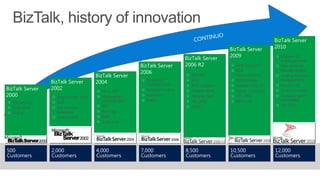
BizTalk, history of innovation
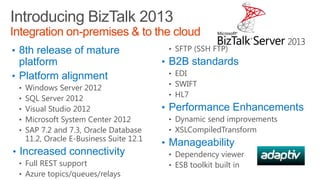
Introducing BizTalk 2013
Integration on-premises & to the cloud
• 8th release of mature

platform
• Platform alignment
•
•
•
•
•

Windows Server 2012
SQL Server 2012
Visual Studio 2012
Microsoft System Center 2012
SAP 7.2 and 7.3, Oracle Database
11.2, Oracle E-Business Suite 12.1

• Increased connectivity
• Full REST support
• Azure topics/queues/relays

• SFTP (SSH FTP)

• B2B standards
• EDI
• SWIFT
• HL7

• Performance Enhancements
• Dynamic send improvements
• XSLCompiledTransform

• Manageability
• Dependency viewer
• ESB toolkit built in
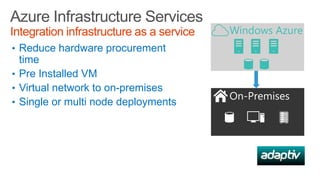
Azure Infrastructure Services
Integration infrastructure as a service
• Reduce hardware procurement

time
• Pre Installed VM
• Virtual network to on-premises
• Single or multi node deployments
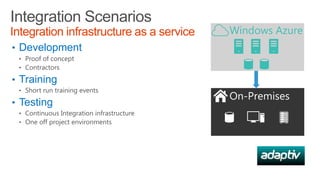
Integration Scenarios
Integration infrastructure as a service
• Development
• Proof of concept
• Contractors

• Training
• Short run training events

• Testing
• Continuous Integration infrastructure
• One off project environments
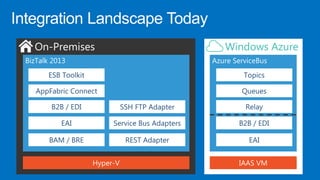
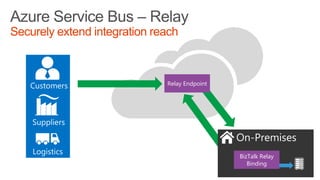
Azure Service Bus – Relay
Securely extend integration reach

Relay Endpoint

BizTalk Relay
Binding
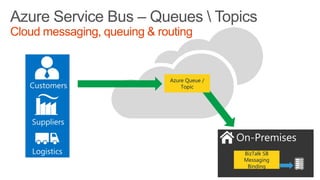
Azure Service Bus – Queues  Topics
Cloud messaging, queuing & routing

Azure Queue /
Topic

BizTalk SB
Messaging
Binding
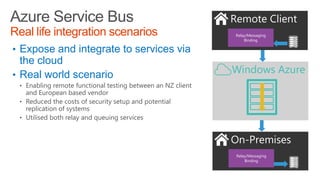
Azure Service Bus
Real life integration scenarios

Relay/Messaging
Binding

• Expose and integrate to services via

the cloud
• Real world scenario
• Enabling remote functional testing between an NZ client

and European based vendor
• Reduced the costs of security setup and potential
replication of systems
• Utilised both relay and queuing services

Relay/Messaging
Binding
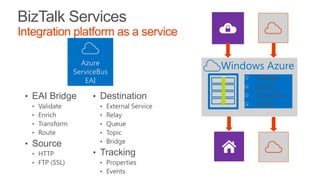
BizTalk Services
Integration platform as a service

• EAI Bridge
•
•
•
•

Validate
Enrich
Transform
Route

• Source
• HTTP
• FTP (SSL)

• Destination
•
•
•
•
•

External Service
Relay
Queue
Topic
Bridge

• Tracking
• Properties
• Events

Validate
Enrich
Transform
Route
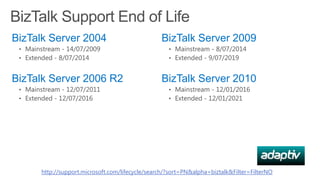
BizTalk Support End of Life
BizTalk Server 2004

BizTalk Server 2009

• Mainstream - 14/07/2009
• Extended - 8/07/2014

• Mainstream - 8/07/2014
• Extended - 9/07/2019

BizTalk Server 2006 R2
• Mainstream - 12/07/2011
• Extended - 12/07/2016

BizTalk Server 2010
• Mainstream - 12/01/2016
• Extended - 12/01/2021

http://support.microsoft.com/lifecycle/search/?sort=PN&alpha=biztalk&Filter=FilterNO
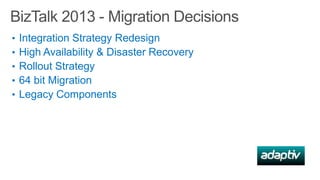
BizTalk 2013 - Migration Decisions
•
•
•
•
•

Integration Strategy Redesign
High Availability & Disaster Recovery
Rollout Strategy
64 bit Migration
Legacy Components
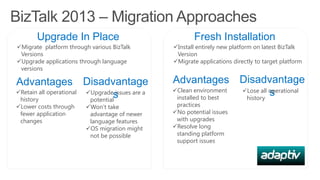
BizTalk 2013 – Migration Approaches
Upgrade In Place

Fresh Installation

Migrate platform through various BizTalk
Versions
Upgrade applications through language
versions

Install entirely new platform on latest BizTalk
Version
Migrate applications directly to target platform

Advantages Disadvantage
Retain all operational
Upgrade issues are a
s
history
potential

Advantages Disadvantage
Clean environment
Lose all operational
s
installed to best
history

Lower costs through
fewer application
changes

Won’t take
advantage of newer
language features
OS migration might
not be possible

practices
No potential issues
with upgrades
Resolve long
standing platform
support issues
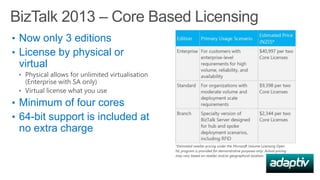
BizTalk 2013 – Core Based Licensing
• Now only 3 editions
• License by physical or

virtual
• Physical allows for unlimited virtualisation

(Enterprise with SA only)
• Virtual license what you use

• Minimum of four cores
• 64-bit support is included at

no extra charge
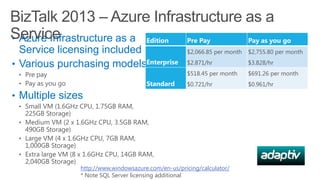
BizTalk 2013 – Azure Infrastructure as a
Service
• Azure Infrastructure as a Edition
Pre Pay
Pay as you go
Service licensing included
• Various purchasing modelsEnterprise
• Pre pay
• Pay as you go

Standard

$2,066.85 per month

$2,755.80 per month

$2.871/hr

$3.828/hr

$518.45 per month

$691.26 per month

$0.721/hr

$0.961/hr

• Multiple sizes
• Small VM (1.6GHz CPU, 1.75GB RAM,

225GB Storage)
• Medium VM (2 x 1.6GHz CPU, 3.5GB RAM,
490GB Storage)
• Large VM (4 x 1.6GHz CPU, 7GB RAM,
1,000GB Storage)
• Extra large VM (8 x 1.6GHz CPU, 14GB RAM,
2,040GB Storage)

http://www.windowsazure.com/en-us/pricing/calculator/
* Note SQL Server licensing additional
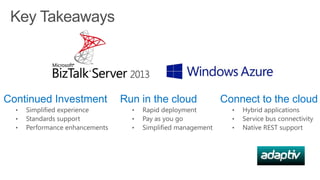
Key Takeaways

Continued Investment

Run in the cloud

Connect to the cloud
Thank you
Visit microsoft.com/biztalk

Biztalk 2013 Launch Briefing

  • 1.
    BizTalk 2013 Overview Nikolai Blackie PrincipalArchitect - Adaptiv Integration
  • 3.
  • 4.
    Introducing BizTalk 2013 Integrationon-premises & to the cloud • 8th release of mature platform • Platform alignment • • • • • Windows Server 2012 SQL Server 2012 Visual Studio 2012 Microsoft System Center 2012 SAP 7.2 and 7.3, Oracle Database 11.2, Oracle E-Business Suite 12.1 • Increased connectivity • Full REST support • Azure topics/queues/relays • SFTP (SSH FTP) • B2B standards • EDI • SWIFT • HL7 • Performance Enhancements • Dynamic send improvements • XSLCompiledTransform • Manageability • Dependency viewer • ESB toolkit built in
  • 6.
    Azure Infrastructure Services Integrationinfrastructure as a service • Reduce hardware procurement time • Pre Installed VM • Virtual network to on-premises • Single or multi node deployments
  • 7.
    Integration Scenarios Integration infrastructureas a service • Development • Proof of concept • Contractors • Training • Short run training events • Testing • Continuous Integration infrastructure • One off project environments
  • 8.
    Azure Service Bus– Relay Securely extend integration reach Relay Endpoint BizTalk Relay Binding
  • 9.
    Azure Service Bus– Queues Topics Cloud messaging, queuing & routing Azure Queue / Topic BizTalk SB Messaging Binding
  • 10.
    Azure Service Bus Reallife integration scenarios Relay/Messaging Binding • Expose and integrate to services via the cloud • Real world scenario • Enabling remote functional testing between an NZ client and European based vendor • Reduced the costs of security setup and potential replication of systems • Utilised both relay and queuing services Relay/Messaging Binding
  • 11.
    BizTalk Services Integration platformas a service • EAI Bridge • • • • Validate Enrich Transform Route • Source • HTTP • FTP (SSL) • Destination • • • • • External Service Relay Queue Topic Bridge • Tracking • Properties • Events Validate Enrich Transform Route
  • 12.
    BizTalk Support Endof Life BizTalk Server 2004 BizTalk Server 2009 • Mainstream - 14/07/2009 • Extended - 8/07/2014 • Mainstream - 8/07/2014 • Extended - 9/07/2019 BizTalk Server 2006 R2 • Mainstream - 12/07/2011 • Extended - 12/07/2016 BizTalk Server 2010 • Mainstream - 12/01/2016 • Extended - 12/01/2021 http://support.microsoft.com/lifecycle/search/?sort=PN&alpha=biztalk&Filter=FilterNO
  • 13.
    BizTalk 2013 -Migration Decisions • • • • • Integration Strategy Redesign High Availability & Disaster Recovery Rollout Strategy 64 bit Migration Legacy Components
  • 14.
    BizTalk 2013 –Migration Approaches Upgrade In Place Fresh Installation Migrate platform through various BizTalk Versions Upgrade applications through language versions Install entirely new platform on latest BizTalk Version Migrate applications directly to target platform Advantages Disadvantage Retain all operational Upgrade issues are a s history potential Advantages Disadvantage Clean environment Lose all operational s installed to best history Lower costs through fewer application changes Won’t take advantage of newer language features OS migration might not be possible practices No potential issues with upgrades Resolve long standing platform support issues
  • 15.
    BizTalk 2013 –Core Based Licensing • Now only 3 editions • License by physical or virtual • Physical allows for unlimited virtualisation (Enterprise with SA only) • Virtual license what you use • Minimum of four cores • 64-bit support is included at no extra charge
  • 16.
    BizTalk 2013 –Azure Infrastructure as a Service • Azure Infrastructure as a Edition Pre Pay Pay as you go Service licensing included • Various purchasing modelsEnterprise • Pre pay • Pay as you go Standard $2,066.85 per month $2,755.80 per month $2.871/hr $3.828/hr $518.45 per month $691.26 per month $0.721/hr $0.961/hr • Multiple sizes • Small VM (1.6GHz CPU, 1.75GB RAM, 225GB Storage) • Medium VM (2 x 1.6GHz CPU, 3.5GB RAM, 490GB Storage) • Large VM (4 x 1.6GHz CPU, 7GB RAM, 1,000GB Storage) • Extra large VM (8 x 1.6GHz CPU, 14GB RAM, 2,040GB Storage) http://www.windowsazure.com/en-us/pricing/calculator/ * Note SQL Server licensing additional
  • 17.
    Key Takeaways Continued Investment Runin the cloud Connect to the cloud
  • 18.