Integrating BIRT Within Your Applications Mica J. Block Director, Actuate Corporate Engineers
Agenda BIRT Overview BIRT Scripting BIRT Engine(s) Overview Deploying BIRT Deploying the BIRT Viewer Deploying a custom Servlet, which calls the BIRT APIs RCP Deployment
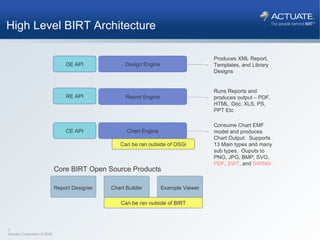
Design Engine Report Engine Chart Engine Produces XML Report, Templates, and Library Designs Runs Reports and produces output – PDF, HTML, Doc, XLS, PS, PPT Etc Consume Chart EMF model and produces Chart Output.  Supports 13 Main types and many sub types.  Ouputs to PNG, JPG, BMP, SVG,  PDF ,  SWT , and  SWING DE API RE API CE API Can be ran outside of OSGi Report Designer Chart Builder Example Viewer Can be ran outside of BIRT Core BIRT Open Source Products High Level BIRT Architecture
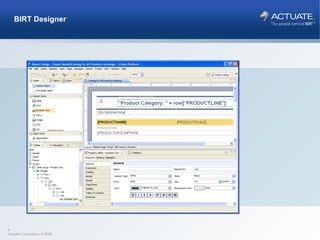
BIRT Designer
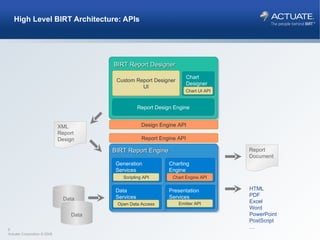
High Level BIRT Architecture: APIs BIRT Report Engine Presentation Services Generation Services Data Services Charting Engine BIRT Report Designer Report Design Engine Eclipse Report Designer Chart Designer Eclipse  DTP, WTP,… XML Report Design Report Document HTML PDF Excel Word PowerPoint PostScript … Data Data Custom Report Designer UI Report Engine API Open Data Access Chart Engine API Emitter API Chart UI API Scripting API Design Engine API
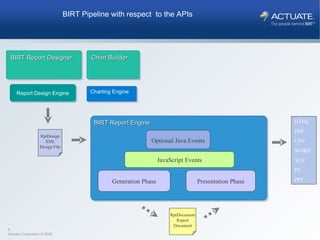
BIRT Report Engine JavaScript Events Optional Java Events Generation Phase Presentation Phase HTML PDF CSV WORD XLS PS PPT RptDocument Report Document BIRT Report Designer Chart Builder Report Design Engine Charting Engine RptDesign XML Design File BIRT Pipeline with respect  to the APIs
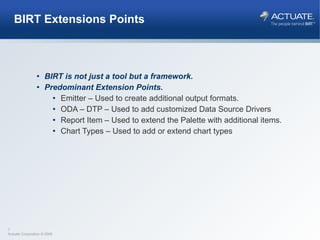
BIRT Extensions Points BIRT is not just a tool but a framework. Predominant Extension Points. Emitter – Used to create additional output formats. ODA – DTP – Used to add customized Data Source Drivers Report Item – Used to extend the Palette with additional items. Chart Types – Used to add or extend chart types
Agenda BIRT Scripting
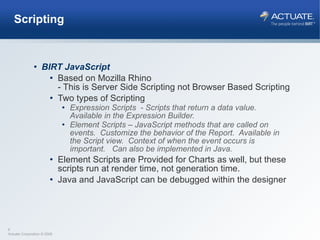
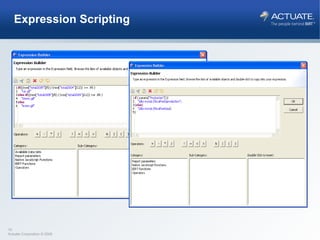
Scripting BIRT JavaScript Based on Mozilla Rhino - This is Server Side Scripting not Browser Based Scripting Two types of Scripting Expression Scripts  - Scripts that return a data value.  Available in the Expression Builder. Element Scripts – JavaScript methods that are called on events.  Customize the behavior of the Report.  Available in the Script view.  Context of when the event occurs is important.  Can also be implemented in Java. Element Scripts are Provided for Charts as well, but these scripts run at render time, not generation time. Java and JavaScript can be debugged within the designer
Expression Scripting
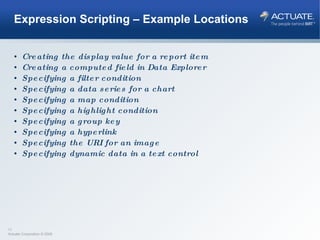
Expression Scripting – Example Locations Creating the display value for a report item Creating a computed field in Data Explorer Specifying a filter condition Specifying a data series for a chart Specifying a map condition Specifying a highlight condition Specifying a group key Specifying a hyperlink Specifying the URI for an image Specifying dynamic data in a text control
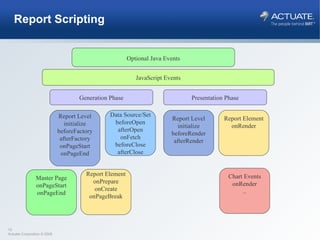
Report Scripting JavaScript Events Generation Phase Report Level initialize beforeFactory afterFactory onPageStart onPageEnd Data Source/Set beforeOpen afterOpen onFetch beforeClose afterClose Report Element onPrepare onCreate onPageBreak Report Level initialize beforeRender afterRender Presentation Phase Report Element onRender Optional Java Events Chart Events onRender .. Master Page onPageStart onPageEnd
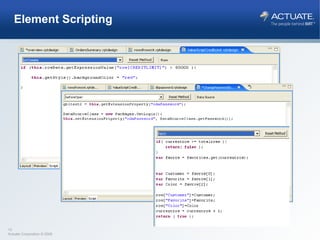
Element Scripting
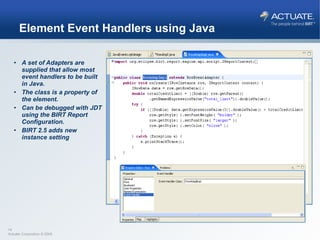
Element Event Handlers using Java A set of Adapters are supplied that allow most event handlers to be built in Java. The class is a property of the element. Can be debugged with JDT using the BIRT Report Configuration. BIRT 2.5 adds new instance setting
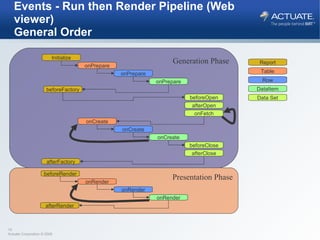
Events - Run then Render Pipeline (Web viewer)  General Order Generation Phase Initialize onPrepare beforeFactory beforeOpen afterOpen onFetch onPrepare onPrepare onCreate beforeClose afterClose onCreate onCreate Table Row DataItem Data Set Report afterFactory Presentation Phase beforeRender onRender onRender onRender afterRender
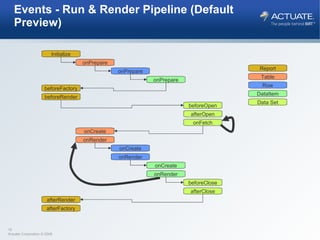
Events - Run & Render Pipeline (Default Preview) Initialize onPrepare beforeFactory beforeRender beforeOpen afterOpen onFetch onPrepare onPrepare onCreate onRender beforeClose afterClose onCreate onRender onCreate onRender afterRender afterFactory Table Row DataItem Data Set Report
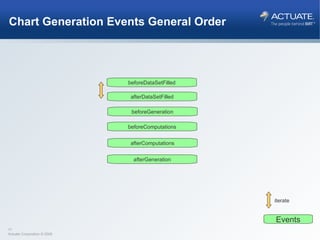
Chart Generation Events General Order beforeDataSetFilled iterate Events afterDataSetFilled beforeGeneration beforeComputations afterComputations afterGeneration
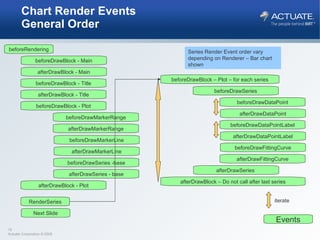
Chart Render Events General Order beforeRendering Next Slide beforeDrawBlock - Main afterDrawBlock - Main beforeDrawBlock - Title afterDrawBlock - Title beforeDrawBlock - Plot beforeDrawMarkerRange afterDrawMarkerRange beforeDrawMarkerLine afterDrawMarkerLine beforeDrawSeries -base afterDrawSeries - base afterDrawBlock - Plot beforeDrawBlock – Plot – for each series beforeDrawSeries beforeDrawDataPoint afterDrawDataPoint beforeDrawFittingCurve afterDrawFittingCurve afterDrawSeries  afterDrawBlock – Do not call after last series beforeDrawDataPointLabel afterDrawDataPointLabel Series Render Event order vary depending on Renderer – Bar chart shown RenderSeries iterate Events
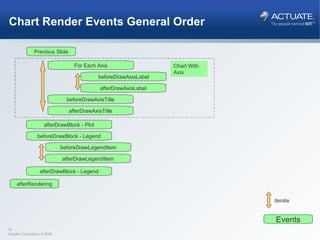
Chart Render Events General Order Previous Slide afterRendering For Each Axis beforeDrawAxisLabel afterDrawAxisLabel beforeDrawAxisTitle afterDrawAxisTitle afterDrawBlock - Plot iterate Chart With Axis beforeDrawBlock - Legend beforeDrawLegendItem afterDrawLegendItem afterDrawBlock - Legend Events
BIRT Scripting Demo DEMO
Agenda BIRT Engine(s) Overview
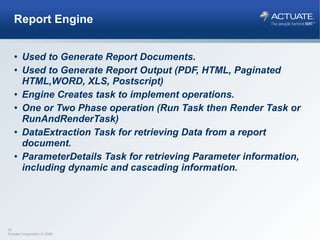
Report Engine Used to Generate Report Documents. Used to Generate Report Output (PDF, HTML, Paginated HTML,WORD, XLS, Postscript) Engine Creates task to implement operations. One or Two Phase operation (Run Task then Render Task or RunAndRenderTask) DataExtraction Task for retrieving Data from a report document. ParameterDetails Task for retrieving Parameter information, including dynamic and cascading information.
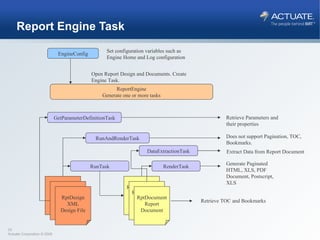
Report Engine Task EngineConfig Set configuration variables such as Engine Home and Log configuration ReportEngine Generate one or more tasks Open Report Design and Documents. Create Engine Task. DataExtractionTask GetParameterDefinitionTask RunTask RenderTask RunAndRenderTask Retrieve Parameters and their properties Does not support Pagination, TOC, Bookmarks. Generate Paginated HTML, XLS, PDF Document, Postscript, XLS Retrieve TOC and Bookmarks Extract Data from Report Document RptDesign XML Design File RptDesign XML Design File RptDesign XML Design File RptDocument Report Document RptDocument Report Document RptDocument Report Document
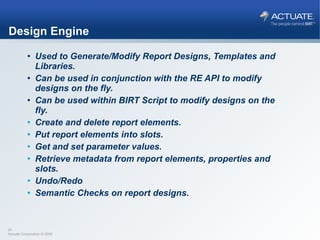
Design Engine Used to Generate/Modify Report Designs, Templates and Libraries. Can be used in conjunction with the RE API to modify designs on the fly. Can be used within BIRT Script to modify designs on the fly. Create and delete report elements. Put report elements into slots. Get and set parameter values. Retrieve metadata from report elements, properties and slots. Undo/Redo Semantic Checks on report designs.
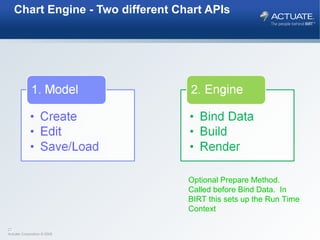
Chart Engine - Two different Chart APIs Optional Prepare Method. Called before Bind Data.  In BIRT this sets up the Run Time Context
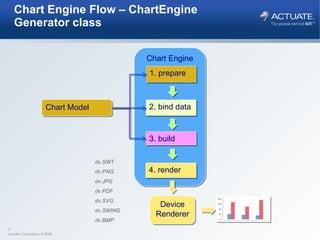
Chart Engine Flow – ChartEngine Generator class Chart Engine Chart Model 2. bind data 3. build 4. render Device Renderer 1. prepare dv.SWT  dv.PNG  dv.JPG  dv.PDF  dv.SVG  dv.SWING dv.BMP
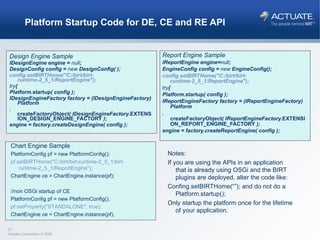
Platform Startup Code for DE, CE and RE API Design Engine Sample IDesignEngine engine =  null ; DesignConfig config =  new  DesignConfig( ); config.setBIRTHome("C:/birt/birt-runtime-2_5_1/ReportEngine"); try { Platform. startup ( config ); IDesignEngineFactory factory = (IDesignEngineFactory) Platform . createFactoryObject ( IDesignEngineFactory. EXTENSION_DESIGN_ENGINE_FACTORY  ); engine = factory.createDesignEngine( config ); Report Engine Sample IReportEngine engine= null ; EngineConfig config =  new  EngineConfig(); config.setBIRTHome("C:/birt/birt-runtime-2_5_1/ReportEngine"); try { Platform. startup ( config ); IReportEngineFactory factory = (IReportEngineFactory) Platform . createFactoryObject ( IReportEngineFactory. EXTENSION_REPORT_ENGINE_FACTORY  ); engine = factory.createReportEngine( config ); Chart Engine Sample PlatformConfig pf = new PlatformConfig(); pf.setBIRTHome("C:/birt/birt-runtime-2_5_1/birt-runtime-2_5_1/ReportEngine"); ChartEngine ce = ChartEngine.instance(pf); //non OSGi startup of CE  PlatformConfig pf = new PlatformConfig(); pf.setProperty("STANDALONE", true); ChartEngine ce = ChartEngine.instance(pf); Notes: If you are using the APIs in an application that is already using OSGi and the BIRT plugins are deployed, alter the code like: Confing.setBIRTHome(“”); and do not do a Platform.startup(); Only startup the platform once for the lifetime of your application.
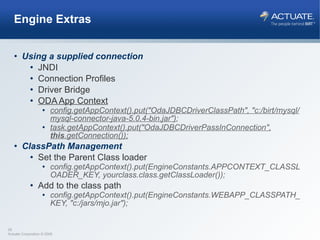
Engine Extras Using a supplied connection JNDI Connection Profiles Driver Bridge ODA App Context config.getAppContext().put("OdaJDBCDriverClassPath", "c:/birt/mysql/mysql-connector-java-5.0.4-bin.jar") ; task.getAppContext().put("OdaJDBCDriverPassInConnection",  this .getConnection()); ClassPath Management Set the Parent Class loader config.getAppContext().put(EngineConstants.APPCONTEXT_CLASSLOADER_KEY, yourclass.class.getClassLoader()); Add to the class path config.getAppContext().put(EngineConstants.WEBAPP_CLASSPATH_KEY, "c:/jars/mjo.jar");
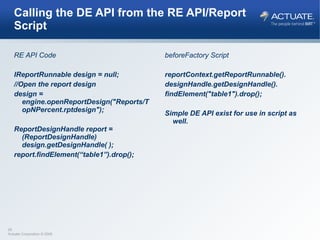
Calling the DE API from the RE API/Report Script RE API Code IReportRunnable design = null; //Open the report design design = engine.openReportDesign("Reports/TopNPercent.rptdesign");  ReportDesignHandle report = (ReportDesignHandle) design.getDesignHandle( ); report.findElement(“table1”).drop(); beforeFactory Script reportContext.getReportRunnable(). designHandle.getDesignHandle(). findElement("table1").drop(); Simple DE API exist for use in script as well.
Agenda BIRT Deployment
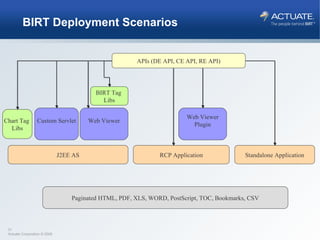
BIRT Deployment Scenarios APIs (DE API, CE API, RE API) Web Viewer J2EE AS Custom Servlet BIRT Tag  Libs RCP Application Standalone Application Web Viewer Plugin Paginated HTML, PDF, XLS, WORD, PostScript, TOC, Bookmarks, CSV Chart Tag  Libs
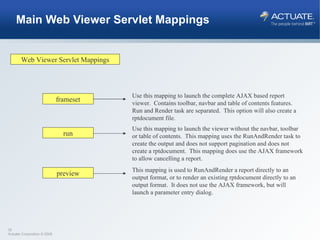
Main Web Viewer Servlet Mappings Web Viewer Servlet Mappings frameset run preview Use this mapping to launch the complete AJAX based report viewer.  Contains toolbar, navbar and table of contents features.  Run and Render task are separated.  This option will also create a rptdocument file. Use this mapping to launch the viewer without the navbar, toolbar or table of contents.  This mapping uses the RunAndRender task to create the output and does not support pagination and does not create a rptdocument.  This mapping does use the AJAX framework to allow cancelling a report. This mapping is used to RunAndRender a report directly to an output format, or to render an existing rptdocument directly to an output format.  It does not use the AJAX framework, but will launch a parameter entry dialog.
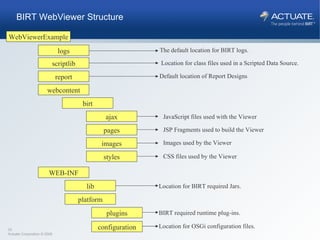
WebViewerExample plugins logs scriptlib WEB-INF lib BIRT required runtime plug-ins. The default location for BIRT logs. Location for BIRT required Jars. platform configuration Location for OSGi configuration files. report webcontent birt ajax pages images styles Location for class files used in a Scripted Data Source. Default location of Report Designs JavaScript files used with the Viewer JSP Fragments used to build the Viewer Images used by the Viewer CSS files used by the Viewer BIRT WebViewer Structure
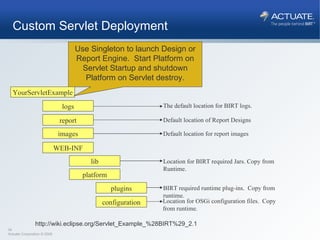
YourServletExample plugins logs WEB-INF lib BIRT required runtime plug-ins.  Copy from runtime. The default location for BIRT logs. Location for BIRT required Jars. Copy from Runtime. platform configuration Location for OSGi configuration files.  Copy from runtime. report images Default location of Report Designs Default location for report images Custom Servlet Deployment Use Singleton to launch Design or Report Engine.  Start Platform on Servlet Startup and shutdown Platform on Servlet destroy. http://wiki.eclipse.org/Servlet_Example_%28BIRT%29_2.1
RCP Deployment Using the BIRT Plug-ins in Eclipse based applications
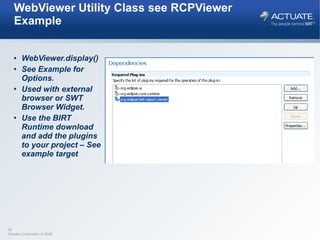
WebViewer Utility Class see RCPViewer Example WebViewer.display() See Example for Options. Used with external browser or SWT Browser Widget. Use the BIRT Runtime download and add the plugins to your project – See example target
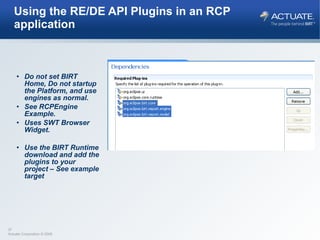
Using the RE/DE API Plugins in an RCP application Do not set BIRT Home, Do not startup the Platform, and use engines as normal. See RCPEngine Example. Uses SWT Browser Widget. Use the BIRT Runtime download and add the plugins to your project – See example target
BIRT Engine and Deployment Demo http://www.birt-exchange.org/devshare/deploying-birt-reports/1061-birt-api-examples/#description   http://www.birt-exchange.org/devshare/deploying-birt-reports/1060-scripting-event-handler-samples/#description   DEMO
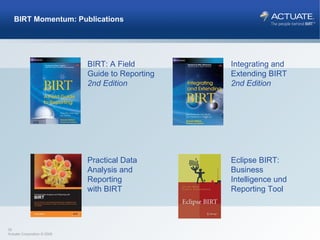
BIRT Momentum: Publications BIRT: A Field  Guide to Reporting 2nd Edition Integrating and  Extending BIRT 2nd Edition Practical Data Analysis and Reporting  with BIRT Eclipse BIRT: Business Intelligence und Reporting Tool
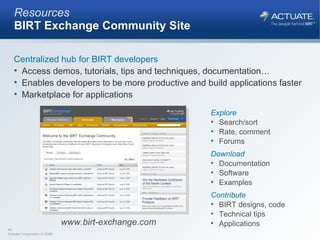
Resources BIRT Exchange Community Site Centralized hub for BIRT developers Access demos, tutorials, tips and techniques, documentation… Enables developers to be more productive and build applications faster Marketplace for applications Explore Search/sort Rate, comment Forums Download Documentation Software Examples Contribute BIRT designs, code Technical tips Applications www.birt-exchange.com

Birt Integration

  • 1.
    Integrating BIRT WithinYour Applications Mica J. Block Director, Actuate Corporate Engineers
  • 2.
    Agenda BIRT OverviewBIRT Scripting BIRT Engine(s) Overview Deploying BIRT Deploying the BIRT Viewer Deploying a custom Servlet, which calls the BIRT APIs RCP Deployment
  • 3.
    Design Engine ReportEngine Chart Engine Produces XML Report, Templates, and Library Designs Runs Reports and produces output – PDF, HTML, Doc, XLS, PS, PPT Etc Consume Chart EMF model and produces Chart Output. Supports 13 Main types and many sub types. Ouputs to PNG, JPG, BMP, SVG, PDF , SWT , and SWING DE API RE API CE API Can be ran outside of OSGi Report Designer Chart Builder Example Viewer Can be ran outside of BIRT Core BIRT Open Source Products High Level BIRT Architecture
  • 4.
  • 5.
    High Level BIRTArchitecture: APIs BIRT Report Engine Presentation Services Generation Services Data Services Charting Engine BIRT Report Designer Report Design Engine Eclipse Report Designer Chart Designer Eclipse DTP, WTP,… XML Report Design Report Document HTML PDF Excel Word PowerPoint PostScript … Data Data Custom Report Designer UI Report Engine API Open Data Access Chart Engine API Emitter API Chart UI API Scripting API Design Engine API
  • 6.
    BIRT Report EngineJavaScript Events Optional Java Events Generation Phase Presentation Phase HTML PDF CSV WORD XLS PS PPT RptDocument Report Document BIRT Report Designer Chart Builder Report Design Engine Charting Engine RptDesign XML Design File BIRT Pipeline with respect to the APIs
  • 7.
    BIRT Extensions PointsBIRT is not just a tool but a framework. Predominant Extension Points. Emitter – Used to create additional output formats. ODA – DTP – Used to add customized Data Source Drivers Report Item – Used to extend the Palette with additional items. Chart Types – Used to add or extend chart types
  • 8.
  • 9.
    Scripting BIRT JavaScriptBased on Mozilla Rhino - This is Server Side Scripting not Browser Based Scripting Two types of Scripting Expression Scripts - Scripts that return a data value. Available in the Expression Builder. Element Scripts – JavaScript methods that are called on events. Customize the behavior of the Report. Available in the Script view. Context of when the event occurs is important. Can also be implemented in Java. Element Scripts are Provided for Charts as well, but these scripts run at render time, not generation time. Java and JavaScript can be debugged within the designer
  • 10.
  • 11.
    Expression Scripting –Example Locations Creating the display value for a report item Creating a computed field in Data Explorer Specifying a filter condition Specifying a data series for a chart Specifying a map condition Specifying a highlight condition Specifying a group key Specifying a hyperlink Specifying the URI for an image Specifying dynamic data in a text control
  • 12.
    Report Scripting JavaScriptEvents Generation Phase Report Level initialize beforeFactory afterFactory onPageStart onPageEnd Data Source/Set beforeOpen afterOpen onFetch beforeClose afterClose Report Element onPrepare onCreate onPageBreak Report Level initialize beforeRender afterRender Presentation Phase Report Element onRender Optional Java Events Chart Events onRender .. Master Page onPageStart onPageEnd
  • 13.
  • 14.
    Element Event Handlersusing Java A set of Adapters are supplied that allow most event handlers to be built in Java. The class is a property of the element. Can be debugged with JDT using the BIRT Report Configuration. BIRT 2.5 adds new instance setting
  • 15.
    Events - Runthen Render Pipeline (Web viewer) General Order Generation Phase Initialize onPrepare beforeFactory beforeOpen afterOpen onFetch onPrepare onPrepare onCreate beforeClose afterClose onCreate onCreate Table Row DataItem Data Set Report afterFactory Presentation Phase beforeRender onRender onRender onRender afterRender
  • 16.
    Events - Run& Render Pipeline (Default Preview) Initialize onPrepare beforeFactory beforeRender beforeOpen afterOpen onFetch onPrepare onPrepare onCreate onRender beforeClose afterClose onCreate onRender onCreate onRender afterRender afterFactory Table Row DataItem Data Set Report
  • 17.
    Chart Generation EventsGeneral Order beforeDataSetFilled iterate Events afterDataSetFilled beforeGeneration beforeComputations afterComputations afterGeneration
  • 18.
    Chart Render EventsGeneral Order beforeRendering Next Slide beforeDrawBlock - Main afterDrawBlock - Main beforeDrawBlock - Title afterDrawBlock - Title beforeDrawBlock - Plot beforeDrawMarkerRange afterDrawMarkerRange beforeDrawMarkerLine afterDrawMarkerLine beforeDrawSeries -base afterDrawSeries - base afterDrawBlock - Plot beforeDrawBlock – Plot – for each series beforeDrawSeries beforeDrawDataPoint afterDrawDataPoint beforeDrawFittingCurve afterDrawFittingCurve afterDrawSeries afterDrawBlock – Do not call after last series beforeDrawDataPointLabel afterDrawDataPointLabel Series Render Event order vary depending on Renderer – Bar chart shown RenderSeries iterate Events
  • 19.
    Chart Render EventsGeneral Order Previous Slide afterRendering For Each Axis beforeDrawAxisLabel afterDrawAxisLabel beforeDrawAxisTitle afterDrawAxisTitle afterDrawBlock - Plot iterate Chart With Axis beforeDrawBlock - Legend beforeDrawLegendItem afterDrawLegendItem afterDrawBlock - Legend Events
  • 20.
  • 21.
  • 22.
    Report Engine Usedto Generate Report Documents. Used to Generate Report Output (PDF, HTML, Paginated HTML,WORD, XLS, Postscript) Engine Creates task to implement operations. One or Two Phase operation (Run Task then Render Task or RunAndRenderTask) DataExtraction Task for retrieving Data from a report document. ParameterDetails Task for retrieving Parameter information, including dynamic and cascading information.
  • 23.
    Report Engine TaskEngineConfig Set configuration variables such as Engine Home and Log configuration ReportEngine Generate one or more tasks Open Report Design and Documents. Create Engine Task. DataExtractionTask GetParameterDefinitionTask RunTask RenderTask RunAndRenderTask Retrieve Parameters and their properties Does not support Pagination, TOC, Bookmarks. Generate Paginated HTML, XLS, PDF Document, Postscript, XLS Retrieve TOC and Bookmarks Extract Data from Report Document RptDesign XML Design File RptDesign XML Design File RptDesign XML Design File RptDocument Report Document RptDocument Report Document RptDocument Report Document
  • 24.
    Design Engine Usedto Generate/Modify Report Designs, Templates and Libraries. Can be used in conjunction with the RE API to modify designs on the fly. Can be used within BIRT Script to modify designs on the fly. Create and delete report elements. Put report elements into slots. Get and set parameter values. Retrieve metadata from report elements, properties and slots. Undo/Redo Semantic Checks on report designs.
  • 25.
    Chart Engine -Two different Chart APIs Optional Prepare Method. Called before Bind Data. In BIRT this sets up the Run Time Context
  • 26.
    Chart Engine Flow– ChartEngine Generator class Chart Engine Chart Model 2. bind data 3. build 4. render Device Renderer 1. prepare dv.SWT dv.PNG dv.JPG dv.PDF dv.SVG dv.SWING dv.BMP
  • 27.
    Platform Startup Codefor DE, CE and RE API Design Engine Sample IDesignEngine engine = null ; DesignConfig config = new DesignConfig( ); config.setBIRTHome("C:/birt/birt-runtime-2_5_1/ReportEngine"); try { Platform. startup ( config ); IDesignEngineFactory factory = (IDesignEngineFactory) Platform . createFactoryObject ( IDesignEngineFactory. EXTENSION_DESIGN_ENGINE_FACTORY ); engine = factory.createDesignEngine( config ); Report Engine Sample IReportEngine engine= null ; EngineConfig config = new EngineConfig(); config.setBIRTHome("C:/birt/birt-runtime-2_5_1/ReportEngine"); try { Platform. startup ( config ); IReportEngineFactory factory = (IReportEngineFactory) Platform . createFactoryObject ( IReportEngineFactory. EXTENSION_REPORT_ENGINE_FACTORY ); engine = factory.createReportEngine( config ); Chart Engine Sample PlatformConfig pf = new PlatformConfig(); pf.setBIRTHome("C:/birt/birt-runtime-2_5_1/birt-runtime-2_5_1/ReportEngine"); ChartEngine ce = ChartEngine.instance(pf); //non OSGi startup of CE PlatformConfig pf = new PlatformConfig(); pf.setProperty("STANDALONE", true); ChartEngine ce = ChartEngine.instance(pf); Notes: If you are using the APIs in an application that is already using OSGi and the BIRT plugins are deployed, alter the code like: Confing.setBIRTHome(“”); and do not do a Platform.startup(); Only startup the platform once for the lifetime of your application.
  • 28.
    Engine Extras Usinga supplied connection JNDI Connection Profiles Driver Bridge ODA App Context config.getAppContext().put("OdaJDBCDriverClassPath", "c:/birt/mysql/mysql-connector-java-5.0.4-bin.jar") ; task.getAppContext().put("OdaJDBCDriverPassInConnection", this .getConnection()); ClassPath Management Set the Parent Class loader config.getAppContext().put(EngineConstants.APPCONTEXT_CLASSLOADER_KEY, yourclass.class.getClassLoader()); Add to the class path config.getAppContext().put(EngineConstants.WEBAPP_CLASSPATH_KEY, "c:/jars/mjo.jar");
  • 29.
    Calling the DEAPI from the RE API/Report Script RE API Code IReportRunnable design = null; //Open the report design design = engine.openReportDesign("Reports/TopNPercent.rptdesign"); ReportDesignHandle report = (ReportDesignHandle) design.getDesignHandle( ); report.findElement(“table1”).drop(); beforeFactory Script reportContext.getReportRunnable(). designHandle.getDesignHandle(). findElement("table1").drop(); Simple DE API exist for use in script as well.
  • 30.
  • 31.
    BIRT Deployment ScenariosAPIs (DE API, CE API, RE API) Web Viewer J2EE AS Custom Servlet BIRT Tag Libs RCP Application Standalone Application Web Viewer Plugin Paginated HTML, PDF, XLS, WORD, PostScript, TOC, Bookmarks, CSV Chart Tag Libs
  • 32.
    Main Web ViewerServlet Mappings Web Viewer Servlet Mappings frameset run preview Use this mapping to launch the complete AJAX based report viewer. Contains toolbar, navbar and table of contents features. Run and Render task are separated. This option will also create a rptdocument file. Use this mapping to launch the viewer without the navbar, toolbar or table of contents. This mapping uses the RunAndRender task to create the output and does not support pagination and does not create a rptdocument. This mapping does use the AJAX framework to allow cancelling a report. This mapping is used to RunAndRender a report directly to an output format, or to render an existing rptdocument directly to an output format. It does not use the AJAX framework, but will launch a parameter entry dialog.
  • 33.
    WebViewerExample plugins logsscriptlib WEB-INF lib BIRT required runtime plug-ins. The default location for BIRT logs. Location for BIRT required Jars. platform configuration Location for OSGi configuration files. report webcontent birt ajax pages images styles Location for class files used in a Scripted Data Source. Default location of Report Designs JavaScript files used with the Viewer JSP Fragments used to build the Viewer Images used by the Viewer CSS files used by the Viewer BIRT WebViewer Structure
  • 34.
    YourServletExample plugins logsWEB-INF lib BIRT required runtime plug-ins. Copy from runtime. The default location for BIRT logs. Location for BIRT required Jars. Copy from Runtime. platform configuration Location for OSGi configuration files. Copy from runtime. report images Default location of Report Designs Default location for report images Custom Servlet Deployment Use Singleton to launch Design or Report Engine. Start Platform on Servlet Startup and shutdown Platform on Servlet destroy. http://wiki.eclipse.org/Servlet_Example_%28BIRT%29_2.1
  • 35.
    RCP Deployment Usingthe BIRT Plug-ins in Eclipse based applications
  • 36.
    WebViewer Utility Classsee RCPViewer Example WebViewer.display() See Example for Options. Used with external browser or SWT Browser Widget. Use the BIRT Runtime download and add the plugins to your project – See example target
  • 37.
    Using the RE/DEAPI Plugins in an RCP application Do not set BIRT Home, Do not startup the Platform, and use engines as normal. See RCPEngine Example. Uses SWT Browser Widget. Use the BIRT Runtime download and add the plugins to your project – See example target
  • 38.
    BIRT Engine andDeployment Demo http://www.birt-exchange.org/devshare/deploying-birt-reports/1061-birt-api-examples/#description http://www.birt-exchange.org/devshare/deploying-birt-reports/1060-scripting-event-handler-samples/#description DEMO
  • 39.
    BIRT Momentum: PublicationsBIRT: A Field Guide to Reporting 2nd Edition Integrating and Extending BIRT 2nd Edition Practical Data Analysis and Reporting with BIRT Eclipse BIRT: Business Intelligence und Reporting Tool
  • 40.
    Resources BIRT ExchangeCommunity Site Centralized hub for BIRT developers Access demos, tutorials, tips and techniques, documentation… Enables developers to be more productive and build applications faster Marketplace for applications Explore Search/sort Rate, comment Forums Download Documentation Software Examples Contribute BIRT designs, code Technical tips Applications www.birt-exchange.com
Editor's Notes

  • #4 SWING is Graphics2D context SWT is GC context – PaintEvent.gc
  • #35 Detailed in eclipse wiki