CIS 591 Design / Final Report: ‘Birdie’
                         http://birdie.kreegerstudios.com/

                                 Benjamin Kreeger
                                    (816) 806-7096
                      kreeger545@missouristate.edu
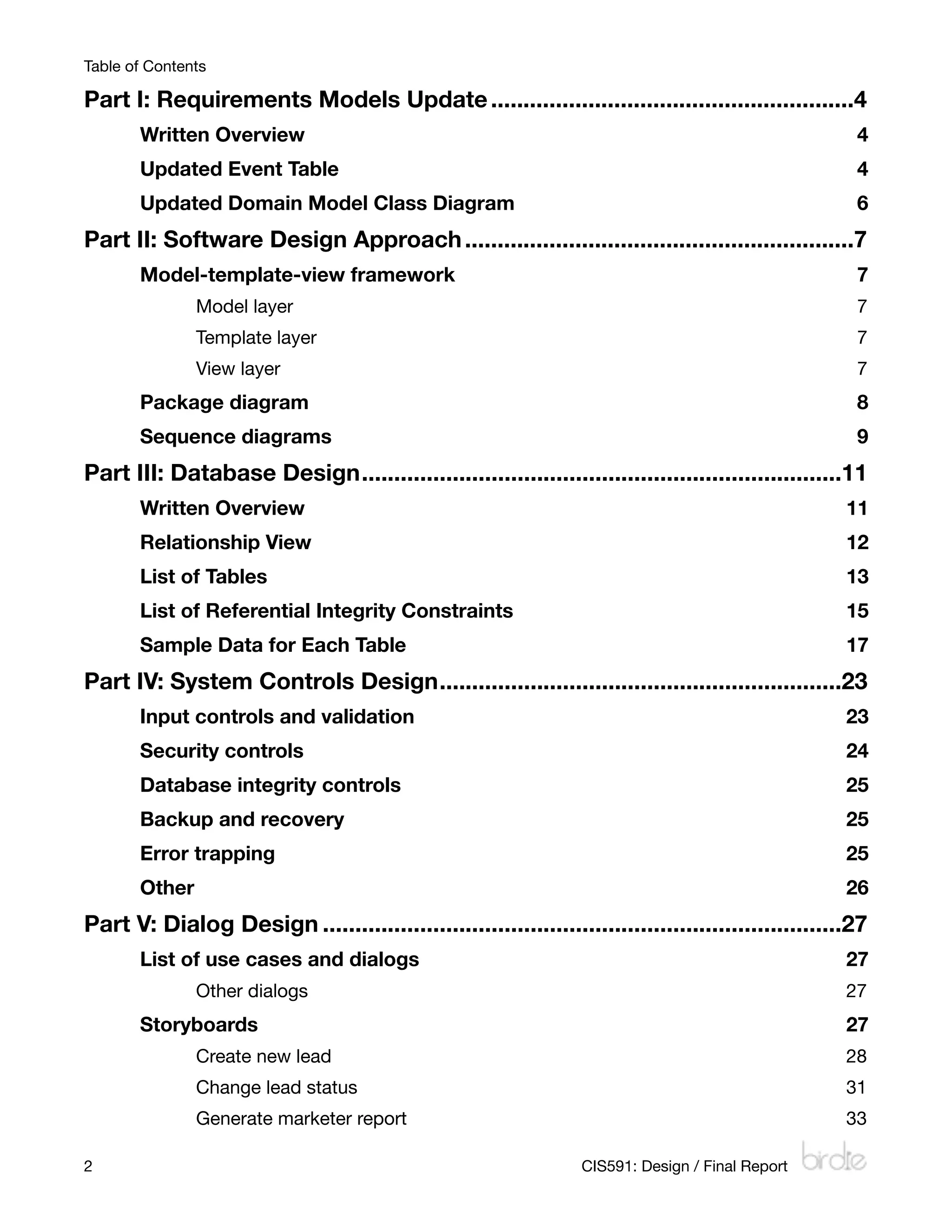
Table of Contents

Part I: Requirements Models Update
........................................................4
       Written Overview
                                                                              4
       Updated Event Table
                                                                           4
       Updated Domain Model Class Diagram
                                                            6
Part II: Software Design Approach
............................................................7
       Model-template-view framework
                                                                 7
               Model layer
                                                                           7
               Template layer
                                                                        7
               View layer
                                                                            7
       Package diagram
                                                                               8
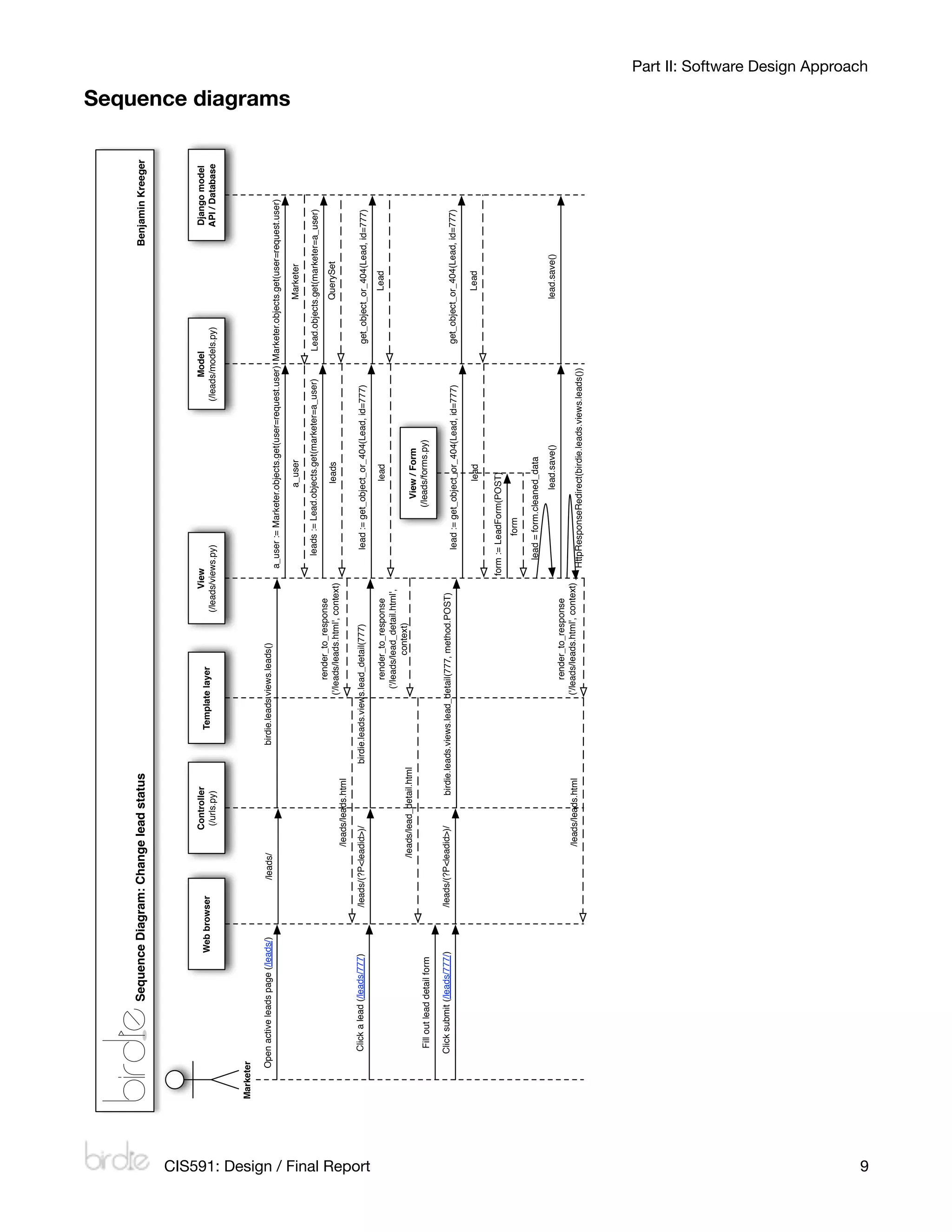
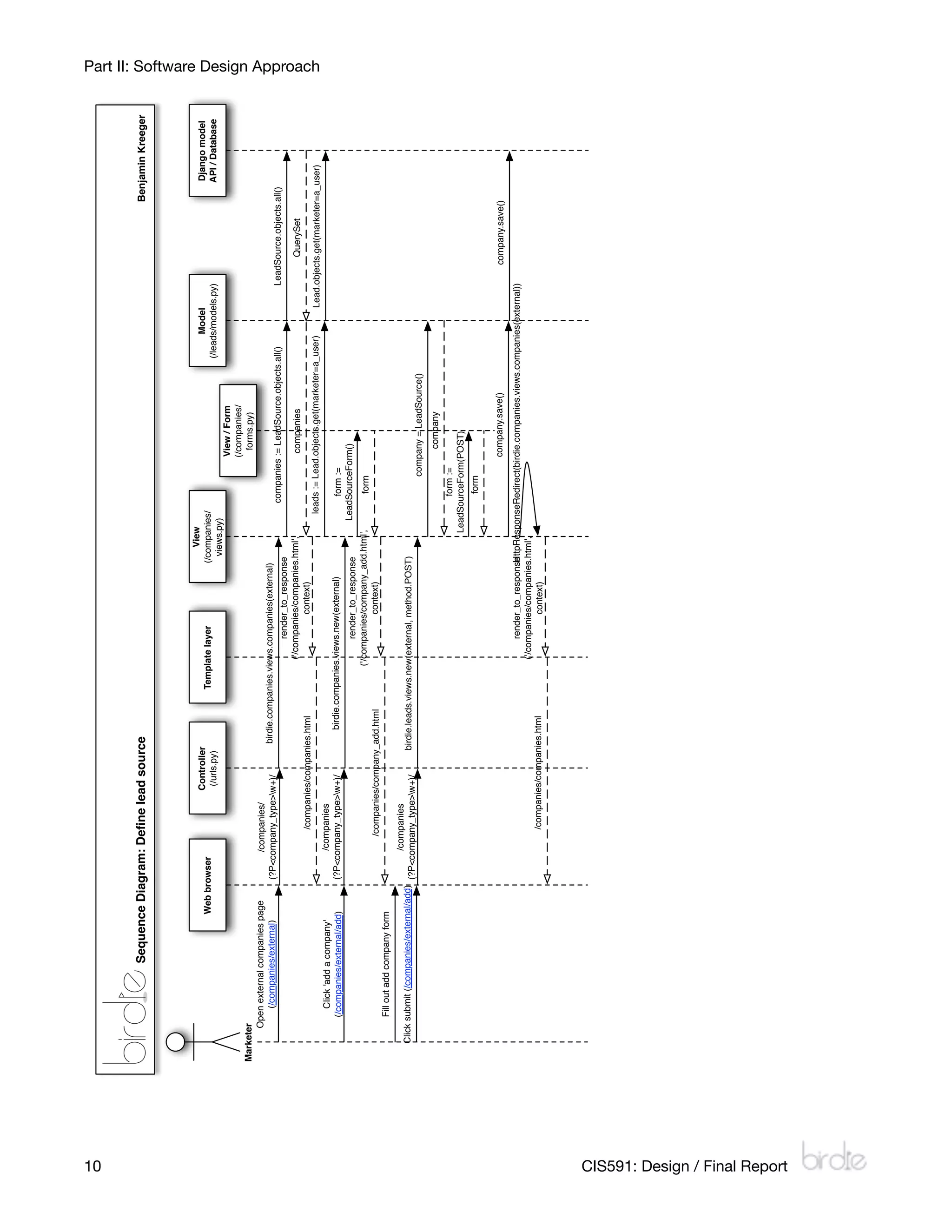
       Sequence diagrams
                                                                             9
Part III: Database Design
                         ..........................................................................11
       Written Overview
                                                                             11
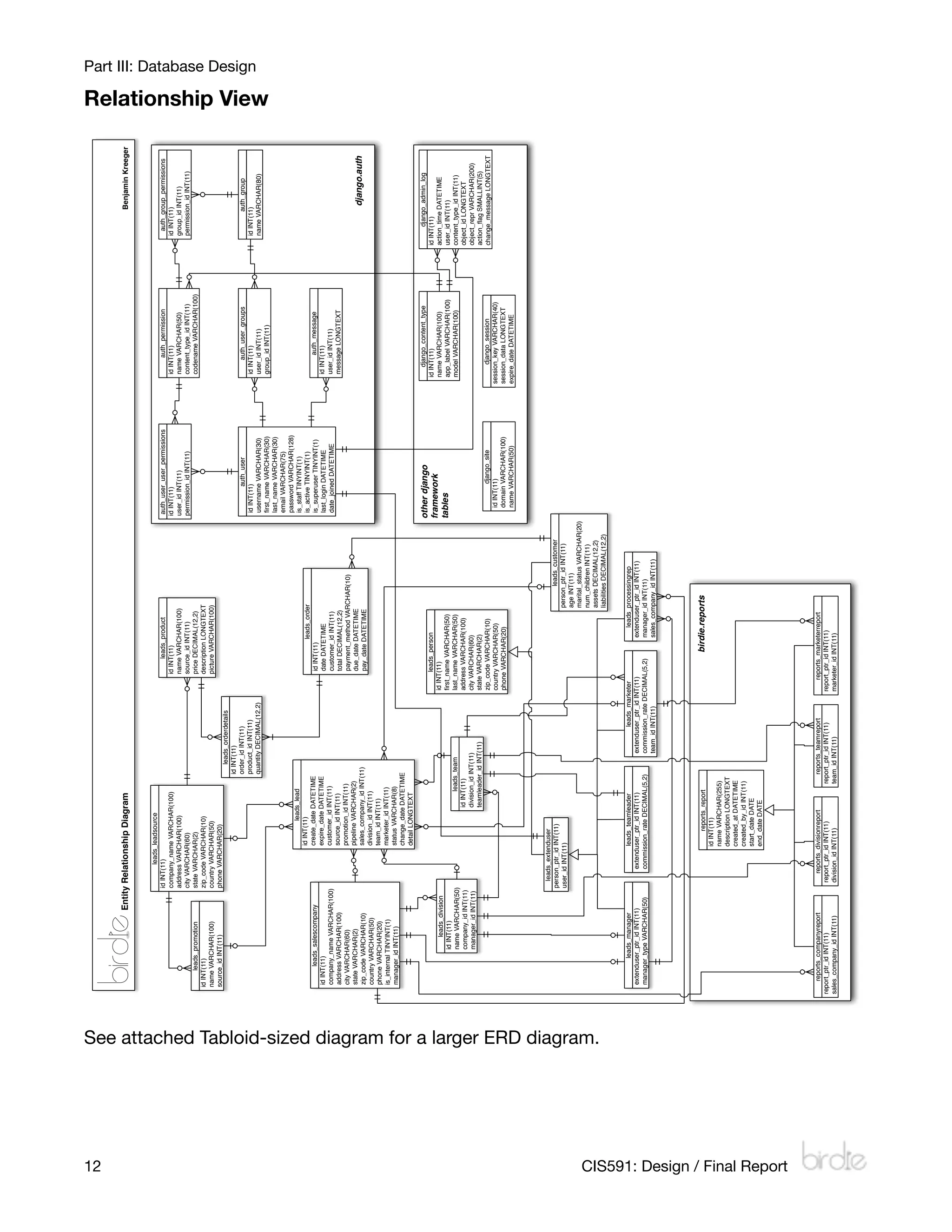
       Relationship View
                                                                            12
       List of Tables
                                                                               13
       List of Referential Integrity Constraints
                                                    15
       Sample Data for Each Table
                                                                   17
Part IV: System Controls Design
                               ..............................................................23
       Input controls and validation
                                                                23
       Security controls
                                                                            24
       Database integrity controls
                                                                  25
       Backup and recovery
                                                                          25
       Error trapping
                                                                               25
       Other
                                                                                        26
Part V: Dialog Design
................................................................................27
       List of use cases and dialogs 
                                                               27
               Other dialogs
                                                                        27
       Storyboards
                                                                                  27
               Create new lead
                                                                      28
               Change lead status
                                                                   31
               Generate marketer report
                                                             33

2
                                                                CIS591: Design / Final Report
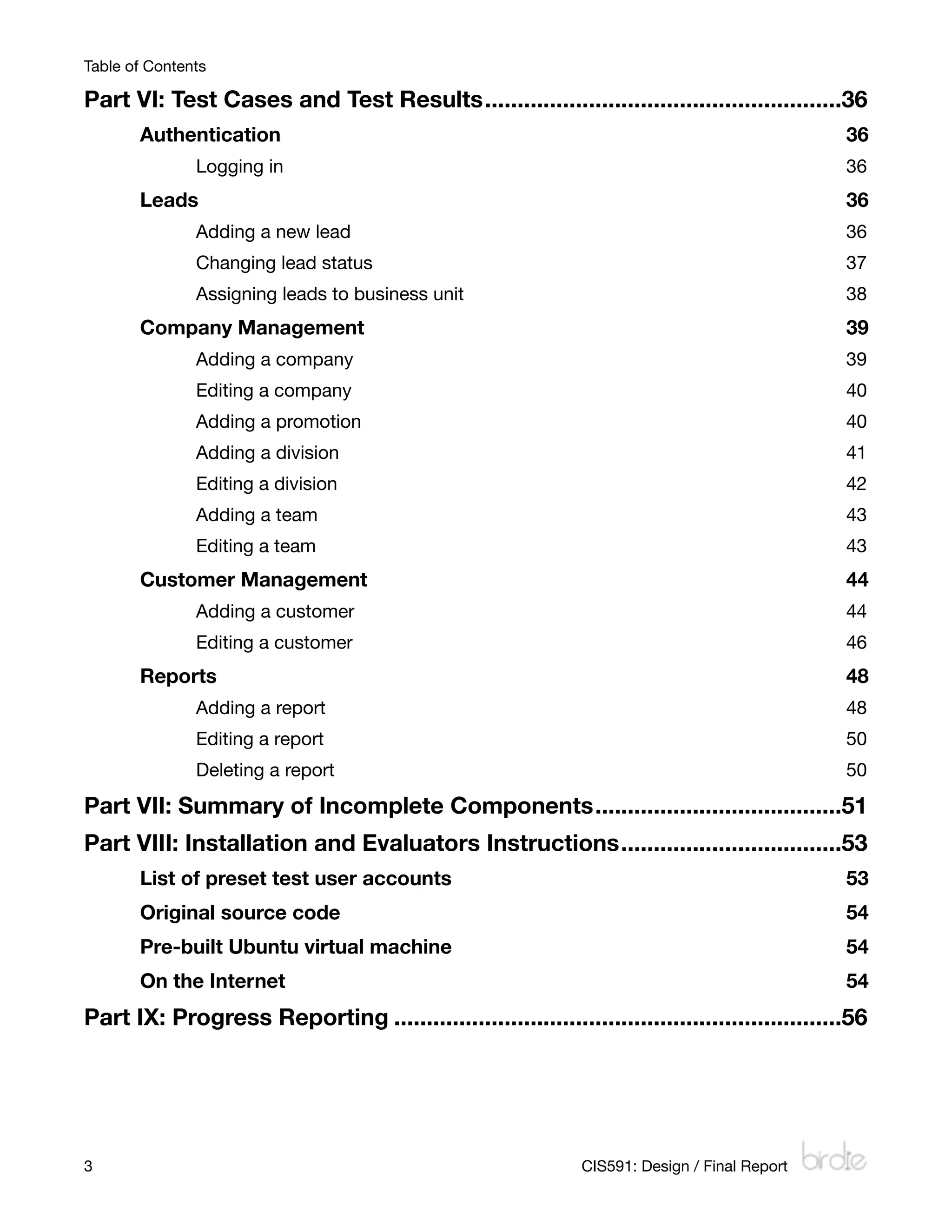
Table of Contents

Part VI: Test Cases and Test Results
.......................................................36
       Authentication
                                                                          36
               Logging in
                                                                      36
       Leads 
                                                                                  36
               Adding a new lead
                                                               36
               Changing lead status
                                                            37
               Assigning leads to business unit
                                                38
       Company Management
                                                                      39
               Adding a company
                                                                39
               Editing a company
                                                               40
               Adding a promotion
                                                              40
               Adding a division
                                                               41
               Editing a division
                                                              42
               Adding a team
                                                                   43
               Editing a team
                                                                  43
       Customer Management
                                                                     44
               Adding a customer
                                                               44
               Editing a customer
                                                              46
       Reports
                                                                                 48
               Adding a report
                                                                 48
               Editing a report
                                                                50
               Deleting a report
                                                               50

Part VII: Summary of Incomplete Components
......................................51
Part VIII: Installation and Evaluators Instructions
..................................53
       List of preset test user accounts
                                                       53
       Original source code
                                                                    54
       Pre-built Ubuntu virtual machine
                                                        54
       On the Internet
                                                                         54
Part IX: Progress Reporting
.....................................................................56


3
                                                            CIS591: Design / Final Report
Part I: System Requirements Models

Part I: Requirements Models Update
Written Overview
Some of my requirements have changed since my analysis report. In particular, I’ve
eliminated the define campaign use case, as it was somewhat redundant (and too closely
related to the define promotion use case). I’ve had to move the order/product use cases to
the back burner to finish up the core functionality of the application (the management and
tracking of sales leads), and I’ve done the same for some of the more minor aspects of leads
management (including mass import/export). I have plans in place for how those should be
implemented, and they are in the initial stages of being implemented, but I’ve had to wrap up
the project for the semester before their completion. More on those can be found in Section
VII.

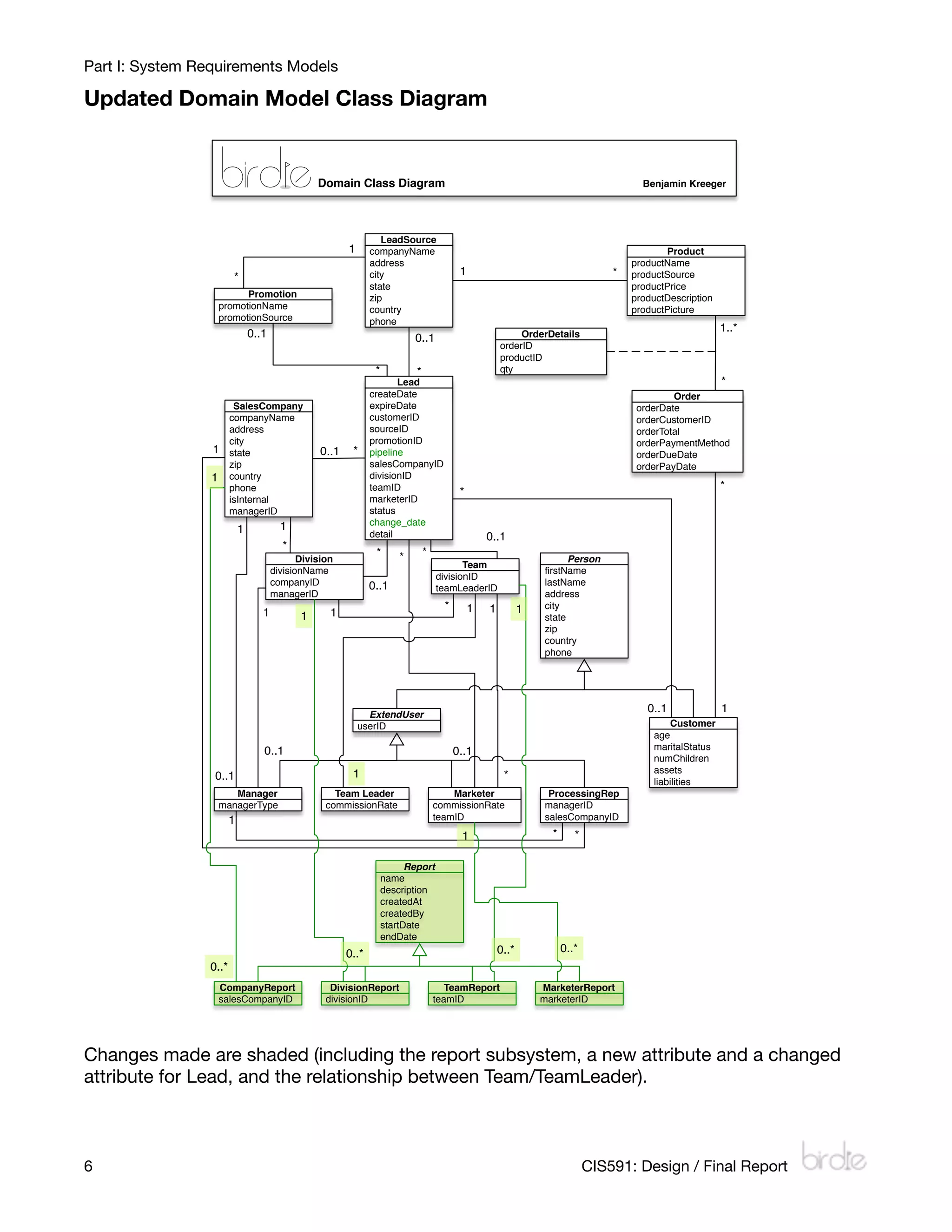
I’ve added a subset of report classes; I’ve decided that there was enough information in each
report (and more planned) that it could be worthwhile for users to save the reports they create
in the system. Thus, a report class was made with four subclasses (each according to a
certain kind of report).

Updated Event Table
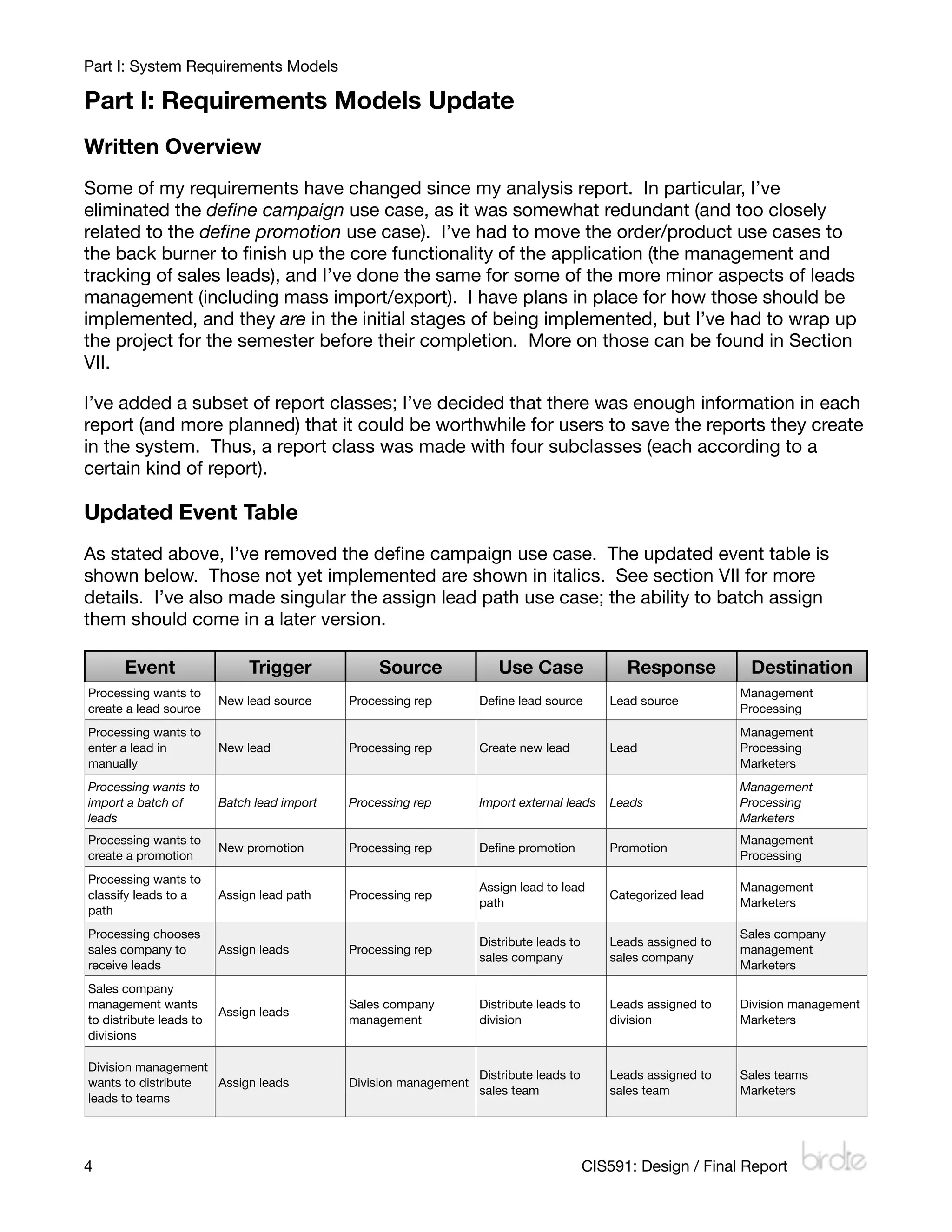
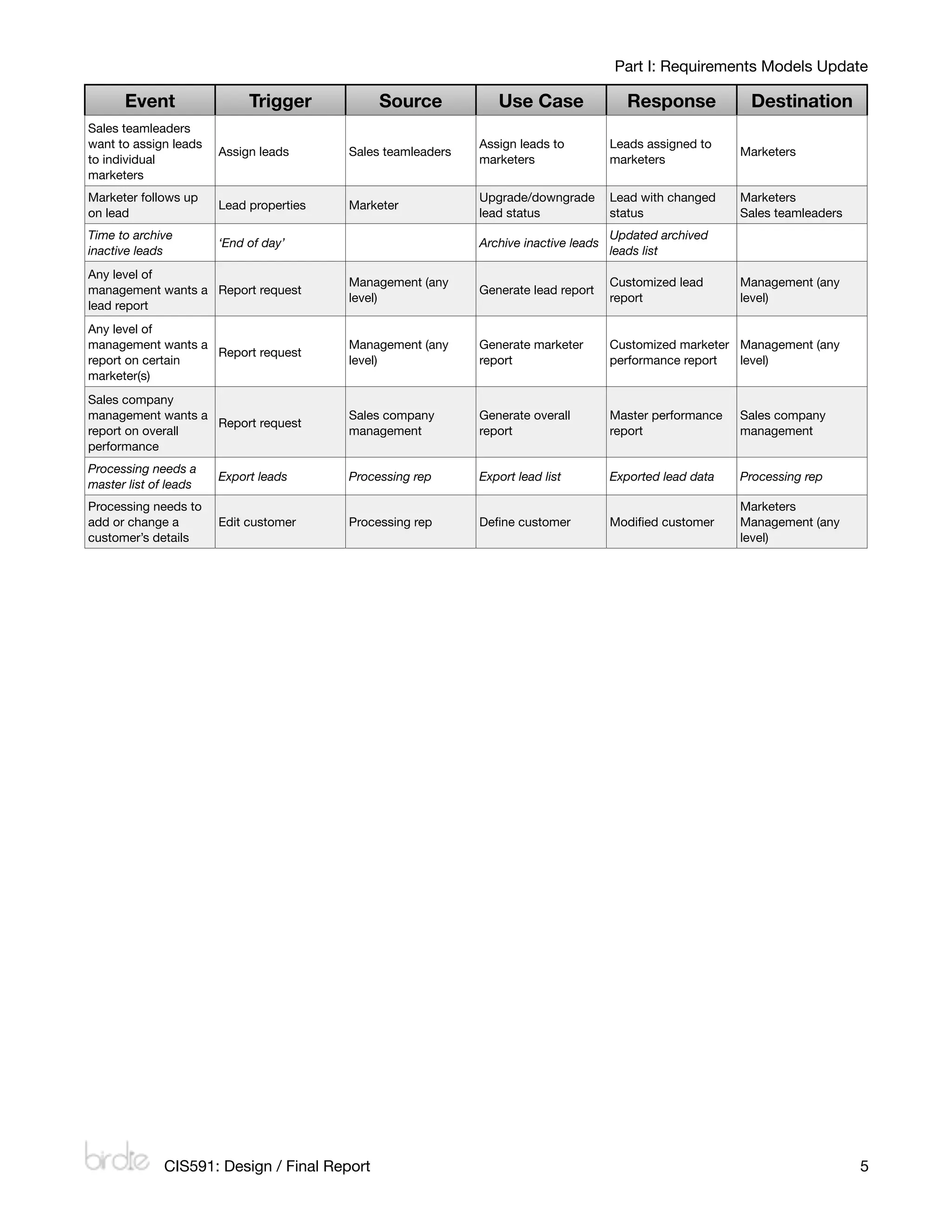
As stated above, I’ve removed the define campaign use case. The updated event table is
shown below. Those not yet implemented are shown in italics. See section VII for more
details. I’ve also made singular the assign lead path use case; the ability to batch assign
them should come in a later version.

       Event                  Trigger             Source              Use Case                 Response          Destination
Processing wants to                                                                                             Management
                         New lead source     Processing rep        Define lead source        Lead source
create a lead source                                                                                            Processing
Processing wants to                                                                                             Management
enter a lead in          New lead            Processing rep        Create new lead          Lead                Processing
manually                                                                                                        Marketers
Processing wants to                                                                                             Management
import a batch of        Batch lead import   Processing rep        Import external leads    Leads               Processing
leads                                                                                                           Marketers
Processing wants to                                                                                             Management
                         New promotion       Processing rep        Define promotion          Promotion
create a promotion                                                                                              Processing
Processing wants to
                                                                   Assign lead to lead                          Management
classify leads to a      Assign lead path    Processing rep                                 Categorized lead
                                                                   path                                         Marketers
path
Processing chooses                                                                                              Sales company
                                                                   Distribute leads to      Leads assigned to
sales company to         Assign leads        Processing rep                                                     management
                                                                   sales company            sales company
receive leads                                                                                                   Marketers
Sales company
management wants                             Sales company         Distribute leads to      Leads assigned to   Division management
                         Assign leads
to distribute leads to                       management            division                 division            Marketers
divisions

Division management
                                                                   Distribute leads to      Leads assigned to   Sales teams
wants to distribute Assign leads             Division management
                                                                   sales team               sales team          Marketers
leads to teams


4
                                                                                       CIS591: Design / Final Report
Part I: Requirements Models Update

      Event                 Trigger            Source           Use Case                 Response           Destination
Sales teamleaders
want to assign leads                                         Assign leads to          Leads assigned to
                       Assign leads      Sales teamleaders                                                 Marketers
to individual                                                marketers                marketers
marketers
Marketer follows up                                          Upgrade/downgrade        Lead with changed    Marketers
                       Lead properties   Marketer
on lead                                                      lead status              status               Sales teamleaders
Time to archive                                                                       Updated archived
                       ‘End of day’                          Archive inactive leads
inactive leads                                                                        leads list
Any level of
                                         Management (any                              Customized lead      Management (any
management wants a Report request                            Generate lead report
                                         level)                                       report               level)
lead report
Any level of
management wants a                       Management (any     Generate marketer        Customized marketer Management (any
                   Report request
report on certain                        level)              report                   performance report  level)
marketer(s)
Sales company
management wants a                       Sales company       Generate overall         Master performance   Sales company
                   Report request
report on overall                        management          report                   report               management
performance
Processing needs a
                       Export leads      Processing rep      Export lead list         Exported lead data   Processing rep
master list of leads
Processing needs to                                                                                        Marketers
add or change a        Edit customer     Processing rep      Define customer           Modified customer     Management (any
customer’s details                                                                                         level)


              CIS591: Design / Final Report
                                                                                   5
Part I: System Requirements Models

Updated Domain Model Class Diagram


                                                 Domain Class Diagram                                                                    Benjamin Kreeger


                                                                  LeadSource
                                                        1      companyName                                                                    Product
                                                               address                                                                 productName
                                                               city                        1                                       *   productSource
                       *
                                                               state                                                                   productPrice
                           Promotion                           zip                                                                     productDescription
                     promotionName                             country                                                                 productPicture
                     promotionSource                           phone
                               0..1                                                                         OrderDetails
                                                                                                                                                            1..*
                                                                            0..1
                                                                                                       orderID
                                                                                                       productID
                                                                *           *                          qty
                                                                      Lead                                                                                  *
                                                               createDate                                                                       Order
                        SalesCompany                           expireDate                                                               orderDate
                       companyName                             customerID                                                               orderCustomerID
                       address                                 sourceID                                                                 orderTotal
                       city                                    promotionID                                                              orderPaymentMethod
                 1     state                     0..1    *     pipeline                                                                 orderDueDate
                       zip                                     salesCompanyID                                                           orderPayDate
                 1     country                                 divisionID
                       phone                                   teamID                                                                                       *
                                                                                           *
                       isInternal                              marketerID
                       managerID                               status
                                        1                      change_date
                           1                                   detail                              0..1
                                        *
                                                                *       *       *
                                             Division                                                                   Person
                                                                                           Team
                                      divisionName                                                                firstName
                                                                                    divisionID
                                      companyID                0..1                                               lastName
                                                                                    teamLeaderID
                                      managerID                                                                   address
                                                                                      *        1   1          1   city
                                  1          1      1                                                             state
                                                                                                                  zip
                                                                                                                  country
                                                                                                                  phone


                                                              ExtendUser
                                                                                                                                          0..1              1
                                                            userID                                                                             Customer
                                                                                                                                           age
                                  0..1                                                    0..1                                             maritalStatus
                                                                                                                                           numChildren
                                                         1                                                                                 assets
                 0..1                                                                                   *
                                                                                                                                           liabilities
                        Manager                      Team Leader                        Marketer                   ProcessingRep
                     managerType                   commissionRate                   commissionRate                managerID
                       1                                                            teamID                        salesCompanyID
                                                                                           1                        *      *

                                                                          Report
                                                                    name
                                                                    description
                                                                    createdAt
                                                                    createdBy
                                                                    startDate
                                                                    endDate
                                                        0..*                                           0..*             0..*
                0..*
                     CompanyReport                  DivisionReport                     TeamReport                 MarketerReport
                     salesCompanyID                divisionID                       teamID                        marketerID


Changes made are shaded (including the report subsystem, a new attribute and a changed
attribute for Lead, and the relationship between Team/TeamLeader).


6
                                                                                                                             CIS591: Design / Final Report
Part II: Software Design Approach

Part II: Software Design Approach
Model-template-view framework
My web application was written using a three-layer object-oriented design. The Django
framework utilizes a slightly altered rendition of the Model-View-Controller framework it calls
the Model-Template-View framework. The Controller layer (the ‘URLconf’ file) is mostly
behind the scenes, and manages URL routing using regular expression pattern matching.

Model layer

The Model layer defines the data structure of the application using built-in field types. Each
model class becomes a table in the database, and extra tables are added in the case of
many-to-many relationships between models. Data layer abstraction is handled by the
framework using object-relational mapping. Django’s ORM system supports MySQL,
SQLite3, PostgreSQL, and Oracle, as well as other custom database backends.

Template layer

The Template layer consists of HTML files marked up with variables in double-curly-brace
sets, {{ like so }}. When a template is rendered, it is passed a context (a Python dictionary) of
variables which it inserts into the curly-brace sets. Various other template layer functions and
constructs are available such as if/else and for blocks. Custom functions, such as those that
can format text or expand abbreviated values, can be written and stored in another Python
module, and loaded at the start of each template. Template inheritance is also allowed, so
master templates can be specified.

View layer

The view layer takes data from the model layer, processes it, packages it, and passes it to the
template layer to be rendered. Each ‘view’ is really a Python function that takes a request
object, and any additional objects passed to it from the controller. These functions can
access the model layer using Django’s model API functions, which can return objects,
querysets, and more. Each function has access to all the Python modules the programmer
can import.

Another aspect of the view layer is Django’s forms API, which can abstract field information
about the model layer and provide form display and validation with just a few lines of code on
the programmer’s end.


         CIS591: Design / Final Report
                                                            7
Part II: Software Design Approach

Package diagram


                          Package Diagram                                                                   Benjamin Kreeger


         Templates (*.html)

                          Companies                                                                                  Reports
                            companies
                                                                              Leads
                               detail
                                                    Customers                                  Orders                 reports
                                edit
         Admin                                                               detail                                     add
                                new
           (mostly                                    detail                  new               orders                  edit
                          division_detail
       generated by                                    edit                  leads              detail                 delete
                           division_edit
        framework)                                     new                to_division            edit                company
                           division_new
                                                    customers            to_marketers            new                  division
                           team_detail
                                                                           to_sales                                  marketer
                            team_edit
                                                                                                                       team
                            team_new

                                    Extras: birdie_tags: capitalize, money, buyer, ifnone, intext


        Controllers (urls.py)

                         urls.py (URLconf)


     Views (views.py / forms.py)

         Companies
        company_detail
                                                                                                                    Reports
              edit                Customers                                              Orders
                                                                 Leads
              new
                                                                                                                   reports
            div_add                customers                                              orders
                                                                   leads                                             add
           div_detail            customer_detail                                          detail
                                                                lead_detail                                     report_detail
            div_edit                  edit                                                 edit
                                                                    new                                          report_edit
           team_add                   add                                                  new
                                                                                                               report_delete
          team_detail
           team_edit

       Forms: LeadSourceForm, SalesCompanyForm, DivisionForm, NewDivisionForm, TeamForm, NewTeamForm, CustomerForm,
          LeadDetailForm, NewLeadForm, MarketerReportForm, TeamReportForm, DivisionReportForm, CompanyReportForm


        Models (models.py)

                                            Leads                                                         Reports

            Person           Customer           LeadSource             Promotion                           Report

                                                                                                    CompanyReport
         ExtendUser          Manager            Teamleader           ProcessingRep
                                                                                                     DivisionReport
           Marketer       SalesCompany               Division             Team
                                                                                                         TeamReport
             Lead             Product                 Order            OrderDetail
                                                                                                     MarketerReport


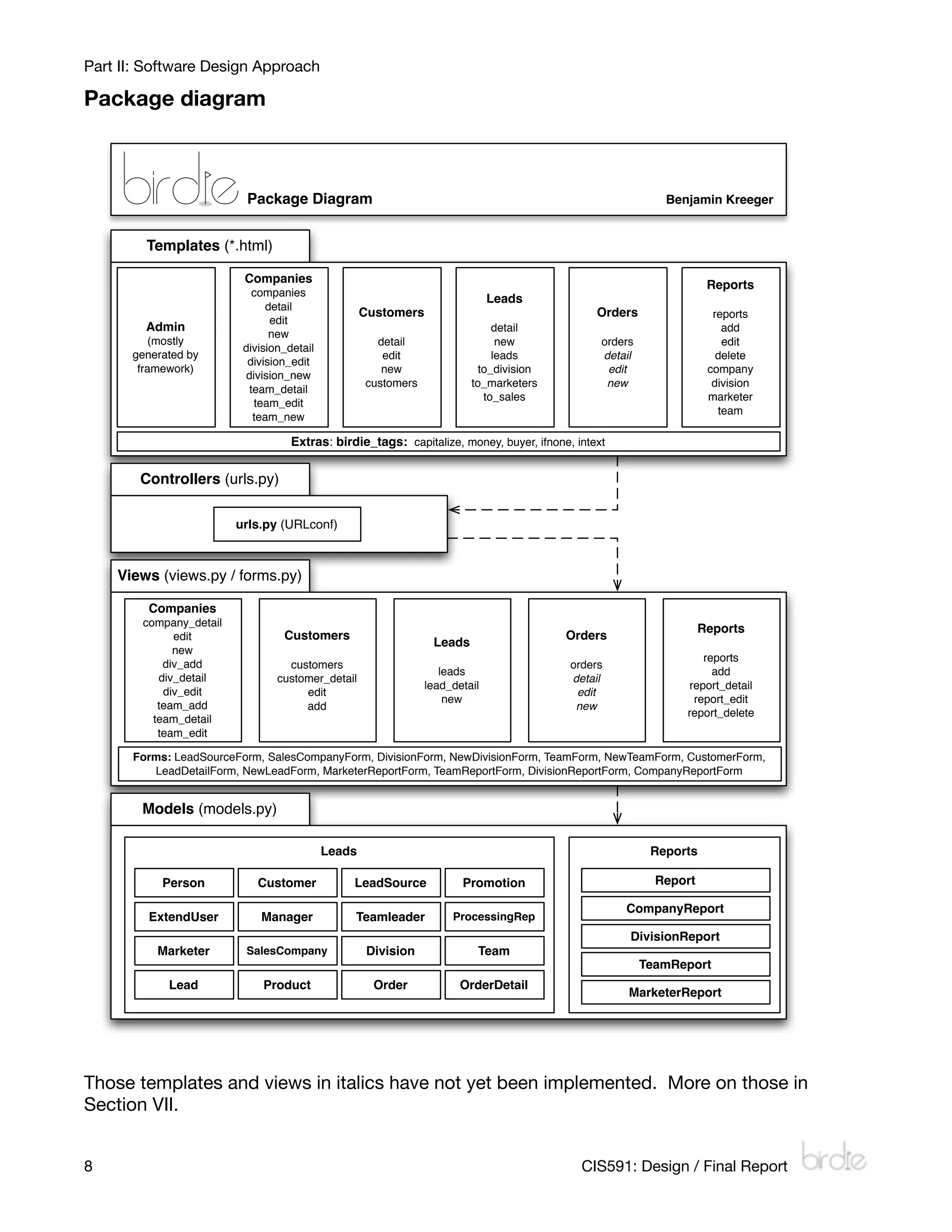
Those templates and views in italics have not yet been implemented. More on those in
Section VII.


8
                                                                                          CIS591: Design / Final Report
Sequence Diagram: Change lead status                                                                                                                                                           Benjamin Kreeger


                                                                                                     Controller                                                     View                                                Model                               Django model
                                                                         Web browser                                           Template layer
                                                                                                      (/urls.py)                                              (/leads/views.py)                                   (/leads/models.py)                        API / Database


                                 Marketer

                                       Open active leads page (/leads/)                /leads/                             birdie.leads.views.leads()
                                                                                                                                                                          a_user := Marketer.objects.get(user=request.user) Marketer.objects.get(user=request.user)
                                                                                                                                                                                                                                                                             Sequence diagrams


                                                                                                                                                                                              a_user                                      Marketer
                                                                                                                                                                             leads := Lead.objects.get(marketer=a_user)       Lead.objects.get(marketer=a_user)
                                                                                                                                             render_to_response
                                                                                                                                        ('/leads/leads.html', context)                         leads                                      QuerySet
                                                                                                 /leads/leads.html
                                            Click a lead (/leads/777)            /leads/(?P<leadid>)/                  birdie.leads.views.lead_detail(777)                    lead := get_object_or_404(Lead, id=777)           get_object_or_404(Lead, id=777)


CIS591: Design / Final Report
                                                                                                                                             render_to_response                                lead                                         Lead
                                                                                                                                         ('/leads/lead_detail.html',
                                                                                                                                                   context)
                                                                                             /leads/lead_detail.html                                                                        View / Form
                                             Fill out lead detail form                                                                                                                   (/leads/forms.py)

                                            Click submit (/leads/777/)           /leads/(?P<leadid>)/        birdie.leads.views.lead_detail(777, method.POST)
                                                                                                                                                                              lead := get_object_or_404(Lead, id=777)           get_object_or_404(Lead, id=777)

                                                                                                                                                                                               lead                                         Lead

                                                                                                                                                                         form := LeadForm(POST)
                                                                                                                                                                                  form

                                                                                                                                                                            lead = form.cleaned_data
                                                                                                                                                                                             lead.save()                                  lead.save()
                                                                                                                                             render_to_response
                                                                                                 /leads/leads.html                      ('/leads/leads.html', context)
                                                                                                                                                                          HttpResponseRedirect(birdie.leads.views.leads())
                                                                                                                                                                                                                                                                                                 Part II: Software Design Approach


9
10
                                                     Sequence Diagram: Define lead source                                                                                                                                                  Benjamin Kreeger


                                                                                                                                                        View
                                                                                            Controller                                                                                                     Model                                 Django model
                                                                 Web browser                                          Template layer                (/companies/
                                                                                             (/urls.py)                                                                                              (/leads/models.py)                          API / Database
                                                                                                                                                      views.py)
                                                                                                                                                                             View / Form
                                                                                                                                                                             (/companies/
                                Marketer                                                                                                                                       forms.py)
                                       Open external companies page           /companies/
                                          (/companies/external)         (?P<company_type>w+)/            birdie.companies.views.companies(external)
                                                                                                                                                                   companies := LeadSource.objects.all()              LeadSource.objects.all()
                                                                                                                                  render_to_response
                                                                                                                             ('/companies/companies.html',                    companies                                     QuerySet
                                                                                   /companies/companies.html                            context)
                                                                                                                                                                                                                                                                  Part II: Software Design Approach


                                                                                                                                                                leads := Lead.objects.get(marketer=a_user)       Lead.objects.get(marketer=a_user)
                                            Click 'add a company'             /companies
                                         (/companies/external/add)      (?P<company_type>w+)/               birdie.companies.views.new(external)               form :=
                                                                                                                                 render_to_response        LeadSourceForm()
                                                                                                                           ('/companies/company_add.html',       form
                                                                                  /companies/company_add.html                          context)
                                         Fill out add company form
                                                                                /companies
                                   Click submit (/companies/external/add) (?P<company_type>w+)/      birdie.leads.views.new(external, method.POST)
                                                                                                                                                                         company = LeadSource()
                                                                                                                                                                               company
                                                                                                                                                                    form :=
                                                                                                                                                             LeadSourceForm(POST)
                                                                                                                                                                     form

                                                                                                                                                                             company.save()                                company.save()
                                                                                                                                                   HttpResponseRedirect(birdie.companies.views.companies(external))
                                                                                                                                  render_to_response
                                                                                                                             ('/companies/companies.html',
                                                                                   /companies/companies.html                            context)


CIS591: Design / Final Report
Part III: Database Design

Part III: Database Design
Written Overview
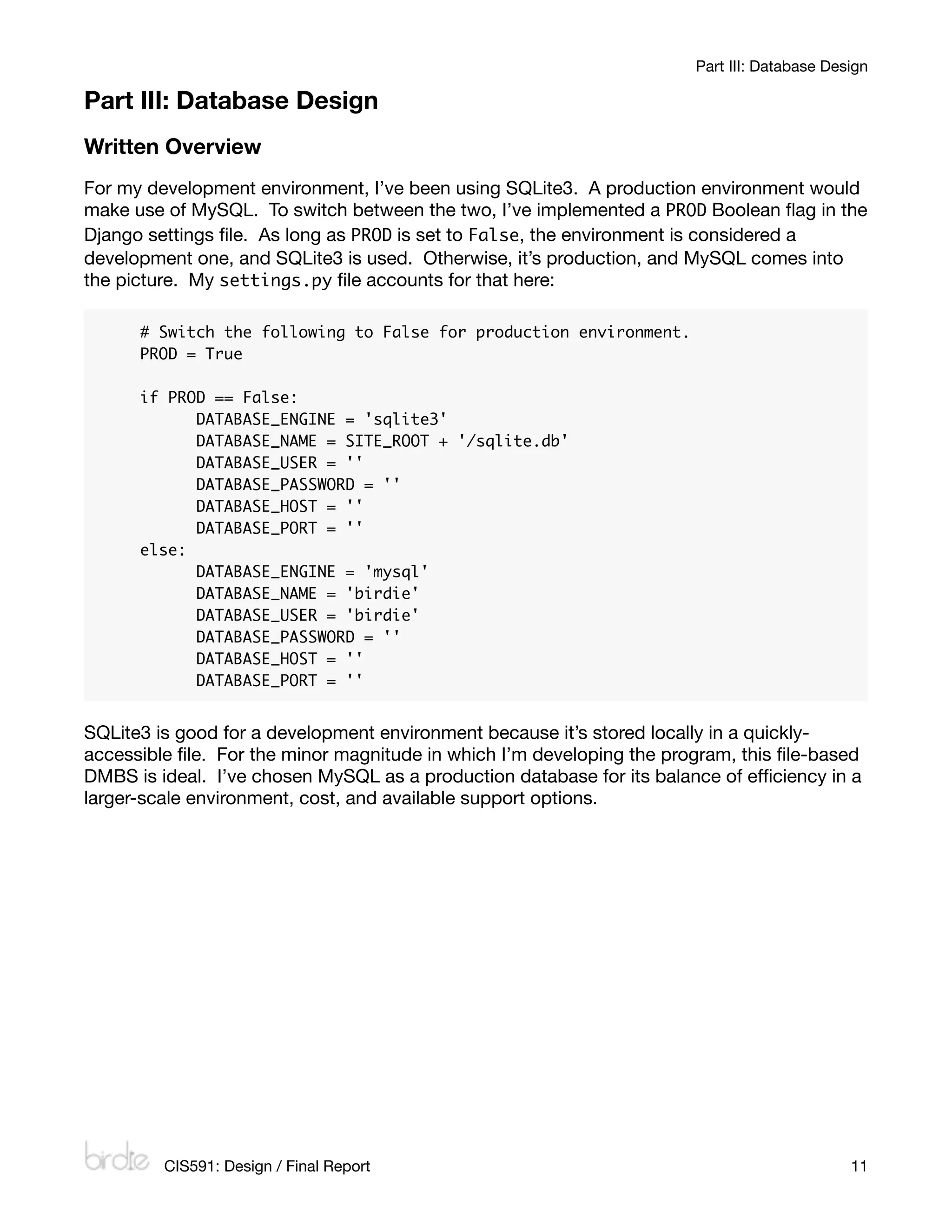
For my development environment, I’ve been using SQLite3. A production environment would
make use of MySQL. To switch between the two, I’ve implemented a PROD Boolean flag in the
Django settings file. As long as PROD is set to False, the environment is considered a
development one, and SQLite3 is used. Otherwise, it’s production, and MySQL comes into
the picture. My settings.py file accounts for that here:

      # Switch the following to False for production environment.
      PROD = True

      if PROD == False:
      	     DATABASE_ENGINE = 'sqlite3'
      	     DATABASE_NAME = SITE_ROOT + '/sqlite.db'
      	     DATABASE_USER = ''
      	     DATABASE_PASSWORD = ''
      	     DATABASE_HOST = ''
      	     DATABASE_PORT = ''
      else:
      	     DATABASE_ENGINE = 'mysql'
      	     DATABASE_NAME = 'birdie'
      	     DATABASE_USER = 'birdie'
      	     DATABASE_PASSWORD = ''
      	     DATABASE_HOST = ''
      	     DATABASE_PORT = ''


SQLite3 is good for a development environment because it’s stored locally in a quickly-
accessible file. For the minor magnitude in which I’m developing the program, this file-based
DMBS is ideal. I’ve chosen MySQL as a production database for its balance of efficiency in a
larger-scale environment, cost, and available support options.


         CIS591: Design / Final Report
                                                      11
12
                                                                                                                           Entity Relationship Diagram                                                                                                                                                                         Benjamin Kreeger


                                                                                                                                        leads_leadsource
                                                                                                                                id INT(11)                                                                  leads_product                                   auth_user_user_permissions           auth_permission         auth_group_permissions
                                                                                                                                company_name VARCHAR(100)                                             id INT(11)                                           id INT(11)                      id INT(11)                  id INT(11)
                                                                                                                                address VARCHAR(100)                                                  name VARCHAR(100)                                    user_id INT(11)                 name VARCHAR(50)            group_id INT(11)
                                                                                                                                city VARCHAR(60)                                                      source_id INT(11)                                    permission_id INT(11)           content_type_id INT(11)     permission_id INT(11)
                                                                                                       leads_promotion          state VARCHAR(2)                                                      price DECIMAL(12,2)                                                                  codename VARCHAR(100)
                                                                                                 id INT(11)                     zip_code VARCHAR(10)                                                  description LONGTEXT
                                                                                                 name VARCHAR(100)              country VARCHAR(50)                                                   picture VARCHAR(100)
                                                                                                 source_id INT(11)              phone VARCHAR(20)
                                                                                                                                                                            leads_orderdetails
                                                                                                                                                                        id INT(11)
                                                                                                                                                                        order_id INT(11)                                                                              auth_user                 auth_user_groups               auth_group
                                                                                                                                                                        product_id INT(11)                                                                  id INT(11)                     id INT(11)                  id INT(11)
                                                                                                                                                                                                                                                                                                                                                                      Part III: Database Design


                                                                                                                                                                        quantity DECIMAL(12,2)                                                              username VARCHAR(30)           user_id INT(11)             name VARCHAR(80)
                                                                                                                                                                                                                                                                                                                                                  Relationship View


                                                                                                                                                                                                                                                            first_name VARCHAR(30)          group_id INT(11)
                                                                                                                                                                                                                                                            last_name VARCHAR(30)
                                                                                                                                                                                                                                                            email VARCHAR(75)
                                                                                                                                                                                                                                                            password VARCHAR(128)
                                                                                                                                                       leads_lead                                                                                           is_staff TINYINT(1)
                                                                                                                                              id INT(11)                                                          leads_order                               is_active TINYINT(1)
                                                                                                        leads_salescompany                    create_date DATETIME                                     id INT(11)                                           is_superuser TINYINT(1)               auth_message
                                                                                                 id INT(11)                                   expire_date DATETIME                                     date DATETIME                                        last_login DATETIME            id INT(11)
                                                                                                 company_name VARCHAR(100)                    customer_id INT(11)                                      customer_id INT(11)                                  date_joined DATETIME           user_id INT(11)
                                                                                                 address VARCHAR(100)                         source_id INT(11)                                        total DECIMAL(12,2)                                                                 message LONGTEXT
                                                                                                 city VARCHAR(60)                             promotion_id INT(11)                                     payment_method VARCHAR(10)
                                                                                                 state VARCHAR(2)                             pipeline VARCHAR(2)                                      due_date DATETIME
                                                                                                 zip_code VARCHAR(10)                         sales_company_id INT(11)                                                                                                                                                          django.auth
                                                                                                                                                                                                       pay_date DATETIME
                                                                                                 country VARCHAR(50)                          division_id INT(11)
                                                                                                 phone VARCHAR(20)                            team_id INT(11)
                                                                                                 is_internal TINYINT(1)                       marketer_id INT(11)
                                                                                                 manager_id INT(11)                           status VARCHAR(8)
                                                                                                                                              change_date DATETIME
                                                                                                                                              detail LONGTEXT

                                                                                                                                                                                                                                                           other django                       django_content_type          django_admin_log
                                                                                                                                                                                                        leads_person                                                                      id INT(11)                 id INT(11)
                                                                                                                                                                                                 id INT(11)                                                framework                      name VARCHAR(100)          action_time DATETIME
                                                                                                                 leads_division
                                                                                                            id INT(11)                                                                           first_name VARCHAR(50)                                     tables                         app_label VARCHAR(100)     user_id INT(11)
                                                                                                            name VARCHAR(50)                                        leads_team                   last_name VARCHAR(50)                                                                    model VARCHAR(100)         content_type_id INT(11)
                                                                                                            company_id INT(11)                                id INT(11)                         address VARCHAR(100)                                                                                                object_id LONGTEXT
                                                                                                            manager_id INT(11)                                division_id INT(11)                city VARCHAR(60)                                                                                                    object_repr VARCHAR(200)
                                                                                                                                                              teamleader_id INT(11)              state VARCHAR(2)                                                                                                    action_flag SMALLINT(5)
                                                                                                                                                                                                 zip_code VARCHAR(10)                                                django_site               django_session        change_message LONGTEXT
                                                                                                                                                                                                 country VARCHAR(50)                                         id INT(11)                  session_key VARCHAR(40)
                                                                                                                                                                                                 phone VARCHAR(20)                                           domain VARCHAR(100)         session_data LONGTEXT
                                                                                                                                                                                                                                                             name VARCHAR(50)            expire_date DATETIME


                                                                                                                                  leads_extenduser
                                                                                                                                person_ptr_id INT(11)                                                                                   leads_customer
                                                                                                                                user_id INT(11)                                                                               person_ptr_id INT(11)
                                                                                                                                                                                                                              age INT(11)
                                                                                                                                                                                                                              marital_status VARCHAR(20)
                                                                                                                                                                                                                              num_children INT(11)
                                                                                                                                                                                                                              assets DECIMAL(12,2)


                                See attached Tabloid-sized diagram for a larger ERD diagram.
                                                                                                                                                                                                                              liabilities DECIMAL(12,2)


                                                                                                         leads_manager                       leads_teamleader                           leads_marketer               leads_processingrep
                                                                                                 extenduser_ptr_id INT(11)            extenduser_ptr_id INT(11)                extenduser_ptr_id INT(11)          extenduser_ptr_id INT(11)
                                                                                                 manager_type VARCHAR(50)             commission_rate DECIMAL(5,2)             commission_rate DECIMAL(5,2)       manager_id INT(11)
                                                                                                                                                                               team_id INT(11)                    sales_company_id INT(11)


                                                                                                                                                    reports_report                                            birdie.reports
                                                                                                                                              id INT(11)
                                                                                                                                              name VARCHAR(255)
                                                                                                                                              description LONGTEXT
                                                                                                                                              created_at DATETIME
                                                                                                                                              created_by_id INT(11)
                                                                                                                                              start_date DATE
                                                                                                                                              end_date DATE


CIS591: Design / Final Report
                                                                                                   reports_companyreport             reports_divisionreport             reports_teamreport           reports_marketerreport
                                                                                               report_ptr_id INT(11)              report_ptr_id INT(11)              report_ptr_id INT(11)       report_ptr_id INT(11)
                                                                                               sales_company_id INT(11)           division_id INT(11)                team_id INT(11)             marketer_id INT(11)
Part III: Database Design

List of Tables
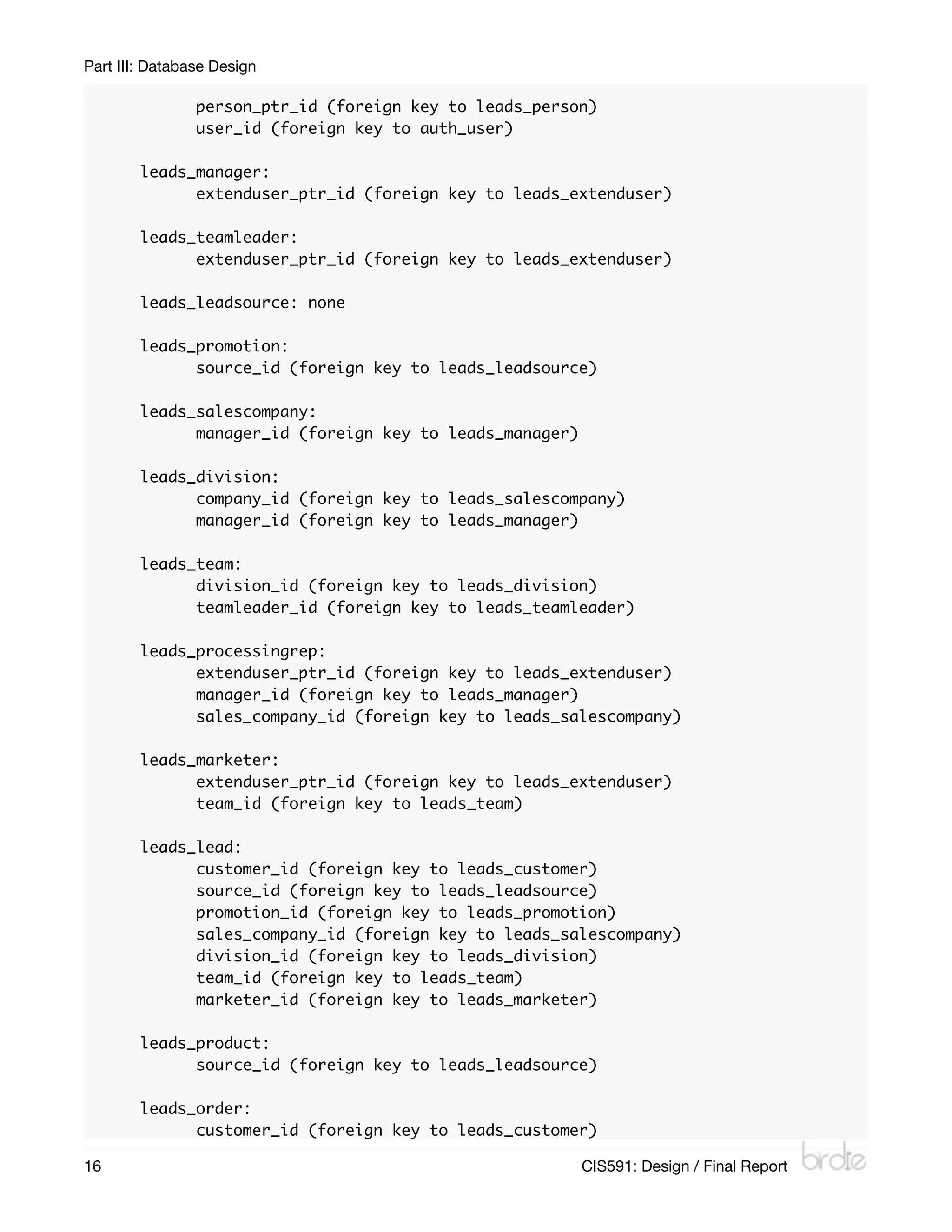
The list of tables in my database is below. Those beginning with auth_ and django_ are
created by the framework; the only ones I use heavily out of those would be auth_user, and
I’m still working on implementing auth_group and auth_permission. Primary keys are
underlined, and foreign keys are denoted by a following [fk=related_table] notation.

      auth_permission (id, name, content_type_id [fk=django_content_type],
      codename)

      auth_group (id, name)

      auth_user (id, username, first_name, last_name, email, password, is_staff,
      is_active, is_superuser, last_login, date_joined)

      auth_message (id, user_id [fk=auth_user], message)

      auth_group_permissions (id, group_id [fk=auth_group], permission_id
      [fk=auth_permission])

      auth_user_groups (id, user_id [fk=auth_user], group_id [fk=auth_group])

      auth_user_user_permissions (id, user_id [fk=auth_user], permission_id
      [fk=auth_permission])

      django_admin_log (id, action_time, user_id [fk=auth_user], content_type_id
      [fk=django_content_type], object_id, object_repr, action_flag,
      change_message)

      django_content_type (id, name, app_label, model)

      django_session (session_key, session_data, expire_date)

      django_site (id, domain, name)

      leads_person (id, first_name, last_name, address, city, state, zip_code,
      country, phone)

      leads_customer (person_ptr_id [fk=leads_person], age, marital_status,
      num_children, assets, liabilities)

      leads_extenduser (person_ptr_id [fk=leads_person], user_id [fk=auth_user])

      leads_manager (extenduser_ptr_id [fk=leads_extenduser], manager_type)

      leads_teamleader (extenduser_ptr_id [fk=leads_extenduser], commission_rate)


         CIS591: Design / Final Report
                                                      13
Part III: Database Design

        leads_leadsource (id, company_name, address, city, state, zip_code, country,
        phone)

        leads_promotion (id, name, source_id [fk=leads_leadsource])

        leads_salescompany (id, company_name, address, city, state, zip_code,
        country, phone, is_internal, manager_id [fk=leads_manager])

        leads_division (id, name, company_id [fk=leads_salescompany], manager_id
        [fk=leads_manager])

        leads_team (id, division_id [fk=leads_division], teamleader_id
        [fk=leads_teamleader])

        leads_processingrep (extenduser_ptr_id [fk=leads_extenduser], manager_id
        [fk=leads_manager], sales_company_id [fk=leads_salescompany])

        leads_marketer (extenduser_ptr_id [fk=leads_extenduser], commission_rate,
        team_id [fk=leads_team])

        leads_lead (id, create_date, expire_date, customer_id [fk=leads_customer],
        source_id [fk=leads_leadsource], promotion_id [fk=leads_promotion], pipeline,
        sales_company_id [fk=leads_salescompany], division_id [fk=leads_division],
        team_id [fk=leads_team], marketer_id [fk=leads_marketer], status,
        change_date, detail)

        leads_product (id, name, source_id [fk=leads_leadsource], price, description,
        picture)

        leads_order (id, date, customer_id [fk=leads_customer], total,
        payment_method, due_date, pay_date)

        leads_orderdetail (id, order_id [fk=leads_order], product_id
        [fk=leads_product], quantity)

        reports_report (id, name, description, created_at, created_by_id
        [fk=auth_user], start_date, end_date)

        reports_marketerreport (report_ptr_id [fk=reports_report], marketer_id
        [fk=leads_marketer])

        reports_teamreport (report_ptr_id [fk=reports_report], team_id
        [fk=leads_team])

        reports_divisionreport (report_ptr_id [fk=reports_report], division_id
        [fk=leads_division])

        reports_companyreport (report_ptr_id [fk=reports_report], sales_company_id

14
                                                    CIS591: Design / Final Report
Part III: Database Design

       [fk=leads_salescompany])


List of Referential Integrity Constraints
Below is a list of the referential integrity constraints in the Birdie database. Primary keys in
the database are auto_incremented and are not allowed to be changed.

       auth_permission:
       	     content_type_id (foreign key to django_content_type)

       auth_group: none

       auth_user: none

       auth_message:
       	     user_id (foreign key to auth_user)

       auth_group_permissions:
       	     group_id (foreign key to auth_group)
       	     permission_id (foreign key to auth_permission)

       auth_user_groups:
       	     user_id (foreign key to auth_user)
       	     group_id (foreign key to auth_group)

       auth_user_user_permissions:
       	     user_id (foreign key to auth_user)
       	     permission_id (foreign key to auth_permission)

       django_admin_log:
       	     user_id (foreign key to auth_user)
       	     content_type_id (foreign key to django_content_type)

       django_content_type: none

       django_session: none

       django_site: none

       leads_person: none

       leads_customer:
       	     person_ptr_id (foreign key to leads_person)

       leads_extenduser:

          CIS591: Design / Final Report
                                                           15
Part III: Database Design

        	       person_ptr_id (foreign key to leads_person)
        	       user_id (foreign key to auth_user)

        leads_manager:
        	     extenduser_ptr_id (foreign key to leads_extenduser)

        leads_teamleader:
        	     extenduser_ptr_id (foreign key to leads_extenduser)

        leads_leadsource: none

        leads_promotion:
        	     source_id (foreign key to leads_leadsource)

        leads_salescompany:
        	     manager_id (foreign key to leads_manager)

        leads_division:
        	     company_id (foreign key to leads_salescompany)
        	     manager_id (foreign key to leads_manager)

        leads_team:
        	     division_id (foreign key to leads_division)
        	     teamleader_id (foreign key to leads_teamleader)

        leads_processingrep:
        	     extenduser_ptr_id (foreign key to leads_extenduser)
        	     manager_id (foreign key to leads_manager)
        	     sales_company_id (foreign key to leads_salescompany)

        leads_marketer:
        	     extenduser_ptr_id (foreign key to leads_extenduser)
        	     team_id (foreign key to leads_team)

        leads_lead:
        	     customer_id (foreign key to leads_customer)
        	     source_id (foreign key to leads_leadsource)
        	     promotion_id (foreign key to leads_promotion)
        	     sales_company_id (foreign key to leads_salescompany)
        	     division_id (foreign key to leads_division)
        	     team_id (foreign key to leads_team)
        	     marketer_id (foreign key to leads_marketer)

        leads_product:
        	     source_id (foreign key to leads_leadsource)

        leads_order:
        	     customer_id (foreign key to leads_customer)

16
                                                       CIS591: Design / Final Report
Part III: Database Design

        leads_orderdetail:
        	     order_id (foreign key to leads_order)
        	     product_id (foreign key to leads_product)

        reports_report:
        	     created_by_id (foreign key to auth_user)

        reports_marketerreport:
        	     report_ptr_id (foreign key to reports_report)
        	     marketer_id (foreign key to leads_marketer)

        reports_teamreport:
        	     report_ptr_id (foreign key to reports_report)
        	     team_id (foreign key to leads_team)

        reports_divisionreport:
        	     report_ptr_id (foreign key to reports_report)
        	     division_id (foreign key to leads_division)

        reports_companyreport:
        	     report_ptr_id (foreign key to reports_report)
        	     sales_company_id (foreign key to leads_salescompany)


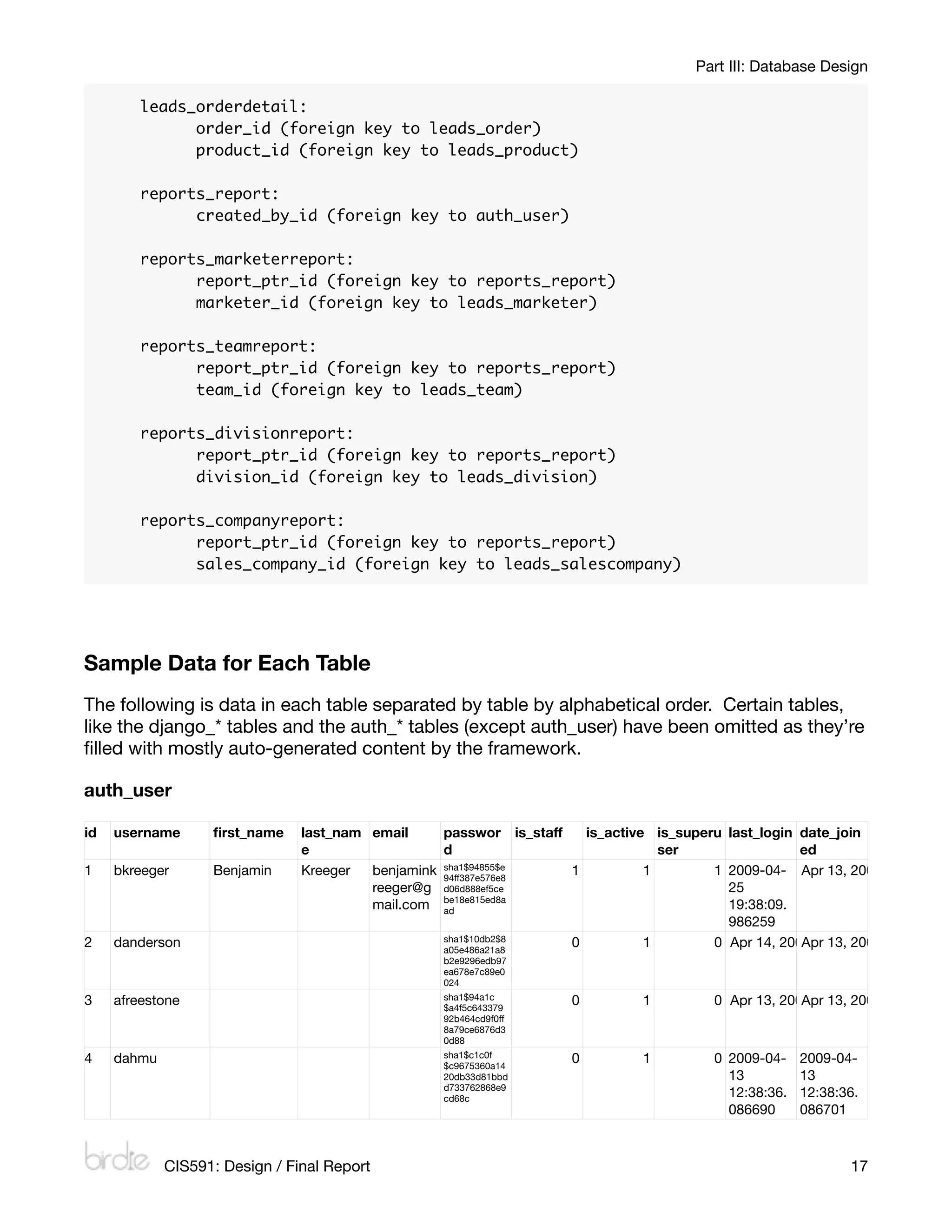
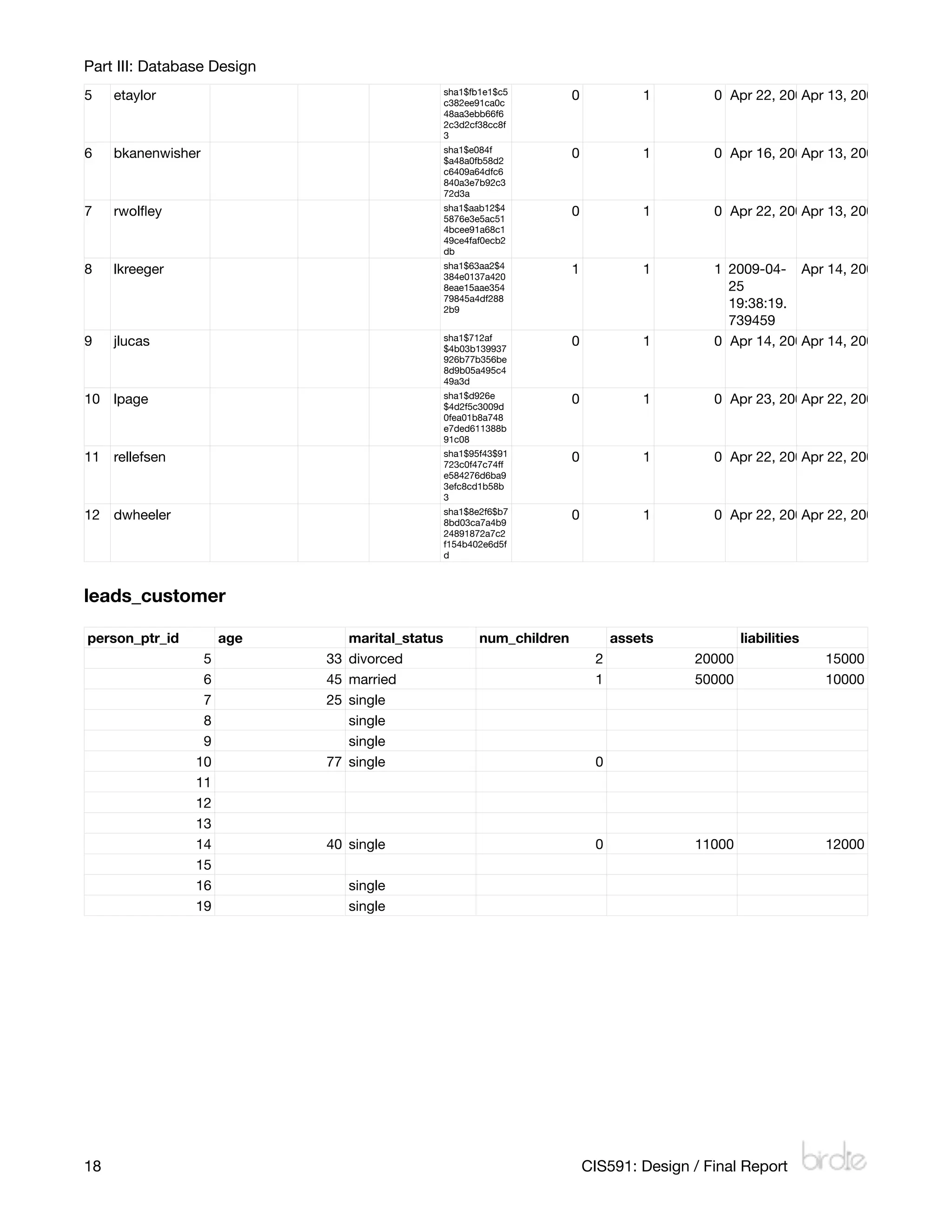
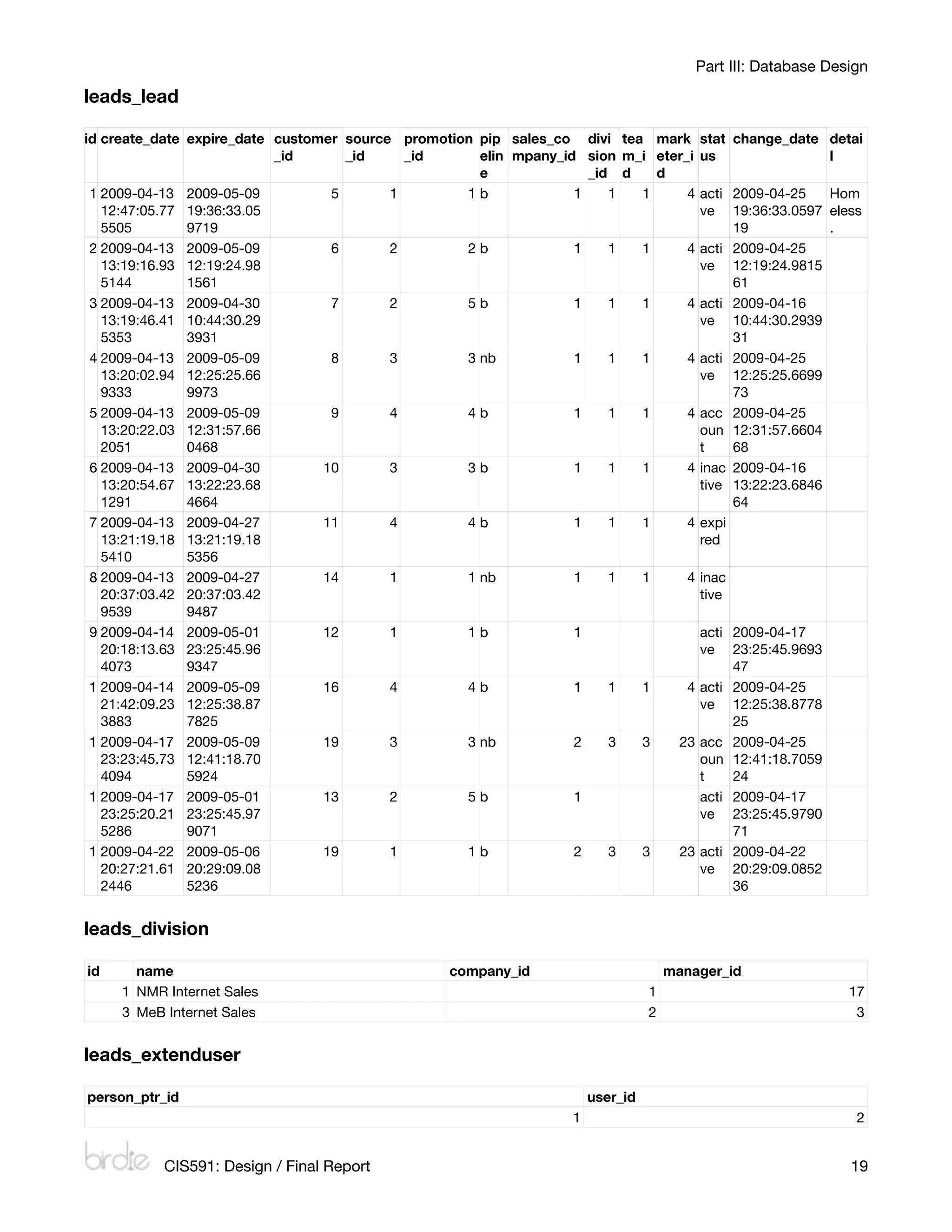
Sample Data for Each Table
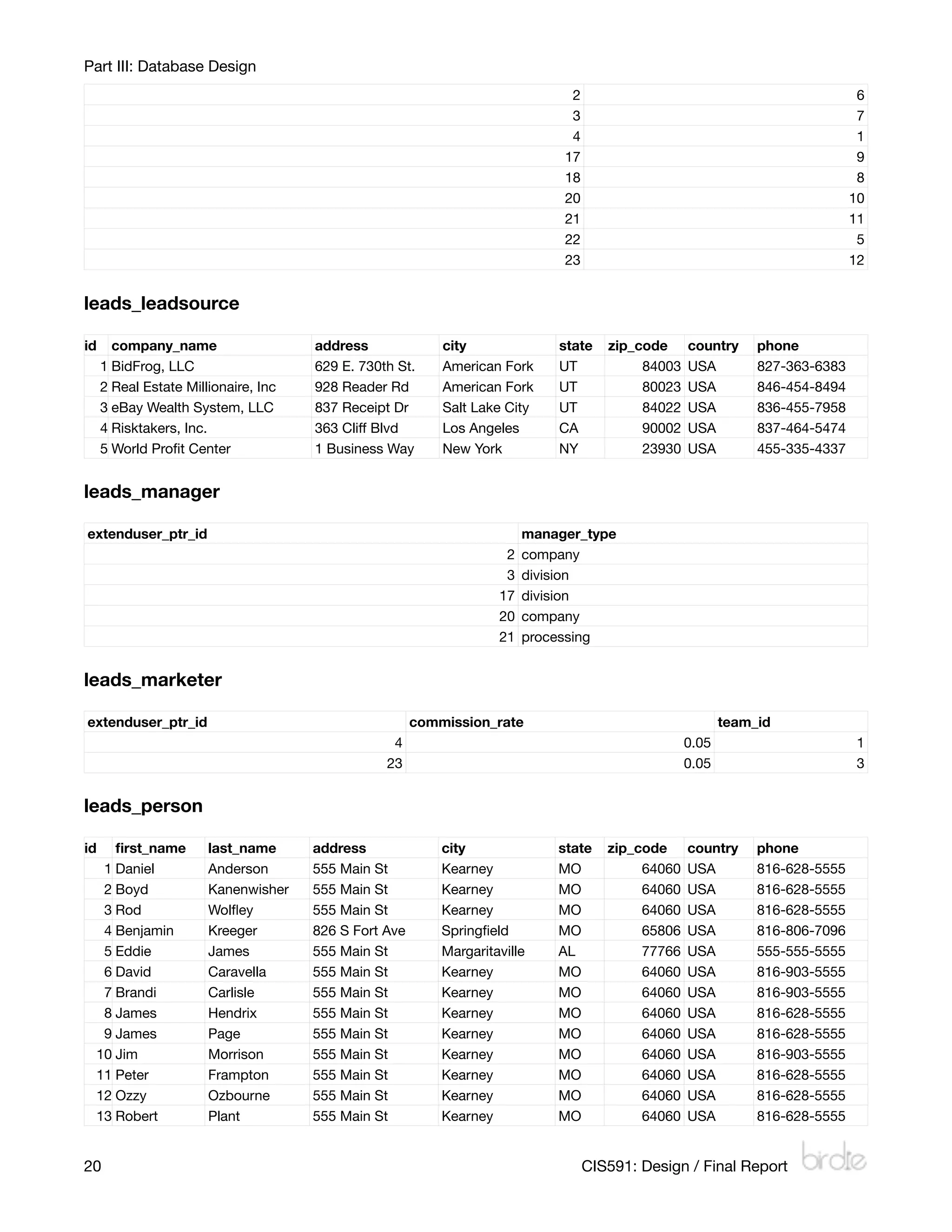
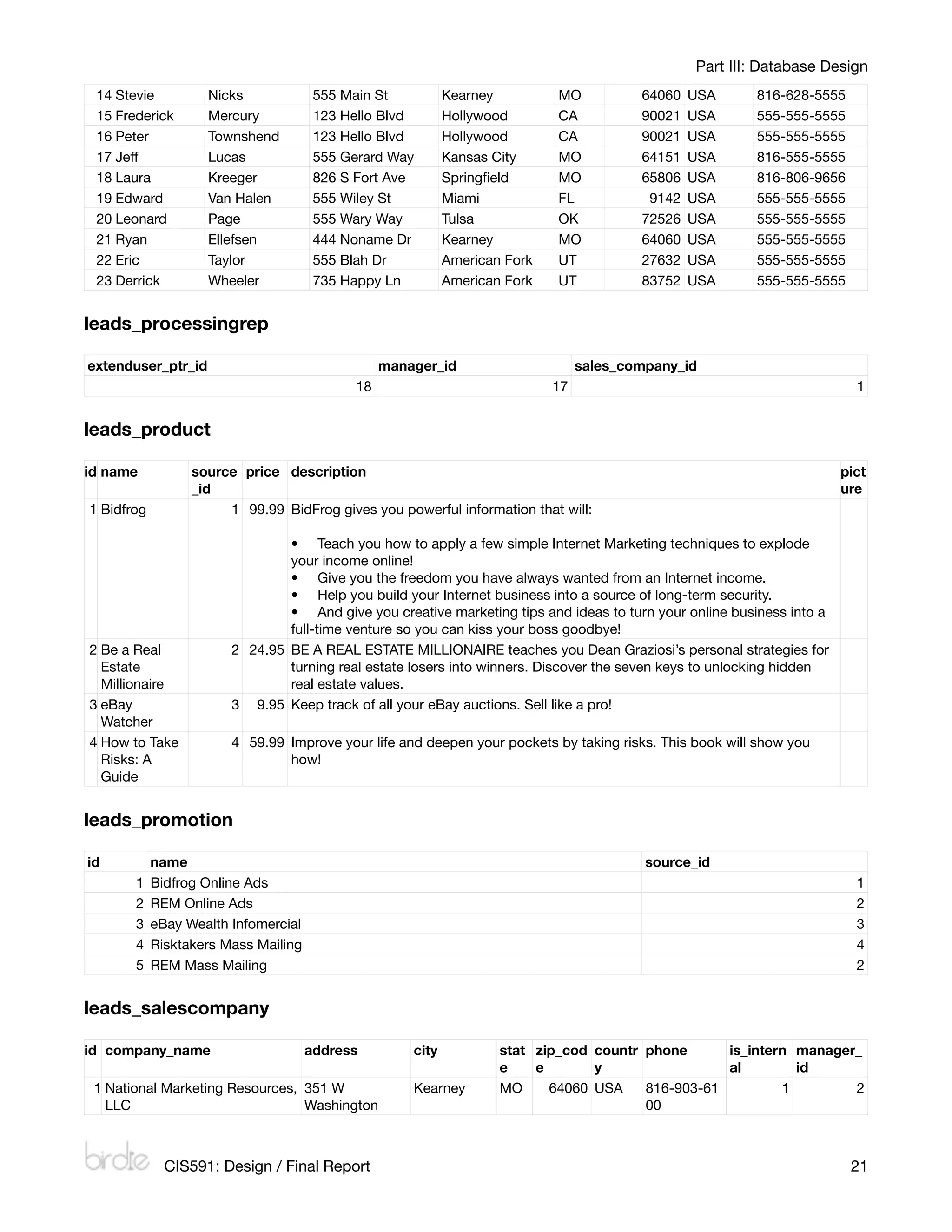
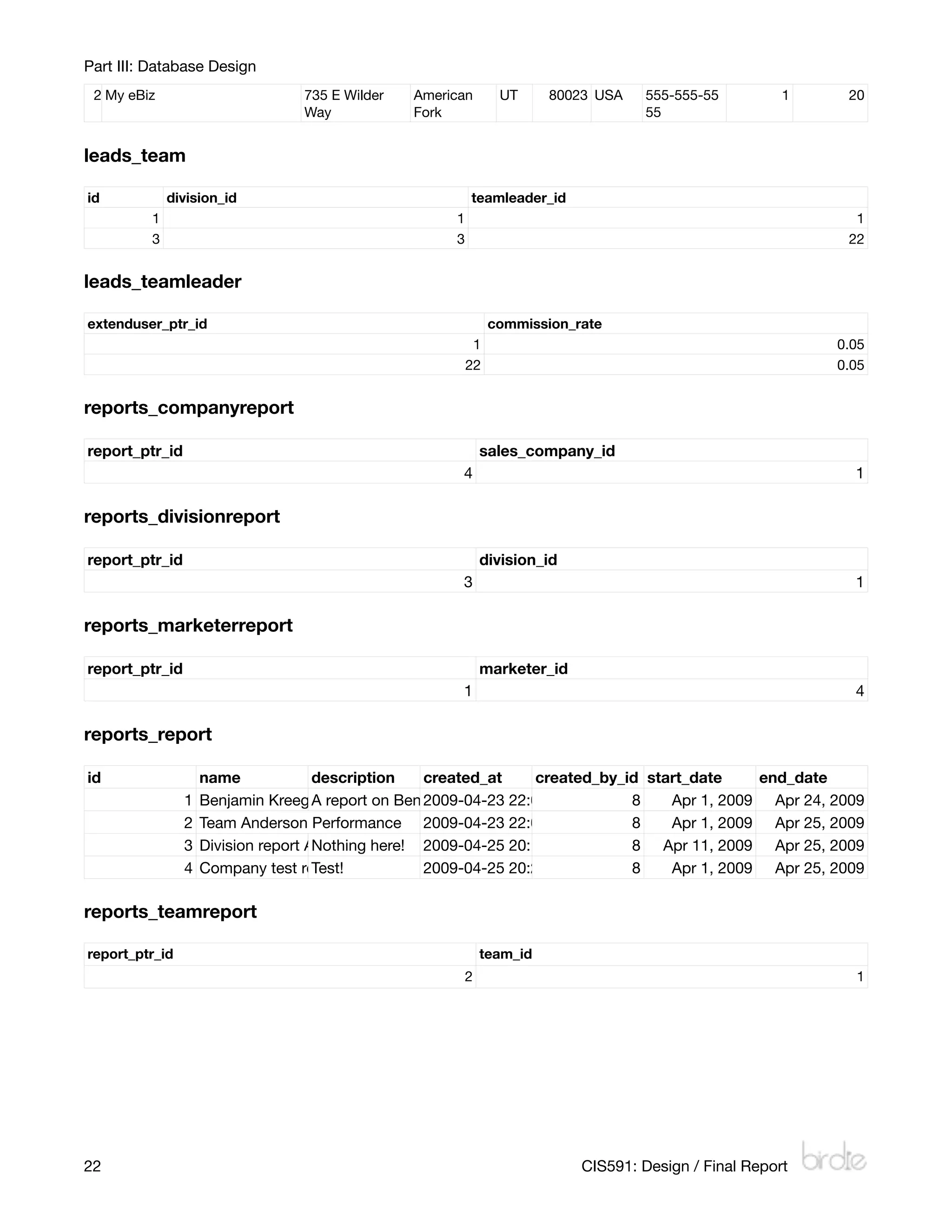
The following is data in each table separated by table by alphabetical order. Certain tables,
like the django_* tables and the auth_* tables (except auth_user) have been omitted as they’re
filled with mostly auto-generated content by the framework.

auth_user

id   username       first_name   last_nam email     passwor is_staff   is_active is_superulast_login date_join
                                e                  d                             ser                ed
1    bkreeger       Benjamin    Kreeger  benjamink sha1$94855$e
                                                   94ff387e576e8
                                                                    1          1        12009-04- Apr 13, 2009 12:31 PM
                                         reeger@g d06d888ef5ce                           25
                                         mail.com be18e815ed8a
                                                   ad                                    19:38:09.
                                                                                         986259
                                                   sha1$10db2$8
2    danderson                                     a05e486a21a8
                                                                    0         1        0 Apr 14, 2009 10:06 2009 12:37 PM
                                                                                                    Apr 13, PM
                                                   b2e9296edb97
                                                   ea678e7c89e0
                                                   024
                                                   sha1$94a1c
3    afreestone                                    $a4f5c643379
                                                                    0         1        0 Apr 13, 2009 12:38 2009 12:38 PM
                                                                                                    Apr 13, PM
                                                   92b464cd9f0ff
                                                   8a79ce6876d3
                                                   0d88
                                                   sha1$c1c0f
4    dahmu                                         $c9675360a14
                                                                    0         1        0 2009-04-    2009-04-
                                                   20db33d81bbd                          13          13
                                                   d733762868e9
                                                   cd68c                                 12:38:36.   12:38:36.
                                                                                         086690      086701


             CIS591: Design / Final Report
                                                                 17
Part III: Database Design
                                                sha1$fb1e1$c5
5     etaylor                                   c382ee91ca0c
                                                                      0            1        0 Apr 22, 2009 8:29 PM 12:39 PM
                                                                                                         Apr 13, 2009
                                                48aa3ebb66f6
                                                2c3d2cf38cc8f
                                                3
                                                sha1$e084f
6     bkanenwisher                              $a48a0fb58d2
                                                                      0            1        0 Apr 16, 2009 1:29 PM 12:39 PM
                                                                                                         Apr 13, 2009
                                                c6409a64dfc6
                                                840a3e7b92c3
                                                72d3a
                                                sha1$aab12$4
7     rwolfley                                   5876e3e5ac51
                                                                      0            1        0 Apr 22, 2009 8:27 PM 12:41 PM
                                                                                                         Apr 13, 2009
                                                4bcee91a68c1
                                                49ce4faf0ecb2
                                                db
                                                sha1$63aa2$4
8     lkreeger                                  384e0137a420
                                                                      1            1        1 2009-04- Apr 14, 2009 8:08 PM
                                                8eae15aae354                                  25
                                                79845a4df288
                                                2b9                                           19:38:19.
                                                                                              739459
                                                sha1$712af
9     jlucas                                    $4b03b139937
                                                                      0            1        0 Apr 14, 2009 8:10 PM 8:09 PM
                                                                                                         Apr 14, 2009
                                                926b77b356be
                                                8d9b05a495c4
                                                49a3d
                                                sha1$d926e
10 lpage                                        $4d2f5c3009d
                                                                      0            1        0 Apr 23, 2009 8:54 PM 7:51 PM
                                                                                                         Apr 22, 2009
                                                0fea01b8a748
                                                e7ded611388b
                                                91c08
                                                sha1$95f43$91
11 rellefsen                                    723c0f47c74ff
                                                                      0            1        0 Apr 22, 2009 7:57 PM 7:57 PM
                                                                                                         Apr 22, 2009
                                                e584276d6ba9
                                                3efc8cd1b58b
                                                3
                                                sha1$8e2f6$b7
12 dwheeler                                     8bd03ca7a4b9
                                                                      0            1        0 Apr 22, 2009 8:29 PM 8:28 PM
                                                                                                         Apr 22, 2009
                                                24891872a7c2
                                                f154b402e6d5f
                                                d


leads_customer

person_ptr_id         age      marital_status          num_children            assets            liabilities
                  5         33 divorced                                    2             20000                 15000
                  6         45 married                                     1             50000                 10000
                  7         25 single
                  8            single
                  9            single
                 10         77 single                                      0
                 11
                 12
                 13
                 14         40 single                                      0             11000                 12000
                 15
                 16            single
                 19            single


18
                                                                       CIS591: Design / Final Report
Part III: Database Design

leads_lead

id create_date expire_date customer source promotion pip sales_co divi tea mark        stat change_date detai
                           _id      _id     _id      elin mpany_id sion m_i eter_i     us               l
                                                     e              _id d   d
 1 2009-04-13 2009-05-09          5       1        1b             1    1  1      4     acti 2009-04-25    Hom
   12:47:05.77 19:36:33.05                                                             ve 19:36:33.0597 eless
   5505        9719                                                                         19            .
 2 2009-04-13 2009-05-09          6       2        2b             1    1  1      4     acti 2009-04-25
   13:19:16.93 12:19:24.98                                                             ve 12:19:24.9815
   5144        1561                                                                         61
 3 2009-04-13 2009-04-30          7       2        5b             1    1  1      4     acti 2009-04-16
   13:19:46.41 10:44:30.29                                                             ve 10:44:30.2939
   5353        3931                                                                         31
 4 2009-04-13 2009-05-09          8       3        3 nb           1    1  1      4     acti 2009-04-25
   13:20:02.94 12:25:25.66                                                             ve 12:25:25.6699
   9333        9973                                                                         73
 5 2009-04-13 2009-05-09          9       4        4b             1    1  1      4     acc 2009-04-25
   13:20:22.03 12:31:57.66                                                             oun 12:31:57.6604
   2051        0468                                                                    t    68
 6 2009-04-13 2009-04-30         10       3        3b             1    1  1      4     inac 2009-04-16
   13:20:54.67 13:22:23.68                                                             tive 13:22:23.6846
   1291        4664                                                                         64
 7 2009-04-13 2009-04-27         11       4        4b             1    1  1      4     expi
   13:21:19.18 13:21:19.18                                                             red
   5410        5356
 8 2009-04-13 2009-04-27         14       1        1 nb           1    1  1      4     inac
   20:37:03.42 20:37:03.42                                                             tive
   9539        9487
 9 2009-04-14 2009-05-01         12       1        1b             1                    acti 2009-04-17
   20:18:13.63 23:25:45.96                                                             ve 23:25:45.9693
   4073        9347                                                                         47
 102009-04-14 2009-05-09         16       4        4b             1    1  1      4     acti 2009-04-25
   21:42:09.23 12:25:38.87                                                             ve 12:25:38.8778
   3883        7825                                                                         25
 112009-04-17 2009-05-09         19       3        3 nb           2    3  3    23      acc 2009-04-25
   23:23:45.73 12:41:18.70                                                             oun 12:41:18.7059
   4094        5924                                                                    t    24
 122009-04-17 2009-05-01         13       2        5b             1                    acti 2009-04-17
   23:25:20.21 23:25:45.97                                                             ve 23:25:45.9790
   5286        9071                                                                         71
 132009-04-22 2009-05-06         19       1        1b             2    3  3    23      acti 2009-04-22
   20:27:21.61 20:29:09.08                                                             ve 20:29:09.0852
   2446        5236                                                                         36


leads_division

id     name                                      company_id                        manager_id
     1 NMR Internet Sales                                                      1                             17
     3 MeB Internet Sales                                                      2                              3


leads_extenduser

person_ptr_id                                                        user_id
                                                                 1                                            2


           CIS591: Design / Final Report
                                                                    19
Part III: Database Design
                                                                               2                                               6
                                                                               3                                               7
                                                                               4                                               1
                                                                              17                                               9
                                                                              18                                               8
                                                                              20                                              10
                                                                              21                                              11
                                                                              22                                               5
                                                                              23                                              12


leads_leadsource

id     company_name                   address              city              state    zip_code     country     phone
     1 BidFrog, LLC                   629 E. 730th St.     American Fork     UT            84003   USA         827-363-6383
     2 Real Estate Millionaire, Inc   928 Reader Rd        American Fork     UT            80023   USA         846-454-8494
     3 eBay Wealth System, LLC        837 Receipt Dr       Salt Lake City    UT            84022   USA         836-455-7958
     4 Risktakers, Inc.               363 Cliff Blvd       Los Angeles       CA            90002   USA         837-464-5474
     5 World Profit Center             1 Business Way       New York          NY            23930   USA         455-335-4337


leads_manager

extenduser_ptr_id                                                        manager_type
                                                                     2   company
                                                                     3   division
                                                                    17   division
                                                                    20   company
                                                                    21   processing


leads_marketer

extenduser_ptr_id                                      commission_rate                                    team_id
                                                  4                                                0.05                       1
                                                 23                                                0.05                       3


leads_person

id  first_name          last_name      address              city              state    zip_code     country     phone
  1 Daniel             Anderson       555 Main St          Kearney           MO            64060   USA         816-628-5555
  2 Boyd               Kanenwisher    555 Main St          Kearney           MO            64060   USA         816-628-5555
  3 Rod                Wolfley         555 Main St          Kearney           MO            64060   USA         816-628-5555
  4 Benjamin           Kreeger        826 S Fort Ave       Springfield        MO            65806   USA         816-806-7096
  5 Eddie              James          555 Main St          Margaritaville    AL            77766   USA         555-555-5555
  6 David              Caravella      555 Main St          Kearney           MO            64060   USA         816-903-5555
  7 Brandi             Carlisle       555 Main St          Kearney           MO            64060   USA         816-903-5555
  8 James              Hendrix        555 Main St          Kearney           MO            64060   USA         816-628-5555
  9 James              Page           555 Main St          Kearney           MO            64060   USA         816-628-5555
 10 Jim                Morrison       555 Main St          Kearney           MO            64060   USA         816-903-5555
 11 Peter              Frampton       555 Main St          Kearney           MO            64060   USA         816-628-5555
 12 Ozzy               Ozbourne       555 Main St          Kearney           MO            64060   USA         816-628-5555
 13 Robert             Plant          555 Main St          Kearney           MO            64060   USA         816-628-5555


20
                                                                                CIS591: Design / Final Report
Part III: Database Design
     14 Stevie          Nicks              555 Main St          Kearney         MO           64060   USA     816-628-5555
     15 Frederick       Mercury            123 Hello Blvd       Hollywood       CA           90021   USA     555-555-5555
     16 Peter           Townshend          123 Hello Blvd       Hollywood       CA           90021   USA     555-555-5555
     17 Jeff            Lucas              555 Gerard Way       Kansas City     MO           64151   USA     816-555-5555
     18 Laura           Kreeger            826 S Fort Ave       Springfield      MO           65806   USA     816-806-9656
     19 Edward          Van Halen          555 Wiley St         Miami           FL            9142   USA     555-555-5555
     20 Leonard         Page               555 Wary Way         Tulsa           OK           72526   USA     555-555-5555
     21 Ryan            Ellefsen           444 Noname Dr        Kearney         MO           64060   USA     555-555-5555
     22 Eric            Taylor             555 Blah Dr          American Fork   UT           27632   USA     555-555-5555
     23 Derrick         Wheeler            735 Happy Ln         American Fork   UT           83752   USA     555-555-5555


leads_processingrep

extenduser_ptr_id                                    manager_id                      sales_company_id
                                                18                              17                                           1


leads_product

id name               source price description                                                                             pict
                      _id                                                                                                  ure
    1 Bidfrog              1 99.99 BidFrog gives you powerful information that will:

                                    • Teach you how to apply a few simple Internet Marketing techniques to explode
                                    your income online!
                                    • Give you the freedom you have always wanted from an Internet income.
                                    • Help you build your Internet business into a source of long-term security.
                                    • And give you creative marketing tips and ideas to turn your online business into a
                                    full-time venture so you can kiss your boss goodbye!
    2 Be a Real             2 24.95 BE A REAL ESTATE MILLIONAIRE teaches you Dean Graziosi’s personal strategies for
      Estate                        turning real estate losers into winners. Discover the seven keys to unlocking hidden
      Millionaire                   real estate values.
    3 eBay                  3 9.95 Keep track of all your eBay auctions. Sell like a pro!
      Watcher
    4 How to Take           4 59.99 Improve your life and deepen your pockets by taking risks. This book will show you
      Risks: A                      how!
      Guide


leads_promotion

id              name                                                                          source_id
           1    Bidfrog Online Ads                                                                                           1
           2    REM Online Ads                                                                                               2
           3    eBay Wealth Infomercial                                                                                      3
           4    Risktakers Mass Mailing                                                                                      4
           5    REM Mass Mailing                                                                                             2


leads_salescompany

id company_name                           address        city           stat zip_cod countr phone      is_intern manager_
                                                                        e    e       y                 al        id
    1 National Marketing Resources, 351 W                Kearney        MO     64060 USA    816-903-61         1        2
      LLC                           Washington                                              00


                  CIS591: Design / Final Report
                                                                            21
Part III: Database Design
 2 My eBiz                        735 E Wilder   American        UT      80023 USA    555-555-55         1    20
                                  Way            Fork                                 55


leads_team

id           division_id                                   teamleader_id
         1                                             1                                                       1
         3                                             3                                                      22


leads_teamleader

extenduser_ptr_id                                               commission_rate
                                                            1                                                0.05
                                                           22                                                0.05


reports_companyreport

report_ptr_id                                                  sales_company_id
                                                        4                                                      1

reports_divisionreport

report_ptr_id                                                  division_id
                                                        3                                                      1

reports_marketerreport

report_ptr_id                                                  marketer_id
                                                        1                                                      4

reports_report

id                  name             description   created_at     created_by_id start_date            end_date
                1   Benjamin Kreeger report on Benjamin Kreeger's progress for the firstApr 1, 2009 Apr 24, 2009
                                     A report      2009-04-23 22:00:48.544827 8         half of April.
                2   Team Anderson Performance 2009-04-23 22:03:25.693368 8             Apr 1, 2009 Apr 25, 2009
                3   Division report ANothing here! 2009-04-25 20:19:44.609280 8 Apr 11, 2009 Apr 25, 2009
                4   Company test report
                                     Test!         2009-04-25 20:26:49.119675 8        Apr 1, 2009 Apr 25, 2009

reports_teamreport

report_ptr_id                                                  team_id
                                                           2                                                   1


22
                                                                          CIS591: Design / Final Report
Part IV: System Controls Design

Part IV: System Controls Design
Input controls and validation
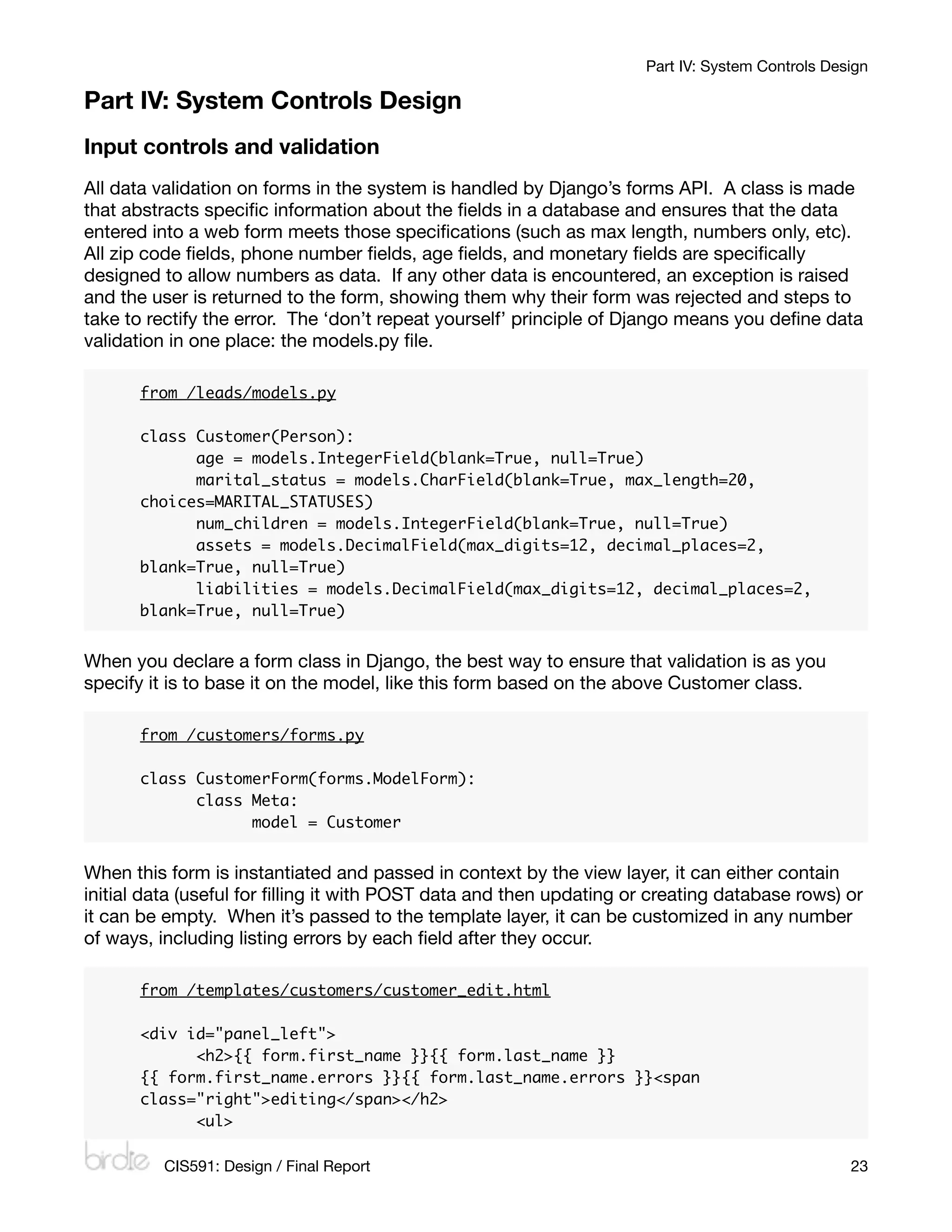
All data validation on forms in the system is handled by Django’s forms API. A class is made
that abstracts specific information about the fields in a database and ensures that the data
entered into a web form meets those specifications (such as max length, numbers only, etc).
All zip code fields, phone number fields, age fields, and monetary fields are specifically
designed to allow numbers as data. If any other data is encountered, an exception is raised
and the user is returned to the form, showing them why their form was rejected and steps to
take to rectify the error. The ‘don’t repeat yourself’ principle of Django means you define data
validation in one place: the models.py file.

      from /leads/models.py

      class Customer(Person):
      	     age = models.IntegerField(blank=True, null=True)
      	     marital_status = models.CharField(blank=True, max_length=20,
      choices=MARITAL_STATUSES)
      	     num_children = models.IntegerField(blank=True, null=True)
      	     assets = models.DecimalField(max_digits=12, decimal_places=2,
      blank=True, null=True)
      	     liabilities = models.DecimalField(max_digits=12, decimal_places=2,
      blank=True, null=True)


When you declare a form class in Django, the best way to ensure that validation is as you
specify it is to base it on the model, like this form based on the above Customer class.

      from /customers/forms.py

      class CustomerForm(forms.ModelForm):
      	     class Meta:
      	     	     model = Customer


When this form is instantiated and passed in context by the view layer, it can either contain
initial data (useful for filling it with POST data and then updating or creating database rows) or
it can be empty. When it’s passed to the template layer, it can be customized in any number
of ways, including listing errors by each field after they occur.

      from /templates/customers/customer_edit.html

      <div id="panel_left">
      	     <h2>{{ form.first_name }}{{ form.last_name }}
      {{ form.first_name.errors }}{{ form.last_name.errors }}<span
      class="right">editing</span></h2>
      	     <ul>

         CIS591: Design / Final Report
                                                          23
Part IV: System Controls Design

       	     	     <li>{{ form.address }}{{ form.address.errors }}</li>
       	     	     <li>{{ form.city }}{{ form.city.errors }}, {{ form.state }}
       {{ form.state.errors }} {{ form.zip_code }}{{ form.zip_code.errors }}</li>
       	     	     <li>{{ form.country }}{{ form.country.errors }}</li>
       	     	     <li>{{ form.phone }}{{ form.phone.errors }}</li>

       	       ...


Security controls
The web application is currently being hosted at WebFaction (http://webfaction.com/), which
houses its servers stateside in Texas. The app is only accessible via secure HTTP (HTTPS) —
a redirect occurs when a user visits the http:// side of the site to the https:// version. No
information is ever sent over plain text. If hosted elsewhere, this could easily be re-
implemented in Apache’s .conf configuration files.

Users must log in to the system with their credentials to access anything other than the main
Welcome page. A user’s account can be deactivated only by somebody with staff privileges
(equivalent to having master access). Django’s optional auth framework (which I’ve chosen to
utilize for this project) handles user, group, and permission management. So far, I’ve
implemented users as well as basic groups and permissions, but site access is currently open
to all authenticated users until I can further implement permissions and groups per view. The
only exception to this is the admin site, which I’ve locked down to only those who have staff
privileges.

Ensuring only those that are logged in are those that can view web pages is the following
Python decorator before each view (underlined):

       @login_required
       def new(request):
       	     ...


The rest is handled by Django’s auth framework.

The production server, managed by WebFaction, is hosted in The Planet’s Datacenter in
Houston. The following is a rundown from WebFaction’s website on server security:


       We've been in business for over 6 years and we use some of the top datacenters
       in the world (from The Planet). The datacenter features redundant UPS systems,
       generator backup, VESPA detection systems, closed circuit monitoring of all
       areas and entrances, 24 hour guard manned security, redundant a/c systems,
       and fiber from 5 separate providers.


24
                                                        CIS591: Design / Final Report
Part IV: System Controls Design

Database integrity controls
The only login/entry point to the MySQL database is defined in the /settings.py file. Only
one user with full privileges over only the Birdie database (the password, a non-dictionary-
based random sequence of 8 letters and numbers, has been omitted) is specified, as shown
below.

       DATABASE_ENGINE = 'mysql'
       DATABASE_NAME = 'kreeger_birdie’
       DATABASE_USER = 'kreeger_birdie'
       DATABASE_PASSWORD = '••••••••'
       DATABASE_HOST = ''
       DATABASE_PORT = ''


In the future, for more secure database access, the password could be converted to an SHA1
hash. Currently, the only MySQL connections allowed are from localhost, on the same server
hosted by WebFaction. If the system is hosted elsewhere, this could easily be re-
implemented in MySQL’s privileges table.

I have not implemented transaction logs beyond those included with the admin backend
interface. Those admin transaction logs detail the time a transaction occurred, who initiated
the transaction (an instance of auth.user), and the type of transaction.

Backup and recovery
During the project, I’ve kept a repository of all my code on GitHub (http://github.com/kreeger),
which is an online Git repository library. The Birdie repository is private, however, to ensure
data integrity. Only those with given RSA IDs linked to my GitHub account are able to commit
to or clone the source trunk. Regular backups are also made of my computer via Time
Machine.

In the event that disaster does strike and recovery is needed, all I’ll have to do is either restore
from my Time Machine backup or re-clone my git repository. The Planet’s Datacenter takes
care of all other disaster recovery processes for the production server.

I do have a custom cron job specified on my WebFaction server that runs daily at 1:15am; it
does a full MySQL dump of all the data in the tables, zips it up, and stores it on the server.
The output log is stored in a file in the same directory. This backup script is set to keep 14
days worth of files (and clean up anything older than that).

Error trapping
All error trapping in Birdie’s code is done with Python constructs, mostly try/except blocks.
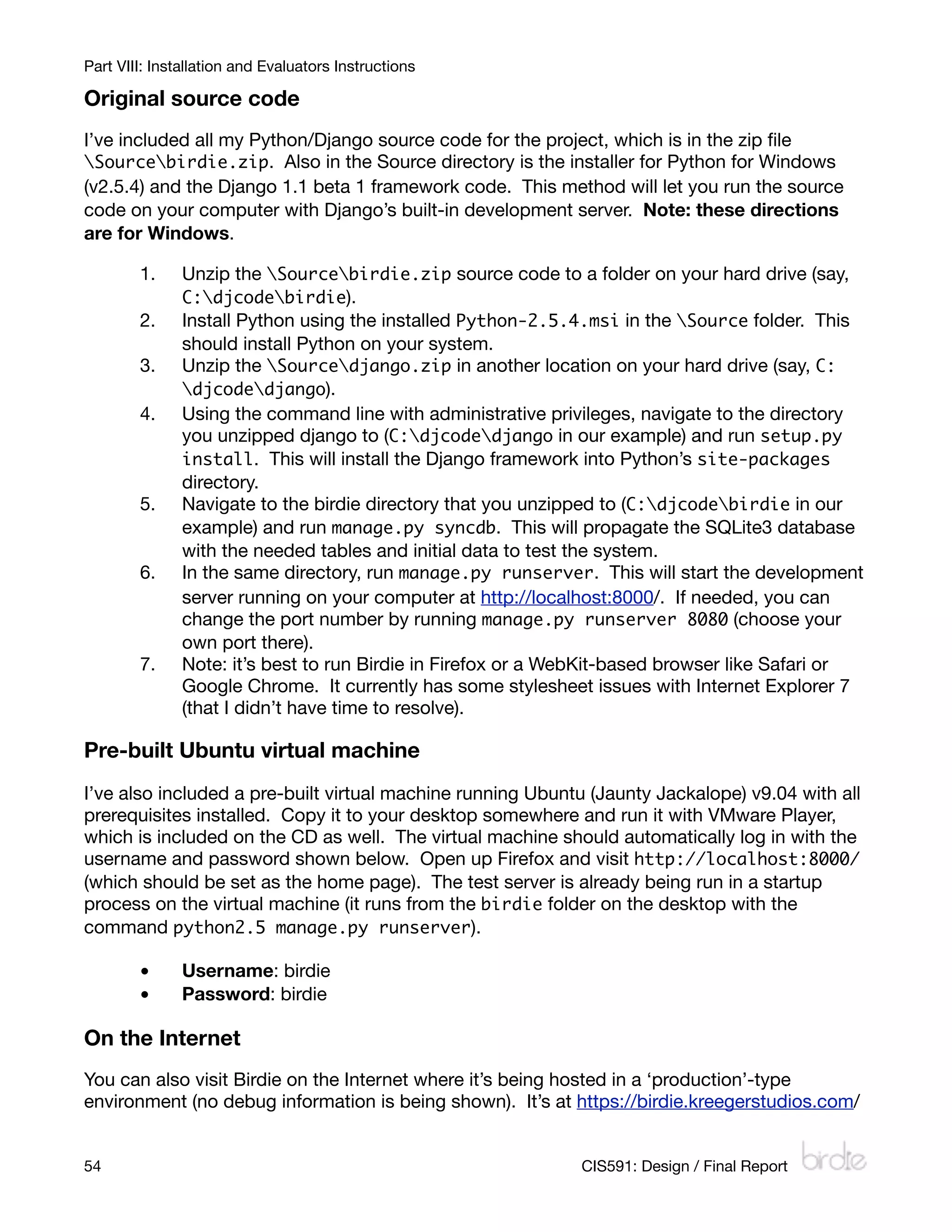
While learning Python for this project, most of my original try/except blocks were anonymous,
which is bad for one’s code; I’ve since converted several of them into explicit try/except
blocks (catching certain errors). Most errors, like failed database lookups, are forwarded to
HTTP 404 pages. Any other errors (like problems in the server-side code) are sent to HTTP
500.

          CIS591: Design / Final Report
                                                           25
Part IV: System Controls Design

Other
For the sake of this project, no sensitive information like Social Security or credit card
numbers are stored in the system.


26
                                                            CIS591: Design / Final Report
Part V: Dialog Design

Part V: Dialog Design
List of use cases and dialogs
Those in italics are not yet implemented.

Define lead source	................ Company Management > External Companies > Add a company
Create new lead	............................................................................................ Leads > Add a lead
Import external leads	................................................................ Leads > Import leads (delimited)
Define promotion	    ......... Company Management > External Companies > [company] > Add promotion
Assign leads to lead path	................................................................................. Leads > Edit lead
Distribute leads to sales company	             ....................................... Leads > Assign leads to [company]
Distribute leads to division	..................................................... Leads > Assign leads to [division]
Distribute leads to sales team	.................................................... Leads > Assign leads to [team]
Assign leads to marketers	.................................................... Leads > Assign leads to [marketer]
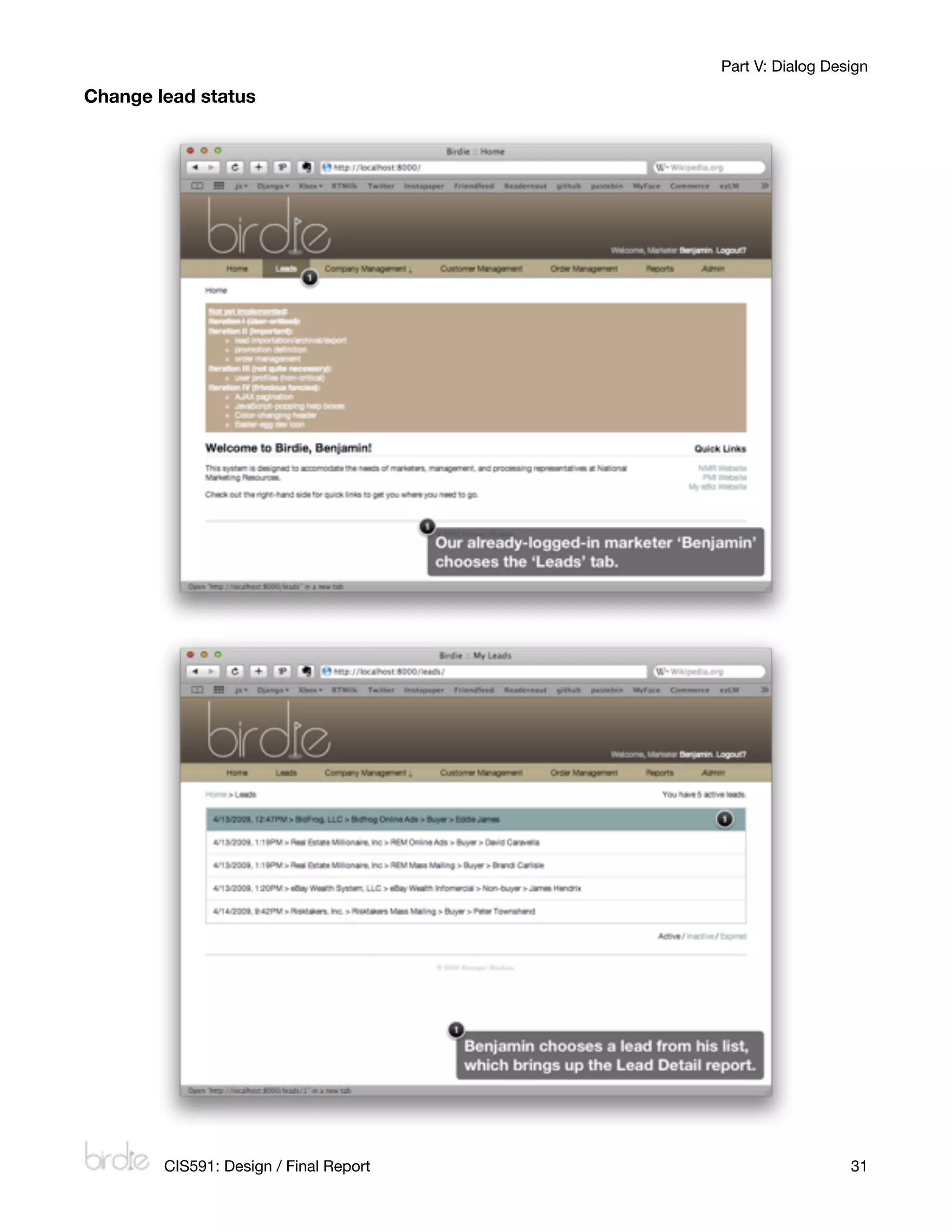
Upgrade/downgrade (change) lead status	............................................................ Leads > [lead]
Archive inactive leads 	.................................................................... Temporal event (not in menu)
Generate lead report	     .............................................................................................. Leads > [lead]
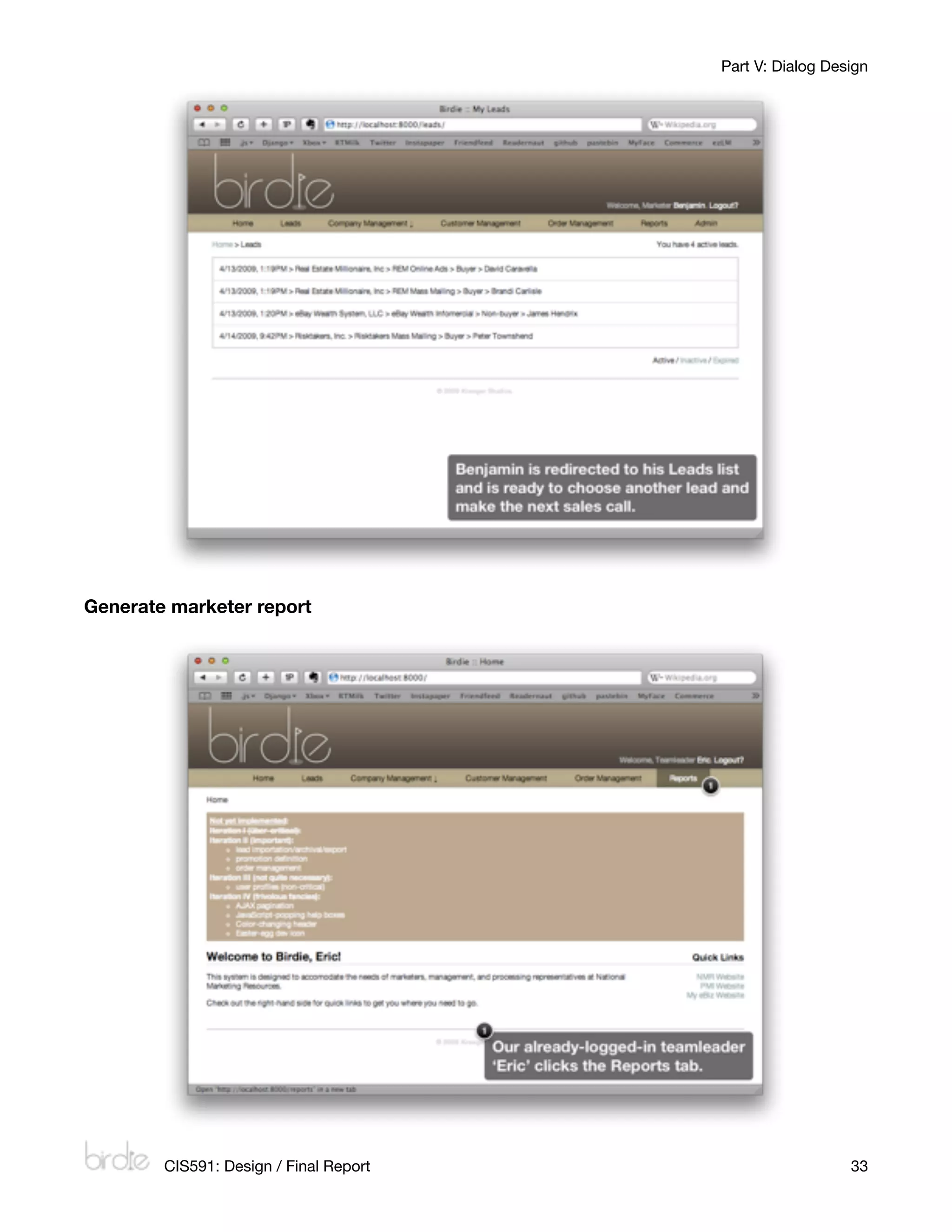
Generate marketer report	...................................... Reports > Marketer > Add a marketer report
Generate overall report	..................... Reports > Sales Company > Add a sales company report
Export lead list	
                ............................................................................Leads > Export leads (delimited)
Define customer	....................................................... Customer Management > Add a customer

Other dialogs

The following is a list of other dialogs in the system not specifically related to a predetermined
use case.

Get a list of leads for user	.................................................................................................. Leads
Define product	.............. Company Management > External Companies > [company] > Add a product
Define sales company	........... Company Management > Internal Companies > Add a company
Define division	............... Company Management > Internal Companies > [company] > Add a division
Define team	...... Company Management > Internal Companies > [company] > [division] > Add a team
Define order
......................................................................... Order Management > Add an order
View user profile
............................................................................... [any screen] > [user’s name]

Storyboards
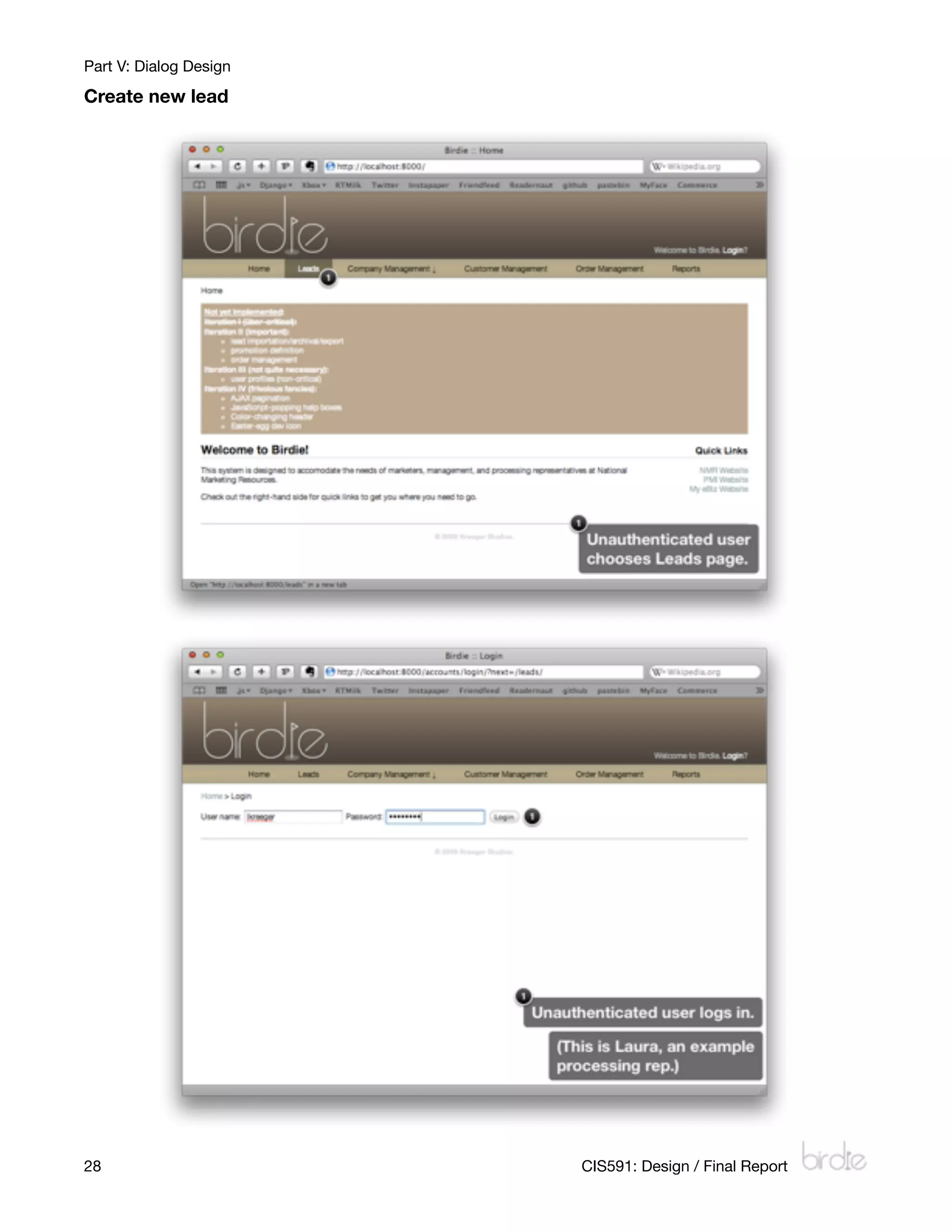
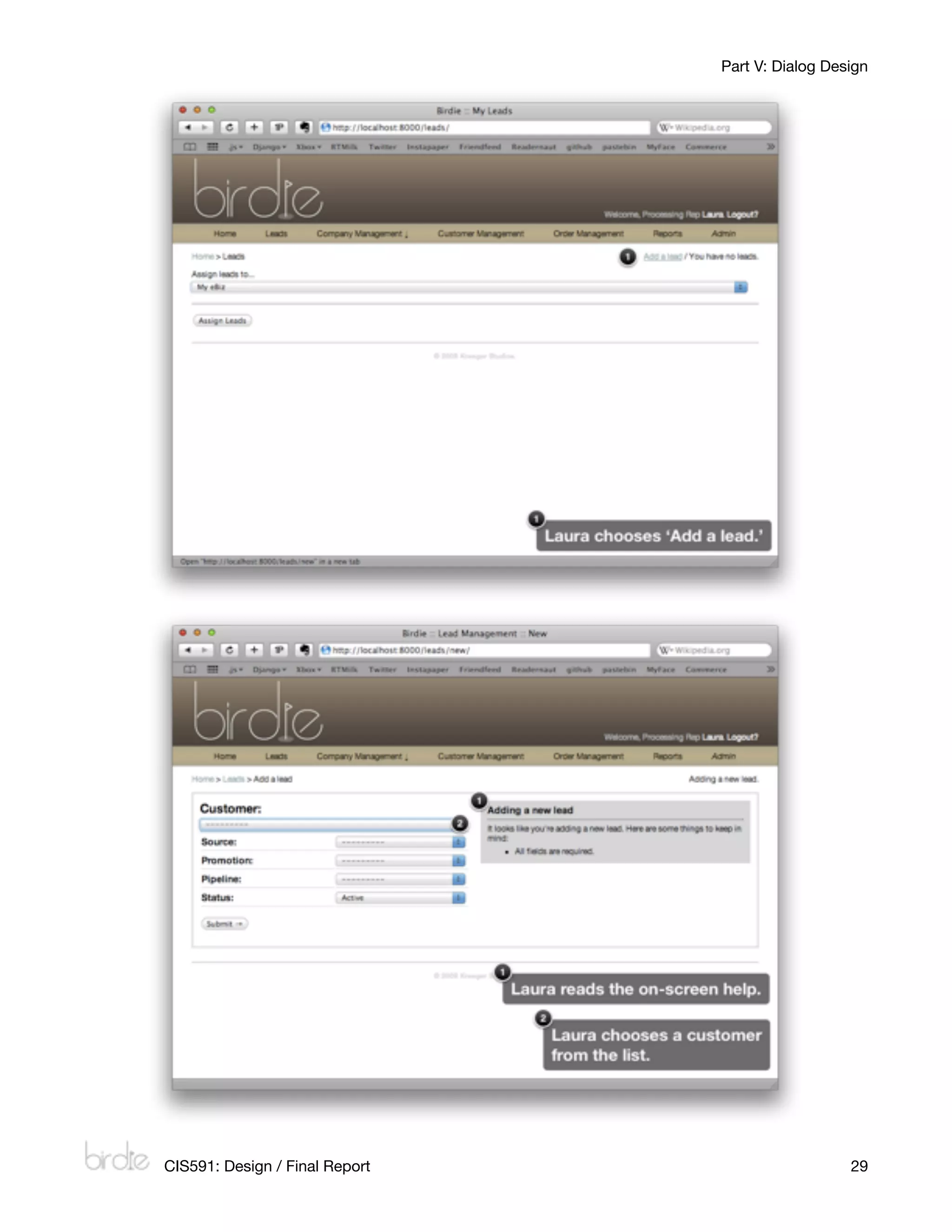
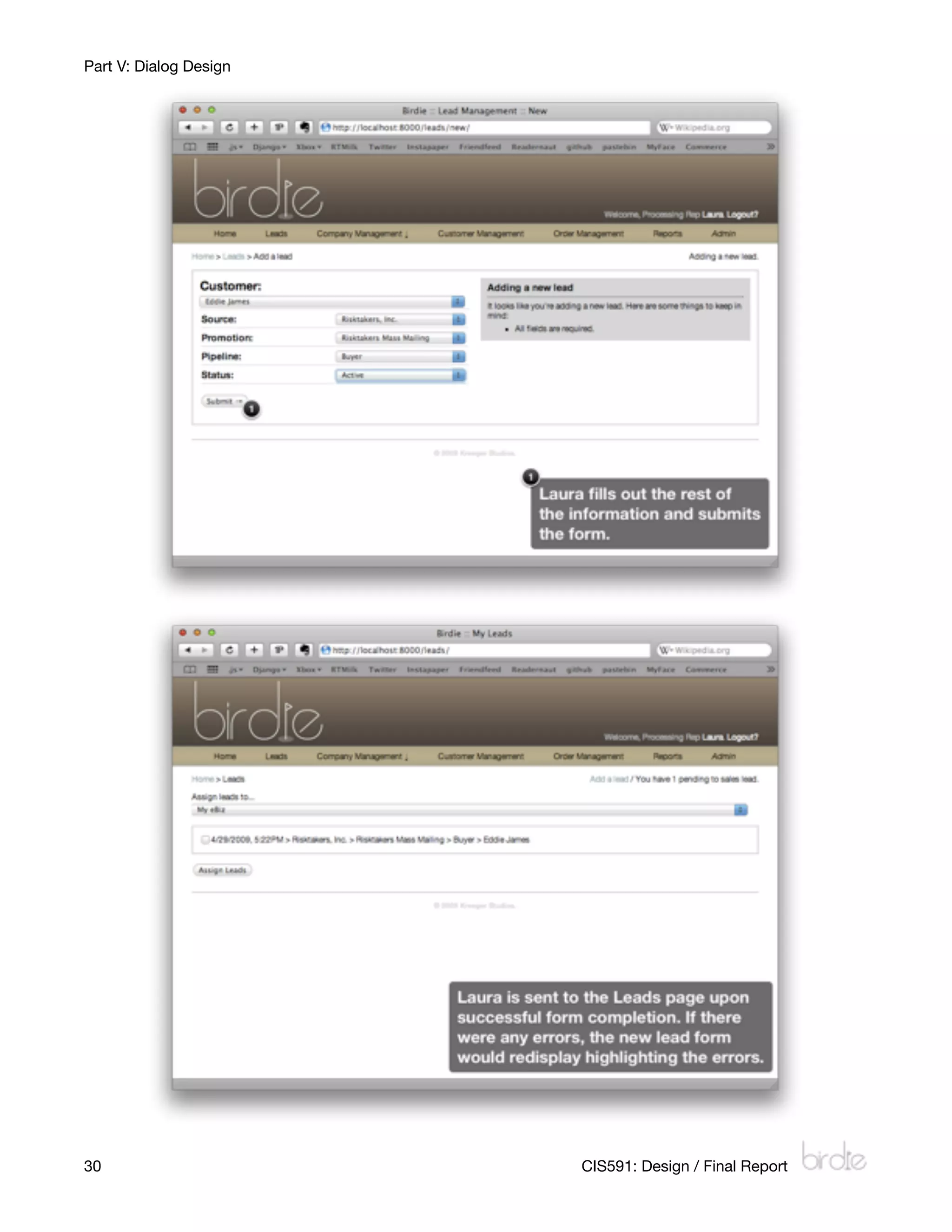
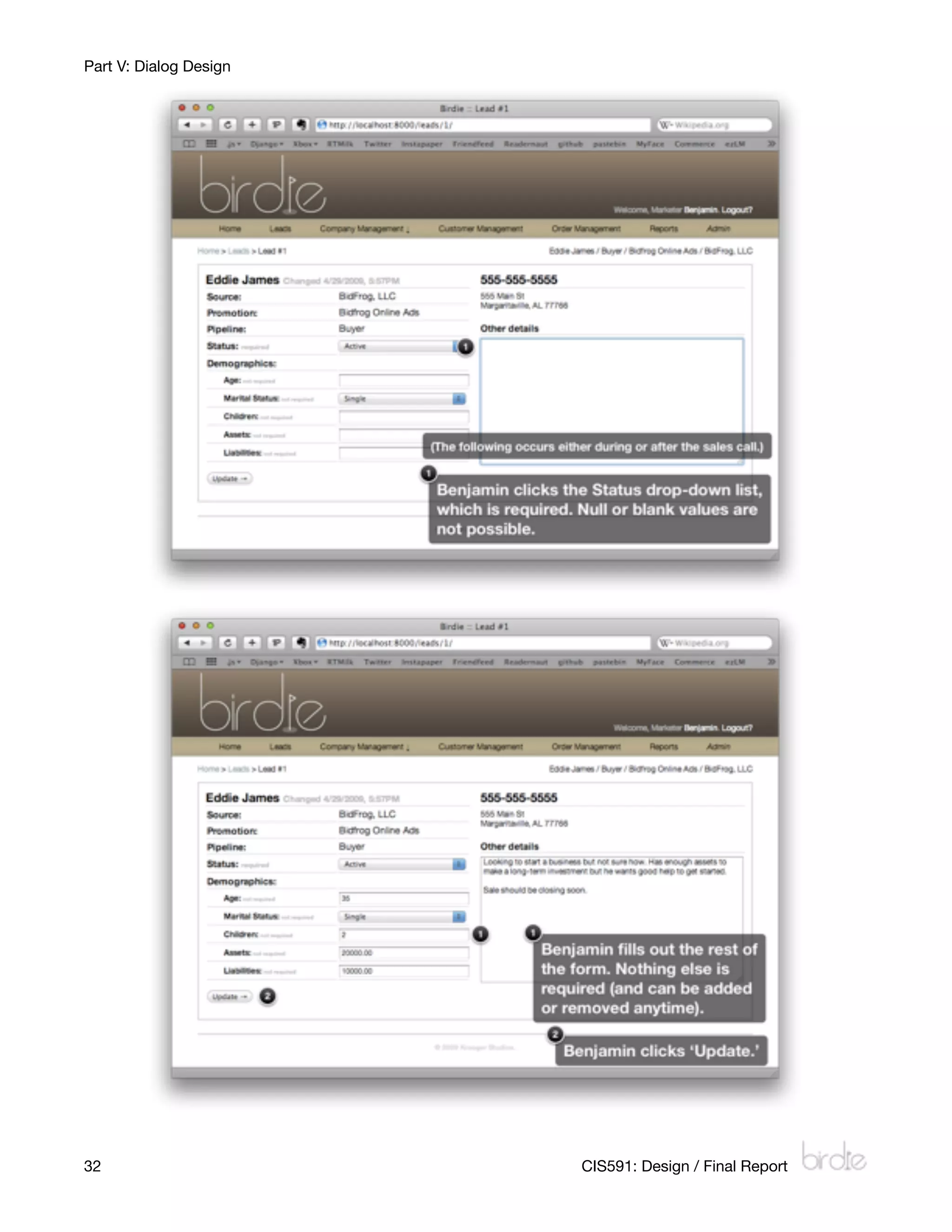
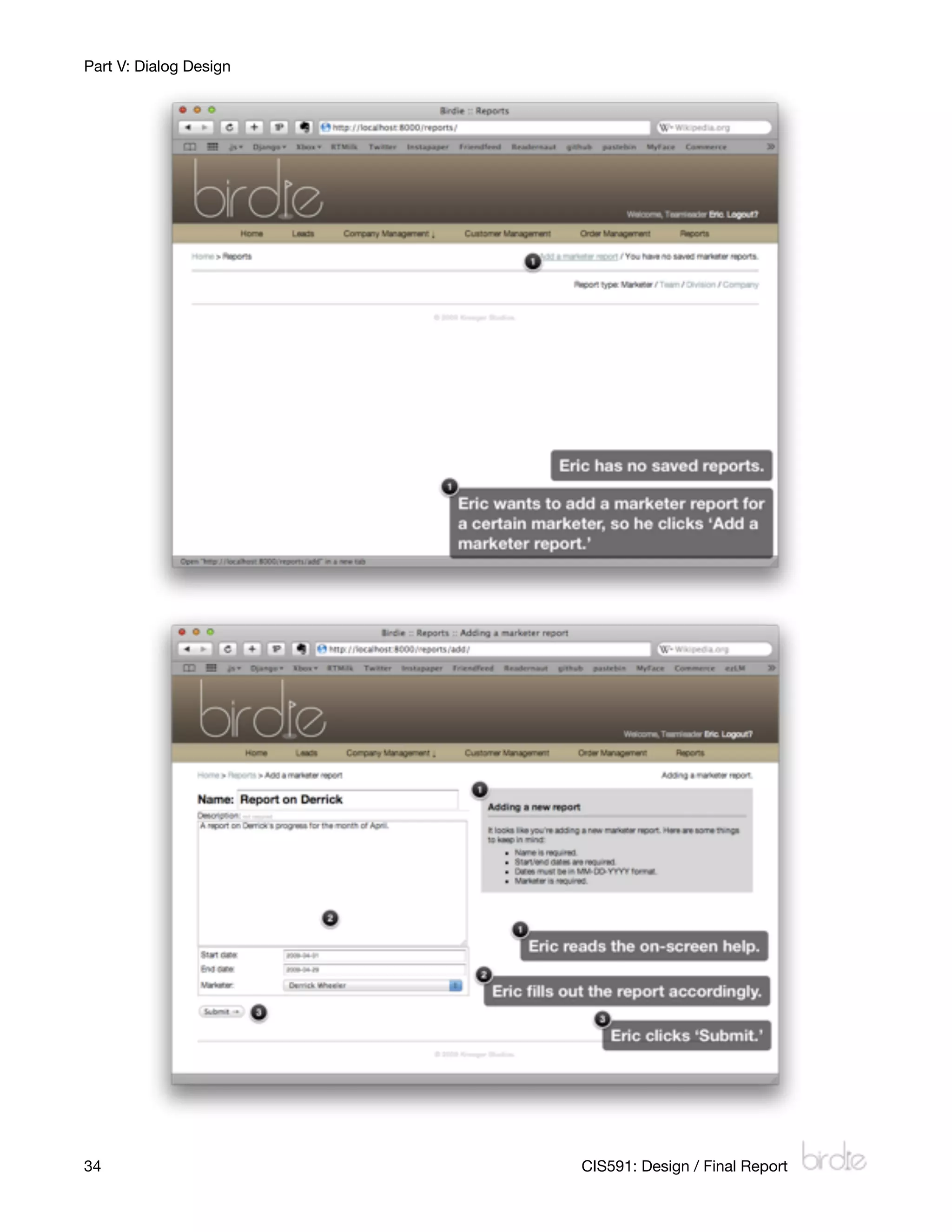
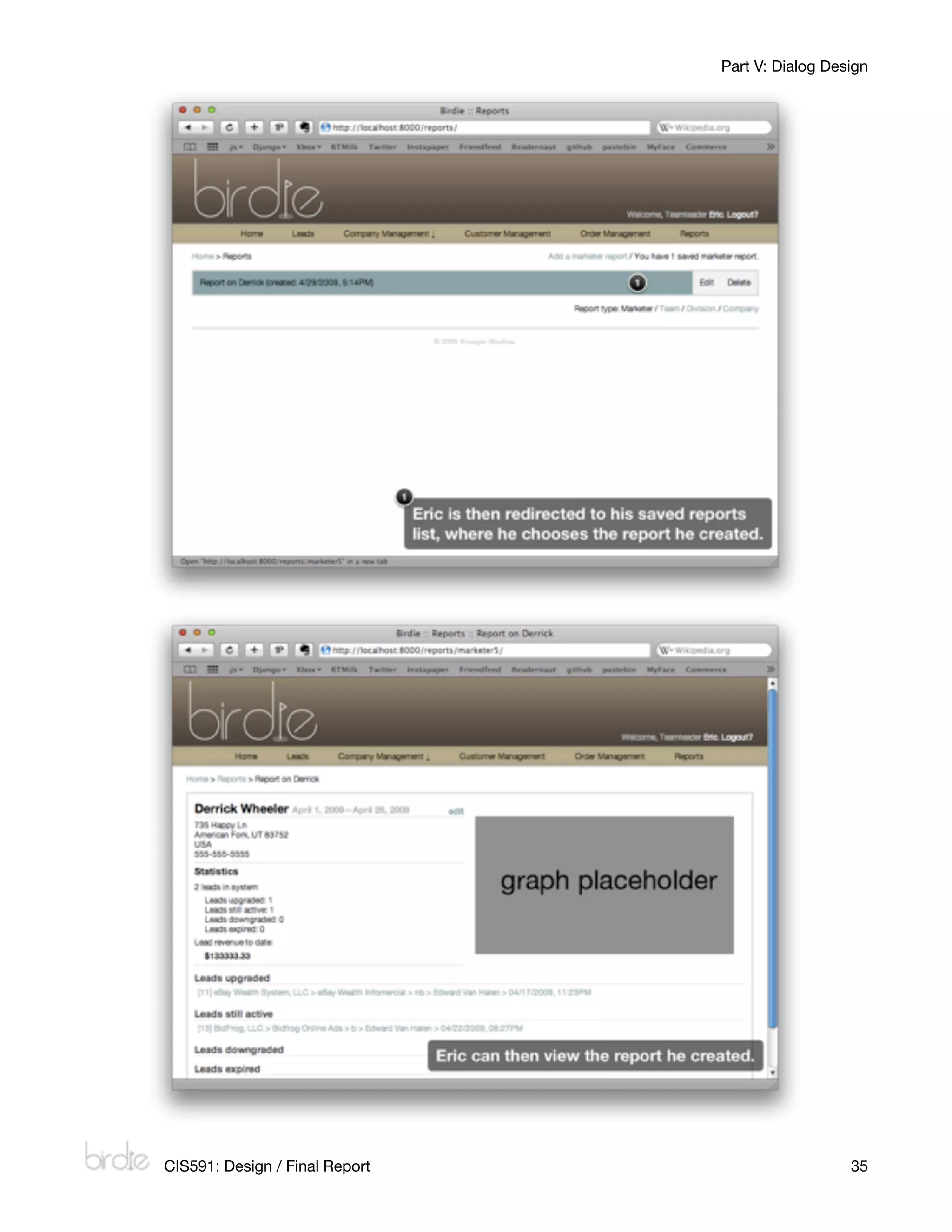
The following are storyboards related to three important use cases. Each screenshot is
marked up with details and instructions on the process.


             CIS591: Design / Final Report
                                                                                         27
Part V: Dialog Design

Create new lead


28
                     CIS591: Design / Final Report
Part V: Dialog Design


    CIS591: Design / Final Report
                     29
Part V: Dialog Design


30
                     CIS591: Design / Final Report
Part V: Dialog Design

Change lead status


        CIS591: Design / Final Report
                     31
Part V: Dialog Design


32
                     CIS591: Design / Final Report
Part V: Dialog Design


Generate marketer report


        CIS591: Design / Final Report
                     33
Part V: Dialog Design


34
                     CIS591: Design / Final Report
Part V: Dialog Design


    CIS591: Design / Final Report
                     35
Part VI: Test Cases and Test Results

Part VI: Test Cases and Test Results
Authentication
Logging in

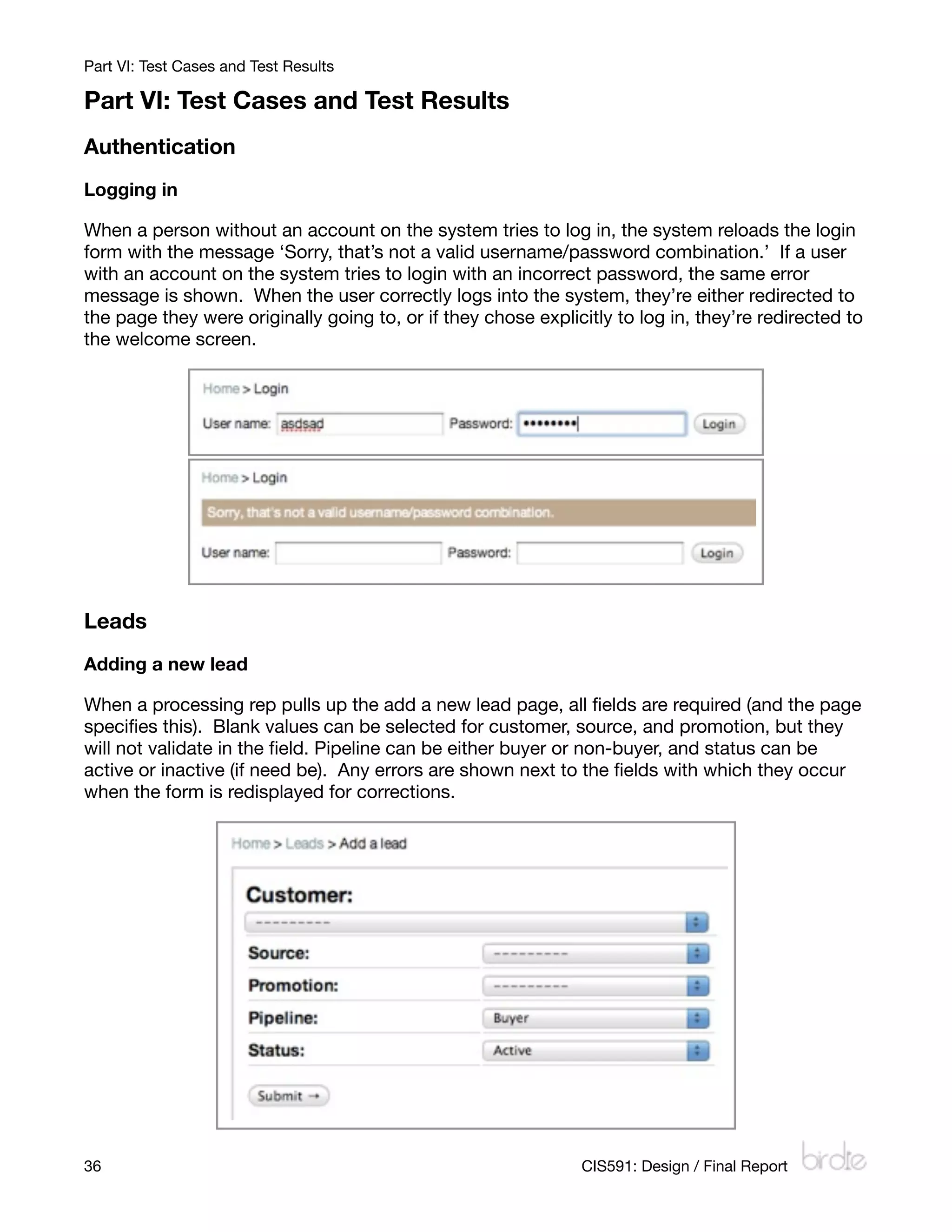
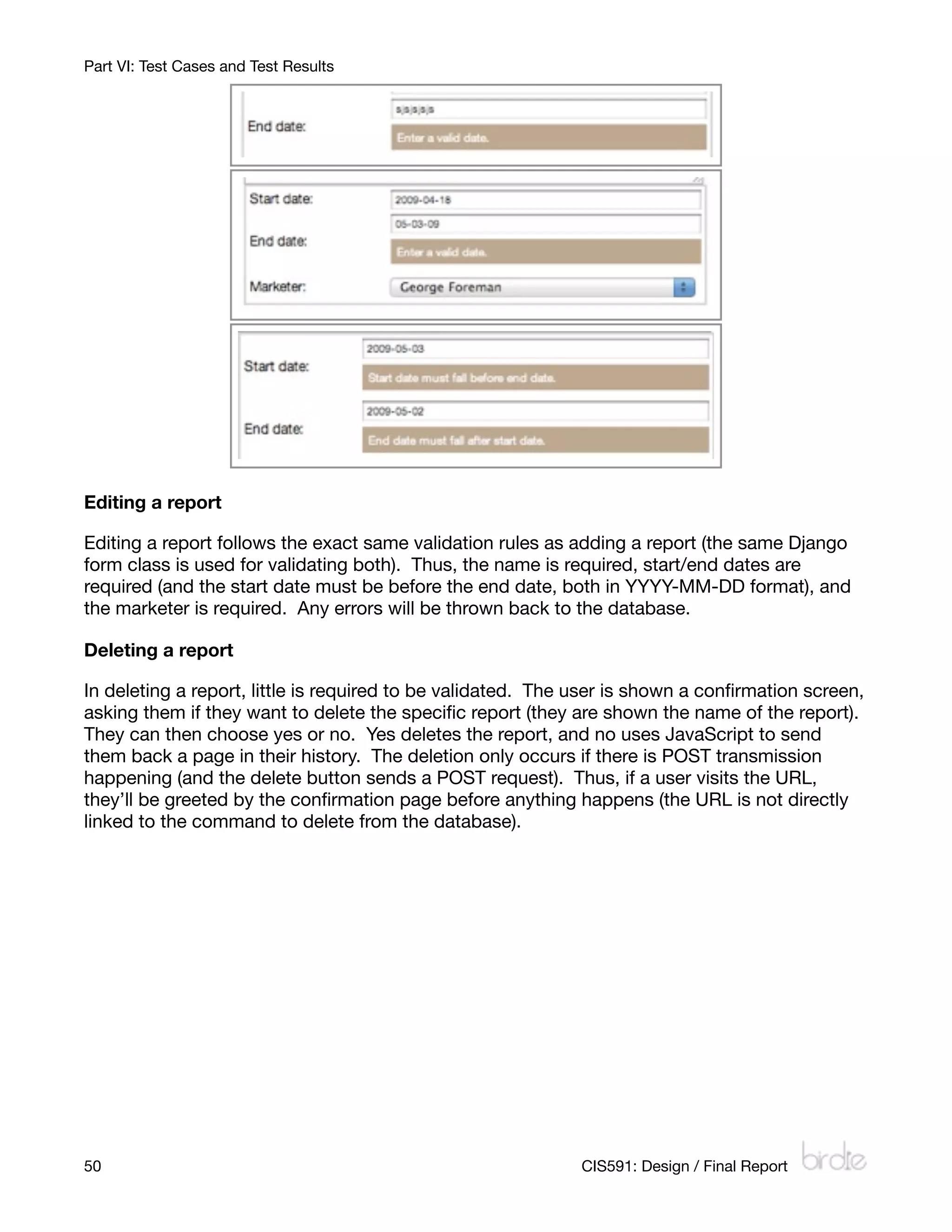
When a person without an account on the system tries to log in, the system reloads the login
form with the message ‘Sorry, that’s not a valid username/password combination.’ If a user
with an account on the system tries to login with an incorrect password, the same error
message is shown. When the user correctly logs into the system, they’re either redirected to
the page they were originally going to, or if they chose explicitly to log in, they’re redirected to
the welcome screen.


Leads
Adding a new lead

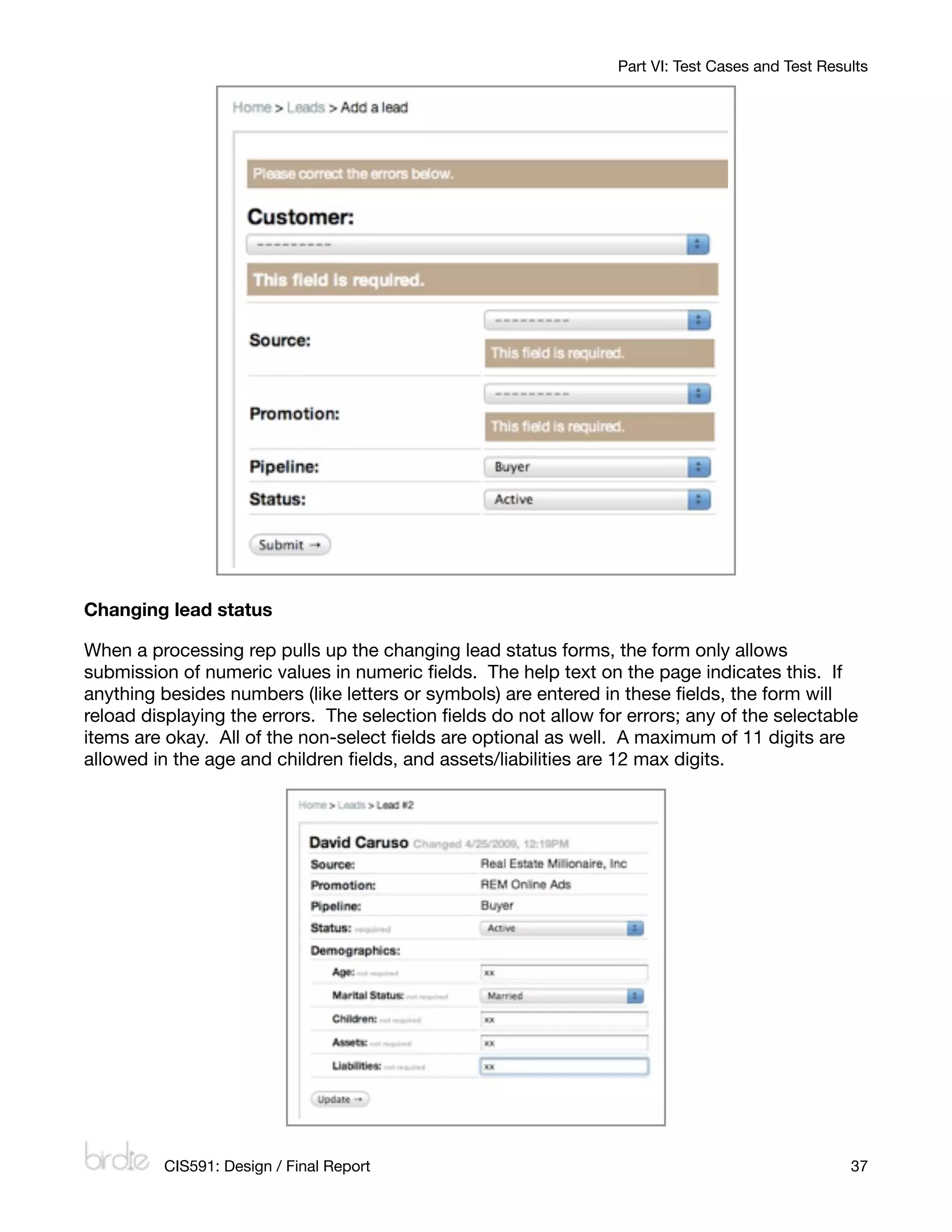
When a processing rep pulls up the add a new lead page, all fields are required (and the page
specifies this). Blank values can be selected for customer, source, and promotion, but they
will not validate in the field. Pipeline can be either buyer or non-buyer, and status can be
active or inactive (if need be). Any errors are shown next to the fields with which they occur
when the form is redisplayed for corrections.


36
                                                            CIS591: Design / Final Report
Part VI: Test Cases and Test Results


Changing lead status

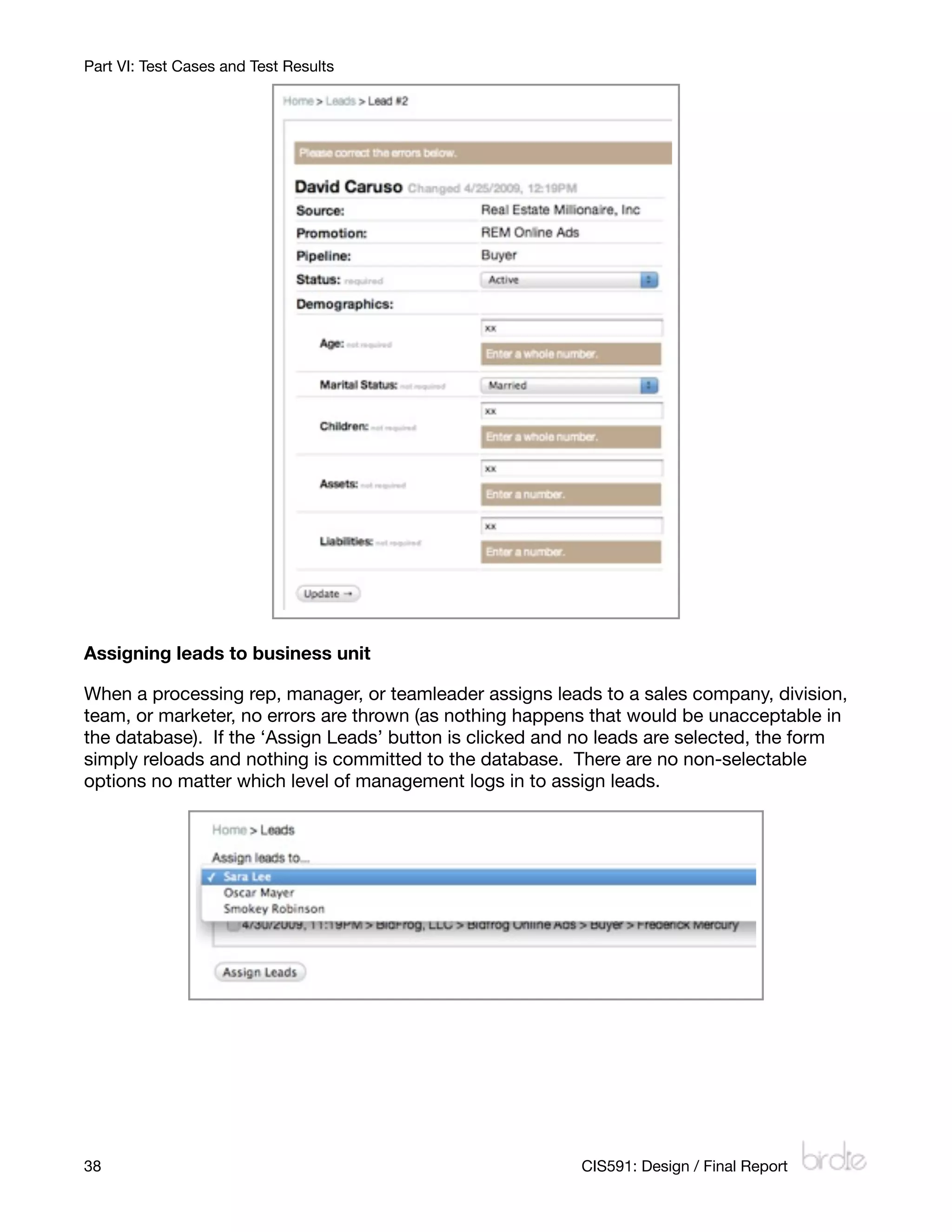
When a processing rep pulls up the changing lead status forms, the form only allows
submission of numeric values in numeric fields. The help text on the page indicates this. If
anything besides numbers (like letters or symbols) are entered in these fields, the form will
reload displaying the errors. The selection fields do not allow for errors; any of the selectable
items are okay. All of the non-select fields are optional as well. A maximum of 11 digits are
allowed in the age and children fields, and assets/liabilities are 12 max digits.


         CIS591: Design / Final Report
                                                            37
Part VI: Test Cases and Test Results


Assigning leads to business unit

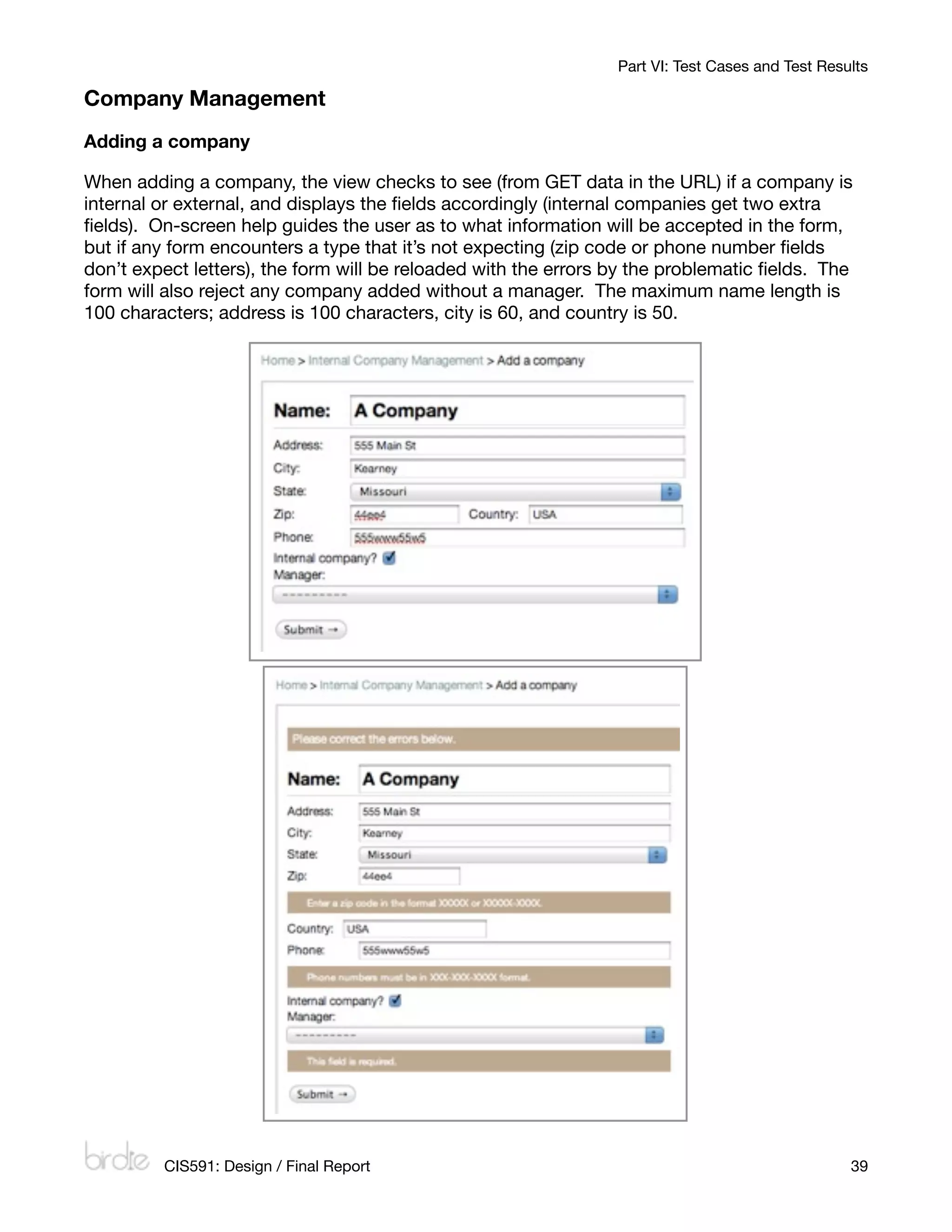
When a processing rep, manager, or teamleader assigns leads to a sales company, division,
team, or marketer, no errors are thrown (as nothing happens that would be unacceptable in
the database). If the ‘Assign Leads’ button is clicked and no leads are selected, the form
simply reloads and nothing is committed to the database. There are no non-selectable
options no matter which level of management logs in to assign leads.


38
                                                       CIS591: Design / Final Report
Part VI: Test Cases and Test Results

Company Management
Adding a company

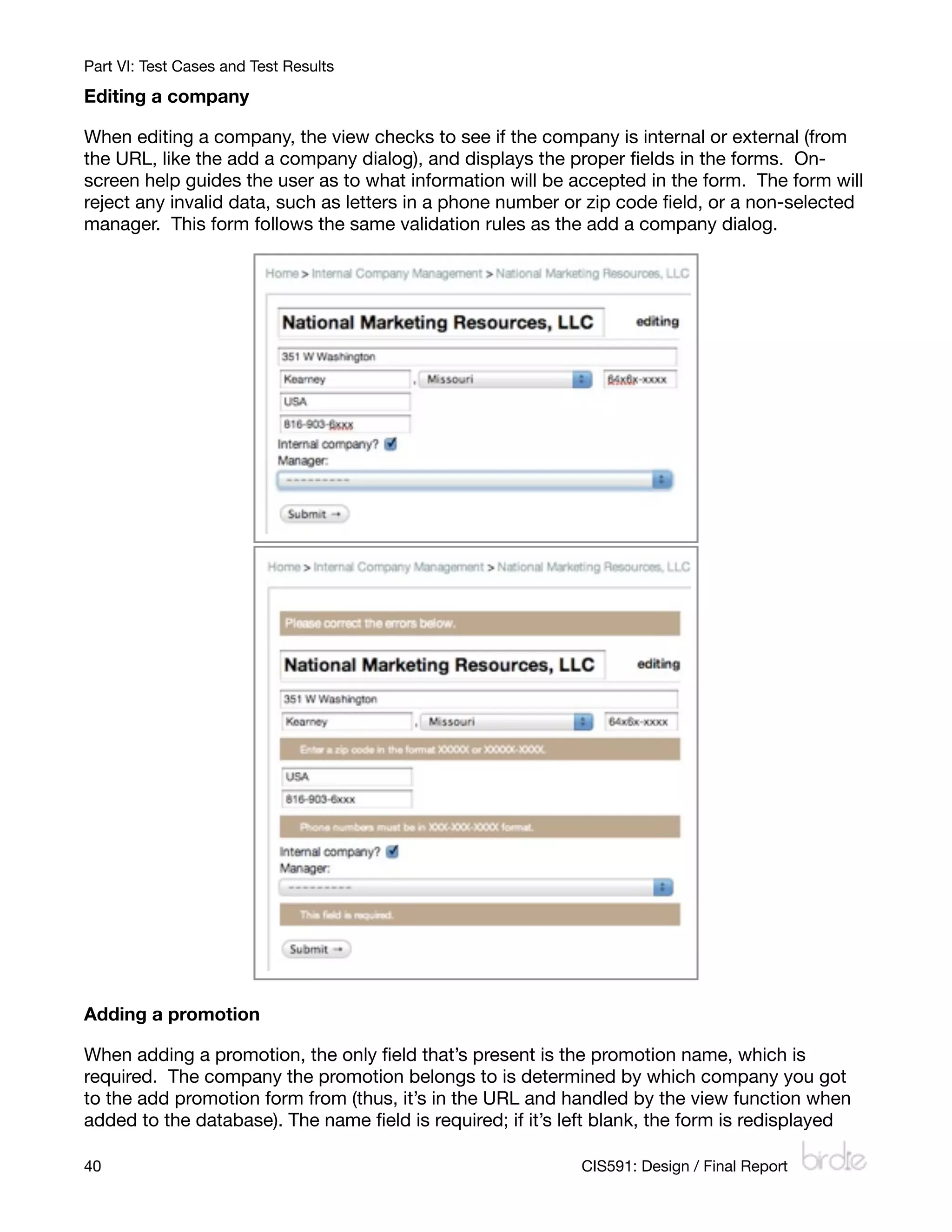
When adding a company, the view checks to see (from GET data in the URL) if a company is
internal or external, and displays the fields accordingly (internal companies get two extra
fields). On-screen help guides the user as to what information will be accepted in the form,
but if any form encounters a type that it’s not expecting (zip code or phone number fields
don’t expect letters), the form will be reloaded with the errors by the problematic fields. The
form will also reject any company added without a manager. The maximum name length is
100 characters; address is 100 characters, city is 60, and country is 50.


         CIS591: Design / Final Report
                                                           39
Part VI: Test Cases and Test Results

Editing a company

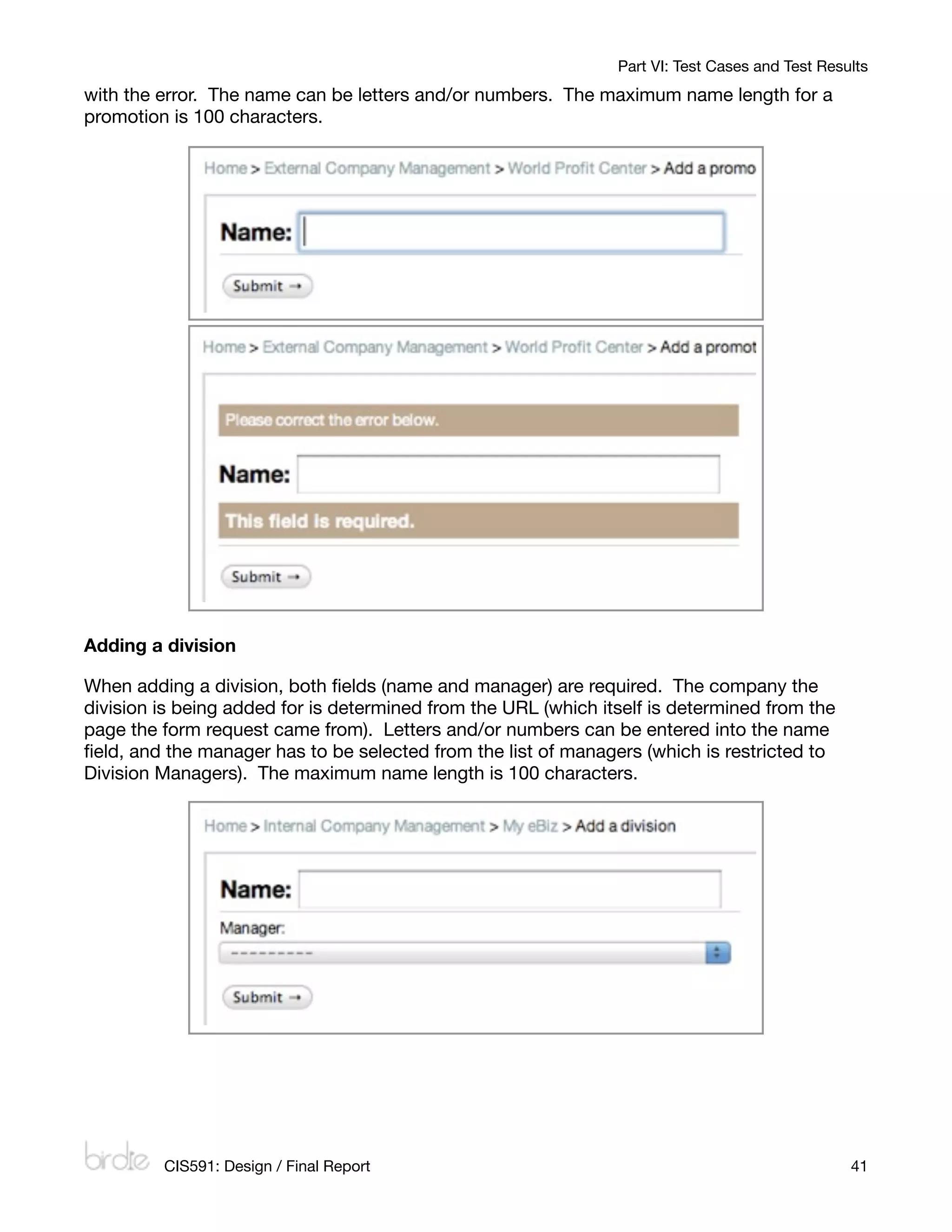
When editing a company, the view checks to see if the company is internal or external (from
the URL, like the add a company dialog), and displays the proper fields in the forms. On-
screen help guides the user as to what information will be accepted in the form. The form will
reject any invalid data, such as letters in a phone number or zip code field, or a non-selected
manager. This form follows the same validation rules as the add a company dialog.


Adding a promotion

When adding a promotion, the only field that’s present is the promotion name, which is
required. The company the promotion belongs to is determined by which company you got
to the add promotion form from (thus, it’s in the URL and handled by the view function when
added to the database). The name field is required; if it’s left blank, the form is redisplayed

40
                                                         CIS591: Design / Final Report
Part VI: Test Cases and Test Results
with the error. The name can be letters and/or numbers. The maximum name length for a
promotion is 100 characters.


Adding a division

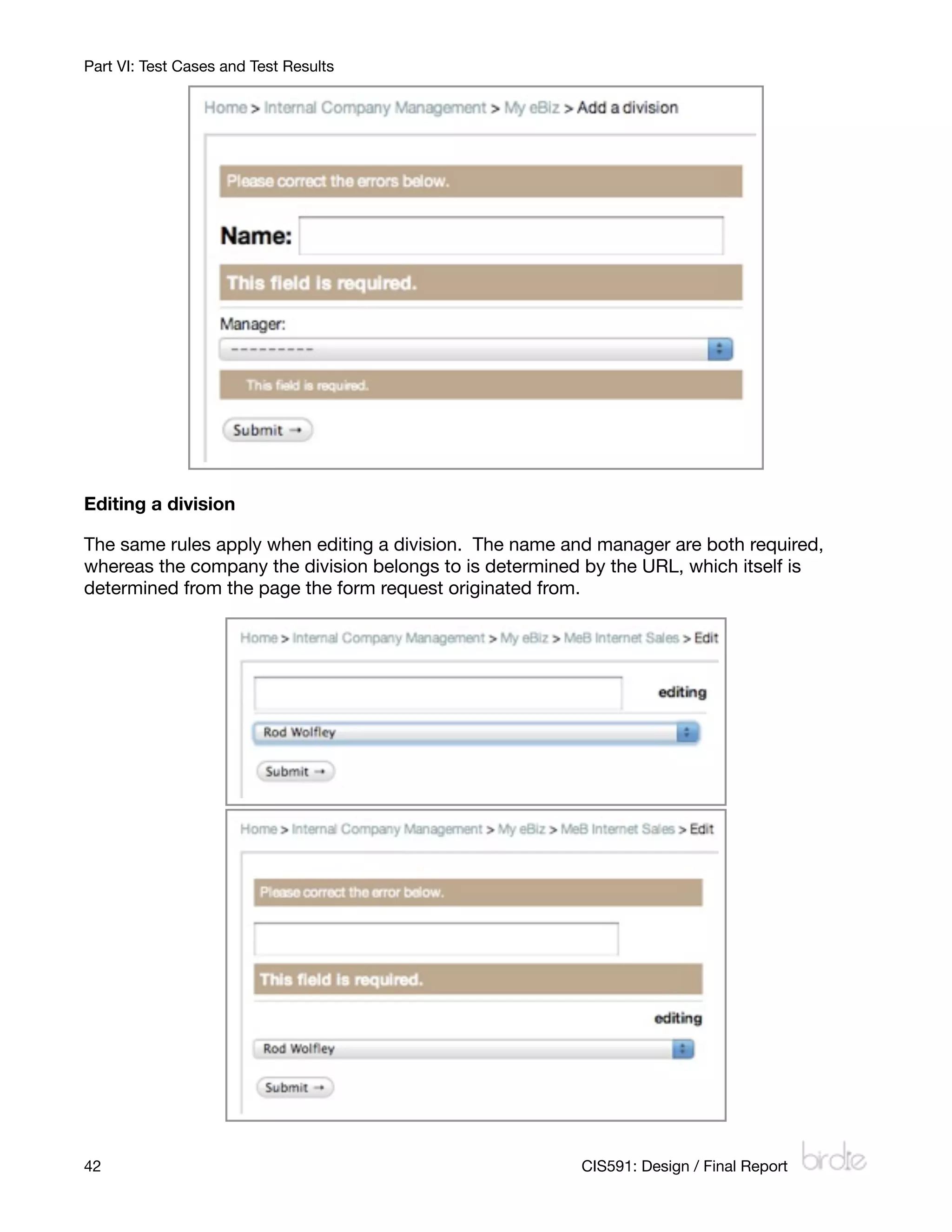
When adding a division, both fields (name and manager) are required. The company the
division is being added for is determined from the URL (which itself is determined from the
page the form request came from). Letters and/or numbers can be entered into the name
field, and the manager has to be selected from the list of managers (which is restricted to
Division Managers). The maximum name length is 100 characters.


         CIS591: Design / Final Report
                                                          41
Part VI: Test Cases and Test Results


Editing a division

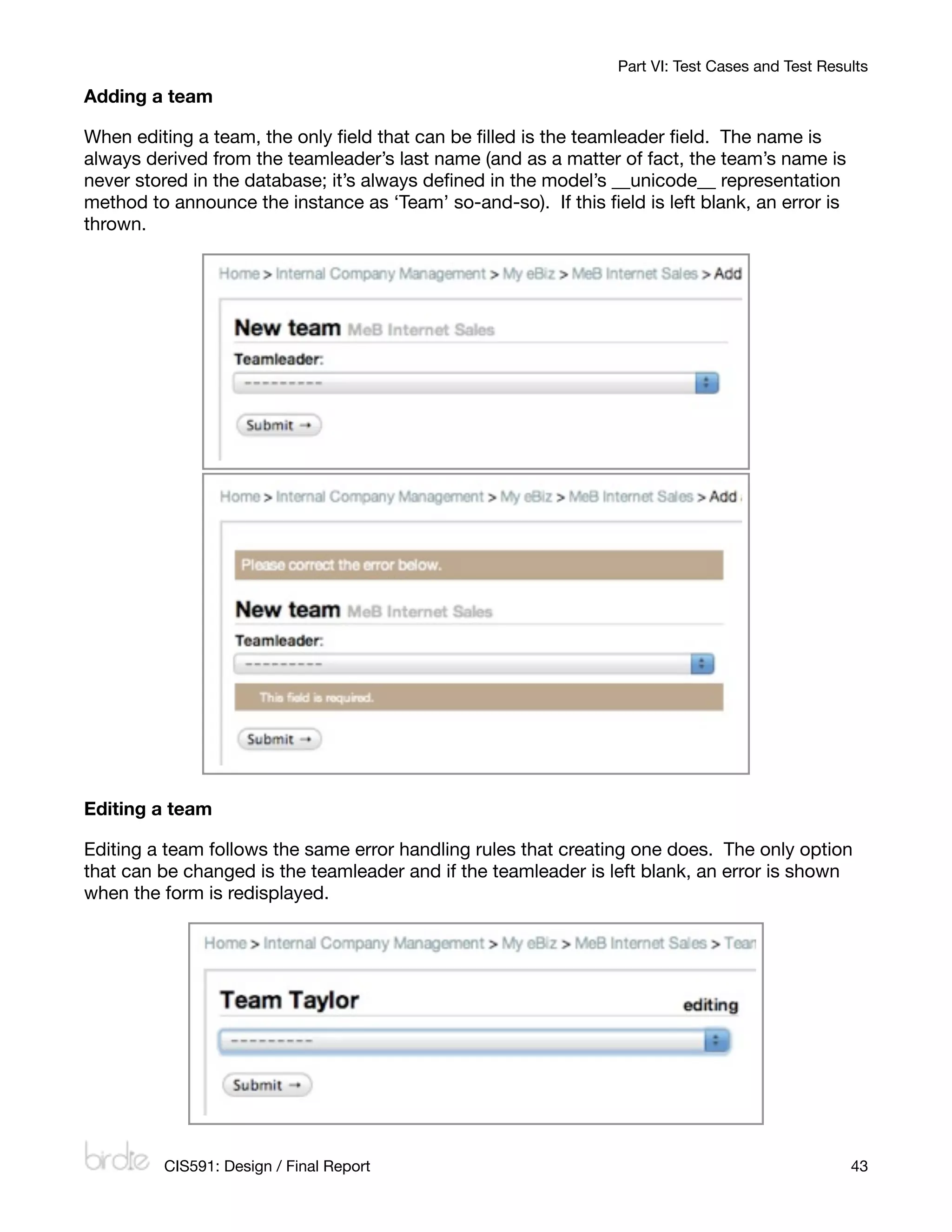
The same rules apply when editing a division. The name and manager are both required,
whereas the company the division belongs to is determined by the URL, which itself is
determined from the page the form request originated from.


42
                                                      CIS591: Design / Final Report
Part VI: Test Cases and Test Results

Adding a team

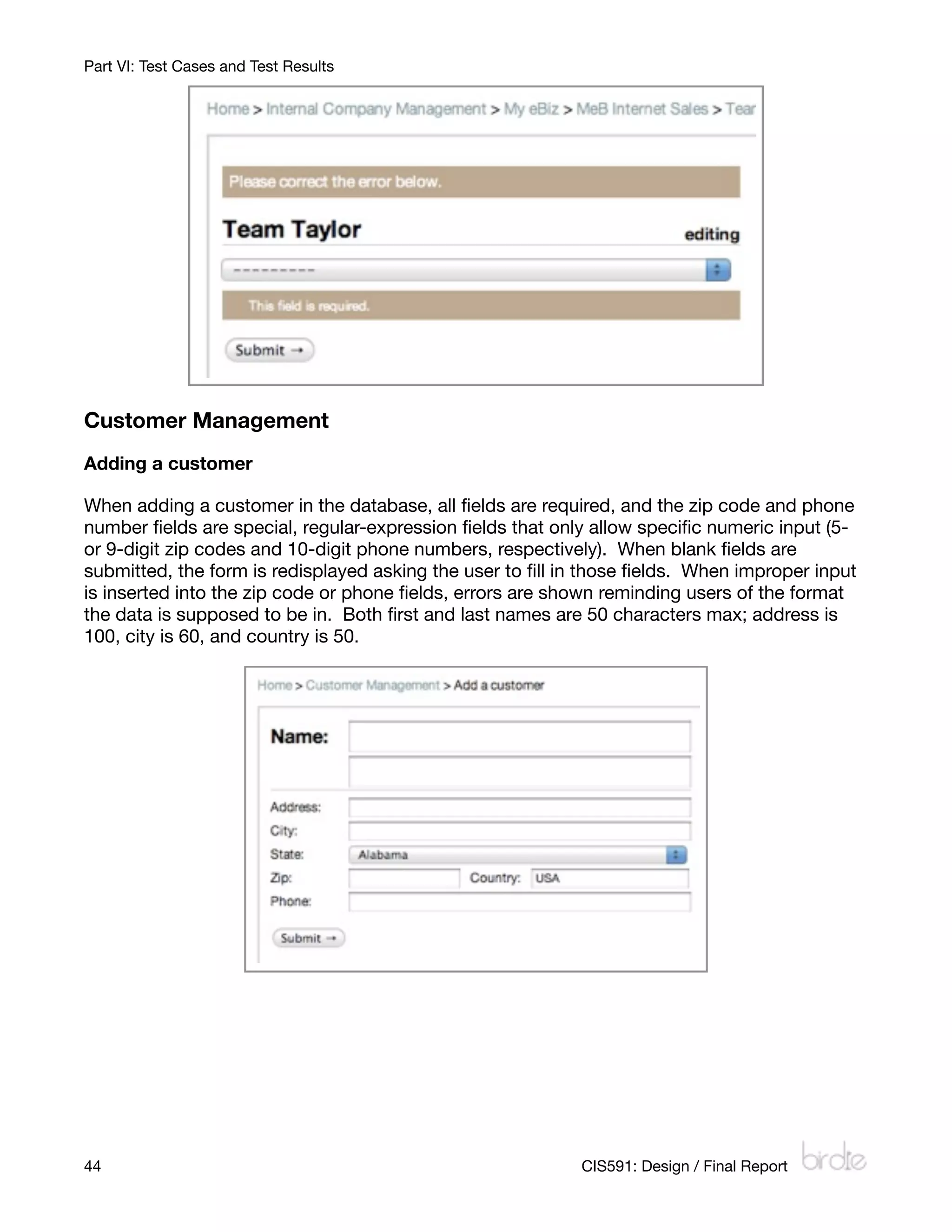
When editing a team, the only field that can be filled is the teamleader field. The name is
always derived from the teamleader’s last name (and as a matter of fact, the team’s name is
never stored in the database; it’s always defined in the model’s __unicode__ representation
method to announce the instance as ‘Team’ so-and-so). If this field is left blank, an error is
thrown.


Editing a team

Editing a team follows the same error handling rules that creating one does. The only option
that can be changed is the teamleader and if the teamleader is left blank, an error is shown
when the form is redisplayed.


         CIS591: Design / Final Report
                                                           43
Part VI: Test Cases and Test Results


Customer Management
Adding a customer

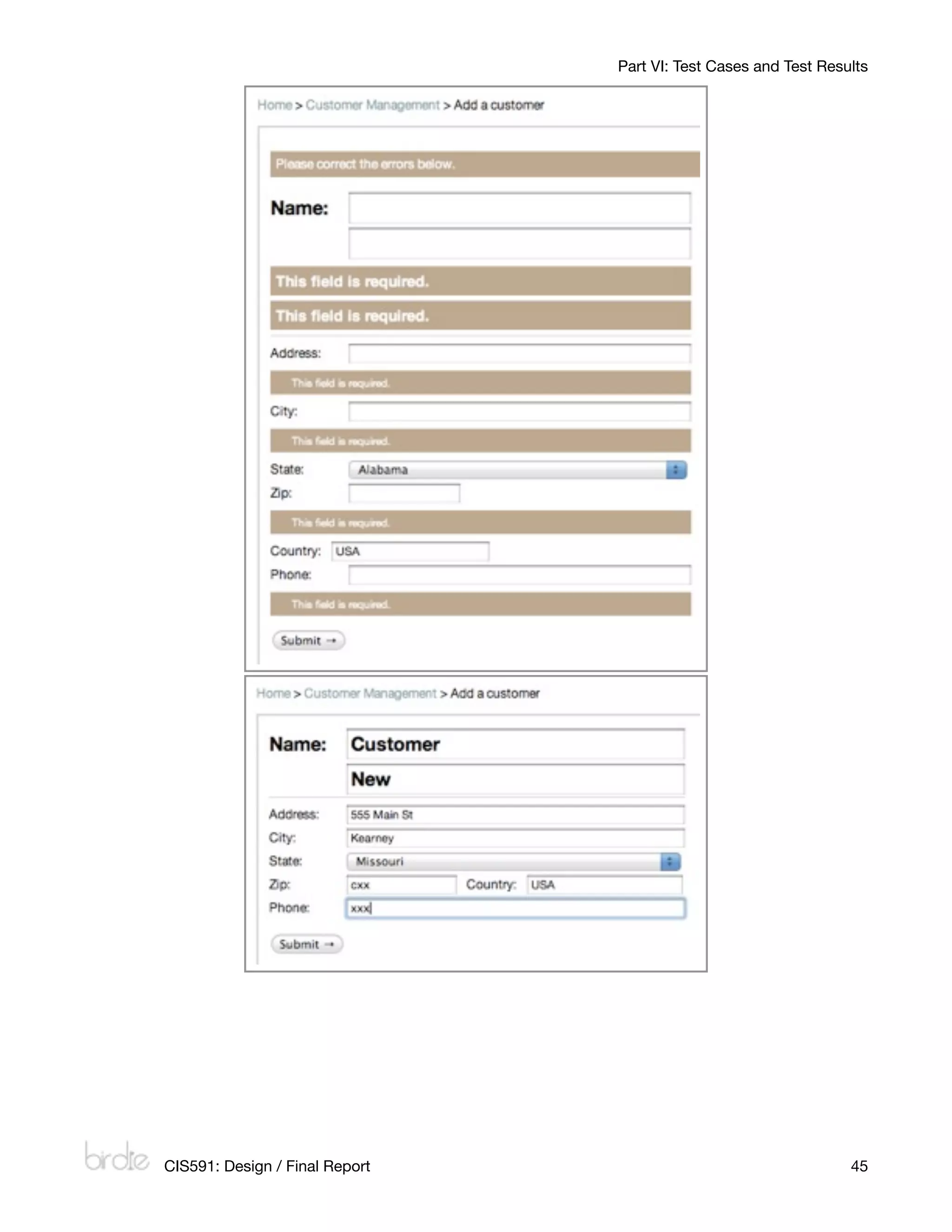
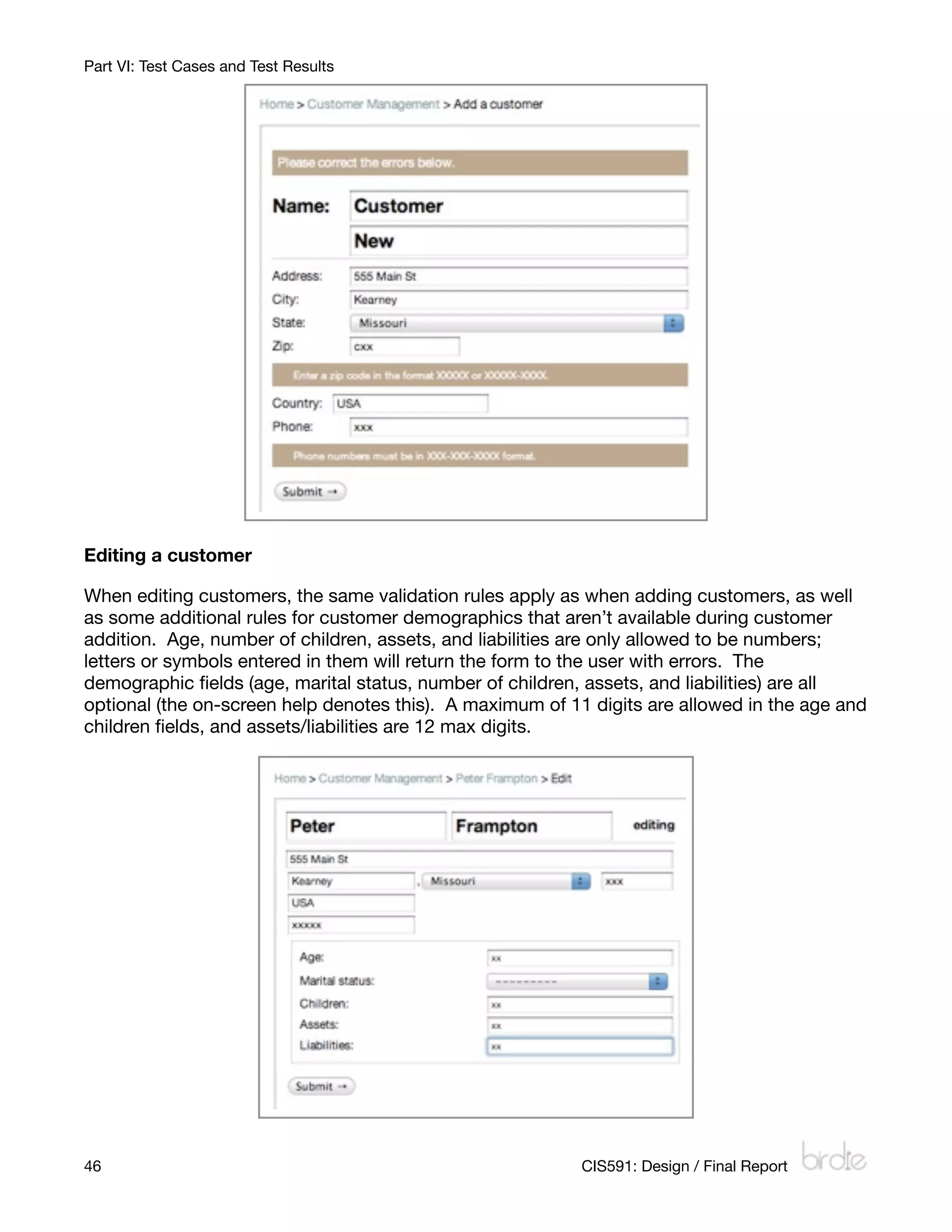
When adding a customer in the database, all fields are required, and the zip code and phone
number fields are special, regular-expression fields that only allow specific numeric input (5-
or 9-digit zip codes and 10-digit phone numbers, respectively). When blank fields are
submitted, the form is redisplayed asking the user to fill in those fields. When improper input
is inserted into the zip code or phone fields, errors are shown reminding users of the format
the data is supposed to be in. Both first and last names are 50 characters max; address is
100, city is 60, and country is 50.


44
                                                        CIS591: Design / Final Report
Part VI: Test Cases and Test Results


    CIS591: Design / Final Report
                                    45
Part VI: Test Cases and Test Results


Editing a customer

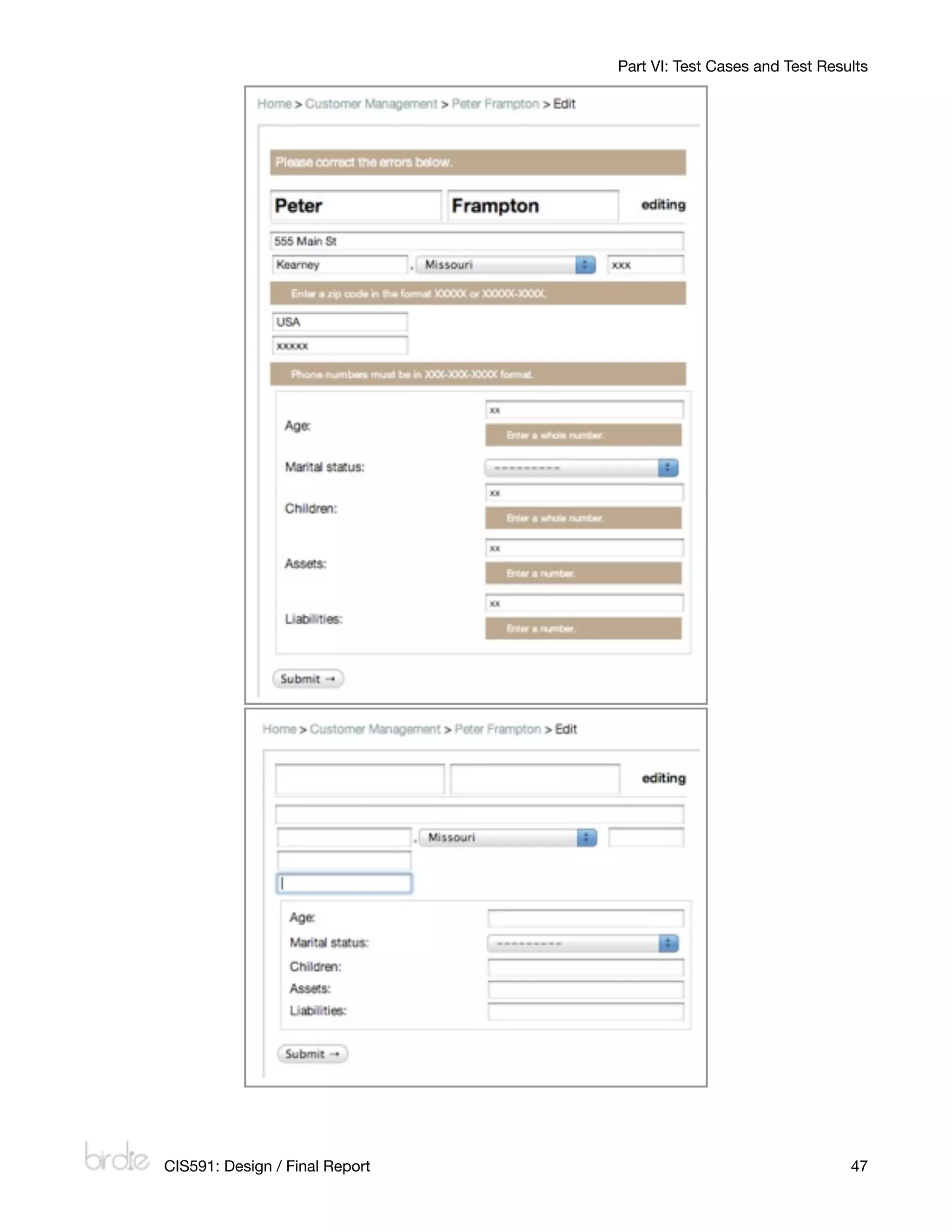
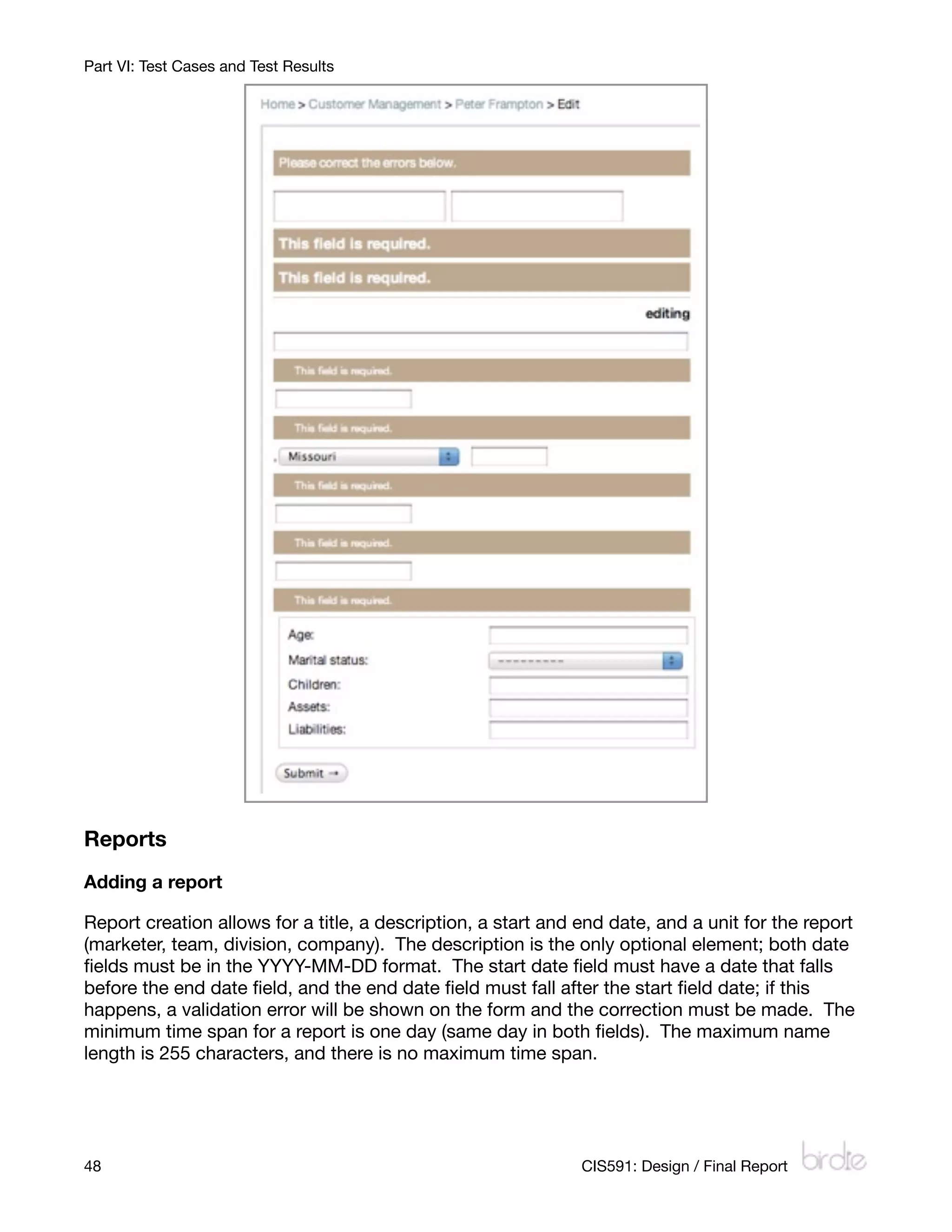
When editing customers, the same validation rules apply as when adding customers, as well
as some additional rules for customer demographics that aren’t available during customer
addition. Age, number of children, assets, and liabilities are only allowed to be numbers;
letters or symbols entered in them will return the form to the user with errors. The
demographic fields (age, marital status, number of children, assets, and liabilities) are all
optional (the on-screen help denotes this). A maximum of 11 digits are allowed in the age and
children fields, and assets/liabilities are 12 max digits.


46
                                                        CIS591: Design / Final Report
Part VI: Test Cases and Test Results


    CIS591: Design / Final Report
                                    47
Part VI: Test Cases and Test Results


Reports
Adding a report

Report creation allows for a title, a description, a start and end date, and a unit for the report
(marketer, team, division, company). The description is the only optional element; both date
fields must be in the YYYY-MM-DD format. The start date field must have a date that falls
before the end date field, and the end date field must fall after the start field date; if this
happens, a validation error will be shown on the form and the correction must be made. The
minimum time span for a report is one day (same day in both fields). The maximum name
length is 255 characters, and there is no maximum time span.


48
                                                            CIS591: Design / Final Report
Part VI: Test Cases and Test Results


    CIS591: Design / Final Report
                                    49
Part VI: Test Cases and Test Results


Editing a report

Editing a report follows the exact same validation rules as adding a report (the same Django
form class is used for validating both). Thus, the name is required, start/end dates are
required (and the start date must be before the end date, both in YYYY-MM-DD format), and
the marketer is required. Any errors will be thrown back to the database.

Deleting a report

In deleting a report, little is required to be validated. The user is shown a confirmation screen,
asking them if they want to delete the specific report (they are shown the name of the report).
They can then choose yes or no. Yes deletes the report, and no uses JavaScript to send
them back a page in their history. The deletion only occurs if there is POST transmission
happening (and the delete button sends a POST request). Thus, if a user visits the URL,
they’ll be greeted by the confirmation page before anything happens (the URL is not directly
linked to the command to delete from the database).


50
                                                          CIS591: Design / Final Report
Part VII: Summary of Incomplete Components

Part VII: Summary of Incomplete Components
The following is a list of components I haven’t had time to implement, as well as some ideas I
knew I wouldn’t have time to implement (but I’d have liked to). They’re in order according to
the most important down to the most trivial.

      •     Lead import and export
            I have the links in place under the processing representative’s leads list, but I
            don’t have views hooked up to them; right now, they bounce to HTTP 404 pages,
            which is where they should go until I can implement them. I know that Python has
            easy-to-use file parsing components, including parsing delimited documents
            (which is the format that batch leads usually come to the company in, either
            comma- or tab-delimited), and those are in my plans for this component. A form
            would accept a file to be uploaded; the file will be checked to see if it’s in the
            proper format (no erroneous files will be allowed), each lead in the file will be
            parsed and then entered into the database.
      •     Customer/promotion addition inside lead creation
            I understand right now that it’s troublesome to have to create a new customer or
            promotion for adding a lead that has new information that’s not already in the
            system. Complementing the lead import/export use case, this feature would allow
            the addition of a customer that’s not already in the database while adding a lead
            that introduces that new customer. The same would go with promotions.
      •     Lead auto-expire
            After a certain date, leads are set to expire. What I need to do is either program a
            Python script or something to filter through the database every hour or so and get
            all leads whose expire date/time is less than the current date/time and set their
            status to expired.
      •     Lead archival
            At the end of the day, expired and inactive leads should be archived for later
            retrieval if needed. What I ended up implementing was similar in fashion but
            didn’t use a temporal event; I sorted the list of leads into active / inactive / expired
            categories. However this doesn’t archive inactive and expired leads at the end of
            the day; they’re still there. Implementing this would involve adding an attribute to
            the leads_lead model that’s a Boolean value stating whether it’s archived or not.
            Archived leads could be pulled up by a teamleader for redistribution to marketers
            if necessary.
      •     Per-unit deletion
            Right now, the option to delete things in the database is available in the admin
            backend; if a user has the proper privileges, they can delete whatever they want
            (with the proper rows in other tables cascading like they should). In the future, I’d
            like to implement the ability for an appropriate user to delete a team, a marketer,
            etc. from the database (with confirmation) without having to enter the backend.
            The basic deletion functionality is implemented in the reports subsystem.
      •     Order management subsystem
            One of the parts of the system that I had originally included was that of order
            management. Once a customer’s account was upgraded, they would be sold a
            product, and that order would go in the system complete with payment


          CIS591: Design / Final Report
                                                          51
Part VII: Summary of Incomplete Components
            information, due dates, and so forth. The database tables are there, and the basic
            list view is already written, but the act of creating an order is not yet in the system
            (the user is forwarded to an HTTP 404 error page). What I ended up doing was
            expanding the report subsystem more than originally planned, which pushed
            order management to the backburner. This subsystem included adding products,
            viewing product detail, adding orders, viewing order details, and editing those
            objects as well.
       •    Lead quotas
            Marketers should really only be assigned so many leads maximum; lead quotas
            would prevent this from happening. Either quotas would be set per individual
            marketers, or quotas would be set for every marketer at the same time; either
            way, this would prevent overloading a bunch of leads on to a marketer that’s too
            busy. All this would entail is either editing the model or setting a system-wide
            constant setting, and then try the ‘assign leads to marketer’ use case within an if/
            else block (if the marketer’s lead count is equal to their quota, then raise an error;
            else, assign lead to marketer).
       •    Internet Explorer stylesheet issues
            I didn’t have time to fix it, but Internet Explorer doesn’t show the navigation bar
            properly due to Internet Explorer’s CSS incompatibilities; it shows the inline list as
            a regular list (straight down instead of straight across the screen). For now it’s
            best to open up the site using Firefox or a WebKit-based browser like Safari or
            Google Chrome.
       •    Graphs in reports
            I also had planned to use the matplotlib Python library for creating graphs for
            reports; right now, there’s a placeholder image on each report where the graph
            would go. After researching matplotlib and a few other alternatives, I started
            leaning towards doing HTML/CSS-based graphs, which would better lend itself to
            being reformatted if visited by a mobile browser. As this wasn’t critical to the
            system, it was also pushed to the backburner.
       •    Additional user preferences
            Another component that I had planned for the future of the system was that of
            setting user preferences: color schemes, visibility changes, the number of leads to
            display per page (once pagination has been implemented), etc. As most web
            applications have a generous number of preferences, I did have several in the
            back of my mind as I was planning and coding the project, but I didn’t want to
            spend my already limited time writing in preferences; I wanted to wait until I had
            most of the core features in place before I added user preferences.
       •    Undo functions
            If a user makes a mistake, they have to go into the admin interface and correct it.
            This is a problem if a user needs to undo something and they don’t have admin
            privileges. Undo would add a flash at the top of the screen after an action has
            occurred (like assigning leads to a unit), with an undo button. Clicking this would
            undo the changes to the database (and un-assign those leads).


52
                                                           CIS591: Design / Final Report
Part VIII: Installation and Evaluators Instructions

Part VIII: Installation and Evaluators Instructions
Included on the source code disc is a few different options for evaluating the system I’ve
written.

List of preset test user accounts
The following is a list of all preset accounts in the system, along with their user types. For the
sake of simplicity, everybody’s password is pa55w0rd. Those in italics are staff members,
meaning they can use the admin interface as well.

             National Marketing Resources                                           My eBiz
    bkanenwisher                 Sales company mgr         lpage                          Sales company mgr

    rellefsen                    Processing mgr            rwolfley                        Division mgr (Int. Sls)

    lkreeger                     Processing rep            etaylor                        Teamleader

    jlucas                       Division mgr (Int. Sls)   cchocula                       Marketer

    danderson                    Teamleader                rmcintire                      Marketer

    ccrunch                      Marketer                  dwheeler                       Marketer

    bkreeger                     Marketer                  mtyson                         Division mgr (Rl. Est.)

    svaughn                      Marketer                  esmith                         Teamleader

    mjackson                     Teamleader                mcarey                         Marketer

    slee                         Marketer                  smclachlan                     Marketer

    omayer                       Marketer                  swhite                         Marketer

    srobinson                    Marketer                  afranklin                      Teamleader

    rthornton                    Division mgr (Rl. Est.)   rgold                          Marketer

    rbronson                     Teamleader                dross                          Marketer

    ejames                       Marketer                  rwilliams                      Marketer

    yono                         Marketer

    cpebbles                     Marketer

    troll                        Teamleader

    bevans                       Marketer

    gforeman                     Marketer

    dmadison                     Marketer


                CIS591: Design / Final Report
                                                                       53
Part VIII: Installation and Evaluators Instructions

Original source code
I’ve included all my Python/Django source code for the project, which is in the zip file
Sourcebirdie.zip. Also in the Source directory is the installer for Python for Windows
(v2.5.4) and the Django 1.1 beta 1 framework code. This method will let you run the source
code on your computer with Django’s built-in development server. Note: these directions
are for Windows.

        1.     Unzip the Sourcebirdie.zip source code to a folder on your hard drive (say,
               C:djcodebirdie).
        2.     Install Python using the installed Python-2.5.4.msi in the Source folder. This
               should install Python on your system.
        3.     Unzip the Sourcedjango.zip in another location on your hard drive (say, C:
               djcodedjango).
        4.     Using the command line with administrative privileges, navigate to the directory
               you unzipped django to (C:djcodedjango in our example) and run setup.py
               install. This will install the Django framework into Python’s site-packages
               directory.
        5.     Navigate to the birdie directory that you unzipped to (C:djcodebirdie in our
               example) and run manage.py syncdb. This will propagate the SQLite3 database
               with the needed tables and initial data to test the system.
        6.     In the same directory, run manage.py runserver. This will start the development
               server running on your computer at http://localhost:8000/. If needed, you can
               change the port number by running manage.py runserver 8080 (choose your
               own port there).
        7.     Note: it’s best to run Birdie in Firefox or a WebKit-based browser like Safari or
               Google Chrome. It currently has some stylesheet issues with Internet Explorer 7
               (that I didn’t have time to resolve).

Pre-built Ubuntu virtual machine
I’ve also included a pre-built virtual machine running Ubuntu (Jaunty Jackalope) v9.04 with all
prerequisites installed. Copy it to your desktop somewhere and run it with VMware Player,
which is included on the CD as well. The virtual machine should automatically log in with the
username and password shown below. Open up Firefox and visit http://localhost:8000/
(which should be set as the home page). The test server is already being run in a startup
process on the virtual machine (it runs from the birdie folder on the desktop with the
command python2.5 manage.py runserver).

        •      Username: birdie
        •      Password: birdie

On the Internet
You can also visit Birdie on the Internet where it’s being hosted in a ‘production’-type
environment (no debug information is being shown). It’s at https://birdie.kreegerstudios.com/


54
                                                           CIS591: Design / Final Report
Part VIII: Installation and Evaluators Instructions
and should be up for another month (at least). It’s best to use Firefox, Safari, or Chrome
(Internet Explorer has some stylesheet issues that mess up the navigation bar).


         CIS591: Design / Final Report
                                                                55
Part IX: Progress Reporting

Part IX: Progress Reporting
I didn’t end up spending as much time as I thought I would coding; I had somewhat planned
on going over my hours, but as I coded each week, I was able to do more with less code
thanks to the framework. Because of the deadlines and time restraints for class, I wasn’t able
to talk to the end users at National Marketing Resources much at all about the system’s
progress; I did brief my wife as a test user for the system and had her use it for a little while
through out development.

In all, I didn’t get to some of the activities I had planned, and some I even decided not to do.
My original task list was fairly comprehensive, and I didn’t add too many tasks to it as I went
along (if any; I think there may be one that I added earlier on). I worked less than the total
hours planned for the project. I was on par with a lot of the simpler activities (those that took
4 hours or less) but my estimates for the greater tasks, like coding, were somewhat-less-than-
ballpark accuracy.

Week 16 went from April 26th to May 2nd. Any time spent during Week 17 (a small amount of
time) was spent creating the presentation slides.

                                                                                            Week #
                                                     Hours                                                                Actual
                                                     Allotte                                                              Hours
Activities                                              d      1   2   3   4   5   6    7    8   9 10 11 12 13 14 15 16   Worked
Business modeling
Understanding the business environment                                                                    f
Research problems with current system                  2       1   1                                                               2
Identify stakeholders                                  1       1                                                                   1
Determine integration with other systems               1           1                                                               1
Understand new system’s place with existing system
                                                       2           2                                                               2
architecture
Create the system vision
Identify system objectives                             2       1   1                                                               2
Determine system capabilities                          2       1   1                                                               2
Identify benefits                                       2           1   1                                                           2
Create business models
Create organizational chart                            1                   1                                                       1
Create sales lead workflow model                        2                       1   1                                               2
Create computing infrastructure diagram                2                           1    1                                          2
Create marketer lead processing workflow model          2                       1   1                                               2
Requirements
Gather detailed information
Gather existing documentation on work processes        3       1   2                                                               3
Review existing LINKS system                           4       2   2                                                               4
Get information about desired reports                  2               1   1                                                       2
Observe users of current LINKS system                  3                       2   1                                               3
Define functional requirements
Write detailed use case descriptions                   7                                2    3   3                                 8
Create use case diagram(s)                             2                                3                                          3
Create problem domain class diagram                    2                                2        2   2                             6
Create interaction diagrams                            7                                     3   3                                 6
Define nonfunctional requirements


56
                                                                                    CIS591: Design / Final Report
Part IX: Progress Reporting
                                                                                                 Week #
                                                           Hours                                                                      Actual
                                                           Allotte                                                                    Hours
    Activities                                                d      1   2   3   4   5   6   7    8   9 10 11 12 13 14 15 16          Worked
    Define security requirements                              1       1                                                                         1
    Define reliability requirements                           1       1                                                                         1
    Define technological requirements                         2           1                                                                     1
    Define usability requirements                             2           1                                                                     1
    Prioritize requirements
    Determine core requirements                              2           1       1                                                             2
    Plan other requirements per iteration                    2           1   1                                                                 2
    Set aside some requirements for future releases          1                                                1   1       1   1                4
    Develop user interface dialogs
    Create storyboards for each use case                     8                       2            2           2           2   1                9
    Determine color scheme                                   1                       1                                                         1
    Create mockups for overall site design (desktop
                                                             3                           1   2                                                 3
    browsers)
    Create mockups for mobile site design                    3                                                                                 0
    Evaluate requirements with users
    Interview users regarding requirements                   4                   2       2                                                     4
    Revise requirements based on interviews                  2                           2                                                     2
    Remove unnecessary requirements                          1                               1                                                 1
    Design
    Design the support services architecture and
    deployment environment
    Plan for server operating systems                        2                   1   1                                                         2
    Design internal site access vs. external site access     2           2                                                                     2
    Determine periodic system upgrade plan                   1                                                                                 0
    Design the software architecture
    Establish model-template-controller components           5                           4        1                                            5
    Design package diagrams                                  3                                                        1   2                    3
    Design use case realizations
    Create design class diagram                              4                                                                                 0
    Create expanded sequence/interaction diagrams            8                                        1           2   2                        5
    Implement core use cases                                 40                          3                2   4 10 5      5   5   5        39
    Implement non-core use cases                             20                                           1   1       5   5   5   5        22
    Design the database
    Finalize domain class diagram                            2                                            1   1                                2
    Use domain class diagram to define schema                 2                           1                    2                           2.5
    Specify relationships between tables                     2                                                2                                2
    Determine if integration with other DBs is necessary     1                                                1                                1
    Design the system and user interfaces
    Markup storyboards as necessary                          2                                                                1   1            2
    Define Django templates                                   20                                   1       2   1   5   3   4   4   2        22
    Design reports and forms                                 10                                           1   1   2   2   3   2   2        13
    Choose system fonts                                      2                                        1   1                                    2
    Determine links and integrations to other systems if
                                                             1                                                                                 0
    necessary
    Design the system security and controls
    Determine security groups and users                      2                                        1   1                                    2
    Determine access levels for each group                   2                                                                                 0
    Determine system administrators                          2                                                                                 0
    Design login area                                        4                                                                                 0
    Set an encryption level                                  2                                                                                 0


                 CIS591: Design / Final Report
                                                                                            57
Part IX: Progress Reporting
                                                                                                 Week #
                                                          Hours                                                                       Actual
                                                          Allotte                                                                     Hours
Activities                                                   d      1   2   3   4   5   6    7    8   9 10 11 12 13 14 15 16          Worked
Implementation
Build software components
Write view logic                                            40                                            2   1   5   5   4   4   4        25
Write models                                                10                          1    3    1   2   1   1           1   1            11
Write presentation templates                                20                                            2   1   5   5   2   1   1        17
Write URL configurations                                     10                          1    1    1   1   1   1       1       1   1            9
Write settings file                                          5                       1             1       1   1   1       1       1            7
Integrate software components
Upload changes from test server to production server        5                                                     1   1   1   1   1       2.5
Testing
Define and conduct unit testing
Define unit tests to be done                                 4                                                         1       1                2
Carry out unit tests on core system functions               4                                                                 1   1            2
Carry out unit tests on extra features                      2                                                                 1                1
Carry out unit tests on system security                     4                                                             1   1   1            3
Define and conduct integration testing
Define integration tests to be done (core functions must
                                                            4                                                         1   1   2                4
always work)
Carry out integration testing on each part of system as
                                                            4                                                         1       1                2
it’s built
Define and conduct usability testing
Compare storyboards with actual system interfaces           2                                                     1       1                    2
Determine ease-of-use with users                            2                                                         1                        1
Define and conduct user acceptance testing                   12                                                                                 0
Have users test core functions for acceptance               6                                                                                  0
Have users test extra features for acceptance               6                                                                                  0
Deployment
Acquire hardware and system software
Download server operating system                            2                                                                 1                1
Download MySQL Server                                       1                                                                 1                1
Download Django framework                                   1                                                                 1                1
Obtain server hardware                                      4                                                                                  0
Package and install components
Install server OS on hardware                               2                                                                 1           0.5
Install MySQL Server on server                              1                                                                                  0
Install Django framework on top of Python                   1                                                                     1            1
Install all upgrades as necessary                           2                                                                     1            1
Setup Apache with mod_python                                1                                                                                  0
Train users
Develop training documentation for system                   10                                                    1   1                        2
Distribute training documentation                           1                                                             1   1                1
Implement documentation within system                       5                                                         1   1   1   1            4
Hands-on training sessions with users                       5                                                                                  0
Convert and initialize data
Import needed geographical data                             2                                                                                  0
Import initial batch of leads                               2                                                                 2                2
Add users and security groups to the system                 2                                                         1   1   1                3
Project Management
Evaluate the project’s scope and risk

58
                                                                                         CIS591: Design / Final Report
Part IX: Progress Reporting
                                                                                                     Week #
                                                               Hours                                                                      Actual
                                                               Allotte                                                                    Hours
    Activities                                                    d      1   2   3   4   5   6   7    8   9 10 11 12 13 14 15 16          Worked
    Determine project scope with use case list                   4       2   2                                                                     4
    Create problem domain class list                             2           2                                                                     2
    Determine project risk                                       2                   2                                                             2
    Identify any possible threats to progress of project         2                   2                                                             2
    Confirm the project’s feasibility
    Calculate net present value                                  2                   2                                                             2
    Calculate rate of return on project                          2                   2                                                             2
    List costs per year of system                                2               2                                                                 2
    Develop payback analysis                                     2                   2                                                             2
    Complete feasibility study section of planning report        1                       1                                                         1
    Develop the project and iteration schedules
    List out all tasks as required by project                    6               4   2                                                             6
    Discuss direction of project schedule with Dr. Satzinger     1                       1                                                         1
    Determine tasks to be done per iteration                     2                           1   1                                                 2
    Monitor and control the project’s iterations
    Log time worked on all tasks                                 2       0   0   0   0   0   0   0    0   0   0   0   0   0   0   0   0       1.6
    Keep a journal of everything done per day                    2               0   0   0   0   0    0   0   0   0   0   0   0   0   0       1.4
    Adjust project schedule / iterations as necessary            2                                                1                   1            2
    Develop periodic deliverable reports for Dr. Satzinger       1           0                                                    2   2       4.1
    Configuration and Change
    Management
    Develop change control procedures
    Keep daily backups of all code and documentation             2       0   0   0   0   0   0   0    0   0   0   0   0   0   0   0   0       1.9
    Develop plan for moving code to production server            2                                        1                       1                2
    Manage models and software components
    Update models as project evolves                             2                                        1       1                                2
    Keep documentation on changes to code (versioning)           2                                    0   0   0   0                           0.4
    Environment
    Select, configure, and understand the
    development tools
    Establish programming software (obtain and install)          2       2                                                                         2
    Establish software needed for model creation,
                                                                 2       1   1                                                                     2
    diagramming
    Learn Python / Django as needed                              30      4   4   4   3   5   2   2    3   3   1   1                            32
    Tailor the UP development process
    Lay out and setup project deliverables                       4       2   1   1                                                                 4
    Meet with Dr. Satzinger as often as needed                   5           1       1                                                             1
    Determine which models to develop and include in
                                                                 1                                    1                                            1
    deliverables
    Provide technical support services
    Answer questions of any test users                           3                                                                                 0
    Grand Total of Hours                                       493 20 28 14 22 16 22 18 17 19 19 24 34 37 36 45 31                         403.9


                  CIS591: Design / Final Report
                                                                                               59

Birdie Design Report

  • 1.
    CIS 591 Design/ Final Report: ‘Birdie’ http://birdie.kreegerstudios.com/ Benjamin Kreeger (816) 806-7096 kreeger545@missouristate.edu
  • 2.
    Table of Contents PartI: Requirements Models Update ........................................................4 Written Overview 4 Updated Event Table 4 Updated Domain Model Class Diagram 6 Part II: Software Design Approach ............................................................7 Model-template-view framework 7 Model layer 7 Template layer 7 View layer 7 Package diagram 8 Sequence diagrams 9 Part III: Database Design ..........................................................................11 Written Overview 11 Relationship View 12 List of Tables 13 List of Referential Integrity Constraints 15 Sample Data for Each Table 17 Part IV: System Controls Design ..............................................................23 Input controls and validation 23 Security controls 24 Database integrity controls 25 Backup and recovery 25 Error trapping 25 Other 26 Part V: Dialog Design ................................................................................27 List of use cases and dialogs 27 Other dialogs 27 Storyboards 27 Create new lead 28 Change lead status 31 Generate marketer report 33 2 CIS591: Design / Final Report
  • 3.
    Table of Contents PartVI: Test Cases and Test Results .......................................................36 Authentication 36 Logging in 36 Leads 36 Adding a new lead 36 Changing lead status 37 Assigning leads to business unit 38 Company Management 39 Adding a company 39 Editing a company 40 Adding a promotion 40 Adding a division 41 Editing a division 42 Adding a team 43 Editing a team 43 Customer Management 44 Adding a customer 44 Editing a customer 46 Reports 48 Adding a report 48 Editing a report 50 Deleting a report 50 Part VII: Summary of Incomplete Components ......................................51 Part VIII: Installation and Evaluators Instructions ..................................53 List of preset test user accounts 53 Original source code 54 Pre-built Ubuntu virtual machine 54 On the Internet 54 Part IX: Progress Reporting .....................................................................56 3 CIS591: Design / Final Report
  • 4.
    Part I: SystemRequirements Models Part I: Requirements Models Update Written Overview Some of my requirements have changed since my analysis report. In particular, I’ve eliminated the define campaign use case, as it was somewhat redundant (and too closely related to the define promotion use case). I’ve had to move the order/product use cases to the back burner to finish up the core functionality of the application (the management and tracking of sales leads), and I’ve done the same for some of the more minor aspects of leads management (including mass import/export). I have plans in place for how those should be implemented, and they are in the initial stages of being implemented, but I’ve had to wrap up the project for the semester before their completion. More on those can be found in Section VII. I’ve added a subset of report classes; I’ve decided that there was enough information in each report (and more planned) that it could be worthwhile for users to save the reports they create in the system. Thus, a report class was made with four subclasses (each according to a certain kind of report). Updated Event Table As stated above, I’ve removed the define campaign use case. The updated event table is shown below. Those not yet implemented are shown in italics. See section VII for more details. I’ve also made singular the assign lead path use case; the ability to batch assign them should come in a later version. Event Trigger Source Use Case Response Destination Processing wants to Management New lead source Processing rep Define lead source Lead source create a lead source Processing Processing wants to Management enter a lead in New lead Processing rep Create new lead Lead Processing manually Marketers Processing wants to Management import a batch of Batch lead import Processing rep Import external leads Leads Processing leads Marketers Processing wants to Management New promotion Processing rep Define promotion Promotion create a promotion Processing Processing wants to Assign lead to lead Management classify leads to a Assign lead path Processing rep Categorized lead path Marketers path Processing chooses Sales company Distribute leads to Leads assigned to sales company to Assign leads Processing rep management sales company sales company receive leads Marketers Sales company management wants Sales company Distribute leads to Leads assigned to Division management Assign leads to distribute leads to management division division Marketers divisions Division management Distribute leads to Leads assigned to Sales teams wants to distribute Assign leads Division management sales team sales team Marketers leads to teams 4 CIS591: Design / Final Report
  • 5.
    Part I: RequirementsModels Update Event Trigger Source Use Case Response Destination Sales teamleaders want to assign leads Assign leads to Leads assigned to Assign leads Sales teamleaders Marketers to individual marketers marketers marketers Marketer follows up Upgrade/downgrade Lead with changed Marketers Lead properties Marketer on lead lead status status Sales teamleaders Time to archive Updated archived ‘End of day’ Archive inactive leads inactive leads leads list Any level of Management (any Customized lead Management (any management wants a Report request Generate lead report level) report level) lead report Any level of management wants a Management (any Generate marketer Customized marketer Management (any Report request report on certain level) report performance report level) marketer(s) Sales company management wants a Sales company Generate overall Master performance Sales company Report request report on overall management report report management performance Processing needs a Export leads Processing rep Export lead list Exported lead data Processing rep master list of leads Processing needs to Marketers add or change a Edit customer Processing rep Define customer Modified customer Management (any customer’s details level) CIS591: Design / Final Report 5
  • 6.
    Part I: SystemRequirements Models Updated Domain Model Class Diagram Domain Class Diagram Benjamin Kreeger LeadSource 1 companyName Product address productName city 1 * productSource * state productPrice Promotion zip productDescription promotionName country productPicture promotionSource phone 0..1 OrderDetails 1..* 0..1 orderID productID * * qty Lead * createDate Order SalesCompany expireDate orderDate companyName customerID orderCustomerID address sourceID orderTotal city promotionID orderPaymentMethod 1 state 0..1 * pipeline orderDueDate zip salesCompanyID orderPayDate 1 country divisionID phone teamID * * isInternal marketerID managerID status 1 change_date 1 detail 0..1 * * * * Division Person Team divisionName firstName divisionID companyID 0..1 lastName teamLeaderID managerID address * 1 1 1 city 1 1 1 state zip country phone ExtendUser 0..1 1 userID Customer age 0..1 0..1 maritalStatus numChildren 1 assets 0..1 * liabilities Manager Team Leader Marketer ProcessingRep managerType commissionRate commissionRate managerID 1 teamID salesCompanyID 1 * * Report name description createdAt createdBy startDate endDate 0..* 0..* 0..* 0..* CompanyReport DivisionReport TeamReport MarketerReport salesCompanyID divisionID teamID marketerID Changes made are shaded (including the report subsystem, a new attribute and a changed attribute for Lead, and the relationship between Team/TeamLeader). 6 CIS591: Design / Final Report
  • 7.
    Part II: SoftwareDesign Approach Part II: Software Design Approach Model-template-view framework My web application was written using a three-layer object-oriented design. The Django framework utilizes a slightly altered rendition of the Model-View-Controller framework it calls the Model-Template-View framework. The Controller layer (the ‘URLconf’ file) is mostly behind the scenes, and manages URL routing using regular expression pattern matching. Model layer The Model layer defines the data structure of the application using built-in field types. Each model class becomes a table in the database, and extra tables are added in the case of many-to-many relationships between models. Data layer abstraction is handled by the framework using object-relational mapping. Django’s ORM system supports MySQL, SQLite3, PostgreSQL, and Oracle, as well as other custom database backends. Template layer The Template layer consists of HTML files marked up with variables in double-curly-brace sets, {{ like so }}. When a template is rendered, it is passed a context (a Python dictionary) of variables which it inserts into the curly-brace sets. Various other template layer functions and constructs are available such as if/else and for blocks. Custom functions, such as those that can format text or expand abbreviated values, can be written and stored in another Python module, and loaded at the start of each template. Template inheritance is also allowed, so master templates can be specified. View layer The view layer takes data from the model layer, processes it, packages it, and passes it to the template layer to be rendered. Each ‘view’ is really a Python function that takes a request object, and any additional objects passed to it from the controller. These functions can access the model layer using Django’s model API functions, which can return objects, querysets, and more. Each function has access to all the Python modules the programmer can import. Another aspect of the view layer is Django’s forms API, which can abstract field information about the model layer and provide form display and validation with just a few lines of code on the programmer’s end. CIS591: Design / Final Report 7
  • 8.
    Part II: SoftwareDesign Approach Package diagram Package Diagram Benjamin Kreeger Templates (*.html) Companies Reports companies Leads detail Customers Orders reports edit Admin detail add new (mostly detail new orders edit division_detail generated by edit leads detail delete division_edit framework) new to_division edit company division_new customers to_marketers new division team_detail to_sales marketer team_edit team team_new Extras: birdie_tags: capitalize, money, buyer, ifnone, intext Controllers (urls.py) urls.py (URLconf) Views (views.py / forms.py) Companies company_detail Reports edit Customers Orders Leads new reports div_add customers orders leads add div_detail customer_detail detail lead_detail report_detail div_edit edit edit new report_edit team_add add new report_delete team_detail team_edit Forms: LeadSourceForm, SalesCompanyForm, DivisionForm, NewDivisionForm, TeamForm, NewTeamForm, CustomerForm, LeadDetailForm, NewLeadForm, MarketerReportForm, TeamReportForm, DivisionReportForm, CompanyReportForm Models (models.py) Leads Reports Person Customer LeadSource Promotion Report CompanyReport ExtendUser Manager Teamleader ProcessingRep DivisionReport Marketer SalesCompany Division Team TeamReport Lead Product Order OrderDetail MarketerReport Those templates and views in italics have not yet been implemented. More on those in Section VII. 8 CIS591: Design / Final Report
  • 9.
    Sequence Diagram: Changelead status Benjamin Kreeger Controller View Model Django model Web browser Template layer (/urls.py) (/leads/views.py) (/leads/models.py) API / Database Marketer Open active leads page (/leads/) /leads/ birdie.leads.views.leads() a_user := Marketer.objects.get(user=request.user) Marketer.objects.get(user=request.user) Sequence diagrams a_user Marketer leads := Lead.objects.get(marketer=a_user) Lead.objects.get(marketer=a_user) render_to_response ('/leads/leads.html', context) leads QuerySet /leads/leads.html Click a lead (/leads/777) /leads/(?P<leadid>)/ birdie.leads.views.lead_detail(777) lead := get_object_or_404(Lead, id=777) get_object_or_404(Lead, id=777) CIS591: Design / Final Report render_to_response lead Lead ('/leads/lead_detail.html', context) /leads/lead_detail.html View / Form Fill out lead detail form (/leads/forms.py) Click submit (/leads/777/) /leads/(?P<leadid>)/ birdie.leads.views.lead_detail(777, method.POST) lead := get_object_or_404(Lead, id=777) get_object_or_404(Lead, id=777) lead Lead form := LeadForm(POST) form lead = form.cleaned_data lead.save() lead.save() render_to_response /leads/leads.html ('/leads/leads.html', context) HttpResponseRedirect(birdie.leads.views.leads()) Part II: Software Design Approach 9
  • 10.
    10 Sequence Diagram: Define lead source Benjamin Kreeger View Controller Model Django model Web browser Template layer (/companies/ (/urls.py) (/leads/models.py) API / Database views.py) View / Form (/companies/ Marketer forms.py) Open external companies page /companies/ (/companies/external) (?P<company_type>w+)/ birdie.companies.views.companies(external) companies := LeadSource.objects.all() LeadSource.objects.all() render_to_response ('/companies/companies.html', companies QuerySet /companies/companies.html context) Part II: Software Design Approach leads := Lead.objects.get(marketer=a_user) Lead.objects.get(marketer=a_user) Click 'add a company' /companies (/companies/external/add) (?P<company_type>w+)/ birdie.companies.views.new(external) form := render_to_response LeadSourceForm() ('/companies/company_add.html', form /companies/company_add.html context) Fill out add company form /companies Click submit (/companies/external/add) (?P<company_type>w+)/ birdie.leads.views.new(external, method.POST) company = LeadSource() company form := LeadSourceForm(POST) form company.save() company.save() HttpResponseRedirect(birdie.companies.views.companies(external)) render_to_response ('/companies/companies.html', /companies/companies.html context) CIS591: Design / Final Report
  • 11.
    Part III: DatabaseDesign Part III: Database Design Written Overview For my development environment, I’ve been using SQLite3. A production environment would make use of MySQL. To switch between the two, I’ve implemented a PROD Boolean flag in the Django settings file. As long as PROD is set to False, the environment is considered a development one, and SQLite3 is used. Otherwise, it’s production, and MySQL comes into the picture. My settings.py file accounts for that here: # Switch the following to False for production environment. PROD = True if PROD == False: DATABASE_ENGINE = 'sqlite3' DATABASE_NAME = SITE_ROOT + '/sqlite.db' DATABASE_USER = '' DATABASE_PASSWORD = '' DATABASE_HOST = '' DATABASE_PORT = '' else: DATABASE_ENGINE = 'mysql' DATABASE_NAME = 'birdie' DATABASE_USER = 'birdie' DATABASE_PASSWORD = '' DATABASE_HOST = '' DATABASE_PORT = '' SQLite3 is good for a development environment because it’s stored locally in a quickly- accessible file. For the minor magnitude in which I’m developing the program, this file-based DMBS is ideal. I’ve chosen MySQL as a production database for its balance of efficiency in a larger-scale environment, cost, and available support options. CIS591: Design / Final Report 11
  • 12.
    12 Entity Relationship Diagram Benjamin Kreeger leads_leadsource id INT(11) leads_product auth_user_user_permissions auth_permission auth_group_permissions company_name VARCHAR(100) id INT(11) id INT(11) id INT(11) id INT(11) address VARCHAR(100) name VARCHAR(100) user_id INT(11) name VARCHAR(50) group_id INT(11) city VARCHAR(60) source_id INT(11) permission_id INT(11) content_type_id INT(11) permission_id INT(11) leads_promotion state VARCHAR(2) price DECIMAL(12,2) codename VARCHAR(100) id INT(11) zip_code VARCHAR(10) description LONGTEXT name VARCHAR(100) country VARCHAR(50) picture VARCHAR(100) source_id INT(11) phone VARCHAR(20) leads_orderdetails id INT(11) order_id INT(11) auth_user auth_user_groups auth_group product_id INT(11) id INT(11) id INT(11) id INT(11) Part III: Database Design quantity DECIMAL(12,2) username VARCHAR(30) user_id INT(11) name VARCHAR(80) Relationship View first_name VARCHAR(30) group_id INT(11) last_name VARCHAR(30) email VARCHAR(75) password VARCHAR(128) leads_lead is_staff TINYINT(1) id INT(11) leads_order is_active TINYINT(1) leads_salescompany create_date DATETIME id INT(11) is_superuser TINYINT(1) auth_message id INT(11) expire_date DATETIME date DATETIME last_login DATETIME id INT(11) company_name VARCHAR(100) customer_id INT(11) customer_id INT(11) date_joined DATETIME user_id INT(11) address VARCHAR(100) source_id INT(11) total DECIMAL(12,2) message LONGTEXT city VARCHAR(60) promotion_id INT(11) payment_method VARCHAR(10) state VARCHAR(2) pipeline VARCHAR(2) due_date DATETIME zip_code VARCHAR(10) sales_company_id INT(11) django.auth pay_date DATETIME country VARCHAR(50) division_id INT(11) phone VARCHAR(20) team_id INT(11) is_internal TINYINT(1) marketer_id INT(11) manager_id INT(11) status VARCHAR(8) change_date DATETIME detail LONGTEXT other django django_content_type django_admin_log leads_person id INT(11) id INT(11) id INT(11) framework name VARCHAR(100) action_time DATETIME leads_division id INT(11) first_name VARCHAR(50) tables app_label VARCHAR(100) user_id INT(11) name VARCHAR(50) leads_team last_name VARCHAR(50) model VARCHAR(100) content_type_id INT(11) company_id INT(11) id INT(11) address VARCHAR(100) object_id LONGTEXT manager_id INT(11) division_id INT(11) city VARCHAR(60) object_repr VARCHAR(200) teamleader_id INT(11) state VARCHAR(2) action_flag SMALLINT(5) zip_code VARCHAR(10) django_site django_session change_message LONGTEXT country VARCHAR(50) id INT(11) session_key VARCHAR(40) phone VARCHAR(20) domain VARCHAR(100) session_data LONGTEXT name VARCHAR(50) expire_date DATETIME leads_extenduser person_ptr_id INT(11) leads_customer user_id INT(11) person_ptr_id INT(11) age INT(11) marital_status VARCHAR(20) num_children INT(11) assets DECIMAL(12,2) See attached Tabloid-sized diagram for a larger ERD diagram. liabilities DECIMAL(12,2) leads_manager leads_teamleader leads_marketer leads_processingrep extenduser_ptr_id INT(11) extenduser_ptr_id INT(11) extenduser_ptr_id INT(11) extenduser_ptr_id INT(11) manager_type VARCHAR(50) commission_rate DECIMAL(5,2) commission_rate DECIMAL(5,2) manager_id INT(11) team_id INT(11) sales_company_id INT(11) reports_report birdie.reports id INT(11) name VARCHAR(255) description LONGTEXT created_at DATETIME created_by_id INT(11) start_date DATE end_date DATE CIS591: Design / Final Report reports_companyreport reports_divisionreport reports_teamreport reports_marketerreport report_ptr_id INT(11) report_ptr_id INT(11) report_ptr_id INT(11) report_ptr_id INT(11) sales_company_id INT(11) division_id INT(11) team_id INT(11) marketer_id INT(11)
  • 13.
    Part III: DatabaseDesign List of Tables The list of tables in my database is below. Those beginning with auth_ and django_ are created by the framework; the only ones I use heavily out of those would be auth_user, and I’m still working on implementing auth_group and auth_permission. Primary keys are underlined, and foreign keys are denoted by a following [fk=related_table] notation. auth_permission (id, name, content_type_id [fk=django_content_type], codename) auth_group (id, name) auth_user (id, username, first_name, last_name, email, password, is_staff, is_active, is_superuser, last_login, date_joined) auth_message (id, user_id [fk=auth_user], message) auth_group_permissions (id, group_id [fk=auth_group], permission_id [fk=auth_permission]) auth_user_groups (id, user_id [fk=auth_user], group_id [fk=auth_group]) auth_user_user_permissions (id, user_id [fk=auth_user], permission_id [fk=auth_permission]) django_admin_log (id, action_time, user_id [fk=auth_user], content_type_id [fk=django_content_type], object_id, object_repr, action_flag, change_message) django_content_type (id, name, app_label, model) django_session (session_key, session_data, expire_date) django_site (id, domain, name) leads_person (id, first_name, last_name, address, city, state, zip_code, country, phone) leads_customer (person_ptr_id [fk=leads_person], age, marital_status, num_children, assets, liabilities) leads_extenduser (person_ptr_id [fk=leads_person], user_id [fk=auth_user]) leads_manager (extenduser_ptr_id [fk=leads_extenduser], manager_type) leads_teamleader (extenduser_ptr_id [fk=leads_extenduser], commission_rate) CIS591: Design / Final Report 13
  • 14.
    Part III: DatabaseDesign leads_leadsource (id, company_name, address, city, state, zip_code, country, phone) leads_promotion (id, name, source_id [fk=leads_leadsource]) leads_salescompany (id, company_name, address, city, state, zip_code, country, phone, is_internal, manager_id [fk=leads_manager]) leads_division (id, name, company_id [fk=leads_salescompany], manager_id [fk=leads_manager]) leads_team (id, division_id [fk=leads_division], teamleader_id [fk=leads_teamleader]) leads_processingrep (extenduser_ptr_id [fk=leads_extenduser], manager_id [fk=leads_manager], sales_company_id [fk=leads_salescompany]) leads_marketer (extenduser_ptr_id [fk=leads_extenduser], commission_rate, team_id [fk=leads_team]) leads_lead (id, create_date, expire_date, customer_id [fk=leads_customer], source_id [fk=leads_leadsource], promotion_id [fk=leads_promotion], pipeline, sales_company_id [fk=leads_salescompany], division_id [fk=leads_division], team_id [fk=leads_team], marketer_id [fk=leads_marketer], status, change_date, detail) leads_product (id, name, source_id [fk=leads_leadsource], price, description, picture) leads_order (id, date, customer_id [fk=leads_customer], total, payment_method, due_date, pay_date) leads_orderdetail (id, order_id [fk=leads_order], product_id [fk=leads_product], quantity) reports_report (id, name, description, created_at, created_by_id [fk=auth_user], start_date, end_date) reports_marketerreport (report_ptr_id [fk=reports_report], marketer_id [fk=leads_marketer]) reports_teamreport (report_ptr_id [fk=reports_report], team_id [fk=leads_team]) reports_divisionreport (report_ptr_id [fk=reports_report], division_id [fk=leads_division]) reports_companyreport (report_ptr_id [fk=reports_report], sales_company_id 14 CIS591: Design / Final Report
  • 15.
    Part III: DatabaseDesign [fk=leads_salescompany]) List of Referential Integrity Constraints Below is a list of the referential integrity constraints in the Birdie database. Primary keys in the database are auto_incremented and are not allowed to be changed. auth_permission: content_type_id (foreign key to django_content_type) auth_group: none auth_user: none auth_message: user_id (foreign key to auth_user) auth_group_permissions: group_id (foreign key to auth_group) permission_id (foreign key to auth_permission) auth_user_groups: user_id (foreign key to auth_user) group_id (foreign key to auth_group) auth_user_user_permissions: user_id (foreign key to auth_user) permission_id (foreign key to auth_permission) django_admin_log: user_id (foreign key to auth_user) content_type_id (foreign key to django_content_type) django_content_type: none django_session: none django_site: none leads_person: none leads_customer: person_ptr_id (foreign key to leads_person) leads_extenduser: CIS591: Design / Final Report 15
  • 16.
    Part III: DatabaseDesign person_ptr_id (foreign key to leads_person) user_id (foreign key to auth_user) leads_manager: extenduser_ptr_id (foreign key to leads_extenduser) leads_teamleader: extenduser_ptr_id (foreign key to leads_extenduser) leads_leadsource: none leads_promotion: source_id (foreign key to leads_leadsource) leads_salescompany: manager_id (foreign key to leads_manager) leads_division: company_id (foreign key to leads_salescompany) manager_id (foreign key to leads_manager) leads_team: division_id (foreign key to leads_division) teamleader_id (foreign key to leads_teamleader) leads_processingrep: extenduser_ptr_id (foreign key to leads_extenduser) manager_id (foreign key to leads_manager) sales_company_id (foreign key to leads_salescompany) leads_marketer: extenduser_ptr_id (foreign key to leads_extenduser) team_id (foreign key to leads_team) leads_lead: customer_id (foreign key to leads_customer) source_id (foreign key to leads_leadsource) promotion_id (foreign key to leads_promotion) sales_company_id (foreign key to leads_salescompany) division_id (foreign key to leads_division) team_id (foreign key to leads_team) marketer_id (foreign key to leads_marketer) leads_product: source_id (foreign key to leads_leadsource) leads_order: customer_id (foreign key to leads_customer) 16 CIS591: Design / Final Report
  • 17.
    Part III: DatabaseDesign leads_orderdetail: order_id (foreign key to leads_order) product_id (foreign key to leads_product) reports_report: created_by_id (foreign key to auth_user) reports_marketerreport: report_ptr_id (foreign key to reports_report) marketer_id (foreign key to leads_marketer) reports_teamreport: report_ptr_id (foreign key to reports_report) team_id (foreign key to leads_team) reports_divisionreport: report_ptr_id (foreign key to reports_report) division_id (foreign key to leads_division) reports_companyreport: report_ptr_id (foreign key to reports_report) sales_company_id (foreign key to leads_salescompany) Sample Data for Each Table The following is data in each table separated by table by alphabetical order. Certain tables, like the django_* tables and the auth_* tables (except auth_user) have been omitted as they’re filled with mostly auto-generated content by the framework. auth_user id username first_name last_nam email passwor is_staff is_active is_superulast_login date_join e d ser ed 1 bkreeger Benjamin Kreeger benjamink sha1$94855$e 94ff387e576e8 1 1 12009-04- Apr 13, 2009 12:31 PM reeger@g d06d888ef5ce 25 mail.com be18e815ed8a ad 19:38:09. 986259 sha1$10db2$8 2 danderson a05e486a21a8 0 1 0 Apr 14, 2009 10:06 2009 12:37 PM Apr 13, PM b2e9296edb97 ea678e7c89e0 024 sha1$94a1c 3 afreestone $a4f5c643379 0 1 0 Apr 13, 2009 12:38 2009 12:38 PM Apr 13, PM 92b464cd9f0ff 8a79ce6876d3 0d88 sha1$c1c0f 4 dahmu $c9675360a14 0 1 0 2009-04- 2009-04- 20db33d81bbd 13 13 d733762868e9 cd68c 12:38:36. 12:38:36. 086690 086701 CIS591: Design / Final Report 17
  • 18.
    Part III: DatabaseDesign sha1$fb1e1$c5 5 etaylor c382ee91ca0c 0 1 0 Apr 22, 2009 8:29 PM 12:39 PM Apr 13, 2009 48aa3ebb66f6 2c3d2cf38cc8f 3 sha1$e084f 6 bkanenwisher $a48a0fb58d2 0 1 0 Apr 16, 2009 1:29 PM 12:39 PM Apr 13, 2009 c6409a64dfc6 840a3e7b92c3 72d3a sha1$aab12$4 7 rwolfley 5876e3e5ac51 0 1 0 Apr 22, 2009 8:27 PM 12:41 PM Apr 13, 2009 4bcee91a68c1 49ce4faf0ecb2 db sha1$63aa2$4 8 lkreeger 384e0137a420 1 1 1 2009-04- Apr 14, 2009 8:08 PM 8eae15aae354 25 79845a4df288 2b9 19:38:19. 739459 sha1$712af 9 jlucas $4b03b139937 0 1 0 Apr 14, 2009 8:10 PM 8:09 PM Apr 14, 2009 926b77b356be 8d9b05a495c4 49a3d sha1$d926e 10 lpage $4d2f5c3009d 0 1 0 Apr 23, 2009 8:54 PM 7:51 PM Apr 22, 2009 0fea01b8a748 e7ded611388b 91c08 sha1$95f43$91 11 rellefsen 723c0f47c74ff 0 1 0 Apr 22, 2009 7:57 PM 7:57 PM Apr 22, 2009 e584276d6ba9 3efc8cd1b58b 3 sha1$8e2f6$b7 12 dwheeler 8bd03ca7a4b9 0 1 0 Apr 22, 2009 8:29 PM 8:28 PM Apr 22, 2009 24891872a7c2 f154b402e6d5f d leads_customer person_ptr_id age marital_status num_children assets liabilities 5 33 divorced 2 20000 15000 6 45 married 1 50000 10000 7 25 single 8 single 9 single 10 77 single 0 11 12 13 14 40 single 0 11000 12000 15 16 single 19 single 18 CIS591: Design / Final Report
  • 19.
    Part III: DatabaseDesign leads_lead id create_date expire_date customer source promotion pip sales_co divi tea mark stat change_date detai _id _id _id elin mpany_id sion m_i eter_i us l e _id d d 1 2009-04-13 2009-05-09 5 1 1b 1 1 1 4 acti 2009-04-25 Hom 12:47:05.77 19:36:33.05 ve 19:36:33.0597 eless 5505 9719 19 . 2 2009-04-13 2009-05-09 6 2 2b 1 1 1 4 acti 2009-04-25 13:19:16.93 12:19:24.98 ve 12:19:24.9815 5144 1561 61 3 2009-04-13 2009-04-30 7 2 5b 1 1 1 4 acti 2009-04-16 13:19:46.41 10:44:30.29 ve 10:44:30.2939 5353 3931 31 4 2009-04-13 2009-05-09 8 3 3 nb 1 1 1 4 acti 2009-04-25 13:20:02.94 12:25:25.66 ve 12:25:25.6699 9333 9973 73 5 2009-04-13 2009-05-09 9 4 4b 1 1 1 4 acc 2009-04-25 13:20:22.03 12:31:57.66 oun 12:31:57.6604 2051 0468 t 68 6 2009-04-13 2009-04-30 10 3 3b 1 1 1 4 inac 2009-04-16 13:20:54.67 13:22:23.68 tive 13:22:23.6846 1291 4664 64 7 2009-04-13 2009-04-27 11 4 4b 1 1 1 4 expi 13:21:19.18 13:21:19.18 red 5410 5356 8 2009-04-13 2009-04-27 14 1 1 nb 1 1 1 4 inac 20:37:03.42 20:37:03.42 tive 9539 9487 9 2009-04-14 2009-05-01 12 1 1b 1 acti 2009-04-17 20:18:13.63 23:25:45.96 ve 23:25:45.9693 4073 9347 47 102009-04-14 2009-05-09 16 4 4b 1 1 1 4 acti 2009-04-25 21:42:09.23 12:25:38.87 ve 12:25:38.8778 3883 7825 25 112009-04-17 2009-05-09 19 3 3 nb 2 3 3 23 acc 2009-04-25 23:23:45.73 12:41:18.70 oun 12:41:18.7059 4094 5924 t 24 122009-04-17 2009-05-01 13 2 5b 1 acti 2009-04-17 23:25:20.21 23:25:45.97 ve 23:25:45.9790 5286 9071 71 132009-04-22 2009-05-06 19 1 1b 2 3 3 23 acti 2009-04-22 20:27:21.61 20:29:09.08 ve 20:29:09.0852 2446 5236 36 leads_division id name company_id manager_id 1 NMR Internet Sales 1 17 3 MeB Internet Sales 2 3 leads_extenduser person_ptr_id user_id 1 2 CIS591: Design / Final Report 19
  • 20.
    Part III: DatabaseDesign 2 6 3 7 4 1 17 9 18 8 20 10 21 11 22 5 23 12 leads_leadsource id company_name address city state zip_code country phone 1 BidFrog, LLC 629 E. 730th St. American Fork UT 84003 USA 827-363-6383 2 Real Estate Millionaire, Inc 928 Reader Rd American Fork UT 80023 USA 846-454-8494 3 eBay Wealth System, LLC 837 Receipt Dr Salt Lake City UT 84022 USA 836-455-7958 4 Risktakers, Inc. 363 Cliff Blvd Los Angeles CA 90002 USA 837-464-5474 5 World Profit Center 1 Business Way New York NY 23930 USA 455-335-4337 leads_manager extenduser_ptr_id manager_type 2 company 3 division 17 division 20 company 21 processing leads_marketer extenduser_ptr_id commission_rate team_id 4 0.05 1 23 0.05 3 leads_person id first_name last_name address city state zip_code country phone 1 Daniel Anderson 555 Main St Kearney MO 64060 USA 816-628-5555 2 Boyd Kanenwisher 555 Main St Kearney MO 64060 USA 816-628-5555 3 Rod Wolfley 555 Main St Kearney MO 64060 USA 816-628-5555 4 Benjamin Kreeger 826 S Fort Ave Springfield MO 65806 USA 816-806-7096 5 Eddie James 555 Main St Margaritaville AL 77766 USA 555-555-5555 6 David Caravella 555 Main St Kearney MO 64060 USA 816-903-5555 7 Brandi Carlisle 555 Main St Kearney MO 64060 USA 816-903-5555 8 James Hendrix 555 Main St Kearney MO 64060 USA 816-628-5555 9 James Page 555 Main St Kearney MO 64060 USA 816-628-5555 10 Jim Morrison 555 Main St Kearney MO 64060 USA 816-903-5555 11 Peter Frampton 555 Main St Kearney MO 64060 USA 816-628-5555 12 Ozzy Ozbourne 555 Main St Kearney MO 64060 USA 816-628-5555 13 Robert Plant 555 Main St Kearney MO 64060 USA 816-628-5555 20 CIS591: Design / Final Report
  • 21.
    Part III: DatabaseDesign 14 Stevie Nicks 555 Main St Kearney MO 64060 USA 816-628-5555 15 Frederick Mercury 123 Hello Blvd Hollywood CA 90021 USA 555-555-5555 16 Peter Townshend 123 Hello Blvd Hollywood CA 90021 USA 555-555-5555 17 Jeff Lucas 555 Gerard Way Kansas City MO 64151 USA 816-555-5555 18 Laura Kreeger 826 S Fort Ave Springfield MO 65806 USA 816-806-9656 19 Edward Van Halen 555 Wiley St Miami FL 9142 USA 555-555-5555 20 Leonard Page 555 Wary Way Tulsa OK 72526 USA 555-555-5555 21 Ryan Ellefsen 444 Noname Dr Kearney MO 64060 USA 555-555-5555 22 Eric Taylor 555 Blah Dr American Fork UT 27632 USA 555-555-5555 23 Derrick Wheeler 735 Happy Ln American Fork UT 83752 USA 555-555-5555 leads_processingrep extenduser_ptr_id manager_id sales_company_id 18 17 1 leads_product id name source price description pict _id ure 1 Bidfrog 1 99.99 BidFrog gives you powerful information that will: • Teach you how to apply a few simple Internet Marketing techniques to explode your income online! • Give you the freedom you have always wanted from an Internet income. • Help you build your Internet business into a source of long-term security. • And give you creative marketing tips and ideas to turn your online business into a full-time venture so you can kiss your boss goodbye! 2 Be a Real 2 24.95 BE A REAL ESTATE MILLIONAIRE teaches you Dean Graziosi’s personal strategies for Estate turning real estate losers into winners. Discover the seven keys to unlocking hidden Millionaire real estate values. 3 eBay 3 9.95 Keep track of all your eBay auctions. Sell like a pro! Watcher 4 How to Take 4 59.99 Improve your life and deepen your pockets by taking risks. This book will show you Risks: A how! Guide leads_promotion id name source_id 1 Bidfrog Online Ads 1 2 REM Online Ads 2 3 eBay Wealth Infomercial 3 4 Risktakers Mass Mailing 4 5 REM Mass Mailing 2 leads_salescompany id company_name address city stat zip_cod countr phone is_intern manager_ e e y al id 1 National Marketing Resources, 351 W Kearney MO 64060 USA 816-903-61 1 2 LLC Washington 00 CIS591: Design / Final Report 21
  • 22.
    Part III: DatabaseDesign 2 My eBiz 735 E Wilder American UT 80023 USA 555-555-55 1 20 Way Fork 55 leads_team id division_id teamleader_id 1 1 1 3 3 22 leads_teamleader extenduser_ptr_id commission_rate 1 0.05 22 0.05 reports_companyreport report_ptr_id sales_company_id 4 1 reports_divisionreport report_ptr_id division_id 3 1 reports_marketerreport report_ptr_id marketer_id 1 4 reports_report id name description created_at created_by_id start_date end_date 1 Benjamin Kreeger report on Benjamin Kreeger's progress for the firstApr 1, 2009 Apr 24, 2009 A report 2009-04-23 22:00:48.544827 8 half of April. 2 Team Anderson Performance 2009-04-23 22:03:25.693368 8 Apr 1, 2009 Apr 25, 2009 3 Division report ANothing here! 2009-04-25 20:19:44.609280 8 Apr 11, 2009 Apr 25, 2009 4 Company test report Test! 2009-04-25 20:26:49.119675 8 Apr 1, 2009 Apr 25, 2009 reports_teamreport report_ptr_id team_id 2 1 22 CIS591: Design / Final Report
  • 23.
    Part IV: SystemControls Design Part IV: System Controls Design Input controls and validation All data validation on forms in the system is handled by Django’s forms API. A class is made that abstracts specific information about the fields in a database and ensures that the data entered into a web form meets those specifications (such as max length, numbers only, etc). All zip code fields, phone number fields, age fields, and monetary fields are specifically designed to allow numbers as data. If any other data is encountered, an exception is raised and the user is returned to the form, showing them why their form was rejected and steps to take to rectify the error. The ‘don’t repeat yourself’ principle of Django means you define data validation in one place: the models.py file. from /leads/models.py class Customer(Person): age = models.IntegerField(blank=True, null=True) marital_status = models.CharField(blank=True, max_length=20, choices=MARITAL_STATUSES) num_children = models.IntegerField(blank=True, null=True) assets = models.DecimalField(max_digits=12, decimal_places=2, blank=True, null=True) liabilities = models.DecimalField(max_digits=12, decimal_places=2, blank=True, null=True) When you declare a form class in Django, the best way to ensure that validation is as you specify it is to base it on the model, like this form based on the above Customer class. from /customers/forms.py class CustomerForm(forms.ModelForm): class Meta: model = Customer When this form is instantiated and passed in context by the view layer, it can either contain initial data (useful for filling it with POST data and then updating or creating database rows) or it can be empty. When it’s passed to the template layer, it can be customized in any number of ways, including listing errors by each field after they occur. from /templates/customers/customer_edit.html <div id="panel_left"> <h2>{{ form.first_name }}{{ form.last_name }} {{ form.first_name.errors }}{{ form.last_name.errors }}<span class="right">editing</span></h2> <ul> CIS591: Design / Final Report 23
  • 24.
    Part IV: SystemControls Design <li>{{ form.address }}{{ form.address.errors }}</li> <li>{{ form.city }}{{ form.city.errors }}, {{ form.state }} {{ form.state.errors }} {{ form.zip_code }}{{ form.zip_code.errors }}</li> <li>{{ form.country }}{{ form.country.errors }}</li> <li>{{ form.phone }}{{ form.phone.errors }}</li> ... Security controls The web application is currently being hosted at WebFaction (http://webfaction.com/), which houses its servers stateside in Texas. The app is only accessible via secure HTTP (HTTPS) — a redirect occurs when a user visits the http:// side of the site to the https:// version. No information is ever sent over plain text. If hosted elsewhere, this could easily be re- implemented in Apache’s .conf configuration files. Users must log in to the system with their credentials to access anything other than the main Welcome page. A user’s account can be deactivated only by somebody with staff privileges (equivalent to having master access). Django’s optional auth framework (which I’ve chosen to utilize for this project) handles user, group, and permission management. So far, I’ve implemented users as well as basic groups and permissions, but site access is currently open to all authenticated users until I can further implement permissions and groups per view. The only exception to this is the admin site, which I’ve locked down to only those who have staff privileges. Ensuring only those that are logged in are those that can view web pages is the following Python decorator before each view (underlined): @login_required def new(request): ... The rest is handled by Django’s auth framework. The production server, managed by WebFaction, is hosted in The Planet’s Datacenter in Houston. The following is a rundown from WebFaction’s website on server security: We've been in business for over 6 years and we use some of the top datacenters in the world (from The Planet). The datacenter features redundant UPS systems, generator backup, VESPA detection systems, closed circuit monitoring of all areas and entrances, 24 hour guard manned security, redundant a/c systems, and fiber from 5 separate providers. 24 CIS591: Design / Final Report
  • 25.
    Part IV: SystemControls Design Database integrity controls The only login/entry point to the MySQL database is defined in the /settings.py file. Only one user with full privileges over only the Birdie database (the password, a non-dictionary- based random sequence of 8 letters and numbers, has been omitted) is specified, as shown below. DATABASE_ENGINE = 'mysql' DATABASE_NAME = 'kreeger_birdie’ DATABASE_USER = 'kreeger_birdie' DATABASE_PASSWORD = '••••••••' DATABASE_HOST = '' DATABASE_PORT = '' In the future, for more secure database access, the password could be converted to an SHA1 hash. Currently, the only MySQL connections allowed are from localhost, on the same server hosted by WebFaction. If the system is hosted elsewhere, this could easily be re- implemented in MySQL’s privileges table. I have not implemented transaction logs beyond those included with the admin backend interface. Those admin transaction logs detail the time a transaction occurred, who initiated the transaction (an instance of auth.user), and the type of transaction. Backup and recovery During the project, I’ve kept a repository of all my code on GitHub (http://github.com/kreeger), which is an online Git repository library. The Birdie repository is private, however, to ensure data integrity. Only those with given RSA IDs linked to my GitHub account are able to commit to or clone the source trunk. Regular backups are also made of my computer via Time Machine. In the event that disaster does strike and recovery is needed, all I’ll have to do is either restore from my Time Machine backup or re-clone my git repository. The Planet’s Datacenter takes care of all other disaster recovery processes for the production server. I do have a custom cron job specified on my WebFaction server that runs daily at 1:15am; it does a full MySQL dump of all the data in the tables, zips it up, and stores it on the server. The output log is stored in a file in the same directory. This backup script is set to keep 14 days worth of files (and clean up anything older than that). Error trapping All error trapping in Birdie’s code is done with Python constructs, mostly try/except blocks. While learning Python for this project, most of my original try/except blocks were anonymous, which is bad for one’s code; I’ve since converted several of them into explicit try/except blocks (catching certain errors). Most errors, like failed database lookups, are forwarded to HTTP 404 pages. Any other errors (like problems in the server-side code) are sent to HTTP 500. CIS591: Design / Final Report 25
  • 26.
    Part IV: SystemControls Design Other For the sake of this project, no sensitive information like Social Security or credit card numbers are stored in the system. 26 CIS591: Design / Final Report
  • 27.
    Part V: DialogDesign Part V: Dialog Design List of use cases and dialogs Those in italics are not yet implemented. Define lead source ................ Company Management > External Companies > Add a company Create new lead ............................................................................................ Leads > Add a lead Import external leads ................................................................ Leads > Import leads (delimited) Define promotion ......... Company Management > External Companies > [company] > Add promotion Assign leads to lead path ................................................................................. Leads > Edit lead Distribute leads to sales company ....................................... Leads > Assign leads to [company] Distribute leads to division ..................................................... Leads > Assign leads to [division] Distribute leads to sales team .................................................... Leads > Assign leads to [team] Assign leads to marketers .................................................... Leads > Assign leads to [marketer] Upgrade/downgrade (change) lead status ............................................................ Leads > [lead] Archive inactive leads .................................................................... Temporal event (not in menu) Generate lead report .............................................................................................. Leads > [lead] Generate marketer report ...................................... Reports > Marketer > Add a marketer report Generate overall report ..................... Reports > Sales Company > Add a sales company report Export lead list ............................................................................Leads > Export leads (delimited) Define customer ....................................................... Customer Management > Add a customer Other dialogs The following is a list of other dialogs in the system not specifically related to a predetermined use case. Get a list of leads for user .................................................................................................. Leads Define product .............. Company Management > External Companies > [company] > Add a product Define sales company ........... Company Management > Internal Companies > Add a company Define division ............... Company Management > Internal Companies > [company] > Add a division Define team ...... Company Management > Internal Companies > [company] > [division] > Add a team Define order ......................................................................... Order Management > Add an order View user profile ............................................................................... [any screen] > [user’s name] Storyboards The following are storyboards related to three important use cases. Each screenshot is marked up with details and instructions on the process. CIS591: Design / Final Report 27
  • 28.
    Part V: DialogDesign Create new lead 28 CIS591: Design / Final Report
  • 29.
    Part V: DialogDesign CIS591: Design / Final Report 29
  • 30.
    Part V: DialogDesign 30 CIS591: Design / Final Report
  • 31.
    Part V: DialogDesign Change lead status CIS591: Design / Final Report 31
  • 32.
    Part V: DialogDesign 32 CIS591: Design / Final Report
  • 33.
    Part V: DialogDesign Generate marketer report CIS591: Design / Final Report 33
  • 34.
    Part V: DialogDesign 34 CIS591: Design / Final Report
  • 35.
    Part V: DialogDesign CIS591: Design / Final Report 35
  • 36.
    Part VI: TestCases and Test Results Part VI: Test Cases and Test Results Authentication Logging in When a person without an account on the system tries to log in, the system reloads the login form with the message ‘Sorry, that’s not a valid username/password combination.’ If a user with an account on the system tries to login with an incorrect password, the same error message is shown. When the user correctly logs into the system, they’re either redirected to the page they were originally going to, or if they chose explicitly to log in, they’re redirected to the welcome screen. Leads Adding a new lead When a processing rep pulls up the add a new lead page, all fields are required (and the page specifies this). Blank values can be selected for customer, source, and promotion, but they will not validate in the field. Pipeline can be either buyer or non-buyer, and status can be active or inactive (if need be). Any errors are shown next to the fields with which they occur when the form is redisplayed for corrections. 36 CIS591: Design / Final Report
  • 37.
    Part VI: TestCases and Test Results Changing lead status When a processing rep pulls up the changing lead status forms, the form only allows submission of numeric values in numeric fields. The help text on the page indicates this. If anything besides numbers (like letters or symbols) are entered in these fields, the form will reload displaying the errors. The selection fields do not allow for errors; any of the selectable items are okay. All of the non-select fields are optional as well. A maximum of 11 digits are allowed in the age and children fields, and assets/liabilities are 12 max digits. CIS591: Design / Final Report 37
  • 38.
    Part VI: TestCases and Test Results Assigning leads to business unit When a processing rep, manager, or teamleader assigns leads to a sales company, division, team, or marketer, no errors are thrown (as nothing happens that would be unacceptable in the database). If the ‘Assign Leads’ button is clicked and no leads are selected, the form simply reloads and nothing is committed to the database. There are no non-selectable options no matter which level of management logs in to assign leads. 38 CIS591: Design / Final Report
  • 39.
    Part VI: TestCases and Test Results Company Management Adding a company When adding a company, the view checks to see (from GET data in the URL) if a company is internal or external, and displays the fields accordingly (internal companies get two extra fields). On-screen help guides the user as to what information will be accepted in the form, but if any form encounters a type that it’s not expecting (zip code or phone number fields don’t expect letters), the form will be reloaded with the errors by the problematic fields. The form will also reject any company added without a manager. The maximum name length is 100 characters; address is 100 characters, city is 60, and country is 50. CIS591: Design / Final Report 39
  • 40.
    Part VI: TestCases and Test Results Editing a company When editing a company, the view checks to see if the company is internal or external (from the URL, like the add a company dialog), and displays the proper fields in the forms. On- screen help guides the user as to what information will be accepted in the form. The form will reject any invalid data, such as letters in a phone number or zip code field, or a non-selected manager. This form follows the same validation rules as the add a company dialog. Adding a promotion When adding a promotion, the only field that’s present is the promotion name, which is required. The company the promotion belongs to is determined by which company you got to the add promotion form from (thus, it’s in the URL and handled by the view function when added to the database). The name field is required; if it’s left blank, the form is redisplayed 40 CIS591: Design / Final Report
  • 41.
    Part VI: TestCases and Test Results with the error. The name can be letters and/or numbers. The maximum name length for a promotion is 100 characters. Adding a division When adding a division, both fields (name and manager) are required. The company the division is being added for is determined from the URL (which itself is determined from the page the form request came from). Letters and/or numbers can be entered into the name field, and the manager has to be selected from the list of managers (which is restricted to Division Managers). The maximum name length is 100 characters. CIS591: Design / Final Report 41
  • 42.
    Part VI: TestCases and Test Results Editing a division The same rules apply when editing a division. The name and manager are both required, whereas the company the division belongs to is determined by the URL, which itself is determined from the page the form request originated from. 42 CIS591: Design / Final Report
  • 43.
    Part VI: TestCases and Test Results Adding a team When editing a team, the only field that can be filled is the teamleader field. The name is always derived from the teamleader’s last name (and as a matter of fact, the team’s name is never stored in the database; it’s always defined in the model’s __unicode__ representation method to announce the instance as ‘Team’ so-and-so). If this field is left blank, an error is thrown. Editing a team Editing a team follows the same error handling rules that creating one does. The only option that can be changed is the teamleader and if the teamleader is left blank, an error is shown when the form is redisplayed. CIS591: Design / Final Report 43
  • 44.
    Part VI: TestCases and Test Results Customer Management Adding a customer When adding a customer in the database, all fields are required, and the zip code and phone number fields are special, regular-expression fields that only allow specific numeric input (5- or 9-digit zip codes and 10-digit phone numbers, respectively). When blank fields are submitted, the form is redisplayed asking the user to fill in those fields. When improper input is inserted into the zip code or phone fields, errors are shown reminding users of the format the data is supposed to be in. Both first and last names are 50 characters max; address is 100, city is 60, and country is 50. 44 CIS591: Design / Final Report
  • 45.
    Part VI: TestCases and Test Results CIS591: Design / Final Report 45
  • 46.
    Part VI: TestCases and Test Results Editing a customer When editing customers, the same validation rules apply as when adding customers, as well as some additional rules for customer demographics that aren’t available during customer addition. Age, number of children, assets, and liabilities are only allowed to be numbers; letters or symbols entered in them will return the form to the user with errors. The demographic fields (age, marital status, number of children, assets, and liabilities) are all optional (the on-screen help denotes this). A maximum of 11 digits are allowed in the age and children fields, and assets/liabilities are 12 max digits. 46 CIS591: Design / Final Report
  • 47.
    Part VI: TestCases and Test Results CIS591: Design / Final Report 47
  • 48.
    Part VI: TestCases and Test Results Reports Adding a report Report creation allows for a title, a description, a start and end date, and a unit for the report (marketer, team, division, company). The description is the only optional element; both date fields must be in the YYYY-MM-DD format. The start date field must have a date that falls before the end date field, and the end date field must fall after the start field date; if this happens, a validation error will be shown on the form and the correction must be made. The minimum time span for a report is one day (same day in both fields). The maximum name length is 255 characters, and there is no maximum time span. 48 CIS591: Design / Final Report
  • 49.
    Part VI: TestCases and Test Results CIS591: Design / Final Report 49
  • 50.
    Part VI: TestCases and Test Results Editing a report Editing a report follows the exact same validation rules as adding a report (the same Django form class is used for validating both). Thus, the name is required, start/end dates are required (and the start date must be before the end date, both in YYYY-MM-DD format), and the marketer is required. Any errors will be thrown back to the database. Deleting a report In deleting a report, little is required to be validated. The user is shown a confirmation screen, asking them if they want to delete the specific report (they are shown the name of the report). They can then choose yes or no. Yes deletes the report, and no uses JavaScript to send them back a page in their history. The deletion only occurs if there is POST transmission happening (and the delete button sends a POST request). Thus, if a user visits the URL, they’ll be greeted by the confirmation page before anything happens (the URL is not directly linked to the command to delete from the database). 50 CIS591: Design / Final Report
  • 51.
    Part VII: Summaryof Incomplete Components Part VII: Summary of Incomplete Components The following is a list of components I haven’t had time to implement, as well as some ideas I knew I wouldn’t have time to implement (but I’d have liked to). They’re in order according to the most important down to the most trivial. • Lead import and export I have the links in place under the processing representative’s leads list, but I don’t have views hooked up to them; right now, they bounce to HTTP 404 pages, which is where they should go until I can implement them. I know that Python has easy-to-use file parsing components, including parsing delimited documents (which is the format that batch leads usually come to the company in, either comma- or tab-delimited), and those are in my plans for this component. A form would accept a file to be uploaded; the file will be checked to see if it’s in the proper format (no erroneous files will be allowed), each lead in the file will be parsed and then entered into the database. • Customer/promotion addition inside lead creation I understand right now that it’s troublesome to have to create a new customer or promotion for adding a lead that has new information that’s not already in the system. Complementing the lead import/export use case, this feature would allow the addition of a customer that’s not already in the database while adding a lead that introduces that new customer. The same would go with promotions. • Lead auto-expire After a certain date, leads are set to expire. What I need to do is either program a Python script or something to filter through the database every hour or so and get all leads whose expire date/time is less than the current date/time and set their status to expired. • Lead archival At the end of the day, expired and inactive leads should be archived for later retrieval if needed. What I ended up implementing was similar in fashion but didn’t use a temporal event; I sorted the list of leads into active / inactive / expired categories. However this doesn’t archive inactive and expired leads at the end of the day; they’re still there. Implementing this would involve adding an attribute to the leads_lead model that’s a Boolean value stating whether it’s archived or not. Archived leads could be pulled up by a teamleader for redistribution to marketers if necessary. • Per-unit deletion Right now, the option to delete things in the database is available in the admin backend; if a user has the proper privileges, they can delete whatever they want (with the proper rows in other tables cascading like they should). In the future, I’d like to implement the ability for an appropriate user to delete a team, a marketer, etc. from the database (with confirmation) without having to enter the backend. The basic deletion functionality is implemented in the reports subsystem. • Order management subsystem One of the parts of the system that I had originally included was that of order management. Once a customer’s account was upgraded, they would be sold a product, and that order would go in the system complete with payment CIS591: Design / Final Report 51
  • 52.
    Part VII: Summaryof Incomplete Components information, due dates, and so forth. The database tables are there, and the basic list view is already written, but the act of creating an order is not yet in the system (the user is forwarded to an HTTP 404 error page). What I ended up doing was expanding the report subsystem more than originally planned, which pushed order management to the backburner. This subsystem included adding products, viewing product detail, adding orders, viewing order details, and editing those objects as well. • Lead quotas Marketers should really only be assigned so many leads maximum; lead quotas would prevent this from happening. Either quotas would be set per individual marketers, or quotas would be set for every marketer at the same time; either way, this would prevent overloading a bunch of leads on to a marketer that’s too busy. All this would entail is either editing the model or setting a system-wide constant setting, and then try the ‘assign leads to marketer’ use case within an if/ else block (if the marketer’s lead count is equal to their quota, then raise an error; else, assign lead to marketer). • Internet Explorer stylesheet issues I didn’t have time to fix it, but Internet Explorer doesn’t show the navigation bar properly due to Internet Explorer’s CSS incompatibilities; it shows the inline list as a regular list (straight down instead of straight across the screen). For now it’s best to open up the site using Firefox or a WebKit-based browser like Safari or Google Chrome. • Graphs in reports I also had planned to use the matplotlib Python library for creating graphs for reports; right now, there’s a placeholder image on each report where the graph would go. After researching matplotlib and a few other alternatives, I started leaning towards doing HTML/CSS-based graphs, which would better lend itself to being reformatted if visited by a mobile browser. As this wasn’t critical to the system, it was also pushed to the backburner. • Additional user preferences Another component that I had planned for the future of the system was that of setting user preferences: color schemes, visibility changes, the number of leads to display per page (once pagination has been implemented), etc. As most web applications have a generous number of preferences, I did have several in the back of my mind as I was planning and coding the project, but I didn’t want to spend my already limited time writing in preferences; I wanted to wait until I had most of the core features in place before I added user preferences. • Undo functions If a user makes a mistake, they have to go into the admin interface and correct it. This is a problem if a user needs to undo something and they don’t have admin privileges. Undo would add a flash at the top of the screen after an action has occurred (like assigning leads to a unit), with an undo button. Clicking this would undo the changes to the database (and un-assign those leads). 52 CIS591: Design / Final Report
  • 53.
    Part VIII: Installationand Evaluators Instructions Part VIII: Installation and Evaluators Instructions Included on the source code disc is a few different options for evaluating the system I’ve written. List of preset test user accounts The following is a list of all preset accounts in the system, along with their user types. For the sake of simplicity, everybody’s password is pa55w0rd. Those in italics are staff members, meaning they can use the admin interface as well. National Marketing Resources My eBiz bkanenwisher Sales company mgr lpage Sales company mgr rellefsen Processing mgr rwolfley Division mgr (Int. Sls) lkreeger Processing rep etaylor Teamleader jlucas Division mgr (Int. Sls) cchocula Marketer danderson Teamleader rmcintire Marketer ccrunch Marketer dwheeler Marketer bkreeger Marketer mtyson Division mgr (Rl. Est.) svaughn Marketer esmith Teamleader mjackson Teamleader mcarey Marketer slee Marketer smclachlan Marketer omayer Marketer swhite Marketer srobinson Marketer afranklin Teamleader rthornton Division mgr (Rl. Est.) rgold Marketer rbronson Teamleader dross Marketer ejames Marketer rwilliams Marketer yono Marketer cpebbles Marketer troll Teamleader bevans Marketer gforeman Marketer dmadison Marketer CIS591: Design / Final Report 53
  • 54.
    Part VIII: Installationand Evaluators Instructions Original source code I’ve included all my Python/Django source code for the project, which is in the zip file Sourcebirdie.zip. Also in the Source directory is the installer for Python for Windows (v2.5.4) and the Django 1.1 beta 1 framework code. This method will let you run the source code on your computer with Django’s built-in development server. Note: these directions are for Windows. 1. Unzip the Sourcebirdie.zip source code to a folder on your hard drive (say, C:djcodebirdie). 2. Install Python using the installed Python-2.5.4.msi in the Source folder. This should install Python on your system. 3. Unzip the Sourcedjango.zip in another location on your hard drive (say, C: djcodedjango). 4. Using the command line with administrative privileges, navigate to the directory you unzipped django to (C:djcodedjango in our example) and run setup.py install. This will install the Django framework into Python’s site-packages directory. 5. Navigate to the birdie directory that you unzipped to (C:djcodebirdie in our example) and run manage.py syncdb. This will propagate the SQLite3 database with the needed tables and initial data to test the system. 6. In the same directory, run manage.py runserver. This will start the development server running on your computer at http://localhost:8000/. If needed, you can change the port number by running manage.py runserver 8080 (choose your own port there). 7. Note: it’s best to run Birdie in Firefox or a WebKit-based browser like Safari or Google Chrome. It currently has some stylesheet issues with Internet Explorer 7 (that I didn’t have time to resolve). Pre-built Ubuntu virtual machine I’ve also included a pre-built virtual machine running Ubuntu (Jaunty Jackalope) v9.04 with all prerequisites installed. Copy it to your desktop somewhere and run it with VMware Player, which is included on the CD as well. The virtual machine should automatically log in with the username and password shown below. Open up Firefox and visit http://localhost:8000/ (which should be set as the home page). The test server is already being run in a startup process on the virtual machine (it runs from the birdie folder on the desktop with the command python2.5 manage.py runserver). • Username: birdie • Password: birdie On the Internet You can also visit Birdie on the Internet where it’s being hosted in a ‘production’-type environment (no debug information is being shown). It’s at https://birdie.kreegerstudios.com/ 54 CIS591: Design / Final Report
  • 55.
    Part VIII: Installationand Evaluators Instructions and should be up for another month (at least). It’s best to use Firefox, Safari, or Chrome (Internet Explorer has some stylesheet issues that mess up the navigation bar). CIS591: Design / Final Report 55
  • 56.
    Part IX: ProgressReporting Part IX: Progress Reporting I didn’t end up spending as much time as I thought I would coding; I had somewhat planned on going over my hours, but as I coded each week, I was able to do more with less code thanks to the framework. Because of the deadlines and time restraints for class, I wasn’t able to talk to the end users at National Marketing Resources much at all about the system’s progress; I did brief my wife as a test user for the system and had her use it for a little while through out development. In all, I didn’t get to some of the activities I had planned, and some I even decided not to do. My original task list was fairly comprehensive, and I didn’t add too many tasks to it as I went along (if any; I think there may be one that I added earlier on). I worked less than the total hours planned for the project. I was on par with a lot of the simpler activities (those that took 4 hours or less) but my estimates for the greater tasks, like coding, were somewhat-less-than- ballpark accuracy. Week 16 went from April 26th to May 2nd. Any time spent during Week 17 (a small amount of time) was spent creating the presentation slides. Week # Hours Actual Allotte Hours Activities d 1 2 3 4 5 6 7 8 9 10 11 12 13 14 15 16 Worked Business modeling Understanding the business environment f Research problems with current system 2 1 1 2 Identify stakeholders 1 1 1 Determine integration with other systems 1 1 1 Understand new system’s place with existing system 2 2 2 architecture Create the system vision Identify system objectives 2 1 1 2 Determine system capabilities 2 1 1 2 Identify benefits 2 1 1 2 Create business models Create organizational chart 1 1 1 Create sales lead workflow model 2 1 1 2 Create computing infrastructure diagram 2 1 1 2 Create marketer lead processing workflow model 2 1 1 2 Requirements Gather detailed information Gather existing documentation on work processes 3 1 2 3 Review existing LINKS system 4 2 2 4 Get information about desired reports 2 1 1 2 Observe users of current LINKS system 3 2 1 3 Define functional requirements Write detailed use case descriptions 7 2 3 3 8 Create use case diagram(s) 2 3 3 Create problem domain class diagram 2 2 2 2 6 Create interaction diagrams 7 3 3 6 Define nonfunctional requirements 56 CIS591: Design / Final Report
  • 57.
    Part IX: ProgressReporting Week # Hours Actual Allotte Hours Activities d 1 2 3 4 5 6 7 8 9 10 11 12 13 14 15 16 Worked Define security requirements 1 1 1 Define reliability requirements 1 1 1 Define technological requirements 2 1 1 Define usability requirements 2 1 1 Prioritize requirements Determine core requirements 2 1 1 2 Plan other requirements per iteration 2 1 1 2 Set aside some requirements for future releases 1 1 1 1 1 4 Develop user interface dialogs Create storyboards for each use case 8 2 2 2 2 1 9 Determine color scheme 1 1 1 Create mockups for overall site design (desktop 3 1 2 3 browsers) Create mockups for mobile site design 3 0 Evaluate requirements with users Interview users regarding requirements 4 2 2 4 Revise requirements based on interviews 2 2 2 Remove unnecessary requirements 1 1 1 Design Design the support services architecture and deployment environment Plan for server operating systems 2 1 1 2 Design internal site access vs. external site access 2 2 2 Determine periodic system upgrade plan 1 0 Design the software architecture Establish model-template-controller components 5 4 1 5 Design package diagrams 3 1 2 3 Design use case realizations Create design class diagram 4 0 Create expanded sequence/interaction diagrams 8 1 2 2 5 Implement core use cases 40 3 2 4 10 5 5 5 5 39 Implement non-core use cases 20 1 1 5 5 5 5 22 Design the database Finalize domain class diagram 2 1 1 2 Use domain class diagram to define schema 2 1 2 2.5 Specify relationships between tables 2 2 2 Determine if integration with other DBs is necessary 1 1 1 Design the system and user interfaces Markup storyboards as necessary 2 1 1 2 Define Django templates 20 1 2 1 5 3 4 4 2 22 Design reports and forms 10 1 1 2 2 3 2 2 13 Choose system fonts 2 1 1 2 Determine links and integrations to other systems if 1 0 necessary Design the system security and controls Determine security groups and users 2 1 1 2 Determine access levels for each group 2 0 Determine system administrators 2 0 Design login area 4 0 Set an encryption level 2 0 CIS591: Design / Final Report 57
  • 58.
    Part IX: ProgressReporting Week # Hours Actual Allotte Hours Activities d 1 2 3 4 5 6 7 8 9 10 11 12 13 14 15 16 Worked Implementation Build software components Write view logic 40 2 1 5 5 4 4 4 25 Write models 10 1 3 1 2 1 1 1 1 11 Write presentation templates 20 2 1 5 5 2 1 1 17 Write URL configurations 10 1 1 1 1 1 1 1 1 1 9 Write settings file 5 1 1 1 1 1 1 1 7 Integrate software components Upload changes from test server to production server 5 1 1 1 1 1 2.5 Testing Define and conduct unit testing Define unit tests to be done 4 1 1 2 Carry out unit tests on core system functions 4 1 1 2 Carry out unit tests on extra features 2 1 1 Carry out unit tests on system security 4 1 1 1 3 Define and conduct integration testing Define integration tests to be done (core functions must 4 1 1 2 4 always work) Carry out integration testing on each part of system as 4 1 1 2 it’s built Define and conduct usability testing Compare storyboards with actual system interfaces 2 1 1 2 Determine ease-of-use with users 2 1 1 Define and conduct user acceptance testing 12 0 Have users test core functions for acceptance 6 0 Have users test extra features for acceptance 6 0 Deployment Acquire hardware and system software Download server operating system 2 1 1 Download MySQL Server 1 1 1 Download Django framework 1 1 1 Obtain server hardware 4 0 Package and install components Install server OS on hardware 2 1 0.5 Install MySQL Server on server 1 0 Install Django framework on top of Python 1 1 1 Install all upgrades as necessary 2 1 1 Setup Apache with mod_python 1 0 Train users Develop training documentation for system 10 1 1 2 Distribute training documentation 1 1 1 1 Implement documentation within system 5 1 1 1 1 4 Hands-on training sessions with users 5 0 Convert and initialize data Import needed geographical data 2 0 Import initial batch of leads 2 2 2 Add users and security groups to the system 2 1 1 1 3 Project Management Evaluate the project’s scope and risk 58 CIS591: Design / Final Report
  • 59.
    Part IX: ProgressReporting Week # Hours Actual Allotte Hours Activities d 1 2 3 4 5 6 7 8 9 10 11 12 13 14 15 16 Worked Determine project scope with use case list 4 2 2 4 Create problem domain class list 2 2 2 Determine project risk 2 2 2 Identify any possible threats to progress of project 2 2 2 Confirm the project’s feasibility Calculate net present value 2 2 2 Calculate rate of return on project 2 2 2 List costs per year of system 2 2 2 Develop payback analysis 2 2 2 Complete feasibility study section of planning report 1 1 1 Develop the project and iteration schedules List out all tasks as required by project 6 4 2 6 Discuss direction of project schedule with Dr. Satzinger 1 1 1 Determine tasks to be done per iteration 2 1 1 2 Monitor and control the project’s iterations Log time worked on all tasks 2 0 0 0 0 0 0 0 0 0 0 0 0 0 0 0 0 1.6 Keep a journal of everything done per day 2 0 0 0 0 0 0 0 0 0 0 0 0 0 0 1.4 Adjust project schedule / iterations as necessary 2 1 1 2 Develop periodic deliverable reports for Dr. Satzinger 1 0 2 2 4.1 Configuration and Change Management Develop change control procedures Keep daily backups of all code and documentation 2 0 0 0 0 0 0 0 0 0 0 0 0 0 0 0 0 1.9 Develop plan for moving code to production server 2 1 1 2 Manage models and software components Update models as project evolves 2 1 1 2 Keep documentation on changes to code (versioning) 2 0 0 0 0 0.4 Environment Select, configure, and understand the development tools Establish programming software (obtain and install) 2 2 2 Establish software needed for model creation, 2 1 1 2 diagramming Learn Python / Django as needed 30 4 4 4 3 5 2 2 3 3 1 1 32 Tailor the UP development process Lay out and setup project deliverables 4 2 1 1 4 Meet with Dr. Satzinger as often as needed 5 1 1 1 Determine which models to develop and include in 1 1 1 deliverables Provide technical support services Answer questions of any test users 3 0 Grand Total of Hours 493 20 28 14 22 16 22 18 17 19 19 24 34 37 36 45 31 403.9 CIS591: Design / Final Report 59