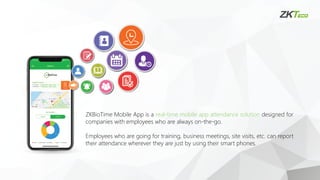
ZKBioTime Mobile Appis a real-time mobile app attendance solution designed for
companies with employees who are always on-the-go.
Employees who are going for training, business meetings, site visits, etc. can report
their attendance wherever they are just by using their smart phones.
5.
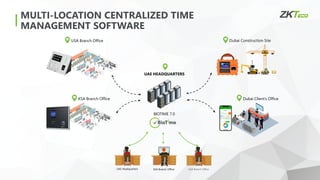
USA Branch OfficeDubai Construction Site
Dubai Client’s Office
KSA Branch Office
BIOTIME 7.0
UAE HEADQUARTERS
UAE Headquarters KSA Branch Office USA Branch Office
MULTI-LOCATION CENTRALIZED TIME
MANAGEMENT SOFTWARE
6.
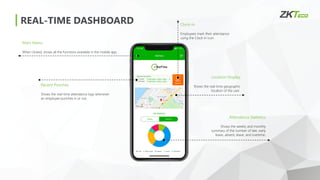
REAL-TIME DASHBOARD
Main Menu
Whenclicked, shows all the functions available in the mobile app.
Location Display
Shows the real-time geographic
location of the user.
Attendance Statistics
Shows the weekly and monthly
summary of the number of late, early
leave, absent, leave, and overtime.
Recent Punches
Shows the real-time attendance logs whenever
an employee punches in or out.
Clock-in
Employees mark their attendance
using the Clock-in icon.
7.
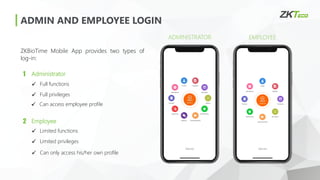
ADMIN AND EMPLOYEELOGIN
ZKBioTime Mobile App provides two types of
log-in:
EMPLOYEE
ADMINISTRATOR
1 Administrator
2 Employee
✓ Full functions
✓ Full privileges
✓ Limited functions
✓ Limited privileges
✓ Can access employee profile
✓ Can only access his/her own profile
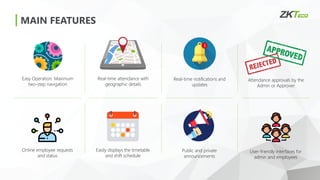
MAIN FEATURES
Easy Operation:Maximum
two-step navigation
Real-time attendance with
geographic details
Real-time notifications and
updates
Attendance approvals by the
Admin or Approver
Online employee requests
and status
Easily displays the timetable
and shift schedule
Public and private
announcements
User-friendly interfaces for
admin and employees
10.
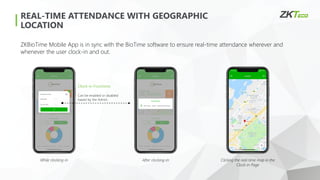
REAL-TIME ATTENDANCE WITHGEOGRAPHIC
LOCATION
Clock-in Functions
Can be enabled or disabled
based by the Admin.
ZKBioTime Mobile App is in sync with the BioTime software to ensure real-time attendance wherever and
whenever the user clock-in and out.
While clocking-in After clocking-in Clicking the real-time map in the
Clock-in Page
11.
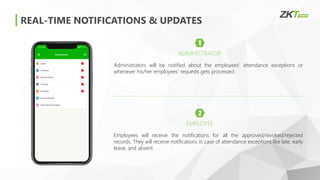
REAL-TIME NOTIFICATIONS &UPDATES
1
ADMINISTRATOR
Administrators will be notified about the employees’ attendance exceptions or
whenever his/her employees’ requests gets processed.
2
EMPLOYEE
Employees will receive the notifications for all the approved/revoked/rejected
records. They will receive notifications in case of attendance exceptions like late, early
leave, and absent.
12.
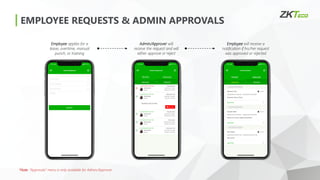
EMPLOYEE REQUESTS &ADMIN APPROVALS
Employee applies for a
leave, overtime, manual
punch, or training
Admin/Approver will
receive the request and will
either approve or reject
Employee will receive a
notification if his/her request
was approved or rejected
*Note: “Approvals” menu is only available for Admin/Approver.
13.
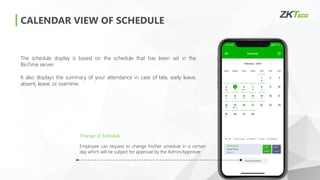
CALENDAR VIEW OFSCHEDULE
The schedule display is based on the schedule that has been set in the
BioTime server.
It also displays the summary of your attendance in case of late, early leave,
absent, leave, or overtime.
Change of Schedule
Employee can request to change his/her schedule in a certain
day which will be subject for approval by the Admin/Approver.
14.
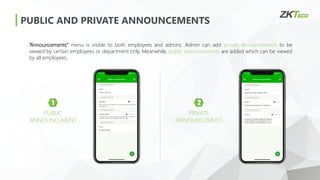
PUBLIC AND PRIVATEANNOUNCEMENTS
1
PUBLIC
ANNOUNCEMENT
“Announcements” menu is visible to both employees and admins. Admin can add private announcements to be
viewed by certain employees or department only. Meanwhile, public announcements are added which can be viewed
by all employees.
2
PRIVATE
ANNOUNCEMENT
15.
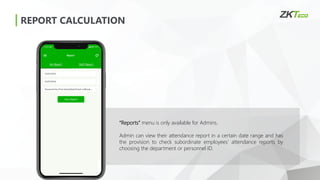
REPORT CALCULATION
“Reports” menuis only available for Admins.
Admin can view their attendance report in a certain date range and has
the provision to check subordinate employees’ attendance reports by
choosing the department or personnel ID.
16.
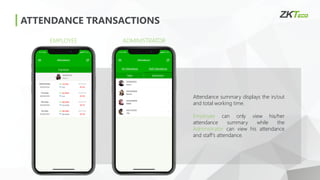
ATTENDANCE TRANSACTIONS
EMPLOYEE ADMINISTRATOR
Attendancesummary displays the in/out
and total working time.
Employee can only view his/her
attendance summary while the
Administrator can view his attendance
and staff’s attendance.
17.
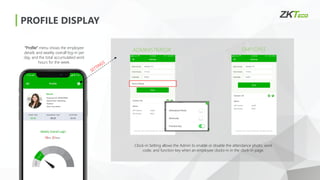
PROFILE DISPLAY
EMPLOYEE
ADMINISTRATOR
Clock-in Settingallows the Admin to enable or disable the attendance photo, work
code, and function key when an employee clocks-in in the clock-in page.
“Profile” menu shows the employee
details and weekly overall log-in per
day, and the total accumulated work
hours for the week.
18.
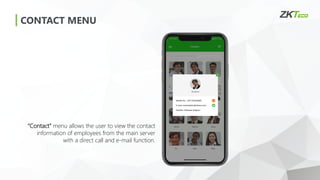
CONTACT MENU
“Contact” menuallows the user to view the contact
information of employees from the main server
with a direct call and e-mail function.
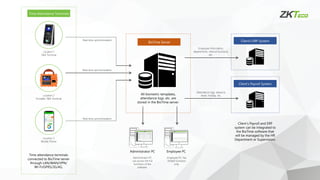
Location 3
Mobile Phone
Location2
Portable T&A Terminal
Location 1
T&A Terminal
Time Attendance Terminals
Time attendance terminals
connected to BioTime server
through LAN/WAN/VPN/
Wi-Fi/GPRS/3G/4G.
Real-time synchronization
Real-time synchronization
Real-time synchronization
BioTime Server
All biometric templates,
attendance logs, etc. are
stored in the BioTime server.
Administrator PC Employee PC
Employee PC has
limited functions
only.
Administrator PC
can access the full
functions of the
software.
Client’s ERP System
Client’s Payroll and ERP
system can be integrated to
the BioTime software that
will be managed by the HR
Department or Supervisiors.
Client’s Payroll System
Attendance logs, absence,
leave, holiday, etc.
Employee information,
departments, internal functions,
etc.
22.
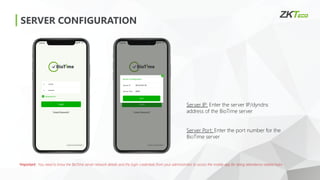
SERVER CONFIGURATION
*Important: Youneed to know the BioTime server network details and the login credentials from your administrator to access the mobile app for doing attendance related tasks.
Server IP: Enter the server IP/dyndns
address of the BioTime server
Server Port: Enter the port number for the
BioTime server
23.
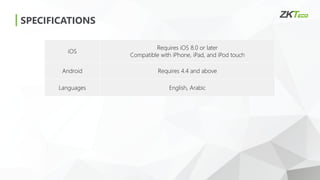
SPECIFICATIONS
iOS
Requires iOS 8.0or later
Compatible with iPhone, iPad, and iPod touch
Android Requires 4.4 and above
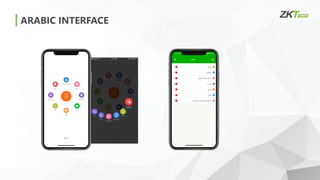
Languages English, Arabic
24.
BIOTIME 7.0 TRIAL
Gothis link and connect your ZKTeco time attendance device
http://80.227.52.78:8080/accounts/login/
DOWNLOAD ZKBIOTIME APP
FREE
TRIAL


![v2Web TMS [Task Management System]: Simplify your Works](https://cdn.slidesharecdn.com/ss_thumbnails/tms-160209120052-thumbnail.jpg?width=640&height=640&fit=bounds)


