Beerfarmer.com
 Give the Gift of Beer
What is Beerfarmer.com?

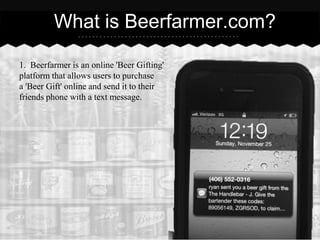
1. Beerfarmer is an online 'Beer Gifting'
platform that allows users to purchase
a 'Beer Gift' online and send it to their
friends phone with a text message.
What is a Beer Gift?

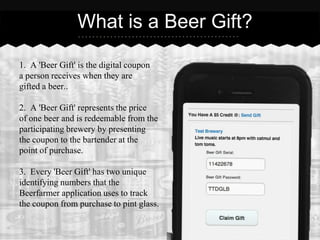
1. A 'Beer Gift' is the digital coupon
a person receives when they are
gifted a beer..

2. A 'Beer Gift' represents the price
of one beer and is redeemable from the
participating brewery by presenting
the coupon to the bartender at the
point of purchase.

3. Every 'Beer Gift' has two unique
identifying numbers that the
Beerfarmer application uses to track
the coupon from purchase to pint glass.
How do I claim a Beer Gift?

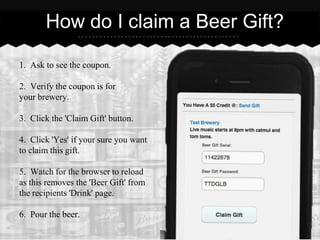
1. Ask to see the coupon.

2. Verify the coupon is for
your brewery.

3. Click the 'Claim Gift' button.

4. Click 'Yes' if your sure you want
to claim this gift.

5. Watch for the browser to reload
as this removes the 'Beer Gift' from
the recipients 'Drink' page.

6. Pour the beer.
Important things to know

1. Every beer gift can only be sent once. This eliminates any chance of a
   duplicate coupon or users gaming the system.

2. Drinks can only be claimed from within the Beerfarmer app. If the coupon
   is being displayed on the user's 'Drink' page it is a valid coupon.

3. Coupons automatically remove themselves from the 'Drink' page once they
   are claimed. Look to see the browser reload.

4. You can verify that the system is tracking all 'Beer Gifts' claimed by
   visiting your beerfarmer admin page.

Beerfarmer

  • 1.
  • 2.
    What is Beerfarmer.com? 1.Beerfarmer is an online 'Beer Gifting' platform that allows users to purchase a 'Beer Gift' online and send it to their friends phone with a text message.
  • 3.
    What is aBeer Gift? 1. A 'Beer Gift' is the digital coupon a person receives when they are gifted a beer.. 2. A 'Beer Gift' represents the price of one beer and is redeemable from the participating brewery by presenting the coupon to the bartender at the point of purchase. 3. Every 'Beer Gift' has two unique identifying numbers that the Beerfarmer application uses to track the coupon from purchase to pint glass.
  • 4.
    How do Iclaim a Beer Gift? 1. Ask to see the coupon. 2. Verify the coupon is for your brewery. 3. Click the 'Claim Gift' button. 4. Click 'Yes' if your sure you want to claim this gift. 5. Watch for the browser to reload as this removes the 'Beer Gift' from the recipients 'Drink' page. 6. Pour the beer.
  • 5.
    Important things toknow 1. Every beer gift can only be sent once. This eliminates any chance of a duplicate coupon or users gaming the system. 2. Drinks can only be claimed from within the Beerfarmer app. If the coupon is being displayed on the user's 'Drink' page it is a valid coupon. 3. Coupons automatically remove themselves from the 'Drink' page once they are claimed. Look to see the browser reload. 4. You can verify that the system is tracking all 'Beer Gifts' claimed by visiting your beerfarmer admin page.