Turning Contacts into Valuable Relationships
TUTORIAL
Disclaimer: BCockpit is under development. Alfa version. Continuous improvements on the way.
1. Login
2. User Profile
3. Import Contacts
4. My Contacts
5. Contacts Map
6. Geolocation
7. Street View
8. New Contact
9. Search
10. Company Profile / Edit
11. Send Email
12. Social Media
13. Early Birds
14. Angels & Investors
15. Coming Soon
16. Benefits
Tutorial for Early Birds
BCockpit will be a B2B Social Geo SRM - Stakeholder Relationship Management
platform, i.e., it will be a much simpler CRM based on corporate stakeholder´s
geopositioning.
Login – Demo
1. Watch Tutorial
User Profile
3. Change your password
4. Edit your profile (Address)
2. Click on photo
5. Click here
Import Contacts
7. Upload a complete .XLS file
(the more, the better)
File´s name = tag
6. Download template .XLS
My Contacts
File´s name = tag
Contacts Map
8. Click here
Geolocation
9. Click here
10. Get directions
Street View
11. Zoom in and
position yellow
man very close
This icon indicates
destination is close
Add New Contact – 1 by 1
12. Click here
13. Complete all fields
(the more, the better)
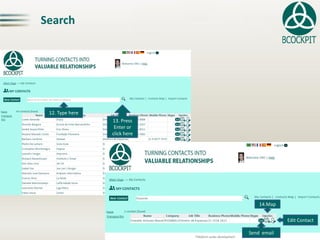
Search
14. Type here
15. Press
Enter or
click here
Send email
16.Map
Edit Contact
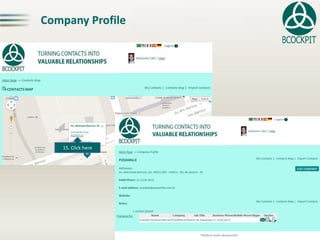
Company Profile
17. Click here
Company Profile - Edit
18. Click here
19. Complete all fields
(the more, the better)
Send Email
20. Send email
Company profile updated
Cc own user´s email also included
Several options
Recipient´s email already inserted
Social Media
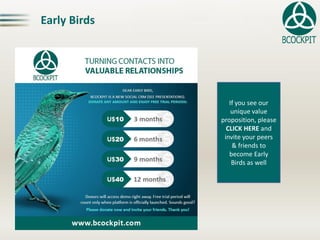
Early Birds
If you see our
unique value
proposition, please
CLICK HERE and
invite your peers
& friends to
become Early
Birds as well
Angels & Investors
Dear Sir / Madam,
In order to speed up development,
we are open to talk to potential
angels and investors.
May you wish to seriously support
our growth, please contact us so that
we will send you the investor´s deck
for your analysis.
Thanks in advance for your interest.
Top 13 Benefits*
1. Geolocalize contacts of interest (address required)
2. Tag imported files
3. Contacts segmentation via tagging
4. Organize messy contact databasis in one single point
5. Accessible via smartphone / tablets (Android version)
6. Develop a good habit of keeping contacts updated
7. Help managing sales efforts and time by region
8. Get directions on Google Maps / Street View
9. Search and reach contact details promptly
10. Send emails with automatic copy to own user
11. Recover all contacts in case of phone loss /damage
12. Export contacts databasis (all, by tag, by company)
13. Benefit job seekers, professionals, entrepreneurs and managers
* Subject to databasis quality. The more complete, the better
Octavio Pitaluga Neto (LinkedIN)
BCockpit
Chief Networking Officer
octavio@bcockpit.com
http://www.bcockpit.com
Tel: +55 21. 2235-8721
Cel: +55 21. 9 8829-4933
Skype: octaviopitaluga
GTalk: opitaluga@gmail.com
@bcockpit
Contact
Disclaimer: BCockpit is under development. Alfa version. Continuous improvements on the way.

BCockpit - Tutorial (EN)

  • 1.
    Turning Contacts intoValuable Relationships TUTORIAL Disclaimer: BCockpit is under development. Alfa version. Continuous improvements on the way.
  • 2.
    1. Login 2. UserProfile 3. Import Contacts 4. My Contacts 5. Contacts Map 6. Geolocation 7. Street View 8. New Contact 9. Search 10. Company Profile / Edit 11. Send Email 12. Social Media 13. Early Birds 14. Angels & Investors 15. Coming Soon 16. Benefits Tutorial for Early Birds BCockpit will be a B2B Social Geo SRM - Stakeholder Relationship Management platform, i.e., it will be a much simpler CRM based on corporate stakeholder´s geopositioning.
  • 3.
    Login – Demo 1.Watch Tutorial
  • 4.
    User Profile 3. Changeyour password 4. Edit your profile (Address) 2. Click on photo 5. Click here
  • 5.
    Import Contacts 7. Uploada complete .XLS file (the more, the better) File´s name = tag 6. Download template .XLS
  • 6.
  • 7.
  • 8.
  • 9.
    Street View 11. Zoomin and position yellow man very close This icon indicates destination is close
  • 10.
    Add New Contact– 1 by 1 12. Click here 13. Complete all fields (the more, the better)
  • 11.
    Search 14. Type here 15.Press Enter or click here Send email 16.Map Edit Contact
  • 12.
  • 13.
    Company Profile -Edit 18. Click here 19. Complete all fields (the more, the better)
  • 14.
    Send Email 20. Sendemail Company profile updated Cc own user´s email also included Several options Recipient´s email already inserted
  • 15.
  • 16.
    Early Birds If yousee our unique value proposition, please CLICK HERE and invite your peers & friends to become Early Birds as well
  • 17.
    Angels & Investors DearSir / Madam, In order to speed up development, we are open to talk to potential angels and investors. May you wish to seriously support our growth, please contact us so that we will send you the investor´s deck for your analysis. Thanks in advance for your interest.
  • 18.
    Top 13 Benefits* 1.Geolocalize contacts of interest (address required) 2. Tag imported files 3. Contacts segmentation via tagging 4. Organize messy contact databasis in one single point 5. Accessible via smartphone / tablets (Android version) 6. Develop a good habit of keeping contacts updated 7. Help managing sales efforts and time by region 8. Get directions on Google Maps / Street View 9. Search and reach contact details promptly 10. Send emails with automatic copy to own user 11. Recover all contacts in case of phone loss /damage 12. Export contacts databasis (all, by tag, by company) 13. Benefit job seekers, professionals, entrepreneurs and managers * Subject to databasis quality. The more complete, the better
  • 19.
    Octavio Pitaluga Neto(LinkedIN) BCockpit Chief Networking Officer octavio@bcockpit.com http://www.bcockpit.com Tel: +55 21. 2235-8721 Cel: +55 21. 9 8829-4933 Skype: octaviopitaluga GTalk: opitaluga@gmail.com @bcockpit Contact Disclaimer: BCockpit is under development. Alfa version. Continuous improvements on the way.