Maven – Introductionto the Build Lifecycle
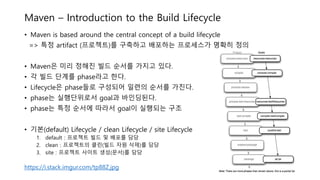
• Maven is based around the central concept of a build lifecycle
=> 특정 artifact (프로젝트)를 구축하고 배포하는 프로세스가 명확히 정의
• Maven은 미리 정해진 빌드 순서를 가지고 있다.
• 각 빌드 단계를 phase라고 한다.
• Lifecycle은 phase들로 구성되어 일련의 순서를 가진다.
• phase는 실행단위로서 goal과 바인딩된다.
• phase는 특정 순서에 따라서 goal이 실행되는 구조
• 기본(default) Lifecycle / clean Lifecycle / site Lifecycle
1. default : 프로젝트 빌드 및 배포를 담당
2. clean : 프로젝트의 클린(빌드 자원 삭제)를 담당
3. site : 프로젝트 사이트 생성(문서)를 담당
https://i.stack.imgur.com/tp88Z.jpg
4.
Maven – BuildLifecycle
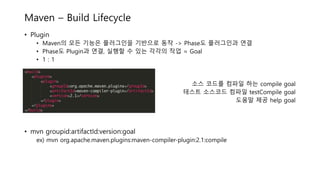
• Plugin
• Maven의 모든 기능은 플러그인을 기반으로 동작 -> Phase도 플러그인과 연결
• Phase도 Plugin과 연결, 실행할 수 있는 각각의 작업 = Goal
• 1 : 1
소스 코드를 컴파일 하는 compile goal
테스트 소스코드 컴파일 testCompile goal
도움말 제공 help goal
• mvn groupid:artifactId:version:goal
ex) mvn org.apache.maven.plugins:maven-compiler-plugin:2.1:compile
5.
Maven – BuildLifecycle
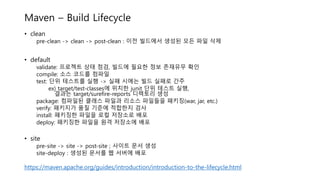
• clean
pre-clean -> clean -> post-clean : 이전 빌드에서 생성된 모든 파일 삭제
• default
validate: 프로젝트 상태 점검, 빌드에 필요한 정보 존재유무 확인
compile: 소스 코드를 컴파일
test: 단위 테스트를 실행 -> 실패 시에는 빌드 실패로 간주
ex) target/test-classes에 위치한 junit 단위 테스트 실행,
결과는 target/surefire-reports 디렉토리 생성
package: 컴파일된 클래스 파일과 리소스 파일들을 패키징(war, jar, etc.)
verify: 패키지가 품질 기준에 적합한지 검사
install: 패키징한 파일을 로컬 저장소로 배포
deploy: 패키징한 파일을 원격 저장소에 배포
• site
pre-site -> site -> post-site ; 사이트 문서 생성
site-deploy : 생성된 문서를 웹 서버에 배포
https://maven.apache.org/guides/introduction/introduction-to-the-lifecycle.html
6.
Maven – BuildLifecycle
• mvn package를 실행할 경우, package phase 전의 모든 phase가 우선적으로 실행
• use case
=> maven [options] [<goal(s)>] [<phase(s)>]
1. mvn package
2. mvn clean install
3. mvn clean deploy
ex) CI 도구를 이용하여 Maven Build를 할 때, 빌드된 결과물을 제거하고 빌드 결과물이 생성
4. mvn compiler:compile
ex) compiler 플러그인에서 compile Goal을 실행한다는 의미
mvn [plugin-name]:[goal-name]
• 빌드와 관련된 설정은 pom.xml에서 e.g. Lifecycle별 실행할 플러그인 설정 등
• Maven Lifecycle 전체는 maven-core module 내의 components.xml에 정의됨.
• default Lifecycle bindings - Maven 2.x : components.xml, Maven 3.x : default-bindings.xml
7.
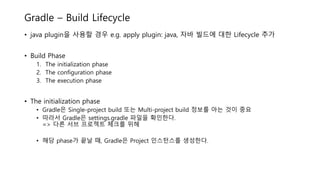
Gradle – BuildLifecycle
• java plugin을 사용할 경우 e.g. apply plugin: java, 자바 빌드에 대한 Lifecycle 추가
• Build Phase
1. The initialization phase
2. The configuration phase
3. The execution phase
• The initialization phase
• Gradle은 Single-project build 또는 Multi-project build 정보를 아는 것이 중요
• 따라서 Gradle은 settings.gradle 파일을 확인한다.
=> 다른 서브 프로젝트 체크를 위해
• 해당 phase가 끝날 때, Gradle은 Project 인스턴스를 생성한다.
8.
Gradle – BuildLifecycle
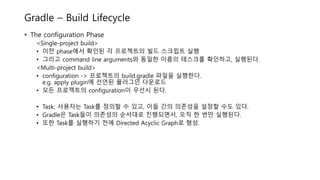
• The configuration Phase
<Single-project build>
• 이전 phase에서 확인된 각 프로젝트의 빌드 스크립트 실행
• 그리고 command line arguments와 동일한 이름의 테스크를 확인하고, 실행된다.
<Multi-project build>
• configuration -> 프로젝트의 build.gradle 파일을 실행한다.
e.g. apply plugin에 선언된 플러그인 다운로드
• 모든 프로젝트의 configuration이 우선시 된다.
• Task; 사용자는 Task를 정의할 수 있고, 이들 간의 의존성을 설정할 수도 있다.
• Gradle은 Task들이 의존성의 순서대로 진행되면서, 오직 한 번만 실행된다.
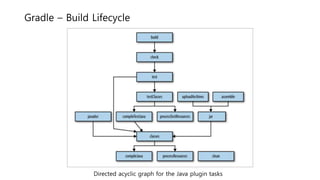
• 또한 Task를 실행하기 전에 Directed Acyclic Graph로 형성.
9.
Gradle – BuildLifecycle
Directed acyclic graph for the Java plugin tasks
10.
Gradle – BuildLifecycle
• The execution Phase
• Gradle은 이전 phase에서 만들고, 설정했던 task의 하위 집합을 결정 및 수행
• Task name argument을 바탕으로 어떤 task를 실행해야 하는지 결정
cf) Java 플러그인의 build task를 사용해 컴파일, 테스트 등을 할 수 있다.
buildNeeded / buildDependent
11.
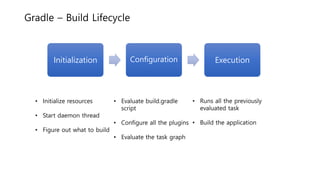
Gradle – BuildLifecycle
Initialization Configuration Execution
• Initialize resources
• Start daemon thread
• Figure out what to build
• Evaluate build.gradle
script
• Configure all the plugins
• Evaluate the task graph
• Runs all the previously
evaluated task
• Build the application
![Maven – Build Lifecycle
• mvn package를 실행할 경우, package phase 전의 모든 phase가 우선적으로 실행
• use case
=> maven [options] [<goal(s)>] [<phase(s)>]
1. mvn package
2. mvn clean install
3. mvn clean deploy
ex) CI 도구를 이용하여 Maven Build를 할 때, 빌드된 결과물을 제거하고 빌드 결과물이 생성
4. mvn compiler:compile
ex) compiler 플러그인에서 compile Goal을 실행한다는 의미
mvn [plugin-name]:[goal-name]
• 빌드와 관련된 설정은 pom.xml에서 e.g. Lifecycle별 실행할 플러그인 설정 등
• Maven Lifecycle 전체는 maven-core module 내의 components.xml에 정의됨.
• default Lifecycle bindings - Maven 2.x : components.xml, Maven 3.x : default-bindings.xml](https://image.slidesharecdn.com/mavengradlebuildlifecycle-180726142921/85/Backend-Master-3-1-4-Build-Java-build-tool-Maven-Gradle-Build-Lifecycle-6-320.jpg)




![[오픈소스컨설팅]Gradle Basic - How to use Gradle in Java Project](https://cdn.slidesharecdn.com/ss_thumbnails/gradle-140122201033-phpapp01-thumbnail.jpg?width=640&height=640&fit=bounds)


![[NHN_NEXT] 게임 휴먼 프로젝트 CI + GitHub 세팅 방법](https://cdn.slidesharecdn.com/ss_thumbnails/ci-140315010841-phpapp02-thumbnail.jpg?width=640&height=640&fit=bounds)


![[NDC17] 왓 스튜디오 서비스파트](https://cdn.slidesharecdn.com/ss_thumbnails/random-170427100335-thumbnail.jpg?width=640&height=640&fit=bounds)


![[세미나] 20160520 Gradle](https://cdn.slidesharecdn.com/ss_thumbnails/20160520gradle-160523005620-thumbnail.jpg?width=640&height=640&fit=bounds)


