The Power of Azure DevOps
DevOps Overview
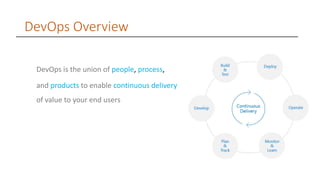
DevOps is the union of people, process,
and products to enable continuous delivery
of value to your end users
Azure DevOps Overview
Azure DevOps (formerly Visual Studio Team Services) is a hosted service
providing development and collaboration tools. With a Free tier to get started
and no need to run your own agents you can quickly get up and running with
the many tools available
Git & Repository Overview
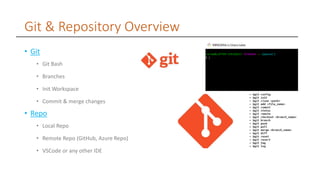
• Git
• Git Bash
• Branches
• Init Workspace
• Commit & merge changes
• Repo
• Local Repo
• Remote Repo (GitHub, Azure Repo)
• VSCode or any other IDE
Azure Devops Components
• Azure Boards
• Azure Repo
• Azure Pipelines
• Azure Artifacts
Azure Repo Overview
• Azure Repos
• Working Files & Folders (Developer)
• No of Commits(List of Commits)
• No of Pushes(Pushes from Local Repo)
• Branches(No of Branches)
• Tags
• Pull requests (Commit changes to another
branches)
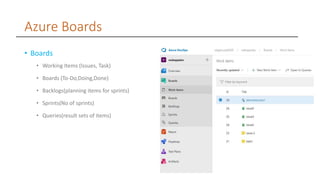
Azure Boards
• Boards
• Working Items (Issues, Task)
• Boards (To-Do,Doing,Done)
• Backlogs(planning items for sprints)
• Sprints(No of sprints)
• Queries(result sets of items)
Azure Pipelines
Build Pipeline
A Deployment pipeline is the process of taking code from version control and making it
readily available to users of your application in an automated fashion. When a team of
developers are working on projects or features they need a reliable and efficient way
to build, test and deploy their work
Release Pipeline
Release management entails planning, scheduling, and controlling a software build
through different stages and environments. we allow teams to have control over
production deployments
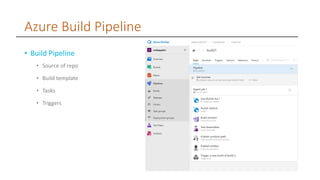
Azure Build Pipeline
• Build Pipeline
• Source of repo
• Build template
• Tasks
• Triggers
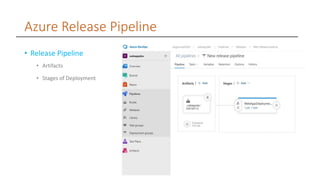
Azure Release Pipeline
• Release Pipeline
• Artifacts
• Stages of Deployment
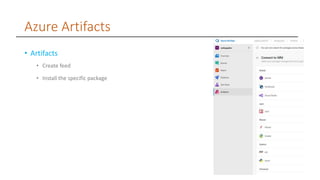
Azure Artifacts
• Artifacts
• Create feed
• Install the specific package
Azure dev ops-demo

Azure dev ops-demo

  • 1.
    The Power ofAzure DevOps
  • 2.
    DevOps Overview DevOps isthe union of people, process, and products to enable continuous delivery of value to your end users
  • 3.
    Azure DevOps Overview AzureDevOps (formerly Visual Studio Team Services) is a hosted service providing development and collaboration tools. With a Free tier to get started and no need to run your own agents you can quickly get up and running with the many tools available
  • 4.
    Git & RepositoryOverview • Git • Git Bash • Branches • Init Workspace • Commit & merge changes • Repo • Local Repo • Remote Repo (GitHub, Azure Repo) • VSCode or any other IDE
  • 5.
    Azure Devops Components •Azure Boards • Azure Repo • Azure Pipelines • Azure Artifacts
  • 6.
    Azure Repo Overview •Azure Repos • Working Files & Folders (Developer) • No of Commits(List of Commits) • No of Pushes(Pushes from Local Repo) • Branches(No of Branches) • Tags • Pull requests (Commit changes to another branches)
  • 7.
    Azure Boards • Boards •Working Items (Issues, Task) • Boards (To-Do,Doing,Done) • Backlogs(planning items for sprints) • Sprints(No of sprints) • Queries(result sets of items)
  • 8.
    Azure Pipelines Build Pipeline ADeployment pipeline is the process of taking code from version control and making it readily available to users of your application in an automated fashion. When a team of developers are working on projects or features they need a reliable and efficient way to build, test and deploy their work Release Pipeline Release management entails planning, scheduling, and controlling a software build through different stages and environments. we allow teams to have control over production deployments
  • 9.
    Azure Build Pipeline •Build Pipeline • Source of repo • Build template • Tasks • Triggers
  • 10.
    Azure Release Pipeline •Release Pipeline • Artifacts • Stages of Deployment
  • 11.
    Azure Artifacts • Artifacts •Create feed • Install the specific package