Windows Azure!
Push & DB
용영환
마이크로소프트 멜팅팟 세미나
2014년 4월 24일
• 용영환!
• http://xenonix.com!
• xenonix@gmail.com
Notification services
!
= Push
두 가지가 있습니다.
!
Mobile service Push
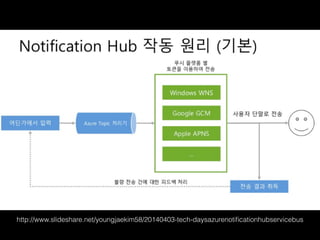
Notification hub
Mobile service Push
Notification Hub
http://msdn.microsoft.com/en-us/library/jj927170.aspx
http://www.slideshare.net/youngjaekim58/20140403-tech-daysazurenotificationhubservicebus
특징
http://www.slideshare.net/youngjaekim58/20140403-tech-daysazurenotificationhubservicebus
Mobile service push !
!
가볍게 Push를 사용하고 싶을 때
!
Notification Hub!
대량의 단체 Push를 전송하고 싶을 때
우리의 MS 문서는 친절합니다.
검색은 구글이죠.
http://azure.microsoft.com/en-us/documentation/articles/
mobile-services-android-get-started-push/
Push notification using Azure Mobile service
역시 구글은 친절합니다.
Get started Notification Hubs
http://azure.microsoft.com/en-us/documentation/articles/
notification-hubs-android-get-started/
그런데…
알려드린 Azure 문서에 살짝
생략된 내용들이 있습니다.
!
그러므로
이 발표 자료를 따라하시기를 권장합니다.
account.windowsazure.com
https://console.developers.google.com
azuresdk-android-1.1.5.zip
먼저 안드로이드
프로젝트를 생성합니다.
google-play-service가
안보이면
google-play-service가
안보이면
AndroidManifest.xml
<uses-permission android:name="android.permission.INTERNET"/>
<uses-permission android:name="android.permission.GET_ACCOUNTS"/>
<uses-permission android:name="android.permission.WAKE_LOCK"/>
<uses-permission android:name="android.permission.ACCESS_NETWORK_STATE" />
<uses-permission android:name="com.google.android.c2dm.permission.RECEIVE" />
<permission android:name="com.xenonix.azurex.permission.C2D_MESSAGE"
android:protectionLevel="signature" />
<uses-permission android:name="com.xenonix.azurex.permission.C2D_MESSAGE"/>
MainActivity.java
public class MainActivity extends Activity {
!
private String SENDER_ID = “SENDER_ID";
private GoogleCloudMessaging gcm;
private NotificationHub hub;
MainActivity.java
@SuppressWarnings("unchecked")
private void registerWithNotificationHubs() {
new AsyncTask() {
@Override
protected Object doInBackground(Object... params) {
try {
String regid = gcm.register(SENDER_ID);
hub.register(regid);
} catch (Exception e) {
return e;
}
return null;
}
}.execute(null, null, null);
}
MainActivity.java
@Override
protected void onCreate(Bundle savedInstanceState) {
… ( 생략 )
NotificationsManager.handleNotifications(this, SENDER_ID, MyHandler.class);
!
gcm = GoogleCloudMessaging.getInstance(this);
!
String connectionString = “CONNECTION_STRING";
hub = new NotificationHub(“NOTIFICATION_HUB_NAME”, connectionString, this);
!
registerWithNotificationHubs();
CONNECTION STRING
Service Bus 메뉴
SENDER_ID
import android.os.AsyncTask;
import com.google.android.gms.gcm.*;
import com.microsoft.windowsazure.messaging.*;
import com.microsoft.windowsazure.notifications.NotificationsManager;
MainActivity.java 안에
SDK 파일을 libs 안에 복사
그리고 F5 키 클릭!
MyHandler.class 가 없기 때문!!!
!
만들어 주자!
여기서 MyHandler는
Receiver 입니다.
AndroidManifest.xml
<receiver
android:name="com.microsoft.windowsazure.notifications.NotificationsBroadcastReceiver"
android:permission="com.google.android.c2dm.permission.SEND">
<intent-filter>
<!-- Receives the actual messages. -->
<action android:name="com.google.android.c2dm.intent.RECEIVE" />
<!-- Receives the registration id. -->
<action android:name="com.google.android.c2dm.intent.REGISTRATION" />
<category android:name="com.xenonix.azurex" />
</intent-filter>
</receiver>
<application> </application> 안에
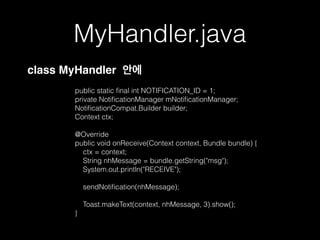
MyHandler.java
!
public static final int NOTIFICATION_ID = 1;
private NotificationManager mNotificationManager;
NotificationCompat.Builder builder;
Context ctx;
!
@Override
public void onReceive(Context context, Bundle bundle) {
ctx = context;
String nhMessage = bundle.getString("msg");
System.out.println("RECEIVE");
!
sendNotification(nhMessage);
Toast.makeText(context, nhMessage, 3).show();
}
class MyHandler 안에
MyHandler.java
!
private void sendNotification(String msg) {
mNotificationManager = (NotificationManager)
ctx.getSystemService(Context.NOTIFICATION_SERVICE);
!
PendingIntent contentIntent = PendingIntent.getActivity(ctx, 0,
new Intent(ctx, MainActivity.class), 0);
!
NotificationCompat.Builder mBuilder =
new NotificationCompat.Builder(ctx)
.setSmallIcon(R.drawable.ic_launcher)
.setContentTitle("Notification Hub Demo")
.setStyle(new NotificationCompat.BigTextStyle()
.bigText(msg))
.setContentText(msg);
!
mBuilder.setContentIntent(contentIntent);
mNotificationManager.notify(NOTIFICATION_ID, mBuilder.build());
}
class MyHandler 안에
이제 Push를 날려봅니다.
script
function azurex_push() {
var azure = require('azure');
var notificationHubService = azure.createNotificationHubService(‘NOTIFICATION_HUB_NAME’,
‘CONNECTION_STRING');
notificationHubService.gcm.send(null,'{"data":{"msg" : "Hello from Mobile Services!"}}',
function (error)
{
if (!error) {
console.warn("Notification successful");
}
else
{
console.warn("Notification failed" + error);
}
}
);
}
DB를 사용해 보겠습니다.
AndroidManifest.xml 에
<uses-permission
android:name="android.permission.INTERNET" />
MainActivity.java 에
import com.microsoft.windowsazure.mobileservices.*;
private MobileServiceClient mClient;
onCreate( ) 에
MainActivity.java 에
import com.microsoft.windowsazure.mobileservices.*;
private MobileServiceClient mClient;
onCreate( ) 에
mClient = new MobileServiceClient( "https://azurex.azure-mobile.net/",
“RnBqhfpTezpdVDRhYM…생략”, this );
Item 클래스를 만듭니다.
package com.xenonix.azurex;
!
public class Item {
!
public String Id;
public String Text;
}
DB에 넣는 기능을 만듭니다.
Item item = new Item();
item.Text = "Awesome item";
mClient.getTable(Item.class).insert(item, new
TableOperationCallback<Item>() {
public void onCompleted(Item entity, Exception exception,
ServiceFilterResponse response) {
if (exception == null) {
// Insert succeeded
} else {
// Insert failed
}
}
});
이 문서에 사용한 소스 코드는

http://xenonix.com 에서 내려 받으실 수 있습니다.

마이크로소프트 Azure 에서 안드로이드 Push 구현과 Data 처리