

AWS Support
Presented By
Ravi Mulchandani
4/23/2015RNM
1
Contents
• What is AWS Support?
• How are AWS Support tiers different from Basic Support?
• AWS Support Features
• Understanding of Features
• AWS Support Pricing
• Customers using AWS Support
• Canceling AWS Support Subscription
• Summary
• References
4/23/2015RNM
2
What is AWS Support?
• One-on-one and fast response channel
• Technical support engineers and experienced customer service
professionals
• Four support tiers – Basic, Developer, Business and Enterprise
• Allows customers to choose support tiers that meet specific
needs
• pay-by-the-month pricing and no long-term contracts
4/23/2015RNM
3
How are AWS Support tiers
different from Basic Support?
• Provides access to Resource Center, Service Health Dashboard,
Product FAQs, Discussion Forums, and Support for Health
Checks
• No additional charge and free from long-term commitments
• Can subscribe to AWS Support at the Developer, Business, or
Enterprise level
• pay-by-the-month pricing and unlimited support cases
• Can contact a team of support engineers and receive a
predictable response
4/23/2015RNM
4
AWS Support Features
• Provides a highly personalized level of service for customers
seeking technical help
• By default access to Basic Support with no additional charge
• Basic Support includes – Resource Center, Product FAQs,
Discussion Forums, and Support for Health Checks.
4/23/2015RNM
5
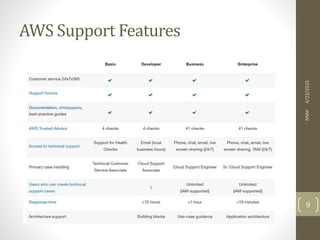
AWS Support Features
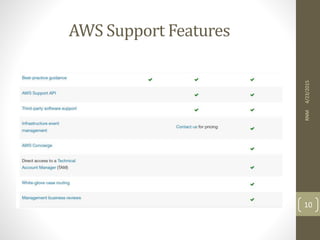
• Developer-level support includes
• Best practice guidance
• Client side diagnostic tools
• guidance on how to use AWS products, features, and services
together
4/23/2015RNM
6
AWS Support Features
• Business-level support includes –
• what AWS products, features, and services to use to best support
your specific needs
• AWS Identity and Access Management – controls individuals’
access to AWS Support
• AWS Trusted Advisor - inspects customer environments and
identifies opportunities to save money, close security gaps, and
improve system reliability and performance
• An API for interacting with Support Center and Trusted Advisor
• Third-party software support
4/23/2015RNM
7
AWS Support Features
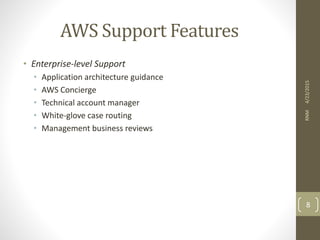
• Enterprise-level Support
• Application architecture guidance
• AWS Concierge
• Technical account manager
• White-glove case routing
• Management business reviews
4/23/2015RNM
8
AWS Support Features
4/23/2015RNM
9
AWS Support Features
4/23/2015RNM
10
Case Management
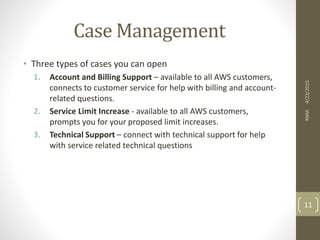
• Three types of cases you can open
1. Account and Billing Support – available to all AWS customers,
connects to customer service for help with billing and account-
related questions.
2. Service Limit Increase - available to all AWS customers,
prompts you for your proposed limit increases.
3. Technical Support – connect with technical support for help
with service related technical questions
4/23/2015RNM
11
Understanding of Features
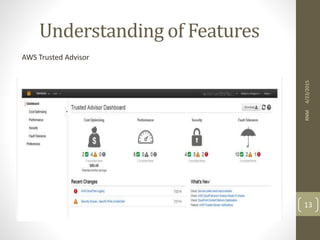
• AWS Trusted Advisor
• Provides best practices in four categories: cost optimization,
security, fault tolerance, and performance improvement
• Over 40 Trusted Advisor checks to monitor and improve the
deployment
• Four Trusted Advisor best practices that are now available to all
AWS customers - Service Limits (in the Performance category)
and Security Groups - Specific Ports Unrestricted, IAM Use, and
MFA on Root Account
• Color Coding is as follows:
• Red: action recommended
• Yellow: investigation recommended
• Green: no problem detected
4/23/2015RNM
12
Understanding of Features
4/23/2015RNM
13
AWS Trusted Advisor
Understanding of Features
• Support center
• Open a case online with support via email (web support), chat, or
phone
• Send more information by adding additional correspondences to
your existing case
• Check on the status of your open cases
• Track any telephone or online correspondence between you and
developer support engineers
• View the service health dashboard for each AWS region
• Jump to other handy resources like the discussion forums and the
product FAQs
4/23/2015RNM
14
Understanding of Features
• Health Check
• Monitor the health and status of AWS services
• The status of these checks is displayed in the AWS management
console
• When a check does not pass, customers have the option to open
a high-priority ticket with technical support for assistance.
• Health checks are currently available for amazon EC2 instances
and amazon EBS volumes.
4/23/2015RNM
15
Understanding of Features
4/23/2015RNM
16
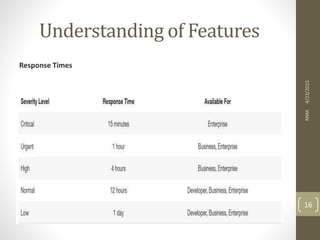
Response Times
Understanding of Features
• Best Practice and New Feature Guidance
• Recommendations to improve performance and efficiency
• Recommendations on how new AWS offerings may fit your use
case.
• AWS Concierge
• Senior customer service agent who is assigned to your account
when you subscribe to an enterprise
• Primary point of contact for billing or account inquiries
• When you don’t know whom to call, they will find the right
people to help
4/23/2015RNM
17
Understanding of Features
• AWS Support API
• Allows you to programmatically interact with your Support cases
(create, edit, close) and access/refresh Trusted Advisor best
practices
• Third-Party Software Support
• AWS Support engineers can assist with the setup, configuration,
and troubleshooting of the third-party platforms and
applications.
• Technical Account Manager (TAM)
• TAMs work with AWS Solution Architects to help you launch new
projects and give best practices recommendations throughout
the implementation life cycle.
• Primary point of contact for ongoing support needs
• A direct telephone line to your TAM.
4/23/2015RNM
18
Understanding of Features
• Management Business Reviews
• TAM conducts regular performance reviews, participates in
requested meetings, and collaborates on new launches to ensure
readiness.
• White-Glove Case Routing
• Cases submitted by Enterprise-level customers are routed directly
to specially trained engineers to ensure fast, accurate resolution
of critical issues
4/23/2015RNM
19
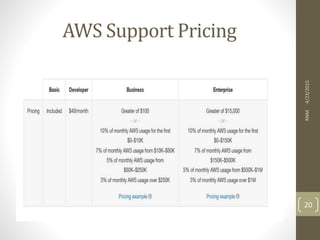
AWS Support Pricing
4/23/2015RNM
20
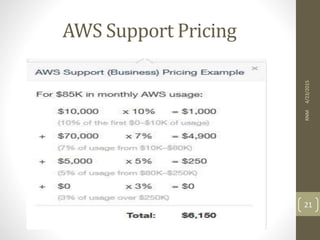
AWS Support Pricing
4/23/2015RNM
21
Customers using AWS Support
• HTC
• UCAS
• NETFLIX
• EASY TAXI
• ENVISION
• And many more
4/23/2015RNM
22
Canceling AWS Support
Subscription
• Sign in to your "Manage Your Account" page.
• Scroll down to "Cancel Selected Services".
• Select "AWS Support" in the drop down list.
• Click "Cancel Service".
4/23/2015RNM
23
References
• https://aws.amazon.com/premiumsupport/
• https://aws.amazon.com/premiumsupport/faqs/
• https://aws.amazon.com/premiumsupport/features/
• https://aws.amazon.com/premiumsupport/trustedadvisor/be
st-practices/
• https://aws.amazon.com/premiumsupport/pricing/
• https://aws.amazon.com/premiumsupport/features/
4/23/2015RNM
24
4/23/2015RNM
25
4/23/2015RNM
26

AWS Support

  • 1.
    AWS Support Presented By RaviMulchandani 4/23/2015RNM 1
  • 2.
    Contents • What isAWS Support? • How are AWS Support tiers different from Basic Support? • AWS Support Features • Understanding of Features • AWS Support Pricing • Customers using AWS Support • Canceling AWS Support Subscription • Summary • References 4/23/2015RNM 2
  • 3.
    What is AWSSupport? • One-on-one and fast response channel • Technical support engineers and experienced customer service professionals • Four support tiers – Basic, Developer, Business and Enterprise • Allows customers to choose support tiers that meet specific needs • pay-by-the-month pricing and no long-term contracts 4/23/2015RNM 3
  • 4.
    How are AWSSupport tiers different from Basic Support? • Provides access to Resource Center, Service Health Dashboard, Product FAQs, Discussion Forums, and Support for Health Checks • No additional charge and free from long-term commitments • Can subscribe to AWS Support at the Developer, Business, or Enterprise level • pay-by-the-month pricing and unlimited support cases • Can contact a team of support engineers and receive a predictable response 4/23/2015RNM 4
  • 5.
    AWS Support Features •Provides a highly personalized level of service for customers seeking technical help • By default access to Basic Support with no additional charge • Basic Support includes – Resource Center, Product FAQs, Discussion Forums, and Support for Health Checks. 4/23/2015RNM 5
  • 6.
    AWS Support Features •Developer-level support includes • Best practice guidance • Client side diagnostic tools • guidance on how to use AWS products, features, and services together 4/23/2015RNM 6
  • 7.
    AWS Support Features •Business-level support includes – • what AWS products, features, and services to use to best support your specific needs • AWS Identity and Access Management – controls individuals’ access to AWS Support • AWS Trusted Advisor - inspects customer environments and identifies opportunities to save money, close security gaps, and improve system reliability and performance • An API for interacting with Support Center and Trusted Advisor • Third-party software support 4/23/2015RNM 7
  • 8.
    AWS Support Features •Enterprise-level Support • Application architecture guidance • AWS Concierge • Technical account manager • White-glove case routing • Management business reviews 4/23/2015RNM 8
  • 9.
  • 10.
  • 11.
    Case Management • Threetypes of cases you can open 1. Account and Billing Support – available to all AWS customers, connects to customer service for help with billing and account- related questions. 2. Service Limit Increase - available to all AWS customers, prompts you for your proposed limit increases. 3. Technical Support – connect with technical support for help with service related technical questions 4/23/2015RNM 11
  • 12.
    Understanding of Features •AWS Trusted Advisor • Provides best practices in four categories: cost optimization, security, fault tolerance, and performance improvement • Over 40 Trusted Advisor checks to monitor and improve the deployment • Four Trusted Advisor best practices that are now available to all AWS customers - Service Limits (in the Performance category) and Security Groups - Specific Ports Unrestricted, IAM Use, and MFA on Root Account • Color Coding is as follows: • Red: action recommended • Yellow: investigation recommended • Green: no problem detected 4/23/2015RNM 12
  • 13.
  • 14.
    Understanding of Features •Support center • Open a case online with support via email (web support), chat, or phone • Send more information by adding additional correspondences to your existing case • Check on the status of your open cases • Track any telephone or online correspondence between you and developer support engineers • View the service health dashboard for each AWS region • Jump to other handy resources like the discussion forums and the product FAQs 4/23/2015RNM 14
  • 15.
    Understanding of Features •Health Check • Monitor the health and status of AWS services • The status of these checks is displayed in the AWS management console • When a check does not pass, customers have the option to open a high-priority ticket with technical support for assistance. • Health checks are currently available for amazon EC2 instances and amazon EBS volumes. 4/23/2015RNM 15
  • 16.
  • 17.
    Understanding of Features •Best Practice and New Feature Guidance • Recommendations to improve performance and efficiency • Recommendations on how new AWS offerings may fit your use case. • AWS Concierge • Senior customer service agent who is assigned to your account when you subscribe to an enterprise • Primary point of contact for billing or account inquiries • When you don’t know whom to call, they will find the right people to help 4/23/2015RNM 17
  • 18.
    Understanding of Features •AWS Support API • Allows you to programmatically interact with your Support cases (create, edit, close) and access/refresh Trusted Advisor best practices • Third-Party Software Support • AWS Support engineers can assist with the setup, configuration, and troubleshooting of the third-party platforms and applications. • Technical Account Manager (TAM) • TAMs work with AWS Solution Architects to help you launch new projects and give best practices recommendations throughout the implementation life cycle. • Primary point of contact for ongoing support needs • A direct telephone line to your TAM. 4/23/2015RNM 18
  • 19.
    Understanding of Features •Management Business Reviews • TAM conducts regular performance reviews, participates in requested meetings, and collaborates on new launches to ensure readiness. • White-Glove Case Routing • Cases submitted by Enterprise-level customers are routed directly to specially trained engineers to ensure fast, accurate resolution of critical issues 4/23/2015RNM 19
  • 20.
  • 21.
  • 22.
    Customers using AWSSupport • HTC • UCAS • NETFLIX • EASY TAXI • ENVISION • And many more 4/23/2015RNM 22
  • 23.
    Canceling AWS Support Subscription •Sign in to your "Manage Your Account" page. • Scroll down to "Cancel Selected Services". • Select "AWS Support" in the drop down list. • Click "Cancel Service". 4/23/2015RNM 23
  • 24.
    References • https://aws.amazon.com/premiumsupport/ • https://aws.amazon.com/premiumsupport/faqs/ •https://aws.amazon.com/premiumsupport/features/ • https://aws.amazon.com/premiumsupport/trustedadvisor/be st-practices/ • https://aws.amazon.com/premiumsupport/pricing/ • https://aws.amazon.com/premiumsupport/features/ 4/23/2015RNM 24
  • 25.
  • 26.