AWS Observability
made simple
Eóin Shanaghy - Luciano Mammino
AWS Community Day - November 11th 2021
fth.link/o11y-simple
Hi! I’m Eoin 🙂
CTO
aiasaservicebook.com
@eoins
eoins
✉ Get in touch
👋 Hello, I am Luciano
Senior architect
nodejsdesignpatterns.com
Let’s connect:
🌎 loige.co
🐦 @loige
🎥 loige
🧳 lucianomammino
We are business focused technologists
that deliver.
Accelerated Serverless | AI as a Service | Platform Modernisation
We are hiring! Let’s have a chat 🙂
Check out our new Podcast!
awsbites.com
fth.link/o11y-simple
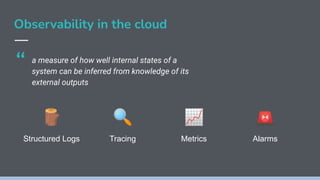
Observability in the cloud
a measure of how well internal states of a
system can be inferred from knowledge of its
external outputs
🪵 🔍 📈 🚨
Structured Logs Tracing Metrics Alarms
“
A typical case study
⚡ Serverless app
● Distributed system (100s of components)
🔌 HTTP APIs using
● Lambda
● DynamoDB
● API Gateway
● Cognito
🧱 Multiple services / stacks
🏁 Using SLIC Starter (fth.link/slic)
173
resources!
A typical case study
⚽ The goal: know about problems before users do
How?
📝 Structured Logs
📐 Metrics
🔔 Alarms
📊 Dashboards
🗺 Traces (X-Ray)
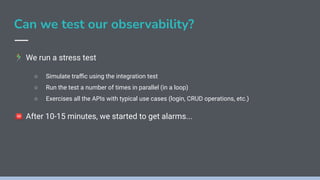
Can we test our observability?
󰝊 We run a stress test
○ Simulate traffic using the integration test
○ Run the test a number of times in parallel (in a loop)
○ Exercises all the APIs with typical use cases (login, CRUD operations, etc.)
🚨 After 10-15 minutes, we started to get alarms...
🚨 Alerts flow!
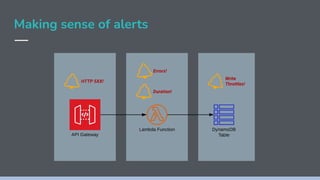
Making sense of alerts
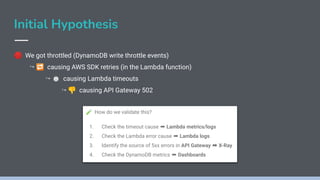
Initial Hypothesis
🛑 We got throttled (DynamoDB write throttle events)
↪ 🔁 causing AWS SDK retries (in the Lambda function)
↪ ⏱ causing Lambda timeouts
↪ 👎 causing API Gateway 502
🧪 How do we validate this?
1. Check the timeout cause ➡ Lambda metrics/logs
2. Check the Lambda error cause ➡ Lambda logs
3. Identify the source of 5xx errors in API Gateway ➡ X-Ray
4. Check the DynamoDB metrics ➡ Dashboards
Gathering evidence
Checking timeouts
● Check lambda timeouts
○ Duration metrics (aggregated data)
○ Logs (individual requests)
● Logs Insights give us duration for each
individual request. We can use this to
isolate the logs for just that request.
● We use stats to see how many executions
are affected.
Inspecting DynamoDB Capacity
Tracing errors
HTTP 502
HTTP 500
UNEXPECTED! 😱
Lambda CloudWatch
Logs
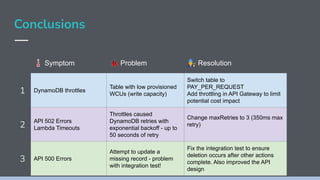
Conclusions
🌡 Symptom 🐞 Problem 󰟿 Resolution
1 DynamoDB throttles
Table with low provisioned
WCUs (write capacity)
Switch table to
PAY_PER_REQUEST
Add throttling in API Gateway to limit
potential cost impact
2
API 502 Errors
Lambda Timeouts
Throttles caused
DynamoDB retries with
exponential backoff - up to
50 seconds of retry
Change maxRetries to 3 (350ms max
retry)
3 API 500 Errors
Attempt to update a
missing record - problem
with integration test!
Fix the integration test to ensure
deletion occurs after other actions
complete. Also improved the API
design
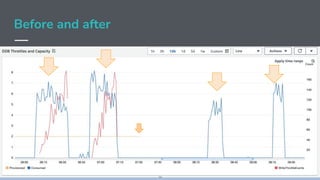
Before and after
What we have learned so far 󰠅
● We were able to identify, understand and fix these errors quite quickly
● We didn’t have to change the code to do that
● Nor did we run it locally with a debugger
● All of this was possible because we configured observability tools in
AWS in advance
AWS native o11y = CloudWatch
Cloudwatch gives you:
➔ Logs with Insights
➔ Metrics
➔ Dashboards
➔ Alarms
➔ Canaries
➔ Distributed tracing (with X-Ray)
Alternatives outside AWS
Established
New entrants
Roll your own (only for the brave)
CloudWatch out of the box
😍 A toolkit you can use to build
observability
🤩 Metrics are automatically
generated for all services!
😟 Lots of dashboards, but by
service and not by application!
😢 Zero alarms out of the box!
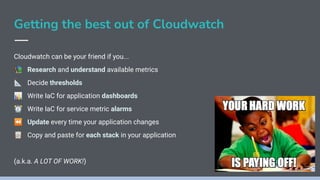
Getting the best out of Cloudwatch
Cloudwatch can be your friend if you...
📚 Research and understand available metrics
📐 Decide thresholds
📊 Write IaC for application dashboards
⏰ Write IaC for service metric alarms
⏪ Update every time your application changes
📋 Copy and paste for each stack in your application
(a.k.a. A LOT OF WORK!)
Best practices
😇 AWS Well Architected Framework
🏛 5 Pillars
⚙ Operational excellence pillar covers observability
🧐 Serverless lens applies these pillars
👍 Good guidance on metrics to observe
👎 More reading and research + you still have to pick thresholds
CloudFormation for CloudWatch Alarms 😬
"Type": "AWS::CloudWatch::Alarm",
"Properties": {
"ActionsEnabled": true,
"AlarmActions": [
"arn:aws:sns:eu-west-1:665863320777:FTSLICAlarms"
],
"AlarmName": "LambdaThrottles_serverless-test-project-dev-hello",
"AlarmDescription": "Throttles % for serverless-test-project-dev-hello ..",
"EvaluationPeriods": 1,
"ComparisonOperator": "GreaterThanThreshold",
"Threshold": 0,
"TreatMissingData": "notBreaching",
"Metrics": [
{
"Id": "throttles_pc",
"Expression": "(throttles / throttles + invocations) * 100",
"Label": "% Throttles",
"ReturnData": true
},
{
"Id": "throttles",
"MetricStat": {
"Metric": {
"Namespace": "AWS/Lambda",
"MetricName": "Throttles",
"Dimensions": [
{
"Name": "FunctionName",
"Value": "serverless-test-project-dev-hello"
}
]
},
"Period": 60,
"Stat": "Sum"
},
"ReturnData": false
},
{
"Id": "invocations",
"MetricStat": {
"Metric": {
"Namespace": "AWS/Lambda",
"MetricName": "Invocations",
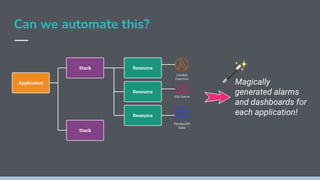
Can we automate this?
Magically
generated alarms
and dashboards for
each application!
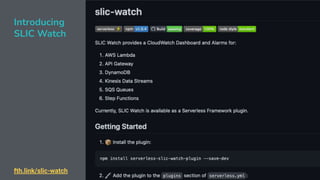
fth.link/slic-watch
Introducing
SLIC Watch
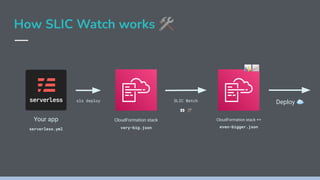
How SLIC Watch works 🛠
Your app
serverless.yml
sls deploy
CloudFormation stack
very-big.json
SLIC Watch
👀 🛠
CloudFormation stack ++
even-bigger.json
Deploy ☁
📊📈
Before SLIC Watch
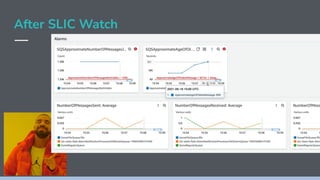
After SLIC Watch
After SLIC Watch
After SLIC Watch
After SLIC Watch
After SLIC Watch
Check out SLIC Slack
Configuration
🎀 SLIC Watch comes with sane defaults
📝 You can configure what you don’t like
🔌 Or disable specific dashboards or alarms
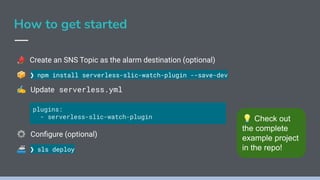
How to get started
📣 Create an SNS Topic as the alarm destination (optional)
📦 ❯ npm install serverless-slic-watch-plugin --save-dev
✍ Update serverless.yml
⚙ Configure (optional)
🚢 ❯ sls deploy
plugins:
- serverless-slic-watch-plugin 💡 Check out
the complete
example project
in the repo!
Wrapping up 🎁
★ If your services are failing you definitely want to know about it!
★ Observability can save you from hundreds of hours of blind debugging!
★ CloudWatch is the go to tool in AWS but you have to configure it!
★ Automation can take most of the configuration pain away
★ SLIC Watch can give you this automation
★ You still have control and flexibility
🔬Try it out! 🗣 Give feedback! 🌈 Let’s make it better!
fth.link/slic-watch
Thank you!
fth.link/o11y-simple
Cover picture by Markus Spiske on Unsplash

AWS Observability Made Simple

  • 1.
    AWS Observability made simple EóinShanaghy - Luciano Mammino AWS Community Day - November 11th 2021 fth.link/o11y-simple
  • 2.
    Hi! I’m Eoin🙂 CTO aiasaservicebook.com @eoins eoins ✉ Get in touch
  • 3.
    👋 Hello, Iam Luciano Senior architect nodejsdesignpatterns.com Let’s connect: 🌎 loige.co 🐦 @loige 🎥 loige 🧳 lucianomammino
  • 4.
    We are businessfocused technologists that deliver. Accelerated Serverless | AI as a Service | Platform Modernisation We are hiring! Let’s have a chat 🙂
  • 5.
    Check out ournew Podcast! awsbites.com
  • 6.
  • 7.
    Observability in thecloud a measure of how well internal states of a system can be inferred from knowledge of its external outputs 🪵 🔍 📈 🚨 Structured Logs Tracing Metrics Alarms “
  • 8.
    A typical casestudy ⚡ Serverless app ● Distributed system (100s of components) 🔌 HTTP APIs using ● Lambda ● DynamoDB ● API Gateway ● Cognito 🧱 Multiple services / stacks 🏁 Using SLIC Starter (fth.link/slic) 173 resources!
  • 9.
    A typical casestudy ⚽ The goal: know about problems before users do How? 📝 Structured Logs 📐 Metrics 🔔 Alarms 📊 Dashboards 🗺 Traces (X-Ray)
  • 10.
    Can we testour observability? 󰝊 We run a stress test ○ Simulate traffic using the integration test ○ Run the test a number of times in parallel (in a loop) ○ Exercises all the APIs with typical use cases (login, CRUD operations, etc.) 🚨 After 10-15 minutes, we started to get alarms...
  • 11.
  • 12.
  • 13.
    Initial Hypothesis 🛑 Wegot throttled (DynamoDB write throttle events) ↪ 🔁 causing AWS SDK retries (in the Lambda function) ↪ ⏱ causing Lambda timeouts ↪ 👎 causing API Gateway 502 🧪 How do we validate this? 1. Check the timeout cause ➡ Lambda metrics/logs 2. Check the Lambda error cause ➡ Lambda logs 3. Identify the source of 5xx errors in API Gateway ➡ X-Ray 4. Check the DynamoDB metrics ➡ Dashboards
  • 14.
  • 15.
    Checking timeouts ● Checklambda timeouts ○ Duration metrics (aggregated data) ○ Logs (individual requests) ● Logs Insights give us duration for each individual request. We can use this to isolate the logs for just that request. ● We use stats to see how many executions are affected.
  • 16.
  • 17.
  • 18.
  • 19.
  • 20.
  • 21.
    Conclusions 🌡 Symptom 🐞Problem 󰟿 Resolution 1 DynamoDB throttles Table with low provisioned WCUs (write capacity) Switch table to PAY_PER_REQUEST Add throttling in API Gateway to limit potential cost impact 2 API 502 Errors Lambda Timeouts Throttles caused DynamoDB retries with exponential backoff - up to 50 seconds of retry Change maxRetries to 3 (350ms max retry) 3 API 500 Errors Attempt to update a missing record - problem with integration test! Fix the integration test to ensure deletion occurs after other actions complete. Also improved the API design
  • 22.
  • 23.
    What we havelearned so far 󰠅 ● We were able to identify, understand and fix these errors quite quickly ● We didn’t have to change the code to do that ● Nor did we run it locally with a debugger ● All of this was possible because we configured observability tools in AWS in advance
  • 24.
    AWS native o11y= CloudWatch Cloudwatch gives you: ➔ Logs with Insights ➔ Metrics ➔ Dashboards ➔ Alarms ➔ Canaries ➔ Distributed tracing (with X-Ray)
  • 25.
    Alternatives outside AWS Established Newentrants Roll your own (only for the brave)
  • 26.
    CloudWatch out ofthe box 😍 A toolkit you can use to build observability 🤩 Metrics are automatically generated for all services! 😟 Lots of dashboards, but by service and not by application! 😢 Zero alarms out of the box!
  • 27.
    Getting the bestout of Cloudwatch Cloudwatch can be your friend if you... 📚 Research and understand available metrics 📐 Decide thresholds 📊 Write IaC for application dashboards ⏰ Write IaC for service metric alarms ⏪ Update every time your application changes 📋 Copy and paste for each stack in your application (a.k.a. A LOT OF WORK!)
  • 28.
    Best practices 😇 AWSWell Architected Framework 🏛 5 Pillars ⚙ Operational excellence pillar covers observability 🧐 Serverless lens applies these pillars 👍 Good guidance on metrics to observe 👎 More reading and research + you still have to pick thresholds
  • 29.
    CloudFormation for CloudWatchAlarms 😬 "Type": "AWS::CloudWatch::Alarm", "Properties": { "ActionsEnabled": true, "AlarmActions": [ "arn:aws:sns:eu-west-1:665863320777:FTSLICAlarms" ], "AlarmName": "LambdaThrottles_serverless-test-project-dev-hello", "AlarmDescription": "Throttles % for serverless-test-project-dev-hello ..", "EvaluationPeriods": 1, "ComparisonOperator": "GreaterThanThreshold", "Threshold": 0, "TreatMissingData": "notBreaching", "Metrics": [ { "Id": "throttles_pc", "Expression": "(throttles / throttles + invocations) * 100", "Label": "% Throttles", "ReturnData": true }, { "Id": "throttles", "MetricStat": { "Metric": { "Namespace": "AWS/Lambda", "MetricName": "Throttles", "Dimensions": [ { "Name": "FunctionName", "Value": "serverless-test-project-dev-hello" } ] }, "Period": 60, "Stat": "Sum" }, "ReturnData": false }, { "Id": "invocations", "MetricStat": { "Metric": { "Namespace": "AWS/Lambda", "MetricName": "Invocations",
  • 30.
    Can we automatethis? Magically generated alarms and dashboards for each application!
  • 31.
  • 32.
    How SLIC Watchworks 🛠 Your app serverless.yml sls deploy CloudFormation stack very-big.json SLIC Watch 👀 🛠 CloudFormation stack ++ even-bigger.json Deploy ☁ 📊📈
  • 33.
  • 34.
  • 35.
  • 36.
  • 37.
  • 38.
    After SLIC Watch Checkout SLIC Slack
  • 39.
    Configuration 🎀 SLIC Watchcomes with sane defaults 📝 You can configure what you don’t like 🔌 Or disable specific dashboards or alarms
  • 40.
    How to getstarted 📣 Create an SNS Topic as the alarm destination (optional) 📦 ❯ npm install serverless-slic-watch-plugin --save-dev ✍ Update serverless.yml ⚙ Configure (optional) 🚢 ❯ sls deploy plugins: - serverless-slic-watch-plugin 💡 Check out the complete example project in the repo!
  • 41.
    Wrapping up 🎁 ★If your services are failing you definitely want to know about it! ★ Observability can save you from hundreds of hours of blind debugging! ★ CloudWatch is the go to tool in AWS but you have to configure it! ★ Automation can take most of the configuration pain away ★ SLIC Watch can give you this automation ★ You still have control and flexibility 🔬Try it out! 🗣 Give feedback! 🌈 Let’s make it better! fth.link/slic-watch
  • 42.