Build,SkillandEnableBuild,SkillandEnable
Disaster Recovery with AWS
Bipin Sinhaa
Bipinsinhaa.in
Innovate, Collaborate & Accelerate
Build,SkillandEnable
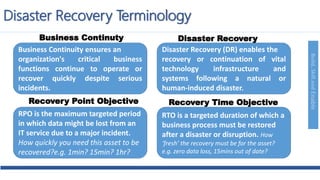
Disaster Recovery Terminology
Business Continuity ensures an
organization's critical business
functions continue to operate or
recover quickly despite serious
incidents.
Disaster Recovery (DR) enables the
recovery or continuation of vital
technology infrastructure and
systems following a natural or
human-induced disaster.
RPO is the maximum targeted period
in which data might be lost from an
IT service due to a major incident.
How quickly you need this asset to be
recovered?e.g. 1min? 15min? 1hr?
RTO is a targeted duration of which a
business process must be restored
after a disaster or disruption. How
‘fresh’ the recovery must be for the asset?
e.g. zero data loss, 15mins out of date?
Business Continuty Disaster Recovery
Recovery Point Objective Recovery Time Objective
Build,SkillandEnable
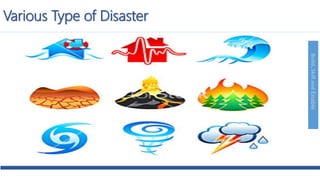
Various Type of Disaster
Build,SkillandEnable
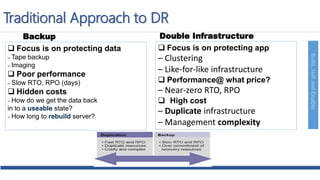
Traditional Approach to DR
 Focus is on protecting data
– Tape backup
– Imaging
 Poor performance
– Slow RTO, RPO (days)
 Hidden costs
– How do we get the data back
in to a useable state?
– How long to rebuild server?
 Focus is on protecting app
– Clustering
– Like-for-like infrastructure
 Performance@ what price?
– Near-zero RTO, RPO
 High cost
– Duplicate infrastructure
– Management complexity
Backup Double Infrastructure
Build,SkillandEnable
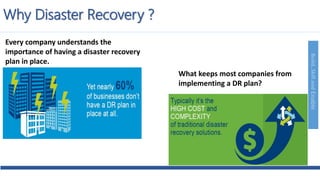
Why Disaster Recovery ?
Every company understands the
importance of having a disaster recovery
plan in place.
What keeps most companies from
implementing a DR plan?
Build,SkillandEnable
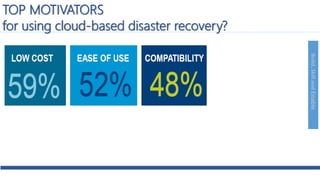
TOP MOTIVATORS
for using cloud-based disaster recovery?
Build,SkillandEnable
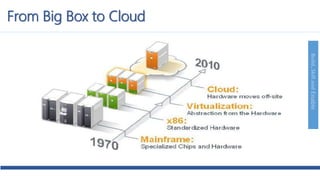
From Big Box to Cloud
Build,SkillandEnable
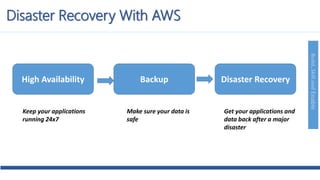
Disaster Recovery With AWS
High Availability Backup Disaster Recovery
Make sure your data is
safe
Keep your applications
running 24x7
Get your applications and
data back after a major
disaster
Build,SkillandEnable
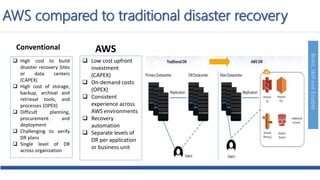
AWS compared to traditional disaster recovery
 High cost to build
disaster recovery Sites
or data centers
(CAPEX)
 High cost of storage,
backup, archival and
retrieval tools, and
processes (OPEX)
 Difficult planning,
procurement and
deployment
 Challenging to verify
DR plans
 Single level of DR
across organization
 Low cost upfront
investment
(CAPEX)
 On-demand costs
(OPEX)
 Consistent
experience across
AWS environments
 Recovery
automation
 Separate levels of
DR per application
or business unit
Conventional AWS
Build,SkillandEnable
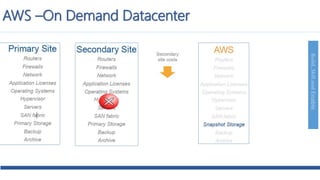
AWS –On Demand Datacenter
Build,SkillandEnable
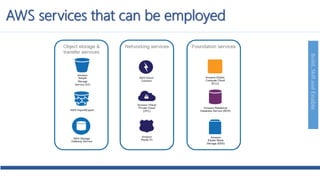
AWS services that can be employed
Build,SkillandEnable
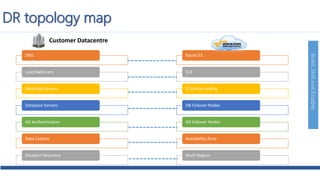
DNS
Load Balancers
Web/App Servers
Database Servers
AD Authentication
Data Centres
Disasters Recovery
Route 53
ELB
EC2/Auto scaling
DB Failover Nodes
AD Failover Nodes
Availability Zone
Multi-Region
DR topology map
Customer Datacentre
Build,SkillandEnable
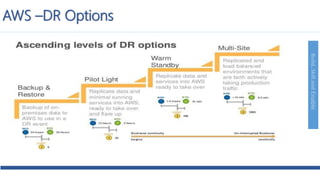
AWS –DR Options
Build,SkillandEnable
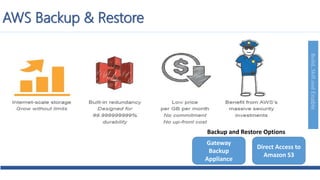
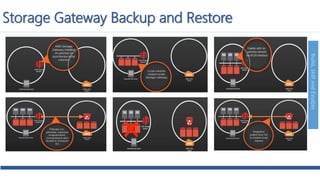
AWS Backup & Restore
Backup and Restore Options
Gateway
Backup
Appliance
Direct Access to
Amazon S3
Build,SkillandEnable
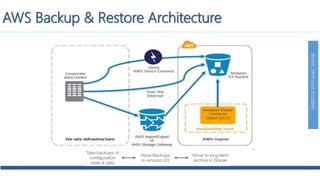
AWS Backup & Restore Architecture
Build,SkillandEnable
Storage Gateway Backup and Restore
Build,SkillandEnable
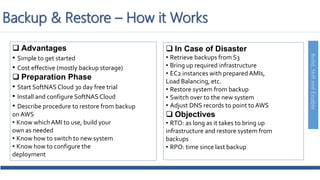
 Advantages
• Simple to get started
• Cost effective (mostly backup storage)
 Preparation Phase
• Start SoftNAS Cloud 30 day free trial
• Install and configure SoftNAS Cloud
• Describe procedure to restore from backup
onAWS
• Know whichAMI to use, build your
own as needed
• Know how to switch to new system
• Know how to configure the
deployment
 In Case of Disaster
• Retrieve backups from S3
• Bring up required infrastructure
• EC2 instances with prepared AMIs,
Load Balancing, etc.
• Restore system from backup
• Switch over to the new system
• Adjust DNS records to point to AWS
 Objectives
• RTO: as long as it takes to bring up
infrastructure and restore system from
backups
• RPO: time since last backup
Backup & Restore – How it Works
Build,SkillandEnable
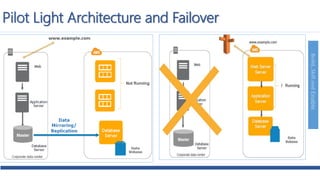
Pilot Light Architecture and Failover
Build,SkillandEnable
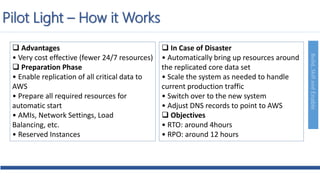
 Advantages
• Very cost effective (fewer 24/7 resources)
 Preparation Phase
• Enable replication of all critical data to
AWS
• Prepare all required resources for
automatic start
• AMIs, Network Settings, Load
Balancing, etc.
• Reserved Instances
 In Case of Disaster
• Automatically bring up resources around
the replicated core data set
• Scale the system as needed to handle
current production traffic
• Switch over to the new system
• Adjust DNS records to point to AWS
 Objectives
• RTO: around 4hours
• RPO: around 12 hours
Pilot Light – How it Works
Build,SkillandEnable
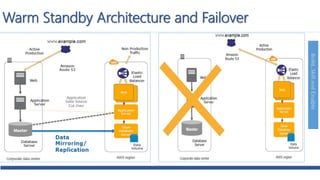
Warm Standby Architecture and Failover
Build,SkillandEnable
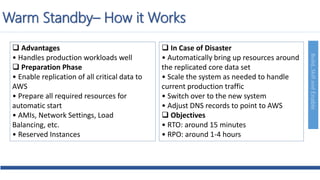
 Advantages
• Handles production workloads well
 Preparation Phase
• Enable replication of all critical data to
AWS
• Prepare all required resources for
automatic start
• AMIs, Network Settings, Load
Balancing, etc.
• Reserved Instances
 In Case of Disaster
• Automatically bring up resources around
the replicated core data set
• Scale the system as needed to handle
current production traffic
• Switch over to the new system
• Adjust DNS records to point to AWS
 Objectives
• RTO: around 15 minutes
• RPO: around 1-4 hours
Warm Standby– How it Works
Build,SkillandEnable
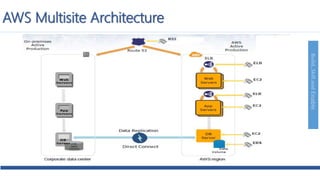
AWS Multisite Architecture
Build,SkillandEnable
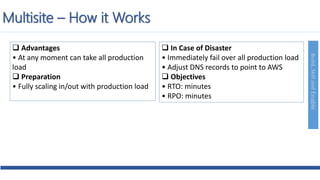
 Advantages
• At any moment can take all production
load
 Preparation
• Fully scaling in/out with production load
 In Case of Disaster
• Immediately fail over all production load
• Adjust DNS records to point to AWS
 Objectives
• RTO: minutes
• RPO: minutes
Multisite – How it Works
Build,SkillandEnable
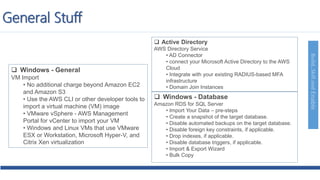
 Windows - General
VM Import
• No additional charge beyond Amazon EC2
and Amazon S3
• Use the AWS CLI or other developer tools to
import a virtual machine (VM) image
• VMware vSphere - AWS Management
Portal for vCenter to import your VM
• Windows and Linux VMs that use VMware
ESX or Workstation, Microsoft Hyper-V, and
Citrix Xen virtualization
 Active Directory
AWS Directory Service
• AD Connector
• connect your Microsoft Active Directory to the AWS
Cloud
• Integrate with your existing RADIUS-based MFA
infrastructure
• Domain Join Instances
 Windows - Database
Amazon RDS for SQL Server
• Import Your Data – pre-steps
• Create a snapshot of the target database.
• Disable automated backups on the target database.
• Disable foreign key constraints, if applicable.
• Drop indexes, if applicable.
• Disable database triggers, if applicable.
• Import & Export Wizard
• Bulk Copy
General Stuff
Build,SkillandEnable
Thank You
Innovate, Collaborate & Accelerate

Aws disaster recovery

  • 1.
    Build,SkillandEnableBuild,SkillandEnable Disaster Recovery withAWS Bipin Sinhaa Bipinsinhaa.in Innovate, Collaborate & Accelerate
  • 2.
    Build,SkillandEnable Disaster Recovery Terminology BusinessContinuity ensures an organization's critical business functions continue to operate or recover quickly despite serious incidents. Disaster Recovery (DR) enables the recovery or continuation of vital technology infrastructure and systems following a natural or human-induced disaster. RPO is the maximum targeted period in which data might be lost from an IT service due to a major incident. How quickly you need this asset to be recovered?e.g. 1min? 15min? 1hr? RTO is a targeted duration of which a business process must be restored after a disaster or disruption. How ‘fresh’ the recovery must be for the asset? e.g. zero data loss, 15mins out of date? Business Continuty Disaster Recovery Recovery Point Objective Recovery Time Objective
  • 3.
  • 4.
    Build,SkillandEnable Traditional Approach toDR  Focus is on protecting data – Tape backup – Imaging  Poor performance – Slow RTO, RPO (days)  Hidden costs – How do we get the data back in to a useable state? – How long to rebuild server?  Focus is on protecting app – Clustering – Like-for-like infrastructure  Performance@ what price? – Near-zero RTO, RPO  High cost – Duplicate infrastructure – Management complexity Backup Double Infrastructure
  • 5.
    Build,SkillandEnable Why Disaster Recovery? Every company understands the importance of having a disaster recovery plan in place. What keeps most companies from implementing a DR plan?
  • 6.
    Build,SkillandEnable TOP MOTIVATORS for usingcloud-based disaster recovery?
  • 7.
  • 8.
    Build,SkillandEnable Disaster Recovery WithAWS High Availability Backup Disaster Recovery Make sure your data is safe Keep your applications running 24x7 Get your applications and data back after a major disaster
  • 9.
    Build,SkillandEnable AWS compared totraditional disaster recovery  High cost to build disaster recovery Sites or data centers (CAPEX)  High cost of storage, backup, archival and retrieval tools, and processes (OPEX)  Difficult planning, procurement and deployment  Challenging to verify DR plans  Single level of DR across organization  Low cost upfront investment (CAPEX)  On-demand costs (OPEX)  Consistent experience across AWS environments  Recovery automation  Separate levels of DR per application or business unit Conventional AWS
  • 10.
  • 11.
  • 12.
    Build,SkillandEnable DNS Load Balancers Web/App Servers DatabaseServers AD Authentication Data Centres Disasters Recovery Route 53 ELB EC2/Auto scaling DB Failover Nodes AD Failover Nodes Availability Zone Multi-Region DR topology map Customer Datacentre
  • 13.
  • 14.
    Build,SkillandEnable AWS Backup &Restore Backup and Restore Options Gateway Backup Appliance Direct Access to Amazon S3
  • 15.
  • 16.
  • 17.
    Build,SkillandEnable  Advantages • Simpleto get started • Cost effective (mostly backup storage)  Preparation Phase • Start SoftNAS Cloud 30 day free trial • Install and configure SoftNAS Cloud • Describe procedure to restore from backup onAWS • Know whichAMI to use, build your own as needed • Know how to switch to new system • Know how to configure the deployment  In Case of Disaster • Retrieve backups from S3 • Bring up required infrastructure • EC2 instances with prepared AMIs, Load Balancing, etc. • Restore system from backup • Switch over to the new system • Adjust DNS records to point to AWS  Objectives • RTO: as long as it takes to bring up infrastructure and restore system from backups • RPO: time since last backup Backup & Restore – How it Works
  • 18.
  • 19.
    Build,SkillandEnable  Advantages • Verycost effective (fewer 24/7 resources)  Preparation Phase • Enable replication of all critical data to AWS • Prepare all required resources for automatic start • AMIs, Network Settings, Load Balancing, etc. • Reserved Instances  In Case of Disaster • Automatically bring up resources around the replicated core data set • Scale the system as needed to handle current production traffic • Switch over to the new system • Adjust DNS records to point to AWS  Objectives • RTO: around 4hours • RPO: around 12 hours Pilot Light – How it Works
  • 20.
  • 21.
    Build,SkillandEnable  Advantages • Handlesproduction workloads well  Preparation Phase • Enable replication of all critical data to AWS • Prepare all required resources for automatic start • AMIs, Network Settings, Load Balancing, etc. • Reserved Instances  In Case of Disaster • Automatically bring up resources around the replicated core data set • Scale the system as needed to handle current production traffic • Switch over to the new system • Adjust DNS records to point to AWS  Objectives • RTO: around 15 minutes • RPO: around 1-4 hours Warm Standby– How it Works
  • 22.
  • 23.
    Build,SkillandEnable  Advantages • Atany moment can take all production load  Preparation • Fully scaling in/out with production load  In Case of Disaster • Immediately fail over all production load • Adjust DNS records to point to AWS  Objectives • RTO: minutes • RPO: minutes Multisite – How it Works
  • 24.
    Build,SkillandEnable  Windows -General VM Import • No additional charge beyond Amazon EC2 and Amazon S3 • Use the AWS CLI or other developer tools to import a virtual machine (VM) image • VMware vSphere - AWS Management Portal for vCenter to import your VM • Windows and Linux VMs that use VMware ESX or Workstation, Microsoft Hyper-V, and Citrix Xen virtualization  Active Directory AWS Directory Service • AD Connector • connect your Microsoft Active Directory to the AWS Cloud • Integrate with your existing RADIUS-based MFA infrastructure • Domain Join Instances  Windows - Database Amazon RDS for SQL Server • Import Your Data – pre-steps • Create a snapshot of the target database. • Disable automated backups on the target database. • Disable foreign key constraints, if applicable. • Drop indexes, if applicable. • Disable database triggers, if applicable. • Import & Export Wizard • Bulk Copy General Stuff
  • 25.