

FRAMEWORK FOR AUTOMATION
TESTING – PRACTICE SHARING
June 2013
KMS Technology: http://kms-technology.com
AGENDA
Duong Phan – QA Architect
 Introduction
 Challenges and Solutions
 KMS Test Automation Framework
 Advanced Features
Vu Duong – Engineering Manager
 ROI and Metrics
2
KMS TECHNOLOGY OVERVIEW
3
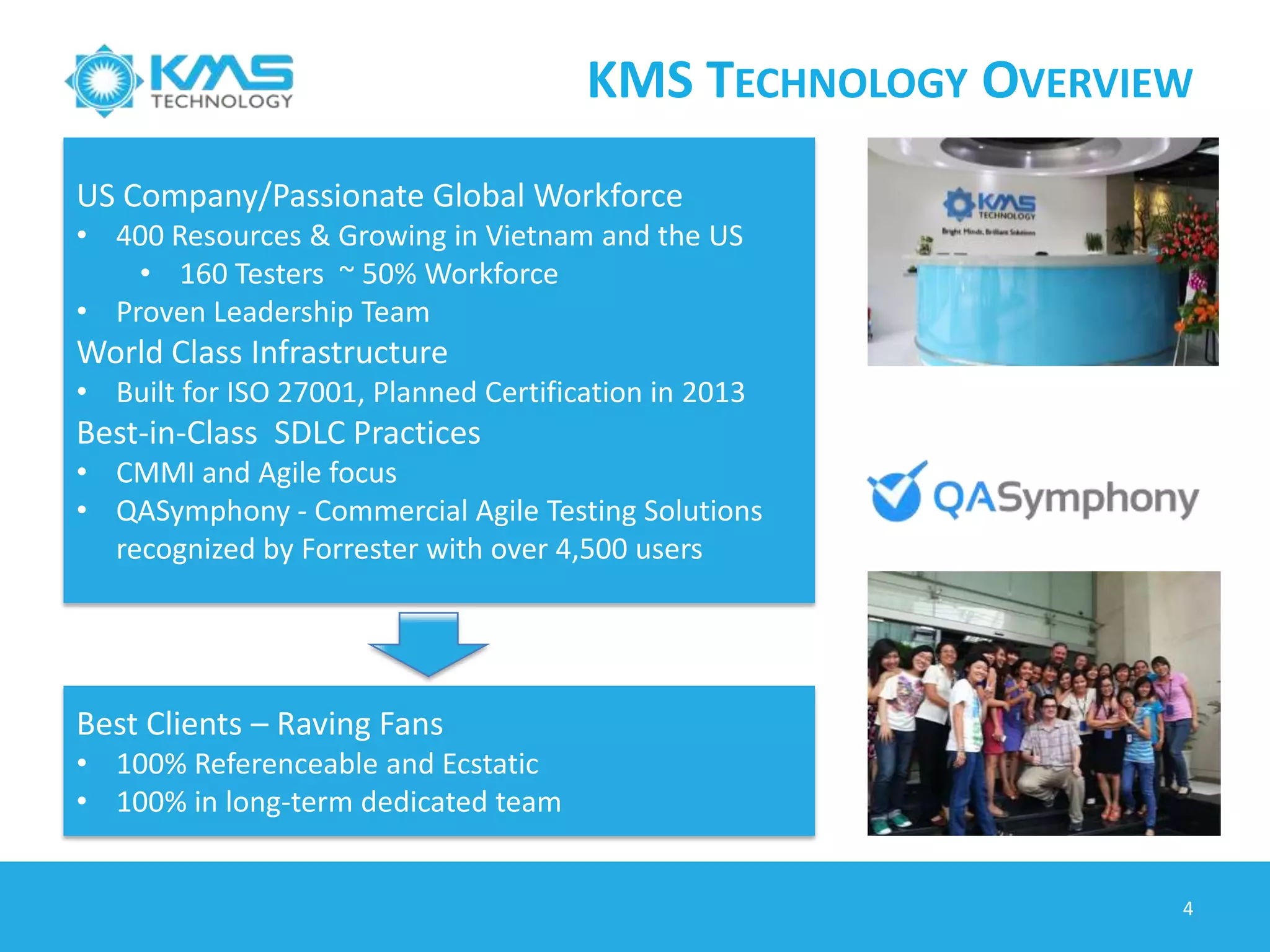
US Company/Passionate Global Workforce
• 400 Resources & Growing in Vietnam and the US
• 160 Testers ~ 50% Workforce
• Proven Leadership Team
World Class Infrastructure
• Built for ISO 27001, Planned Certification in 2013
Best-in-Class SDLC Practices
• CMMI and Agile focus
• QASymphony - Commercial Agile Testing Solutions
recognized by Forrester with over 4,500 users
Best Clients – Raving Fans
• 100% Referenceable and Ecstatic
• 100% in long-term dedicated team
A CASE STUDY
4
About the Client
is a leader in eCommerce software and
solutions, Provide multifaceted
eCommerce platform, reliable 24/7/365
service, scalable IT infrastructure,
integration with third party, and custom-
built features, Serve over 160 retail sites
Technology:
 Platform: Windows XP, Windows 7,
Linux, OSX, iOS and Android.
 Technology: Java, .NET/C#, Oracle
 Testing Tools: JIRA, Testlink, KMS
Automation Framework
Achievements
 KMS is responsible for automation of
client Core Platform Product and also for
distribution platforms
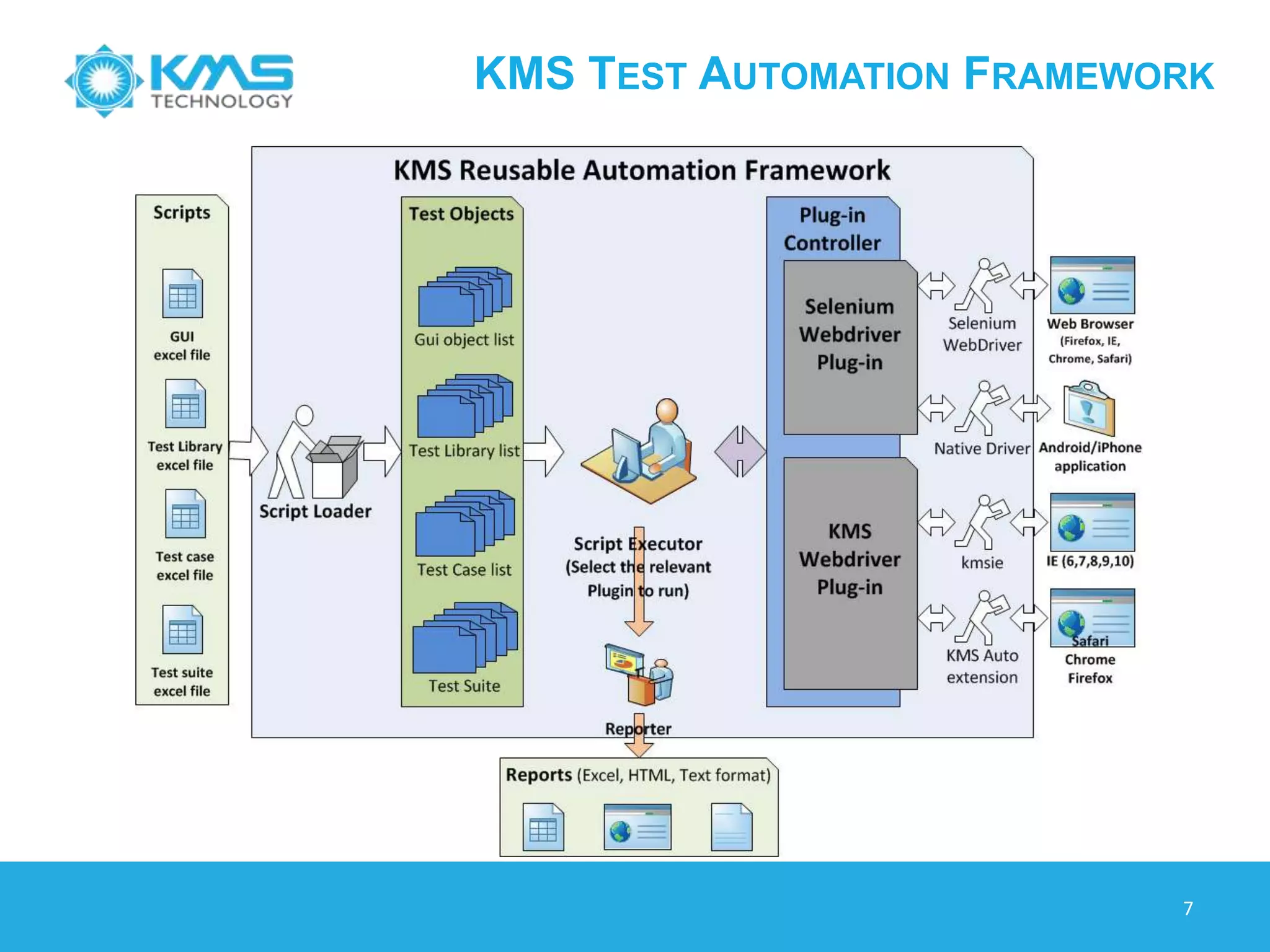
 Reusable Automation Framework can
stand independent with KMS run-time
plug-in (support web testing) although
can adapt other tools (Selenium)
 Framework support multiple OS:
Windows, Linux and OSX, iOS and
Android
 Execute test daily, Automation script is
able to find a lot of defects
Confidential
Automation Goals
 Reduce cost of development and quality
assurance
 Continuous platform upgrade to provide
new features and patch releases
 Testing is performed on core platform
and more than 200 of distributions
 Testing on many browsers (IE, Firefox,
Chrome, Safari)
CHALLENGES AND OUTCOMES
 Project Specification
 Multiple Instance Application Types
 Flexible Components
 Regular Sanity Test
 Automation must find bugs
 Customer Satisfaction
 Cost Saving
 Product Quality Improvement
 Bug Escape Reduction
5
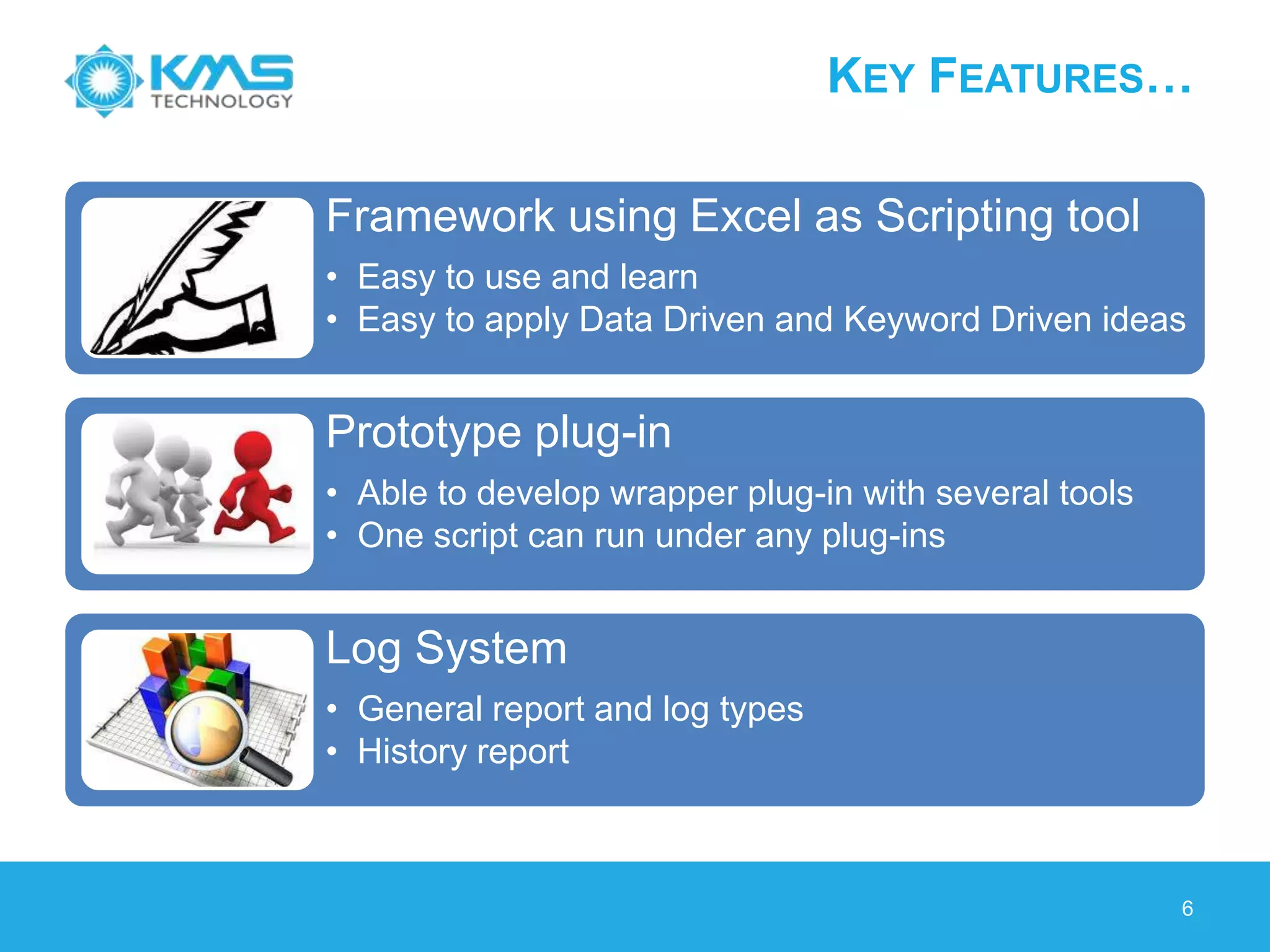
KEY FEATURES…
Framework using Excel as Scripting tool
• Easy to use and learn
• Easy to apply Data Driven and Keyword Driven ideas
Prototype plug-in
• Able to develop wrapper plug-in with several tools
• One script can run under any plug-ins
Log System
• General report and log types
• History report
6
KMS TEST AUTOMATION FRAMEWORK
7
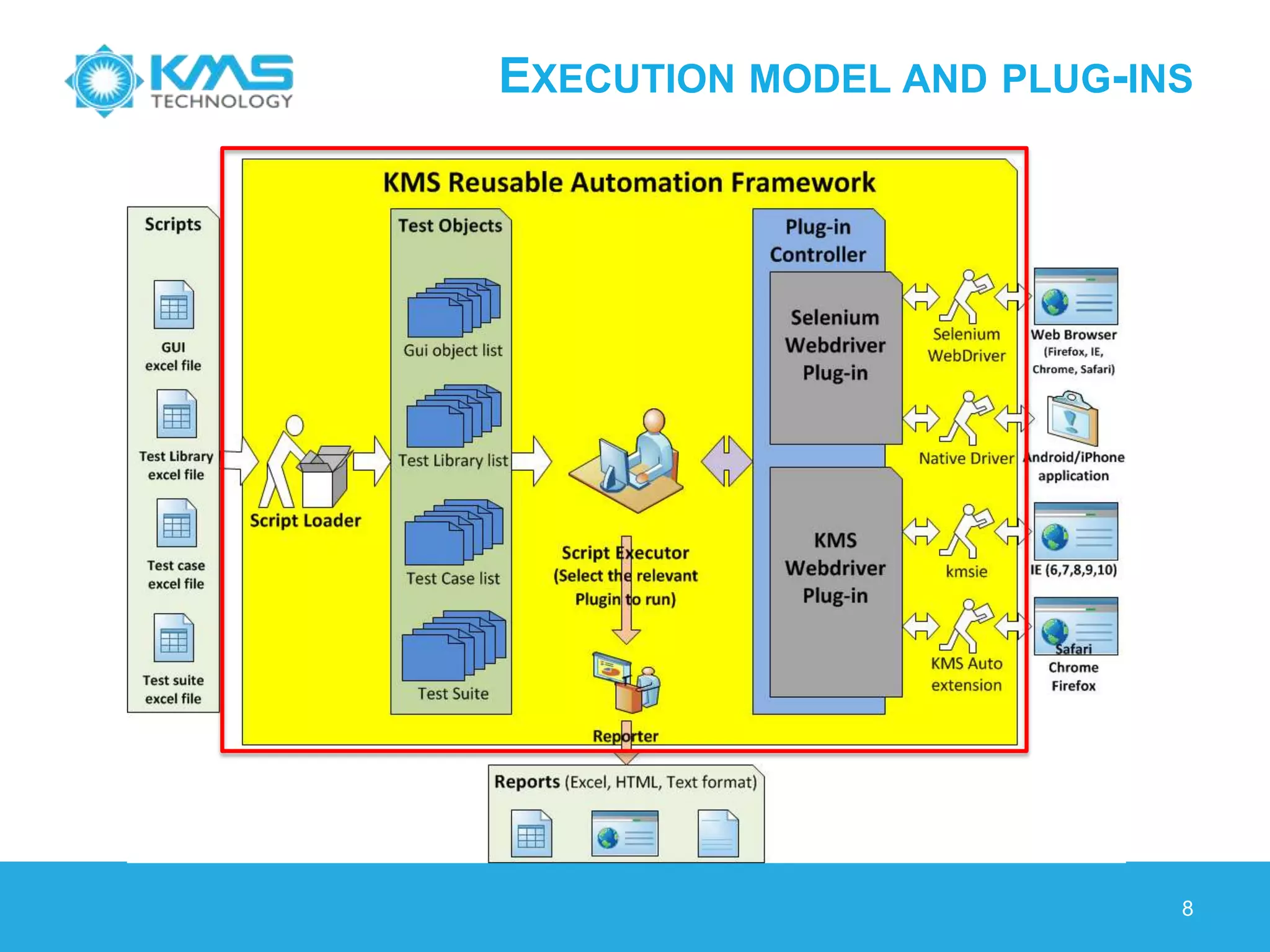
EXECUTION MODEL AND PLUG-INS
8
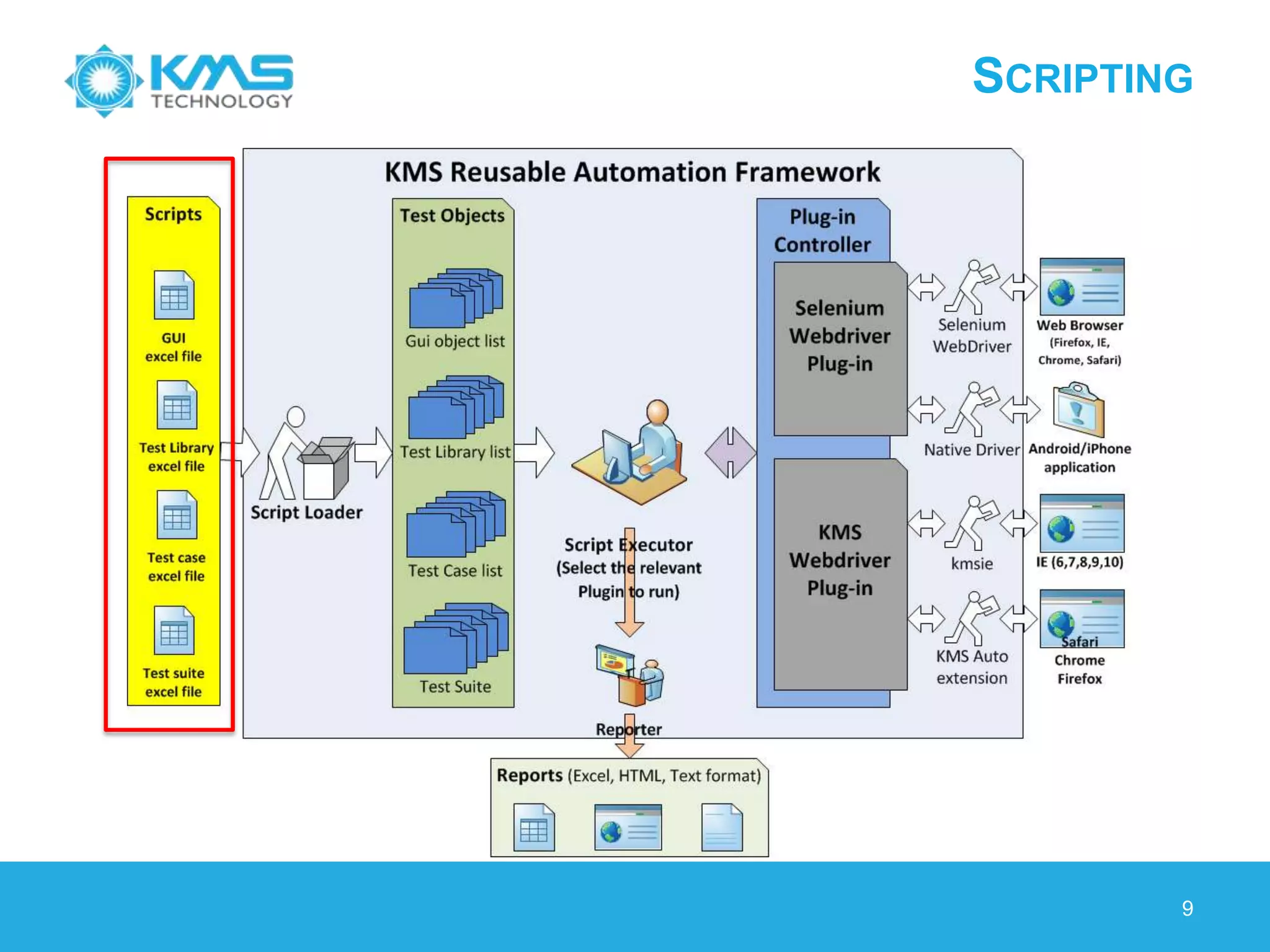
SCRIPTING
9
© 2013 KMS Technology
ADVANCED FEATURES
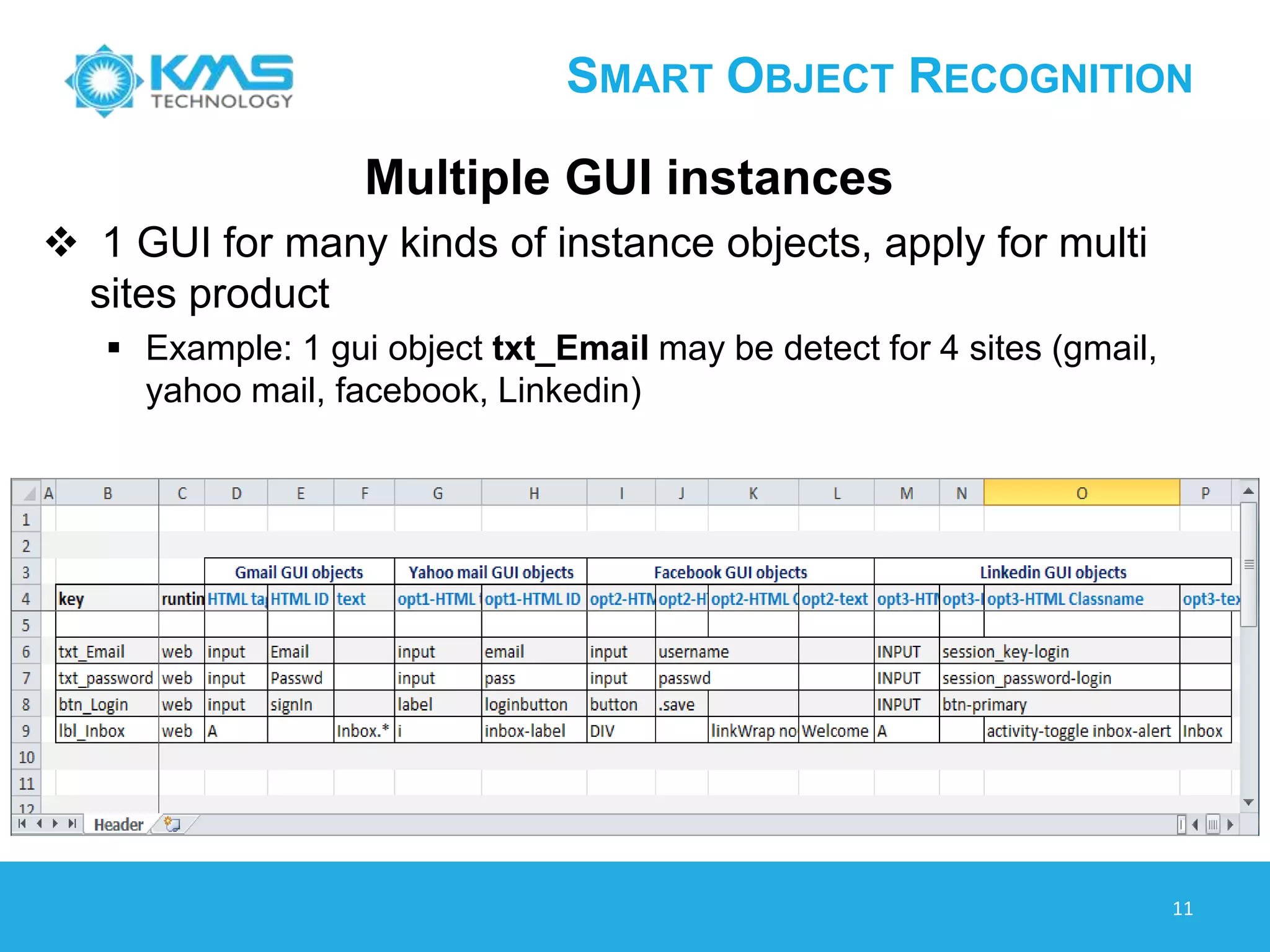
SMART OBJECT RECOGNITION
Multiple GUI instances
 1 GUI for many kinds of instance objects, apply for multi
sites product
 Example: 1 gui object txt_Email may be detect for 4 sites (gmail,
yahoo mail, facebook, Linkedin)
11
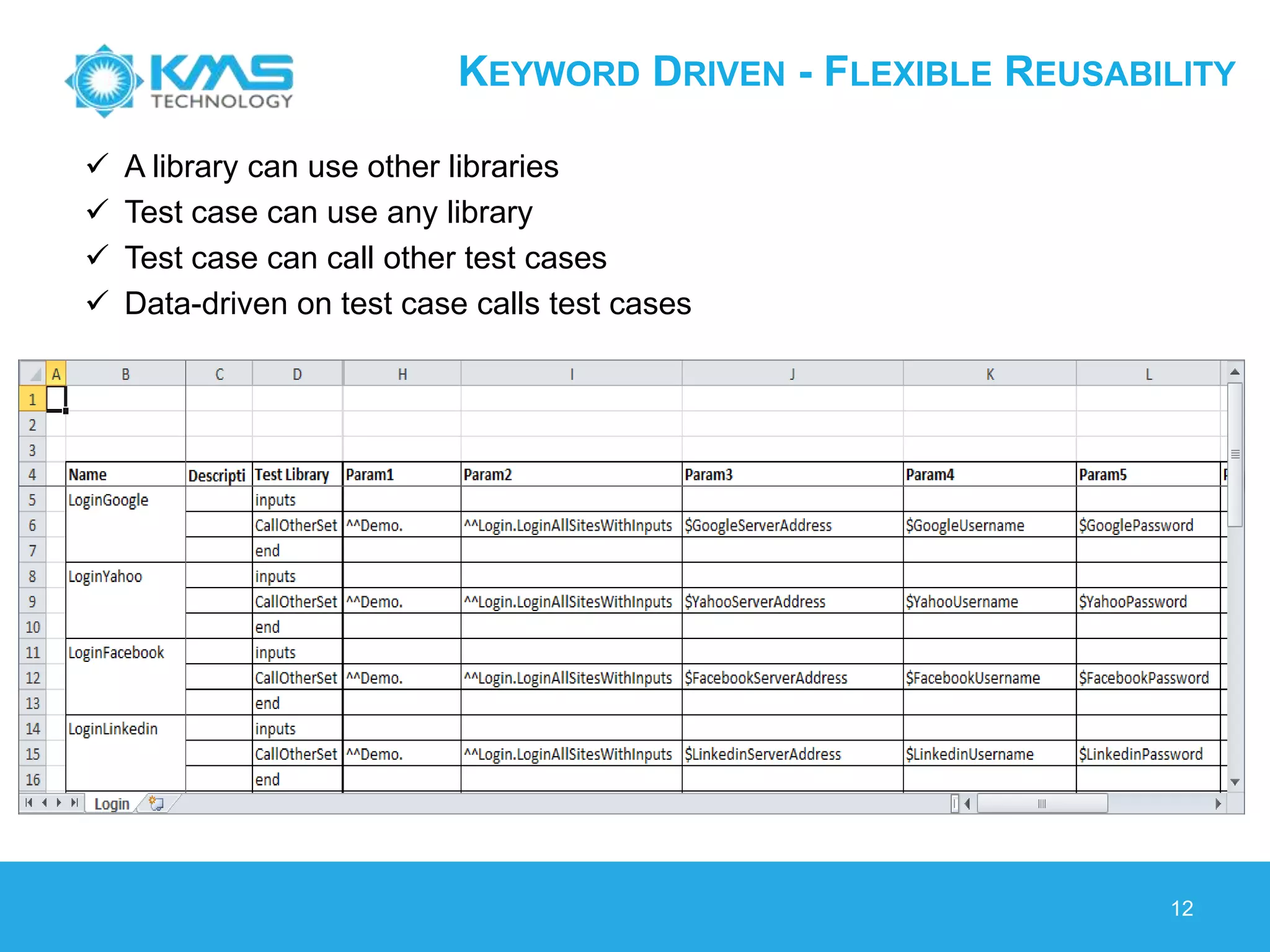
KEYWORD DRIVEN - FLEXIBLE REUSABILITY
12
 A library can use other libraries
 Test case can use any library
 Test case can call other test cases
 Data-driven on test case calls test cases
DATA DRIVEN - FLEXIBLE CONFIGURATION
13
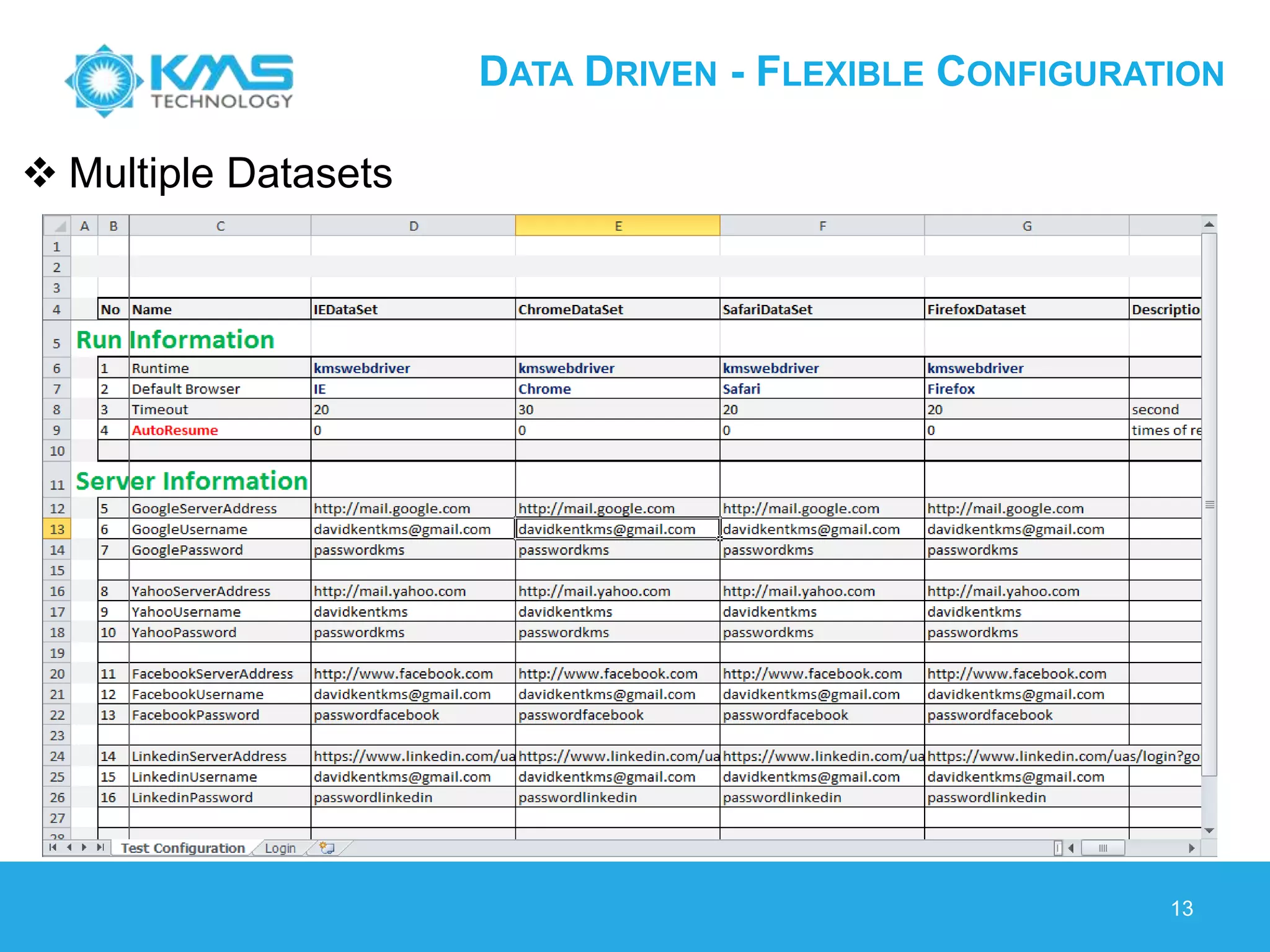
 Multiple Datasets
DATA DRIVEN - FLEXIBLE CONFIGURATION
14
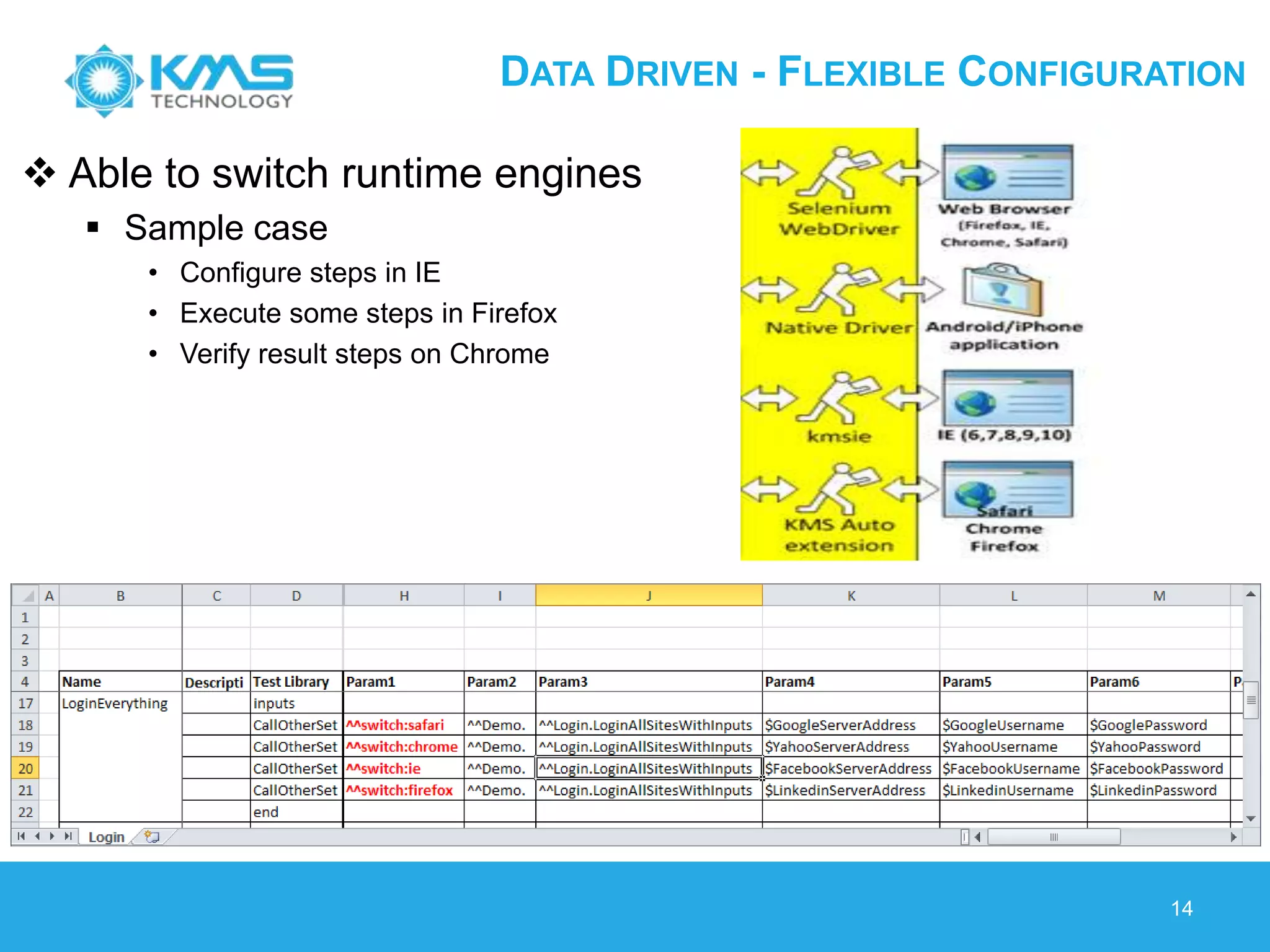
 Able to switch runtime engines
 Sample case
• Configure steps in IE
• Execute some steps in Firefox
• Verify result steps on Chrome
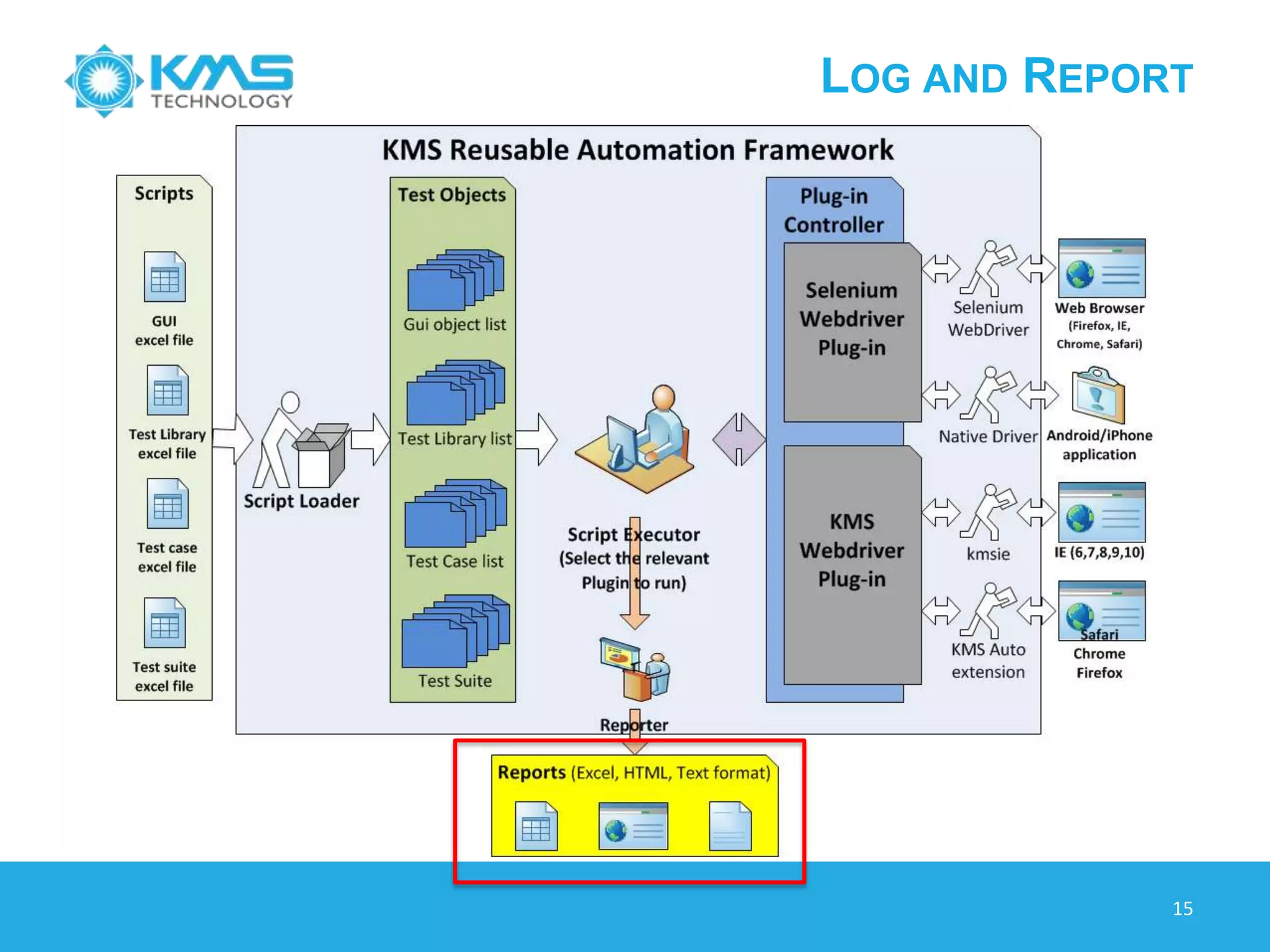
LOG AND REPORT
15
LOG AND REPORT
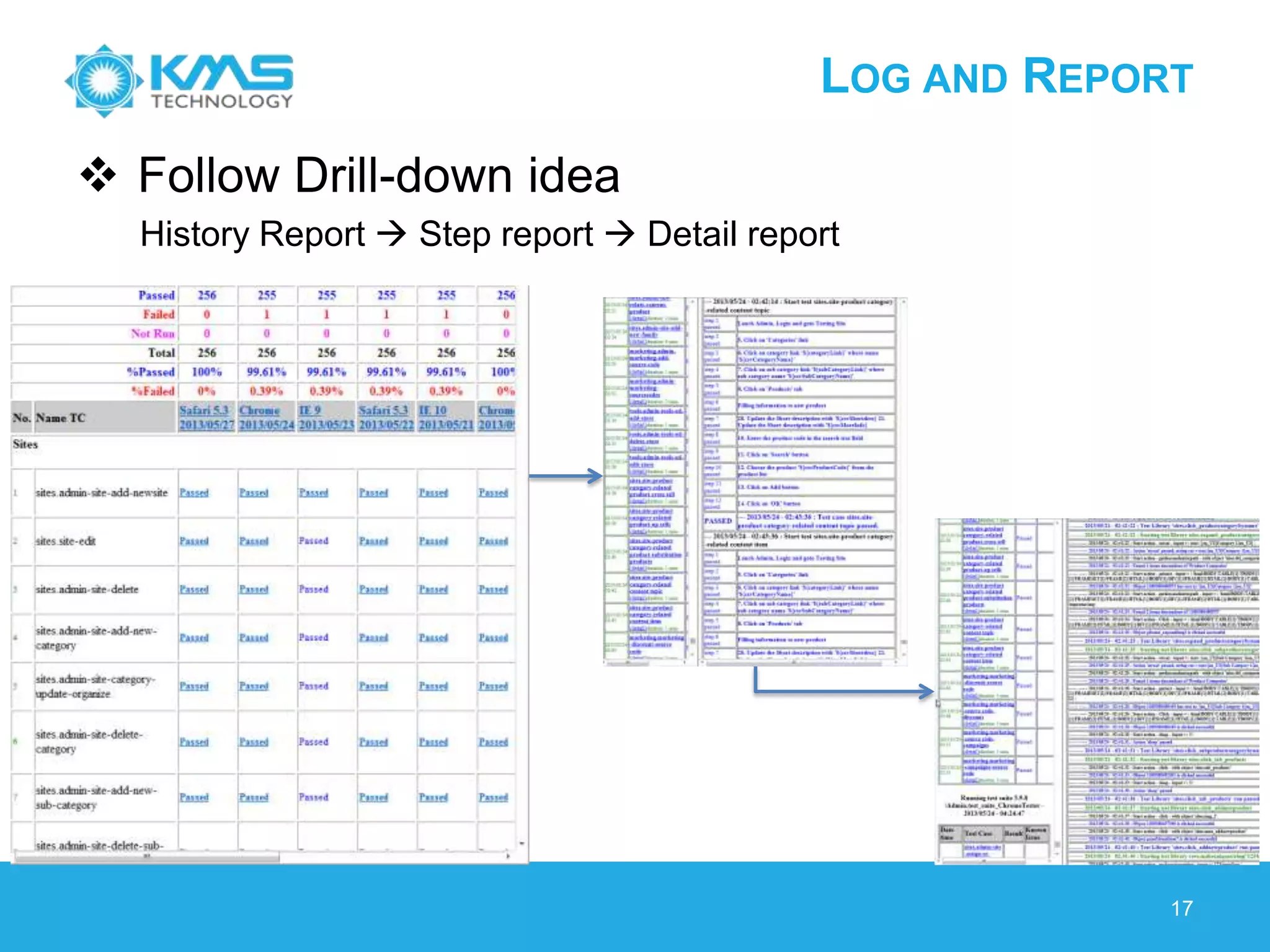
History report (excel, html and email)
 Helpful to follow bug fixing
 HTML format can be opened anywhere
 Email (HTML format) is portable
Various type of reports/logs
 Statistic of result
 Detail report/log
 HTML / Excel format report
 Reminders
 Send email notification
 Define groups to send notification
16
LOG AND REPORT
 Follow Drill-down idea
History Report  Step report  Detail report
17
© 2013 KMS Technology
ROI & METRICS
VU DUONG
ROI – WHAT?
19
ROI – WHAT?
20
ROI – WHY?
21
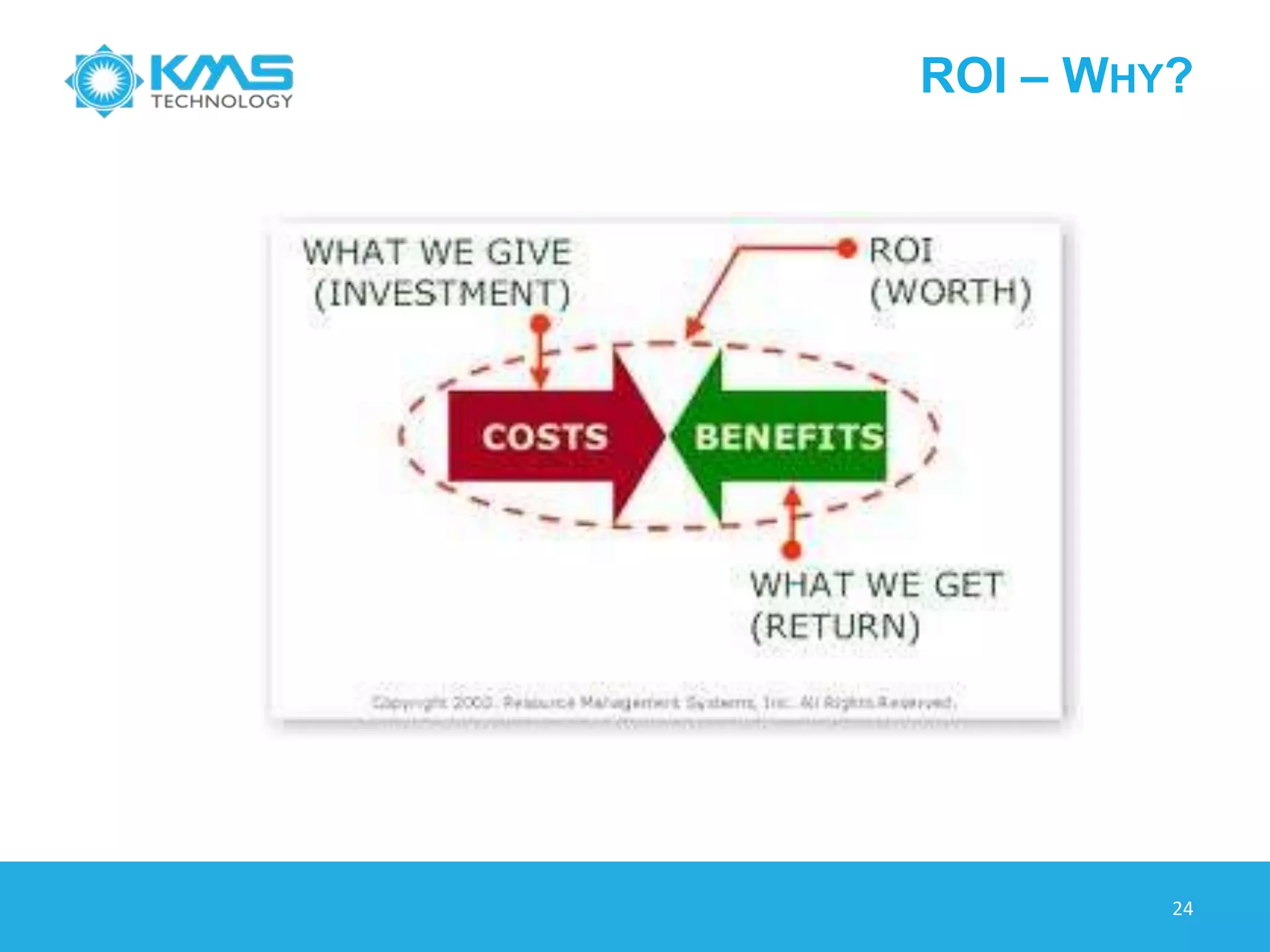
ROI – WHY?
22
ROI – HOW?
23
ROI ANALYSIS OVERVIEW
24
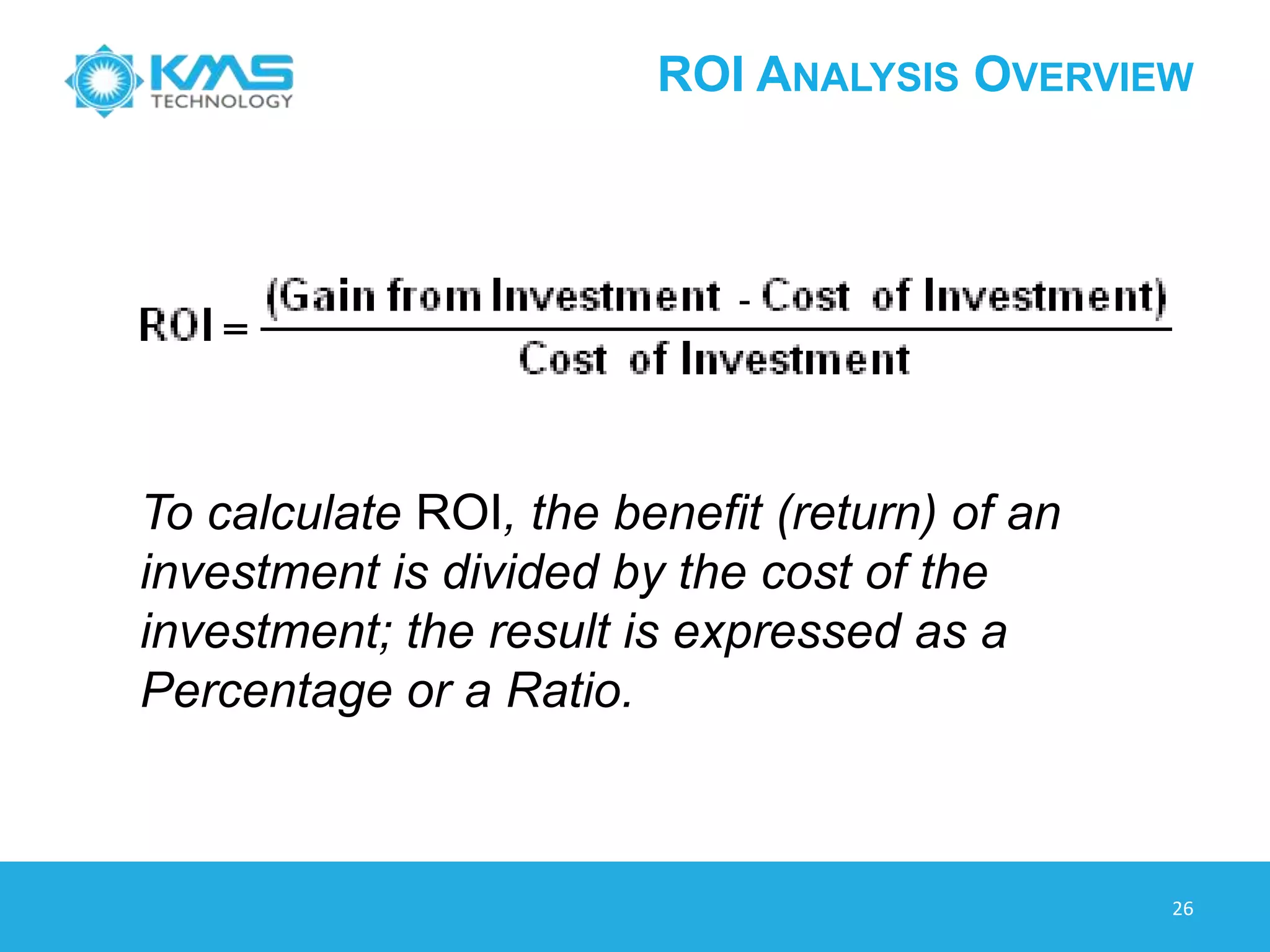
To calculate ROI, the benefit (return) of an
investment is divided by the cost of the
investment; the result is expressed as a
Percentage or a Ratio.
ROI – BEST PRACTICE
25
 ROI (Effort)
 ROI (Cost)
ROI - EFFORT
26
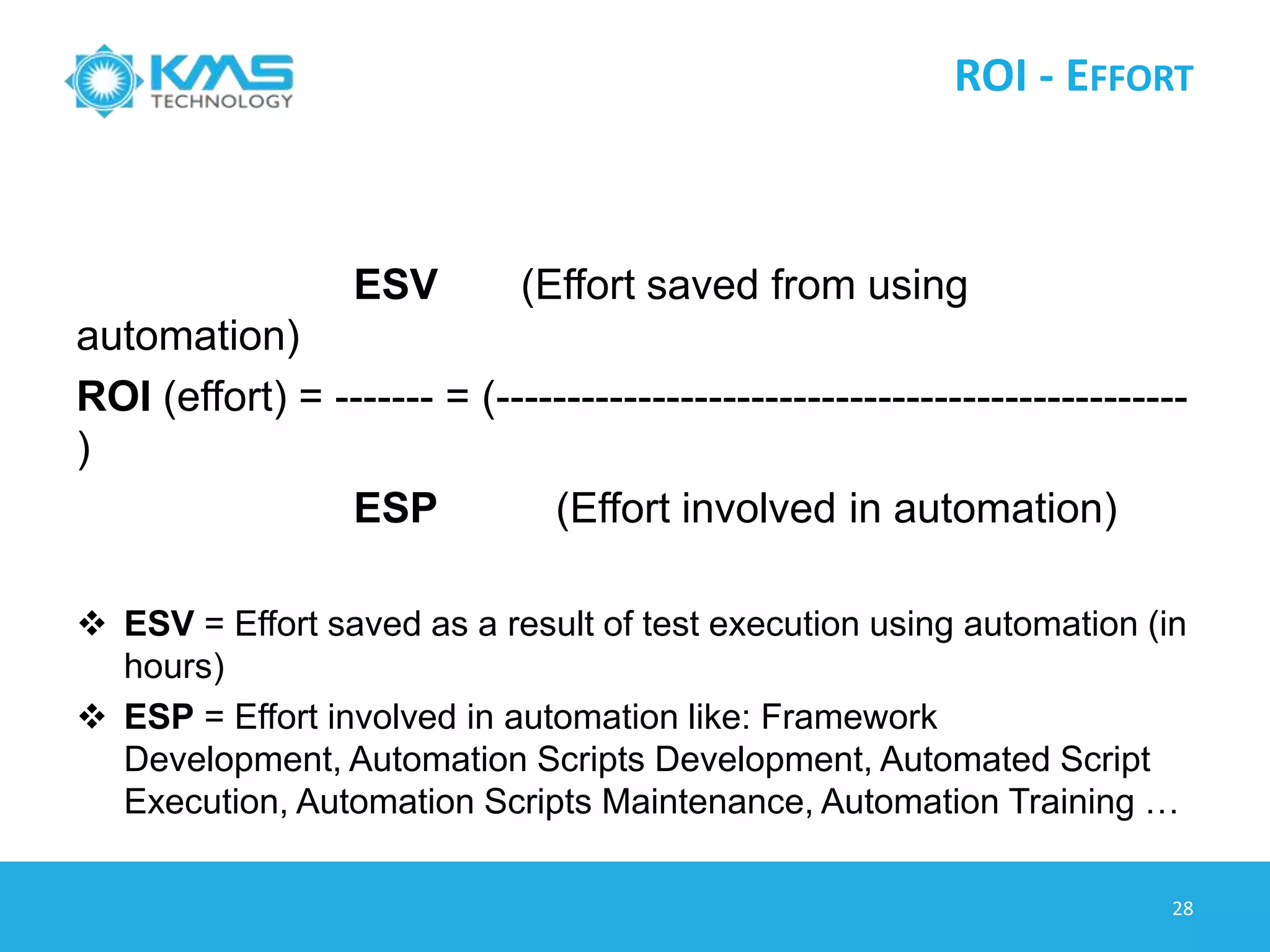
ESV (Effort saved from using
automation)
ROI (effort) = ------- = (-------------------------------------------------
)
ESP (Effort involved in automation)
 ESV = Effort saved as a result of test execution using automation (in
hours)
 ESP = Effort involved in automation like: Framework Development,
Automation Scripts Development, Automated Script Execution,
Automation Scripts Maintenance, Automation Training …
ROI ANALYSIS – EFFORT
27
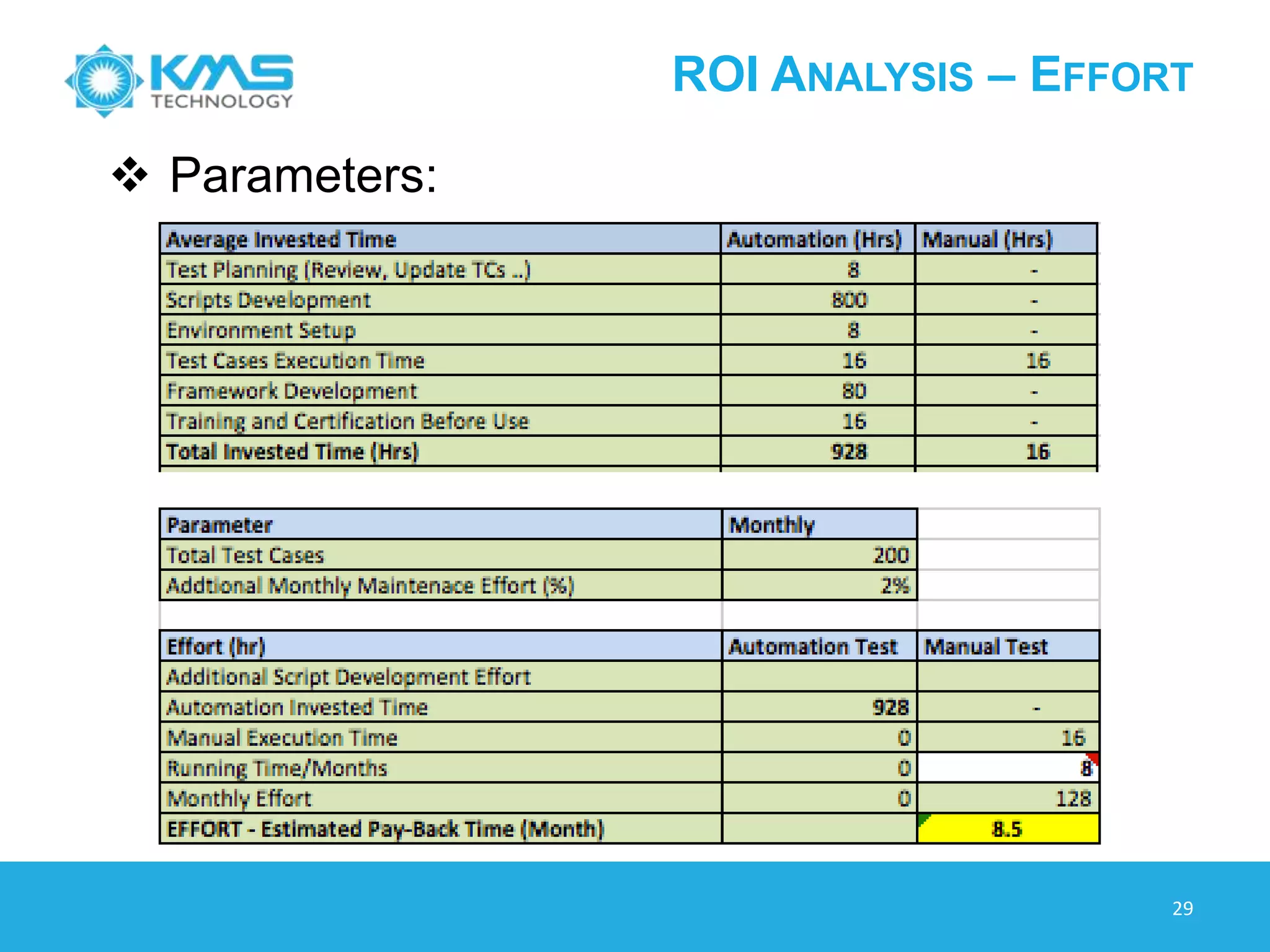
 Parameters:
ROI ANALYSIS – EFFORT
28
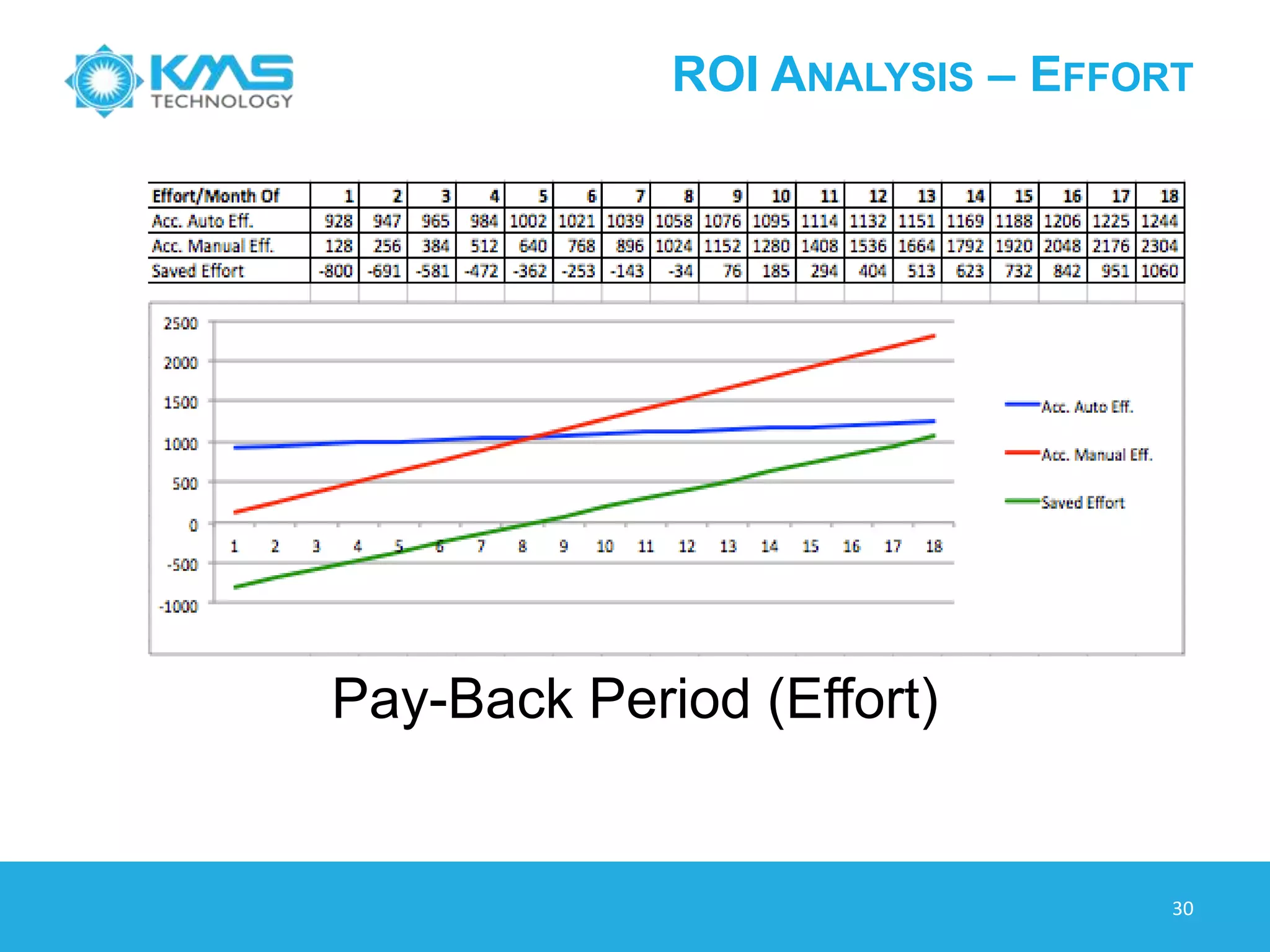
Pay-Back Period (Effort)
ROI ANALYSIS – COST
29
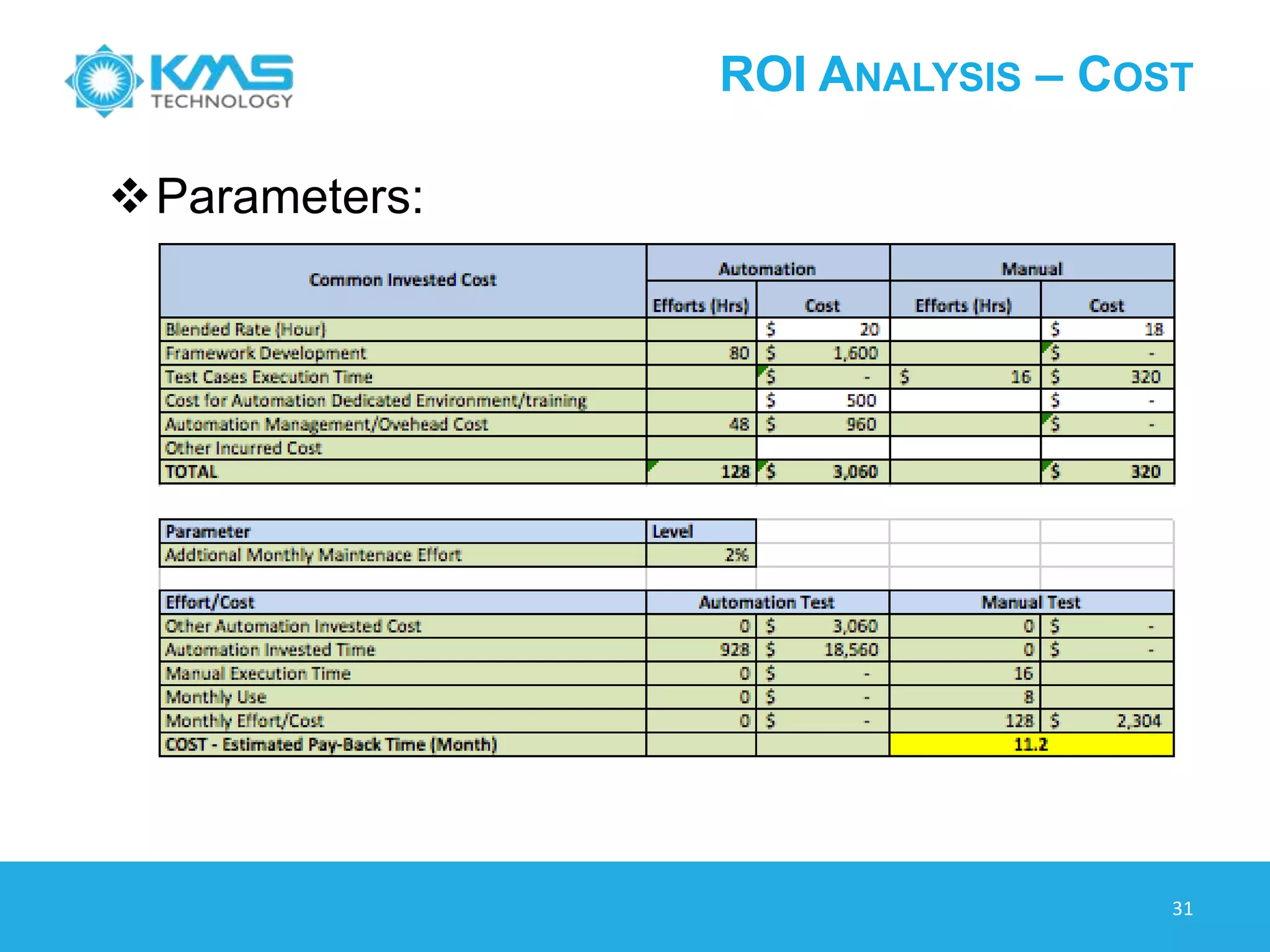
Parameters:
ROI ANALYSIS – COST
30
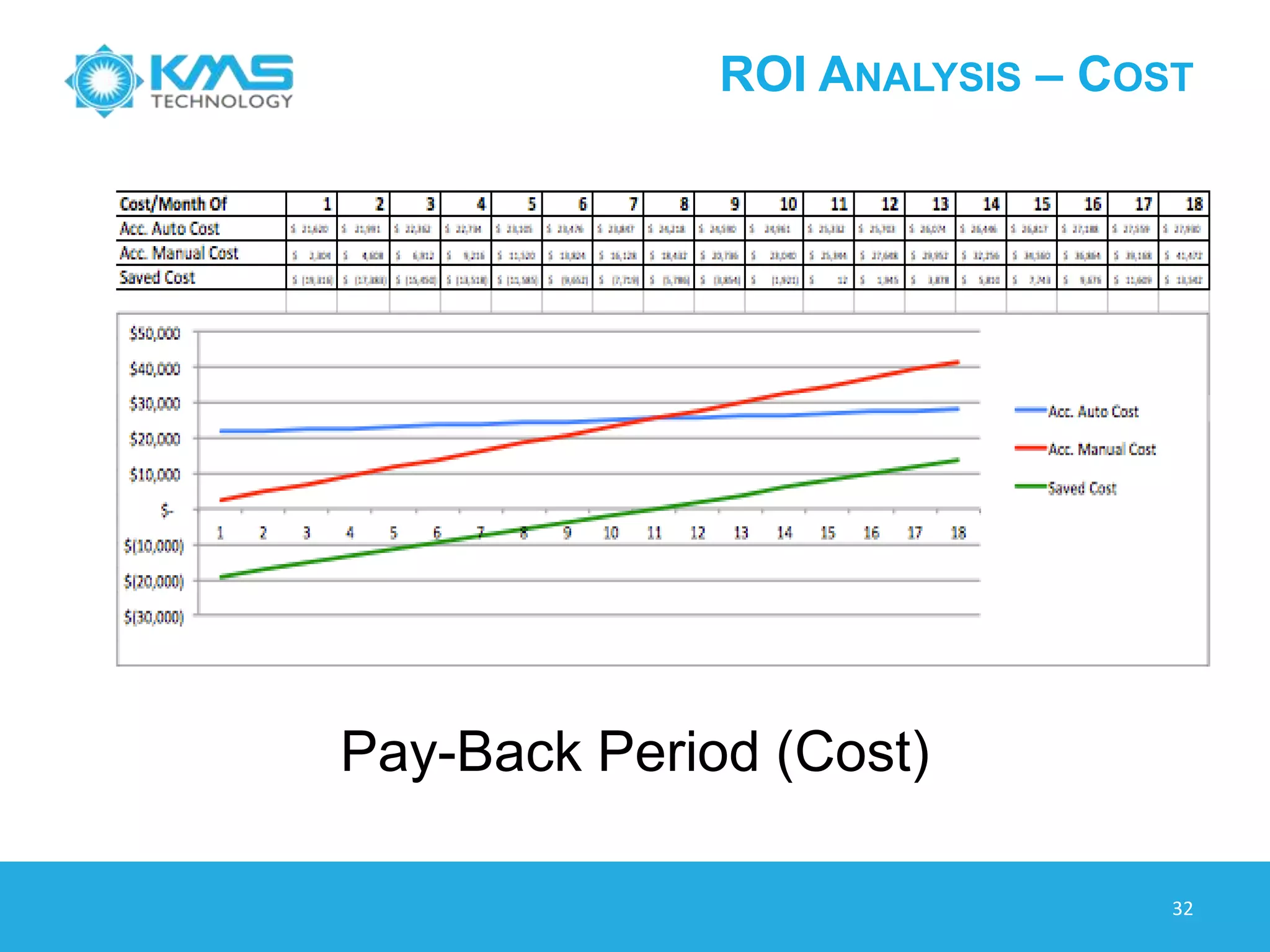
Pay-Back Period (Cost)
METRICS
31
METRICS – EFFORT/COST
32
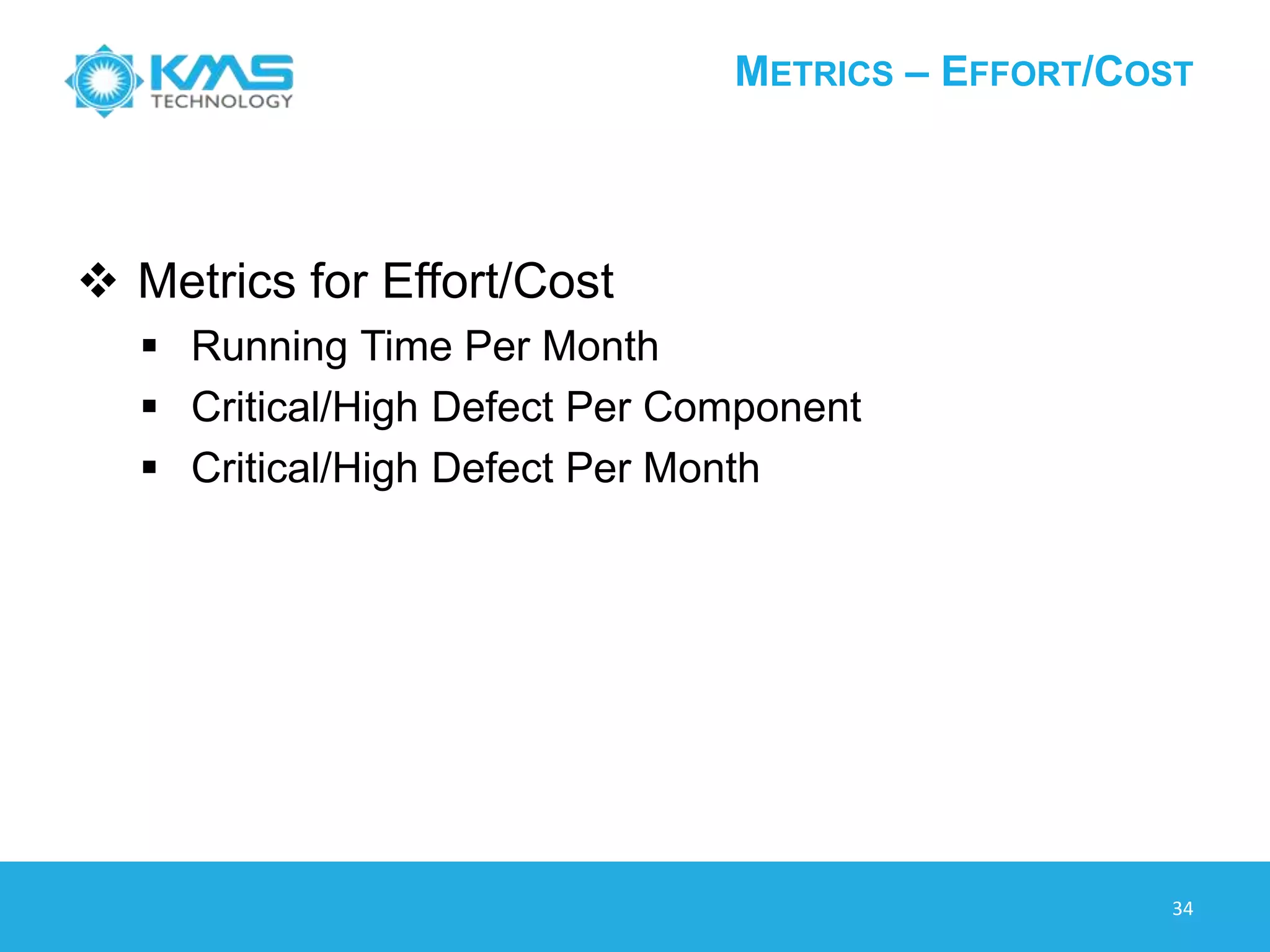
 Metrics for Effort/Cost
 Running Time Per Month
 Critical/High Defect Per Component
 Critical/High Defect Per Month
METRICS – QUALITY
33
 Metrics for Quality
 Defect Escape
 % Automation Coverage Per Sites/Features
 Defect Found by Automation
 Defect Rate (Compare with Manual)
 …….
© 2013 KMS Technology
THANK YOU
34

Framework For Automation Testing Practice Sharing

  • 1.
    FRAMEWORK FOR AUTOMATION TESTING– PRACTICE SHARING June 2013 KMS Technology: http://kms-technology.com
  • 2.
    AGENDA Duong Phan –QA Architect  Introduction  Challenges and Solutions  KMS Test Automation Framework  Advanced Features Vu Duong – Engineering Manager  ROI and Metrics 2
  • 3.
    KMS TECHNOLOGY OVERVIEW 3 USCompany/Passionate Global Workforce • 400 Resources & Growing in Vietnam and the US • 160 Testers ~ 50% Workforce • Proven Leadership Team World Class Infrastructure • Built for ISO 27001, Planned Certification in 2013 Best-in-Class SDLC Practices • CMMI and Agile focus • QASymphony - Commercial Agile Testing Solutions recognized by Forrester with over 4,500 users Best Clients – Raving Fans • 100% Referenceable and Ecstatic • 100% in long-term dedicated team
  • 4.
    A CASE STUDY 4 Aboutthe Client is a leader in eCommerce software and solutions, Provide multifaceted eCommerce platform, reliable 24/7/365 service, scalable IT infrastructure, integration with third party, and custom- built features, Serve over 160 retail sites Technology:  Platform: Windows XP, Windows 7, Linux, OSX, iOS and Android.  Technology: Java, .NET/C#, Oracle  Testing Tools: JIRA, Testlink, KMS Automation Framework Achievements  KMS is responsible for automation of client Core Platform Product and also for distribution platforms  Reusable Automation Framework can stand independent with KMS run-time plug-in (support web testing) although can adapt other tools (Selenium)  Framework support multiple OS: Windows, Linux and OSX, iOS and Android  Execute test daily, Automation script is able to find a lot of defects Confidential Automation Goals  Reduce cost of development and quality assurance  Continuous platform upgrade to provide new features and patch releases  Testing is performed on core platform and more than 200 of distributions  Testing on many browsers (IE, Firefox, Chrome, Safari)
  • 5.
    CHALLENGES AND OUTCOMES Project Specification  Multiple Instance Application Types  Flexible Components  Regular Sanity Test  Automation must find bugs  Customer Satisfaction  Cost Saving  Product Quality Improvement  Bug Escape Reduction 5
  • 6.
    KEY FEATURES… Framework usingExcel as Scripting tool • Easy to use and learn • Easy to apply Data Driven and Keyword Driven ideas Prototype plug-in • Able to develop wrapper plug-in with several tools • One script can run under any plug-ins Log System • General report and log types • History report 6
  • 7.
  • 8.
  • 9.
  • 10.
    © 2013 KMSTechnology ADVANCED FEATURES
  • 11.
    SMART OBJECT RECOGNITION MultipleGUI instances  1 GUI for many kinds of instance objects, apply for multi sites product  Example: 1 gui object txt_Email may be detect for 4 sites (gmail, yahoo mail, facebook, Linkedin) 11
  • 12.
    KEYWORD DRIVEN -FLEXIBLE REUSABILITY 12  A library can use other libraries  Test case can use any library  Test case can call other test cases  Data-driven on test case calls test cases
  • 13.
    DATA DRIVEN -FLEXIBLE CONFIGURATION 13  Multiple Datasets
  • 14.
    DATA DRIVEN -FLEXIBLE CONFIGURATION 14  Able to switch runtime engines  Sample case • Configure steps in IE • Execute some steps in Firefox • Verify result steps on Chrome
  • 15.
  • 16.
    LOG AND REPORT Historyreport (excel, html and email)  Helpful to follow bug fixing  HTML format can be opened anywhere  Email (HTML format) is portable Various type of reports/logs  Statistic of result  Detail report/log  HTML / Excel format report  Reminders  Send email notification  Define groups to send notification 16
  • 17.
    LOG AND REPORT Follow Drill-down idea History Report  Step report  Detail report 17
  • 18.
    © 2013 KMSTechnology ROI & METRICS VU DUONG
  • 19.
  • 20.
  • 21.
  • 22.
  • 23.
  • 24.
    ROI ANALYSIS OVERVIEW 24 Tocalculate ROI, the benefit (return) of an investment is divided by the cost of the investment; the result is expressed as a Percentage or a Ratio.
  • 25.
    ROI – BESTPRACTICE 25  ROI (Effort)  ROI (Cost)
  • 26.
    ROI - EFFORT 26 ESV(Effort saved from using automation) ROI (effort) = ------- = (------------------------------------------------- ) ESP (Effort involved in automation)  ESV = Effort saved as a result of test execution using automation (in hours)  ESP = Effort involved in automation like: Framework Development, Automation Scripts Development, Automated Script Execution, Automation Scripts Maintenance, Automation Training …
  • 27.
    ROI ANALYSIS –EFFORT 27  Parameters:
  • 28.
    ROI ANALYSIS –EFFORT 28 Pay-Back Period (Effort)
  • 29.
    ROI ANALYSIS –COST 29 Parameters:
  • 30.
    ROI ANALYSIS –COST 30 Pay-Back Period (Cost)
  • 31.
  • 32.
    METRICS – EFFORT/COST 32 Metrics for Effort/Cost  Running Time Per Month  Critical/High Defect Per Component  Critical/High Defect Per Month
  • 33.
    METRICS – QUALITY 33 Metrics for Quality  Defect Escape  % Automation Coverage Per Sites/Features  Defect Found by Automation  Defect Rate (Compare with Manual)  …….
  • 34.
    © 2013 KMSTechnology THANK YOU 34

Editor's Notes

  • #6 BackGround about project technologyHard case to Challenge case -> Advantage features
  • #9 Configuration declare in dataset, Able to switch runtime engine while runningExecution Plug-insFramework provide template (API template or format)Plug-in can be developed separatelyPlug-in can be loaded independent AdvantageOne script able to run on several Application Under TestEasier to adapter with big changes of productEasier to adapter with new toolsExtensibility
  • #10 Why scripts are using Excel?Consider effort to convert manual steps to automation stepsNeed to reduce effort by reusable functions or libraryExcel is a good choice for Data Driven and Keyword Driven1st Generation – Record and Playback2nd Generation – Use/reuse of functions in test scripts3rd Generation – Data Driven scripts/functions4th Generation – Action word (keyword) scripts/functions5th Generation – Script less Automation
  • #12 Focus multi site
  • #13 Test case dependent , advance that test case call test caseData flow in keyword driven to support test case call test case as child steps
  • #16 Highlight Log/Debug component
  • #19 Talk more about the challenge before starting: - Question on theirs clients MKL’s product is running on multiple browser Tools selection
  • #22 Asking for some customer
  • #27 ROI (effort):o   = 1 indicates: There is no human effort saved as a result of test automation.o   > 1 indicates: All other factors remaining constant, it is worth automating the application testing.o   < 1 indicates: Effort saved as a result of test automation is not high enough to justify effort spent on automation implementation.
  • #29 Diem hoa von
  • #30 ----- Meeting Notes (6/4/13 16:44) ------ Consider on Cost & Licencing- Customer with strickly budget
  • #31 ----- Meeting Notes (6/4/13 16:44) ------ Consider on Cost & Licencing- Customer with strickly budget