




ASP.NET 4.0
Julie Iskander
MSC. Communication and Electronics
Lecture Outlines
 Handlers and Modules
 Deploying web application
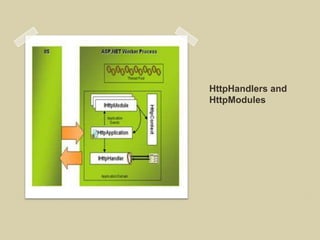
HttpHandlers and
HttpModules
HttpModules
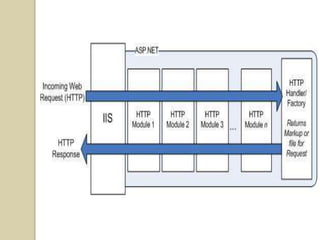
 Simple classes that can plug
  themselves into the request-
  processing pipeline
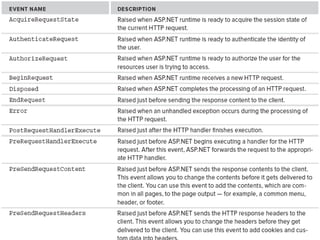
 Attaching to events thrown by the
  application.
 Similar to Global.asax
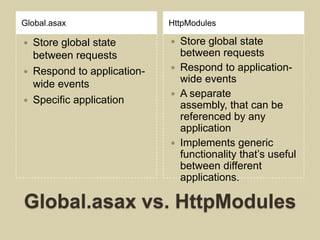
Global.asax                 HttpModules

 Store global state           Store global state
  between requests              between requests
 Respond to application-      Respond to application-
  wide events                   wide events
                               A separate
 Specific application
                                assembly, that can be
                                referenced by any
                                application
                               Implements generic
                                functionality that’s useful
                                between different
                                applications.

Global.asax vs. HttpModules
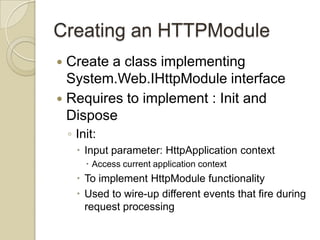
Creating an HTTPModule
 Create a class implementing
  System.Web.IHttpModule interface
 Requires to implement : Init and
  Dispose
    ◦ Init:
       Input parameter: HttpApplication context
         Access current application context
       To implement HttpModule functionality
       Used to wire-up different events that fire during
        request processing
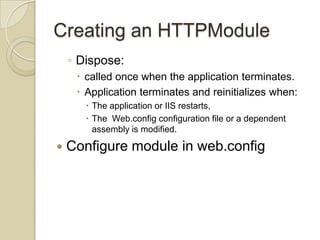
Creating an HTTPModule
    ◦ Dispose:
      called once when the application terminates.
      Application terminates and reinitializes when:
        The application or IIS restarts,
        The Web.config configuration file or a dependent
         assembly is modified.

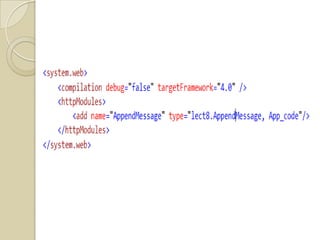
   Configure module in web.config
Convert from an HTML to an aspx page
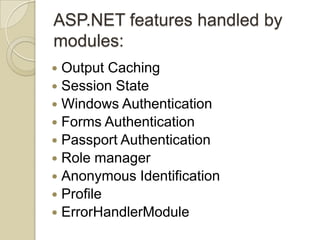
ASP.NET features handled by
modules:
 Output Caching
 Session State
 Windows Authentication
 Forms Authentication
 Passport Authentication
 Role manager
 Anonymous Identification
 Profile
 ErrorHandlerModule
HttpHandlers
 The last stop for incoming HTTP
  Request
 The point in the request processing
  pipeline that is responsible for serving
  up the requested content
 Mapped to a specific file extension
  (.aspx, .html,.jpg…………)
 Unlike modules, only one handler is
  used to process a request.
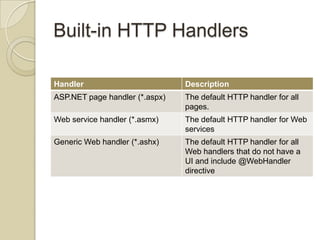
Built-in HTTP Handlers

Handler                         Description
ASP.NET page handler (*.aspx)   The default HTTP handler for all
                                pages.
Web service handler (*.asmx)    The default HTTP handler for Web
                                services
Generic Web handler (*.ashx)    The default HTTP handler for all
                                Web handlers that do not have a
                                UI and include @WebHandler
                                directive
Creating HttpHandlers
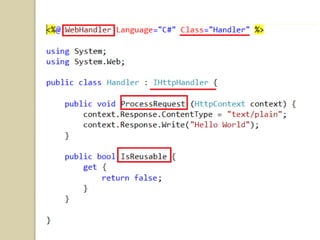
 Using generic handler .ashx
 Mapping the HttpHandler to a custom
  file extension.
Generic HttpHandlers
 Add new item Generic Handler
  (*.ashx)
 Class implements IHttpHandler
    ◦ ProcessRequest:
      Actually process incoming HTTP request.
      Input argument:
        HTTPContext object has access to all objects of the
         current HTTP context as
         response, request, user, profile, ……..
    ◦ IsReusable:
      Property to let ASP.NET know whether incoming
       HTTP requests can reuse the same instance of the
       HttpHandler
Convert from an HTML to an aspx page
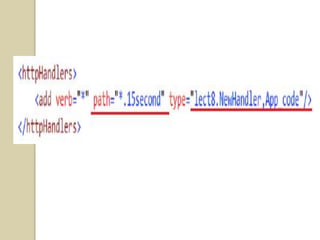
HttpHandlers to custom file
extensions
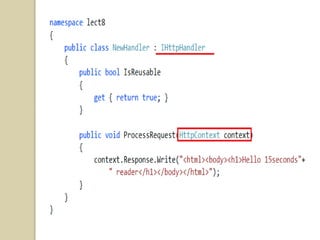
 Create a class that inherit from
  IHttpHandler, add it to App_code or in
  a separate library project to be added
  as an assembly
 Implement the 2 methods same as
  previously
 Add configuration to web.config
Convert from an HTML to an aspx page
Deployment
Publish on Local IIS
 Must run Visual Studio as
  Administration
 Install all needed IIS components
 Reinstall ASP.NET if needed
 Make sure application pool is set to
  .NET Framework 4.0
 Add user(with permissions to db and
  files) to application pool identity
Publish on Local IIS
 Use Copy Website
 Use Publish Website
Important Note
   To avoid problems with configuration
    in machine root web.config
    ◦ Add <clear /> in all providers
   To avoid problems with users and
    roles in multiple applications add
    applicationName attribute to all
    providers
Reading Assignment #8
   Chapter 26 – Professional ASP.NET 4
    in CS and VB
REFERENCES

 [1] Beginning ASP.NET 4 In C# 2010, Matthew
  Macdonald, Apress
 [2] Web Application Architecture
  Principles, Protocols And Practices, Leon Shklar
  And Richard Rosen, Wiley
 [3] Professional AS P.NE T 4 In C# And VB, Bill
  Evjen, Scott Hanselman And Devin Rader, Wiley
 [4] Pro ASP.NET In C# 2010, Fourth
  Edition,matthew Macdonald, Adam Freeman, And
  Mario Szpuszta, Apress

ASP.NET lecture 8

  • 1.
    ASP.NET 4.0 Julie Iskander MSC.Communication and Electronics
  • 2.
    Lecture Outlines  Handlersand Modules  Deploying web application
  • 3.
  • 6.
    HttpModules  Simple classesthat can plug themselves into the request- processing pipeline  Attaching to events thrown by the application.  Similar to Global.asax
  • 7.
    Global.asax HttpModules  Store global state  Store global state between requests between requests  Respond to application-  Respond to application- wide events wide events  A separate  Specific application assembly, that can be referenced by any application  Implements generic functionality that’s useful between different applications. Global.asax vs. HttpModules
  • 8.
    Creating an HTTPModule Create a class implementing System.Web.IHttpModule interface  Requires to implement : Init and Dispose ◦ Init:  Input parameter: HttpApplication context  Access current application context  To implement HttpModule functionality  Used to wire-up different events that fire during request processing
  • 9.
    Creating an HTTPModule ◦ Dispose:  called once when the application terminates.  Application terminates and reinitializes when:  The application or IIS restarts,  The Web.config configuration file or a dependent assembly is modified.  Configure module in web.config
  • 12.
    Convert from anHTML to an aspx page
  • 14.
    ASP.NET features handledby modules:  Output Caching  Session State  Windows Authentication  Forms Authentication  Passport Authentication  Role manager  Anonymous Identification  Profile  ErrorHandlerModule
  • 16.
    HttpHandlers  The laststop for incoming HTTP Request  The point in the request processing pipeline that is responsible for serving up the requested content  Mapped to a specific file extension (.aspx, .html,.jpg…………)  Unlike modules, only one handler is used to process a request.
  • 17.
    Built-in HTTP Handlers Handler Description ASP.NET page handler (*.aspx) The default HTTP handler for all pages. Web service handler (*.asmx) The default HTTP handler for Web services Generic Web handler (*.ashx) The default HTTP handler for all Web handlers that do not have a UI and include @WebHandler directive
  • 18.
    Creating HttpHandlers  Usinggeneric handler .ashx  Mapping the HttpHandler to a custom file extension.
  • 19.
    Generic HttpHandlers  Addnew item Generic Handler (*.ashx)  Class implements IHttpHandler ◦ ProcessRequest:  Actually process incoming HTTP request.  Input argument:  HTTPContext object has access to all objects of the current HTTP context as response, request, user, profile, …….. ◦ IsReusable:  Property to let ASP.NET know whether incoming HTTP requests can reuse the same instance of the HttpHandler
  • 21.
    Convert from anHTML to an aspx page
  • 22.
    HttpHandlers to customfile extensions  Create a class that inherit from IHttpHandler, add it to App_code or in a separate library project to be added as an assembly  Implement the 2 methods same as previously  Add configuration to web.config
  • 25.
    Convert from anHTML to an aspx page
  • 26.
  • 28.
    Publish on LocalIIS  Must run Visual Studio as Administration  Install all needed IIS components  Reinstall ASP.NET if needed  Make sure application pool is set to .NET Framework 4.0  Add user(with permissions to db and files) to application pool identity
  • 29.
    Publish on LocalIIS  Use Copy Website  Use Publish Website
  • 30.
    Important Note  To avoid problems with configuration in machine root web.config ◦ Add <clear /> in all providers  To avoid problems with users and roles in multiple applications add applicationName attribute to all providers
  • 31.
    Reading Assignment #8  Chapter 26 – Professional ASP.NET 4 in CS and VB
  • 32.
    REFERENCES  [1] BeginningASP.NET 4 In C# 2010, Matthew Macdonald, Apress  [2] Web Application Architecture Principles, Protocols And Practices, Leon Shklar And Richard Rosen, Wiley  [3] Professional AS P.NE T 4 In C# And VB, Bill Evjen, Scott Hanselman And Devin Rader, Wiley  [4] Pro ASP.NET In C# 2010, Fourth Edition,matthew Macdonald, Adam Freeman, And Mario Szpuszta, Apress

Editor's Notes

  • #4 Successor of ISAPI extensions and filters.Interact with the Web server itself.Interact with low level processes, as the processing of incoming and outgoing HTTP requests.
  • #5 Study ASP.NET request pipeline first
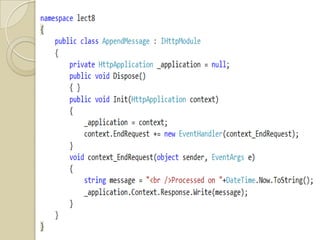
  • #13 AppendMessage.cs
  • #16 Difference between dynamic and static sites
  • #21 Try changing ContentType
  • #22 imageHandler.ashx
  • #23 Note to add it to IIS it must be an assembly
  • #29 Web.config: In all providers &lt;clear/&gt; first add applicationName