

ASP.NET 4.0
Julie Iskander
MSC. Communication and Electronics
Lecture Outlines
   Custom Server Controls
Custom Server Controls
   Why use them?
    ◦ Complete control over rendered HTML
    ◦ Better design-time support
   More difficult then User Controls
Custom Server Control
   Inherits System.Web.UI.Control
    ◦ Provides common properties and methods
    ◦ Ex. ID, ViewState, Controls
   Sometimes inherits from
    System.Web.UI.WebControls.WebContr
    ol
    ◦ Adds more features to implement styles
    ◦ Ex. Font, ForeColor , BackColor
Creating a Completely Custom
Control
   Steps:
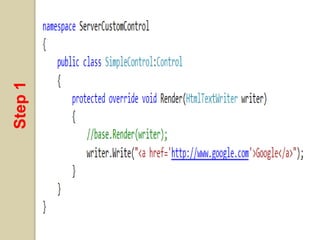
    1. Create a new ASP.NET Server Control
       Project
     1. Add a new class derive from Control
     2. Override Render() method
        Use HTTPTextWriter to write the wanted HTML.
    2. In your website:
     1. Add reference to the custom control assembly
        (.dll)
     2. Register assembly (.dll) in page
     3. Register assembly (.dll) in web.config
     4. Add the item to the Toolbox
     5. Use in page
Step 1
Convert from an HTML to an aspx page
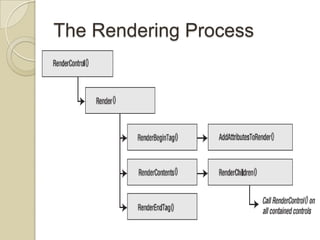
The Rendering Process
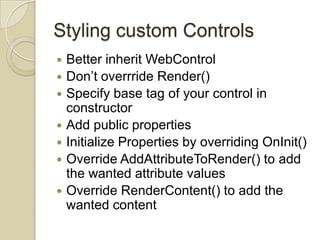
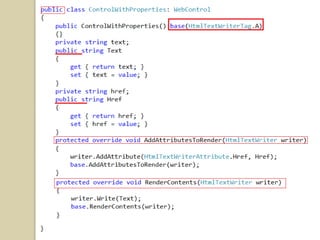
Styling custom Controls
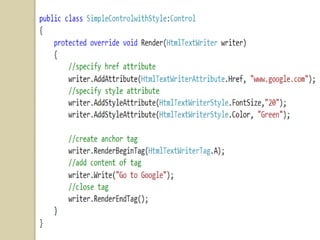
   Better inherit WebControl
   Don’t overrride Render()
   Specify base tag of your control in
    constructor
   Add public properties
   Initialize Properties by overriding OnInit()
   Override AddAttributeToRender() to add
    the wanted attribute values
   Override RenderContent() to add the
    wanted content
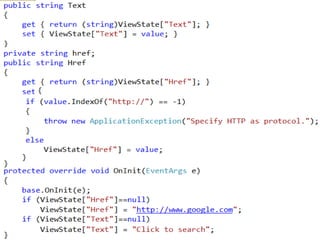
Convert from an HTML to an aspx page
View State
 To save and retrieve property values
  in the view state
 To store information of the control
  between postbacks.
Convert from an HTML to an aspx page
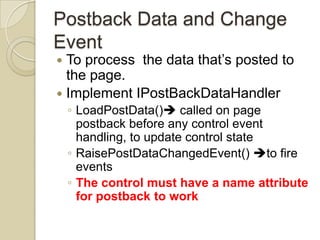
Postback Data and Change
Event
 To process the data that’s posted to
  the page.
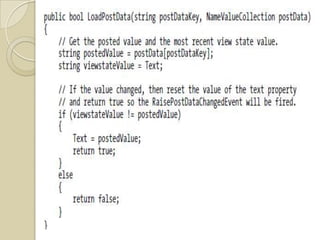
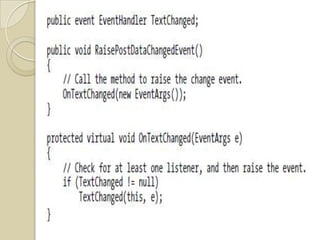
 Implement IPostBackDataHandler
    ◦ LoadPostData() called on page
      postback before any control event
      handling, to update control state
    ◦ RaisePostDataChangedEvent() to fire
      events
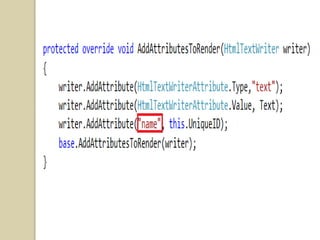
    ◦ The control must have a name attribute
      for postback to work
Convert from an HTML to an aspx page
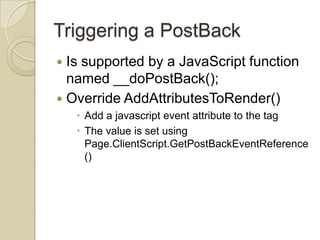
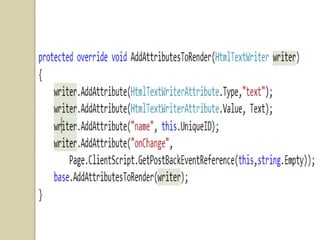
Triggering a PostBack
 Is supported by a JavaScript function
  named __doPostBack();
 Override AddAttributesToRender()
     Add a javascript event attribute to the tag
     The value is set using
      Page.ClientScript.GetPostBackEventReference
      ()
Convert from an HTML to an aspx page
Controls Property
   A collection of childern controls to be
    added to the control rendered with
    RenderChild()
Convert from an HTML to an aspx page
Lab #6
   Create a custom control
    ◦ A labeled textbox with onTextChange
      event of the textbox and a Text attribute
      for the label. The data must be retained
      between postbacks.
    ◦ Use it in register.aspx
Report #6
   What is control state of a control?
REFERENCES

 [1] Beginning ASP.NET 4 In C# 2010, Matthew
  Macdonald, Apress
 [2] Web Application Architecture Principles,
  Protocols And Practices, Leon Shklar And Richard
  Rosen, Wiley
 [3] Professional AS P.NE T 4 In C# And VB, Bill
  Evjen, Scott Hanselman And Devin Rader, Wiley
 [4] Pro ASP.NET In C# 2010, Fourth
  Edition,matthew Macdonald, Adam Freeman, And
  Mario Szpuszta, Apress

ASP.NET Lecture 6

  • 1.
    ASP.NET 4.0 Julie Iskander MSC.Communication and Electronics
  • 2.
    Lecture Outlines  Custom Server Controls
  • 3.
    Custom Server Controls  Why use them? ◦ Complete control over rendered HTML ◦ Better design-time support  More difficult then User Controls
  • 4.
    Custom Server Control  Inherits System.Web.UI.Control ◦ Provides common properties and methods ◦ Ex. ID, ViewState, Controls  Sometimes inherits from System.Web.UI.WebControls.WebContr ol ◦ Adds more features to implement styles ◦ Ex. Font, ForeColor , BackColor
  • 5.
    Creating a CompletelyCustom Control  Steps: 1. Create a new ASP.NET Server Control Project 1. Add a new class derive from Control 2. Override Render() method  Use HTTPTextWriter to write the wanted HTML. 2. In your website: 1. Add reference to the custom control assembly (.dll) 2. Register assembly (.dll) in page 3. Register assembly (.dll) in web.config 4. Add the item to the Toolbox 5. Use in page
  • 6.
  • 8.
    Convert from anHTML to an aspx page
  • 9.
  • 10.
    Styling custom Controls  Better inherit WebControl  Don’t overrride Render()  Specify base tag of your control in constructor  Add public properties  Initialize Properties by overriding OnInit()  Override AddAttributeToRender() to add the wanted attribute values  Override RenderContent() to add the wanted content
  • 12.
    Convert from anHTML to an aspx page
  • 13.
    View State  Tosave and retrieve property values in the view state  To store information of the control between postbacks.
  • 15.
    Convert from anHTML to an aspx page
  • 16.
    Postback Data andChange Event  To process the data that’s posted to the page.  Implement IPostBackDataHandler ◦ LoadPostData() called on page postback before any control event handling, to update control state ◦ RaisePostDataChangedEvent() to fire events ◦ The control must have a name attribute for postback to work
  • 20.
    Convert from anHTML to an aspx page
  • 21.
    Triggering a PostBack Is supported by a JavaScript function named __doPostBack();  Override AddAttributesToRender()  Add a javascript event attribute to the tag  The value is set using Page.ClientScript.GetPostBackEventReference ()
  • 23.
    Convert from anHTML to an aspx page
  • 24.
    Controls Property  A collection of childern controls to be added to the control rendered with RenderChild()
  • 25.
    Convert from anHTML to an aspx page
  • 26.
    Lab #6  Create a custom control ◦ A labeled textbox with onTextChange event of the textbox and a Text attribute for the label. The data must be retained between postbacks. ◦ Use it in register.aspx
  • 27.
    Report #6  What is control state of a control?
  • 28.
    REFERENCES  [1] BeginningASP.NET 4 In C# 2010, Matthew Macdonald, Apress  [2] Web Application Architecture Principles, Protocols And Practices, Leon Shklar And Richard Rosen, Wiley  [3] Professional AS P.NE T 4 In C# And VB, Bill Evjen, Scott Hanselman And Devin Rader, Wiley  [4] Pro ASP.NET In C# 2010, Fourth Edition,matthew Macdonald, Adam Freeman, And Mario Szpuszta, Apress

Editor's Notes

  • #7 Create a new project  ASP.NET Server Control HTMLTextWriter class  to write raw HTML, provides methods to manage style attributes and tags
  • #9 SimpleControl
  • #10 RenderControl is not overriden
  • #13 ControlWithPropertyControlWithExceptionHandlin
  • #16 ControlWithViewState
  • #17 LoadPostData tell ASP.NET whether a change happened and an event is required.
  • #19 For a custom textbox
  • #21 ControlWithPostBack
  • #24 ControlWithPostBack
  • #26 GreetControl