ASP.NET Core For
The Agile Enterprise
DENNIS MOON
Dennis Moon
 Senior software architect and web designer/developer specializing in
modern ASP.NET and JavaScript web technology stacks
 Married to Christine
 Stepson Ian and future daughter-in-law Kaila
 Hobbies: Guitar, Singing, Vinyards and Wineries, B&Bs
 Passions: Technology, Pluralsight and Egghead videos, my blog
 Employer: CUNA Mutual Financial Group
My Info
Blog: https://dennismoon.com
Twitter: @comfycoder
Linked in:
https://www.linkedin.com/in/dennis-moon-b469b93
Code Repository: https://github.com/dennismoon
Old School Command And Control
 Waterfall software development methodologies
 Large monolithic applications
 Long and detailed analysis, requirements, and design phases
 Testing performed at the end of the project
 Technologies changed while a project was in flight
 Developers ability to affect change limited
 Business impatient with team progress
 Business did not get to see their vision until late in the process
 Business wanted to change their designs or add scope
 Business was seldom happy with the outcome
An Agile Transformation Is Needed
 Business needs to become more agile to survive
 Everyone from the top down must learn how to collaborate
 Communication blockers must become servant leaders
 IT Development team should be integrated into the full lifecycle
 Product owners (business) should communicate with the team daily
 Developers must adopt agile technical practices
 New enterprise shared technologies required
 Focus on short two week work sprints
 Integrate testing and user experience staff early and often
 Review progress with business stakeholders at the end of each sprint
What’s In Your Agile?
Large enterprise organizations are working to adopt agile
processes at all levels and departments. They have hired
consultants, and adopted new enterprise level agile frameworks
to facilitate their “transformation”.
The concern is that middle management and PMOs have cherry
picked these to maintain what they currently have - a heavy-
handed, command and control-oriented, sanctioned process
with the word “Agile” somewhere in its title.
This is exactly what the original agile methodologies were meant
to change.
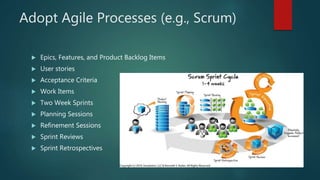
Adopt Agile Processes (e.g., Scrum)
 Epics, Features, and Product Backlog Items
 User stories
 Acceptance Criteria
 Work Items
 Two Week Sprints
 Planning Sessions
 Refinement Sessions
 Sprint Reviews
 Sprint Retrospectives
Adopt Agile Technical Practices
 Define a definition of done
 Emergent Design
 Business-Oriented Domain Driven Design (DDD)
 Automated Unit and Integration Tests (TDD, BDD, etc.)
 Refactor often (an act of continuous design)
 Code Reviews
 Pair Programming
 Continuous Integration Builds
 Continuous Deployment Releases
 Adopt DevOps practices
Enterprise Architecture Past/Present
 Relational Databases
 Web Services
 Data Pumps
 Message Queues
 Interface Engines
 Source Code Repositories
 SDLC Tools
 Shared Web Services and Components
 Source Code Repository
 Everything On-Premise
Enterprise Architecture Evolves
 Master Data Management
 Document Databases
 In-Memory Databases
 Agile Focused ALM Tools
 Build and Release Management Tools
 API Management Gateway
 Event Messaging
 Microservices
 Moving To Cloud
What’s Happening To IT?
 Departmental Budgets Reduced
 Staff Members Cut
 Training Budgets Cut
 Entire Departments Outsourced
 Adoption Of Cloud Apps
 Data Is The New Focus
 Service Offerings Change Focus
 Developers Must Learn Business
ASP.NET Core – Agile Advantages
 Smaller Footprint, Higher Performance, More Saleable
 Open Source
 NuGet Dependency Management
 Middleware Request Processing Pipeline
 Many new ASP.NET features and improvements
 Easier to configure
 Dependency Injection Everywhere
 Cross-Platform Capable
 Better Support for JavaScript Frameworks
 Designed for the cloud
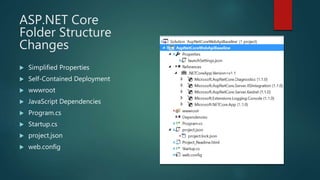
ASP.NET Core
Folder Structure
Changes
 Simplified Properties
 Self-Contained Deployment
 wwwroot
 JavaScript Dependencies
 Program.cs
 Startup.cs
 project.json
 web.config
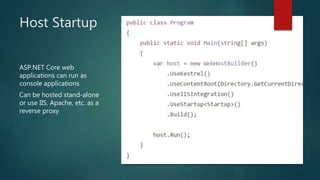
Host Startup
ASP.NET Core web
applications can run as
console applications
Can be hosted stand-alone
or use IIS, Apache, etc. as a
reverse proxy
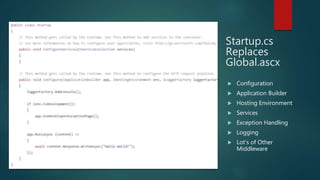
Startup.cs
Replaces
Global.ascx
 Configuration
 Application Builder
 Hosting Environment
 Services
 Exception Handling
 Logging
 Lot’s of Other
Middleware
Create Bare Metal
 Start with and empty ASP.NET Core 1.0.1 web Project
 Upgrade entries in project.json to version 1.1.0
 Upgrade NuGet Packages
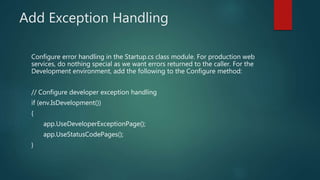
Add Exception Handling
Configure error handling in the Startup.cs class module. For production web
services, do nothing special as we want errors returned to the caller. For the
Development environment, add the following to the Configure method:
// Configure developer exception handling
if (env.IsDevelopment())
{
app.UseDeveloperExceptionPage();
app.UseStatusCodePages();
}
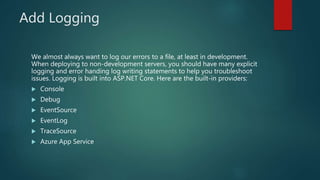
Add Logging
We almost always want to log our errors to a file, at least in development.
When deploying to non-development servers, you should have many explicit
logging and error handing log writing statements to help you troubleshoot
issues. Logging is built into ASP.NET Core. Here are the built-in providers:
 Console
 Debug
 EventSource
 EventLog
 TraceSource
 Azure App Service
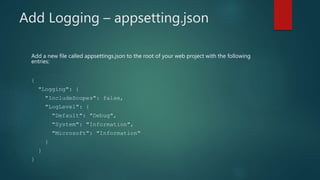
Add Logging – appsetting.json
Add a new file called appsettings.json to the root of your web project with the following
entries:
{
"Logging": {
"IncludeScopes": false,
"LogLevel": {
"Default": "Debug",
"System": "Information",
"Microsoft": "Information"
}
}
}
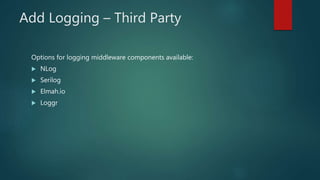
Add Logging – Third Party
Options for logging middleware components available:
 NLog
 Serilog
 Elmah.io
 Loggr
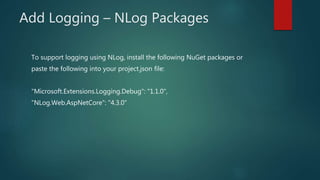
Add Logging – NLog Packages
To support logging using NLog, install the following NuGet packages or
paste the following into your project.json file:
"Microsoft.Extensions.Logging.Debug": "1.1.0",
"NLog.Web.AspNetCore": "4.3.0"
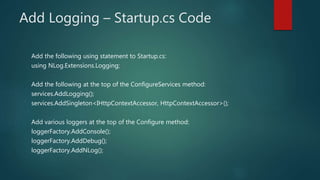
Add Logging – Startup.cs Code
Add the following using statement to Startup.cs:
using NLog.Extensions.Logging;
Add the following at the top of the ConfigureServices method:
services.AddLogging();
services.AddSingleton<IHttpContextAccessor, HttpContextAccessor>();
Add various loggers at the top of the Configure method:
loggerFactory.AddConsole();
loggerFactory.AddDebug();
loggerFactory.AddNLog();
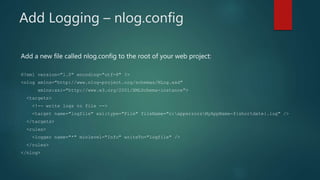
Add Logging – nlog.config
Add a new file called nlog.config to the root of your web project:
<?xml version="1.0" encoding="utf-8" ?>
<nlog xmlns="http://www.nlog-project.org/schemas/NLog.xsd"
xmlns:xsi="http://www.w3.org/2001/XMLSchema-instance">
<targets>
<!-- write logs to file -->
<target name="logfile" xsi:type="File" fileName="c:apperrorsMyAppName-${shortdate}.log" />
</targets>
<rules>
<logger name="*" minlevel="Info" writeTo="logfile" />
</rules>
</nlog>
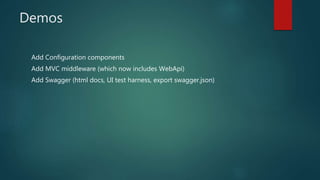
Demos
Add Configuration components
Add MVC middleware (which now includes WebApi)
Add Swagger (html docs, UI test harness, export swagger.json)
References
ASP.NET Core Documentation
https://docs.microsoft.com/en-us/aspnet/core/
NLog
http://nlog-project.org/
https://github.com/NLog/NLog.Extensions.Logging
Swashbuckle
https://github.com/domaindrivendev/Swashbuckle
References - Continued
Colin Dembovsky’s ALM Corner (TFS Build and Release)
http://www.colinsalmcorner.com/
GitHub ASP.NET .Core Announcements
https://github.com/aspnet/Announcements
Source code from my presentation
https://github.com/dennismoon/aspnet-core-webapi-baseline
Pluralsight
Building Your First API with ASP.NET Core
https://app.pluralsight.com/library/courses/asp-dotnet-core-api-building-
first/table-of-contents
Implementing Custom Middleware Components in ASP.NET Core
https://app.pluralsight.com/library/courses/implementing-custom-middleware-
components-aspdotnet-core/table-of-contents
Testing .NET Code with xUnit.net 2
https://app.pluralsight.com/library/courses/xunitdotnet2-dotnet-code-
testing/table-of-contents
EF Core 1.0: First Look
https://app.pluralsight.com/library/courses/play-by-play-ef-core-1-0-first-look-
julie-lerman/table-of-contents
Patches
January 2017 Update for ASP.NET Core 1.1
https://blogs.msdn.microsoft.com/dotnet/2017/01/30/january-2017-update-
for-asp-net-core-1-1/
Thank You

ASP.NET Core For The Agile Enterprise

  • 1.
    ASP.NET Core For TheAgile Enterprise DENNIS MOON
  • 2.
    Dennis Moon  Seniorsoftware architect and web designer/developer specializing in modern ASP.NET and JavaScript web technology stacks  Married to Christine  Stepson Ian and future daughter-in-law Kaila  Hobbies: Guitar, Singing, Vinyards and Wineries, B&Bs  Passions: Technology, Pluralsight and Egghead videos, my blog  Employer: CUNA Mutual Financial Group
  • 3.
    My Info Blog: https://dennismoon.com Twitter:@comfycoder Linked in: https://www.linkedin.com/in/dennis-moon-b469b93 Code Repository: https://github.com/dennismoon
  • 4.
    Old School CommandAnd Control  Waterfall software development methodologies  Large monolithic applications  Long and detailed analysis, requirements, and design phases  Testing performed at the end of the project  Technologies changed while a project was in flight  Developers ability to affect change limited  Business impatient with team progress  Business did not get to see their vision until late in the process  Business wanted to change their designs or add scope  Business was seldom happy with the outcome
  • 5.
    An Agile TransformationIs Needed  Business needs to become more agile to survive  Everyone from the top down must learn how to collaborate  Communication blockers must become servant leaders  IT Development team should be integrated into the full lifecycle  Product owners (business) should communicate with the team daily  Developers must adopt agile technical practices  New enterprise shared technologies required  Focus on short two week work sprints  Integrate testing and user experience staff early and often  Review progress with business stakeholders at the end of each sprint
  • 6.
    What’s In YourAgile? Large enterprise organizations are working to adopt agile processes at all levels and departments. They have hired consultants, and adopted new enterprise level agile frameworks to facilitate their “transformation”. The concern is that middle management and PMOs have cherry picked these to maintain what they currently have - a heavy- handed, command and control-oriented, sanctioned process with the word “Agile” somewhere in its title. This is exactly what the original agile methodologies were meant to change.
  • 7.
    Adopt Agile Processes(e.g., Scrum)  Epics, Features, and Product Backlog Items  User stories  Acceptance Criteria  Work Items  Two Week Sprints  Planning Sessions  Refinement Sessions  Sprint Reviews  Sprint Retrospectives
  • 8.
    Adopt Agile TechnicalPractices  Define a definition of done  Emergent Design  Business-Oriented Domain Driven Design (DDD)  Automated Unit and Integration Tests (TDD, BDD, etc.)  Refactor often (an act of continuous design)  Code Reviews  Pair Programming  Continuous Integration Builds  Continuous Deployment Releases  Adopt DevOps practices
  • 9.
    Enterprise Architecture Past/Present Relational Databases  Web Services  Data Pumps  Message Queues  Interface Engines  Source Code Repositories  SDLC Tools  Shared Web Services and Components  Source Code Repository  Everything On-Premise
  • 10.
    Enterprise Architecture Evolves Master Data Management  Document Databases  In-Memory Databases  Agile Focused ALM Tools  Build and Release Management Tools  API Management Gateway  Event Messaging  Microservices  Moving To Cloud
  • 11.
    What’s Happening ToIT?  Departmental Budgets Reduced  Staff Members Cut  Training Budgets Cut  Entire Departments Outsourced  Adoption Of Cloud Apps  Data Is The New Focus  Service Offerings Change Focus  Developers Must Learn Business
  • 12.
    ASP.NET Core –Agile Advantages  Smaller Footprint, Higher Performance, More Saleable  Open Source  NuGet Dependency Management  Middleware Request Processing Pipeline  Many new ASP.NET features and improvements  Easier to configure  Dependency Injection Everywhere  Cross-Platform Capable  Better Support for JavaScript Frameworks  Designed for the cloud
  • 13.
    ASP.NET Core Folder Structure Changes Simplified Properties  Self-Contained Deployment  wwwroot  JavaScript Dependencies  Program.cs  Startup.cs  project.json  web.config
  • 14.
    Host Startup ASP.NET Coreweb applications can run as console applications Can be hosted stand-alone or use IIS, Apache, etc. as a reverse proxy
  • 15.
    Startup.cs Replaces Global.ascx  Configuration  ApplicationBuilder  Hosting Environment  Services  Exception Handling  Logging  Lot’s of Other Middleware
  • 16.
    Create Bare Metal Start with and empty ASP.NET Core 1.0.1 web Project  Upgrade entries in project.json to version 1.1.0  Upgrade NuGet Packages
  • 17.
    Add Exception Handling Configureerror handling in the Startup.cs class module. For production web services, do nothing special as we want errors returned to the caller. For the Development environment, add the following to the Configure method: // Configure developer exception handling if (env.IsDevelopment()) { app.UseDeveloperExceptionPage(); app.UseStatusCodePages(); }
  • 18.
    Add Logging We almostalways want to log our errors to a file, at least in development. When deploying to non-development servers, you should have many explicit logging and error handing log writing statements to help you troubleshoot issues. Logging is built into ASP.NET Core. Here are the built-in providers:  Console  Debug  EventSource  EventLog  TraceSource  Azure App Service
  • 19.
    Add Logging –appsetting.json Add a new file called appsettings.json to the root of your web project with the following entries: { "Logging": { "IncludeScopes": false, "LogLevel": { "Default": "Debug", "System": "Information", "Microsoft": "Information" } } }
  • 20.
    Add Logging –Third Party Options for logging middleware components available:  NLog  Serilog  Elmah.io  Loggr
  • 21.
    Add Logging –NLog Packages To support logging using NLog, install the following NuGet packages or paste the following into your project.json file: "Microsoft.Extensions.Logging.Debug": "1.1.0", "NLog.Web.AspNetCore": "4.3.0"
  • 22.
    Add Logging –Startup.cs Code Add the following using statement to Startup.cs: using NLog.Extensions.Logging; Add the following at the top of the ConfigureServices method: services.AddLogging(); services.AddSingleton<IHttpContextAccessor, HttpContextAccessor>(); Add various loggers at the top of the Configure method: loggerFactory.AddConsole(); loggerFactory.AddDebug(); loggerFactory.AddNLog();
  • 23.
    Add Logging –nlog.config Add a new file called nlog.config to the root of your web project: <?xml version="1.0" encoding="utf-8" ?> <nlog xmlns="http://www.nlog-project.org/schemas/NLog.xsd" xmlns:xsi="http://www.w3.org/2001/XMLSchema-instance"> <targets> <!-- write logs to file --> <target name="logfile" xsi:type="File" fileName="c:apperrorsMyAppName-${shortdate}.log" /> </targets> <rules> <logger name="*" minlevel="Info" writeTo="logfile" /> </rules> </nlog>
  • 24.
    Demos Add Configuration components AddMVC middleware (which now includes WebApi) Add Swagger (html docs, UI test harness, export swagger.json)
  • 25.
  • 26.
    References - Continued ColinDembovsky’s ALM Corner (TFS Build and Release) http://www.colinsalmcorner.com/ GitHub ASP.NET .Core Announcements https://github.com/aspnet/Announcements Source code from my presentation https://github.com/dennismoon/aspnet-core-webapi-baseline
  • 27.
    Pluralsight Building Your FirstAPI with ASP.NET Core https://app.pluralsight.com/library/courses/asp-dotnet-core-api-building- first/table-of-contents Implementing Custom Middleware Components in ASP.NET Core https://app.pluralsight.com/library/courses/implementing-custom-middleware- components-aspdotnet-core/table-of-contents Testing .NET Code with xUnit.net 2 https://app.pluralsight.com/library/courses/xunitdotnet2-dotnet-code- testing/table-of-contents EF Core 1.0: First Look https://app.pluralsight.com/library/courses/play-by-play-ef-core-1-0-first-look- julie-lerman/table-of-contents
  • 28.
    Patches January 2017 Updatefor ASP.NET Core 1.1 https://blogs.msdn.microsoft.com/dotnet/2017/01/30/january-2017-update- for-asp-net-core-1-1/
  • 29.