BASIC SERIES 
USER MANUAL 
FOR THE 
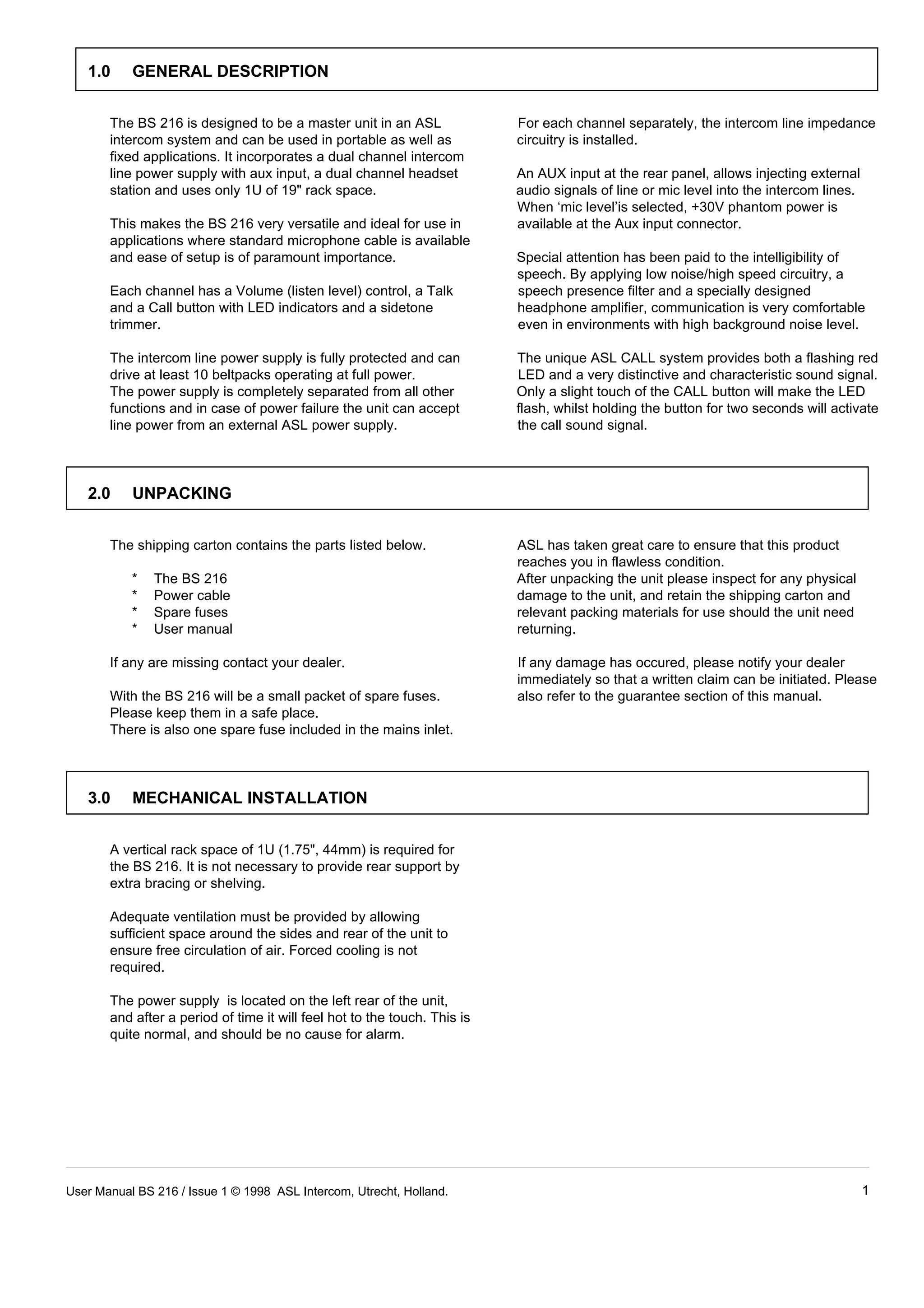
BS 216 
DUAL CHANNEL MASTER STATION 
CONTENTS 
1.0 GENERAL DESCRIPTION . . . . . . . . . . . . . . . . . . . . . . 1 
2.0 UNPACKING . . . . . . . . . . . . . . . . . . . . . . . . . . . . . . . . . 1 
3.0 MECHANICAL INSTALLATION . . . . . . . . . . . . . . . . . . . 1 
4.0 MAINS POWER . . . . . . . . . . . . . . . . . . . . . . . . . . . . . . . 2 
5.0 FRONT PANEL CONTROLS . . . . . . . . . . . . . . . . . . . . . 3 
6.0 REAR PANEL CONNECTORS . . . . . . . . . . . . . . . . . . . 4 
7.0 INTERNAL CONTROLS . . . . . . . . . . . . . . . . . . . . . . . . 4 
8.0 CABLING . . . . . . . . . . . . . . . . . . . . . . . . . . . . . . . . . . . . 5 
9.0 PARTY LINE, TECHNICAL CONCEPT . . . . . . . . . . . . . 6 
10.0 GUARANTEE . . . . . . . . . . . . . . . . . . . . . . . . . . . . . . . . . 6 
11.0 TECHNICAL SPECIFICATIONS . . . . . . . . . . . . . . . . . . 6 
User Manual BS 216 / Issue 1 © 1998 ASL Intercom, Utrecht, Holland.
1.0 GENERAL DESCRIPTION 
The BS 216 is designed to be a master unit in an ASL For each channel separately, the intercom line impedance 
intercom system and can be used in portable as well as circuitry is installed. 
fixed applications. It incorporates a dual channel intercom 
line power supply with aux input, a dual channel headset An AUX input at the rear panel, allows injecting external 
station and uses only 1U of 19" rack space. audio signals of line or mic level into the intercom lines. 
When ‘mic level’is selected, +30V phantom power is 
This makes the BS 216 very versatile and ideal for use in available at the Aux input connector. 
applications where standard microphone cable is available 
and ease of setup is of paramount importance. Special attention has been paid to the intelligibility of 
speech. By applying low noise/high speed circuitry, a 
Each channel has a Volume (listen level) control, a Talk speech presence filter and a specially designed 
and a Call button with LED indicators and a sidetone headphone amplifier, communication is very comfortable 
trimmer. even in environments with high background noise level. 
The intercom line power supply is fully protected and can The unique ASL CALL system provides both a flashing red 
drive at least 10 beltpacks operating at full power. LED and a very distinctive and characteristic sound signal. 
The power supply is completely separated from all other Only a slight touch of the CALL button will make the LED 
functions and in case of power failure the unit can accept flash, whilst holding the button for two seconds will activate 
line power from an external ASL power supply. the call sound signal. 
2.0 UNPACKING 
The shipping carton contains the parts listed below. ASL has taken great care to ensure that this product 
reaches you in flawless condition. 
* The BS 216 After unpacking the unit please inspect for any physical 
* Power cable damage to the unit, and retain the shipping carton and 
* Spare fuses relevant packing materials for use should the unit need 
* User manual returning. 
If any are missing contact your dealer. If any damage has occured, please notify your dealer 
immediately so that a written claim can be initiated. Please 
With the BS 216 will be a small packet of spare fuses. also refer to the guarantee section of this manual. 
Please keep them in a safe place. 
There is also one spare fuse included in the mains inlet. 
3.0 MECHANICAL INSTALLATION 
A vertical rack space of 1U (1.75", 44mm) is required for 
the BS 216. It is not necessary to provide rear support by 
extra bracing or shelving. 
Adequate ventilation must be provided by allowing 
sufficient space around the sides and rear of the unit to 
ensure free circulation of air. Forced cooling is not 
required. 
The power supply is located on the left rear of the unit, 
and after a period of time it will feel hot to the touch. This is 
quite normal, and should be no cause for alarm. 
User Manual BS 216 / Issue 1 © 1998 ASL Intercom, Utrecht, Holland. 1
IMPORTANT 
The BS 216 may be connected to the mains power outlet The wires in this mains lead are colour coded in 
to which other audio equipment is connected. The outlet accordance with the following code: 
should have a clean earth. Avoid using mains power 
outlets which also power dimmer controlled lighting green and yellow Earth / safety ground 
equipment. blue Neutral 
brown Live 
The used AC power source can be anything from 100 - 
240 V AC, 50/60 Hz. There is no need to adjust the unit to As the colours of the wires in the mains lead may not 
the used mains voltage. correspond with the coloured markings identifying the 
terminals in your plug, proceed as follows: 
The power cord supplied with this unit carries the following - The wire which is coloured green-and-yellow must be 
information label: connected to the terminal in the plug which is marked 
WARNING 
4.0 MAINS POWER 
This appliance must be earthed 
with the letter "E", or by the earth symbol which is or 
coloured green. 
- The wire which is coloured blue must be connected to 
the terminal which is marked with the letter "N" or 
coloured black. 
- The wire which is coloured brown must be connected 
to the terminal which is marked with the letter "L" or 
coloured red. 
Those units that are supplied to the North American 
market will have an integral moulded 3 pin connector 
which is provided to satisfy required local standards. 
4.1 SAFETY EARTHING 
The green-and-yellow wire of the mains cord must always 
be connected to the electrical installation safety earth or 
ground. It is essential for personal safety as well for proper 
operation of the BS 216 and the other connected stations. 
This wire is internally connected to all exposed metal 
surfaces and any rack framework into which this unit might 
be mounted is assumed to be connected to the same 
grounding circuit. 
4.2 POWERING UP 
Powering up procedure: 
- Make sure that the red power switch on the left side of 
the front panel is OFF. 
- Connect the power cord to the rear of the station. 
- Plug the other end of the power cord into a 
PROPERLY GROUNDED outlet. 
- Turn on the power with the red button, the green power 
LED will go on, indicating the station is active. 
2 User Manual BS 216 / Issue 1 © 1998 ASL Intercom, Utrecht, Holland.
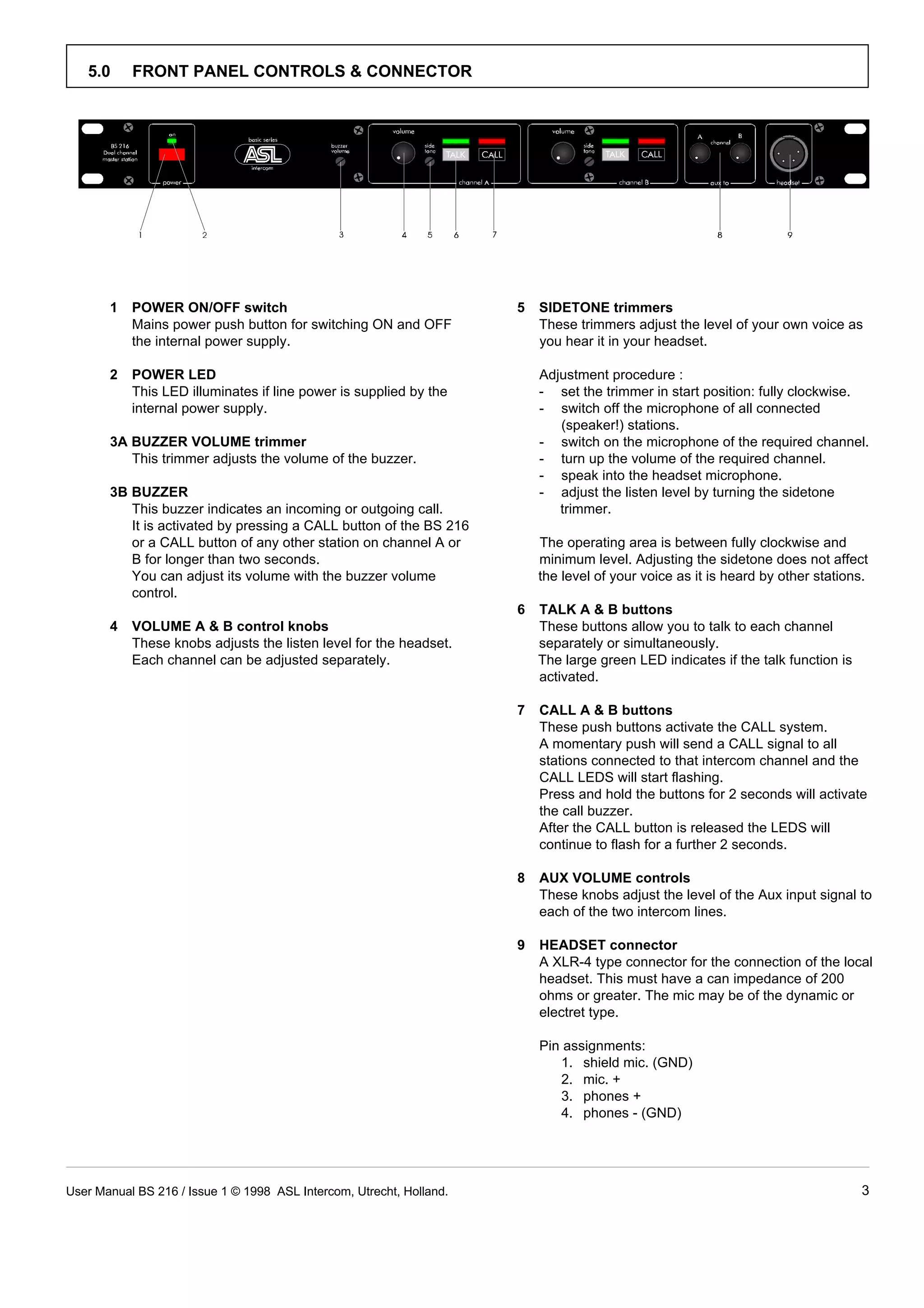
5.0 FRONT PANEL CONTROLS & CONNECTOR 
1 POWER ON/OFF switch 5 SIDETONE trimmers 
Mains power push button for switching ON and OFF These trimmers adjust the level of your own voice as 
the internal power supply. you hear it in your headset. 
2 POWER LED 
Adjustment procedure : 
This LED illuminates if line power is supplied by the - set the trimmer in start position: fully clockwise. 
internal power supply. - switch off the microphone of all connected 
3A BUZZER VOLUME trimmer 
(speaker!) stations. 
- switch on the microphone of the required channel. 
This trimmer adjusts the volume of the buzzer. - turn up the volume of the required channel. 
3B BUZZER 
- speak into the headset microphone. 
- adjust the listen level by turning the sidetone 
This buzzer indicates an incoming or outgoing call. trimmer. 
It is activated by pressing a CALL button of the BS 216 
or a CALL button of any other station on channel A or The operating area is between fully clockwise and 
B for longer than two seconds. minimum level. Adjusting the sidetone does not affect 
You can adjust its volume with the buzzer volume the level of your voice as it is heard by other stations. 
control. 
4 VOLUME A & B control knobs 
6 TALK A & B buttons 
These buttons allow you to talk to each channel 
These knobs adjusts the listen level for the headset. separately or simultaneously. 
Each channel can be adjusted separately. The large green LED indicates if the talk function is 
activated. 
7 CALL A & B buttons 
These push buttons activate the CALL system. 
A momentary push will send a CALL signal to all 
stations connected to that intercom channel and the 
CALL LEDS will start flashing. 
Press and hold the buttons for 2 seconds will activate 
the call buzzer. 
After the CALL button is released the LEDS will 
continue to flash for a further 2 seconds. 
8 AUX VOLUME controls 
These knobs adjust the level of the Aux input signal to 
each of the two intercom lines. 
9 HEADSET connector 
A XLR-4 type connector for the connection of the local 
headset. This must have a can impedance of 200 
ohms or greater. The mic may be of the dynamic or 
electret type. 
Pin assignments: 
1. shield mic. (GND) 
2. mic. + 
3. phones + 
4. phones - (GND) 
User Manual BS 216 / Issue 1 © 1998 ASL Intercom, Utrecht, Holland. 3
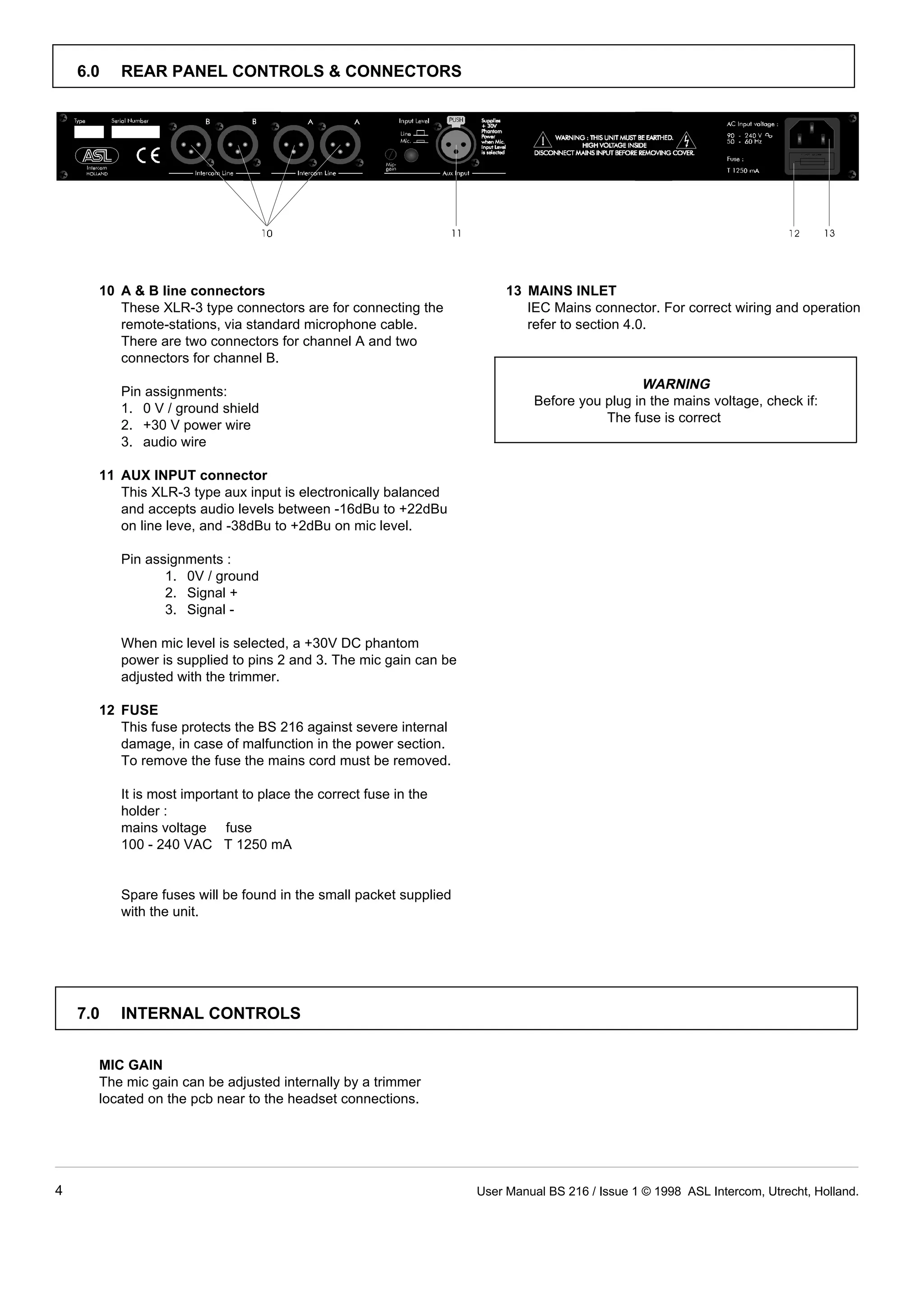
These XLR-3 type connectors are for connecting the IEC Mains connector. For correct wiring and operation 
remote-stations, via standard microphone cable. refer to section 4.0. 
There are two connectors for channel A and two 
connectors for channel B. 
WARNING 
10 A & B line connectors 13 MAINS INLET 
Before you plug in the mains voltage, check if: 
The fuse is correct 
6.0 REAR PANEL CONTROLS & CONNECTORS 
Pin assignments: 
1. 0 V / ground shield 
2. +30 V power wire 
3. audio wire 
11 AUX INPUT connector 
This XLR-3 type aux input is electronically balanced 
and accepts audio levels between -16dBu to +22dBu 
on line leve, and -38dBu to +2dBu on mic level. 
Pin assignments : 
1. 0V / ground 
2. Signal + 
3. Signal - 
When mic level is selected, a +30V DC phantom 
power is supplied to pins 2 and 3. The mic gain can be 
adjusted with the trimmer. 
12 FUSE 
This fuse protects the BS 216 against severe internal 
damage, in case of malfunction in the power section. 
To remove the fuse the mains cord must be removed. 
It is most important to place the correct fuse in the 
holder : 
mains voltage fuse 
100 - 240 VAC T 1250 mA 
Spare fuses will be found in the small packet supplied 
with the unit. 
7.0 INTERNAL CONTROLS 
MIC GAIN 
The mic gain can be adjusted internally by a trimmer 
located on the pcb near to the headset connections. 
4 User Manual BS 216 / Issue 1 © 1998 ASL Intercom, Utrecht, Holland.
8.0 CABLING 
For the BASIC Series Intercom system the interconnecting 
cables are of the shielded two-conductor microphone 
cable type and the intercom line connectors are of the 
XLR-3 type. Audio and Call signals are on XLR pin 3, DC 
power is on XLR pin 2. XLR pin 1 is connected to the 
shield of the cable which functions as the common return 
for audio and power. 
Since the audio signal is transferred in an unbalanced ¼ 
way, certain rules have to be obeyed when installing the 
cables of an intercom network. This in order to avoid earth 
loops and to minimize power loss and the possible effect 
of electromagnetical fields. 
These rules are: 
 Use high quality (multipair) cable.  Keep cables parallel as much as possible. 
For interconnecting user stations, power supplies and When two (two channel) units in a network are 
accessories in an ASL Intercom network, use high connected by more than one cable, make sure that 
quality shielded two-conductor (minimum 2x 0.30 mm2) these cables are parallel to each other over the whole 
microphone cable only. distance between those units. When using multipair 
In case of a two channel intercom network, use high cable, parallelism is ensured in the best possible way. 
quality microphone 'multipair' cable only, each pair 
consisting of two conductors (minimum 2x 0.15 mm2) 
with separate shield. Multipair cable should also have Always avoid that cables are making a loop. So-called 
an overall shield. 'ring intercom' should not physically be cabled as a 
 Use flexible cables. 
 Avoid closed loops. 
ring. All cable routes should have a 'star' configuration, 
with the central earthing point (usually close to the 
Use flexible single and multipair microphone cable power supply position) as the centre of the star. 
instead of cable with solid cores, especially when the 
cable is subjected to bending during operation or 
installation. Keep intercom cables away from high energy cables, 
 Separate cable screen to XLR pin 1. 
 Keep cables away from electromagnetic sources. 
e.g. 110/220/380V mains power or dimmer controlled 
feeds for spotlights. 
The screen of each separate microphone cable and/or Intercom cables should cross high energy cables in at 
the screen of each single pair in a multipair cable, angle of 90( only. 
should be connected to pin 1 of each XLR-3 connector. Intercom cables should never be in the same trunking 
Do not connect this cable screen to the metal housing with energy cables. 
of the connector or to metal wall boxes (outlets). 
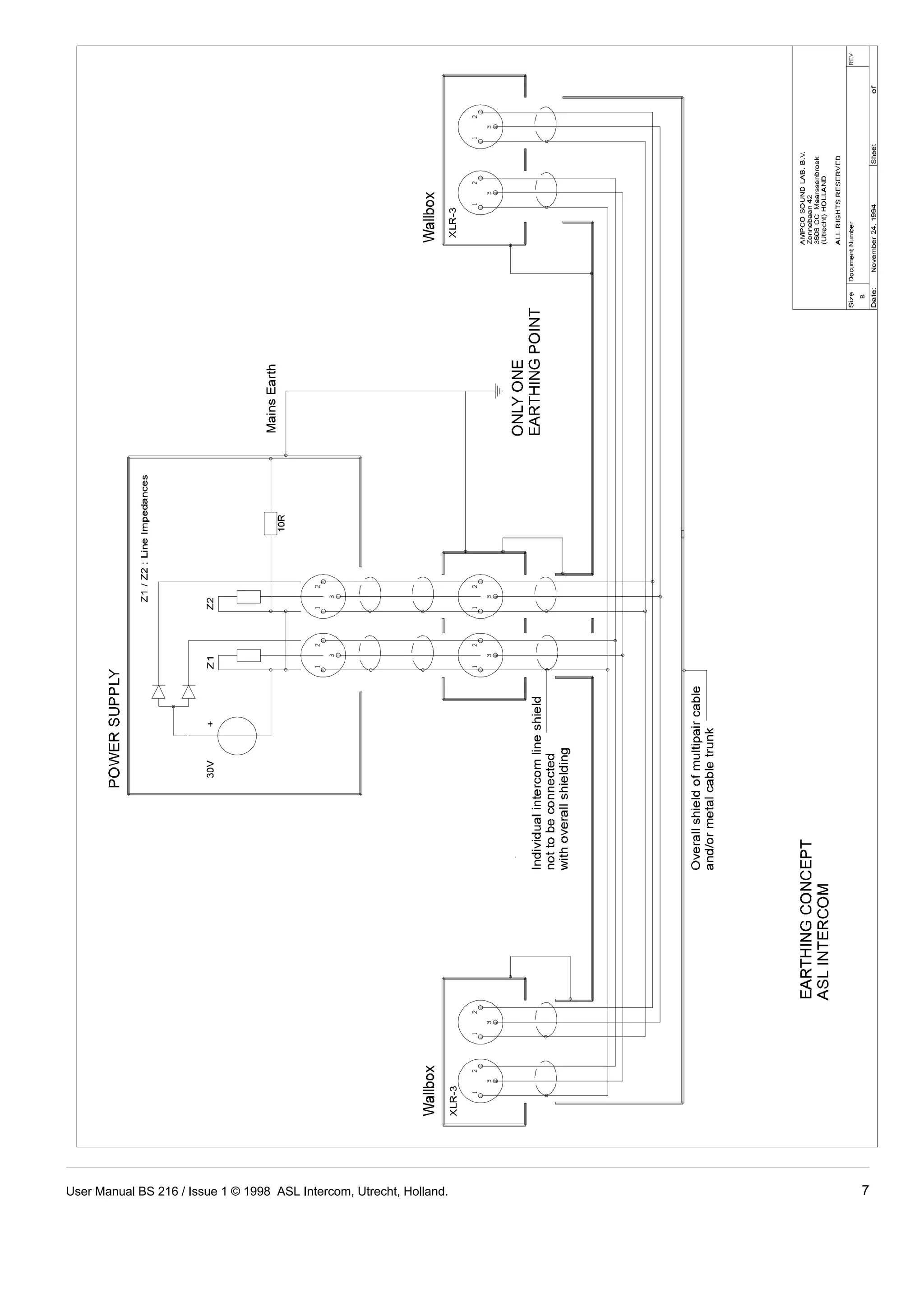
See page 10 for Earthing Concept. 
 Cable trunks, connection boxes and overall 
 Place power supply in a central position. 
In order to avoid unacceptable power losses, place the 
power supply as close as possible to where most 
power consumption occurs or, in other words, most 
multipair cable screen to clean earth. 
Metal cable trunks, metal connection boxes and overall user stations are placed. 
multipair cable screen should be interconnected and, 
at one point (the 'central earthing point') in the intercom 
network only, be connected to a clean earth or a safety 
earth. The ASL power supply may be connected to the mains 
See page 10 for Earthing Concept. power outlet to which other audio equipment is 
 Keep metal connection boxes and cable housings 
 Connect ASL power supply to a 'clean' mains 
outlet. 
connected. Avoid using mains outlets which also power 
dimmer controlled lighting systems. 
isolated from other metal parts. 
Metal housings for intercom cables and connectors In case of more complex installations, don't hesitate to 
should be mounted in such a way that they are isolated contact us. Please send us a block diagram of the planned 
from other metal cable and connector housings and network with a list of all user stations and their positions, 
from any other metal construction parts. and we are happy to advise you on cabling lay out. 
¼ See Party Line, Technical Concept 
User Manual BS 216 / Issue 1 © 1998 ASL Intercom, Utrecht, Holland. 5
9.0 PARTY LINE, TECHNICAL CONCEPT 11.0 TECHNICAL SPECIFICATIONS BS 216 
POWER SUPPLY 
ASL's BASIC Series offers a complete two way ('full 
duplex') communications system. mains voltage range 100 - 240 V 50/ 60Hz AC 
Users of the system are connected via a 'party line'. DC output voltage +30 V +/-5% DC 
Master stations (with built-in power supply), beltpacks ripple and noise  11 mV rms 
and power supplies are interconnected via standard max. output current 1.8 A continuous /2.31 A peak 
microphone cable. One wire is used as an audio line, 
one as a power line and the screen of the cable functions 
MIC. PREAMP 
as earth/return. mic. impedance 200 ohms 
gain 40 dB - 70 dB (adjustable internally) 
Current drive is used for signal transfer. Each station presence filter +6 dB at 5 kHz 
utilises a current amplifier to amplify the microphone signal frequency response 200 Hz - 13 kHz (-3 dB) 
and place it on the common audio line where, due to the V electret mic + 9 V DC 
constant line impedance (situated in the power supply 
between XLR pin 3 and 1), a signal voltage is developed 
which can be further amplified and sent to the max. load 200 ohms 
headphones. max. output level 8 V rms (200 ohms) 
This principle has three advantages: 
- the use of a single audio line allows several stations to 
HEADPHONES DRIVER AMP 
max. output power 0.16 W rms (each can) 
SIDETONE 
talk and listen simultaneously. rejection 0 - 30 dB adjustable 
- due to the high bridging impedance offered by each 
BUZZER 
station, the number of stations 'on line' has no 
influence on the level of the communications signal. max. SPL 100 dBA 
- power and audio to the intercom stations use the same 
cable. 
AUX INPUT 
Input impedance 30 Kohms (balanced line level) 
The Call signal is also sent as a current on the audio line. 4.6 Kohms (balanced mic level) 
It develops a DC potential over the line impedance which Nominal input level -18 dBu to +6dBu (line level) 
will be sensed by each station and interpreted as a Call -38 dBu to -14 dBu (mic level) 
signal. max. input level +22 dBu (line level) 
10.0 GUARANTEE 
This unit is warranted by ASL Intercom to the original end-user 
purchaser against defects in workmanship and 
materials in it's manufacture for a period of one year from 
date of shipment to the end-user. 
Faults arising from misuse, unauthorised modifications or 
accidents are not covered by this warranty. If the unit is 
faulty it should be sent in it's original packing, to the 
supplier or your local ASL dealer, with shipping prepaid. A 
note must be included stating the faults found and a copy 
of the original suppliers invoice. 
THIS PRODUCT WAS DESIGNED, DEVELOPED AND 
MANUFACTURED BY: 
ASL-intercom BV 
MAARSSEN (UTRECHT) HOLLAND. 
+2 dBu (mic level) 
Phantom power +30V DC (mic level selected) 
DIMENSIONS AND WEIGHT 
width 19 (483 mm) 
height 1U (44.5 mm) 
depth 124 mm 
weight 1.85 Kg 
GENERAL SYSTEM SPECIFICATIONS 
intercom line impedance 350 ohms (1kHz) 
2.2 Kohms (DC) 
intercom line audio level nom. -18 dBu 
max. +4 dBu 
dynamic range 80 dB 
call send signal 2.8 mA 
call receive signal threshold +2.4 V DC 
supply voltage +30 V DC (12 V to 32 V) 
Note: 0 dBu = 775 mV into open circuit. 
ASL reserves the right to alter specifications without further 
notice. 
6 User Manual BS 216 / Issue 1 © 1998 ASL Intercom, Utrecht, Holland.
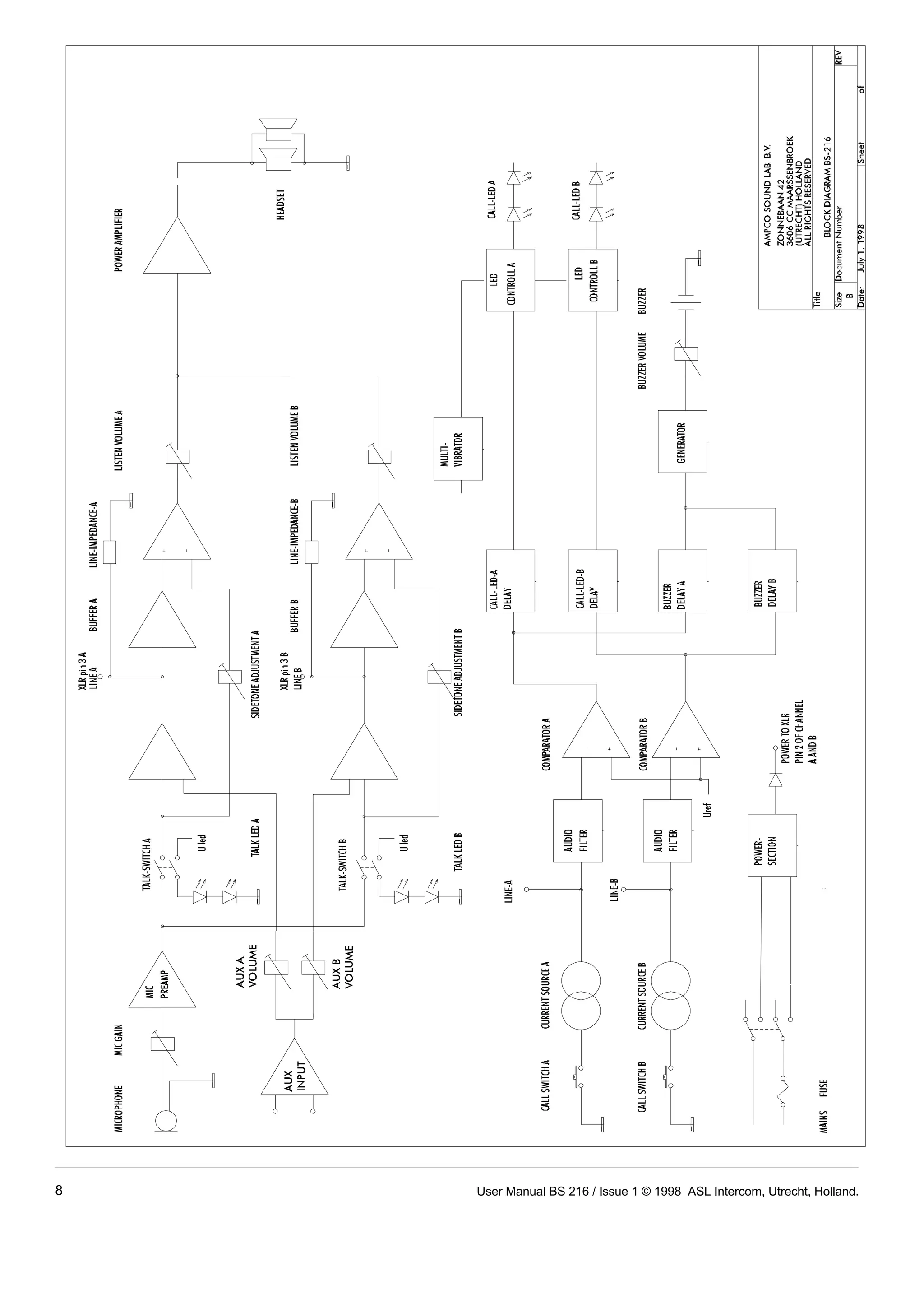
User Manual BS 216 / Issue 1 © 1998 ASL Intercom, Utrecht, Holland. 7
8 User Manual BS 216 / Issue 1 © 1998 ASL Intercom, Utrecht, Holland.
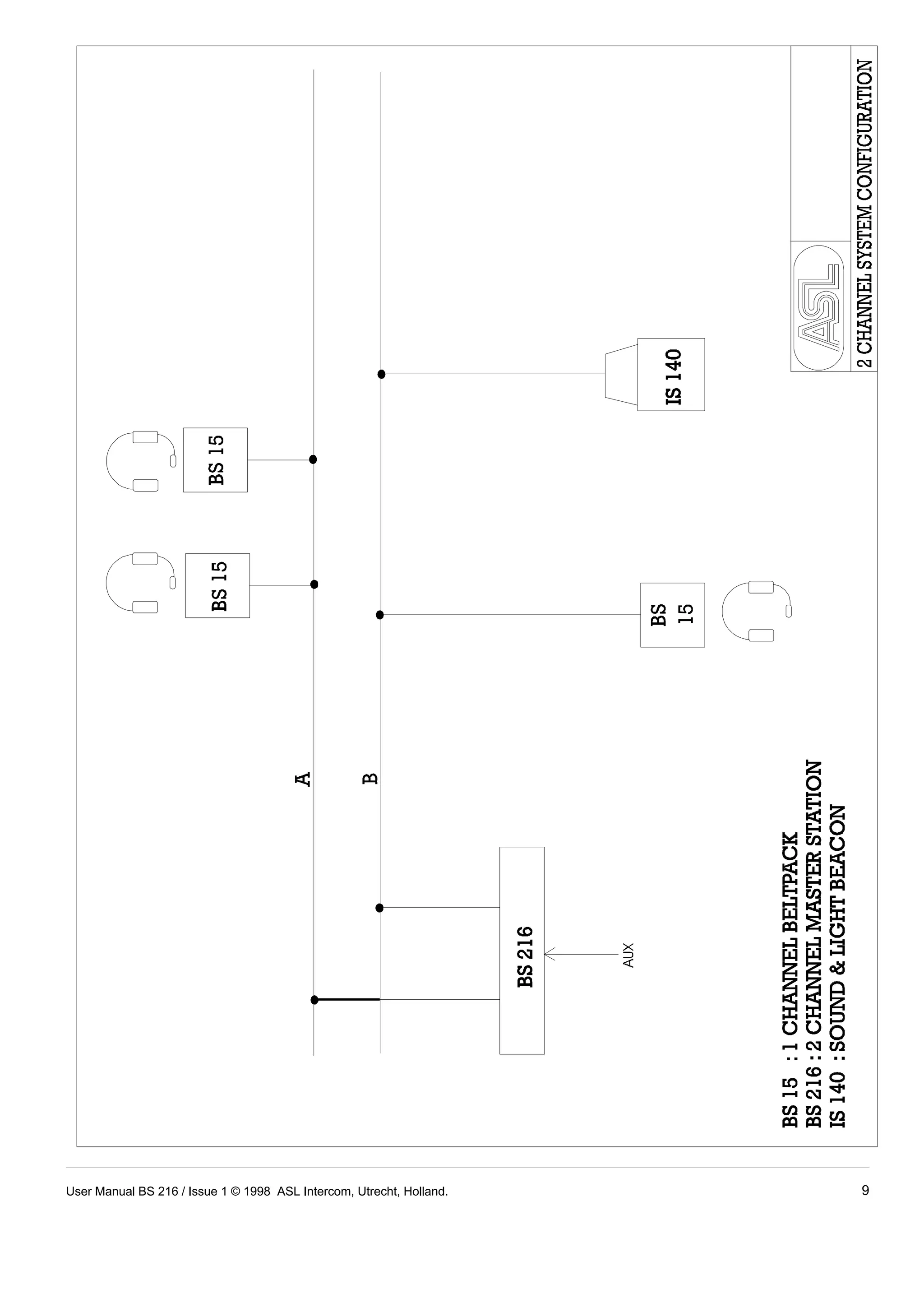
User Manual BS 216 / Issue 1 © 1998 ASL Intercom, Utrecht, Holland. 9
10 User Manual BS 216 / Issue 1 © 1998 ASL Intercom, Utrecht, Holland.

ASL Intercom BS-216 2-channel Master Station

  • 1.
    BASIC SERIES USERMANUAL FOR THE BS 216 DUAL CHANNEL MASTER STATION CONTENTS 1.0 GENERAL DESCRIPTION . . . . . . . . . . . . . . . . . . . . . . 1 2.0 UNPACKING . . . . . . . . . . . . . . . . . . . . . . . . . . . . . . . . . 1 3.0 MECHANICAL INSTALLATION . . . . . . . . . . . . . . . . . . . 1 4.0 MAINS POWER . . . . . . . . . . . . . . . . . . . . . . . . . . . . . . . 2 5.0 FRONT PANEL CONTROLS . . . . . . . . . . . . . . . . . . . . . 3 6.0 REAR PANEL CONNECTORS . . . . . . . . . . . . . . . . . . . 4 7.0 INTERNAL CONTROLS . . . . . . . . . . . . . . . . . . . . . . . . 4 8.0 CABLING . . . . . . . . . . . . . . . . . . . . . . . . . . . . . . . . . . . . 5 9.0 PARTY LINE, TECHNICAL CONCEPT . . . . . . . . . . . . . 6 10.0 GUARANTEE . . . . . . . . . . . . . . . . . . . . . . . . . . . . . . . . . 6 11.0 TECHNICAL SPECIFICATIONS . . . . . . . . . . . . . . . . . . 6 User Manual BS 216 / Issue 1 © 1998 ASL Intercom, Utrecht, Holland.
  • 2.
    1.0 GENERAL DESCRIPTION The BS 216 is designed to be a master unit in an ASL For each channel separately, the intercom line impedance intercom system and can be used in portable as well as circuitry is installed. fixed applications. It incorporates a dual channel intercom line power supply with aux input, a dual channel headset An AUX input at the rear panel, allows injecting external station and uses only 1U of 19" rack space. audio signals of line or mic level into the intercom lines. When ‘mic level’is selected, +30V phantom power is This makes the BS 216 very versatile and ideal for use in available at the Aux input connector. applications where standard microphone cable is available and ease of setup is of paramount importance. Special attention has been paid to the intelligibility of speech. By applying low noise/high speed circuitry, a Each channel has a Volume (listen level) control, a Talk speech presence filter and a specially designed and a Call button with LED indicators and a sidetone headphone amplifier, communication is very comfortable trimmer. even in environments with high background noise level. The intercom line power supply is fully protected and can The unique ASL CALL system provides both a flashing red drive at least 10 beltpacks operating at full power. LED and a very distinctive and characteristic sound signal. The power supply is completely separated from all other Only a slight touch of the CALL button will make the LED functions and in case of power failure the unit can accept flash, whilst holding the button for two seconds will activate line power from an external ASL power supply. the call sound signal. 2.0 UNPACKING The shipping carton contains the parts listed below. ASL has taken great care to ensure that this product reaches you in flawless condition. * The BS 216 After unpacking the unit please inspect for any physical * Power cable damage to the unit, and retain the shipping carton and * Spare fuses relevant packing materials for use should the unit need * User manual returning. If any are missing contact your dealer. If any damage has occured, please notify your dealer immediately so that a written claim can be initiated. Please With the BS 216 will be a small packet of spare fuses. also refer to the guarantee section of this manual. Please keep them in a safe place. There is also one spare fuse included in the mains inlet. 3.0 MECHANICAL INSTALLATION A vertical rack space of 1U (1.75", 44mm) is required for the BS 216. It is not necessary to provide rear support by extra bracing or shelving. Adequate ventilation must be provided by allowing sufficient space around the sides and rear of the unit to ensure free circulation of air. Forced cooling is not required. The power supply is located on the left rear of the unit, and after a period of time it will feel hot to the touch. This is quite normal, and should be no cause for alarm. User Manual BS 216 / Issue 1 © 1998 ASL Intercom, Utrecht, Holland. 1
  • 3.
    IMPORTANT The BS216 may be connected to the mains power outlet The wires in this mains lead are colour coded in to which other audio equipment is connected. The outlet accordance with the following code: should have a clean earth. Avoid using mains power outlets which also power dimmer controlled lighting green and yellow Earth / safety ground equipment. blue Neutral brown Live The used AC power source can be anything from 100 - 240 V AC, 50/60 Hz. There is no need to adjust the unit to As the colours of the wires in the mains lead may not the used mains voltage. correspond with the coloured markings identifying the terminals in your plug, proceed as follows: The power cord supplied with this unit carries the following - The wire which is coloured green-and-yellow must be information label: connected to the terminal in the plug which is marked WARNING 4.0 MAINS POWER This appliance must be earthed with the letter "E", or by the earth symbol which is or coloured green. - The wire which is coloured blue must be connected to the terminal which is marked with the letter "N" or coloured black. - The wire which is coloured brown must be connected to the terminal which is marked with the letter "L" or coloured red. Those units that are supplied to the North American market will have an integral moulded 3 pin connector which is provided to satisfy required local standards. 4.1 SAFETY EARTHING The green-and-yellow wire of the mains cord must always be connected to the electrical installation safety earth or ground. It is essential for personal safety as well for proper operation of the BS 216 and the other connected stations. This wire is internally connected to all exposed metal surfaces and any rack framework into which this unit might be mounted is assumed to be connected to the same grounding circuit. 4.2 POWERING UP Powering up procedure: - Make sure that the red power switch on the left side of the front panel is OFF. - Connect the power cord to the rear of the station. - Plug the other end of the power cord into a PROPERLY GROUNDED outlet. - Turn on the power with the red button, the green power LED will go on, indicating the station is active. 2 User Manual BS 216 / Issue 1 © 1998 ASL Intercom, Utrecht, Holland.
  • 4.
    5.0 FRONT PANELCONTROLS & CONNECTOR 1 POWER ON/OFF switch 5 SIDETONE trimmers Mains power push button for switching ON and OFF These trimmers adjust the level of your own voice as the internal power supply. you hear it in your headset. 2 POWER LED Adjustment procedure : This LED illuminates if line power is supplied by the - set the trimmer in start position: fully clockwise. internal power supply. - switch off the microphone of all connected 3A BUZZER VOLUME trimmer (speaker!) stations. - switch on the microphone of the required channel. This trimmer adjusts the volume of the buzzer. - turn up the volume of the required channel. 3B BUZZER - speak into the headset microphone. - adjust the listen level by turning the sidetone This buzzer indicates an incoming or outgoing call. trimmer. It is activated by pressing a CALL button of the BS 216 or a CALL button of any other station on channel A or The operating area is between fully clockwise and B for longer than two seconds. minimum level. Adjusting the sidetone does not affect You can adjust its volume with the buzzer volume the level of your voice as it is heard by other stations. control. 4 VOLUME A & B control knobs 6 TALK A & B buttons These buttons allow you to talk to each channel These knobs adjusts the listen level for the headset. separately or simultaneously. Each channel can be adjusted separately. The large green LED indicates if the talk function is activated. 7 CALL A & B buttons These push buttons activate the CALL system. A momentary push will send a CALL signal to all stations connected to that intercom channel and the CALL LEDS will start flashing. Press and hold the buttons for 2 seconds will activate the call buzzer. After the CALL button is released the LEDS will continue to flash for a further 2 seconds. 8 AUX VOLUME controls These knobs adjust the level of the Aux input signal to each of the two intercom lines. 9 HEADSET connector A XLR-4 type connector for the connection of the local headset. This must have a can impedance of 200 ohms or greater. The mic may be of the dynamic or electret type. Pin assignments: 1. shield mic. (GND) 2. mic. + 3. phones + 4. phones - (GND) User Manual BS 216 / Issue 1 © 1998 ASL Intercom, Utrecht, Holland. 3
  • 5.
    These XLR-3 typeconnectors are for connecting the IEC Mains connector. For correct wiring and operation remote-stations, via standard microphone cable. refer to section 4.0. There are two connectors for channel A and two connectors for channel B. WARNING 10 A & B line connectors 13 MAINS INLET Before you plug in the mains voltage, check if: The fuse is correct 6.0 REAR PANEL CONTROLS & CONNECTORS Pin assignments: 1. 0 V / ground shield 2. +30 V power wire 3. audio wire 11 AUX INPUT connector This XLR-3 type aux input is electronically balanced and accepts audio levels between -16dBu to +22dBu on line leve, and -38dBu to +2dBu on mic level. Pin assignments : 1. 0V / ground 2. Signal + 3. Signal - When mic level is selected, a +30V DC phantom power is supplied to pins 2 and 3. The mic gain can be adjusted with the trimmer. 12 FUSE This fuse protects the BS 216 against severe internal damage, in case of malfunction in the power section. To remove the fuse the mains cord must be removed. It is most important to place the correct fuse in the holder : mains voltage fuse 100 - 240 VAC T 1250 mA Spare fuses will be found in the small packet supplied with the unit. 7.0 INTERNAL CONTROLS MIC GAIN The mic gain can be adjusted internally by a trimmer located on the pcb near to the headset connections. 4 User Manual BS 216 / Issue 1 © 1998 ASL Intercom, Utrecht, Holland.
  • 6.
    8.0 CABLING Forthe BASIC Series Intercom system the interconnecting cables are of the shielded two-conductor microphone cable type and the intercom line connectors are of the XLR-3 type. Audio and Call signals are on XLR pin 3, DC power is on XLR pin 2. XLR pin 1 is connected to the shield of the cable which functions as the common return for audio and power. Since the audio signal is transferred in an unbalanced ¼ way, certain rules have to be obeyed when installing the cables of an intercom network. This in order to avoid earth loops and to minimize power loss and the possible effect of electromagnetical fields. These rules are: Use high quality (multipair) cable. Keep cables parallel as much as possible. For interconnecting user stations, power supplies and When two (two channel) units in a network are accessories in an ASL Intercom network, use high connected by more than one cable, make sure that quality shielded two-conductor (minimum 2x 0.30 mm2) these cables are parallel to each other over the whole microphone cable only. distance between those units. When using multipair In case of a two channel intercom network, use high cable, parallelism is ensured in the best possible way. quality microphone 'multipair' cable only, each pair consisting of two conductors (minimum 2x 0.15 mm2) with separate shield. Multipair cable should also have Always avoid that cables are making a loop. So-called an overall shield. 'ring intercom' should not physically be cabled as a Use flexible cables. Avoid closed loops. ring. All cable routes should have a 'star' configuration, with the central earthing point (usually close to the Use flexible single and multipair microphone cable power supply position) as the centre of the star. instead of cable with solid cores, especially when the cable is subjected to bending during operation or installation. Keep intercom cables away from high energy cables, Separate cable screen to XLR pin 1. Keep cables away from electromagnetic sources. e.g. 110/220/380V mains power or dimmer controlled feeds for spotlights. The screen of each separate microphone cable and/or Intercom cables should cross high energy cables in at the screen of each single pair in a multipair cable, angle of 90( only. should be connected to pin 1 of each XLR-3 connector. Intercom cables should never be in the same trunking Do not connect this cable screen to the metal housing with energy cables. of the connector or to metal wall boxes (outlets). See page 10 for Earthing Concept. Cable trunks, connection boxes and overall Place power supply in a central position. In order to avoid unacceptable power losses, place the power supply as close as possible to where most power consumption occurs or, in other words, most multipair cable screen to clean earth. Metal cable trunks, metal connection boxes and overall user stations are placed. multipair cable screen should be interconnected and, at one point (the 'central earthing point') in the intercom network only, be connected to a clean earth or a safety earth. The ASL power supply may be connected to the mains See page 10 for Earthing Concept. power outlet to which other audio equipment is Keep metal connection boxes and cable housings Connect ASL power supply to a 'clean' mains outlet. connected. Avoid using mains outlets which also power dimmer controlled lighting systems. isolated from other metal parts. Metal housings for intercom cables and connectors In case of more complex installations, don't hesitate to should be mounted in such a way that they are isolated contact us. Please send us a block diagram of the planned from other metal cable and connector housings and network with a list of all user stations and their positions, from any other metal construction parts. and we are happy to advise you on cabling lay out. ¼ See Party Line, Technical Concept User Manual BS 216 / Issue 1 © 1998 ASL Intercom, Utrecht, Holland. 5
  • 7.
    9.0 PARTY LINE,TECHNICAL CONCEPT 11.0 TECHNICAL SPECIFICATIONS BS 216 POWER SUPPLY ASL's BASIC Series offers a complete two way ('full duplex') communications system. mains voltage range 100 - 240 V 50/ 60Hz AC Users of the system are connected via a 'party line'. DC output voltage +30 V +/-5% DC Master stations (with built-in power supply), beltpacks ripple and noise 11 mV rms and power supplies are interconnected via standard max. output current 1.8 A continuous /2.31 A peak microphone cable. One wire is used as an audio line, one as a power line and the screen of the cable functions MIC. PREAMP as earth/return. mic. impedance 200 ohms gain 40 dB - 70 dB (adjustable internally) Current drive is used for signal transfer. Each station presence filter +6 dB at 5 kHz utilises a current amplifier to amplify the microphone signal frequency response 200 Hz - 13 kHz (-3 dB) and place it on the common audio line where, due to the V electret mic + 9 V DC constant line impedance (situated in the power supply between XLR pin 3 and 1), a signal voltage is developed which can be further amplified and sent to the max. load 200 ohms headphones. max. output level 8 V rms (200 ohms) This principle has three advantages: - the use of a single audio line allows several stations to HEADPHONES DRIVER AMP max. output power 0.16 W rms (each can) SIDETONE talk and listen simultaneously. rejection 0 - 30 dB adjustable - due to the high bridging impedance offered by each BUZZER station, the number of stations 'on line' has no influence on the level of the communications signal. max. SPL 100 dBA - power and audio to the intercom stations use the same cable. AUX INPUT Input impedance 30 Kohms (balanced line level) The Call signal is also sent as a current on the audio line. 4.6 Kohms (balanced mic level) It develops a DC potential over the line impedance which Nominal input level -18 dBu to +6dBu (line level) will be sensed by each station and interpreted as a Call -38 dBu to -14 dBu (mic level) signal. max. input level +22 dBu (line level) 10.0 GUARANTEE This unit is warranted by ASL Intercom to the original end-user purchaser against defects in workmanship and materials in it's manufacture for a period of one year from date of shipment to the end-user. Faults arising from misuse, unauthorised modifications or accidents are not covered by this warranty. If the unit is faulty it should be sent in it's original packing, to the supplier or your local ASL dealer, with shipping prepaid. A note must be included stating the faults found and a copy of the original suppliers invoice. THIS PRODUCT WAS DESIGNED, DEVELOPED AND MANUFACTURED BY: ASL-intercom BV MAARSSEN (UTRECHT) HOLLAND. +2 dBu (mic level) Phantom power +30V DC (mic level selected) DIMENSIONS AND WEIGHT width 19 (483 mm) height 1U (44.5 mm) depth 124 mm weight 1.85 Kg GENERAL SYSTEM SPECIFICATIONS intercom line impedance 350 ohms (1kHz) 2.2 Kohms (DC) intercom line audio level nom. -18 dBu max. +4 dBu dynamic range 80 dB call send signal 2.8 mA call receive signal threshold +2.4 V DC supply voltage +30 V DC (12 V to 32 V) Note: 0 dBu = 775 mV into open circuit. ASL reserves the right to alter specifications without further notice. 6 User Manual BS 216 / Issue 1 © 1998 ASL Intercom, Utrecht, Holland.
  • 8.
    User Manual BS216 / Issue 1 © 1998 ASL Intercom, Utrecht, Holland. 7
  • 9.
    8 User ManualBS 216 / Issue 1 © 1998 ASL Intercom, Utrecht, Holland.
  • 10.
    User Manual BS216 / Issue 1 © 1998 ASL Intercom, Utrecht, Holland. 9
  • 11.
    10 User ManualBS 216 / Issue 1 © 1998 ASL Intercom, Utrecht, Holland.