10
3
Tap
Tap
Tap
Tap
Tap
Tap
Tap
Tap
Tap
Tap
Tap
Reading Screen
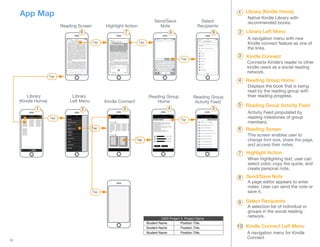
Native Kindle Library with
recommended books.
A navigation menu with new
Kindle connect feature as one of
the links.
A navigation menu for Kindle
Connect
Connects Kindle’s reader to other
kindle users as a social reading
network.
Displays the book that is being
read by the reading group with
their reading progress.
Activity Feed propulated by
reading milestones of group
members.
Highlight Action
Send/Save
Note
Select
Recipients
Library
(Kindle Home)
Library (Kindle Home)
Library
Left Menu
Library Left Menu
Kindle Connect
Kindle Connect
Reading Group
Home
Reading Group Home
Reading Group
Activity Feed
Reading Group Activity Feed
2 31 4 5
6 7 8 9
1
2
3
4
5
6
7
8
9
10
Reading Screen
This screen enables user to
change font size, share the page,
and access their notes.
When highlighting text, user can
select color, copy the quote, and
create personal note.
A page editor appears to enter
notes. User can send the note or
save it,
A selection list of individual or
groups in the social reading
network.
Highlight Action
Send/Save Note
Select Recipients
Kindle Connect Left Menu
Tap
UXDI Project 3: Project Name
Student Name
Student Name
Student Name
Position Title.
Position Title.
Position Title.
App Map
Tap

App Map

  • 1.
    10 3 Tap Tap Tap Tap Tap Tap Tap Tap Tap Tap Tap Reading Screen Native KindleLibrary with recommended books. A navigation menu with new Kindle connect feature as one of the links. A navigation menu for Kindle Connect Connects Kindle’s reader to other kindle users as a social reading network. Displays the book that is being read by the reading group with their reading progress. Activity Feed propulated by reading milestones of group members. Highlight Action Send/Save Note Select Recipients Library (Kindle Home) Library (Kindle Home) Library Left Menu Library Left Menu Kindle Connect Kindle Connect Reading Group Home Reading Group Home Reading Group Activity Feed Reading Group Activity Feed 2 31 4 5 6 7 8 9 1 2 3 4 5 6 7 8 9 10 Reading Screen This screen enables user to change font size, share the page, and access their notes. When highlighting text, user can select color, copy the quote, and create personal note. A page editor appears to enter notes. User can send the note or save it, A selection list of individual or groups in the social reading network. Highlight Action Send/Save Note Select Recipients Kindle Connect Left Menu Tap UXDI Project 3: Project Name Student Name Student Name Student Name Position Title. Position Title. Position Title. App Map Tap